Preface
Hibernate is an object/relational mapping (ORM) framework for Java applications.
Hibernate maps Java domain models to relational data and supports business logic implemented in Java, in the database, or across both. Applications can combine entity-based persistence with native SQL and stored procedure calls, using Hibernate’s result mapping facilities to translate query results into Java objects.
Getting Started
While a strong background in SQL is not required to use Hibernate, a basic understanding of its concepts is useful, especially the principles of data modeling. Understanding the basics of transactions and design patterns such as Unit of Work is important as well.
|
Start with the Quick Start guide for a tutorial, or Introduction to Hibernate for an overview of commonly used features. This User Guide provides detailed reference material. The topical guides cover subjects such as logging, compatibility, and support. |
Finding your way through this guide
Use this reference guide by task, or follow the chapter order from mapping and setup through runtime operations, querying, and performance. The following links provide starting points for common tasks.
| Task | Start here |
|---|---|
Dependencies for the required Java runtime, Jakarta Persistence, and JDBC versions. |
|
Understand the main APIs |
|
Map application data |
|
Configure and start Hibernate |
Bootstrap and Database Access. See Schema Tooling for schema operations and DDL scripts, Bytecode Enhancement for enhancement capabilities and build-time or runtime setup, and Build Tool Integration for Gradle, Maven, and Ant integration, metamodel generation, and other build services. |
Manage entity state and transactions |
|
Construct and execute queries |
Query APIs and execution, Criteria queries, Programmatic query specifications, Native SQL Queries, and Stored procedures and functions. See Function integration for registering custom functions, and the Query Language guide for HQL syntax and built-in functions. |
Plan loading and tune performance |
Fetching, Batching, Caching, Statistics, and Performance Tuning and Best Practices. |
Use integrations and specialized features |
Multitenancy, Interceptors and Events, Managed Beans, Spatial, and Hibernate Vector module. |
Evaluate portability across databases or persistence providers |
Database Portability Considerations for portability boundaries, mapping and query choices, and target-environment verification. |
Look up settings and diagnostic events |
Configuration Settings and Monitoring with Java Flight Recorder. |
Get Involved
-
Report bugs and request enhancements through the issue tracker.
-
Contribute fixes, features, or documentation improvements using the contribution guidelines.
-
Ask questions, help other users, and join development discussions through the forums, Zulip, and mailing lists linked from the community page.
1. Compatibility
1.1. Dependencies
Hibernate 8.0 requires the following dependencies (among others):
Version |
|
|---|---|
Java Runtime |
17 or 21 |
4.0 |
|
JDBC (bundled with the Java Runtime) |
4.2 |
|
Find more information for all versions of Hibernate on our compatibility matrix. The compatibility policy may also be of interest. |
If you get Hibernate from Maven Central, it is recommended to import either hibernate-platform
or hibernate-bom as part of your dependency management to keep artifact versions aligned.
-
hibernate-platformmanages versions of Hibernate ORM modules and their key third-party dependencies. -
hibernate-bommanages versions of Hibernate ORM modules only.
See Platform and BOM in the Getting Started Guide for full details and examples.
1.2. Database
Hibernate 8.0’s compatibility with a given database and version depends on the dialect being used.
Refer to the Dialects guide for details about both dialects and supported databases.
2. Architecture
2.1. Overview
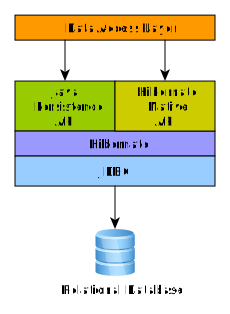
Hibernate, as an ORM solution, effectively "sits between" the Java application data access layer and the Relational Database, as can be seen in the diagram above. The Java application makes use of the Hibernate APIs to load, store, query, etc. its domain data. Here we will introduce the essential Hibernate APIs. This will be a brief introduction; we will discuss these contracts in detail later.
As a Jakarta Persistence provider, Hibernate implements the Jakarta Persistence specification. The following diagram shows the relationships between Jakarta Persistence interfaces, Hibernate interfaces, and their implementations:
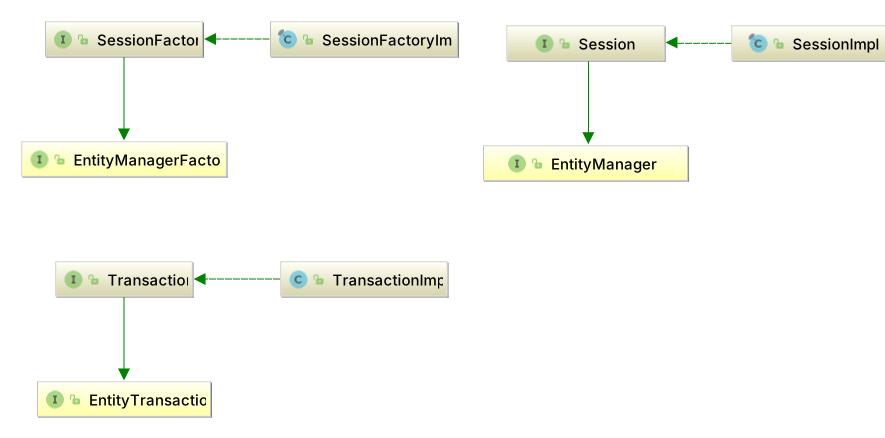
- SessionFactory (
org.hibernate.SessionFactory) -
A thread-safe (and immutable) representation of the mapping of the application domain model to a database. Acts as a factory for
org.hibernate.Sessionandorg.hibernate.StatelessSessioninstances.SessionFactoryextends Jakarta Persistence’sEntityManagerFactory, so a Hibernate factory implements both interfaces.A
SessionFactoryis very expensive to create, so the application should reuse a long-lived factory for a given domain mapping and configuration. Separate persistence units may use the same database with different mappings or configurations, while a multitenant factory may serve multiple databases. TheSessionFactorymaintains services that Hibernate uses across allSession(s)such as second level caches, connection pools, transaction system integrations, etc. - SharedSessionContract (
org.hibernate.SharedSessionContract) -
The common contract for
SessionandStatelessSession, including query execution, transaction access, and JDBC work.SharedSessionContractextends Jakarta Persistence’sEntityHandler, the common contract forEntityManagerandEntityAgent. Whether entities returned by these operations are managed or detached depends on the session type. - Session (
org.hibernate.Session) -
A single-threaded, short-lived object conceptually modeling a "Unit of Work" (PoEAA).
Sessionextends bothSharedSessionContractand Jakarta Persistence’sEntityManager, so a Hibernate session implements both interfaces.Behind the scenes, the Hibernate
Sessionobtains JDBCjava.sql.Connectioninstances as needed and provides access toorg.hibernate.Transactioninstances. Connection acquisition and release depend on the configured connection handling mode; a session need not hold a single connection throughout its lifetime.The session maintains a persistence context (first-level cache) of the application domain model, reusing managed entity instances for a given persistent identity. This provides repeatable reads of managed entity state, but does not change database transaction isolation or guarantee identical results from repeated queries. See Physical Transactions for details.
- StatelessSession (
org.hibernate.StatelessSession) -
A single-threaded, short-lived object providing explicit, command-oriented operations on detached entity instances, with no persistence context or first-level cache.
StatelessSessionextends bothSharedSessionContractand Jakarta Persistence’sEntityAgent, so a Hibernate stateless session implements both interfaces.A stateless session does not perform automatic dirty checking or transactional write-behind, and its entity operations do not cascade to associated entities. Changes to entity state must be persisted explicitly. See Batching for further discussion of stateless sessions.
- Transaction (
org.hibernate.Transaction) -
A single-threaded, short-lived object used by the application to demarcate individual physical transaction boundaries.
Transactionextends Jakarta Persistence’sEntityTransaction, which controls resource-local transactions. Hibernate’sTransactionAPI abstracts the underlying transaction system (JDBC or JTA), but access to a JTA transaction through this API depends on Hibernate’s transaction compliance settings. In portable Jakarta Persistence applications, JTA transactions are demarcated using Jakarta Transactions APIs or managed by the container, rather than usingEntityTransaction.
3. Domain Model
3.1. Domain model overview
A domain model describes an application’s problem domain.
Its persistent classes represent the data mapped by the ORM.
Hibernate works best when these classes follow the Plain Old Java Object (POJO) / JavaBean programming model,
but it also supports other representations, such as trees of java.util.Map instances.
Hibernate historically used a proprietary XML format to define mappings. Jakarta Persistence defines annotations and a standard XML format for mappings that are portable across persistence providers. This chapter uses Jakarta Persistence mappings where possible and Hibernate extension annotations for additional features.
|
This chapter mostly uses "implicit naming" for table names, column names, etc. For details on adjusting these names see Naming strategies. |
The following table and domain model illustrate the type categories.
create table Contact (
    id integer not null,
    first varchar(255),
    last varchar(255),
    middle varchar(255),
    notes varchar(255),
    starred boolean not null,
    website varchar(255),
    primary key (id)
)@Entity(name = "Contact")
public static class Contact {
@Id
private Integer id;
private Name name;
private String notes;
private URL website;
private boolean starred;
//Getters and setters are omitted for brevity
}
@Embeddable
public static class Name {
private String firstName;
private String middleName;
private String lastName;
// getters and setters omitted
}In the broadest sense, Hibernate categorizes types into two groups:
3.1.1. Value types
A value type is a piece of data that does not define its own lifecycle. It is, in effect, owned by an entity, which defines its lifecycle.
An entity’s state is expressed through fields or JavaBean properties termed persistent attributes.
The persistent attributes of the Contact class are value types.
An association reference is also a value in the containing entity’s state, but the referenced entity has its own identity and lifecycle.
For example, an Order.customer reference belongs to the order’s state; the Customer it references is an entity.
Changing or removing the reference does not, by itself, remove the customer.
Cascade operations and orphan removal can propagate lifecycle operations to the referenced entity when configured.
In this sense, value types include the following categories:
- Basic types
-
in the
Contactmapping, all attributes exceptnameare basic types. Basic types are discussed in detail in Basic types - Embeddable types
-
the
nameattribute is an example of an embeddable type, which is discussed in detail in Embeddable types - To-one association references
-
@ManyToOne,@OneToOne, and Hibernate’s@Anyattributes hold references to entities. The reference is part of the containing entity’s state; its target is an entity type. See Associations. - Collection types
-
although not featured in this example, collection types are also a distinct category among value types. A collection may contain values or references to entities. Collection types are further discussed in Collections
3.1.2. Entity types
Entities, by nature of their unique identifier, exist independently of other objects whereas values do not.
Entities are domain model classes which correlate to rows in a database table, using a unique identifier.
The Contact class is an entity.
Mapping entities is discussed in detail in Entity types.
3.2. Entity classes and attribute access
Entity classes represent objects with persistent identity. The following sections describe class requirements and how Hibernate accesses persistent attributes. See Identifiers and entity equality for identifier mappings and Tables, columns, and naming for table and column mappings.
3.2.1. POJO Models
Section 2.1 The Entity Class of the Jakarta Persistence specification defines its requirements for an entity class. Applications that wish to remain portable across Jakarta Persistence providers should adhere to these requirements:
The entity class must be annotated with the
@Entityannotation or declared as anentityin its XML descriptor.The entity class must be a top-level class or a static inner class. An enum, record, or interface may not be designated as an entity.
The entity class must have a
publicorprotectedconstructor with no parameters, which is called by the persistence provider runtime to instantiate the entity.The entity class must be non-
final. Every method and persistent instance variable of the entity class must also be non-final.An entity might be an abstract class, or it might be a concrete class. An entity may extend a non-entity class, or it may extend another entity class. A non-entity class may extend an entity class.
The persistent state of an entity is represented by instance variables, which may correspond to JavaBeans properties. An instance variable may be directly accessed only within the methods of the entity, by the entity instance itself. An instance variable of an entity must not be directly accessed by a client of the entity. The state of the entity is available to clients only through the methods of the entity—that is, via accessor (getter/setter) methods, or via other business methods.
Hibernate, however, is not as strict in its requirements. Differences from the list above include:
-
Fields may be declared
finalin many cases; see Prefer non-final persistent fields below. -
The constructor with no parameters may be declared with package visibility, or, when the bytecode enhancer is used, it may be omitted completely.
-
Final classes and classes with final methods are tolerated but not recommended unless the bytecode enhancer is used.
The following sections explain these requirements.
3.2.2. Prefer non-final classes
A central feature of Hibernate is the ability to lazily load entity state via proxies. This feature depends on:
-
the entity class being non-
final(or implementing an interface that declares the external operations of the entity), and -
the non-
privatemethods and accessor methods being non-final.
Hibernate can persist a final entity class that does not implement any interface, but it is then not able to use proxies for lazily fetching to-one associations to that entity type, limiting options for performance tuning.
The bytecode enhancer automatically makes any entity class non-final, along with all its methods.
3.2.3. Prefer non-final persistent fields
While the JPA specification requires persistent fields to be non-final, Hibernate tolerates final persistent fields.
However, final persistent fields are not guaranteed to work in every situation.
Hibernate typically instantiates entities using a no-argument constructor and then sets persistent fields individually through reflection.
Setting a final field through reflection is deprecated starting with JDK 26 and will be denied in a future JDK version.
When Hibernate detects final persistent fields that will need to be set through reflection, it logs a warning on boot.
The bytecode enhancer automatically removes the final modifier from persistent fields,
resolving these warnings.
Alternatively, remove the final modifier from the persistent field declarations.
final fields are supported for types that use constructor-based instantiation:
-
record types used as
@Embeddable(including@EmbeddedId) or as@IdClass, -
embeddable or
@IdClasstypes with an@Instantiator-annotated constructor,
since those are instantiated through their constructor without any reflective field mutation.
The configuration property hibernate.mapping.final_persistent_fields controls the behavior of this check.
Valid values are warn (the default), error (fail on boot), and ignore (suppress the check).
3.2.4. Implement a no-argument constructor
The entity class should have a constructor with no parameters.
Both Hibernate and Jakarta Persistence require this.
Hibernate allows the constructor to be declared with public, protected, or package visibility.
The bytecode enhancer automatically adds a constructor with no parameters if it is missing.
3.2.5. Version attributes
A version attribute enables optimistic locking: Hibernate maintains it to detect conflicting updates or deletes to an entity.
Declare it using @Version and let Hibernate initialize and update its value.
Application code must not assign a new version to force an update.
See versioned optimistic locking for conflict checks and explicit validation of unchanged entities.
An entity hierarchy has at most one version attribute, declared on the root entity or an inherited mapped superclass. For an entity mapped to multiple tables, map the version to its primary table.
Jakarta Persistence supports int, Integer, short, Short, long, Long, java.sql.Timestamp, java.time.Instant, and java.time.LocalDateTime as version types.
Hibernate also supports additional types with suitable version semantics; custom types require an appropriate UserVersionType.
@Entity(name = "GuideBook")
public static class Book {
	@Id
	private Long id;
	private String title;
	@Version
	private long version;
}
@Version
private Instant version;Numeric versions and automatic advancement
A numeric version records successive revisions of an entity without depending on clock precision. Hibernate initializes it when the entity is persisted and advances it when a version-affecting change is written.
Not every attribute or relationship change increments the entity’s version. Excluded attributes do not themselves trigger an increment, and relationship effects depend on association ownership and mapping. An inverse-side relationship change does not by itself imply an increment of that entity’s version.
Explicit force-increment locks can advance a version even without an ordinary entity change. See lock modes and requesting locks for their timing, prerequisites, and upgrade behavior.
Temporal versions and generation
A temporal version, such as the Instant mapping above, uses timestamps instead of a sequence of revision numbers.
Numeric versions are generally preferable for conflict detection: finite timestamp precision or repeated clock values can produce the same version for separate changes.
Database timestamps also depend on the database’s clock and timestamp semantics; they are not guaranteed unique revisions.
Hibernate normally generates a temporal version in the VM.
@CurrentTimestamp(source = SourceType.DB) uses the database clock, while source = SourceType.VM uses the VM clock.
The default source of @CurrentTimestamp is DB.
For a version attribute, obtaining the database timestamp can occur before the write; do not assume that every database-generated value uses identical SQL or retrieval behavior.
See @CurrentTimestamp generation for the general annotation contract.
@Entity(name = "Person")
public static class Person {

	@Id
	private Long id;

	private String firstName;

	private String lastName;

	@Version @CurrentTimestamp
private LocalDateTime version;Person person = new Person();
person.setId(1L);
person.setFirstName("John");
person.setLastName("Doe");
assertNull( person.getVersion() );
entityManager.persist(person);
assertNotNull( person.getVersion() );CALL current_timestamp()
INSERT INTO
Person
(firstName, lastName, version, id)
VALUES
(?, ?, ?, ?)
-- binding parameter [1] as [VARCHAR] - [John]
-- binding parameter [2] as [VARCHAR] - [Doe]
-- binding parameter [3] as [TIMESTAMP] - [2017-05-18 12:03:03.808]
-- binding parameter [4] as [BIGINT] - [1]The SQL illustrates timestamp retrieval followed by an insert for this version mapping.
For trigger-generated values, Hibernate also provides @Generated(event = {INSERT, UPDATE}) and custom generation annotations using OnExecutionGenerator.
The generator must match the database’s actual generation events and version semantics.
Force-increment requests need compatible generation behavior; automatic update generation alone does not establish that support.
See generated properties and @Generated for general generation contracts, and lock modes for explicit force-increment requests.
Initial values and detached state
A null initial wrapper version can serve as an unsaved-state marker, especially with assigned identifiers. It is not a way to reattach a detached entity: preserve its version when transferring state. Hibernate may reject an entity with a generated identifier and an uninitialized version as inconsistent detached state. See merge for applying detached changes and conversations spanning multiple transactions for work across requests.
Excluding attributes from versioning
Use standard @ExcludedFromVersioning for an attribute whose changes should not increment the version.
An excluded change does not itself trigger an increment; this does not remove the version check from a versioned update.
Prefer @ExcludedFromVersioning to Hibernate’s deprecated @OptimisticLock(excluded=true).
|
@Entity(name = "GuideCounter")
public static class Counter {
	@Id
	private Long id;
	private String title;
	@Version
	private long version;
	@ExcludedFromVersioning
	private long readCount;
}
Exclusion does not protect an attribute against lost updates.
See concurrent changes to excluded attributes for an example of the resulting overwrite, and versionless optimistic locking for the effect on ALL/DIRTY predicates.
3.2.6. Attribute access
As a Jakarta Persistence provider, Hibernate can inspect entity fields or property accessor methods.
By default, the placement of the @Id annotation determines the default access strategy.
When placed on a field, Hibernate uses field-based access.
When placed on the identifier getter, Hibernate uses property-based access.
|
To avoid issues such as HCANN-63 - Property name beginning with at least two uppercase characters has odd functionality in HQL, follow the Java Bean specification when naming properties. |
Embeddable types inherit the access strategy from their parent entities.
Strictly speaking, neither Jakarta Persistence nor Hibernate require accessor methods for a persistent field. However, direct access to a field of an entity from outside the entity instance itself can expose uninitialized state to the application. All external access to fields of an entity should go through methods or accessor methods of the entity class.
Declare persistent fields as private to prevent direct external access.
Field-based access
@Entity(name = "Book")
public static class Book {

	@Id
	private Long id;

	private String title;

	private String author;

	//Getters and setters are omitted for brevity
}
With field-based access, Hibernate does not treat entity methods as part of the persistent state.
To exclude a field from the entity’s persistent state, annotate it with @Transient or declare it using the Java transient modifier.
|
Another advantage of using field-based access is that some entity attributes can be hidden from outside the entity. For example, the data access layer usually does not need to modify the entity’s With field-based access, this field does not need a getter or setter for Hibernate to perform optimistic concurrency control. |
Property-based access
@Entity(name = "Book")
public static class Book {

	private Long id;

	private String title;

	private String author;

	@Id
	public Long getId() {
		return id;
	}

	public void setId(Long id) {
		this.id = id;
	}

	public String getTitle() {
		return title;
	}

	public void setTitle(String title) {
		this.title = title;
	}

	public String getAuthor() {
		return author;
	}

	public void setAuthor(String author) {
		this.author = author;
	}
}
When using property-based access, Hibernate uses the accessors for both reading and writing the entity state.
Annotate a getter with @Transient if its JavaBeans property should not be persistent.
Business methods and association-management methods such as addPhone() and removePhone() are not persistent properties and do not require @Transient.
Overriding the default access strategy
Override the default access strategy with the Jakarta Persistence @Access annotation.
In the following example, the @Version attribute is accessed by its field and not by its getter, unlike the other entity attributes.
@Entity(name = "Book")
public static class Book {

	private Long id;

	private String title;

	private String author;

	@Access(AccessType.FIELD)
	@Version
	private int version;

	@Id
	public Long getId() {
		return id;
	}

	public void setId(Long id) {
		this.id = id;
	}

	public String getTitle() {
		return title;
	}

	public void setTitle(String title) {
		this.title = title;
	}

	public String getAuthor() {
		return author;
	}

	public void setAuthor(String author) {
		this.author = author;
	}
}
Embeddable types and access strategy
Embeddables inherit the access strategy of their owning entities. This applies to both embedded attributes and collections of embeddables.
An embeddable type can override this inherited access strategy. In the following example, the embeddable uses property-based access, regardless of the owning entity’s access strategy:
@Embeddable
@Access(AccessType.PROPERTY)
public static class Author {

	private String firstName;

	private String lastName;

	public Author() {
	}

	public Author(String firstName, String lastName) {
		this.firstName = firstName;
		this.lastName = lastName;
	}

	public String getFirstName() {
		return firstName;
	}

	public void setFirstName(String firstName) {
		this.firstName = firstName;
	}

	public String getLastName() {
		return lastName;
	}

	public void setLastName(String lastName) {
		this.lastName = lastName;
	}
}
The owning entity can use field-based access while the embeddable uses property-based access as specified explicitly:
@Entity(name = "Book")
public static class Book {

	@Id
	private Long id;

	private String title;

	@Embedded
	private Author author;

	//Getters and setters are omitted for brevity
}
This also applies to collections of embeddable types:
@Entity(name = "Book")
public static class Book {

	@Id
	private Long id;

	private String title;

	@ElementCollection
	@CollectionTable(
		name = "book_author",
		joinColumns = @JoinColumn(name = "book_id")
	)
	private List<Author> authors = new ArrayList<>();

	//Getters and setters are omitted for brevity
}
3.3. Tables, columns, and naming
Entity names identify mapped types in queries; table and column names identify database objects. This section covers explicit mappings, default names, and naming strategies.
3.3.1. Entity names and tables
The main piece in mapping the entity is the jakarta.persistence.Entity annotation.
The @Entity annotation defines just the name attribute which is used to give a specific entity name for use in JPQL queries.
By default, if the name attribute of the @Entity annotation is missing, the unqualified name of the entity class itself will be used as the entity name.
|
Because the entity name is given by the unqualified name of the class, Hibernate does not allow registering multiple entities with the same name even if the entity classes reside in different packages. Without imposing this restriction, Hibernate would not know which entity class is referenced in a JPQL query if the unqualified entity name is associated with more then one entity classes. |
In the following example, the entity name (e.g. Book) is given by the unqualified name of the entity class name.
@Entity mapping with an implicit name@Entity
public class Book {
@Id
private Long id;
private String title;
private String author;
//Getters and setters are omitted for brevity
}However, the entity name can also be set explicitly as illustrated by the following example.
@Entity mapping with an explicit name@Entity(name = "Book")
public static class Book {
@Id
private Long id;
private String title;
private String author;
//Getters and setters are omitted for brevity
}An entity models a database table.
The identifier uniquely identifies each row in that table.
By default, the name of the table is assumed to be the same as the name of the entity.
Use jakarta.persistence.Table to specify the table name or other table mapping details.
@Entity with @Table @Entity(name = "Book")
@Table(
catalog = "public",
schema = "store",
name = "book"
)
public static class Book {
@Id
private Long id;
private String title;
private String author;
//Getters and setters are omitted for brevity
}Mapping the catalog of the associated table
If the mapping omits the catalog, Hibernate uses the current database connection’s default catalog.
For a database with multiple catalogs, specify the table’s catalog using the catalog attribute of the Jakarta Persistence @Table annotation.
The following MySQL example maps Book to the book table in the public catalog:
book table located in the public catalogcreate table public.book (
id bigint not null,
author varchar(255),
title varchar(255),
primary key (id)
) engine=InnoDBThe mapping specifies the catalog using @Table(catalog = "public").
@Table annotation@Entity(name = "Book")
@Table(
catalog = "public",
name = "book"
)
public static class Book {
@Id
private Long id;
private String title;
private String author;
//Getters and setters are omitted for brevity
}Mapping the schema of the associated table
If the mapping omits the schema, Hibernate uses the current database connection’s default schema.
For a database that supports schemas, specify the table’s schema using the schema attribute of the Jakarta Persistence @Table annotation.
The following PostgreSQL example maps Book to the book table in the library schema:
book table located in the library schemacreate table library.book (
id int8 not null,
author varchar(255),
title varchar(255),
primary key (id)
)The mapping specifies the schema using @Table(schema = "library").
@Table annotation@Entity(name = "Book")
@Table(
schema = "library",
name = "book"
)
public static class Book {
@Id
private Long id;
private String title;
private String author;
//Getters and setters are omitted for brevity
}|
The For MySQL or MariaDB, where schema is an alias for catalog, use the
|
Mapping secondary tables
@SecondaryTable maps additional state of the same entity to another table.
The entity retains one identifier; the secondary table is joined to the primary table using that identifier.
This differs from an association to a separate entity with its own lifecycle.
Use @Column(table=…) to place an attribute in a declared secondary table.
@Entity(name = "GuideEntry")
@Table(name = "guide_entry")
@SecondaryTable(name = "guide_entry_details", pkJoinColumns = @PrimaryKeyJoinColumn(name = "entry_id"))
public static class Entry {
@Id
Long id;
@Column(nullable = false, length = 120)
String title;
@Column(precision = 12, scale = 2)
BigDecimal price;
@Column(updatable = false)
String createdBy;
@Column(table = "guide_entry_details")
String summary;
@Version
Long version;
@Column(name = "published_year")
Year published;
}Here, title, price, and createdBy belong to guide_entry, while summary belongs to guide_entry_details.
The primary key of guide_entry_details is entry_id, joining the identifier column of guide_entry.
When pkJoinColumns is omitted, the secondary-table primary-key column names default to those of the primary table.
Composite identifiers require the corresponding join columns when overriding these defaults.
Declare multiple secondary tables using repeated @SecondaryTable annotations or @SecondaryTables.
To place an entire embedded value in a secondary table, see @EmbeddedTable.
Hibernate’s @SecondaryRow controls optional and owned secondary rows;
row creation and removal should not be assumed identical for every secondary-table mapping.
3.3.2. @Column
Jakarta Persistence defines rules for implicitly determining the name of tables and columns. For a detailed discussion of implicit naming see Naming strategies.
For basic type attributes, the implicit naming rule is that the column name is the same as the attribute name.
Use @Column to override the implicit column name.
@Entity(name = "Product")
public static class Product {
@Id
private Integer id;
private String sku;
private String name;
@Column(name = "NOTES")
private String description;
}Here, @Column explicitly maps the description attribute to the NOTES column, as opposed to the
implicit column name description. See Naming strategies for additional details.
Column options
Besides naming a column, @Column describes its schema and participation in writes:
| Member | Purpose |
|---|---|
|
Overrides the implicit column name. |
|
Specifies whether the column permits SQL |
|
Requests a single-column unique constraint in the generated schema. |
|
Specifies the length for column types to which length applies, such as character and binary types. |
|
Specify decimal precision and scale for appropriate numeric types. |
|
Control whether this mapping contributes the column to generated INSERT and UPDATE statements. |
|
Selects the table containing the column; the primary table is used by default. |
|
Supplies a database-specific SQL fragment for schema generation, reducing portability. |
These options do not alter an existing database schema unless schema-management tooling is used.
The resulting SQL types and constraints depend on the dialect.
nullable=false is not a substitute for Bean Validation or application validation;
Hibernate may perform nullability checks, but a database constraint remains necessary to enforce the rule for all writers.
insertable=false or updatable=false does not make a Java field immutable.
It excludes that column from the corresponding generated writes through this mapping.
It does not by itself generate a value or arrange for a database-generated value to be refreshed; see Generated properties.
For constraints, indexes, defaults, and generated columns, see Schema Tooling.
The example in Mapping secondary tables combines length and decimal precision with an attribute excluded from updates.
3.3.3. SQL quoted identifiers
To quote an identifier in generated SQL, enclose the table or column name in backticks in the mapping document. While traditionally, Hibernate used backticks for escaping SQL reserved keywords, Jakarta Persistence uses double quotes instead.
Once the reserved keywords are escaped, Hibernate will use the correct quotation style for the SQL Dialect.
This is usually double quotes, but SQL Server uses brackets and MySQL uses backticks.
@Entity(name = "Product")
public static class Product {
@Id
private Long id;
@Column(name = "`name`")
private String name;
@Column(name = "`number`")
private String number;
//Getters and setters are omitted for brevity
}@Entity(name = "Product")
public static class Product {
@Id
private Long id;
@Column(name = "\"name\"")
private String name;
@Column(name = "\"number\"")
private String number;
//Getters and setters are omitted for brevity
}Because name and number are reserved words, the Product entity mapping uses backticks to quote these column names.
When saving the following Product entity, Hibernate generates the following SQL insert statement:
Product product = new Product();
product.setId(1L);
product.setName("Mobile phone");
product.setNumber("123-456-7890");
entityManager.persist(product);INSERT INTO Product ("name", "number", id)
VALUES ('Mobile phone', '123-456-7890', 1)Global quoting
Hibernate can also quote all identifiers (e.g. table, columns) using the following configuration property:
<property
name="hibernate.globally_quoted_identifiers"
value="true"
/>With this setting, identifiers do not need to be quoted individually in the mapping:
@Entity(name = "Product")
public static class Product {
@Id
private Long id;
private String name;
private String number;
//Getters and setters are omitted for brevity
}When persisting a Product entity, Hibernate quotes all identifiers as in the following example:
INSERT INTO "Product" ("name", "number", "id")
VALUES ('Mobile phone', '123-456-7890', 1)Both the table name and all column names are quoted.
For more about quoting-related configuration properties, check out the Mapping configurations section as well.
3.3.4. Naming strategies
Part of the mapping of an object model to the relational database is mapping names from the object model to the corresponding database names. Hibernate resolves names in two stages:
-
The first stage is determining a proper logical name from the domain model mapping. A logical name can be either explicitly specified by the user (e.g., using
@Columnor@Table) or it can be implicitly determined by Hibernate through an ImplicitNamingStrategy contract. -
The second stage resolves the logical name to a physical name, as defined by the PhysicalNamingStrategy contract.
At the core, the idea behind each naming strategy is to minimize the amount of repetitive information a developer must provide for mapping a domain model.
|
Jakarta Persistence Compatibility
Jakarta Persistence defines rules for implicit names.
Use Also, Jakarta Persistence defines no separation between logical and physical name. Following the Jakarta Persistence specification, the logical name is the physical name. If Jakarta Persistence provider portability is important, applications should prefer not to specify a PhysicalNamingStrategy. |
ImplicitNamingStrategy
When a mapping omits a table or column name,
org.hibernate.boot.model.naming.ImplicitNamingStrategy determines the implicit logical name.
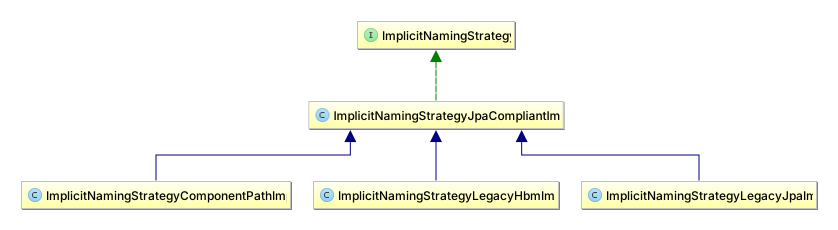
Hibernate defines multiple ImplicitNamingStrategy implementations out-of-the-box. Applications are also free to plug in custom implementations.
There are multiple ways to specify the ImplicitNamingStrategy to use. First, applications can specify
the implementation using the hibernate.implicit_naming_strategy configuration setting which accepts:
-
pre-defined "short names" for the out-of-the-box implementations
default-
for
org.hibernate.boot.model.naming.ImplicitNamingStrategyJpaCompliantImpl- an alias forjpa jpa-
for
org.hibernate.boot.model.naming.ImplicitNamingStrategyJpaCompliantImpl- the Jakarta Persistence compliant naming strategy legacy-hbm-
for
org.hibernate.boot.model.naming.ImplicitNamingStrategyLegacyHbmImpl- compliant with the original Hibernate NamingStrategy legacy-jpa-
for
org.hibernate.boot.model.naming.ImplicitNamingStrategyLegacyJpaImpl- compliant with the legacy NamingStrategy developed for Java Persistence 1.0, which was unfortunately unclear in many respects regarding implicit naming rules component-path-
for
org.hibernate.boot.model.naming.ImplicitNamingStrategyComponentPathImpl- mostly followsImplicitNamingStrategyJpaCompliantImplrules, except that it uses the full composite paths, as opposed to just the ending property part
-
reference to a Class that implements the
org.hibernate.boot.model.naming.ImplicitNamingStrategycontract -
FQN of a class that implements the
org.hibernate.boot.model.naming.ImplicitNamingStrategycontract
Secondly, applications and integrations can use org.hibernate.boot.MetadataBuilder#applyImplicitNamingStrategy
to specify the ImplicitNamingStrategy to use. See
Bootstrap for additional details on bootstrapping.
|
@EmbeddedColumnNaming
A related topic is the use of |
PhysicalNamingStrategy
Many organizations define rules around the naming of database objects (tables, columns, foreign keys, etc). The idea of a PhysicalNamingStrategy is to help implement such naming rules without having to hard-code them into the mapping via explicit names.
While the purpose of an ImplicitNamingStrategy is to determine that an attribute named accountNumber maps to
a logical column name of accountNumber when not explicitly specified, the purpose of a PhysicalNamingStrategy
would be, for example, to say that the physical column name should instead be abbreviated to acct_num.
|
It is true that the resolution to The |
The default implementation uses the logical name as the physical name. However applications and integrations can define custom implementations of this PhysicalNamingStrategy contract. Here is an example PhysicalNamingStrategy for a fictitious company named Acme Corp whose naming standards are to:
-
prefer underscore-delimited words rather than camel casing
-
replace certain words with standard abbreviations
package org.hibernate.orm.test.naming;
import java.util.Arrays;
import java.util.List;
import java.util.Locale;
import java.util.Map;
import java.util.TreeMap;
import java.util.stream.Collectors;
import org.hibernate.boot.model.naming.Identifier;
import org.hibernate.boot.model.naming.PhysicalNamingStrategyStandardImpl;
import org.hibernate.engine.jdbc.env.spi.JdbcEnvironment;
import org.junit.platform.commons.util.StringUtils;
/**
* An example PhysicalNamingStrategy that implements database object naming standards
* for our fictitious company Acme Corp.
* <p>
* In general Acme Corp prefers underscore-delimited words rather than camel casing.
* <p>
* Additionally standards call for the replacement of certain words with abbreviations.
*
* @author Steve Ebersole
* @author Nathan Xu
*/
public class AcmeCorpPhysicalNamingStrategy extends PhysicalNamingStrategyStandardImpl {
private static final Map<String, String> ABBREVIATIONS;
static {
ABBREVIATIONS = new TreeMap<>(String.CASE_INSENSITIVE_ORDER);
ABBREVIATIONS.put("account", "acct");
ABBREVIATIONS.put("number", "num");
}
@Override
public Identifier toPhysicalTableName(Identifier logicalName, JdbcEnvironment jdbcEnvironment) {
final List<String> parts = splitAndReplace( logicalName.getText());
return jdbcEnvironment.getIdentifierHelper().toIdentifier(
String.join("_", parts),
logicalName.isQuoted()
);
}
@Override
public Identifier toPhysicalSequenceName(Identifier logicalName, JdbcEnvironment jdbcEnvironment) {
final List<String> parts = splitAndReplace( logicalName.getText());
// Acme Corp says all sequences should end with _seq
if (!"seq".equals(parts.get(parts.size() - 1))) {
parts.add("seq");
}
return jdbcEnvironment.getIdentifierHelper().toIdentifier(
String.join("_", parts),
logicalName.isQuoted()
);
}
@Override
public Identifier toPhysicalColumnName(Identifier logicalName, JdbcEnvironment jdbcEnvironment) {
final List<String> parts = splitAndReplace( logicalName.getText());
return jdbcEnvironment.getIdentifierHelper().toIdentifier(
String.join("_", parts),
logicalName.isQuoted()
);
}
private List<String> splitAndReplace(String name) {
return Arrays.stream(splitByCharacterTypeCamelCase(name))
.filter(StringUtils::isNotBlank)
.map(p -> ABBREVIATIONS.getOrDefault(p, p).toLowerCase(Locale.ROOT))
.collect(Collectors.toList());
}
private String[] splitByCharacterTypeCamelCase(String s) {
return s.split( "(?<!(^|[A-Z]))(?=[A-Z])|(?<!^)(?=[A-Z][a-z])" );
}
}There are multiple ways to specify the PhysicalNamingStrategy to use. First, applications can specify
the implementation using the hibernate.physical_naming_strategy configuration setting which accepts:
-
reference to a Class that implements the
org.hibernate.boot.model.naming.PhysicalNamingStrategycontract -
FQN of a class that implements the
org.hibernate.boot.model.naming.PhysicalNamingStrategycontract
Secondly, applications and integrations can use org.hibernate.boot.MetadataBuilder#applyPhysicalNamingStrategy.
See Bootstrap for additional details on bootstrapping.
3.4. Identifiers and entity equality
Identifiers model the primary key of an entity. They are used to uniquely identify each specific entity.
Hibernate and Jakarta Persistence both make the following assumptions about the corresponding database column(s):
UNIQUE-
The values must uniquely identify each row.
NOT NULL-
The values cannot be null. For composite ids, no part can be null.
IMMUTABLE-
The values, once inserted, can never be changed. If a candidate primary key may change, map the mutable value as a natural id and use a surrogate identifier as the primary key. See Natural Ids.
|
Technically the identifier does not have to map to the column(s) physically defined as the table primary key. They just need to map to column(s) that uniquely identify each row. However, this documentation will continue to use the terms identifier and primary key interchangeably. |
Every entity must define an identifier. For entity inheritance hierarchies, the identifier must be defined on the root entity or on a mapped superclass inherited by all entities in the hierarchy.
3.4.1. Providing identifier attribute(s)
|
Use consistent names for identifier attributes across persistent classes, and prefer wrapper types such as |
The placement of the @Id annotation marks the persistence state access strategy.
@Id
private Long id;See Generated identifier values for generation strategies.
3.4.2. Simple identifiers
Simple identifiers map to a single basic attribute, and are denoted using the jakarta.persistence.Id annotation.
According to Jakarta Persistence, only the following types are portably supported for use as identifier attribute types:
-
any Java primitive type
-
any primitive wrapper type
-
java.lang.String -
java.util.UUID -
java.time.LocalDate -
java.util.Date(TemporalType#DATE) -
java.sql.Date -
java.math.BigDecimal -
java.math.BigInteger
Hibernate also supports additional basic types as identifiers, but such mappings are not portable across Jakarta Persistence providers.
Assigned identifiers
For an assigned identifier, the application sets the identifier attribute before persisting the entity.
@Entity(name = "Book")
public static class Book {

	@Id
	private Long id;

	private String title;

	private String author;

	//Getters and setters are omitted for brevity
}Generated identifiers
Values for simple identifiers can be generated. To denote that an identifier attribute is generated, it is
annotated with jakarta.persistence.GeneratedValue
@Entity(name = "Book")
public static class Book {
@Id
@GeneratedValue
private Long id;
private String title;
private String author;
//Getters and setters are omitted for brevity
}When an entity with an identifier defined as generated is persisted, Hibernate will generate the value based on an associated generation strategy. Identifier generation strategies are discussed in detail in the Generated identifier values section.
|
Jakarta Persistence portably supports generated identifiers of type |
3.4.3. Composite identifiers
Composite identifiers correspond to one or more persistent attributes. Here are the rules governing composite identifiers, as defined by the Jakarta Persistence specification:
-
The composite identifier must be represented by a "primary key class". The primary key class may be defined using the
jakarta.persistence.EmbeddedIdannotation (see Composite identifiers with@EmbeddedId), or defined using thejakarta.persistence.IdClassannotation (see Composite identifiers with@IdClass). -
The primary key class may be a non-abstract regular Java class with a public or protected no-argument constructor, or a Java record. Records do not need a no-argument constructor.
-
The primary key class must define equals and hashCode methods, consistent with equality for the underlying database types to which the primary key is mapped.
|
The restriction that a composite identifier has to be represented by a "primary key class" (e.g. Hibernate does allow composite identifiers to be defined without a "primary key class" via multiple |
The attributes making up the composition can be either basic, composite or @ManyToOne. Note especially that collection and one-to-one
are never appropriate.
3.4.4. Composite identifiers with @EmbeddedId
To map a composite identifier using @EmbeddedId, define an embeddable containing the identifier attributes
and expose an attribute of that type on the entity.
@EmbeddedId@Entity(name = "SystemUser")
public static class SystemUser {
@EmbeddedId
private PK pk;
private String name;
//Getters and setters are omitted for brevity
}
@Embeddable
public static class PK implements Serializable {
private String subsystem;
private String username;
public PK(String subsystem, String username) {
this.subsystem = subsystem;
this.username = username;
}
private PK() {
}
@Override
public boolean equals(Object o) {
if (this == o) {
return true;
}
if (o == null || getClass() != o.getClass()) {
return false;
}
PK pk = (PK) o;
return Objects.equals(subsystem, pk.subsystem) &&
Objects.equals(username, pk.username);
}
@Override
public int hashCode() {
return Objects.hash(subsystem, username);
}
}As mentioned before, EmbeddedIds can even contain @ManyToOne attributes:
@EmbeddedId with @ManyToOne@Entity(name = "SystemUser")
public static class SystemUser {
@EmbeddedId
private PK pk;
private String name;
//Getters and setters are omitted for brevity
}
@Entity(name = "Subsystem")
public static class Subsystem {
@Id
private String id;
private String description;
//Getters and setters are omitted for brevity
}
@Embeddable
public static class PK implements Serializable {
@ManyToOne(fetch = FetchType.LAZY)
private Subsystem subsystem;
private String username;
public PK(Subsystem subsystem, String username) {
this.subsystem = subsystem;
this.username = username;
}
private PK() {
}
@Override
public boolean equals(Object o) {
if (this == o) {
return true;
}
if (o == null || getClass() != o.getClass()) {
return false;
}
PK pk = (PK) o;
return Objects.equals(subsystem, pk.subsystem) &&
Objects.equals(username, pk.username);
}
@Override
public int hashCode() {
return Objects.hash(subsystem, username);
}
}|
Hibernate supports directly modeling However, that is not portably supported by the Jakarta Persistence specification. In Jakarta Persistence terms, one would use "derived identifiers". For more details, see Derived Identifiers. |
3.4.5. Composite identifiers with @IdClass
Modeling a composite identifier using an IdClass differs from using an EmbeddedId in that the entity defines each individual attribute making up the composition. The IdClass is used as the representation of the identifier for load-by-id operations.
|
Jakarta Persistence supports Java records as primary key classes, including This is particularly useful when the id class has |
@IdClass@Entity(name = "SystemUser")
@IdClass(PK.class)
public static class SystemUser {
@Id
private String subsystem;
@Id
private String username;
private String name;
public PK getId() {
return new PK(
subsystem,
username
);
}
public void setId(PK id) {
this.subsystem = id.getSubsystem();
this.username = id.getUsername();
}
//Getters and setters are omitted for brevity
}
public static class PK implements Serializable {
private String subsystem;
private String username;
public PK(String subsystem, String username) {
this.subsystem = subsystem;
this.username = username;
}
private PK() {
}
//Getters and setters are omitted for brevity
@Override
public boolean equals(Object o) {
if (this == o) {
return true;
}
if (o == null || getClass() != o.getClass()) {
return false;
}
PK pk = (PK) o;
return Objects.equals(subsystem, pk.subsystem) &&
Objects.equals(username, pk.username);
}
@Override
public int hashCode() {
return Objects.hash(subsystem, username);
}
}Non-aggregated composite identifiers can also contain ManyToOne attributes as with aggregated mappings. Such mappings are not portable across Jakarta Persistence providers.
@ManyToOne@Entity(name = "SystemUser")
@IdClass(PK.class)
public static class SystemUser {
@Id
@ManyToOne(fetch = FetchType.LAZY)
private Subsystem subsystem;
@Id
private String username;
private String name;
//Getters and setters are omitted for brevity
}
@Entity(name = "Subsystem")
public static class Subsystem {
@Id
private String id;
private String description;
//Getters and setters are omitted for brevity
}
public static class PK implements Serializable {
private Subsystem subsystem;
private String username;
public PK(Subsystem subsystem, String username) {
this.subsystem = subsystem;
this.username = username;
}
private PK() {
}
//Getters and setters are omitted for brevity
}With non-aggregated composite identifiers, Hibernate also supports "partial" generation of the composite values.
@IdClass with partial identifier generation using @GeneratedValue@Entity(name = "SystemUser")
@IdClass(PK.class)
public static class SystemUser {
@Id
private String subsystem;
@Id
private String username;
@Id
@GeneratedValue
private Integer registrationId;
private String name;
public PK getId() {
return new PK(
subsystem,
username,
registrationId
);
}
public void setId(PK id) {
this.subsystem = id.getSubsystem();
this.username = id.getUsername();
this.registrationId = id.getRegistrationId();
}
//Getters and setters are omitted for brevity
}
public static class PK implements Serializable {
private String subsystem;
private String username;
private Integer registrationId;
public PK(String subsystem, String username) {
this.subsystem = subsystem;
this.username = username;
}
public PK(String subsystem, String username, Integer registrationId) {
this.subsystem = subsystem;
this.username = username;
this.registrationId = registrationId;
}
private PK() {
}
//Getters and setters are omitted for brevity
@Override
public boolean equals(Object o) {
if (this == o) {
return true;
}
if (o == null || getClass() != o.getClass()) {
return false;
}
PK pk = (PK) o;
return Objects.equals(subsystem, pk.subsystem) &&
Objects.equals(username, pk.username) &&
Objects.equals(registrationId, pk.registrationId);
}
@Override
public int hashCode() {
return Objects.hash(subsystem, username, registrationId);
}
}|
This feature which allows auto-generated values in composite identifiers exists because of a highly questionable interpretation of the Jakarta Persistence specification made by the SpecJ committee. Hibernate does not feel that Jakarta Persistence defines support for this, but added the feature simply to be usable in SpecJ benchmarks. Use of this feature may or may not be portable from a Jakarta Persistence perspective. |
3.4.6. Composite identifiers with associations
Hibernate allows defining a composite identifier out of entity associations.
In the following example, the Book entity identifier is formed of two @ManyToOne associations.
@Entity(name = "Book")
public static class Book implements Serializable {
@Id
@ManyToOne(fetch = FetchType.LAZY)
private Author author;
@Id
@ManyToOne(fetch = FetchType.LAZY)
private Publisher publisher;
@Id
private String title;
public Book(Author author, Publisher publisher, String title) {
this.author = author;
this.publisher = publisher;
this.title = title;
}
private Book() {
}
//Getters and setters are omitted for brevity
@Override
public boolean equals(Object o) {
if (this == o) {
return true;
}
if (o == null || getClass() != o.getClass()) {
return false;
}
Book book = (Book) o;
return Objects.equals(author, book.author) &&
Objects.equals(publisher, book.publisher) &&
Objects.equals(title, book.title);
}
@Override
public int hashCode() {
return Objects.hash(author, publisher, title);
}
}
@Entity(name = "Author")
public static class Author implements Serializable {
@Id
private String name;
//Getters and setters are omitted for brevity
@Override
public boolean equals(Object o) {
if (this == o) {
return true;
}
if (o == null || getClass() != o.getClass()) {
return false;
}
Author author = (Author) o;
return Objects.equals(name, author.name);
}
@Override
public int hashCode() {
return Objects.hash(name);
}
}
@Entity(name = "Publisher")
public static class Publisher implements Serializable {
@Id
private String name;
//Getters and setters are omitted for brevity
@Override
public boolean equals(Object o) {
if (this == o) {
return true;
}
if (o == null || getClass() != o.getClass()) {
return false;
}
Publisher publisher = (Publisher) o;
return Objects.equals(name, publisher.name);
}
@Override
public int hashCode() {
return Objects.hash(name);
}
}Although the mapping is much simpler than using an @EmbeddedId or an @IdClass, there’s no separation between the entity instance and the actual identifier.
To query this entity, an instance of the entity itself must be supplied to the persistence context.
Book book = entityManager.find(Book.class, new Book(
author,
publisher,
"High-Performance Java Persistence"
));
assertEquals("Vlad Mihalcea", book.getAuthor().getName());3.4.7. Derived Identifiers
Java Persistence 2.0 added support for derived identifiers which allow an entity to borrow the identifier from a many-to-one or one-to-one association.
@MapsId@Entity(name = "Person")
public static class Person {
@Id
private Long id;
@NaturalId
private String registrationNumber;
public Person() {
}
public Person(String registrationNumber) {
this.registrationNumber = registrationNumber;
}
//Getters and setters are omitted for brevity
}
@Entity(name = "PersonDetails")
public static class PersonDetails {
@Id
private Long id;
private String nickName;
@OneToOne
@MapsId
private Person person;
//Getters and setters are omitted for brevity
}In the example above, the PersonDetails entity uses the id column for both the entity identifier and for the one-to-one association to the Person entity.
The value of the PersonDetails entity identifier is "derived" from the identifier of its parent Person entity.
@MapsId persist examplescope.inTransaction( entityManager -> {
Person person = new Person( "ABC-123" );
person.setId( 1L );
entityManager.persist( person );
PersonDetails personDetails = new PersonDetails();
personDetails.setNickName( "John Doe" );
personDetails.setPerson( person );
entityManager.persist( personDetails );
} );
scope.inTransaction( entityManager -> {
PersonDetails personDetails = entityManager.find( PersonDetails.class, 1L );
assertThat( personDetails.getNickName() ).isEqualTo( "John Doe" );
} );The @MapsId annotation can also reference columns from an @EmbeddedId identifier as well.
The previous example can also be mapped using @PrimaryKeyJoinColumn.
@PrimaryKeyJoinColumn@Entity(name = "Person")
public static class Person {
@Id
private Long id;
@NaturalId
private String registrationNumber;
public Person() {
}
public Person(String registrationNumber) {
this.registrationNumber = registrationNumber;
}
//Getters and setters are omitted for brevity
}
@Entity(name = "PersonDetails")
public static class PersonDetails {
@Id
private Long id;
private String nickName;
@OneToOne
@PrimaryKeyJoinColumn
private Person person;
public void setPerson(Person person) {
this.person = person;
this.id = person.getId();
}
//Other getters and setters are omitted for brevity
}|
Unlike |
3.4.8. Composite identifiers with generated properties
Hibernate supports generation of individual composite identifier components, as illustrated by the @IdClass example in Composite identifiers with @IdClass.
This is a Hibernate extension; Jakarta Persistence does not require support for generated composite identifiers.
For application-assigned composite identifiers, every component must have a value before the entity is persisted. The following examples illustrate generating these values in application code before constructing the composite identifier.
Consider the following EventId composite identifier and the Event entity that uses it:
@Entity
class Event {

	@Id
	private EventId id;

	@Column(name = "event_key")
	private String key;

	@Column(name = "event_value")
	private String value;

	//Getters and setters are omitted for brevity
}
@Embeddable
class EventId implements Serializable {
private Integer category;
private Timestamp createdOn;
//Getters and setters are omitted for brevity
@Override
public boolean equals(Object o) {
if (this == o) {
return true;
}
if (o == null || getClass() != o.getClass()) {
return false;
}
EventId that = (EventId) o;
return Objects.equals(category, that.category) &&
Objects.equals(createdOn, that.createdOn);
}
@Override
public int hashCode() {
return Objects.hash(category, createdOn);
}
}In-memory generated composite identifier properties
To generate the composite identifier values in memory, assign them before persisting the entity:
EventId id = new EventId();
id.setCategory(1);
id.setCreatedOn(new Timestamp(System.currentTimeMillis()));

Event event = new Event();
event.setId(id);
event.setKey("Temperature");
event.setValue("9");

entityManager.persist(event);
The createdOn property of the EventId composite identifier was generated by the data access code and assigned to the
identifier prior to persisting the Event entity.
Database generated composite identifier properties
To generate the composite identifier values using a database function or stored procedure, retrieve and assign them as shown in the following example.
OffsetDateTime currentTimestamp = (OffsetDateTime) entityManager
.createNativeQuery(
	"SELECT CURRENT_TIMESTAMP", OffsetDateTime.class)
.getSingleResult();

EventId id = new EventId();
id.setCategory(1);
id.setCreatedOn(Timestamp.from(currentTimestamp.toInstant()));

Event event = new Event();
event.setId(id);
event.setKey("Temperature");
event.setValue("9");

entityManager.persist(event);
The createdOn property of the EventId composite identifier was generated by calling the CURRENT_TIMESTAMP database function,
and assigned to the composite identifier before the Event entity is persisted.
3.4.9. Generated identifier values
Hibernate supports identifier value generation across a number of different types.
Jakarta Persistence portably supports generation for int, Integer, long, Long, UUID, and String identifiers.
IDENTITY, SEQUENCE, and TABLE apply to integer identifiers, while UUID applies to UUID and String identifiers.
|
Values can also be generated for non-identifier attributes. For more details, see the Generated properties section. |
Identifier value generation is indicated using the jakarta.persistence.GeneratedValue annotation.
The most important piece of information here is the specified jakarta.persistence.GenerationType which indicates how values will be generated.
AUTO(the default)-
Indicates that the persistence provider (Hibernate) should choose an appropriate generation strategy. See Interpreting AUTO.
IDENTITY-
Indicates that database IDENTITY columns will be used for primary key value generation. See Using IDENTITY columns.
SEQUENCE-
Indicates that database sequence should be used for obtaining primary key values. See Using sequences.
TABLE-
Indicates that a database table should be used for obtaining primary key values. See Using the table identifier generator.
UUID:::Indicates that UUID generation should be used. See Using UUID generation
Interpreting AUTO
How a persistence provider interprets the AUTO generation type is left up to the provider.
The default behavior is to look at the Java type of the identifier attribute, plus what the underlying database supports.
If the identifier type is UUID, Hibernate uses a UUID generator.
If the identifier type is numeric (e.g. Long, Integer), then Hibernate will use its SequenceStyleGenerator which
resolves to a SEQUENCE generation if the underlying database supports sequences and a table-based generation otherwise.
Using sequences
For implementing database sequence-based identifier value generation Hibernate makes use of its
org.hibernate.id.enhanced.SequenceStyleGenerator id generator. It is important to note that SequenceStyleGenerator
is capable of working against databases that do not support sequences by transparently switching to a table as the
underlying backing, which gives Hibernate a huge degree of portability across databases while still maintaining consistent
id generation behavior (versus say choosing between SEQUENCE and IDENTITY).
@Entity(name = "Product")
public static class Product {

	@Id
	@GeneratedValue( strategy = SEQUENCE )
	private Long id;

	@Column(name = "product_name")
	private String name;

	//Getters and setters are omitted for brevity

}
Notice that the mapping does not specify the name of the sequence to use. In such cases, Hibernate will assume a
sequence name based on the name of the table to which the entity is mapped. Here, since the entity is mapped to
a table named product, Hibernate will use a sequence named product_seq.
|
When using |
To specify the sequence name explicitly, the simplest form is to specify @GeneratedValue#generator.
@Entity(name = "Product")
public static class Product {

	@Id
	@GeneratedValue(
		strategy = SEQUENCE,
		generator = "explicit_product_sequence"
	)
	private Long id;

	@Column(name = "product_name")
	private String name;

	//Getters and setters are omitted for brevity

}
For this mapping, Hibernate will use explicit_product_sequence as the name of the sequence.
For more advanced configuration, Jakarta Persistence defines the @SequenceGenerator annotation.
@Entity(name = "Product")
public static class Product {

	@Id
	@GeneratedValue(
		strategy = SEQUENCE,
		generator = "sequence-generator"
	)
	@SequenceGenerator(
		name = "sequence-generator",
		sequenceName = "explicit_product_sequence"
	)
	private Long id;

	@Column(name = "product_name")
	private String name;

	//Getters and setters are omitted for brevity

}
This is a more verbose form of the mapping in Named sequence.
However, the jakarta.persistence.SequenceGenerator annotation also supports additional configuration.
@Entity(name = "Product")
public static class Product {

	@Id
	@GeneratedValue(
		strategy = GenerationType.SEQUENCE,
		generator = "sequence-generator"
	)
	@SequenceGenerator(
		name = "sequence-generator",
		sequenceName = "explicit_product_sequence",
		allocationSize = 5
	)
	private Long id;

	@Column(name = "product_name")
	private String name;

	//Getters and setters are omitted for brevity

}
Again the mapping specifies explicit_product_sequence as the physical sequence name, but it also specifies an
explicit allocation-size ("increment by").
The scope of the generator name can be controlled with the
hibernate.jpa.compliance.global_id_generators
configuration setting. With JPA compliance enabled, the name scope is global i.e.
there may not be two generator definitions with the same name. Historically, Hibernate ORM used a local scope i.e.
every managed type may have a generator with the same name, preferring the "local" definition over a more distant one.
This behavior allows a mapped superclass to define a default generator
and an entity subclass to override it using the same generator name.
Disabling global generator-name scoping is deprecated and will no longer be supported in Hibernate ORM 9.0.
@MappedSuperclass
@SequenceGenerator(name = "my-generator", sequenceName = "base_sequence")
public static abstract class BaseEntity {
	@Id
	@GeneratedValue(generator = "my-generator")
	private Long id;
}

@jakarta.persistence.Entity(name = "Entity1")
public static class Entity1 extends BaseEntity {
}

@jakarta.persistence.Entity(name = "Entity2")
@SequenceGenerator(name = "my-generator", sequenceName = "sub_sequence")
public static class Entity2 extends BaseEntity {
}
In this case, base_sequence will be used when a Entity1 is persisted,
whereas for persists of a Entity2, Hibernate ORM will use sub_sequence.
Using IDENTITY columns
For implementing identifier value generation based on IDENTITY columns,
Hibernate makes use of its org.hibernate.id.IdentityGenerator id generator which expects the identifier to be generated by INSERT into the table.
Hibernate selects a generated-value retrieval strategy according to the dialect, JDBC driver capabilities, and configuration.
This may use JDBC getGeneratedKeys(), an SQL returning clause or equivalent, or a separate query to retrieve the generated identifier.
Dialect-specific identity support is exposed through Dialect#getIdentityColumnSupport().
|
It is important to realize that using IDENTITY columns imposes a runtime behavior where the entity row must be physically inserted prior to the identifier value being known. This can mess up extended persistence contexts (long conversations). Because of the runtime imposition/inconsistency, Hibernate suggests other forms of identifier value generation be used (e.g. SEQUENCE) with extended contexts. Hibernate may delay an identity insert when no transaction is active and the operation does not require immediate access to the identifier. The identifier becomes available only after the insert is executed. |
|
There is yet another important runtime impact of choosing IDENTITY generation: Hibernate will not be able to batch INSERT statements for the entities using the IDENTITY generation. The importance of this depends on the application-specific use cases. This limitation matters less for applications that insert few instances of the entity type and would gain little from batching. |
Using the table identifier generator
Hibernate achieves table-based identifier generation based on its org.hibernate.id.enhanced.TableGenerator which defines a table capable of holding multiple named value segments for any number of entities.
The basic idea is that a given table-generator table (hibernate_sequences for example) can hold multiple segments of identifier generation values.
@Entity(name = "Product")
public static class Product {

	@Id
	@GeneratedValue(
		strategy = GenerationType.TABLE
	)
	private Long id;

	@Column(name = "product_name")
	private String name;

	//Getters and setters are omitted for brevity

}
create table hibernate_sequences (
sequence_name varchar2(255 char) not null,
next_val number(19,0),
primary key (sequence_name)
)If no table name is given Hibernate assumes an implicit name of hibernate_sequences.
Additionally, because no jakarta.persistence.TableGenerator#pkColumnValue is specified,
Hibernate will use the default segment (sequence_name='default') from the hibernate_sequences table.
Configure the table identifier generator using the @TableGenerator annotation.
@Entity(name = "Product")
public static class Product {

	@Id
	@GeneratedValue(
		strategy = GenerationType.TABLE,
		generator = "table-generator"
	)
	@TableGenerator(
		name =  "table-generator",
		table = "table_identifier",
		pkColumnName = "table_name",
		valueColumnName = "product_id",
		allocationSize = 5
	)
	private Long id;

	@Column(name = "product_name")
	private String name;

	//Getters and setters are omitted for brevity

}
create table table_identifier (
table_name varchar2(255 char) not null,
product_id number(19,0),
primary key (table_name)
)When inserting three Product entities, Hibernate generates the following statements:
for (long i = 1; i <= 3; i++) {
	Product product = new Product();
	product.setName(String.format("Product %d", i));
	entityManager.persist(product);
}
select
tbl.product_id
from
table_identifier tbl
where
tbl.table_name = ?
for update
-- binding parameter [1] - [Product]
insert
into
table_identifier
(table_name, product_id)
values
(?, ?)
-- binding parameter [1] - [Product]
-- binding parameter [2] - [1]
update
table_identifier
set
product_id= ?
where
product_id= ?
and table_name= ?
-- binding parameter [1] - [6]
-- binding parameter [2] - [1]
select
tbl.product_id
from
table_identifier tbl
where
tbl.table_name= ? for update
update
table_identifier
set
product_id= ?
where
product_id= ?
and table_name= ?
-- binding parameter [1] - [11]
-- binding parameter [2] - [6]
insert
into
Product
(product_name, id)
values
(?, ?)
-- binding parameter [1] as [VARCHAR] - [Product 1]
-- binding parameter [2] as [BIGINT] - [1]
insert
into
Product
(product_name, id)
values
(?, ?)
-- binding parameter [1] as [VARCHAR] - [Product 2]
-- binding parameter [2] as [BIGINT] - [2]
insert
into
Product
(product_name, id)
values
(?, ?)
-- binding parameter [1] as [VARCHAR] - [Product 3]
-- binding parameter [2] as [BIGINT] - [3]Using UUID generation
Hibernate provides two approaches to UUID generation:
-
using
org.hibernate.id.uuid.UuidGenerator, which can be configured using theorg.hibernate.annotations.UuidGeneratorannotation. -
using
org.hibernate.id.UUIDGenerator, which can be configured using the@GenericGeneratorannotation. Note that this approach is deprecated.
Implicit UUID generation uses org.hibernate.id.uuid.UuidGenerator.
This includes @GeneratedValue(strategy = UUID) and @GeneratedValue with AUTO for UUID or String identifiers.
The following examples use this generator without an explicit @UuidGenerator annotation.
@Entity
public class Book {
	@Id
	@GeneratedValue
	private UUID id;
	@Basic
	private String name;

}@Entity
public class Book {
@Id
@GeneratedValue(strategy = GenerationType.UUID)
private UUID id;
@Basic
private String name;
}@Entity
public class Book {
@Id
@GeneratedValue(strategy = GenerationType.UUID)
private String id;
@Basic
private String name;
}The current org.hibernate.id.uuid.UuidGenerator builds on the @IdGeneratorType support and allows explicit configuration of the generation algorithm.
To use (and optionally configure) this strategy, use the org.hibernate.annotations.UuidGenerator annotation.
By default, Hibernate uses a random (IETF RFC 4122 version 4) generation.
@Entity
public class Book {
	@Id
	@GeneratedValue
	@UuidGenerator
	private UUID id;
	@Basic
	private String name;

}@Entity
public class Book {
@Id
@GeneratedValue
@UuidGenerator(style = RANDOM)
private UUID id;
@Basic
private String name;
}@Entity
public class Book {
@Id
@GeneratedValue(strategy = GenerationType.UUID)
@UuidGenerator
private String id;
@Basic
private String name;
}Hibernate also comes with simplified support for a time-based (IETF RFC 4122 version 1, variant2) generation.
@Entity
public class Book {
	@Id
	@GeneratedValue
	@UuidGenerator(style = TIME)
	private UUID id;
	@Basic
	private String name;

}@Entity
public class Book {
@Id
@GeneratedValue
@UuidGenerator(style = TIME)
private String id;
@Basic
private String name;
}For even more flexibility, Hibernate also offers the ability to plug in custom algorithms for creating the UUID value
by specifying an implementation of org.hibernate.id.uuid.UuidValueGenerator.
@Entity
public class Book {
	@Id
	@GeneratedValue
	@UuidGenerator(algorithm = CustomUuidValueCreator.class)
	private UUID id;
	@Basic
	private String name;

}@Entity
public class Book {
@Id
@GeneratedValue
@UuidGenerator(algorithm = CustomUuidValueCreator.class)
private String id;
@Basic
private String name;
}Optimizers
Most of the Hibernate generators that separately obtain identifier values from database structures support the use of pluggable optimizers. Optimizers reduce the database calls needed to generate identifiers. Without an optimizer, a sequence generator retrieves a new sequence value for each identifier. Allocating a pool of identifiers per database call can improve performance.
The generator’s increment size, configured using allocationSize on @SequenceGenerator or @TableGenerator,
determines the size of the identifier pool. The optimizer determines how values obtained from the database
are interpreted and how identifiers are allocated from that pool.
- none
-
No optimization is performed. The generator accesses the database for each identifier value.
- pooled-lo
-
The pooled-lo optimizer works on the principle that the increment-value is encoded into the database table/sequence structure. In sequence-terms, this means that the sequence is defined with a greater-than-1 increment size.
For example, consider a brand-new sequence defined as
create sequence m_sequence start with 1 increment by 20. Each sequence value defines a pool of 20 identifiers. The pooled-lo optimizer interprets the next-value as the low end of that pool.The first sequence value is 1, so the first pool contains identifiers 1 through 20.
The next sequence value is 21, defining a pool of identifiers 21 through 40, and so on. The "lo" part of the name indicates that the value from the database table/sequence is interpreted as the pool lo(w) end.
- pooled
-
Just like pooled-lo, except that here the value from the table/sequence is interpreted as the high end of the value pool.
- pooled-lotl
-
A variant of pooled-lo that maintains a separate pool of identifiers for each thread.
- hilo; legacy-hilo
-
Define a custom algorithm for generating pools of values based on a single value from a table or sequence.
These optimizers are not recommended for use. They are maintained (and mentioned) here for use by legacy applications that used these strategies previously.
|
Applications can also implement and use their own optimizer strategies, as defined by the |
Selecting an optimizer with @GeneratorOptimizer
The @GeneratorOptimizer annotation selects a standard optimizer for sequence or table identifier generation.
Place it on the identifier field or getter alongside @GeneratedValue, and select a value from
org.hibernate.id.enhanced.StandardOptimizerDescriptor.
pooled-lo for a sequence generator@Entity(name = "LocalSequenceEntity")
public static class LocalSequenceEntity {
@Id
@GeneratedValue(strategy = GenerationType.SEQUENCE, generator = "local_sequence_generator")
@SequenceGenerator(name = "local_sequence_generator", sequenceName = "local_sequence", allocationSize = 20)
@GeneratorOptimizer(StandardOptimizerDescriptor.POOLED_LO)
private Long id;
}The database sequence must have an increment of 20, matching allocationSize.
Hibernate uses this increment when creating the sequence during schema generation.
pooled-lo for a table generator@Entity(name = "LocalTableEntity")
public static class LocalTableEntity {
@Id
@GeneratedValue(strategy = GenerationType.TABLE, generator = "local_table_generator")
@TableGenerator(
name = "local_table_generator",
table = "identifier_pools",
pkColumnName = "segment_name",
valueColumnName = "next_value",
pkColumnValue = "local_table_entity",
allocationSize = 20
)
@GeneratorOptimizer(StandardOptimizerDescriptor.POOLED_LO)
private Long id;
}This mapping uses the local_table_entity segment of the identifier_pools table to allocate pools of 20 identifiers.
To reference a generator declared on another entity class, enable global generator scope using
hibernate.jpa.compliance.global_id_generators=true.
The following example declares a generator on GeneratorDefinitions and references it from two other entities.
@Entity(name = "GeneratorDefinitions")
@SequenceGenerator(name = "shared_generator", sequenceName = "shared_sequence", allocationSize = 20)
public static class GeneratorDefinitions {
	@Id
	private Long id;
}

@Entity(name = "FirstConsumer")
public static class FirstConsumer {
	@Id
	@GeneratedValue(strategy = GenerationType.SEQUENCE, generator = "shared_generator")
	@GeneratorOptimizer(StandardOptimizerDescriptor.POOLED_LO)
	private Long id;
}

@Entity(name = "SecondConsumer")
public static class SecondConsumer {
	@Id
	@GeneratedValue(strategy = GenerationType.SEQUENCE, generator = "shared_generator")
	@GeneratorOptimizer(StandardOptimizerDescriptor.POOLED_LOTL)
	private Long id;
}
Both consuming entities reference the same globally named sequence generator definition.
Hibernate creates a separate generator instance for each entity hierarchy, so each consuming identifier may select its own optimizer.
FirstConsumer selects POOLED_LO, while SecondConsumer selects POOLED_LOTL.
When sharing a database sequence, consumers must use compatible optimizer strategies and allocation sizes.
The optimizer selection belongs to the consuming identifier mapping.
@GeneratorOptimizer cannot be placed on the class or package declaring a global generator definition.
It applies to the sequence and table generation paths; it does not override the configuration of a
@GenericGenerator or a custom generator selected using @IdGeneratorType.
Using @IdGeneratorType
@IdGeneratorType is a meta-annotation that allows the creation of custom annotations that support simple, concise
and type-safe definition and configuration of custom org.hibernate.id.IdentifierGenerator implementations.
public class CustomSequenceGenerator implements IdentifierGenerator {

	public CustomSequenceGenerator(
			Sequence config,
			Member annotatedMember,
			GeneratorCreationContext context) {
		//...
	}

	@Override
	public Object generate(
			SharedSessionContractImplementor session,
			Object object) {
		//...
}

@IdGeneratorType( CustomSequenceGenerator.class )
@Target({METHOD, FIELD})
@Retention(RUNTIME)
public @interface Sequence {
	String name();
	int startWith() default 1;
	int incrementBy() default 50;
	Class<? extends Optimizer> optimizer() default Optimizer.class;
}
The example illustrates using @IdGeneratorType to define a custom sequence-based annotation @Sequence
to apply and configure a custom IdentifierGenerator implementation CustomSequenceGenerator.
Notice the CustomSequenceGenerator constructor. Custom generator defined through @IdGeneratorType
receive the following arguments:
-
The configuration annotation - here,
@Sequence. This is the type-safety aspect, rather than relying on untyped configuration properties in a Map, etc. -
The
Memberto which annotation was applied. This allows access to the Java type of the identifier attribute, etc. -
GeneratorCreationContextis a "parameter object" providing access to things often useful for identifier generators.
3.4.10. Natural Ids
Natural ids are unique identifiers in the domain model that have a meaning in the real world too. A natural id remains useful even when the primary key is a surrogate identifier. Hibernate supports efficient loading by natural id as well as loading by primary key.
Natural Id Mapping
Natural ids are defined in terms of one or more persistent attributes.
@Entity(name = "Book")
public static class Book {

	@Id
	private Long id;

	private String title;

	private String author;

	@NaturalId
	private String isbn;

	//Getters and setters are omitted for brevity
}@Entity(name = "Book")
public static class Book {
@Id
private Long id;
private String title;
private String author;
@NaturalId
@Embedded
private Isbn isbn;
//Getters and setters are omitted for brevity
}
@Embeddable
public static class Isbn implements Serializable {
private String isbn10;
private String isbn13;
//Getters and setters are omitted for brevity
@Override
public boolean equals(Object o) {
if (this == o) {
return true;
}
if (o == null || getClass() != o.getClass()) {
return false;
}
Isbn isbn = (Isbn) o;
return Objects.equals(isbn10, isbn.isbn10) &&
Objects.equals(isbn13, isbn.isbn13);
}
@Override
public int hashCode() {
return Objects.hash(isbn10, isbn13);
}
}@Entity(name = "Book")
public static class Book {
@Id
private Long id;
private String title;
private String author;
@NaturalId
private String productNumber;
@NaturalId
@ManyToOne(fetch = FetchType.LAZY)
private Publisher publisher;
//Getters and setters are omitted for brevity
}
@Entity(name = "Publisher")
public static class Publisher implements Serializable {
@Id
private Long id;
private String name;
//Getters and setters are omitted for brevity
@Override
public boolean equals(Object o) {
if (this == o) {
return true;
}
if (o == null || getClass() != o.getClass()) {
return false;
}
Publisher publisher = (Publisher) o;
return Objects.equals(id, publisher.id) &&
Objects.equals(name, publisher.name);
}
@Override
public int hashCode() {
return Objects.hash(id, name);
}
}Natural ids defined using multiple persistent attributes may also define a @NaturalIdClass which can be used for find operations.
@Entity(name="SystemUser")
@Table(name="t_sys_users")
@NaturalIdClass(SystemUserKey.class)
public static class SystemUser {
	@Id
	private Integer id;
	@NaturalId
	@Column(name = "sys")
	private String system;
	@NaturalId
	private String username;
}
Natural id mutability
A natural id may be mutable or immutable. By default, the @NaturalId annotation marks the attribute as immutable.
An immutable natural id is expected to never change its value.
Hibernate checks at flush time that the value has not changed.
If the value(s) of the natural id attribute(s) may change, @NaturalId(mutable = true) should be used instead.
@Entity(name = "Author")
public static class Author {

	@Id
	private Long id;

	private String name;

	@NaturalId(mutable = true)
	private String email;

	//Getters and setters are omitted for brevity
}
Natural id resolution caching
Within a Session, Hibernate maintains a cross-reference from natural id values to entity identifier values.
These resolutions can also be stored in the second-level cache when second-level caching is enabled.
@Entity(name = "Book")
@NaturalIdCache
public static class Book {

	@Id
	private Long id;

	private String title;

	private String author;

	@NaturalId
	private String isbn;

	//Getters and setters are omitted for brevity
}|
Think carefully before caching resolutions for natural ids which are partially or fully mutable in the second level cache as this will often have a negative impact on performance. |
Loading by natural id
Hibernate provides a means to load one or more entities by natural id using the KeyType.NATURAL FindOption passed to find() or findMultiple().
var book = entityManager.find( Book.class,
		"978-9730228236",
		KeyType.NATURAL,
		LockMode.PESSIMISTIC_WRITE,
		Timeout.seconds( 1 ) );
var books = entityManager.unwrap( Session.class ).findMultiple( Book.class,
		List.of("978-9730228236"),
		KeyType.NATURAL,
		LockMode.PESSIMISTIC_WRITE,
		Timeout.seconds( 1 ) );
When loading by natural id, the type of value accepted depends on the definition of the natural id.
-
For single-attribute natural ids, whether defined by a basic or embedded type, the attribute type should be used.
-
For multi-attribute natural ids, Hibernate will accept a number of forms:
-
If a
@NaturalIdClassis defined, an instance of the natural id class may be used. -
An array of the individual attribute values, ordered alphabetically by name, may be used.
-
A
Mapof the individual attribute values, keyed by the attribute name, may be used.
-
If a mutable natural id changes, its cached resolution can become stale until the session is flushed. Before loading by natural id, Hibernate checks for pending changes and synchronizes the resolutions to avoid incorrect results.
|
This discovery and adjustment (synchronization) has a performance impact.
Use |
Author author = entityManager.find( Author.class,
		"[email protected]",
		KeyType.NATURAL );

// change the natural id value
author.setEmail("[email protected]");

// since there has been no flush,
// the internal resolution cache
// does not know about the change -
// without synchronization, we will
// get a miss.

Author author2 = entityManager.find( Author.class,
		"[email protected]",
		KeyType.NATURAL,
		NaturalIdSynchronization.DISABLED );
assertNull( author2 );

// with synchronization (the default),
// however, we will get correct results.

Author author3 = entityManager.find( Author.class,
		"[email protected]",
		KeyType.NATURAL );
assertEquals( author, author3 );
3.4.11. Implementing equals() and hashCode()
|
This section discusses managed, transient, and detached entities and their relationship to a Hibernate |
The need for equals() and hashCode() depends on how the domain model uses entities.
A user-defined identifier class, such as a composite identifier class, must implement these methods based on its identifier values.
For entity classes, the choice depends on whether instances representing the same database row need to compare as equal.
The default implementations inherited from Object use Java object identity.
Separate instances therefore compare as unequal even when they represent the same row.
Within a single Session, Hibernate guarantees that persistent identity and Java identity coincide.
Loading the same Person multiple times returns the same instance:
Book book1 = entityManager.find(Book.class, 1L);
Book book2 = entityManager.find(Book.class, 1L);

assertTrue(book1 == book2);
Consider a Library entity containing a java.util.Set of Book entities:
@Entity(name = "MyLibrary")
public static class Library {

	@Id
	private Long id;

	private String name;

	@OneToMany(cascade = CascadeType.ALL)
	@JoinColumn(name = "book_id")
	private Set<Book> books = new HashSet<>();

	//Getters and setters are omitted for brevity
}Library library = entityManager.find(Library.class, 1L);
Book book1 = entityManager.find(Book.class, 1L);
Book book2 = entityManager.find(Book.class, 1L);
library.getBooks().add(book1);
library.getBooks().add(book2);
assertEquals(1, library.getBooks().size());The behavior differs for instances loaded by different sessions:
Book book1 = scope.fromTransaction( entityManager -> entityManager.find(Book.class, 1L) );

Book book2 = scope.fromTransaction( entityManager -> entityManager.find(Book.class, 1L) );

assertFalse(book1 == book2);scope.inTransaction( entityManager -> {
Set<Book> books = new HashSet<>();
books.add(book1);
books.add(book2);
assertEquals(2, books.size());
});Specifically, the outcome in this last example will depend on whether the Book class
implemented equals/hashCode, and, if so, how.
If the Book class did not override the default equals/hashCode,
the two Book instances compare as unequal because they have different Java identities.
Consider yet another case:
Library library = entityManager.find(Library.class, 1L);

Book book1 = new Book();
book1.setId(100L);
book1.setTitle("High-Performance Java Persistence");

Book book2 = new Book();
book2.setId(101L);
book2.setTitle("Java Persistence with Hibernate");

library.getBooks().add(book1);
library.getBooks().add(book2);

assertEquals(2, library.getBooks().size());
Consider implementing equals() and hashCode() when transient or detached entities are used outside a Session,
especially in Java collections.
A common initial approach is to use the entity’s identifier attribute as the basis for equals/hashCode calculations:
@Entity(name = "MyLibrary")
public static class Library {

	@Id
	private Long id;

	private String name;

	@OneToMany(cascade = CascadeType.ALL)
	@JoinColumn(name = "book_id")
	private Set<Book> books = new HashSet<>();

	//Getters and setters are omitted for brevity
}

@Entity(name = "Book")
public static class Book {

	@Id
	@GeneratedValue
	private Long id;

	private String title;

	private String author;

	//Getters and setters are omitted for brevity

	@Override
	public boolean equals(Object o) {
		if (this == o) {
			return true;
		}
		if (!(o instanceof Book)) {
			return false;
		}
		Book book = (Book) o;
		return Objects.equals(id, book.getId());
	}

	@Override
	public int hashCode() {
		return Objects.hash(id);
	}
}
This approach fails when a transient Book is added to a set before its identifier is generated:
Book book1 = new Book();
book1.setTitle("High-Performance Java Persistence");

Book book2 = new Book();
book2.setTitle("Java Persistence with Hibernate");

Library library = scope.fromTransaction( entityManager -> {
	Library _library = entityManager.find(Library.class, 1L);

	_library.getBooks().add(book1);
	_library.getBooks().add(book2);

	return _library;
});

assertFalse(library.getBooks().contains(book1));
assertFalse(library.getBooks().contains(book2));
The issue here is a conflict between the use of the generated identifier, the contract of Set, and the equals/hashCode implementations.
Set says that the equals/hashCode value for an object should not change while the object is part of the Set.
But that is exactly what happens when equals() and hashCode() are based on a generated identifier which is assigned after the entity is added to the set.
The timing of identifier assignment depends on the generation strategy: a sequence-generated identifier may be assigned during persist(), while an identity-generated identifier requires execution of the insert.
Note that this is just a concern when using generated identifiers.
Assigned identifiers avoid this problem if the identifier is set before the entity is added to the Set.
Another option is to force the identifier to be generated and set prior to adding to the Set:
Book book1 = new Book();
book1.setTitle("High-Performance Java Persistence");

Book book2 = new Book();
book2.setTitle("Java Persistence with Hibernate");

Library library = scope.fromTransaction( entityManager -> {
	Library _library = entityManager.find(Library.class, 1L);

	entityManager.persist(book1);
	entityManager.persist(book2);
	entityManager.flush();

	_library.getBooks().add(book1);
	_library.getBooks().add(book2);

	return _library;
});

assertTrue(library.getBooks().contains(book1));
assertTrue(library.getBooks().contains(book2));
But this is often not feasible.
An alternative is to base equals() and hashCode() on a natural id or business key.
@Entity(name = "MyLibrary")
public static class Library {

	@Id
	private Long id;

	private String name;

	@OneToMany(cascade = CascadeType.ALL)
	@JoinColumn(name = "book_id")
	private Set<Book> books = new HashSet<>();

	//Getters and setters are omitted for brevity
}

@Entity(name = "Book")
public static class Book {

	@Id
	@GeneratedValue
	private Long id;

	private String title;

	private String author;

	@NaturalId
	private String isbn;

	//Getters and setters are omitted for brevity

	@Override
	public boolean equals(Object o) {
		if (this == o) {
			return true;
		}
		if (!(o instanceof Book)) {
			return false;
		}
		Book book = (Book) o;
		return Objects.equals(isbn, book.getIsbn());
	}

	@Override
	public int hashCode() {
		return Objects.hash(isbn);
	}
}
With this implementation, the Book remains accessible in the Library set after it is persisted:
Book book1 = new Book();
book1.setTitle("High-Performance Java Persistence");
book1.setIsbn("978-9730228236");

Library library = scope.fromTransaction( entityManager -> {
	Library _library = entityManager.find(Library.class, 1L);

	_library.getBooks().add(book1);

	return _library;
});

assertTrue(library.getBooks().contains(book1));
Equality, proxies, and inheritance
An entity reference may be represented by a lazy proxy whose runtime class differs from the entity class.
An equality implementation using getClass() can therefore reject a proxy for the same entity.
Direct field access on a proxy can also observe uninitialized state; use accessor methods when comparing persistent values.
Accessing a business key may initialize the proxy and execute a database query, so equality evaluation is not necessarily free of database access.
An uninitialized detached proxy cannot be assumed to expose those values without an associated session.
The following example uses a non-null, immutable natural id and assumes that Author is not part of an entity inheritance hierarchy:
@Entity(name = "GuideAuthor")
@Table(name = "guide_author")
public static class Author {
	@Id
	Long id;
	@NaturalId
	@Column(nullable = false, unique = true)
	private String code;
	String name;
	public Author() {
	}
	public Author(Long id, String code, String name) {
		this.id = id;
		this.code = Objects.requireNonNull( code );
		this.name = name;
	}
	public String getCode() {
		return code;
	}
	public String getName() {
		return name;
	}
	public void setName(String name) {
		this.name = name;
	}
	@Override
	public boolean equals(Object other) {
		return this == other || other instanceof Author author
				&& getCode() != null && getCode().equals( author.getCode() );
	}
	@Override
	public int hashCode() {
		return Objects.hashCode( getCode() );
	}
}
instanceof accepts subclass proxies. In a mapped inheritance hierarchy, however, accepting every subtype can produce inappropriate equality or violate symmetry if subclasses define different rules.
Exact-type checks require a deliberate proxy-aware type strategy and may also require initialization.
See Concrete proxies and subtype resolution for concrete proxies and subtype resolution.
The business key must be assigned before an instance is added to a hashed collection and remain stable while it is a member. A database uniqueness constraint does not itself guarantee a stable Java hash code. This example deliberately has no natural-id setter; it is not a universal equality implementation for every entity hierarchy.
The appropriate equality strategy depends on the entity’s identifier and how the application uses its instances.
|
A natural id is a useful basis for Using a generated identifier for equality requires special handling:
|
For details on mapping the identifier, see the Identifiers chapter.
3.5. Basic values
A basic type is a mapping between a Java type and a single database column.
Hibernate can map many standard Java types (Integer, String, etc.) as basic
types. The mappings for many types come from tables B-3 and B-4 in the JDBC specification[jdbc].
Hibernate provides additional mappings, such as URL to VARCHAR.
Additionally, Hibernate provides multiple, flexible ways to indicate how the Java type should be mapped to the database.
| Category | Mappings |
|---|---|
Boolean, Byte, Short, Integer, Long, BigInteger, Double, Float, BigDecimal |
|
Duration, Year, Instant, LocalDate, LocalTime, LocalDateTime, OffsetTime, OffsetDateTime, ZonedDateTime, ZoneOffset |
|
Other date/time values |
|
Other value mappings |
Enums, JSON, XML, Arrays and collections stored in a single column |
Mapping options |
@Basic, Temporal mapping, Java time at the JDBC boundary, JDBC time zone, Time-zone storage, Attribute converters, @Formula, Column transformers, Generated properties |
|
The Jakarta Persistence specification strictly limits the Java types that can be marked as basic to the following:
Use these basic types for portability across Jakarta Persistence providers. Jakarta Persistence’s |
3.5.1. @Basic
Strictly speaking, a basic type is denoted by the jakarta.persistence.Basic annotation.
Generally, the @Basic annotation can be ignored as it is assumed by default. Both of the following
examples are ultimately the same.
@Basic explicit@Entity(name = "Product")
public static class Product {
@Id
@Basic
private Integer id;
@Basic
private String sku;
@Basic
private String name;
@Basic
private String description;
}@Basic implied@Entity(name = "Product")
public static class Product {
@Id
private Integer id;
private String sku;
private String name;
private String description;
}The @Basic annotation defines two attributes.
optional- boolean (defaults to true)-
Defines whether this attribute allows nulls. Jakarta Persistence defines this as "a hint", which means the provider is free to ignore it. Jakarta Persistence also says that it will be ignored if the type is primitive. As long as the type is not primitive, Hibernate will honor this value. Works in conjunction with
@Column#nullable- see @Column. fetch- FetchType (defaults to EAGER)-
Defines eager or lazy timing for the basic attribute.
EAGERrequires the value to be available when the owner is loaded.LAZYis a hint permitting deferred loading, not a guarantee that the value is loaded only upon access. Hibernate needs enhancement to defer basic state; see lazy basic attributes and groups and fetch timing.
3.5.2. Standard Java types
The following mappings cover common Java value types. Type-specific examples show how to override the defaults. For custom type descriptors and resolution rules, see [basic-mapping].
Boolean and numeric values
Boolean
By default, Boolean attributes map to BOOLEAN columns, at least when the database has a
dedicated BOOLEAN type. On databases which don’t, Hibernate uses whatever else is available:
BIT, TINYINT, or SMALLINT.
// this will be mapped to BIT or BOOLEAN on the database
@Basic
boolean implicit;
However, it is quite common to find boolean values encoded as a character or as an integer.
Such cases are exactly the intention of AttributeConverter. For convenience, Hibernate
provides three built-in converters for the common boolean mapping cases:
-
YesNoConverterencodes a boolean value as'Y'or'N', -
TrueFalseConverterencodes a boolean value as'T'or'F', and -
NumericBooleanConverterencodes the value as an integer,1for true, and0for false.
AttributeConverter// this will get mapped to CHAR or NCHAR with a conversion
@Basic
@Convert(converter = org.hibernate.type.YesNoConverter.class)
boolean convertedYesNo;
// this will get mapped to CHAR or NCHAR with a conversion
@Basic
@Convert(converter = org.hibernate.type.TrueFalseConverter.class)
boolean convertedTrueFalse;
// this will get mapped to TINYINT with a conversion
@Basic
@Convert(converter = org.hibernate.type.NumericBooleanConverter.class)
boolean convertedNumeric;If the boolean value is defined in the database as something other than BOOLEAN, character or integer,
the value can also be mapped using a custom AttributeConverter - see AttributeConverters.
A UserType may also be used - see Custom basic types
Byte
By default, Hibernate maps values of Byte / byte to the TINYINT JDBC type.
// these will both be mapped using TINYINT
Byte wrapper;
byte primitive;
See Byte array for mapping arrays of bytes.
Short
By default, Hibernate maps values of Short / short to the SMALLINT JDBC type.
// these will both be mapped using SMALLINT
Short wrapper;
short primitive;
Integer
By default, Hibernate maps values of Integer / int to the INTEGER JDBC type.
// these will both be mapped using INTEGER
Integer wrapper;
int primitive;
Long
By default, Hibernate maps values of Long / long to the BIGINT JDBC type.
// these will both be mapped using BIGINT
Long wrapper;
long primitive;
BigInteger
By default, Hibernate maps values of BigInteger to the NUMERIC JDBC type.
// will be mapped using NUMERIC
BigInteger wrapper;
Double
By default, Hibernate maps values of Double to the DOUBLE, FLOAT, REAL or
NUMERIC JDBC type depending on the capabilities of the database
// these will be mapped using DOUBLE, FLOAT, REAL or NUMERIC
// depending on the capabilities of the database
Double wrapper;
double primitive;
A specific type can be influenced using any of the JDBC type influencers covered in JdbcType section.
If @JdbcTypeCode is used, the Dialect is still consulted to make sure the database
supports the requested type. If not, an appropriate type is selected
Float
By default, Hibernate maps values of Float to the FLOAT, REAL or
NUMERIC JDBC type depending on the capabilities of the database.
// these will be mapped using FLOAT, REAL or NUMERIC
// depending on the capabilities of the database
Float wrapper;
float primitive;
A specific type can be influenced using any of the JDBC type influencers covered in [basic-mapping] section.
If @JdbcTypeCode is used, the Dialect is still consulted to make sure the database
supports the requested type. If not, an appropriate type is selected
Text and binary values
Character
By default, Hibernate maps Character to the CHAR JDBC type.
// these will be mapped using CHAR
Character wrapper;
char primitive;
String
By default, Hibernate maps String to the VARCHAR JDBC type.
// will be mapped using VARCHAR
String string;

// will be mapped using CLOB
@Lob
String clobString;
Optionally, specify the maximum length of the string using @Column(length=…),
or using the @Size annotation from Hibernate Validator.
For large strings, use one of the constant values defined by the class
org.hibernate.Length, for example:
@Column(length=Length.LONG)
private String text;
Alternatively, explicitly specify the JDBC type LONGVARCHAR, which is treated
as a VARCHAR mapping with default length=Length.LONG when no length is explicitly
specified:
@JdbcTypeCode(Types.LONGVARCHAR)
private String text;
When generating the schema, Hibernate selects a column type that accommodates the specified maximum length.
|
If the specified maximum length is too long to fit in the largest |
See Handling LOB data for details on mapping to a database CLOB.
For databases that support nationalized character sets, mappings can also store strings as nationalized data.
// will be mapped using NVARCHAR
@Nationalized
String nstring;

// will be mapped using NCLOB
@Lob
@Nationalized
String nclobString;
See Handling nationalized character data for details on mapping strings using nationalized character sets.
Character arrays
By default, Hibernate maps char[] to the VARCHAR JDBC type.
Since Character[] can contain null elements, it is mapped as basic array type instead.
Prior to Hibernate 6.2, also Character[] mapped to VARCHAR, yet disallowed null elements.
To continue mapping Character[] to the VARCHAR JDBC type, or for LOBs mapping to the CLOB JDBC type,
it is necessary to annotate the persistent attribute with @JavaType( CharacterArrayJavaType.class ).
// mapped as VARCHAR
char[] primitive;
Character[] wrapper;
@JavaType( CharacterArrayJavaType.class )
Character[] wrapperOld;

// mapped as CLOB
@Lob
char[] primitiveClob;
@Lob
Character[] wrapperClob;
See Handling LOB data for details on mapping as database LOB.
For databases that support nationalized character sets, mappings can also store character arrays as nationalized data.
// mapped as NVARCHAR
@Nationalized
char[] primitiveNVarchar;
@Nationalized
Character[] wrapperNVarchar;
@Nationalized
@JavaType( CharacterArrayJavaType.class )
Character[] wrapperNVarcharOld;

// mapped as NCLOB
@Lob
@Nationalized
char[] primitiveNClob;
@Lob
@Nationalized
Character[] wrapperNClob;
See Handling nationalized character data for details on mapping strings using nationalized character sets.
Byte array
By default, Hibernate maps byte[] to the VARBINARY JDBC type.
Since Byte[] can contain null elements, it is mapped as basic array type instead.
Prior to Hibernate 6.2, also Byte[] mapped to VARBINARY, yet disallowed null elements.
To continue mapping Byte[] to the VARBINARY JDBC type, or for LOBs mapping to the BLOB JDBC type,
it is necessary to annotate the persistent attribute with @JavaType( ByteArrayJavaType.class ).
// mapped as VARBINARY
private byte[] primitive;
private Byte[] boxed;
@JavaType( ByteArrayJavaType.class )
private Byte[] wrapperOld;

// mapped as (materialized) BLOB
@Lob
private byte[] primitiveLob;
@Lob
private Byte[] wrapperLob;
As with strings, specify the maximum length using @Column(length=…)
or the @Size annotation from Hibernate Validator.
For large arrays, use the constants defined by org.hibernate.Length.
Alternatively @JdbcTypeCode(Types.LONGVARBINARY) is treated as a VARBINARY mapping
with default length=Length.LONG when no length is explicitly specified.
When generating the schema, Hibernate selects a column type that accommodates the specified maximum length.
|
If the specified maximum length is too long to fit in the largest |
See Handling LOB data for details on mapping to a database BLOB.
3.5.3. Enums
Hibernate supports the mapping of Java enums as basic value types in a number of different ways.
@Enumerated
The original Jakarta Persistence-compliant way to map enums was via the @Enumerated or @MapKeyEnumerated
annotations, working on the principle that the enum values are stored according to one of two strategies indicated
by jakarta.persistence.EnumType:
ORDINAL-
stored according to the enum value’s ordinal position within the enum class, as indicated by
java.lang.Enum#ordinal STRING-
stored according to the enum value’s name, as indicated by
java.lang.Enum#name
Jakarta Persistence also supports @EnumeratedValue on a final field of the enum to supply custom database values.
For ORDINAL, this field must have type byte, short, or int; for STRING, it must have type String.
The values must be distinct for each enum constant and must not be null.
For example:
enum Status {
    OPEN("O"), CLOSED("C");

    @EnumeratedValue
    final String code;

    Status(String code) {
        this.code = code;
    }
}
When neither @Enumerated nor an AttributeConverter is specified, an enum with a String field annotated @EnumeratedValue is inferred to use STRING; otherwise, ORDINAL is inferred.
The SQL column type depends on the dialect and mapping configuration.
Ordinal mappings generally use TINYINT or SMALLINT, while string mappings may use a native enum type or a character type.
Assuming the following enumeration:
PhoneType enumerationpublic enum PhoneType {
LAND_LINE,
MOBILE;
}In the ORDINAL example, the nullable phone_type column stores integer values and would hold:
NULL-
For null values
0-
For the
LAND_LINEenum 1-
For the
MOBILEenum
@Enumerated(ORDINAL) example@Entity(name = "Phone")
public static class Phone {
@Id
private Long id;
@Column(name = "phone_number")
private String number;
@Enumerated(EnumType.ORDINAL)
@Column(name = "phone_type")
private PhoneType type;
//Getters and setters are omitted for brevity
}When persisting this entity, Hibernate generates the following SQL statement:
@Enumerated(ORDINAL) mappingPhone phone = new Phone();
phone.setId(1L);
phone.setNumber("123-456-78990");
phone.setType(PhoneType.MOBILE);
entityManager.persist(phone);INSERT INTO Phone (phone_number, phone_type, id)
VALUES ('123-456-78990', 1, 1)In the STRING example, the nullable phone_type column stores the enum names and would hold:
NULL-
For null values
LAND_LINE-
For the
LAND_LINEenum MOBILE-
For the
MOBILEenum
@Enumerated(STRING) example@Entity(name = "Phone")
public static class Phone {
@Id
private Long id;
@Column(name = "phone_number")
private String number;
@Enumerated(EnumType.STRING)
@Column(name = "phone_type")
private PhoneType type;
//Getters and setters are omitted for brevity
}Persisting the same entity as in the @Enumerated(ORDINAL) example, Hibernate generates the following SQL statement:
@Enumerated(STRING) mappingINSERT INTO Phone (phone_number, phone_type, id)
VALUES ('123-456-78990', 'MOBILE', 1)Using AttributeConverter
Consider the following Gender enum, which uses the codes 'M' and 'F'.
public enum Gender {
MALE('M'),
FEMALE('F');
private final char code;
Gender(char code) {
this.code = code;
}
public static Gender fromCode(char code) {
if (code == 'M' || code == 'm') {
return MALE;
}
if (code == 'F' || code == 'f') {
return FEMALE;
}
throw new UnsupportedOperationException(
"The code " + code + " is not supported!"
);
}
public char getCode() {
return code;
}
}An AttributeConverter provides an enum mapping that is portable across Jakarta Persistence providers.
AttributeConverter example@Entity(name = "Person")
public static class Person {
@Id
private Long id;
private String name;
@Convert(converter = GenderConverter.class)
public Gender gender;
//Getters and setters are omitted for brevity
}
@Converter
public static class GenderConverter
implements AttributeConverter<Gender, Character> {
public Character convertToDatabaseColumn(Gender value) {
if (value == null) {
return null;
}
return value.getCode();
}
public Gender convertToEntityAttribute(Character value) {
if (value == null) {
return null;
}
return Gender.fromCode(value);
}
}Here, the gender column is defined as a CHAR type and would hold:
NULL-
For null values
'M'-
For the
MALEenum 'F'-
For the
FEMALEenum
For additional details on using AttributeConverters, see AttributeConverters section.
|
Jakarta Persistence explicitly disallows the use of an Do not combine an |
Custom type
Enums can also be mapped using a Hibernate custom type.
The following example maps Gender using a custom type to store the codes 'M' and 'F'.
@Entity(name = "Person")
public static class Person {
@Id
private Long id;
private String name;
@Type(GenderType.class)
@Column(length = 6)
public Gender gender;
//Getters and setters are omitted for brevity
}
public class GenderType extends UserTypeSupport<Gender> {
public GenderType() {
super(Gender.class, Types.CHAR);
}
}
public class GenderJavaType extends AbstractClassJavaType<Gender> {
public static final GenderJavaType INSTANCE =
new GenderJavaType();
protected GenderJavaType() {
super(Gender.class);
}
public String toString(Gender value) {
return value == null ? null : value.name();
}
public Gender fromString(CharSequence string) {
return string == null ? null : Gender.valueOf(string.toString());
}
public <X> X unwrap(Gender value, Class<X> type, WrapperOptions options) {
return CharacterJavaType.INSTANCE.unwrap(
value == null ? null : value.getCode(),
type,
options
);
}
public <X> Gender wrap(X value, WrapperOptions options) {
return Gender.fromCode(
CharacterJavaType.INSTANCE.wrap( value, options)
);
}
}Again, the gender column is defined as a CHAR type and would hold:
NULL-
For null values
'M'-
For the
MALEenum 'F'-
For the
FEMALEenum
For additional details on using custom types, see Custom basic types section.
3.5.4. UUIDs and other standard Java types
UUID
Hibernate allows mapping UUID values in a number of ways. By default, Hibernate will
store UUID values in the native form by using the SQL type UUID or in binary form with the BINARY JDBC type
if the database does not have a native UUID type.
|
When the database does not support a native UUID type, the default mapping uses the binary representation for efficient storage. However, many applications prefer the readability of the character-based column storage. To switch the default mapping, set the |
UUID as binary
The binary mapping is the default fallback when the database does not support a native UUID type.
It maps the UUID to a byte[] using java.util.UUID#getMostSignificantBits and java.util.UUID#getLeastSignificantBits and stores that as BINARY data.
UUID as (var)char
Maps the UUID to a String using java.util.UUID#toString and java.util.UUID#fromString and stores that as CHAR or VARCHAR data.
UUID as identifier
Hibernate supports using UUID values as identifiers, and they can even be generated on the user’s behalf. For details, see the discussion of generators in Identifiers.
InetAddress
By default, Hibernate maps InetAddress to the INET SQL type and falls back to VARBINARY when the dialect does not provide an INET JDBC mapping.
private InetAddress address;Class
Hibernate maps Class references to VARCHAR JDBC type
// mapped as VARCHAR
private Class<?> clazz;3.5.5. Handling temporal data
Hibernate supports mapping temporal values to the following SQL date/time types:
- DATE
-
Represents a calendar date by storing years, months and days.
- TIME
-
Represents the time of a day by storing hours, minutes and seconds.
- TIME WITH TIME ZONE
-
Represents a time of day with a zone offset.
- TIMESTAMP
-
Represents both a DATE and a TIME plus nanoseconds.
- TIMESTAMP WITH TIME ZONE
-
Represents both a DATE and a TIME plus nanoseconds and zone id or offset.
The mapping of java.time temporal types to the specific SQL Date/Time types is implied as follows:
- DATE
-
java.time.LocalDate - TIME
-
java.time.LocalTime, orjava.time.OffsetTimewhen its offset is normalized - TIME WITH TIME ZONE
-
java.time.OffsetTime, when supported and selected by the mapping - TIMESTAMP
-
java.time.LocalDateTime, orjava.time.Instant,java.time.OffsetDateTime, andjava.time.ZonedDateTimewhen normalized - TIMESTAMP WITH TIME ZONE
-
java.time.Instant,java.time.OffsetDateTime, orjava.time.ZonedDateTime, depending on dialect support and storage configuration
Although Hibernate recommends the use of the java.time package for representing temporal values,
it does support using java.sql.Date, java.sql.Time, java.sql.Timestamp, java.util.Date and
java.util.Calendar.
The mappings for java.sql.Date, java.sql.Time, java.sql.Timestamp are implicit:
- DATE
-
java.sql.Date - TIME
-
java.sql.Time - TIMESTAMP
-
java.sql.Timestamp
|
Applying |
When using java.util.Date or java.util.Calendar, Hibernate assumes TIMESTAMP. To alter that,
use @Temporal.
// mapped as TIMESTAMP by default
Date dateAsTimestamp;
// explicitly mapped as DATE
@Temporal(TemporalType.DATE)
Date dateAsDate;
// explicitly mapped as TIME
@Temporal(TemporalType.TIME)
Date dateAsTime;Java time at the JDBC boundary
The JDBC boundary is where Hibernate binds parameter values to a JDBC statement and extracts values from a JDBC result set.
The Java type exchanged with the JDBC driver at this boundary can differ from the type of the entity attribute.
For example, Hibernate can map a LocalDate attribute to a SQL DATE column either by passing the LocalDate directly to the driver,
or by converting it to a java.sql.Date for JDBC access and converting the retrieved value back to LocalDate.
The hibernate.type.java_time_use_direct_jdbc setting controls
whether Hibernate prefers to exchange java.time values directly with the driver using PreparedStatement.setObject()
and ResultSet.getObject(…, Class).
It defaults to true since Hibernate 8.0; earlier versions defaulted to false.
This setting controls the Java representation at the JDBC boundary, independently of the SQL column type and time-zone storage strategy.
JDBC 4.2, included in Java 8, requires support for LocalDate, LocalTime, LocalDateTime, OffsetTime, and OffsetDateTime.
Despite this requirement, some JDBC drivers still do not support all of these types at the JDBC boundary.
Running on Java 8 or later therefore does not by itself guarantee that a driver can bind and extract these values directly.
Hibernate uses the configured dialect’s knowledge of driver support to select direct access for each Java time type.
When direct access is requested but the dialect reports a type as unsupported, Hibernate uses the corresponding legacy JDBC representation
and logs the known limitation.
To disable this preference globally, for example when migrating an application that depends on the legacy conversions, set:
hibernate.type.java_time_use_direct_jdbc=falseThe entity attributes may still use java.time types; Hibernate performs the conversions needed for JDBC access.
For time-zone configuration when using legacy JDBC temporal types, see Using a specific time zone.
|
JDBC 4.2 does not require direct support for |
Using a specific time zone
By default, Hibernate uses the PreparedStatement.setTimestamp(int parameterIndex, java.sql.Timestamp) or
PreparedStatement.setTime(int parameterIndex, java.sql.Time x) when saving a java.sql.Timestamp or a java.sql.Time property.
When the time zone is not specified, the JDBC driver uses the JVM default time zone. This can produce inconsistent results when application instances run in different time zones. Use a consistent reference time zone, such as UTC, when saving and loading temporal data.
One alternative would be to configure all JVMs to use the reference time zone:
- Declaratively
-
java -Duser.timezone=UTC ... - Programmatically
-
TimeZone.setDefault( TimeZone.getTimeZone( "UTC" ) );
However, as explained in this article, this is not always practical, especially for front-end nodes.
For this reason, Hibernate offers the hibernate.jdbc.time_zone configuration property which can be configured:
- Declaratively, at the
SessionFactorylevel -
settings.put( AvailableSettings.JDBC_TIME_ZONE, TimeZone.getTimeZone( "UTC" ) ); - Programmatically, on a per
Sessionbasis -
Session session = sessionFactory() .withOptions() .jdbcTimeZone( TimeZone.getTimeZone( "UTC" ) ) .openSession();
With this configuration property in place, Hibernate calls the PreparedStatement.setTimestamp(int parameterIndex, java.sql.Timestamp, Calendar cal) or
PreparedStatement.setTime(int parameterIndex, java.sql.Time x, Calendar cal), where the java.util.Calendar references the time zone provided via the hibernate.jdbc.time_zone property.
Handling time zoned temporal data
The default time zone storage strategy is DEFAULT.
For OffsetDateTime and ZonedDateTime, it uses NATIVE when the dialect supports preserving offsets in a TIMESTAMP WITH TIME ZONE column, and NORMALIZE_UTC otherwise.
This preserves the instant, but does not guarantee preservation of the original offset or zone.
The strategy can be configured using hibernate.timezone.default_storage:
settings.put(
AvailableSettings.TIMEZONE_DEFAULT_STORAGE,
TimeZoneStorageType.AUTO
);DEFAULT-
Uses
NATIVEwhen supported, orNORMALIZE_UTCotherwise. AUTO-
Uses
NATIVEwhen supported, orCOLUMNotherwise, preserving the instant and offset. COLUMN-
Stores the offset in a separate column.
NATIVE-
Uses a
TIMESTAMP WITH TIME ZONEcolumn. Hibernate fails at boot if the dialect does not support native time zone storage. NORMALIZE-
Normalizes timestamps to
hibernate.jdbc.time_zone, or to the JVM default time zone if that setting is absent. Values read back use the JVM default zone or offset. NORMALIZE_UTC-
Normalizes timestamps to UTC and reads them back in UTC, without preserving the original offset or zone.
Hibernate determines native time zone support through Dialect#getTimeZoneSupport().
@TimeZoneStorage
Hibernate supports defining the storage to use for time zone information for individual properties
via the @TimeZoneStorage and @TimeZoneColumn annotations.
The storage type can be specified via the @TimeZoneStorage by specifying a org.hibernate.annotations.TimeZoneStorageType.
When @TimeZoneStorage is absent, the configured default strategy applies.
When the annotation is present without an explicit value, its value defaults to AUTO.
The @TimeZoneColumn annotation can be used in conjunction with AUTO or COLUMN and defines
the column details for the time zone information storage.
|
Storing the zone offset might be problematic for future timestamps as zone rules can change.
An offset alone does not retain the rules of a named time zone.
If future scheduling depends on those rules, store the zone identifier separately.
For values which represent only an instant, |
@TimeZoneColumn usage@TimeZoneStorage(TimeZoneStorageType.COLUMN)
@TimeZoneColumn(name = "birthtime_offset_offset")
@Column(name = "birthtime_offset")
private OffsetTime offsetTimeColumn;
@TimeZoneStorage(TimeZoneStorageType.COLUMN)
@TimeZoneColumn(name = "birthday_offset_offset")
@Column(name = "birthday_offset")
private OffsetDateTime offsetDateTimeColumn;
@TimeZoneStorage(TimeZoneStorageType.COLUMN)
@TimeZoneColumn(name = "birthday_zoned_offset")
@Column(name = "birthday_zoned")
private ZonedDateTime zonedDateTimeColumn;Temporal mapping examples
Duration
By default, Hibernate maps Duration to the NUMERIC SQL type.
It’s possible to map Duration to the INTERVAL_SECOND SQL type using @JdbcTypeCode(INTERVAL_SECOND) or by setting hibernate.type.preferred_duration_jdbc_type=INTERVAL_SECOND
|
private Duration duration;Year
Hibernate maps java.time.Year to JDBC INTEGER, storing the numeric year.
No @Temporal annotation or direct JDBC support for exchanging Year instances is needed.
@Column(name = "published_year")
Year published;For example, assigning Year.of(2026) stores the integer 2026 and reconstructs the Year value when the entity is loaded.
Year can also be used as an element-collection value or a basic map key.
Instant
Instant is mapped to the TIMESTAMP_UTC SQL type.
// mapped as TIMESTAMP
private Instant instant;See Handling temporal data for basics of temporal mapping
LocalDate
LocalDate is mapped to the DATE JDBC type.
// mapped as DATE
private LocalDate localDate;See Handling temporal data for basics of temporal mapping
LocalTime
LocalTime is mapped to the TIME JDBC type.
// mapped as TIME
private LocalTime localTime;See Handling temporal data for basics of temporal mapping
LocalDateTime
LocalDateTime is mapped to the TIMESTAMP JDBC type.
// mapped as TIMESTAMP
private LocalDateTime localDateTime;See Handling temporal data for basics of temporal mapping
OffsetTime
OffsetTime is mapped to the TIME or TIME_WITH_TIMEZONE JDBC type
depending on the database.
// mapped as TIME or TIME_WITH_TIMEZONE
private OffsetTime offsetTime;See Handling temporal data for temporal mapping and Using a specific time zone for time-zone handling.
OffsetDateTime
OffsetDateTime is mapped to the TIMESTAMP or TIMESTAMP_WITH_TIMEZONE JDBC type
depending on the database.
// mapped as TIMESTAMP or TIMESTAMP_WITH_TIMEZONE
private OffsetDateTime offsetDateTime;See Handling temporal data for temporal mapping and Using a specific time zone for time-zone handling.
ZonedDateTime
ZonedDateTime is mapped to the TIMESTAMP or TIMESTAMP_WITH_TIMEZONE JDBC type
depending on the database.
// mapped as TIMESTAMP or TIMESTAMP_WITH_TIMEZONE
private ZonedDateTime zonedDateTime;See Handling temporal data for temporal mapping and Using a specific time zone for time-zone handling.
TimeZone
TimeZone is mapped to VARCHAR JDBC type.
// mapped as VARCHAR
private TimeZone timeZone;ZoneOffset
ZoneOffset is mapped to VARCHAR JDBC type.
// mapped as VARCHAR
private ZoneOffset zoneOffset;Calendar
See Handling temporal data for temporal mapping and Using a specific time zone for time-zone handling.
Date
See Handling temporal data for temporal mapping and Using a specific time zone for time-zone handling.
Time
See Handling temporal data for temporal mapping and Using a specific time zone for time-zone handling.
Timestamp
See Handling temporal data for temporal mapping and Using a specific time zone for time-zone handling.
3.5.6. Handling LOB data
The @Lob annotation specifies that character or binary data should be written to the database
using the special JDBC APIs for handling database LOB (Large OBject) types.
|
JDBC LOB handling varies between drivers. Hibernate accounts for these differences where possible, but LOB mappings may require driver-specific configuration or handling beyond the scope of this guide. |
|
For databases with no |
A LOB can be represented in the Java domain model in two ways:
-
using a special JDBC-defined LOB locator type, or
-
using a regular "materialized" type like
String,char[], orbyte[].
LOB Locator
The JDBC LOB locator types are:
-
java.sql.Blob -
java.sql.Clob -
java.sql.NClob
These types represent references to off-table LOB data. In principle, they allow JDBC drivers to support more efficient access to the LOB data. Some drivers stream parts of the LOB data as needed, potentially consuming less memory.
However, java.sql.Blob and java.sql.Clob can be unnatural to deal with and suffer
certain limitations.
For example, it’s not portable to access a LOB locator after the end of the transaction
in which it was obtained.
Materialized LOB
LOB data can also be represented by String, char[], or byte[].
This requires loading the entire LOB into memory when the value is retrieved.
The performance cost depends on the data size and JDBC driver behavior.
|
A database column of type |
Clob / NClob
|
See Handling LOB data for LOB handling and Handling nationalized character data for nationalized character data. |
By default, Hibernate will map the java.sql.Clob Java type to CLOB and java.sql.NClob to NCLOB.
Consider the following database table:
CREATE TABLE Product (
id INTEGER NOT NULL,
name VARCHAR(255),
warranty CLOB,
PRIMARY KEY (id)
)The following mapping uses @Lob and java.sql.Clob:
CLOB mapped to java.sql.Clob@Entity(name = "Product")
public static class Product {
@Id
private Integer id;
private String name;
@Lob
private Clob warranty;
//Getters and setters are omitted for brevity
}To persist the entity, create a Clob using Hibernate’s ClobProxy utility:
java.sql.Clob entityString warranty = "My product warranty";
final Product product = new Product();
product.setId(1);
product.setName("Mobile phone");
product.setWarranty(ClobProxy.generateProxy(warranty));
entityManager.persist(product);To retrieve the Clob content, read from its java.io.Reader:
java.sql.Clob entityProduct product = entityManager.find(Product.class, productId);
try (Reader reader = product.getWarranty().getCharacterStream()) {
assertEquals("My product warranty", toString(reader));
}A materialized CLOB mapping uses String or char[].
CLOB mapped to String@Entity(name = "Product")
public static class Product {
@Id
private Integer id;
private String name;
@Lob
private String warranty;
//Getters and setters are omitted for brevity
}The following mapping uses a character array.
char[] mapping@Entity(name = "Product")
public static class Product {
@Id
private Integer id;
private String name;
@Lob
private char[] warranty;
//Getters and setters are omitted for brevity
}Just like with CLOB, Hibernate can also deal with NCLOB SQL data types:
NCLOB - SQLCREATE TABLE Product (
id INTEGER NOT NULL ,
name VARCHAR(255) ,
warranty nclob ,
PRIMARY KEY ( id )
)Hibernate can map the NCLOB to a java.sql.NClob
NCLOB mapped to java.sql.NClob@Entity(name = "Product")
public static class Product {
@Id
private Integer id;
private String name;
@Lob
@Nationalized
// Clob also works, because NClob extends Clob.
// The database type is still NCLOB either way and handled as such.
private NClob warranty;
//Getters and setters are omitted for brevity
}To persist the entity, create an NClob using Hibernate’s NClobProxy utility:
java.sql.NClob entityString warranty = "My product®™ warranty 😍";
final Product product = new Product();
product.setId(1);
product.setName("Mobile phone");
product.setWarranty(NClobProxy.generateProxy(warranty));
entityManager.persist(product);To retrieve the NClob content, read from its java.io.Reader:
java.sql.NClob entityProduct product = entityManager.find(Product.class, 1);
NClob warranty = product.getWarranty();
assertEquals("My product®™ warranty 😍", warranty.getSubString( 1, (int) warranty.length() ) );A materialized NCLOB mapping uses String or char[].
NCLOB mapped to String@Entity(name = "Product")
public static class Product {
@Id
private Integer id;
private String name;
@Lob
@Nationalized
private String warranty;
//Getters and setters are omitted for brevity
}The following mapping uses a character array.
char[] mapping@Entity(name = "Product")
public static class Product {
@Id
private Integer id;
private String name;
@Lob
@Nationalized
private char[] warranty;
//Getters and setters are omitted for brevity
}Blob
|
Be sure to check out Handling LOB data which covers basics of LOB handling. |
By default, Hibernate will map the java.sql.Blob Java type to BLOB.
Consider the following database table:
CREATE TABLE Product (
id INTEGER NOT NULL ,
image blob ,
name VARCHAR(255) ,
PRIMARY KEY ( id )
)The following mapping uses java.sql.Blob.
BLOB mapped to java.sql.Blob@Entity(name = "Product")
public static class Product {
@Id
private Integer id;
private String name;
@Lob
private Blob image;
//Getters and setters are omitted for brevity
}To persist the entity, create a Blob using Hibernate’s BlobProxy utility:
java.sql.Blob entitybyte[] image = new byte[] {1, 2, 3};
final Product product = new Product();
product.setId(1);
product.setName("Mobile phone");
product.setImage(BlobProxy.generateProxy(image));
entityManager.persist(product);To retrieve the Blob content, read from its java.io.InputStream:
java.sql.Blob entityProduct product = entityManager.find(Product.class, productId);
try (InputStream inputStream = product.getImage().getBinaryStream()) {
assertArrayEquals(new byte[] {1, 2, 3}, toBytes(inputStream));
}A materialized BLOB mapping uses byte[].
BLOB mapped to byte[]@Entity(name = "Product")
public static class Product {
@Id
private Integer id;
private String name;
@Lob
private byte[] image;
//Getters and setters are omitted for brevity
}3.5.7. Handling nationalized character data
How nationalized character data is handled and stored depends on the underlying database.
Most databases support storing nationalized character data through the standardized SQL NCHAR, NVARCHAR, LONGNVARCHAR and NCLOB variants.
Others support storing nationalized data as part of CHAR, VARCHAR, LONGVARCHAR and CLOB. Generally these databases do not support NCHAR, NVARCHAR, LONGNVARCHAR and NCLOB, even as aliased types.
Ultimately Hibernate understands this through Dialect#getNationalizationSupport()
To ensure nationalized character data gets stored and accessed correctly, @Nationalized
can be used locally or hibernate.use_nationalized_character_data can be set globally.
|
|
|
For databases with no See also Handling LOB data regarding similar limitation for databases which do not support
explicit |
Consider the following database table:
NVARCHAR - SQLCREATE TABLE Product (
id INTEGER NOT NULL ,
name VARCHAR(255) ,
warranty NVARCHAR(255) ,
PRIMARY KEY ( id )
)To map a specific attribute to a nationalized variant data type, Hibernate defines the @Nationalized annotation.
NVARCHAR mapping@Entity(name = "Product")
public static class Product {
@Id
private Integer id;
private String name;
@Nationalized
private String warranty;
//Getters and setters are omitted for brevity
}3.5.8. JSON and XML values
JSON mapping
Hibernate will only use the JSON type if explicitly configured through @JdbcTypeCode( SqlTypes.JSON ).
The JSON library used for serialization/deserialization is detected automatically,
but can be overridden by setting hibernate.type.json_format_mapper
as can be read in the Configurations section.
@JdbcTypeCode( SqlTypes.JSON )
private Map<String, String> stringMap;XML mapping
Hibernate will only use the XML type if explicitly configured through @JdbcTypeCode( SqlTypes.SQLXML ).
The XML library used for serialization/deserialization is detected automatically,
but can be overridden by setting hibernate.type.xml_format_mapper
as can be read in the Configurations section.
@JdbcTypeCode( SqlTypes.SQLXML )
private Map<String, StringNode> stringMap;Choosing a document representation
@JdbcTypeCode(SqlTypes.JSON) or @JdbcTypeCode(SqlTypes.SQLXML) selects a JDBC document mapping.
The attribute’s Java type and the format mapper determine how its value is represented.
A structured value, such as a map, is serialized to a document and reconstructed when loaded.
A String value containing an already serialized JSON or XML document is treated as document text, not as a string to be serialized again.
For a JSON String mapping, the database may normalize whitespace or object-key ordering, so the original textual formatting is not guaranteed to survive a round trip.
This differs from a plain String mapping to VARCHAR, even if that string happens to contain JSON.
@JdbcTypeCode(SqlTypes.JSON)
Map<String, String> preferences = new HashMap<>();
@JdbcTypeCode(SqlTypes.JSON)
String document;A basic document value is mapped as one value. An aggregate embeddable additionally exposes its mapped component attributes to Hibernate. Choose an aggregate embeddable when the document represents a mapped component with persistent attributes; choose a basic document value when the application handles it as a single value. Database document types, aggregate operations, and JSON/XML query functions have different dialect requirements.
Document values and dirty checking
Dirty checking depends on the mapping’s Java type, equality behavior, and mutability plan, not merely on choosing a JSON or XML JDBC type.
Replacing a document value and changing a mutable value in place are distinct operations.
For the Map<String,String> mapping above, both of these changes are detected:
Profile profile = session.find( Profile.class, 1L );
profile.preferences.put( "theme", "dark" );profile.preferences = new HashMap<>( Map.of( "theme", "blue" ) );This does not imply that every application-defined object graph supports the same dirty checking. Custom objects need suitable equality and copying behavior; see JavaType and @Mutability. An immutable value declaration tells Hibernate not to expect internal changes and must match how the application uses the value.
For document query functions, see JSON functions and XML functions.
3.5.9. Arrays and collections stored in a single column
Basic array mapping
Basic arrays, other than byte[] and char[], map to the type code SqlTypes.ARRAY by default,
which maps to the SQL standard array type if possible,
as determined by Dialect#getArraySupport() and Dialect#getArrayTypeName().
If SQL standard array types are not available, data will be modeled as SqlTypes.JSON, SqlTypes.SQLXML or SqlTypes.VARBINARY,
depending on the database support as determined by Dialect#getPreferredSqlTypeCodeForArray().
Short[] wrapper;
short[] primitive;SQL array example
By default, Hibernate will choose a type for the array based on Dialect.getPreferredSqlTypeCodeForArray().
Prior to Hibernate 6.1, the default was to always use the BINARY type, as supported by the current Dialect,
but now, Hibernate will leverage the native array data types if possible.
To force the BINARY type, the persistent attribute has to be annotated with @JdbcTypeCode(SqlTypes.VARBINARY).
@Entity(name = "Person")
public static class Person {
@Id
private Long id;
private String[] phones;
//Getters and setters are omitted for brevity
}CREATE TABLE Person (
id BIGINT NOT NULL,
phones VARCHAR(255) ARRAY,
PRIMARY KEY ( id )
)Basic collection mapping
Basic collections (only subtypes of Collection), which are not annotated with @ElementCollection,
map to the type code SqlTypes.ARRAY by default, which maps to the SQL standard array type if possible,
as determined by Dialect#getArraySupport() and Dialect#getArrayTypeName().
If SQL standard array types are not available, data will be modeled as SqlTypes.JSON, SqlTypes.SQLXML or SqlTypes.VARBINARY,
depending on the database support as determined by Dialect#getPreferredSqlTypeCodeForArray().
List<Short> list;
SortedSet<Short> sortedSet;Collection conversion example
Notice how all the previous examples explicitly mark the collection attribute as either @ElementCollection,
@OneToMany or @ManyToMany.
Attributes of collection or array type without any of those annotations are considered basic types and by default mapped like basic arrays as depicted in the previous section.
@Entity(name = "Person")
public static class Person {
@Id
private Long id;
private List<String> phones;
//Getters and setters are omitted for brevity
}CREATE TABLE Person (
id BIGINT NOT NULL,
phones VARCHAR(255) ARRAY,
PRIMARY KEY ( id )
)Prior to Hibernate 6.1, it was common to use an AttributeConverter to map the elements into e.g. a comma separated list which is still a viable option. Just note that it is not required anymore.
public class CommaDelimitedStringsConverter implements AttributeConverter<List<String>,String> {
@Override
public String convertToDatabaseColumn(List<String> attributeValue) {
if ( attributeValue == null ) {
return null;
}
return join( ",", attributeValue );
}
@Override
public List<String> convertToEntityAttribute(String dbData) {
if ( dbData == null ) {
return null;
}
return listOf( dbData.split( "," ) );
}
}
@Entity( name = "Person" )
public static class Person {
@Id
private Integer id;
@Basic
private String name;
@Basic
@Convert( converter = CommaDelimitedStringsConverter.class )
private List<String> nickNames;
// ...
}3.5.10. AttributeConverters
With a custom AttributeConverter, the application developer can map a given JDBC type to an entity basic type.
In the following example, java.time.Period is mapped to a VARCHAR database column.
java.time.Period custom AttributeConverter@Converter
public class PeriodStringConverter
implements AttributeConverter<Period, String> {
@Override
public String convertToDatabaseColumn(Period attribute) {
return attribute.toString();
}
@Override
public Period convertToEntityAttribute(String dbData) {
return Period.parse(dbData);
}
}To make use of this custom converter, the @Convert annotation must decorate the entity attribute.
java.time.Period AttributeConverter mapping@Entity(name = "Event")
public static class Event {
@Id
@GeneratedValue
private Long id;
@Convert(converter = PeriodStringConverter.class)
@Column(columnDefinition = "")
private Period span;
//Getters and setters are omitted for brevity
}When persisting such entity, Hibernate will do the type conversion based on the AttributeConverter logic:
AttributeConverterINSERT INTO Event ( span, id )
VALUES ( 'P1Y2M3D', 1 )Converter selection and applicability
An AttributeConverter<X,Y> converts between the domain Java type X and a relational Java type Y that Hibernate can bind through JDBC.
It does not directly implement JDBC binding or extraction.
Declare a converter using @Converter and ensure that it is discovered or registered as part of the persistence unit.
@Converter(autoApply=true) applies it automatically to eligible mappings of its domain type; primitive types and their wrappers are treated as equivalent for this purpose.
An explicit @Convert(converter=…) selects a converter for a particular mapping, overriding automatic selection.
Use @Convert(disableConversion=true) to suppress automatic conversion:
@Column(name = "automatic_flag")
Boolean automatic;
@Convert(converter = NumericBooleanConverter.class)
@Column(name = "explicit_flag")
Boolean explicit;
@Convert(disableConversion = true)
@Column(name = "disabled_flag")
Boolean disabled;With the package registration shown below, automatic uses YesNoConverter, explicit uses NumericBooleanConverter,
and disabled uses the default Boolean mapping.
When multiple converters could apply to the same type, select one explicitly instead of relying on discovery order. Automatic application does not mean that any converter on the classpath is necessarily discovered.
Conversion applies to basic attributes, basic element-collection values, and basic map keys and values.
On a map, use attributeName="key" or attributeName="value" to select the converted part.
For an attribute inside an embeddable, use its attribute path when declaring a conversion on the embedding attribute.
For example:
@ElementCollection
@CollectionTable(name = "guide_settings_entries")
@MapKeyColumn(name = "duration_key")
@Column(name = "enabled_value")
@Convert(attributeName = "key", converter = PeriodStringConverter.class)
@Convert(attributeName = "value", converter = NumericBooleanConverter.class)
Map<Period, Boolean> entries = new HashMap<>();Jakarta Persistence excludes identifier attributes, version attributes, associations, and attributes explicitly annotated with @Enumerated or @Temporal from automatic conversion.
Explicitly applying converters to these mappings is not portable.
The same restrictions apply to the corresponding map keys.
Registering converters externally
Hibernate’s @ConverterRegistration
registers a converter without requiring changes to its class.
Its autoApply member defaults to true and overrides the converter’s declared automatic-application policy.
Use domainType to specify the domain type for which the registration applies; omitting it uses the converter’s inferred domain type.
This is useful for third-party converters or for refining application to a particular subtype.
@ConverterRegistration(converter = YesNoConverter.class, autoApply = true)
package com.example.model;
import org.hibernate.annotations.ConverterRegistration;
import org.hibernate.type.YesNoConverter;Place registrations in package-info.java or module-info.java so Hibernate processes them before resolving attributes.
They register converters for the persistence unit; package placement is not a restriction to attributes declared in that package.
Class-level registrations are supported, but affect only mappings processed after the registration is encountered and do not revise earlier resolutions.
Avoid relying on that processing order.
@ConverterRegistration is repeatable.
Use repeated annotations or the explicit @ConverterRegistrations container:
@ConverterRegistrations({
@ConverterRegistration(converter = YesNoConverter.class),
@ConverterRegistration(converter = PeriodStringConverter.class, autoApply = false)
})
package org.hibernate.orm.test.mapping.userguide.converters;
import org.hibernate.annotations.ConverterRegistration;
import org.hibernate.annotations.ConverterRegistrations;
import org.hibernate.type.YesNoConverter;
import org.hibernate.orm.test.mapping.converter.PeriodStringConverter;Here, YesNoConverter is automatically applied, while PeriodStringConverter is registered for explicit selection.
These registration annotations are Hibernate extensions.
Choosing a customization mechanism
Use an AttributeConverter to translate a domain value to an existing relational Java representation.
Use compositional mapping annotations to select Java/JDBC descriptors or a mutability plan.
Use UserType when the mapping needs custom JDBC handling beyond a value conversion.
See [basic-jpa-convert-mutability] for converted-value dirty checking.
Mapping an AttributeConverter using HBM mappings
HBM mappings can use a Jakarta Persistence AttributeConverter because Hibernate supports
such mapping via the type attribute as demonstrated by the following example.
Consider the following application-specific Money type:
Money typepublic class Money {
private long cents;
public Money(long cents) {
this.cents = cents;
}
public long getCents() {
return cents;
}
public void setCents(long cents) {
this.cents = cents;
}
}The Account entity uses Money as an attribute type:
Account entity using the Money typepublic class Account {
private Long id;
private String owner;
private Money balance;
//Getters and setters are omitted for brevity
}The following MoneyConverter implements AttributeConverter to convert Money values to Long values for persistence:
MoneyConverter implementing the Jakarta Persistence AttributeConverter interfacepublic class MoneyConverter
implements AttributeConverter<Money, Long> {
@Override
public Long convertToDatabaseColumn(Money attribute) {
return attribute == null ? null : attribute.getCents();
}
@Override
public Money convertToEntityAttribute(Long dbData) {
return dbData == null ? null : new Money(dbData);
}
}To specify MoneyConverter in an HBM mapping, use the converted:: prefix in the type
attribute of the property element.
AttributeConverter<?xml version="1.0"?>
<!DOCTYPE hibernate-mapping PUBLIC
"-//Hibernate/Hibernate Mapping DTD 3.0//EN"
"http://www.hibernate.org/dtd/hibernate-mapping-3.0.dtd">
<hibernate-mapping package="org.hibernate.orm.test.mapping.converter.hbm">
<class name="org.hibernate.orm.test.mapping.converter.hbm.Account" table="account" >
<id name="id"/>
<property name="owner"/>
<property name="balance"
type="converted::org.hibernate.orm.test.mapping.converter.hbm.MoneyConverter"/>
</class>
</hibernate-mapping>Mutability of converted values is discussed in [basic-jpa-convert-mutability].
Using the AttributeConverter entity property as a query parameter
Consider the following entity:
Photo entity with AttributeConverter@Entity(name = "Photo")
public static class Photo {
@Id
private Integer id;
@Column(length = 256)
private String name;
@Column(length = 256)
@Convert(converter = CaptionConverter.class)
private Caption caption;
//Getters and setters are omitted for brevity
}The Caption class is defined as follows:
Caption Java objectpublic static class Caption {
private String text;
public Caption(String text) {
this.text = text;
}
public String getText() {
return text;
}
public void setText(String text) {
this.text = text;
}
@Override
public boolean equals(Object o) {
if ( this == o ) {
return true;
}
if ( o == null || getClass() != o.getClass() ) {
return false;
}
Caption caption = (Caption) o;
return text != null ? text.equals( caption.text ) : caption.text == null;
}
@Override
public int hashCode() {
return text != null ? text.hashCode() : 0;
}
}The following AttributeConverter handles Caption values:
Caption Java object AttributeConverterpublic static class CaptionConverter
implements AttributeConverter<Caption, String> {
@Override
public String convertToDatabaseColumn(Caption attribute) {
return attribute.getText();
}
@Override
public Caption convertToEntityAttribute(String dbData) {
return new Caption( dbData );
}
}The following query binds a String, the database representation of the caption attribute.
Caption property using the DB data representationPhoto photo = entityManager.createQuery(
"select p " +
"from Photo p " +
"where upper(caption) = upper(:caption) ", Photo.class )
.setParameter( "caption", "Nicolae Grigorescu" )
.getSingleResult();To bind a Caption value instead, obtain the associated Hibernate Type.
Caption property using the Java Object representationSessionFactoryImplementor sessionFactory = entityManager.getEntityManagerFactory()
.unwrap( SessionFactoryImplementor.class );
final MappingMetamodelImplementor mappingMetamodel = sessionFactory
.getRuntimeMetamodels()
.getMappingMetamodel();
Type captionType = mappingMetamodel
.getEntityDescriptor( Photo.class )
.getPropertyType( "caption" );
Photo photo = (Photo) entityManager.createQuery(
"select p " +
"from Photo p " +
"where upper(caption) = upper(:caption) ", Photo.class )
.unwrap( Query.class )
.setParameter(
"caption",
new Caption( "Nicolae Grigorescu" ),
(BindableType) captionType
)
.getSingleResult();Passing the associated Hibernate Type allows a Caption object to be bound as the query parameter value.
3.5.11. @Formula
@Formula allows mapping any database computed value as a virtual read-only column.
|
@Formula mapping usage@Entity(name = "Account")
public static class Account {
@Id
private Long id;
private Double credit;
private Double rate;
@Formula(value = "credit * rate")
private Double interest;
//Getters and setters omitted for brevity
}When loading the Account entity, Hibernate calculates the interest property using the configured @Formula:
@Formula mappingscope.inTransaction( entityManager -> {
Account account = new Account();
account.setId(1L);
account.setCredit(5000d);
account.setRate(1.25 / 100);
entityManager.persist(account);
});
scope.inTransaction( entityManager -> {
Account account = entityManager.find(Account.class, 1L);
assertEquals(Double.valueOf(62.5d), account.getInterest());
});INSERT INTO Account (credit, rate, id)
VALUES (5000.0, 0.0125, 1)
SELECT
a.id as id1_0_0_,
a.credit as credit2_0_0_,
a.rate as rate3_0_0_,
a.credit * a.rate as formula0_0_
FROM
Account a
WHERE
a.id = 13.5.12. Column transformers: read and write expressions
Hibernate supports customizing the SQL it uses to read and write the values of columns mapped to @Basic types.
For example, database encryption functions can be applied to individual columns as shown below.
@ColumnTransformer example@Entity(name = "Employee")
public static class Employee {
@Id
private Long id;
@NaturalId
private String username;
@Column(name = "pswd", columnDefinition = "varbinary")
@ColumnTransformer(
read = "trim(trailing u&'\\0000' from cast(decrypt('AES', '00', pswd ) as character varying))",
write = "encrypt('AES', '00', ?)"
)
private String password;
private int accessLevel;
@ManyToOne(fetch = FetchType.LAZY)
private Department department;
@ManyToMany(mappedBy = "employees")
private List<Project> projects = new ArrayList<>();
//Getters and setters omitted for brevity
}If a property uses more than one column, use the forColumn attribute to specify which column the @ColumnTransformer read and write expressions are targeting.
@ColumnTransformer forColumn attribute usage@Entity(name = "Savings")
public static class Savings {
@Id
private Long id;
@CompositeType(MonetaryAmountUserType.class)
@AttributeOverrides({
@AttributeOverride(name = "amount", column = @Column(name = "money")),
@AttributeOverride(name = "currency", column = @Column(name = "currency"))
})
@ColumnTransformer(
forColumn = "money",
read = "money / 100",
write = "? * 100"
)
private MonetaryAmount wallet;
//Getters and setters omitted for brevity
}Hibernate applies the custom expressions automatically whenever the property is referenced in a query. This functionality is similar to a derived-property @Formula with two differences:
-
The property is backed by one or more columns that are exported as part of automatic schema generation.
-
The property is read-write, not read-only.
The write expression, if specified, must contain exactly one '?' placeholder for the value.
@ColumnTransformer and a composite typescope.inTransaction( entityManager -> {
Savings savings = new Savings();
savings.setId(1L);
savings.setWallet(new MonetaryAmount(BigDecimal.TEN, Currency.getInstance(Locale.US)));
entityManager.persist(savings);
});
scope.inTransaction( entityManager -> {
Savings savings = entityManager.find(Savings.class, 1L);
assertEquals(10, savings.getWallet().getAmount().intValue());
assertEquals(Currency.getInstance(Locale.US), savings.getWallet().getCurrency());
});INSERT INTO Savings (money, currency, id)
VALUES (10 * 100, 'USD', 1)
SELECT
s.id as id1_0_0_,
s.money / 100 as money2_0_0_,
s.currency as currency3_0_0_
FROM
Savings s
WHERE
s.id = 13.5.13. Generated properties
| This section talks about generating values for non-identifier attributes. For discussion of generated identifier values, see Generated identifier values. |
Generated attributes have their values generated as part of performing a SQL INSERT or UPDATE. Applications can generate these values in any number of ways (SQL DEFAULT value, trigger, etc). Typically, the application needs to refresh objects that contain any properties for which the database was generating values, which is a major drawback.
Applications can also delegate generation to Hibernate, in which case Hibernate will manage the value generation and (potential[2]) state refresh itself.
|
Only Whether a generated attribute is written in an |
Hibernate supports both in-VM and in-DB generation. A generation that uses the current JVM timestamp as the
generated value is an example of an in-VM strategy. A generation that uses the database’s current_timestamp
function is an example of an in-DB strategy.
Generators declare the events for which they generate a value using org.hibernate.generator.EventType:
INSERT-
The value is generated when the entity is inserted.
UPDATE-
The value is generated when the entity is updated.
FORCE_INCREMENT-
A version value is generated when its increment is forced.
An annotation with an event member may select multiple events, such as event = {INSERT, UPDATE}.
Without a generator, the application supplies the attribute value.
Hibernate supports multiple ways to mark an attribute as generated:
-
Using the dedicated generators provided by Hibernate
-
@CurrentTimestamp-@CurrentTimestamp -
@CreationTimestamp-@CreationTimestamp -
@UpdateTimestamp-@UpdateTimestampannotation -
@Generated-@Generatedannotation -
Using a custom generation strategy - Custom generation strategy
@CurrentTimestamp
The @CurrentTimestamp annotation generates a timestamp for the events selected by its event member.
By default, it includes INSERT, UPDATE, and FORCE_INCREMENT.
Its default source = DB uses the database’s current_timestamp function; source = VM uses the current JVM timestamp.
@CurrentTimestamp mapping example@CurrentTimestamp(event = INSERT)
public Instant createdAt;
@CurrentTimestamp(event = {INSERT, UPDATE})
public Instant lastUpdatedAt;@CreationTimestamp
The @CreationTimestamp annotation generates a timestamp on INSERT only.
By default, source = VM uses the current JVM timestamp; source = DB uses the database timestamp.
Supports most temporal types (java.time.Instant, java.util.Date, java.util.Calendar, etc)
@CreationTimestamp mapping example@Entity(name = "Event")
public static class Event {
@Id
@GeneratedValue
private Long id;
@Column(name = "`timestamp`")
@CreationTimestamp
private Date timestamp;
//Constructors, getters, and setters are omitted for brevity
}While inserting the Event, Hibernate will populate the underlying timestamp column with the current JVM timestamp value
@UpdateTimestamp annotation
The @UpdateTimestamp annotation generates a timestamp on both INSERT and UPDATE.
By default, source = VM uses the current JVM timestamp; source = DB uses the database timestamp.
Supports most temporal types (java.time.Instant, java.util.Date, java.util.Calendar, etc)
@UpdateTimestamp mapping example@Entity(name = "Bid")
public static class Bid {
@Id
@GeneratedValue
private Long id;
@Column(name = "updated_on")
@UpdateTimestamp
private Date updatedOn;
@Column(name = "updated_by")
private String updatedBy;
private Long cents;
//Getters and setters are omitted for brevity
}@Generated annotation
The @Generated annotation marks a value as generated by the database and causes Hibernate to retrieve it after the configured events.
The default is event = INSERT; use event = {INSERT, UPDATE} to retrieve the value after both operations.
Values may come from a column default, a trigger, or an expression supplied using @Generated(sql = …).
With writable = true, Hibernate includes the assigned value in the SQL statement, allowing the database to transform it before Hibernate retrieves the result.
@Generated mapping example@Entity(name = "Person")
public static class Person {
@Id
private Long id;
private String firstName;
private String lastName;
private String middleName1;
private String middleName2;
private String middleName3;
private String middleName4;
private String middleName5;
@Generated(event = {INSERT,UPDATE})
@Column(columnDefinition =
"AS CONCAT(" +
" COALESCE(firstName, ''), " +
" COALESCE(' ' + middleName1, ''), " +
" COALESCE(' ' + middleName2, ''), " +
" COALESCE(' ' + middleName3, ''), " +
" COALESCE(' ' + middleName4, ''), " +
" COALESCE(' ' + middleName5, ''), " +
" COALESCE(' ' + lastName, '') " +
")")
private String fullName;
}Custom generation strategy
Hibernate supports custom value generation using a generator annotation marked with @ValueGenerationType.
The generator implements BeforeExecutionGenerator for values produced in Java or OnExecutionGenerator for values produced by the database.
It may receive annotation configuration through a constructor, as in the following example, or by implementing AnnotationBasedGenerator.
The following example generates UUID values. First, define the attribute mapping:
@GeneratedUuidValue( timing = INSERT )
public UUID createdUuid;
@GeneratedUuidValue( timing = {INSERT, UPDATE} )
public UUID updatedUuid;This example makes use of an annotation named @GeneratedUuidValue - but where is that annotation defined? This is a custom
annotations provided by the application.
@ValueGenerationType( generatedBy = UuidValueGeneration.class )
@Retention(RetentionPolicy.RUNTIME)
@Target( { ElementType.FIELD, ElementType.METHOD, ElementType.ANNOTATION_TYPE } )
@Inherited
public @interface GeneratedUuidValue {
EventType[] timing();
}The @ValueGenerationType( generatedBy = UuidValueGeneration.class ) here is the important piece; it tells
Hibernate how to generate values for the attribute - here it will use the specified UuidValueGeneration class
public static class UuidValueGeneration implements BeforeExecutionGenerator {
private final EnumSet<EventType> eventTypes;
public UuidValueGeneration(GeneratedUuidValue annotation) {
eventTypes = EventTypeSets.fromArray( annotation.timing() );
}
@Override
public EnumSet<EventType> getEventTypes() {
return eventTypes;
}
@Override
public Object generate(SharedSessionContractImplementor session, Object owner, Object currentValue, EventType eventType) {
return SafeRandomUUIDGenerator.safeRandomUUID();
}
}See @ValueGenerationType
and AnnotationBasedGenerator
for details of each contract
3.6. Embeddable values
Embeddables group persistent values into a reusable Java type; see Value types for their lifecycle.
For example, a Publisher class can group name and country,
while a Location class can group country and city.
|
Usage of the word embeddable
This guide uses embeddable as shorthand for an embeddable type,
and |
@Embeddable
public static class Publisher {
private String name;
private Location location;
public Publisher(String name, Location location) {
this.name = name;
this.location = location;
}
private Publisher() {}
//Getters and setters are omitted for brevity
}
@Embeddable
public static class Location {
private String country;
private String city;
public Location(String country, String city) {
this.country = country;
this.city = city;
}
private Location() {}
//Getters and setters are omitted for brevity
}An embeddable is a value type whose lifecycle is bound to its owning entity. By default, it inherits the entity’s attribute access strategy; see Access strategies.
Embeddable types can be made up of basic values as well as associations, with the caveat that, when used as collection elements, they cannot define collections themselves. An association reference is part of the embeddable’s state, but the referenced entity does not acquire the embeddable’s lifecycle. Lifecycle operations may propagate to that entity through configured cascading or orphan removal; see Associations.
3.6.1. Component / Embedded
Most often, embeddable types are used to group multiple basic type mappings and reuse them across several entities.
@Entity(name = "Book")
public static class Book {
@Id
@GeneratedValue
private Long id;
private String title;
private String author;
private Publisher publisher;
//Getters and setters are omitted for brevity
}
@Embeddable
public static class Publisher {
@Column(name = "publisher_name")
private String name;
@Column(name = "publisher_country")
private String country;
//Getters and setters, equals and hashCode methods omitted for brevity
}create table Book (
id bigint not null,
author varchar(255),
publisher_country varchar(255),
publisher_name varchar(255),
title varchar(255),
primary key (id)
)|
Jakarta Persistence defines two terms for working with an embeddable type:
|
The Publisher class represents the embeddable type, and the owning entity uses it through the book.publisher attribute.
By default, the composed values are mapped to the same table as the owning entity. The following entity maps the same table without using an embeddable.
@Entity(name = "Book")
public static class Book {
@Id
@GeneratedValue
private Long id;
private String title;
private String author;
@Column(name = "publisher_name")
private String publisherName;
@Column(name = "publisher_country")
private String publisherCountry;
//Getters and setters are omitted for brevity
}Using an embeddable preserves the grouping of related attributes in the object model.
3.6.2. Mapping an embeddable to a secondary table
Hibernate’s @EmbeddedTable
annotation maps an embedded value to a secondary table declared using @SecondaryTable.
Place it on the embedded field or property to specify the table for the embeddable’s columns and association join columns,
instead of specifying the table separately using @AttributeOverride and @AssociationOverride.
@Entity
@Table(name = "person")
@SecondaryTable(name = "person_address")
class Person {
@Id
Long id;
@Embedded
@EmbeddedTable("person_address")
Address address;
}@EmbeddedTable is supported only on an embedded attribute declared directly on an entity or mapped superclass.
Using it in other locations, such as on an attribute of another embeddable, causes an AnnotationPlacementException.
3.6.3. Reusing embeddable mappings
When the same embeddable type is used more than once in an entity, Jakarta Persistence requires explicit column names to distinguish the mappings.
This requirement is due to how object properties are mapped to database columns. By default, Jakarta Persistence expects a database column with the same name as the associated persistent attribute. When an entity contains multiple attributes of the same embeddable type, the default names can map different attributes to the same column.
When an embeddable type is used multiple times, Jakarta Persistence defines the @AttributeOverride
and @AssociationOverride annotations to handle this scenario to override the default column names defined
by the Embeddable.
See Embeddables and ImplicitNamingStrategy for an alternative to using @AttributeOverride and @AssociationOverride
|
Consider the following Publisher embeddable type
which defines a @ManyToOne association with the Country entity:
@ManyToOne association@Embeddable
public static class Publisher {
private String name;
@ManyToOne(fetch = FetchType.LAZY)
private Country country;
//Getters and setters, equals and hashCode methods omitted for brevity
}
@Entity(name = "Country")
public static class Country {
@Id
@GeneratedValue
private Long id;
@NaturalId
private String name;
//Getters and setters are omitted for brevity
}create table Country (
id bigint not null,
name varchar(255),
primary key (id)
)
alter table Country
add constraint UK_p1n05aafu73sbm3ggsxqeditd
unique (name)A Book entity with two Publisher attributes, for the ebook and paperback versions,
needs distinct column mappings for each attribute.
Therefore, the Book entity needs to override the embeddable type mappings for each Publisher attribute:
@Entity(name = "Book")
@AttributeOverrides({
@AttributeOverride(
name = "ebookPublisher.name",
column = @Column(name = "ebook_pub_name")
),
@AttributeOverride(
name = "paperBackPublisher.name",
column = @Column(name = "paper_back_pub_name")
)
})
@AssociationOverrides({
@AssociationOverride(
name = "ebookPublisher.country",
joinColumns = @JoinColumn(name = "ebook_pub_country_id")
),
@AssociationOverride(
name = "paperBackPublisher.country",
joinColumns = @JoinColumn(name = "paper_back_pub_country_id")
)
})
public static class Book {
@Id
@GeneratedValue
private Long id;
private String title;
private String author;
private Publisher ebookPublisher;
private Publisher paperBackPublisher;
//Getters and setters are omitted for brevity
}create table Book (
id bigint not null,
author varchar(255),
ebook_pub_name varchar(255),
paper_back_pub_name varchar(255),
title varchar(255),
ebook_pub_country_id bigint,
paper_back_pub_country_id bigint,
primary key (id)
)
alter table Book
add constraint FKm39ibh5jstybnslaoojkbac2g
foreign key (ebook_pub_country_id)
references Country
alter table Book
add constraint FK7kqy9da323p7jw7wvqgs6aek7
foreign key (paper_back_pub_country_id)
references Country@EmbeddedColumnNaming
The most common use case for @AttributeOverride in relation to an embeddable is to rename the associated columns.
Consider a typical embeddable mapping -
@Entity
class Person {
// ...
@Embedded
Address homeAddress;
@Embedded
Address workAddress;
}
@Embeddable
class Address {
String street;
String city;
// ...
}Under Jakarta Persistence naming rules, both embedded Address mappings use the same implicit column names,
such as street and city. The resulting duplicate column mappings cause a bootstrapping error.
The portable solution is to use @AttributeOverride, as discussed previously.
Hibernate’s @EmbeddedColumnNaming annotation provides an alternative by applying a pattern to the column names:
@EmbeddedColumnNaming example@Entity
class Person {
// ...
@Embedded
@EmbeddedColumnNaming("home_%s")
Address homeAddress;
@Embedded
@EmbeddedColumnNaming("work_%s")
Address workAddress;
}This mapping produces implicit column names home_street, home_city, work_street, work_city, etc.
@EmbeddedColumnNaming also works in nested usages and supports explicit column names.
@Entity
class Person {
// ...
@Embedded
@EmbeddedColumnNaming("home_%s")
Address homeAddress;
@Embedded
@EmbeddedColumnNaming("work_%s")
Address workAddress;
}
@Embeddable
class Address {
String street;
String city;
@Embedded
private ZipPlus zip;
// ...
}
@Embeddable
public static class ZipPlus {
@Column(name="zip_code")
private String code;
@Column(name="zip_plus4")
private String plus4;
}This will produce implicit column names home_street, home_city, home_zip_code, home_zip_plus4, …
When @EmbeddedColumnNaming is used withing nested embeddables, the affect will be cumulative.
Given the following model:
@Entity
class Person {
// ...
@Embedded
@EmbeddedColumnNaming("home_%s")
Address homeAddress;
@Embedded
@EmbeddedColumnNaming("work_%s")
Address workAddress;
}
@Embeddable
class Address {
String street;
String city;
@Embedded
@EmbeddedColumnNaming("zip_%s")
private ZipPlus zip;
// ...
}
@Embeddable
public static class ZipPlus {
private String code;
private String plus4;
}This produces the columns home_street, home_city, home_zip_code, home_zip_plus4, …
Embeddables and ImplicitNamingStrategy
|
The |
Hibernate naming strategies are covered in detail in Naming. However, for the purposes of this discussion, Hibernate has the capability to interpret implicit column names in a way that is safe for use with multiple embeddable types.
@Entity(name = "Book")
public static class Book {
@Id
@GeneratedValue
private Long id;
private String title;
private String author;
private Publisher ebookPublisher;
private Publisher paperBackPublisher;
//Getters and setters are omitted for brevity
}
@Embeddable
public static class Publisher {
private String name;
@ManyToOne(fetch = FetchType.LAZY)
private Country country;
//Getters and setters, equals and hashCode methods omitted for brevity
}
@Entity(name = "Country")
public static class Country {
@Id
@GeneratedValue
private Long id;
@NaturalId
private String name;
//Getters and setters are omitted for brevity
}This requires the ImplicitNamingStrategyComponentPathImpl naming strategy.
metadataBuilder.applyImplicitNamingStrategy(
ImplicitNamingStrategyComponentPathImpl.INSTANCE
);Now the "path" to attributes are used in the implicit column naming:
create table Book (
id bigint not null,
author varchar(255),
ebookPublisher_name varchar(255),
paperBackPublisher_name varchar(255),
title varchar(255),
ebookPublisher_country_id bigint,
paperBackPublisher_country_id bigint,
primary key (id)
)A custom naming strategy can implement other implicit naming rules.
3.6.4. Embeddables in identifiers and collections
Collections of embeddable types are specifically valued collections (as embeddable types are value types). Value collections are covered in detail in Collections of value types.
Embeddable types can also be used as Map keys.
This topic is covered in detail in Map mappings.
Embeddable types can also be used as entity type identifiers. This usage is covered in detail in Composite identifiers.
|
Embeddable types that are used as collection entries, map keys or entity type identifiers cannot include their own collection mappings. |
3.6.5. Embeddable mappings containing collections
Mapping collections inside an @Embeddable value is supported in most cases. There are a couple exceptions:
-
If the values of an @ElementCollection is of embeddable type, that embeddable cannot contain nested collections;
-
Explicitly selecting an embeddable that contains collections in a query is currently not supported (Hibernate cannot initialize the collection correctly without its owning entity in the persistence context).
3.6.6. @TargetEmbeddable mapping
The @TargetEmbeddable annotation is used to specify the implementation class of an embeddable-valued mapping when the declared type is a non-concrete type (interface, etc).
As an example, consider an @Embedded attribute (City.coordinates) whose declared type (Coordinates) is an interface. However, Hibernate needs to know about the concrete type to use, which is GPS in this case. The @TargetEmbeddable annotation is used to provide this information.
public interface Coordinates {
double x();
double y();
}
@Embeddable
public static class GPS implements Coordinates {
// Omitted for brevity
}
@Entity(name = "City")
public static class City {
// Omitted for brevity
@Embedded
@TargetEmbeddable(GPS.class)
private Coordinates coordinates;
}The mapping works just like any embeddable-valued mapping at this point, with Hibernate using GPS "under the covers":
City city = session.find(City.class, 1L);
assert city.getCoordinates() instanceof GPS;For @Embedded and @EmbeddedId cases, @TargetEmbeddable may be specified on the member’s declared type instead of the member itself:
@TargetEmbeddable(GPS.class)
public interface Coordinates {
double x();
double y();
}
@Embeddable
public static class GPS implements Coordinates {
// Omitted for brevity
}
@Entity(name = "City")
public static class City {
// Omitted for brevity
@Embedded
private Coordinates coordinates;
}3.6.7. @Parent mapping
The Hibernate-specific @Parent annotation provides a reference to the owning entity from within an embeddable.
@Parent mapping usage@Embeddable
public static class GPS {
private double latitude;
private double longitude;
@Parent
private City city;
//Getters and setters omitted for brevity
}
@Entity(name = "City")
public static class City {
@Id
@GeneratedValue
private Long id;
private String name;
@Embedded
@TargetEmbeddable(GPS.class)
private GPS coordinates;
//Getters and setters omitted for brevity
}After persisting the following City entity:
@Parent persist examplescope.inTransaction( entityManager -> {
City cluj = new City();
cluj.setName("Cluj");
cluj.setCoordinates(new GPS(46.77120, 23.62360));
entityManager.persist(cluj);
});When fetching the City entity, the city property of the embeddable type acts as a back reference to the owning parent entity:
@Parent fetching examplescope.inTransaction( entityManager -> {
City cluj = entityManager.find(City.class, 1L);
assertSame(cluj, cluj.getCoordinates().getCity());
});Therefore, the @Parent annotation is used to define the association between an embeddable type and the owning entity.
3.6.8. Aggregate embeddable mapping
An embeddable mapping is usually just a way to encapsulate columns of a table into a Java type, but as of Hibernate 6.2, it is also possible to map embeddable types as SQL aggregate types.
Currently, there are three possible SQL aggregate types which can be specified by annotating one of the following annotations on a persistent attribute:
-
@Struct- maps to a named SQL object type -
@JdbcTypeCode(SqlTypes.JSON)- maps to the SQL type JSON -
@JdbcTypeCode(SqlTypes.SQLXML)- maps to the SQL type XML
Any read or assignment (in an update statement) expression for an attribute of such an embeddable will resolve to the proper SQL expression to access/update the attribute of the SQL type.
The portability of aggregate mappings depends on the database’s support for object, JSON, and XML types. The following table outlines the current support for the different aggregate types:
| Database | Struct | JSON | XML |
|---|---|---|---|
PostgreSQL |
Yes |
Yes |
Yes |
Oracle |
Yes |
Yes |
Yes |
MySQL/MariaDB |
No |
Yes |
No |
DB2 |
Yes |
Yes |
Yes |
SQL Server |
No (not yet) |
Yes |
Yes |
Sybase ASE |
No |
No |
Yes |
H2 |
No |
Yes |
No |
CockroachDB |
No |
Yes |
No |
SAP HANA |
No |
Yes |
Yes |
Also note that embeddable types that are used in array aggregate mappings do not support association mappings.
@Struct aggregate embeddable mapping
The @Struct annotation can be placed on either the persistent attribute, or the embeddable type,
and requires the specification of a name i.e. the name of the SQL object type that it maps to.
The following example mapping, maps the EmbeddableAggregate type to the SQL object type structType:
@Entity(name = "StructHolder")
public static class StructHolder {
@Id
private Long id;
@Struct(name = "structType")
private EmbeddableAggregate aggregate;
}By default, schema generation emits DDL for the object type, as shown below:
create type structType as (
...
)
create table StructHolder as (
id bigint not null primary key,
aggregate structType
)The name and the nullability of the column can be refined through applying a @Column on the persistent attribute.
The column order in the type’s DDL definition must match the order Hibernate expects. By default, the order of columns is based on the alphabetical ordering of the embeddable type attribute names.
Consider the following class:
@Embeddable
@Struct(name = "myStruct")
public class MyStruct {
@Column(name = "b")
String attr1;
@Column(name = "a")
String attr2;
}The expected ordering of columns will be (b,a), because the name attr1 comes before attr2 in alphabetical ordering.
This example aims at showing the importance of the persistent attribute name.
Defining the embeddable type as Java record instead of a class can force a particular ordering through the definition of canonical constructor.
@Embeddable
@Struct(name = "myStruct")
public record MyStruct (
@Column(name = "a")
String attr2,
@Column(name = "b")
String attr1
) {}In this particular example, the expected ordering of columns will be (a,b), because the canonical constructor of the record
defines a specific ordering of persistent attributes, which Hibernate makes use of for @Struct mappings.
It is not necessary to switch to Java records to configure the order though.
The @Struct annotation allows specifying the order through the attributes member,
an array of attribute names that the embeddable type declares, which defines the order in columns appear in the SQL object type.
The same ordering as with the Java record can be achieved this way:
@Embeddable
@Struct(name = "myStruct", attributes = {"attr2", "attr1"})
public class MyStruct {
@Column(name = "b")
String attr1;
@Column(name = "a")
String attr2;
}JSON/XML aggregate embeddable mapping
The @JdbcTypeCode annotation for JSON and XML mappings can only be placed on the persistent attribute.
The following example mapping, maps the EmbeddableAggregate type to the JSON SQL type:
@Entity(name = "JsonHolder")
public static class JsonHolder {
@Id
private Long id;
@JdbcTypeCode(SqlTypes.JSON)
private EmbeddableAggregate aggregate;
}By default, schema generation emits DDL that preserves the embeddable type’s constraints, as shown below:
create table JsonHolder as (
id bigint not null primary key,
aggregate json,
check (json_value(aggregate, '$.attribute1') is not null)
)Again, the name and the nullability of the aggregate column can be refined through applying a @Column on the persistent attribute.
3.7. Inheritance and polymorphism
Although relational database systems don’t provide support for inheritance, Hibernate provides several strategies to leverage this object-oriented trait onto domain model entities:
- MappedSuperclass
-
Inheritance is implemented in the domain model only without reflecting it in the database schema. See MappedSuperclass.
- Single table
-
The domain model class hierarchy is materialized into a single table which contains entities belonging to different class types. See Single table.
- Joined table
-
The base class and all the subclasses have their own database tables and fetching a subclass entity requires a join with the parent table as well. See Joined table.
- Table per class
-
Each subclass has its own table containing both the subclass and the base class properties. See Table per class.
3.7.1. MappedSuperclass
In the following domain model class hierarchy, a DebitAccount and a CreditAccount share the same Account base class.
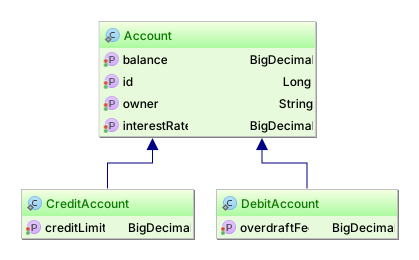
When using MappedSuperclass, the inheritance is visible in the domain model only, and each database table contains both the base class and the subclass properties.
@MappedSuperclass inheritance@MappedSuperclass
public static class Account {
@Id
private Long id;
private String owner;
private BigDecimal balance;
private BigDecimal interestRate;
//Getters and setters are omitted for brevity
}
@Entity(name = "DebitAccount")
public static class DebitAccount extends Account {
private BigDecimal overdraftFee;
//Getters and setters are omitted for brevity
}
@Entity(name = "CreditAccount")
public static class CreditAccount extends Account {
private BigDecimal creditLimit;
//Getters and setters are omitted for brevity
}CREATE TABLE DebitAccount (
id BIGINT NOT NULL ,
balance NUMERIC(19, 2) ,
interestRate NUMERIC(19, 2) ,
owner VARCHAR(255) ,
overdraftFee NUMERIC(19, 2) ,
PRIMARY KEY ( id )
)
CREATE TABLE CreditAccount (
id BIGINT NOT NULL ,
balance NUMERIC(19, 2) ,
interestRate NUMERIC(19, 2) ,
owner VARCHAR(255) ,
creditLimit NUMERIC(19, 2) ,
PRIMARY KEY ( id )
)|
Because the |
3.7.2. Single table
The single table inheritance strategy maps all subclasses to only one database table. Each subclass declares its own persistent properties. Version and id properties are assumed to be inherited from the root class.
|
When omitting an explicit inheritance strategy (e.g. |
@Entity(name = "Account")
@Inheritance(strategy = InheritanceType.SINGLE_TABLE)
public static class Account {
@Id
private Long id;
private String owner;
private BigDecimal balance;
private BigDecimal interestRate;
//Getters and setters are omitted for brevity
}
@Entity(name = "DebitAccount")
public static class DebitAccount extends Account {
private BigDecimal overdraftFee;
//Getters and setters are omitted for brevity
}
@Entity(name = "CreditAccount")
public static class CreditAccount extends Account {
private BigDecimal creditLimit;
//Getters and setters are omitted for brevity
}CREATE TABLE Account (
DTYPE VARCHAR(31) NOT NULL ,
id BIGINT NOT NULL ,
balance NUMERIC(19, 2) ,
interestRate NUMERIC(19, 2) ,
owner VARCHAR(255) ,
overdraftFee NUMERIC(19, 2) ,
creditLimit NUMERIC(19, 2) ,
PRIMARY KEY ( id )
)Each subclass in a hierarchy must define a unique discriminator value, which is used to differentiate between rows belonging to separate subclass types.
If this is not specified, the DTYPE column is used as a discriminator, storing the associated subclass name.
var debitAccount = new DebitAccount();
debitAccount.setId(1L);
debitAccount.setOwner("John Doe");
debitAccount.setBalance(BigDecimal.valueOf(100));
debitAccount.setInterestRate(BigDecimal.valueOf(1.5d));
debitAccount.setOverdraftFee(BigDecimal.valueOf(25));
var creditAccount = new CreditAccount();
creditAccount.setId(2L);
creditAccount.setOwner("John Doe");
creditAccount.setBalance(BigDecimal.valueOf(1000));
creditAccount.setInterestRate(BigDecimal.valueOf(1.9d));
creditAccount.setCreditLimit(BigDecimal.valueOf(5000));
entityManager.persist(debitAccount);
entityManager.persist(creditAccount);INSERT INTO Account (balance, interestRate, owner, overdraftFee, DTYPE, id)
VALUES (100, 1.5, 'John Doe', 25, 'DebitAccount', 1)
INSERT INTO Account (balance, interestRate, owner, creditLimit, DTYPE, id)
VALUES (1000, 1.9, 'John Doe', 5000, 'CreditAccount', 2)When using polymorphic queries, only a single table is required to be scanned to fetch all associated subclass instances.
var accounts = entityManager
.createQuery("select a from Account a")
.getResultList();SELECT singletabl0_.id AS id2_0_ ,
singletabl0_.balance AS balance3_0_ ,
singletabl0_.interestRate AS interest4_0_ ,
singletabl0_.owner AS owner5_0_ ,
singletabl0_.overdraftFee AS overdraf6_0_ ,
singletabl0_.creditLimit AS creditLi7_0_ ,
singletabl0_.DTYPE AS DTYPE1_0_
FROM Account singletabl0_|
The single-table strategy can simplify polymorphic queries by avoiding joins or unions across hierarchy tables.
Its performance still depends on the workload, row width, and database execution plans.
Columns required by every entity in the hierarchy can use |
Discriminator
The discriminator column contains marker values that tell the persistence layer what subclass to instantiate for a particular row.
Hibernate Core supports the following restricted set of types as discriminator column: String, char, int, byte, short, boolean(including yes_no, true_false).
Use the @DiscriminatorColumn to define the discriminator column as well as the discriminator type.
|
The enum
The The second option, |
|
There used to be a |
Discriminator formula
For a legacy schema where the discriminator is derived from existing columns,
use Hibernate’s @DiscriminatorFormula as shown below:
@Entity(name = "Account")
@Inheritance(strategy = InheritanceType.SINGLE_TABLE)
@DiscriminatorFormula(
"case when debitKey is not null " +
"then 'Debit' " +
"else (" +
" case when creditKey is not null " +
" then 'Credit' " +
" else 'Unknown' " +
" end) " +
"end "
)
public static class Account {
@Id
private Long id;
private String owner;
private BigDecimal balance;
private BigDecimal interestRate;
//Getters and setters are omitted for brevity
}
@Entity(name = "DebitAccount")
@DiscriminatorValue(value = "Debit")
public static class DebitAccount extends Account {
private String debitKey;
private BigDecimal overdraftFee;
//Getters and setters are omitted for brevity
}
@Entity(name = "CreditAccount")
@DiscriminatorValue(value = "Credit")
public static class CreditAccount extends Account {
private String creditKey;
private BigDecimal creditLimit;
//Getters and setters are omitted for brevity
}CREATE TABLE Account (
id int8 NOT NULL ,
balance NUMERIC(19, 2) ,
interestRate NUMERIC(19, 2) ,
owner VARCHAR(255) ,
debitKey VARCHAR(255) ,
overdraftFee NUMERIC(19, 2) ,
creditKey VARCHAR(255) ,
creditLimit NUMERIC(19, 2) ,
PRIMARY KEY ( id )
)The @DiscriminatorFormula defines a custom SQL clause that can be used to identify a certain subclass type.
The @DiscriminatorValue defines the mapping between the result of the @DiscriminatorFormula and the inheritance subclass type.
Implicit discriminator values
Aside from the usual discriminator values assigned to each individual subclass type, the @DiscriminatorValue can take two additional values:
null-
If the underlying discriminator column is null, the
nulldiscriminator mapping is used. not null-
If the underlying discriminator column has a not-null value that is not explicitly mapped to any entity, the
not-nulldiscriminator mapping used.
To understand how these two values work, consider the following entity mapping:
null and not-null entity mapping@Entity(name = "Account")
@Inheritance(strategy = InheritanceType.SINGLE_TABLE)
@DiscriminatorValue("null")
public static class Account {
@Id
private Long id;
private String owner;
private BigDecimal balance;
private BigDecimal interestRate;
//Getters and setters are omitted for brevity
}
@Entity(name = "DebitAccount")
@DiscriminatorValue("Debit")
public static class DebitAccount extends Account {
private BigDecimal overdraftFee;
//Getters and setters are omitted for brevity
}
@Entity(name = "CreditAccount")
@DiscriminatorValue("Credit")
public static class CreditAccount extends Account {
private BigDecimal creditLimit;
//Getters and setters are omitted for brevity
}
@Entity(name = "OtherAccount")
@DiscriminatorValue("not null")
public static class OtherAccount extends Account {
private boolean active;
//Getters and setters are omitted for brevity
}The Account class has a @DiscriminatorValue( "null" ) mapping, meaning that any account row which does not contain any discriminator value will be mapped to an Account base class entity.
The DebitAccount and CreditAccount entities use explicit discriminator values.
The OtherAccount entity is used as a generic account type because it maps any database row whose discriminator column is not explicitly assigned to any other entity in the current inheritance tree.
To visualize how it works, consider the following example:
null and not-null entity persistenceDebitAccount debitAccount = new DebitAccount();
debitAccount.setId(1L);
debitAccount.setOwner("John Doe");
debitAccount.setBalance(BigDecimal.valueOf(100));
debitAccount.setInterestRate(BigDecimal.valueOf(1.5d));
debitAccount.setOverdraftFee(BigDecimal.valueOf(25));
CreditAccount creditAccount = new CreditAccount();
creditAccount.setId(2L);
creditAccount.setOwner("John Doe");
creditAccount.setBalance(BigDecimal.valueOf(1000));
creditAccount.setInterestRate(BigDecimal.valueOf(1.9d));
creditAccount.setCreditLimit(BigDecimal.valueOf(5000));
Account account = new Account();
account.setId(3L);
account.setOwner("John Doe");
account.setBalance(BigDecimal.valueOf(1000));
account.setInterestRate(BigDecimal.valueOf(1.9d));
entityManager.persist(debitAccount);
entityManager.persist(creditAccount);
entityManager.persist(account);
entityManager.unwrap(Session.class).doWork(connection -> {
try(Statement statement = connection.createStatement()) {
statement.executeUpdate(
"insert into Account (DTYPE, active, balance, interestRate, owner, id) " +
"values ('Other', true, 25, 0.5, 'Vlad', 4)"
);
}
});
Map<Long, Account> accounts = entityManager.createQuery(
"select a from Account a", Account.class)
.getResultList()
.stream()
.collect(Collectors.toMap(Account::getId, Function.identity()));
Assertions.assertEquals( 4, accounts.size() );
Assertions.assertEquals( DebitAccount.class, accounts.get(1L).getClass() );
Assertions.assertEquals( CreditAccount.class, accounts.get(2L).getClass() );
Assertions.assertEquals( Account.class, accounts.get(3L).getClass() );
Assertions.assertEquals( OtherAccount.class, accounts.get(4L).getClass() );INSERT INTO Account (balance, interestRate, owner, overdraftFee, DTYPE, id)
VALUES (100, 1.5, 'John Doe', 25, 'Debit', 1)
INSERT INTO Account (balance, interestRate, owner, overdraftFee, DTYPE, id)
VALUES (1000, 1.9, 'John Doe', 5000, 'Credit', 2)
INSERT INTO Account (balance, interestRate, owner, id)
VALUES (1000, 1.9, 'John Doe', 3)
INSERT INTO Account (DTYPE, active, balance, interestRate, owner, id)
VALUES ('Other', true, 25, 0.5, 'Vlad', 4)
SELECT a.id as id2_0_,
a.balance as balance3_0_,
a.interestRate as interest4_0_,
a.owner as owner5_0_,
a.overdraftFee as overdraf6_0_,
a.creditLimit as creditLi7_0_,
a.active as active8_0_,
a.DTYPE as DTYPE1_0_
FROM Account aThe Account entity row has a value of NULL in the DTYPE discriminator column,
while the OtherAccount entity was saved with a DTYPE column value of other which has not explicit mapping.
3.7.3. Joined table
Each subclass can also be mapped to its own table. This is also called table-per-subclass mapping strategy. An inherited state is retrieved by joining with the table of the superclass.
A discriminator column is not required for this mapping strategy. Each subclass must, however, declare a table column holding the object identifier.
@Entity(name = "Account")
@Inheritance(strategy = InheritanceType.JOINED)
public static class Account {
@Id
private Long id;
private String owner;
private BigDecimal balance;
private BigDecimal interestRate;
//Getters and setters are omitted for brevity
}
@Entity(name = "DebitAccount")
public static class DebitAccount extends Account {
private BigDecimal overdraftFee;
//Getters and setters are omitted for brevity
}
@Entity(name = "CreditAccount")
public static class CreditAccount extends Account {
private BigDecimal creditLimit;
//Getters and setters are omitted for brevity
}CREATE TABLE Account (
id BIGINT NOT NULL ,
balance NUMERIC(19, 2) ,
interestRate NUMERIC(19, 2) ,
owner VARCHAR(255) ,
PRIMARY KEY ( id )
)
CREATE TABLE CreditAccount (
creditLimit NUMERIC(19, 2) ,
id BIGINT NOT NULL ,
PRIMARY KEY ( id )
)
CREATE TABLE DebitAccount (
overdraftFee NUMERIC(19, 2) ,
id BIGINT NOT NULL ,
PRIMARY KEY ( id )
)
ALTER TABLE CreditAccount
ADD CONSTRAINT FKihw8h3j1k0w31cnyu7jcl7n7n
FOREIGN KEY (id) REFERENCES Account
ALTER TABLE DebitAccount
ADD CONSTRAINT FKia914478noepymc468kiaivqm
FOREIGN KEY (id) REFERENCES Account|
The primary keys of the The table name still defaults to the non-qualified class name.
Also, if |
@PrimaryKeyJoinColumn@Entity(name = "Account")
@Inheritance(strategy = InheritanceType.JOINED)
public static class Account {
@Id
private Long id;
private String owner;
private BigDecimal balance;
private BigDecimal interestRate;
//Getters and setters are omitted for brevity
}
@Entity(name = "DebitAccount")
@PrimaryKeyJoinColumn(name = "account_id")
public static class DebitAccount extends Account {
private BigDecimal overdraftFee;
//Getters and setters are omitted for brevity
}
@Entity(name = "CreditAccount")
@PrimaryKeyJoinColumn(name = "account_id")
public static class CreditAccount extends Account {
private BigDecimal creditLimit;
//Getters and setters are omitted for brevity
}CREATE TABLE CreditAccount (
creditLimit NUMERIC(19, 2) ,
account_id BIGINT NOT NULL ,
PRIMARY KEY ( account_id )
)
CREATE TABLE DebitAccount (
overdraftFee NUMERIC(19, 2) ,
account_id BIGINT NOT NULL ,
PRIMARY KEY ( account_id )
)
ALTER TABLE CreditAccount
ADD CONSTRAINT FK8ulmk1wgs5x7igo370jt0q005
FOREIGN KEY (account_id) REFERENCES Account
ALTER TABLE DebitAccount
ADD CONSTRAINT FK7wjufa570onoidv4omkkru06j
FOREIGN KEY (account_id) REFERENCES AccountWhen using polymorphic queries, the base class table must be joined with all subclass tables to fetch every associated subclass instance.
var accounts = entityManager
.createQuery("select a from Account a")
.getResultList();SELECT jointablet0_.id AS id1_0_ ,
jointablet0_.balance AS balance2_0_ ,
jointablet0_.interestRate AS interest3_0_ ,
jointablet0_.owner AS owner4_0_ ,
jointablet0_1_.overdraftFee AS overdraf1_2_ ,
jointablet0_2_.creditLimit AS creditLi1_1_ ,
CASE WHEN jointablet0_1_.id IS NOT NULL THEN 1
WHEN jointablet0_2_.id IS NOT NULL THEN 2
WHEN jointablet0_.id IS NOT NULL THEN 0
END AS clazz_
FROM Account jointablet0_
LEFT OUTER JOIN DebitAccount jointablet0_1_ ON jointablet0_.id = jointablet0_1_.id
LEFT OUTER JOIN CreditAccount jointablet0_2_ ON jointablet0_.id = jointablet0_2_.id|
The joined table inheritance polymorphic queries can use several JOINS which might affect performance when fetching a large number of entities. |
3.7.4. Table per class
A third option is to map only the concrete classes of an inheritance hierarchy to tables. This is called the table-per-concrete-class strategy. Each table defines all persistent states of the class, including the inherited state.
In Hibernate, it is not necessary to explicitly map such inheritance hierarchies. Each class can be mapped as a separate entity root. For polymorphic associations, such as an association to the hierarchy’s superclass, use the union subclass mapping.
@Entity(name = "Account")
@Inheritance(strategy = InheritanceType.TABLE_PER_CLASS)
public static class Account {
@Id
private Long id;
private String owner;
private BigDecimal balance;
private BigDecimal interestRate;
//Getters and setters are omitted for brevity
}
@Entity(name = "DebitAccount")
public static class DebitAccount extends Account {
private BigDecimal overdraftFee;
//Getters and setters are omitted for brevity
}
@Entity(name = "CreditAccount")
public static class CreditAccount extends Account {
private BigDecimal creditLimit;
//Getters and setters are omitted for brevity
}CREATE TABLE Account (
id BIGINT NOT NULL ,
balance NUMERIC(19, 2) ,
interestRate NUMERIC(19, 2) ,
owner VARCHAR(255) ,
PRIMARY KEY ( id )
)
CREATE TABLE CreditAccount (
id BIGINT NOT NULL ,
balance NUMERIC(19, 2) ,
interestRate NUMERIC(19, 2) ,
owner VARCHAR(255) ,
creditLimit NUMERIC(19, 2) ,
PRIMARY KEY ( id )
)
CREATE TABLE DebitAccount (
id BIGINT NOT NULL ,
balance NUMERIC(19, 2) ,
interestRate NUMERIC(19, 2) ,
owner VARCHAR(255) ,
overdraftFee NUMERIC(19, 2) ,
PRIMARY KEY ( id )
)When using polymorphic queries, a UNION is required to fetch the base class table along with all subclass tables as well.
var accounts = entityManager
.createQuery("select a from Account a")
.getResultList();SELECT tablepercl0_.id AS id1_0_ ,
tablepercl0_.balance AS balance2_0_ ,
tablepercl0_.interestRate AS interest3_0_ ,
tablepercl0_.owner AS owner4_0_ ,
tablepercl0_.overdraftFee AS overdraf1_2_ ,
tablepercl0_.creditLimit AS creditLi1_1_ ,
tablepercl0_.clazz_ AS clazz_
FROM (
SELECT id ,
balance ,
interestRate ,
owner ,
CAST(NULL AS INT) AS overdraftFee ,
CAST(NULL AS INT) AS creditLimit ,
0 AS clazz_
FROM Account
UNION ALL
SELECT id ,
balance ,
interestRate ,
owner ,
overdraftFee ,
CAST(NULL AS INT) AS creditLimit ,
1 AS clazz_
FROM DebitAccount
UNION ALL
SELECT id ,
balance ,
interestRate ,
owner ,
CAST(NULL AS INT) AS overdraftFee ,
creditLimit ,
2 AS clazz_
FROM CreditAccount
) tablepercl0_|
Polymorphic queries require multiple UNION queries, so be aware of the performance implications of a large class hierarchy. |
3.7.5. Concrete proxies and subtype resolution
When working with lazy associations or entity references for types that define and inheritance hierarchy Hibernate often creates proxies starting from the root class, with no information about the actual subtype that’s referenced by the lazy instance. This can be a problem when using instanceof to check the type of said lazy entity references or when trying to cast to the concrete subtype.
The @ConcreteProxy annotation can be used on an entity hierarchy root mapping to specify that Hibernate should always try to resolve the actual subtype corresponding to the proxy instance created. This effectively means that proxies for that entity hierarchy will always be created from the correct subclass, allowing to preserve laziness and enable using type checks and casts.
@ConcreteProxy@Entity(name = "SingleParent")
public static class SingleParent {
@Id
private Long id;
@ManyToOne(fetch = FetchType.LAZY, cascade = CascadeType.PERSIST)
private SingleBase single;
public SingleParent() {
}
public SingleParent(Long id, SingleBase single) {
this.id = id;
this.single = single;
}
public SingleBase getSingle() {
return single;
}
}
@Entity(name = "SingleBase")
@Inheritance(strategy = InheritanceType.SINGLE_TABLE)
@DiscriminatorColumn(name = "disc_col")
@ConcreteProxy
public static class SingleBase {
@Id
private Long id;
public SingleBase() {
}
public SingleBase(Long id) {
this.id = id;
}
}
@Entity(name = "SingleChild1")
public static class SingleChild1 extends SingleBase {
private String child1Prop;
public SingleChild1() {
}
public SingleChild1(Long id, String child1Prop) {
super( id );
this.child1Prop = child1Prop;
}
}
@Entity(name = "SingleSubChild1")
public static class SingleSubChild1 extends SingleChild1 {
private String subChild1Prop;
public SingleSubChild1() {
}
public SingleSubChild1(Long id, String child1Prop, String subChild1Prop) {
super( id, child1Prop );
this.subChild1Prop = subChild1Prop;
}
}
// Other subtypes omitted for brevityThe following example loads the parent’s lazy association as the concrete SingleSubChild1 type:
final SingleParent parent1 = session.find( SingleParent.class, 1L );
assertThat( parent1.getSingle(), instanceOf( SingleSubChild1.class ) );
assertThat( Hibernate.isInitialized( parent1.getSingle() ), is( false ) );
final SingleSubChild1 proxy = (SingleSubChild1) parent1.getSingle();
assertThat( Hibernate.isInitialized( proxy ), is( false ) );select
sp1_0.id,
sp1_0.single_id,
s1_0.disc_col
from
SingleParent sp1_0
left join
SingleBase s1_0
on s1_0.id=sp1_0.single_id
where
sp1_0.id=?
-- binding parameter (1:BIGINT) <- [1]
-- extracted value (2:BIGINT) -> [1]
-- extracted value (3:VARCHAR) -> [SingleSubChild1]| Resolving a concrete proxy type may require Hibernate to query the association target’s tables to determine the subtype for the identifier. |
The concrete type will be determined:
-
With single table inheritance, the discriminator column value will be left joined when fetching associations or simply read from the entity table when getting references.
-
When using joined inheritance, all subtype tables will need to be left joined to determine the concrete type. Note however that when using an explicit discriminator column, the behavior is the same as for single-table inheritance.
-
Finally, for table-per-class inheritance, all subtype tables will need to be (union) queried to determine the concrete type.
The following example shows the query Hibernate uses to resolve the concrete proxy type for an entity reference:
getReference():final SingleChild1 proxy1 = session.getReference( SingleChild1.class, 1L );
assertThat( proxy1, instanceOf( SingleSubChild1.class ) );
assertThat( Hibernate.isInitialized( proxy1 ), is( false ) );
final SingleSubChild1 subChild1 = (SingleSubChild1) proxy1;
assertThat( Hibernate.isInitialized( subChild1 ), is( false ) );select
sc1_0.disc_col
from
SingleBase sc1_0
where
sc1_0.disc_col in ('SingleChild1', 'SingleSubChild1')
and sc1_0.id=?
-- binding parameter (1:BIGINT) <- [1]
-- extracted value (1:VARCHAR) -> [SingleSubChild1]3.7.6. Embeddable inheritance
Hibernate also supports discriminator-based inheritance for embeddable types. This works similarly to
Single Table Entity inheritance: an @Embeddable class may be
extended by other @Embeddable classes, in which case the @Embedded properties using that type will
rely on an additional discriminator column to store information about the composite value’s subtype.
When retrieving the inherited property, Hibernate will read the discriminator value and instantiate the
correct @Embeddable subtype with its corresponding properties.
By default, the discriminator column will be STRING typed and named like <property_name>_DTYPE,
where property_name is the name of the @Embedded property in the respective entity mapping.
It’s possible to customize the discriminator column mapping:
-
For the whole
@Embeddabletype, by using@DiscriminatorColumnor@DiscriminatorFormulaon the root class of the inheritance hierarchy (NOTE: if using the same inheritance-enabled embeddable type for two different properties in the same entity mapping, this will cause a column name conflict); -
For a specific
@Embeddedproperty, by using the@AttributeOverrideannotation with the special name{discriminator}.
Finally, to specify custom discriminator values for each subtype one can annotate the inheritance hierarchy’s
classes with @DiscriminatorValue.
|
Embeddable inheritance IS also supported for components used in an |
Of course, the type() and treat() functions are also supported for embeddable inheritance and can serve to explicitly use the embeddable type information in queries, see types and typecasts.
@Embeddable
@DiscriminatorValue( "parent" )
@DiscriminatorColumn( name = "embeddable_type" )
class ParentEmbeddable implements Serializable {
private String parentProp;
// ...
}@Embeddable
@DiscriminatorValue( "child_one" )
class ChildOneEmbeddable extends ParentEmbeddable {
private Integer childOneProp;
// ...
}@Embeddable
@DiscriminatorValue( "sub_child_one" )
class SubChildOneEmbeddable extends ChildOneEmbeddable {
private Double subChildOneProp;
// ...
}@Entity( name = "TestEntity" )
static class TestEntity {
@Id
private Long id;
@Embedded
private ParentEmbeddable embeddable;
// ...
}This is the resulting table structure:
create table TestEntity (
id bigint not null,
embeddable_type varchar(31) not null,
parentProp varchar(255),
childOneProp integer,
subChildOneProp float(53),
primary key (id)
)3.8. Associations
Associations map relationships between entities.
The association reference is a value in the containing entity’s state; the referenced entity has its own identity and lifecycle.
This distinction applies to @ManyToOne, @OneToOne, and Hibernate’s @Any mapping, as described in Value types.
For a to-many association, the collection holds references to entities rather than owning the entities as embedded values.
A bidirectional association has an owning side and an inverse side identified by mappedBy.
The owning side determines the relationship written to the database.
Applications must keep both sides synchronized, either explicitly or using the automatic management described in Automatic Bidirectionality Management.
|
Hibernate has historically relied on users managing both sides of bidirectional associations. The examples in this chapter generally illustrate this manual management as it is the only portable approach, in the Jakarta Persistence sense. However, starting in 8.0 Hibernate adds the option to automatically manage the inverse side of these bidirectional associations. See Automatic Bidirectionality Management for details. |
3.8.1. @ManyToOne
@ManyToOne is the most common association, having a direct equivalent in the relational database as well (e.g. foreign key),
and so it establishes a relationship between a child entity and a parent.
@ManyToOne association@Entity(name = "Person")
public static class Person {
@Id
@GeneratedValue
private Long id;
//Getters and setters are omitted for brevity
}
@Entity(name = "Phone")
public static class Phone {
@Id
@GeneratedValue
private Long id;
@Column(name = "`number`")
private String number;
@ManyToOne
@JoinColumn(name = "person_id",
foreignKey = @ForeignKey(name = "PERSON_ID_FK")
)
private Person person;
//Getters and setters are omitted for brevity
}CREATE TABLE Person (
id BIGINT NOT NULL ,
PRIMARY KEY ( id )
)
CREATE TABLE Phone (
id BIGINT NOT NULL ,
number VARCHAR(255) ,
person_id BIGINT ,
PRIMARY KEY ( id )
)
ALTER TABLE Phone
ADD CONSTRAINT PERSON_ID_FK
FOREIGN KEY (person_id) REFERENCES PersonEach entity has a lifecycle of its own. Once the @ManyToOne association is set, Hibernate will set the associated database foreign key column.
@ManyToOne association lifecyclePerson person = new Person();
entityManager.persist( person );
Phone phone = new Phone( "123-456-7890" );
phone.setPerson( person );
entityManager.persist( phone );
entityManager.flush();
phone.setPerson( null );INSERT INTO Person ( id )
VALUES ( 1 )
INSERT INTO Phone ( number, person_id, id )
VALUES ( '123-456-7890', 1, 2 )
UPDATE Phone
SET number = '123-456-7890',
person_id = NULL
WHERE id = 23.8.2. @OneToMany
The @OneToMany association links a parent entity with one or more child entities.
An association mapped with @OneToMany is bidirectional when its mappedBy attribute identifies the corresponding @ManyToOne attribute on the child entity.
The application can then navigate the relationship from either end.
Without this mappedBy declaration, the @OneToMany is unidirectional, even if the child has a separate @ManyToOne mapping back to the parent.
Unidirectional @OneToMany
By default, a unidirectional @OneToMany association uses a link table between the two entities.
Alternatively, @JoinColumn may be used to map a foreign key in the child table.
The following example uses the default link-table mapping.
@OneToMany association@Entity(name = "Person")
public static class Person {
@Id
@GeneratedValue
private Long id;
@OneToMany(cascade = CascadeType.ALL, orphanRemoval = true)
private List<Phone> phones = new ArrayList<>();
//Getters and setters are omitted for brevity
}
@Entity(name = "Phone")
public static class Phone {
@Id
@GeneratedValue
private Long id;
@Column(name = "`number`")
private String number;
//Getters and setters are omitted for brevity
}CREATE TABLE Person (
id BIGINT NOT NULL ,
PRIMARY KEY ( id )
)
CREATE TABLE Person_Phone (
Person_id BIGINT NOT NULL ,
phones_id BIGINT NOT NULL
)
CREATE TABLE Phone (
id BIGINT NOT NULL ,
number VARCHAR(255) ,
PRIMARY KEY ( id )
)
ALTER TABLE Person_Phone
ADD CONSTRAINT UK_9uhc5itwc9h5gcng944pcaslf
UNIQUE (phones_id)
ALTER TABLE Person_Phone
ADD CONSTRAINT FKr38us2n8g5p9rj0b494sd3391
FOREIGN KEY (phones_id) REFERENCES Phone
ALTER TABLE Person_Phone
ADD CONSTRAINT FK2ex4e4p7w1cj310kg2woisjl2
FOREIGN KEY (Person_id) REFERENCES Person|
In this example, the |
@OneToMany associationPerson person = new Person();
Phone phone1 = new Phone( "123-456-7890" );
Phone phone2 = new Phone( "321-654-0987" );
person.getPhones().add( phone1 );
person.getPhones().add( phone2 );
entityManager.persist( person );
entityManager.flush();
person.getPhones().remove( phone1 );INSERT INTO Person
( id )
VALUES ( 1 )
INSERT INTO Phone
( number, id )
VALUES ( '123-456-7890', 2 )
INSERT INTO Phone
( number, id )
VALUES ( '321-654-0987', 3 )
INSERT INTO Person_Phone
( Person_id, phones_id )
VALUES ( 1, 2 )
INSERT INTO Person_Phone
( Person_id, phones_id )
VALUES ( 1, 3 )
DELETE FROM Person_Phone
WHERE Person_id = 1
INSERT INTO Person_Phone
( Person_id, phones_id )
VALUES ( 1, 3 )
DELETE FROM Phone
WHERE id = 2When persisting the Person entity, the cascade will propagate the persist operation to the underlying Phone children as well.
Upon removing a Phone from the phones collection, the association row is deleted from the link table, and the orphanRemoval attribute will trigger a Phone removal as well.
|
The unidirectional bag mapping shown here is not very efficient when removing child entities.
In the example above, upon flushing the persistence context, Hibernate deletes all database rows from the link table (e.g. On the other hand, a bidirectional |
Bidirectional @OneToMany
The bidirectional @OneToMany association also requires a @ManyToOne association on the child side.
Although the Domain Model exposes two sides to navigate this association, behind the scenes, the relational database has only one foreign key for this relationship.
Every bidirectional association must have one owning side only (the child side), the other one being referred to as the inverse (or the mappedBy) side.
@OneToMany association mappedBy the @ManyToOne side@Entity(name = "Person")
public static class Person {
@Id
@GeneratedValue
private Long id;
@OneToMany(mappedBy = "person", cascade = CascadeType.ALL, orphanRemoval = true)
private List<Phone> phones = new ArrayList<>();
//Getters and setters are omitted for brevity
public void addPhone(Phone phone) {
phones.add( phone );
phone.setPerson( this );
}
public void removePhone(Phone phone) {
phones.remove( phone );
phone.setPerson( null );
}
}
@Entity(name = "Phone")
public static class Phone {
@Id
@GeneratedValue
private Long id;
@NaturalId
@Column(name = "`number`", unique = true)
private String number;
@ManyToOne
private Person person;
//Getters and setters are omitted for brevity
@Override
public boolean equals(Object o) {
if ( this == o ) {
return true;
}
if ( o == null || getClass() != o.getClass() ) {
return false;
}
Phone phone = (Phone) o;
return Objects.equals( number, phone.number );
}
@Override
public int hashCode() {
return Objects.hash( number );
}
}CREATE TABLE Person (
id BIGINT NOT NULL ,
PRIMARY KEY ( id )
)
CREATE TABLE Phone (
id BIGINT NOT NULL ,
number VARCHAR(255) ,
person_id BIGINT ,
PRIMARY KEY ( id )
)
ALTER TABLE Phone
ADD CONSTRAINT UK_l329ab0g4c1t78onljnxmbnp6
UNIQUE (number)
ALTER TABLE Phone
ADD CONSTRAINT FKmw13yfsjypiiq0i1osdkaeqpg
FOREIGN KEY (person_id) REFERENCES Person|
Applications should keep both sides of a bidirectional association synchronized. Without automatic bidirectionality management, the application must update both sides explicitly. When this optional feature is enabled, Hibernate synchronizes supported inverse-side state from the owning side during flush preparation. For consistent navigation before flush, the application must still update both sides immediately. The |
Because the Phone class has a @NaturalId column (the phone number being unique),
the equals() and the hashCode() can make use of this property, and so the removePhone() logic is reduced to the remove() Java Collection method.
@OneToMany with an owner @ManyToOne side lifecyclePerson person = new Person();
Phone phone1 = new Phone( "123-456-7890" );
Phone phone2 = new Phone( "321-654-0987" );
person.addPhone( phone1 );
person.addPhone( phone2 );
entityManager.persist( person );
entityManager.flush();
person.removePhone( phone1 );INSERT INTO Person
( id )
VALUES ( 1 )
INSERT INTO Phone
( "number", person_id, id )
VALUES ( '123-456-7890', 1, 2 )
INSERT INTO Phone
( "number", person_id, id )
VALUES ( '321-654-0987', 1, 3 )
DELETE FROM Phone
WHERE id = 2Unlike the unidirectional @OneToMany, the bidirectional association is much more efficient when managing the collection persistence state.
Every element removal only requires a single update (in which the foreign key column is set to NULL), and,
if the child entity lifecycle is bound to its owning parent so that the child cannot exist without its parent,
enable orphanRemoval so that dissociating the child also deletes its database row.
3.8.3. @OneToOne
The @OneToOne association can either be unidirectional or bidirectional.
A unidirectional association follows the relational database foreign key semantics, the client-side owning the relationship.
A bidirectional association features a mappedBy @OneToOne parent side too.
Unidirectional @OneToOne
@OneToOne@Entity(name = "Phone")
public static class Phone {
@Id
@GeneratedValue
private Long id;
@Column(name = "`number`")
private String number;
@OneToOne
@JoinColumn(name = "details_id")
private PhoneDetails details;
//Getters and setters are omitted for brevity
}
@Entity(name = "PhoneDetails")
public static class PhoneDetails {
@Id
@GeneratedValue
private Long id;
private String provider;
private String technology;
//Getters and setters are omitted for brevity
}CREATE TABLE Phone (
id BIGINT NOT NULL ,
number VARCHAR(255) ,
details_id BIGINT ,
PRIMARY KEY ( id )
)
CREATE TABLE PhoneDetails (
id BIGINT NOT NULL ,
provider VARCHAR(255) ,
technology VARCHAR(255) ,
PRIMARY KEY ( id )
)
ALTER TABLE Phone
ADD CONSTRAINT FKnoj7cj83ppfqbnvqqa5kolub7
FOREIGN KEY (details_id) REFERENCES PhoneDetailsFrom a relational database point of view, the underlying schema is identical to the unidirectional @ManyToOne association,
as the client-side controls the relationship based on the foreign key column.
Since PhoneDetails cannot exist without a Phone, a more natural mapping treats Phone as the parent
and places the foreign key in the PhoneDetails table.
This mapping requires a bidirectional @OneToOne association:
Bidirectional @OneToOne
@OneToOne@Entity(name = "Phone")
public static class Phone {
@Id
@GeneratedValue
private Long id;
@Column(name = "`number`")
private String number;
@OneToOne(
mappedBy = "phone",
cascade = CascadeType.ALL,
orphanRemoval = true,
fetch = FetchType.LAZY
)
private PhoneDetails details;
//Getters and setters are omitted for brevity
public void addDetails(PhoneDetails details) {
details.setPhone( this );
this.details = details;
}
public void removeDetails() {
if ( details != null ) {
details.setPhone( null );
this.details = null;
}
}
}
@Entity(name = "PhoneDetails")
public static class PhoneDetails {
@Id
@GeneratedValue
private Long id;
private String provider;
private String technology;
@OneToOne(fetch = FetchType.LAZY)
@JoinColumn(name = "phone_id")
private Phone phone;
//Getters and setters are omitted for brevity
}CREATE TABLE Phone (
id BIGINT NOT NULL ,
number VARCHAR(255) ,
PRIMARY KEY ( id )
)
CREATE TABLE PhoneDetails (
id BIGINT NOT NULL ,
provider VARCHAR(255) ,
technology VARCHAR(255) ,
phone_id BIGINT ,
PRIMARY KEY ( id )
)
ALTER TABLE PhoneDetails
ADD CONSTRAINT FKeotuev8ja8v0sdh29dynqj05p
FOREIGN KEY (phone_id) REFERENCES PhoneThis time, the PhoneDetails owns the association, and, like any bidirectional association, the parent-side can propagate its lifecycle to the child-side through cascading.
@OneToOne lifecyclePhone phone = new Phone( "123-456-7890" );
PhoneDetails details = new PhoneDetails( "T-Mobile", "GSM" );
phone.addDetails( details );
entityManager.persist( phone );INSERT INTO Phone ( number, id )
VALUES ( '123-456-7890', 1 )
INSERT INTO PhoneDetails ( phone_id, provider, technology, id )
VALUES ( 1, 'T-Mobile', 'GSM', 2 )When using a bidirectional @OneToOne association, Hibernate enforces the unique constraint upon fetching the child-side.
If there are more than one children associated with the same parent, Hibernate will throw a org.hibernate.exception.ConstraintViolationException.
Continuing the previous example, when adding another PhoneDetails, Hibernate validates the uniqueness constraint when reloading the Phone object.
@OneToOne unique constraintPhoneDetails otherDetails = new PhoneDetails( "T-Mobile", "CDMA" );
otherDetails.setPhone( phone );
entityManager.persist( otherDetails );
entityManager.flush();
entityManager.clear();
//throws jakarta.persistence.PersistenceException: org.hibernate.HibernateException: More than one row with the given identifier was found: 1
phone = entityManager.find( Phone.class, phone.getId() );Bidirectional @OneToOne lazy association
The inverse side does not hold the foreign key, so determining whether an optional association exists
can affect when it loads. See association-specific loading constraints
for enhancement requirements and the lazy mapping example.
A shared-primary-key mapping using @MapsId is a separate identifier and association design choice;
see derived identifier mapping with @MapsId.
3.8.4. @ManyToMany
The @ManyToMany association requires a link table that joins two entities.
Like the @OneToMany association, @ManyToMany can be either unidirectional or bidirectional.
Unidirectional @ManyToMany
@ManyToMany@Entity(name = "Person")
public static class Person {
@Id
@GeneratedValue
private Long id;
@ManyToMany(cascade = {CascadeType.PERSIST, CascadeType.MERGE})
private List<Address> addresses = new ArrayList<>();
//Getters and setters are omitted for brevity
}
@Entity(name = "Address")
public static class Address {
@Id
@GeneratedValue
private Long id;
private String street;
@Column(name = "`number`")
private String number;
//Getters and setters are omitted for brevity
}CREATE TABLE Address (
id BIGINT NOT NULL ,
number VARCHAR(255) ,
street VARCHAR(255) ,
PRIMARY KEY ( id )
)
CREATE TABLE Person (
id BIGINT NOT NULL ,
PRIMARY KEY ( id )
)
CREATE TABLE Person_Address (
Person_id BIGINT NOT NULL ,
addresses_id BIGINT NOT NULL
)
ALTER TABLE Person_Address
ADD CONSTRAINT FKm7j0bnabh2yr0pe99il1d066u
FOREIGN KEY (addresses_id) REFERENCES Address
ALTER TABLE Person_Address
ADD CONSTRAINT FKba7rc9qe2vh44u93u0p2auwti
FOREIGN KEY (Person_id) REFERENCES PersonJust like with unidirectional @OneToMany associations, the link table is controlled by the owning side.
Removing an entity reference from a @ManyToMany collection changes the relationship stored in the link table.
For the bag mapping shown here, Hibernate removes all link-table entries associated with the owner and reinserts the remaining entries.
This behavior depends on the collection semantics: a set mapping can delete an individual link-table row.
@ManyToMany lifecyclePerson person1 = new Person();
Person person2 = new Person();
Address address1 = new Address( "12th Avenue", "12A" );
Address address2 = new Address( "18th Avenue", "18B" );
person1.getAddresses().add( address1 );
person1.getAddresses().add( address2 );
person2.getAddresses().add( address1 );
entityManager.persist( person1 );
entityManager.persist( person2 );
entityManager.flush();
person1.getAddresses().remove( address1 );INSERT INTO Person ( id )
VALUES ( 1 )
INSERT INTO Address ( number, street, id )
VALUES ( '12A', '12th Avenue', 2 )
INSERT INTO Address ( number, street, id )
VALUES ( '18B', '18th Avenue', 3 )
INSERT INTO Person ( id )
VALUES ( 4 )
INSERT INTO Person_Address ( Person_id, addresses_id )
VALUES ( 1, 2 )
INSERT INTO Person_Address ( Person_id, addresses_id )
VALUES ( 1, 3 )
INSERT INTO Person_Address ( Person_id, addresses_id )
VALUES ( 4, 2 )
DELETE FROM Person_Address
WHERE Person_id = 1
INSERT INTO Person_Address ( Person_id, addresses_id )
VALUES ( 1, 3 )|
For For example, if |
Removing the parent entity also removes its associated link records, as shown below:
@ManyToMany entity removalPerson person1 = entityManager.find( Person.class, personId );
entityManager.remove( person1 );DELETE FROM Person_Address
WHERE Person_id = 1
DELETE FROM Person
WHERE id = 1Bidirectional @ManyToMany
A bidirectional @ManyToMany association has an owning and a mappedBy side.
Provide helper methods for adding and removing child entities to keep both sides of the association in sync.
@ManyToMany@Entity(name = "Person")
public static class Person {
@Id
@GeneratedValue
private Long id;
@NaturalId
private String registrationNumber;
@ManyToMany(cascade = {CascadeType.PERSIST, CascadeType.MERGE})
private List<Address> addresses = new ArrayList<>();
//Getters and setters are omitted for brevity
public void addAddress(Address address) {
addresses.add(address);
address.getOwners().add(this);
}
public void removeAddress(Address address) {
addresses.remove(address);
address.getOwners().remove(this);
}
@Override
public boolean equals(Object o) {
if (this == o) {
return true;
}
if (o == null || getClass() != o.getClass()) {
return false;
}
Person person = (Person) o;
return Objects.equals(registrationNumber, person.registrationNumber);
}
@Override
public int hashCode() {
return Objects.hash(registrationNumber);
}
}
@Entity(name = "Address")
public static class Address {
@Id
@GeneratedValue
private Long id;
private String street;
@Column(name = "`number`")
private String number;
private String postalCode;
@ManyToMany(mappedBy = "addresses")
private List<Person> owners = new ArrayList<>();
//Getters and setters are omitted for brevity
@Override
public boolean equals(Object o) {
if (this == o) {
return true;
}
if (o == null || getClass() != o.getClass()) {
return false;
}
Address address = (Address) o;
return Objects.equals(street, address.street) &&
Objects.equals(number, address.number) &&
Objects.equals(postalCode, address.postalCode);
}
@Override
public int hashCode() {
return Objects.hash(street, number, postalCode);
}
}CREATE TABLE Address (
id BIGINT NOT NULL ,
number VARCHAR(255) ,
postalCode VARCHAR(255) ,
street VARCHAR(255) ,
PRIMARY KEY ( id )
)
CREATE TABLE Person (
id BIGINT NOT NULL ,
registrationNumber VARCHAR(255) ,
PRIMARY KEY ( id )
)
CREATE TABLE Person_Address (
owners_id BIGINT NOT NULL ,
addresses_id BIGINT NOT NULL
)
ALTER TABLE Person
ADD CONSTRAINT UK_23enodonj49jm8uwec4i7y37f
UNIQUE (registrationNumber)
ALTER TABLE Person_Address
ADD CONSTRAINT FKm7j0bnabh2yr0pe99il1d066u
FOREIGN KEY (addresses_id) REFERENCES Address
ALTER TABLE Person_Address
ADD CONSTRAINT FKbn86l24gmxdv2vmekayqcsgup
FOREIGN KEY (owners_id) REFERENCES PersonThe helper methods simplify keeping both sides of the association in sync:
@ManyToMany lifecyclePerson person1 = new Person("ABC-123");
Person person2 = new Person("DEF-456");
Address address1 = new Address("12th Avenue", "12A", "4005A");
Address address2 = new Address("18th Avenue", "18B", "4007B");
person1.addAddress(address1);
person1.addAddress(address2);
person2.addAddress(address1);
entityManager.persist(person1);
entityManager.persist(person2);
entityManager.flush();
person1.removeAddress(address1);INSERT INTO Person ( registrationNumber, id )
VALUES ( 'ABC-123', 1 )
INSERT INTO Address ( number, postalCode, street, id )
VALUES ( '12A', '4005A', '12th Avenue', 2 )
INSERT INTO Address ( number, postalCode, street, id )
VALUES ( '18B', '4007B', '18th Avenue', 3 )
INSERT INTO Person ( registrationNumber, id )
VALUES ( 'DEF-456', 4 )
INSERT INTO Person_Address ( owners_id, addresses_id )
VALUES ( 1, 2 )
INSERT INTO Person_Address ( owners_id, addresses_id )
VALUES ( 1, 3 )
INSERT INTO Person_Address ( owners_id, addresses_id )
VALUES ( 4, 2 )
DELETE FROM Person_Address
WHERE owners_id = 1
INSERT INTO Person_Address ( owners_id, addresses_id )
VALUES ( 1, 3 )With a bag mapping, making a @ManyToMany association bidirectional does not eliminate deletion and reinsertion of the owner’s link-table rows.
A set mapping can remove individual rows.
For more control over the link-table lifecycle, expose it as an entity and split the association into two bidirectional @OneToMany relationships.
Bidirectional many-to-many with a link entity
To most natural @ManyToMany association follows the same logic employed by the database schema,
and the link table has an associated entity which controls the relationship for both sides that need to be joined.
@Entity(name = "Person")
public static class Person implements Serializable {
@Id
@GeneratedValue
private Long id;
@NaturalId
private String registrationNumber;
@OneToMany(
mappedBy = "person",
cascade = CascadeType.ALL,
orphanRemoval = true
)
private List<PersonAddress> addresses = new ArrayList<>();
//Getters and setters are omitted for brevity
public void addAddress(Address address) {
PersonAddress personAddress = new PersonAddress( this, address );
addresses.add( personAddress );
address.getOwners().add( personAddress );
}
public void removeAddress(Address address) {
PersonAddress personAddress = new PersonAddress( this, address );
address.getOwners().remove( personAddress );
addresses.remove( personAddress );
personAddress.setPerson( null );
personAddress.setAddress( null );
}
@Override
public boolean equals(Object o) {
if ( this == o ) {
return true;
}
if ( o == null || getClass() != o.getClass() ) {
return false;
}
Person person = (Person) o;
return Objects.equals( registrationNumber, person.registrationNumber );
}
@Override
public int hashCode() {
return Objects.hash( registrationNumber );
}
}
@Entity(name = "PersonAddress")
public static class PersonAddress implements Serializable {
@Id
@ManyToOne
private Person person;
@Id
@ManyToOne
private Address address;
//Getters and setters are omitted for brevity
@Override
public boolean equals(Object o) {
if ( this == o ) {
return true;
}
if ( o == null || getClass() != o.getClass() ) {
return false;
}
PersonAddress that = (PersonAddress) o;
return Objects.equals( person, that.person ) &&
Objects.equals( address, that.address );
}
@Override
public int hashCode() {
return Objects.hash( person, address );
}
}
@Entity(name = "Address")
public static class Address implements Serializable {
@Id
@GeneratedValue
private Long id;
private String street;
@Column(name = "`number`")
private String number;
private String postalCode;
@OneToMany(
mappedBy = "address",
cascade = CascadeType.ALL,
orphanRemoval = true
)
private List<PersonAddress> owners = new ArrayList<>();
//Getters and setters are omitted for brevity
@Override
public boolean equals(Object o) {
if ( this == o ) {
return true;
}
if ( o == null || getClass() != o.getClass() ) {
return false;
}
Address address = (Address) o;
return Objects.equals( street, address.street ) &&
Objects.equals( number, address.number ) &&
Objects.equals( postalCode, address.postalCode );
}
@Override
public int hashCode() {
return Objects.hash( street, number, postalCode );
}
}CREATE TABLE Address (
id BIGINT NOT NULL ,
number VARCHAR(255) ,
postalCode VARCHAR(255) ,
street VARCHAR(255) ,
PRIMARY KEY ( id )
)
CREATE TABLE Person (
id BIGINT NOT NULL ,
registrationNumber VARCHAR(255) ,
PRIMARY KEY ( id )
)
CREATE TABLE PersonAddress (
person_id BIGINT NOT NULL ,
address_id BIGINT NOT NULL ,
PRIMARY KEY ( person_id, address_id )
)
ALTER TABLE Person
ADD CONSTRAINT UK_23enodonj49jm8uwec4i7y37f
UNIQUE (registrationNumber)
ALTER TABLE PersonAddress
ADD CONSTRAINT FK8b3lru5fyej1aarjflamwghqq
FOREIGN KEY (person_id) REFERENCES Person
ALTER TABLE PersonAddress
ADD CONSTRAINT FK7p69mgialumhegyl4byrh65jk
FOREIGN KEY (address_id) REFERENCES AddressBoth the Person and the Address have a mappedBy @OneToMany side, while the PersonAddress owns the person and the address @ManyToOne associations.
Because this mapping is formed out of two bidirectional associations, the helper methods are even more relevant.
|
This example uses a Hibernate-specific mapping for the link entity since Jakarta Persistence doesn’t allow building a composite identifier out of multiple For more details, see the composite identifiers with associations section. |
The entity state transitions are better managed than in the previous bidirectional @ManyToMany case.
Person person1 = new Person( "ABC-123" );
Person person2 = new Person( "DEF-456" );
Address address1 = new Address( "12th Avenue", "12A", "4005A" );
Address address2 = new Address( "18th Avenue", "18B", "4007B" );
entityManager.persist( person1 );
entityManager.persist( person2 );
entityManager.persist( address1 );
entityManager.persist( address2 );
person1.addAddress( address1 );
person1.addAddress( address2 );
person2.addAddress( address1 );
entityManager.flush();
person1.removeAddress( address1 );INSERT INTO Person ( registrationNumber, id )
VALUES ( 'ABC-123', 1 )
INSERT INTO Person ( registrationNumber, id )
VALUES ( 'DEF-456', 2 )
INSERT INTO Address ( number, postalCode, street, id )
VALUES ( '12A', '4005A', '12th Avenue', 3 )
INSERT INTO Address ( number, postalCode, street, id )
VALUES ( '18B', '4007B', '18th Avenue', 4 )
INSERT INTO PersonAddress ( person_id, address_id )
VALUES ( 1, 3 )
INSERT INTO PersonAddress ( person_id, address_id )
VALUES ( 1, 4 )
INSERT INTO PersonAddress ( person_id, address_id )
VALUES ( 2, 3 )
DELETE FROM PersonAddress
WHERE person_id = 1 AND address_id = 3There is only one delete statement executed because, this time, the association is controlled by the @ManyToOne side which only has to monitor the state of the underlying foreign key relationship to trigger the right DML statement.
3.8.5. @NotFound
When dealing with associations which are not enforced by a physical foreign-key, it is possible for a non-null foreign-key value to point to a non-existent value on the associated entity’s table.
|
Not enforcing physical foreign-keys at the database level is highly discouraged. |
Hibernate provides support for such models using the @NotFound annotation, which accepts a
NotFoundAction value which indicates how Hibernate should behave when such broken foreign-keys
are encountered -
- EXCEPTION
-
(default) Hibernate will throw an exception (
FetchNotFoundException) - IGNORE
-
the association will be treated as
null
Both @NotFound(IGNORE) and @NotFound(EXCEPTION) cause Hibernate to assume that there is
no physical foreign-key.
@ManyToOne and @OneToOne associations annotated with @NotFound are always fetched eagerly even
if the fetch strategy is set to FetchType.LAZY.
See Association-specific loading constraints for how such mapping requirements affect fetch plans.
|
If the application itself manages the referential integrity and can guarantee that there are no
broken foreign-keys, |
Considering the following City and Person entity mappings:
@NotFound mapping example@Entity(name = "Person")
@Table(name = "Person")
public static class Person {
@Id
private Integer id;
private String name;
@ManyToOne
@NotFound(action = NotFoundAction.IGNORE)
@JoinColumn(name = "city_fk", referencedColumnName = "id")
private City city;
//Getters and setters are omitted for brevity
}
@Entity(name = "City")
@Table(name = "City")
public static class City implements Serializable {
@Id
private Integer id;
private String name;
//Getters and setters are omitted for brevity
}Given the following entities in the database:
@NotFound persist exampleCity newYork = new City( 1, "New York" );
entityManager.persist( newYork );
Person person = new Person( 1, "John Doe", newYork );
entityManager.persist( person );When loading the Person entity, Hibernate is able to locate the associated City parent entity:
@NotFound - find existing entity examplePerson person = entityManager.find( Person.class, 1 );
assertEquals( "New York", person.getCity().getName() );If the foreign key reference is invalid:
// the database allows this because there is no physical foreign-key
entityManager.createQuery( "delete City" ).executeUpdate();Hibernate assigns null to the reference to the missing City instead of throwing an exception:
@NotFound - find non-existing City examplePerson person = entityManager.find( Person.class, 1 );
assertNull( person.getCity(), "person.getCity() should be null" );@NotFound also affects how the association is treated as "implicit joins" in HQL and Criteria.
When there is a physical foreign-key, Hibernate can safely assume that the value in the foreign-key’s
key-column(s) will match the value in the target-column(s) because the database makes sure that
is the case. However, @NotFound forces Hibernate to perform a physical join for implicit joins
when it might not be needed otherwise.
Using the Person / City model, consider the query from Person p where p.city.id is null.
Normally Hibernate would not need the join between the Person table and the City table because
a physical foreign-key would ensure that any non-null value in the Person.cityName column
has a matching non-null value in the City.name column.
However, with @NotFound mappings it is possible to have a broken association because there is no
physical foreign-key enforcing the relation. As seen in Break the foreign-key,
the Person.cityName column for John Doe has been changed from "New York" to "Atlantis" even though
there is no City in the database named "Atlantis". Hibernate is not able to trust the referring
foreign-key value ("Atlantis") has a matching target value, so it must join to the City table to
resolve the city.id value.
final List<Person> nullResults = entityManager
.createQuery( "from Person p where p.city.id is null", Person.class )
.getResultList();
assertThat( nullResults ).isEmpty();
final List<Person> nonNullResults = entityManager
.createQuery( "from Person p where p.city.id is not null", Person.class )
.getResultList();
assertThat( nonNullResults ).isEmpty();Neither result includes a match for "John Doe" because the inner-join filters out that row.
Hibernate does support a means to refer specifically to the key column (Person.cityName) in a query
using the special fk(..) function. E.g.
final List<String> nullResults = entityManager
.createQuery( "select p.name from Person p where fk( p.city ) is null", String.class )
.getResultList();
assertThat( nullResults ).isEmpty();
final List<String> nonNullResults = entityManager
.createQuery( "select p.name from Person p left join p.city c where fk( c ) is not null", String.class )
.getResultList();
assertThat( nonNullResults ).hasSize( 1 );
assertThat( nonNullResults.get( 0 ) ).isEqualTo( "John Doe" );3.8.6. @Any mapping
The @Any mapping defines a unidirectional to-one association whose target may belong to one of several entity types.
Each attribute value is a reference to a single entity, with the same reference-versus-entity distinction as @ManyToOne and @OneToOne.
Because the @Any mapping defines a polymorphic association to classes from multiple tables,
this association type requires the FK column which provides the associated parent identifier and
a discriminator which identifies the associated entity type.
|
Use this form of polymorphic association only for special cases, such as audit logs or user session data. |
This association mapping requires three pieces of information:
-
The column and mapping for the discriminator
-
The column and mapping for the key
-
The mapping between discriminator values and entity types which may be explicit implicit or mixed.
For the rest of this discussion, consider the following model which will be the target types for the @Any associations:
Payment class hierarchypublic interface Payment {
// ...
}
@Entity
public class CardPayment implements Payment {
// ...
}
@Entity
public class CashPayment implements Payment {
// ...
}
@Entity
public class CheckPayment implements Payment {
// ...
}The discriminator
The discriminator is the value that indicates which entity is referred to by a row.
Its "column" can be specified with either @Column or @Formula. The mapping type can be influenced by any of:
-
@AnyDiscriminatorallows re-using theDiscriminatorTypesimplified mappings from Jakarta Persistence for the common cases -
@JavaType -
@JdbcType -
@JdbcTypeCode
The key
The key of an any-style association holds the matching key for the row
Its "column" can be specified with either @JoinColumn (@JoinFormula not supported). The mapping
type can be influenced by any of:
-
@AnyKeyJavaClass -
@AnyKeyJavaType -
@AnyKeyJdbcType -
@AnyKeyJdbcTypeCode
Explicit discriminator mappings
Explicit discriminator mappings are defined using one-or-more @AnyDiscriminatorValue annotations. E.g.
@Any
@AnyKeyJavaClass( Integer.class )
@JoinColumn(name = "explicit_fk")
@Column( name="explicit_type" )
@AnyDiscriminatorValue( discriminator = "CARD", entity = CardPayment.class )
@AnyDiscriminatorValue( discriminator = "CHECK", entity = CheckPayment.class )
public Payment paymentExplicit;This example defines two explicit discriminator value mappings:
-
CARD<→CardPayment -
CHECK<→CheckPayment
Notice that CashPayment is not explicitly mapped. An attempt to use CashPayment for this attribute will result
in an exception.
Implicit discriminator mappings
Implicit discriminator mappings define no @AnyDiscriminatorValue annotations. E.g.
@Any
@AnyKeyJavaClass( Integer.class )
@JoinColumn(name = "implicit_fk")
@Column(name = "implicit_type")
public Payment paymentImplicit;Here all Payment subtypes are allowed. By default Hibernate will use the entity’s full-name (which is generally the class’s FQN).
Hibernate also offers a @AnyDiscriminatorImplicitValues annotation which allows configuration of how this implicit
mapping works. E.g., to use the entity’s short-name instead of the full-name -
@Any
@AnyKeyJavaClass( Integer.class )
@JoinColumn(name = "implicit_short_fk")
@Column(name = "implicit_short_type")
@AnyDiscriminatorImplicitValues(SHORT_NAME)
public Payment paymentImplicitShortName;|
|
Mixed discriminator mappings
A mixed strategy combines @AnyDiscriminatorValue and @AnyDiscriminatorImplicitValues. Mappings
explicitly defined using @AnyDiscriminatorValue take precedence. E.g.
@Any
@AnyKeyJavaClass( Integer.class )
@JoinColumn(name = "short_mixed_fk")
@Column(name = "short_mixed_type")
@AnyDiscriminatorImplicitValues(SHORT_NAME)
@AnyDiscriminatorValue( discriminator = "CARD", entity = CardPayment.class )
@AnyDiscriminatorValue( discriminator = "CHECK", entity = CheckPayment.class )
public Payment paymentMixedShortName;Using meta-annotations
As mentioned in [basic-mapping], Hibernate’s ANY-related annotations can be composed using meta-annotations to re-use ANY mapping details.
To avoid repeating these details for every Payment mapping,
combine the ANY mapping annotations in a single reusable annotation.
@Any mapping with meta-annotation@Any
@PaymentDiscriminationDef
@Column(name = "payment_type")
@JoinColumn(name = "payment_fk")
public Payment payment;@ManyToAny mapping
While the @Any mapping is useful to emulate a @ManyToOne association when there can be multiple target entities,
to emulate a @OneToMany association, the @ManyToAny annotation must be used.
The collection contains entity references; each referenced entity retains its own identity and lifecycle.
The mapping details are the same between @Any and @ManyToAny except for:
-
The use of
@ManyToAnyinstead of@Any -
The use of
@JoinTable,@JoinTable#joinColumnsand@JoinTable#inverseJoinColumnsinstead of just@JoinColumn
In the following example, the Loan entity has a collection of Payments objects.
The loan_payments table holds the associations between Loan and Payment references.
@ManyToAny mapping usage@ManyToAny
@AnyDiscriminator(DiscriminatorType.STRING)
@Column(name = "payment_type")
@AnyKeyJavaClass(Integer.class)
@AnyDiscriminatorValue( discriminator = "CARD", entity = CardPayment.class )
@AnyDiscriminatorValue( discriminator = "CHECK", entity = CheckPayment.class )
@AnyDiscriminatorImplicitValues(SHORT_NAME)
@JoinTable(name = "loan_payments",
joinColumns = @JoinColumn(name = "loan_fk"),
inverseJoinColumns = @JoinColumn(name = "payment_fk")
)
private Set<Payment> payments;CREATE TABLE loans (
id BIGINT NOT NULL,
...,
PRIMARY KEY ( id )
)
CREATE TABLE loan_payments (
loan_fk BIGINT NOT NULL,
payment_type VARCHAR(255),
payment_fk BIGINT NOT NULL
)3.8.7. @JoinFormula mapping
The @JoinFormula annotation is used to customize the join between a child Foreign Key and a parent row Primary Key.
@JoinFormula mapping usage@Entity(name = "User")
@Table(name = "users")
public static class User {
@Id
private Long id;
private String firstName;
private String lastName;
private String phoneNumber;
@ManyToOne
@JoinFormula("REGEXP_REPLACE(phoneNumber, '\\+(\\d+)-.*', '\\1')::int")
private Country country;
//Getters and setters omitted for brevity
}
@Entity(name = "Country")
@Table(name = "countries")
public static class Country {
@Id
private Integer id;
private String name;
//Getters and setters, equals and hashCode methods omitted for brevity
}CREATE TABLE countries (
id int4 NOT NULL,
name VARCHAR(255),
PRIMARY KEY ( id )
)
CREATE TABLE users (
id int8 NOT NULL,
firstName VARCHAR(255),
lastName VARCHAR(255),
phoneNumber VARCHAR(255),
PRIMARY KEY ( id )
)The country association in the User entity is mapped by the country identifier provided by the phoneNumber property.
Consider the following entities:
@JoinFormula mapping usageCountry US = new Country();
US.setId( 1 );
US.setName( "United States" );
Country Romania = new Country();
Romania.setId( 40 );
Romania.setName( "Romania" );
scope.inTransaction( entityManager -> {
entityManager.persist( US );
entityManager.persist( Romania );
} );
scope.inTransaction( entityManager -> {
User user1 = new User();
user1.setId( 1L );
user1.setFirstName( "John" );
user1.setLastName( "Doe" );
user1.setPhoneNumber( "+1-234-5678" );
entityManager.persist( user1 );
User user2 = new User();
user2.setId( 2L );
user2.setFirstName( "Vlad" );
user2.setLastName( "Mihalcea" );
user2.setPhoneNumber( "+40-123-4567" );
entityManager.persist( user2 );
} );When fetching the User entities, the country property is mapped by the @JoinFormula expression:
@JoinFormula mapping usagescope.inTransaction( entityManager -> {
User john = entityManager.find( User.class, 1L );
assertThat( john.getCountry() ).isEqualTo( US );
User vlad = entityManager.find( User.class, 2L );
assertThat( vlad.getCountry() ).isEqualTo( Romania );
} );-- Fetch User entities
SELECT
u.id as id1_1_0_,
u.firstName as firstNam2_1_0_,
u.lastName as lastName3_1_0_,
u.phoneNumber as phoneNum4_1_0_,
REGEXP_REPLACE(u.phoneNumber, '\+(\d+)-.*', '\1')::int as formula1_0_,
c.id as id1_0_1_,
c.name as name2_0_1_
FROM
users u
LEFT OUTER JOIN
countries c
ON REGEXP_REPLACE(u.phoneNumber, '\+(\d+)-.*', '\1')::int = c.id
WHERE
u.id=?
-- binding parameter [1] as [BIGINT] - [1]
SELECT
u.id as id1_1_0_,
u.firstName as firstNam2_1_0_,
u.lastName as lastName3_1_0_,
u.phoneNumber as phoneNum4_1_0_,
REGEXP_REPLACE(u.phoneNumber, '\+(\d+)-.*', '\1')::int as formula1_0_,
c.id as id1_0_1_,
c.name as name2_0_1_
FROM
users u
LEFT OUTER JOIN
countries c
ON REGEXP_REPLACE(u.phoneNumber, '\+(\d+)-.*', '\1')::int = c.id
WHERE
u.id=?
-- binding parameter [1] as [BIGINT] - [2]Therefore, the @JoinFormula annotation is used to define a custom join association between the parent-child association.
3.8.8. @JoinColumnOrFormula mapping
The @JoinColumnOrFormula annotation is used to customize the join between a child Foreign Key and a parent row Primary Key when the join requires both a column value and a @JoinFormula.
@JoinColumnOrFormula mapping usage@Entity(name = "User")
@Table(name = "users")
public static class User {
@Id
private Long id;
private String firstName;
private String lastName;
private String language;
@ManyToOne
@JoinColumnOrFormula(column =
@JoinColumn(
name = "language",
referencedColumnName = "primaryLanguage",
insertable = false,
updatable = false
)
)
@JoinColumnOrFormula(formula =
@JoinFormula(
value = "true",
referencedColumnName = "is_default"
)
)
private Country country;
//Getters and setters omitted for brevity
}
@Entity(name = "Country")
@Table(name = "countries")
public static class Country implements Serializable {
@Id
private Integer id;
private String name;
private String primaryLanguage;
@Column(name = "is_default")
private boolean _default;
//Getters and setters, equals and hashCode methods omitted for brevity
}CREATE TABLE countries (
id INTEGER NOT NULL,
is_default boolean,
name VARCHAR(255),
primaryLanguage VARCHAR(255),
PRIMARY KEY ( id )
)
CREATE TABLE users (
id BIGINT NOT NULL,
firstName VARCHAR(255),
language VARCHAR(255),
lastName VARCHAR(255),
PRIMARY KEY ( id )
)The country association in the User entity is mapped by the language property value and the associated Country is_default column value.
Consider the following entities:
@JoinColumnOrFormula persist exampleCountry US = new Country();
US.setId( 1 );
US.setDefault( true );
US.setPrimaryLanguage( "English" );
US.setName( "United States" );
Country Romania = new Country();
Romania.setId( 40 );
Romania.setDefault( true );
Romania.setName( "Romania" );
Romania.setPrimaryLanguage( "Romanian" );
scope.inTransaction( entityManager -> {
entityManager.persist( US );
entityManager.persist( Romania );
} );
scope.inTransaction( entityManager -> {
User user1 = new User();
user1.setId( 1L );
user1.setFirstName( "John" );
user1.setLastName( "Doe" );
user1.setLanguage( "English" );
entityManager.persist( user1 );
User user2 = new User();
user2.setId( 2L );
user2.setFirstName( "Vlad" );
user2.setLastName( "Mihalcea" );
user2.setLanguage( "Romanian" );
entityManager.persist( user2 );
} );When fetching the User entities, the country property is mapped by the @JoinColumnOrFormula expression:
@JoinColumnOrFormula fetching examplescope.inTransaction( entityManager -> {
User john = entityManager.find( User.class, 1L );
assertThat( john.getCountry() ).isEqualTo( US );
User vlad = entityManager.find( User.class, 2L );
assertThat( vlad.getCountry() ).isEqualTo( Romania );
} );SELECT
u.id as id1_1_0_,
u.language as language3_1_0_,
u.firstName as firstNam2_1_0_,
u.lastName as lastName4_1_0_,
1 as formula1_0_,
c.id as id1_0_1_,
c.is_default as is_defau2_0_1_,
c.name as name3_0_1_,
c.primaryLanguage as primaryL4_0_1_
FROM
users u
LEFT OUTER JOIN
countries c
ON u.language = c.primaryLanguage
AND 1 = c.is_default
WHERE
u.id = ?
-- binding parameter [1] as [BIGINT] - [1]
SELECT
u.id as id1_1_0_,
u.language as language3_1_0_,
u.firstName as firstNam2_1_0_,
u.lastName as lastName4_1_0_,
1 as formula1_0_,
c.id as id1_0_1_,
c.is_default as is_defau2_0_1_,
c.name as name3_0_1_,
c.primaryLanguage as primaryL4_0_1_
FROM
users u
LEFT OUTER JOIN
countries c
ON u.language = c.primaryLanguage
AND 1 = c.is_default
WHERE
u.id = ?
-- binding parameter [1] as [BIGINT] - [2]Therefore, the @JoinColumnOrFormula annotation is used to define a custom join association between the parent-child association.
3.8.9. One-to-one associations using formulas
A @OneToOne association may use SQL formulas to identify the associated row, including a combination of formulas and read-only physical join columns.
This supports mappings previously expressed using formulas in an hbm.xml <one-to-one>.
The join must contain at least one formula and reference the entire primary key of the target entity for the optional one-to-one behavior described here.
For example, suppose Person.name is the identifier of Person, and Address has a composite identifier consisting of personName and addressType.
A person may have one address of each type, such as HOME or MAILING.
The following association selects the person’s home address:
@OneToOne(optional = true, cascade = CascadeType.ALL)
@JoinColumnsOrFormulas({
@JoinColumnOrFormula(column = @JoinColumn(
name = "name", referencedColumnName = "personName")),
@JoinColumnOrFormula(formula = @JoinFormula(
value = "'HOME'", referencedColumnName = "addressType"))
})
private Address address;The join compares Person.name with Address.personName, and the SQL literal 'HOME' with Address.addressType.
A second association using 'MAILING' may independently select the mailing address.
Join-column names and referencedColumnName values, including those in @JoinFormula, identify logical mapping column names, which Hibernate resolves using the physical naming strategy.
Formula expressions are native SQL and must use physical database column names, with the appropriate case and quoting for the database in use.
Hibernate does not apply the naming strategy to column names embedded in a formula expression.
A join may also consist entirely of formulas. For the same model, the equivalent declaration is:
@OneToOne(optional = true, cascade = CascadeType.ALL)
@JoinColumnsOrFormulas({
@JoinColumnOrFormula(formula = @JoinFormula(
value = "name", referencedColumnName = "personName")),
@JoinColumnOrFormula(formula = @JoinFormula(
value = "'HOME'", referencedColumnName = "addressType"))
})
private Address address;Missing targets and lifecycle
With optional = true, an absent matching address is represented by null, without requiring @NotFound(IGNORE).
The person may exist with a home address, a mailing address, both, or neither.
Direct loading and left fetch joins preserve the person when an optional address is missing.
As with other joins, an inner fetch join excludes a person for whom no matching address exists.
|
Without bytecode enhancement, optional formula one-to-one associations are resolved eagerly, including when |
Formula expressions and read-only join columns do not receive values from association assignments.
Assigning person.address does not copy an identifier from the address into the person or update the discriminator used by the formula.
The application must initialize the address’s identifier and any separately mapped back-reference consistently.
Declared cascades still apply: in the example, persistence and removal cascade to the home address.
The read-only join does not make the associated entity itself read-only.
A formula join does not create a physical foreign-key constraint; a separately mapped Address.person association may still define one.
Explicit @NotFound declarations retain their existing semantics.
In particular, @NotFound(EXCEPTION) still rejects a missing target, while @NotFound(IGNORE) treats it as null.
References to a target unique key instead of the entire primary key retain their existing association semantics; they do not acquire this optional formula one-to-one behavior.
Shared owner identifier columns
For an owning formula one-to-one association, Hibernate infers insertable = false, updatable = false for each physical join column that is also part of the owner’s primary key.
In the first example, the name column is written through the Person identifier mapping, and is read-only through address.
There is no need to repeat the read-only flags on @JoinColumn.
Explicit insertable = true or updatable = true does not opt out of this inference.
Inference applies separately to each column, including individual components of an @IdClass or @EmbeddedId and inherited identifier columns.
It uses the resolved source table and column, respecting column overrides, physical naming strategies, and quoting.
A secondary-table column does not qualify merely because it has the same name as an identifier column.
The join may reuse any subset of the owner’s identifier columns.
Neither the size of the target identifier nor a reference to a target unique key changes which source columns are inferred read-only.
Explicit @NotFound handling does not disable this inference.
Other physical join columns retain their declared insertability and updatability.
After inference, the physical columns of the association must agree on these flags, even when formulas separate them in the declaration.
For example, if a tuple combines a shared identifier column with a non-identifier column, the latter must also be declared insertable = false, updatable = false.
Otherwise, Hibernate rejects the mapping with an error identifying the association and conflicting columns.
Formulas themselves are always read-only.
The optional formula one-to-one behavior requires all physical join columns to be read-only and the tuple to reference the entire target primary key. Mixed joins whose non-identifier columns remain writable retain their existing behavior, subject to the flag consistency requirement.
|
The identifier mapping or generator remains responsible for supplying the owner’s identifier value. An association sharing an owner identifier column cannot supply that value during an INSERT, even if the identifier mapping itself is declared non-insertable. When migrating a mapping that relied on the association to write the identifier column, move that responsibility to the identifier mapping or generator. |
The inference is limited to owning, non-identity-defining one-to-one associations containing at least one formula.
It does not change formula-free associations, declared @ManyToOne associations, join-table associations, or associations that themselves define identity using @Id or @MapsId.
It does not infer @MapsId, propagate identifiers, or change the owner’s identifier mapping.
Hibernate mapping XML
Hibernate mapping XML version 8.0 and newer supports the same formula one-to-one mapping and shared identifier inference.
For example, inside an <entity> mapping for Person:
<attributes>
<id name="name"><column name="name"/></id>
<one-to-one name="address" target-entity="Address" optional="true">
<join-column name="name"/>
<join-formula>'HOME'</join-formula>
<cascade><cascade-all/></cascade>
</one-to-one>
</attributes>This fragment belongs to a document using the Hibernate mapping namespace and version:
<entity-mappings xmlns="https://www.hibernate.org/xsd/orm/mapping"
version="8.0">
<!-- entity mappings -->
</entity-mappings>The example assumes the resolved target identifier column order is personName, addressType.
XML formulas identify target columns positionally, so declare the join tuple in that resolved order.
No property-ref is needed when the tuple references the target primary key.
To express the formula-only variant, replace <join-column name="name"/> with <join-formula>name</join-formula>.
These XML extensions are specific to Hibernate mapping XML, not standard Jakarta Persistence XML.
Shared identifier read-only inference does not apply to Hibernate mapping XML 7.0 or legacy hbm.xml; their existing write semantics remain unchanged.
3.8.10. Automatic Bidirectionality Management
As mentioned earlier, Hibernate assumes that users will manually manage both sides of a bidirectional association keeping them in sync. That approach was discussed throughout this chapter.
However, starting in 8.0 Hibernate also adds the option to automatically manage the inverse side of bidirectional associations.
|
It is important to note that users must still manage the owning side. Changing just the inverse side will have no effect. |
To opt in to this behavior, use
hibernate.bidirectionality_management=trueHibernate performs this management during flush preparation. At that time, Hibernate inspects the managed persistence context, treats the owning side of each bidirectional association as authoritative, and applies the corresponding inverse-side changes for managed entities. These changes are made before dirty checking and before SQL actions are scheduled.
In other words, enabling this feature effectively asks Hibernate to perform the inverse-side updates performed manually in the earlier examples. For example, if a managed child entity is reassigned to a different parent by changing the owning @ManyToOne, Hibernate can remove the child from the old parent’s initialized @OneToMany collection and add it to the new parent’s initialized @OneToMany collection.
Similarly, when an owning bidirectional @OneToOne reference is reassigned, Hibernate updates the managed inverse reference, and when an owning @ManyToMany collection is changed, Hibernate updates initialized managed inverse collections.
Because these changes happen before dirty checking, they participate in normal flush processing. That means collection dirtiness, entity dirtiness, versioning, callbacks, and second-level cache invalidation see the same kind of inverse-side changes they would have seen if application code had made those changes directly before flushing.
Lazy inverse collections
Automatic bidirectionality management does not initialize lazy inverse collections just to keep them synchronized in memory. Only inverse collections which are already initialized in the persistence context are changed.
This boundary is intentional. If an inverse collection is uninitialized, Hibernate leaves it uninitialized during flush. When the collection is later initialized, it is loaded through the usual loading rules and reflects the database state visible to that session.
For example, changing the owning Child.parent association does not force initialization of Parent.children.
If Parent.children was already initialized, Hibernate updates it during flush preparation.
If it was not initialized, Hibernate leaves it alone.
Second-level cache considerations
The same loaded-versus-unloaded boundary is important when second-level caching is enabled.
If a cacheable inverse collection is initialized when bidirectionality management updates it, the collection is dirtied before normal flush processing.
Hibernate therefore applies the usual collection action and collection cache invalidation rules.
This does not depend on hibernate.cache.auto_evict_collection_cache.
If a cacheable inverse collection is not initialized, bidirectionality management does not dirty it and does not evict its collection cache entry by itself. For owner-side-only changes where the inverse collection may remain unloaded, the existing automatic collection cache eviction setting is still relevant:
hibernate.cache.auto_evict_collection_cache=trueThis setting is especially important for cacheable inverse @OneToMany collections mapped by an owning @ManyToOne.
Without either an initialized inverse collection or appropriate collection cache eviction, a later session could read an outdated inverse collection entry from the second-level cache.
The setting does not change the core contract of bidirectionality management: Hibernate manages loaded inverse state during flush preparation, but it does not load every possible inverse collection just to update the in-memory graph.
3.9. Collections
Hibernate supports mapping collections (java.util.Collection and java.util.Map subtypes)
in a variety of ways.
Hibernate even allows mapping a collection as @Basic, but that should generally be avoided.
See Arrays and collections stored in a single column for details of such a mapping.
This section is limited to discussing @ElementCollection, @OneToMany and @ManyToMany.
|
Two entities cannot share a reference to the same collection instance. Collection-valued properties do not support null value semantics. Collections cannot be nested, meaning Hibernate does not support mapping Embeddables which are used as a collection element, Map value or Map key may not themselves define collections |
3.9.1. Element and entity collections
The distinction between element collections and entity collections concerns their contents. In both cases, the collection is part of the containing entity’s state. An element collection contains basic or embeddable values; an entity collection contains references to entities with their own identity and lifecycle.
Element collections
Element collections may contain values of either basic or embeddable types. They have a similar lifecycle to basic/embedded attributes in that their persistence is completely managed as part of the owner - they are created when referenced from an owner and automatically deleted when unreferenced. The specifics of how this lifecycle manifests in terms of database calls depends on the semantics of the mapping.
This section will discuss these lifecycle aspects using the example of mapping a collection of phone numbers. The examples use embeddable values, but the same aspects apply to collections of basic values as well.
The embeddable used in the examples is a PhoneNumber -
@Embeddable
public class Phone {
private String type;
@Column(name = "`number`")
private String number;
//Getters and setters are omitted for brevity
}Entity collections
Entity collections use @OneToMany or @ManyToMany.
Their elements have persistent identity and an independent lifecycle.
Removing a reference from the collection changes the association; it does not by itself delete the referenced entity.
Configured cascading and orphan removal may propagate lifecycle operations to those entities.
Hibernate’s @ManyToAny mapping also defines a collection of entity references,
allowing the targets to belong to different entity types.
See Associations for relationship ownership, directionality, cascading, and orphan removal.
3.9.2. Collection Semantics
The semantics of a collection describes how to handle the collection, including
-
the collection subtype to use -
java.util.List,java.util.Set,java.util.SortedSet, etc. -
how to access elements of the collection
-
how to create instances of the collection - both "raw" and "wrapper" forms.
Hibernate supports the following semantics:
- ARRAY
-
Object and primitive arrays. See [collections-array].
- BAG
-
A collection that may contain duplicate entries and has no defined ordering. See Bags and identifier bags.
- ID_BAG
-
A bag that defines a per-element identifier to uniquely identify elements in the collection. See Bags and identifier bags.
- LIST
-
Follows the semantics defined by
java.util.List. See Lists: positions and ordering. - SET
-
Follows the semantics defined by
java.util.Set. See [collections-set]. - ORDERED_SET
-
A set that is ordered by a SQL fragment defined on its mapping. See [collections-set].
- SORTED_SET
-
A set that is sorted according to a
Comparatordefined on its mapping. See [collections-set]. - MAP
-
Follows the semantics defined by
java.util.Map. See [collections-map]. - ORDERED_MAP
-
A map that is ordered by keys according to a SQL fragment defined on its mapping. See [collections-map].
- SORTED_MAP
-
A map that is sorted by keys according to a
Comparatordefined on its mapping. See [collections-map].
By default, Hibernate interprets the defined type of the plural attribute and makes an interpretation as to which classification it fits in to, using the following checks:
-
if an array → ARRAY
-
if a
List→ LIST, BAG, or ID_BAG according to its mapping annotations and defaults; see [collection-list] -
if a
SortedSet→ SORTED_SET -
if a
Set→ SET -
if a
SortedMap→ SORTED_MAP -
if a
Map→ MAP -
else
Collection→ BAG
3.9.3. Bags and identifier bags
Without any other mapping influencers, java.util.Collection is interpreted using BAG
semantics which means a collection that may contain duplicate entries and has no defined
ordering.
|
Jakarta Persistence does not define support for BAG (nor ID_BAG) classification per-se. The
specification does allow mapping of |
@Entity
public class EntityWithBagAsCollection {
// ..
@ElementCollection
private Collection<Name> names;
}A java.util.List can also be mapped as a bag.
Use @Bag to select bag semantics explicitly:
@Entity
public class EntityWithBagAsList {
// ..
@ElementCollection
@Bag
private List<Name> names;
}Specifically, the usage of @Bag forces the classification as BAG. Even though the names attribute is defined
as List, Hibernate will treat it using the BAG semantics.
As discussed in [collection-list], @DefaultListSemantics(BAG) on a package or module selects
bag semantics for eligible lists. An attribute-level @Bag overrides a scoped LIST default.
An ID_BAG is similar to a BAG, except that it maps a generated, per-row identifier into the collection
table. @CollectionId is the annotation to configure this identifier.
For details about defining an id-bag identifier, see the Javadocs for:
Identifier bag example
An identifier bag assigns a generated identifier to each collection-table row. This identifier is distinct from the owner’s identifier and, for an entity collection, from the element entity’s identifier. It identifies an occurrence in the collection: duplicate element values can have different row identifiers. Identifier bags are a Hibernate extension and do not define a persistent positional order.
The following mapping belongs to Profile, whose identifier is id:
@ElementCollection
@CollectionTable(name = "guide_labels", joinColumns = @JoinColumn(name = "profile_id"))
@Column(name = "label")
@CollectionId(column = @Column(name = "label_id"), generator = "guide_label_ids")
@CollectionIdJdbcTypeCode(Types.BIGINT)
List<String> labels = new ArrayList<>();Declare the named generator on the entity:
@SequenceGenerator(name = "guide_label_ids", sequenceName = "guide_label_ids")The sequence generates the BIGINT row identifiers. Its physical implementation depends on dialect capabilities.
Do not confuse @CollectionId with an @OrderColumn, which records a list position.
Profile profile = new Profile();
profile.id = 1L;
profile.labels.add( "review" );
profile.labels.add( "review" );
session.persist( profile );Both occurrences survive reload. Removing one occurrence leaves the other intact:
Profile profile = session.find( Profile.class, 1L );
assertThat( profile.labels ).containsExactly( "review", "review" );
profile.labels.remove( "review" );Hibernate can identify a removed row by label_id rather than by the potentially duplicated element value.
For this removal, the SQL has the following form:
delete from guide_labels where label_id=?The row identifier enables targeted collection-row deletion; it does not guarantee that every kind of collection modification uses the same SQL strategy.
Bags of embeddable values
The following examples show an ordinary bag without collection-row identifiers.
A bag of the PhoneNumber embeddable uses @ElementCollection:
@Entity(name = "Person")
public static class Person {
@Id
private Integer id;
@ElementCollection
private Collection<String> phones = new ArrayList<>();
//Getters and setters are omitted for brevity
}// Clear element collection and add element
person.getPhones().clear();
person.getPhones().add( "123-456-7890" );
person.getPhones().add( "456-000-1234" );delete from Person_phones where Person_id=1
INSERT INTO Person_phones ( Person_id, phones )
VALUES ( 1, '123-456-7890' )
INSERT INTO Person_phones (Person_id, phones)
VALUES ( 1, '456-000-1234' )Unidirectional bags
The unidirectional bag is mapped using a single @OneToMany annotation on the parent side of the association.
By default, Hibernate uses an association table to manage this relationship, as in the following example.
Alternatively, a unidirectional @OneToMany may use @JoinColumn to map a foreign key in the child table.
@Entity(name = "Person")
public static class Person {
@Id
private Long id;
@OneToMany(cascade = CascadeType.ALL)
private List<Phone> phones = new ArrayList<>();
//Getters and setters are omitted for brevity
}
@Entity(name = "Phone")
public static class Phone {
@Id
private Long id;
private String type;
@Column(name = "`number`")
private String number;
//Getters and setters are omitted for brevity
}CREATE TABLE Person (
id BIGINT NOT NULL ,
PRIMARY KEY ( id )
)
CREATE TABLE Person_Phone (
Person_id BIGINT NOT NULL ,
phones_id BIGINT NOT NULL
)
CREATE TABLE Phone (
id BIGINT NOT NULL ,
number VARCHAR(255) ,
type VARCHAR(255) ,
PRIMARY KEY ( id )
)
ALTER TABLE Person_Phone
ADD CONSTRAINT UK_9uhc5itwc9h5gcng944pcaslf
UNIQUE (phones_id)
ALTER TABLE Person_Phone
ADD CONSTRAINT FKr38us2n8g5p9rj0b494sd3391
FOREIGN KEY (phones_id) REFERENCES Phone
ALTER TABLE Person_Phone
ADD CONSTRAINT FK2ex4e4p7w1cj310kg2woisjl2
FOREIGN KEY (Person_id) REFERENCES Person|
Because both the parent and the child sides are entities, the persistence context manages each entity separately. Cascading propagates an entity state transition from a parent entity to its children. |
By marking the parent side with the CascadeType.ALL attribute, the unidirectional association lifecycle becomes very similar to that of a value type collection.
Person person = new Person(1L);
person.getPhones().add(new Phone(1L, "landline", "028-234-9876"));
person.getPhones().add(new Phone(2L, "mobile", "072-122-9876"));
entityManager.persist(person);INSERT INTO Person ( id )
VALUES ( 1 )
INSERT INTO Phone ( number, type, id )
VALUES ( '028-234-9876', 'landline', 1 )
INSERT INTO Phone ( number, type, id )
VALUES ( '072-122-9876', 'mobile', 2 )
INSERT INTO Person_Phone ( Person_id, phones_id )
VALUES ( 1, 1 )
INSERT INTO Person_Phone ( Person_id, phones_id )
VALUES ( 1, 2 )In the example above, once the parent entity is persisted, the child entities are also persisted.
|
Just like value type collections, unidirectional bags are not as efficient when it comes to modifying the collection structure (removing or reshuffling elements). Because the parent-side cannot uniquely identify each individual child, Hibernate deletes all link table rows associated with the parent entity and re-adds the remaining ones that are found in the current collection state. |
Bidirectional bags
The bidirectional bag is the most common type of entity collection.
See Bidirectional @OneToMany for the ownership and synchronization rules used by the following mapping.
@Entity(name = "Person")
public static class Person {
@Id
private Long id;
@OneToMany(mappedBy = "person", cascade = CascadeType.ALL)
private List<Phone> phones = new ArrayList<>();
//Getters and setters are omitted for brevity
public void addPhone(Phone phone) {
phones.add(phone);
phone.setPerson(this);
}
public void removePhone(Phone phone) {
phones.remove(phone);
phone.setPerson(null);
}
}
@Entity(name = "Phone")
public static class Phone {
@Id
private Long id;
private String type;
@Column(name = "`number`", unique = true)
@NaturalId
private String number;
@ManyToOne
private Person person;
//Getters and setters are omitted for brevity
@Override
public boolean equals(Object o) {
if (this == o) {
return true;
}
if (o == null || getClass() != o.getClass()) {
return false;
}
Phone phone = (Phone) o;
return Objects.equals(number, phone.number);
}
@Override
public int hashCode() {
return Objects.hash(number);
}
}CREATE TABLE Person (
id BIGINT NOT NULL, PRIMARY KEY (id)
)
CREATE TABLE Phone (
id BIGINT NOT NULL,
number VARCHAR(255),
type VARCHAR(255),
person_id BIGINT,
PRIMARY KEY (id)
)
ALTER TABLE Phone
ADD CONSTRAINT UK_l329ab0g4c1t78onljnxmbnp6
UNIQUE (number)
ALTER TABLE Phone
ADD CONSTRAINT FKmw13yfsjypiiq0i1osdkaeqpg
FOREIGN KEy (person_id) REFERENCES Personperson.addPhone(new Phone(1L, "landline", "028-234-9876"));
person.addPhone(new Phone(2L, "mobile", "072-122-9876"));
entityManager.flush();
person.removePhone(person.getPhones().get(0));INSERT INTO Phone (number, person_id, type, id)
VALUES ( '028-234-9876', 1, 'landline', 1 )
INSERT INTO Phone (number, person_id, type, id)
VALUES ( '072-122-9876', 1, 'mobile', 2 )
UPDATE Phone
SET person_id = NULL, type = 'landline' where id = 1@OneToMany(mappedBy = "person", cascade = CascadeType.ALL, orphanRemoval = true)
private List<Phone> phones = new ArrayList<>();DELETE FROM Phone WHERE id = 1When rerunning the previous example, the child will get removed because the parent-side propagates the removal upon dissociating the child entity reference.
3.9.4. Lists: positions and ordering
@Entity
public class EntityWithList {
// ...
@ElementCollection
private List<Name> names;
}By default, the ordering of a list is not maintained.
Use @OrderColumn to explicitly persist element positions, or declare @DefaultListSemantics(LIST)
on a package or module to use an implicit order column for eligible list attributes.
@DefaultListSemantics(LIST)
package org.example.domain;
import org.hibernate.annotations.DefaultListSemantics;
import static org.hibernate.annotations.DefaultListSemantics.Classification.LIST;For ordinary List mappings, Hibernate determines the classification in this order:
-
@BagmeansBAG. -
Collection-identifier metadata such as
@CollectionIdmeansID_BAG. -
Explicit list-index metadata such as
@OrderColumnor@ListIndexBasemeansLIST. -
@OrderByor@SQLOrdermeansBAG. -
Unowned to-many associations without explicit list-index metadata mean
BAG. -
Otherwise, consult
@DefaultListSemantics, falling back to the existing configured default, orBAG.
Existing validation of incompatible annotations still applies. For example, @Bag cannot be combined
with @OrderColumn or @ListIndexBase. Custom collection types retain their own classification.
The package annotation takes precedence over the module annotation, and both override the configured default.
A package annotation applies only to that exact package, not to subpackages.
Inherited attributes use their declaring type’s package and module; attributes of embeddables use the
embeddable’s package and module, even when embedded in an entity in another package.
Use @DefaultListSemantics(BAG) to select bag semantics in a scope whose surrounding default is LIST.
The hibernate.mapping.default_list_semantics setting is deprecated in favor of this annotation and is
scheduled for removal in ORM 9.0. Explicit use of the setting logs a deprecation warning, even when an
annotation overrides it. Until removal, the setting remains a fallback for scopes without the annotation.
The programmatic MetadataBuilder.applyImplicitListSemantics() default also remains supported.
|
Default To retain the order of elements of a The default column name that stores the index is derived from the attribute name, by suffixing |
@Entity
public class EntityWithOrderColumnList {
// ...
@ElementCollection
@OrderColumn( name = "name_index" )
private List<Name> names;
}Now, a column named name_index will be used.
Hibernate stores index values into the order-column based on the element’s position in the list
with no adjustment. The element at names[0] is stored with name_index=0 and so on. That is to say
that the list index is considered 0-based just as list indexes themselves are 0-based. Some legacy
schemas might map the position as 1-based, or any base really. Hibernate also defines support for such
cases using its @ListIndexBase annotation.
@Entity
public class EntityWithIndexBasedList {
// ...
@ElementCollection
@OrderColumn(name = "name_index")
@ListIndexBase(1)
private List<Name> names;
}Although they use the List interface on the Java side, bags don’t retain element order.
Ordering may be defined in the following ways:
@OrderBy-
the collection is ordered upon retrieval using element state
@SQLOrder-
the collection is ordered upon retrieval using a SQL expression
@OrderColumn-
the collection uses a dedicated column to persist element positions
Without explicit list-index metadata, @OrderBy and @SQLOrder retain bag classification
and do not consult @DefaultListSemantics.
For eligible lists without explicit ordering metadata, @DefaultListSemantics(LIST) supplies an implicit order column.
Unidirectional ordered lists
When using the @OrderBy annotation, the mapping looks as follows:
@OrderBy list@Entity(name = "Person")
public static class Person {
@Id
private Long id;
@OneToMany(cascade = CascadeType.ALL)
@OrderBy("number")
private List<Phone> phones = new ArrayList<>();
//Getters and setters are omitted for brevity
}
@Entity(name = "Phone")
public static class Phone {
@Id
private Long id;
private String type;
@Column(name = "`number`")
private String number;
//Getters and setters are omitted for brevity
}The database mapping is the same as with the Unidirectional bags example, so it won’t be repeated. Upon fetching the collection, Hibernate generates the following select statement:
@OrderBy list select statementSELECT
phones0_.Person_id AS Person_i1_1_0_,
phones0_.phones_id AS phones_i2_1_0_,
unidirecti1_.id AS id1_2_1_,
unidirecti1_."number" AS number2_2_1_,
unidirecti1_.type AS type3_2_1_
FROM
Person_Phone phones0_
INNER JOIN
Phone unidirecti1_ ON phones0_.phones_id=unidirecti1_.id
WHERE
phones0_.Person_id = 1
ORDER BY
unidirecti1_."number"The child table column is used to order the list elements.
|
The If no property is specified (e.g. |
Another ordering option is to use the @OrderColumn annotation:
@OrderColumn list@OneToMany(cascade = CascadeType.ALL)
@OrderColumn(name = "order_id")
private List<Phone> phones = new ArrayList<>();CREATE TABLE Person_Phone (
Person_id BIGINT NOT NULL ,
phones_id BIGINT NOT NULL ,
order_id INTEGER NOT NULL ,
PRIMARY KEY ( Person_id, order_id )
)This time, the link table takes the order_id column and uses it to materialize the collection element order.
When fetching the list, the following select query is executed:
@OrderColumn list select statementselect
phones0_.Person_id as Person_i1_1_0_,
phones0_.phones_id as phones_i2_1_0_,
phones0_.order_id as order_id3_0_,
unidirecti1_.id as id1_2_1_,
unidirecti1_.number as number2_2_1_,
unidirecti1_.type as type3_2_1_
from
Person_Phone phones0_
inner join
Phone unidirecti1_
on phones0_.phones_id=unidirecti1_.id
where
phones0_.Person_id = 1With the order_id column in place, Hibernate can order the list in-memory after it’s fetched from the database.
The @ListIndexBase annotation may be used to choose between 0-based and 1-based indexing on the database side.
Bidirectional ordered lists
The mapping is similar to Bidirectional bags, with @OrderBy or @OrderColumn added to the parent-side collection.
@OrderBy list@OneToMany(mappedBy = "person", cascade = CascadeType.ALL)
@OrderBy("number")
private List<Phone> phones = new ArrayList<>();Just like with the unidirectional @OrderBy list, the number column is used to order the statement on the SQL level.
Customizing ORDER BY SQL clause
While the Jakarta Persistence
@OrderBy annotation specifies the entity attributes used for sorting
when fetching the current annotated collection, the Hibernate specific
@SQLOrder annotation is used to specify a SQL clause instead.
In the following example, the @SQLOrder annotation uses the CHAR_LENGTH SQL function to order the Article entities
by the number of characters of the name attribute.
@SQLOrder mapping example@Entity(name = "Person")
public static class Person {
@Id
private Long id;
private String name;
@OneToMany(
mappedBy = "person",
cascade = CascadeType.ALL
)
@SQLOrder("CHAR_LENGTH(name) DESC")
private List<Article> articles = new ArrayList<>();
//Getters and setters are omitted for brevity
}
@Entity(name = "Article")
public static class Article {
@Id
@GeneratedValue
private Long id;
private String name;
private String content;
@ManyToOne(fetch = FetchType.LAZY)
private Person person;
//Getters and setters are omitted for brevity
}When fetching the articles collection, Hibernate uses the ORDER BY SQL clause provided by the mapping:
@SQLOrder fetching examplePerson person = entityManager.find(Person.class, 1L);
assertEquals(
"High-Performance Hibernate",
person.getArticles().get(0).getName()
);select
a.person_id as person_i4_0_0_,
a.id as id1_0_0_,
a.content as content2_0_1_,
a.name as name3_0_1_,
a.person_id as person_i4_0_1_
from
Article a
where
a.person_id = ?
order by
CHAR_LENGTH(a.name) desc3.9.5. Sets: unordered, ordered, and sorted
java.util.Set defines a collection of unique, though unordered elements. Hibernate supports
mapping sets according to the requirements of the java.util.Set.
@Entity
public class EntityWithSet {
// ...
@ElementCollection
private Set<Name> names;
}Hibernate also has the ability to map sorted and ordered sets. A sorted set orders its
elements in memory via an associated Comparator; an ordered set is ordered via
SQL when the set is loaded.
|
An ordered set does not perform any sorting in-memory. If an element is added
after the collection is loaded, the collection would need to be refreshed to re-order
the elements. For this reason, ordered sets are not recommended - if the application
needs ordering of the set elements, a sorted set should be preferred. For this reason,
it is not covered in the User Guide. See the javadocs for |
A set can be sorted using natural ordering or an explicit comparator.
A set is naturally sorted using the natural sort comparator for its elements. Generally
this implies that the element type is Comparable. E.g.
@Embeddable
@Access( AccessType.FIELD )
public class Name implements Comparable<Name> {
private String first;
private String last;
// ...
}
@Entity
public class EntityWithNaturallySortedSet {
// ...
@ElementCollection
@SortNatural
private SortedSet<Name> names;
}Because Name is defined as Comparable, its #compareTo method will be used to sort the elements in this
set.
Hibernate also supports sorting with a custom Comparator.
The following mapping sorts names using NameComparator:
public class NameComparator implements Comparator<Name> {
static final Comparator<Name> comparator = Comparator.comparing( Name::getLast ).thenComparing( Name::getFirst );
@Override
public int compare(Name o1, Name o2) {
return comparator.compare( o1, o2 );
}
}
@Entity
public class EntityWithSortedSet {
// ...
@ElementCollection
@SortComparator( NameComparator.class )
private SortedSet<Name> names;
}Here, instead of Name#compareTo being used for sorting, the explicit NameComparator will be used
instead.
Unidirectional sets
The unidirectional set uses a link table to hold the parent-child associations and the entity mapping looks as follows:
@Entity(name = "Person")
public static class Person {
@Id
private Long id;
@OneToMany(cascade = CascadeType.ALL)
private Set<Phone> phones = new HashSet<>();
//Getters and setters are omitted for brevity
}
@Entity(name = "Phone")
public static class Phone {
@Id
private Long id;
private String type;
@NaturalId
@Column(name = "`number`")
private String number;
//Getters and setters are omitted for brevity
@Override
public boolean equals(Object o) {
if (this == o) {
return true;
}
if (o == null || getClass() != o.getClass()) {
return false;
}
Phone phone = (Phone) o;
return Objects.equals(number, phone.number);
}
@Override
public int hashCode() {
return Objects.hash(number);
}
}The unidirectional set lifecycle is similar to that of the Unidirectional bags, so it can be omitted.
The only difference is that Set doesn’t allow duplicates, but this constraint is enforced by the Java object contract rather than the database mapping.
|
Entities stored in sets need suitable In the absence of a custom equals/hashCode implementation logic, Hibernate will use the default Java reference-based object equality which might render unexpected results when mixing detached and managed object instances. |
Bidirectional sets
Just like bidirectional bags, the bidirectional set doesn’t use a link table, and the child table has a foreign key referencing the parent table primary key. The lifecycle is just like with bidirectional bags except for the duplicates which are filtered out.
@Entity(name = "Person")
public static class Person {
@Id
private Long id;
@OneToMany(mappedBy = "person", cascade = CascadeType.ALL)
private Set<Phone> phones = new HashSet<>();
//Getters and setters are omitted for brevity
public void addPhone(Phone phone) {
phones.add(phone);
phone.setPerson(this);
}
public void removePhone(Phone phone) {
phones.remove(phone);
phone.setPerson(null);
}
}
@Entity(name = "Phone")
public static class Phone {
@Id
private Long id;
private String type;
@Column(name = "`number`", unique = true)
@NaturalId
private String number;
@ManyToOne
private Person person;
//Getters and setters are omitted for brevity
@Override
public boolean equals(Object o) {
if (this == o) {
return true;
}
if (o == null || getClass() != o.getClass()) {
return false;
}
Phone phone = (Phone) o;
return Objects.equals(number, phone.number);
}
@Override
public int hashCode() {
return Objects.hash(number);
}
}Sorted entity set examples
The following examples apply the sorting options described above to entity collections.
Unidirectional sorted sets
A SortedSet that relies on the natural sorting order given by the child element Comparable implementation logic might be annotated with the @SortNatural Hibernate annotation.
@Entity(name = "Person")
public static class Person {
@Id
private Long id;
@OneToMany(cascade = CascadeType.ALL)
@SortNatural
private SortedSet<Phone> phones = new TreeSet<>();
//Getters and setters are omitted for brevity
}
@Entity(name = "Phone")
public static class Phone implements Comparable<Phone> {
@Id
private Long id;
private String type;
@NaturalId
@Column(name = "`number`")
private String number;
//Getters and setters are omitted for brevity
@Override
public int compareTo(Phone o) {
return number.compareTo(o.getNumber());
}
@Override
public boolean equals(Object o) {
if (this == o) {
return true;
}
if (o == null || getClass() != o.getClass()) {
return false;
}
Phone phone = (Phone) o;
return Objects.equals(number, phone.number);
}
@Override
public int hashCode() {
return Objects.hash(number);
}
}The lifecycle and the database mapping are identical to the Unidirectional bags, so they are intentionally omitted.
To provide a custom sorting logic, Hibernate also provides a @SortComparator annotation:
@Entity(name = "Person")
public static class Person {
@Id
private Long id;
@OneToMany(cascade = CascadeType.ALL)
@SortComparator(ReverseComparator.class)
private SortedSet<Phone> phones = new TreeSet<>();
//Getters and setters are omitted for brevity
}
public static class ReverseComparator implements Comparator<Phone> {
@Override
public int compare(Phone o1, Phone o2) {
return o2.compareTo(o1);
}
}
@Entity(name = "Phone")
public static class Phone implements Comparable<Phone> {
@Id
private Long id;
private String type;
@NaturalId
@Column(name = "`number`")
private String number;
//Getters and setters are omitted for brevity
@Override
public int compareTo(Phone o) {
return number.compareTo(o.getNumber());
}
@Override
public boolean equals(Object o) {
if (this == o) {
return true;
}
if (o == null || getClass() != o.getClass()) {
return false;
}
Phone phone = (Phone) o;
return Objects.equals(number, phone.number);
}
@Override
public int hashCode() {
return Objects.hash(number);
}
}Bidirectional sorted sets
The @SortNatural and @SortComparator work the same for bidirectional sorted sets too:
@OneToMany(mappedBy = "person", cascade = CascadeType.ALL)
@SortNatural
private SortedSet<Phone> phones = new TreeSet<>();
}
//tag::collections-unidirectional-sorted-set-custom-comparator-example[]
}|
Before v6, |
3.9.6. Maps: keys, ordering, and sorting
@Entity
public class EntityWithMap {
// ...
@ElementCollection
private Map<Name, Status> names;
}Hibernate has the ability to map sorted and ordered maps - the ordering and sorting applies to the Map key. As with sets, the use of ordered Maps is generally discouraged.
Maps may be sorted naturally -
@Entity
public class EntityWithNaturallySortedMap {
// ...
@ElementCollection
@SortNatural
private Map<Name, Status> names;
}or via a Comparator -
@Entity
public class EntityWithSortedMap {
// ...
@ElementCollection
@SortComparator( NameComparator.class )
private Map<Name, Status> names;
}A java.util.Map is a ternary association because it requires a parent entity, a map key, and a value.
An entity can either be a map key or a map value, depending on the mapping.
Hibernate allows using the following map keys:
MapKeyColumn-
for value type maps, the map key is a column in the link table that defines the grouping logic
MapKey-
the map key is either the primary key or another property of the entity stored as a map entry value
MapKeyEnumerated-
the map key is an
Enumof the target child entity MapKeyTemporal-
the map key is a
Dateor aCalendarof the target child entity MapKeyJoinColumn-
the map key is an entity mapped as an association in the child entity that’s stored as a map entry key
Value type maps
A map of value type must use the @ElementCollection annotation, just like value type lists, bags or sets.
public enum PhoneType {
LAND_LINE,
MOBILE
}
@Entity(name = "Person")
public static class Person {
@Id
private Long id;
@Temporal(TemporalType.TIMESTAMP)
@ElementCollection
@CollectionTable(name = "phone_register")
@Column(name = "since")
private Map<Phone, Date> phoneRegister = new HashMap<>();
//Getters and setters are omitted for brevity
}
@Embeddable
public static class Phone {
private PhoneType type;
@Column(name = "`number`")
private String number;
//Getters and setters are omitted for brevity
}CREATE TABLE Person (
id BIGINT NOT NULL ,
PRIMARY KEY ( id )
)
CREATE TABLE phone_register (
Person_id BIGINT NOT NULL ,
since TIMESTAMP ,
number VARCHAR(255) NOT NULL ,
type INTEGER NOT NULL ,
PRIMARY KEY ( Person_id, number, type )
)
ALTER TABLE phone_register
ADD CONSTRAINT FKrmcsa34hr68of2rq8qf526mlk
FOREIGN KEY (Person_id) REFERENCES PersonAdding entries to the map generates the following SQL statements:
person.getPhoneRegister().put(
new Phone(PhoneType.LAND_LINE, "028-234-9876"), new Date()
);
person.getPhoneRegister().put(
new Phone(PhoneType.MOBILE, "072-122-9876"), new Date()
);INSERT INTO phone_register (Person_id, number, type, since)
VALUES (1, '072-122-9876', 1, '2015-12-15 17:16:45.311')
INSERT INTO phone_register (Person_id, number, type, since)
VALUES (1, '028-234-9876', 0, '2015-12-15 17:16:45.311')Maps with a custom key type
Hibernate defines the
@MapKeyType annotation
for customizing the Map key type.
Consider the following database tables:
create table person (
id int8 not null,
primary key (id)
)
create table call_register (
person_id int8 not null,
phone_number int4,
call_timestamp_epoch int8 not null,
primary key (person_id, call_timestamp_epoch)
)
alter table if exists call_register
add constraint FKsn58spsregnjyn8xt61qkxsub
foreign key (person_id)
references personThe call_register records the call history for every person.
The call_timestamp_epoch column stores the phone call timestamp as a Unix timestamp since the Unix epoch.
|
The |
The following mapping keys calls by their associated java.util.Date values instead of numeric timestamps:
@MapKeyType mapping example@Entity
@Table(name = "person")
public static class Person {
@Id
private Long id;
@ElementCollection
@CollectionTable(
name = "call_register",
joinColumns = @JoinColumn(name = "person_id")
)
@MapKeyJdbcTypeCode(Types.BIGINT)
@MapKeyJavaType(JdbcTimestampJavaType.class)
@MapKeyColumn(name = "call_timestamp_epoch")
@Column(name = "phone_number")
private Map<Date, Integer> callRegister = new HashMap<>();
//Getters and setters are omitted for brevity
}Maps having an interface type as the key
Consider the following PhoneNumber interface and its MobilePhone implementation:
PhoneNumber interface and the MobilePhone class typepublic interface PhoneNumber {
String get();
}
@Embeddable
public static class MobilePhone
implements PhoneNumber {
static PhoneNumber fromString(String phoneNumber) {
String[] tokens = phoneNumber.split("-");
if (tokens.length != 3) {
throw new IllegalArgumentException("invalid phone number: " + phoneNumber);
}
int i = 0;
return new MobilePhone(
tokens[i++],
tokens[i++],
tokens[i]
);
}
private MobilePhone() {
}
public MobilePhone(
String countryCode,
String operatorCode,
String subscriberCode) {
this.countryCode = countryCode;
this.operatorCode = operatorCode;
this.subscriberCode = subscriberCode;
}
@Column(name = "country_code")
private String countryCode;
@Column(name = "operator_code")
private String operatorCode;
@Column(name = "subscriber_code")
private String subscriberCode;
@Override
public String get() {
return String.format(
"%s-%s-%s",
countryCode,
operatorCode,
subscriberCode
);
}
@Override
public boolean equals(Object o) {
if (this == o) {
return true;
}
if (o == null || getClass() != o.getClass()) {
return false;
}
MobilePhone that = (MobilePhone) o;
return Objects.equals(countryCode, that.countryCode) &&
Objects.equals(operatorCode, that.operatorCode) &&
Objects.equals(subscriberCode, that.subscriberCode);
}
@Override
public int hashCode() {
return Objects.hash(countryCode, operatorCode, subscriberCode);
}
}To use PhoneNumber as a java.util.Map key, specify the
@MapKeyClass annotation as well.
@MapKeyClass mapping example@Entity
@Table(name = "person")
public static class Person {
@Id
private Long id;
@ElementCollection
@CollectionTable(
name = "call_register",
joinColumns = @JoinColumn(name = "person_id")
)
@MapKeyColumn(name = "call_timestamp_epoch")
@MapKeyClass(MobilePhone.class)
@Column(name = "call_register")
private Map<PhoneNumber, Integer> callRegister = new HashMap<>();
//Getters and setters are omitted for brevity
}create table person (
id bigint not null,
primary key (id)
)
create table call_register (
person_id bigint not null,
call_register integer,
country_code varchar(255) not null,
operator_code varchar(255) not null,
subscriber_code varchar(255) not null,
primary key (person_id, country_code, operator_code, subscriber_code)
)
alter table call_register
add constraint FKqyj2at6ik010jqckeaw23jtv2
foreign key (person_id)
references personWhen inserting a Person with a callRegister containing two MobilePhone references,
Hibernate generates the following SQL statements:
@MapKeyClass persist examplePerson person = new Person();
person.setId(1L);
person.getCallRegister().put(new MobilePhone("01", "234", "567"), 101);
person.getCallRegister().put(new MobilePhone("01", "234", "789"), 102);
entityManager.persist(person);insert into person (id) values (?)
-- binding parameter [1] as [BIGINT] - [1]
insert into call_register(
person_id,
country_code,
operator_code,
subscriber_code,
call_register
)
values
(?, ?, ?, ?, ?)
-- binding parameter [1] as [BIGINT] - [1]
-- binding parameter [2] as [VARCHAR] - [01]
-- binding parameter [3] as [VARCHAR] - [234]
-- binding parameter [4] as [VARCHAR] - [789]
-- binding parameter [5] as [INTEGER] - [102]
insert into call_register(
person_id,
country_code,
operator_code,
subscriber_code,
call_register
)
values
(?, ?, ?, ?, ?)
-- binding parameter [1] as [BIGINT] - [1]
-- binding parameter [2] as [VARCHAR] - [01]
-- binding parameter [3] as [VARCHAR] - [234]
-- binding parameter [4] as [VARCHAR] - [567]
-- binding parameter [5] as [INTEGER] - [101]When fetching a Person and accessing the callRegister Map,
Hibernate generates the following SQL statements:
@MapKeyClass fetch examplePerson person = entityManager.find(Person.class, 1L);
assertEquals(2, person.getCallRegister().size());
assertEquals(
Integer.valueOf(101),
person.getCallRegister().get(MobilePhone.fromString("01-234-567"))
);
assertEquals(
Integer.valueOf(102),
person.getCallRegister().get(MobilePhone.fromString("01-234-789"))
);select
cr.person_id as person_i1_0_0_,
cr.call_register as call_reg2_0_0_,
cr.country_code as country_3_0_,
cr.operator_code as operator4_0_,
cr.subscriber_code as subscrib5_0_
from
call_register cr
where
cr.person_id = ?
-- binding parameter [1] as [BIGINT] - [1]
-- extracted value ([person_i1_0_0_] : [BIGINT]) - [1]
-- extracted value ([call_reg2_0_0_] : [INTEGER]) - [101]
-- extracted value ([country_3_0_] : [VARCHAR]) - [01]
-- extracted value ([operator4_0_] : [VARCHAR]) - [234]
-- extracted value ([subscrib5_0_] : [VARCHAR]) - [567]
-- extracted value ([person_i1_0_0_] : [BIGINT]) - [1]
-- extracted value ([call_reg2_0_0_] : [INTEGER]) - [102]
-- extracted value ([country_3_0_] : [VARCHAR]) - [01]
-- extracted value ([operator4_0_] : [VARCHAR]) - [234]
-- extracted value ([subscrib5_0_] : [VARCHAR]) - [789]Unidirectional maps
A unidirectional map exposes a parent-child association from the parent-side only.
The following example shows a unidirectional map which also uses a @MapKeyTemporal annotation.
The map key is a timestamp, and it’s taken from the child entity table.
|
The |
public enum PhoneType {
LAND_LINE,
MOBILE
}
@Entity(name = "Person")
public static class Person {
@Id
private Long id;
@OneToMany(cascade = CascadeType.ALL, orphanRemoval = true)
@JoinTable(
name = "phone_register",
joinColumns = @JoinColumn(name = "phone_id"),
inverseJoinColumns = @JoinColumn(name = "person_id"))
@MapKey("since")
@MapKeyTemporal(TemporalType.TIMESTAMP)
private Map<Date, Phone> phoneRegister = new HashMap<>();
//Getters and setters are omitted for brevity
public void addPhone(Phone phone) {
phoneRegister.put(phone.getSince(), phone);
}
}
@Entity(name = "Phone")
public static class Phone {
@Id
@GeneratedValue
private Long id;
private PhoneType type;
@Column(name = "`number`")
private String number;
private Date since;
//Getters and setters are omitted for brevity
}CREATE TABLE Person (
id BIGINT NOT NULL ,
PRIMARY KEY ( id )
)
CREATE TABLE Phone (
id BIGINT NOT NULL ,
number VARCHAR(255) ,
since TIMESTAMP ,
type INTEGER ,
PRIMARY KEY ( id )
)
CREATE TABLE phone_register (
phone_id BIGINT NOT NULL ,
person_id BIGINT NOT NULL ,
PRIMARY KEY ( phone_id, person_id )
)
ALTER TABLE phone_register
ADD CONSTRAINT FKc3jajlx41lw6clbygbw8wm65w
FOREIGN KEY (person_id) REFERENCES Phone
ALTER TABLE phone_register
ADD CONSTRAINT FK6npoomh1rp660o1b55py9ndw4
FOREIGN KEY (phone_id) REFERENCES PersonBidirectional maps
Like most bidirectional associations, this relationship is owned by the child-side while the parent is the inverse side and can propagate its own state transitions to the child entities.
The following example uses @MapKeyEnumerated to map Phone enum values as map keys.
@Entity(name = "Person")
public static class Person {
@Id
private Long id;
@OneToMany(mappedBy = "person", cascade = CascadeType.ALL, orphanRemoval = true)
@MapKey("type")
@MapKeyEnumerated
private Map<PhoneType, Phone> phoneRegister = new HashMap<>();
//Getters and setters are omitted for brevity
public void addPhone(Phone phone) {
phone.setPerson(this);
phoneRegister.put(phone.getType(), phone);
}
}
@Entity(name = "Phone")
public static class Phone {
@Id
@GeneratedValue
private Long id;
private PhoneType type;
@Column(name = "`number`")
private String number;
private Date since;
@ManyToOne
private Person person;
//Getters and setters are omitted for brevity
}CREATE TABLE Person (
id BIGINT NOT NULL ,
PRIMARY KEY ( id )
)
CREATE TABLE Phone (
id BIGINT NOT NULL ,
number VARCHAR(255) ,
since TIMESTAMP ,
type INTEGER ,
person_id BIGINT ,
PRIMARY KEY ( id )
)
ALTER TABLE Phone
ADD CONSTRAINT FKmw13yfsjypiiq0i1osdkaeqpg
FOREIGN KEY (person_id) REFERENCES Person3.9.7. Arrays mapped using collection tables
Hibernate is able to map Object and primitive arrays as collections. Mapping an array is essentially the same as mapping a list.
There is a major limitation of mapping arrays to be aware of - the array cannot be lazy using wrappers. It can, however, be lazy via bytecode enhancement of its owner.
Note that Jakarta Persistence does not define support for arrays as plural attributes; according to the specification, these would be mapped as binary data.
Single-column SQL array mappings are covered in Arrays and collections stored in a single column.
3.9.8. Wrappers
As mentioned in Collection Semantics, Hibernate provides its own implementations
of the Java collection types. These are called wrappers as they wrap an underlying
collection and provide support for lazy loading, dirty tracking, and queueing certain add/remove
operations for uninitialized inverse collections while attached to a session. Hibernate defines the following PersistentCollection
implementations for each of its collection classifications -
-
PersistentArrayHolder -
PersistentBag -
PersistentIdentifierBag -
PersistentList -
PersistentMap -
PersistentSet -
PersistentSortedMap -
PersistentSortedSet
ORDERED_SET uses PersistentSet for its wrapper and ORDERED_MAP uses PersistentMap.
The collections they wrap are called "raw" collections, which are generally the standard
Java implementations (java.util.ArrayList, etc)
3.10. Mutability and immutability
Immutability can be specified for both entities and attributes.
Unfortunately mutability is an overloaded term. It can refer to either:
-
Whether the internal state of a value can be changed. In this sense, a
java.lang.Dateis considered mutable because its internal state can be changed by callingDate#setTime, whereasjava.lang.Stringis considered immutable because its internal state cannot be changed. Hibernate uses this distinction for numerous internal optimizations related to dirty checking and making copies. -
Whether the value is updateable in regard to the database. Hibernate can perform other optimizations based on this distinction.
3.10.1. @Immutable
The @Immutable annotation declares something immutable in the updateability sense. Mutable (updateable)
is the implicit condition.
@Immutable is allowed on an entity, attribute,
AttributeConverter and UserType. Unfortunately, it
has slightly different impacts depending on where it is placed; see the linked sections for details.
3.10.2. Entity immutability
If a specific entity is immutable, it is good practice to mark it with the @Immutable annotation.
@Entity(name = "Event")
@Immutable
public static class Event {
@Id
private Long id;
private Date createdOn;
private String message;
//Getters and setters are omitted for brevity
}Internally, Hibernate performs several optimizations, such as:
-
reducing memory footprint since there is no need to retain the loaded state for the dirty checking mechanism
-
speeding-up the Persistence Context flushing phase since immutable entities can skip the dirty checking process
Considering the following entity is persisted in the database:
Event event = new Event();
event.setId(1L);
event.setCreatedOn(new Date());
event.setMessage("Hibernate User Guide rocks!");
entityManager.persist(event);When loading the entity and trying to change its state,
Hibernate will skip any modification, therefore no SQL UPDATE statement is executed.
Event event = entityManager.find(Event.class, 1L);
log.info("Change event message");
event.setMessage("Hibernate User Guide");SELECT e.id AS id1_0_0_,
e.createdOn AS createdO2_0_0_,
e.message AS message3_0_0_
FROM event e
WHERE e.id = 1
-- Change event message
SELECT e.id AS id1_0_0_,
e.createdOn AS createdO2_0_0_,
e.message AS message3_0_0_
FROM event e
WHERE e.id = 1@Mutability is not allowed on an entity.
3.10.3. Attribute mutability
The @Immutable annotation may also be used on attributes. The impact varies
slightly depending on the exact kind of attribute.
@Mutability on an attribute applies the specified MutabilityPlan to the attribute for handling
internal state changes in the values for the attribute.
Attribute immutability - basic
When applied to a basic attribute, @Immutable implies immutability in both the updateable
and internal-state sense. E.g.
@Immutable
private Date theDate;Changes to the theDate attribute are ignored.
final TheEntity theEntity = session.find( TheEntity.class, 1 );
// this change will be ignored
theEntity.theDate.setTime( Instant.EPOCH.toEpochMilli() );Attribute immutability - embeddable
An embedded attribute annotated with @Immutable is excluded from updates after the owning entity is inserted.
This applies both to replacing the embedded value and to changing its component attributes in place.
The annotation does not prevent changes to the Java object; it prevents those changes from being written through this mapping.
@Embedded
@Immutable
Address address;For example, this change does not update the stored city:
Profile profile = session.find( Profile.class, 1L );
profile.address.city = "Changed";To exclude only one component attribute from updates, place @Immutable on that attribute inside the embeddable.
Other component attributes can remain updateable.
Annotating the embedded attribute applies to that particular embedding; it is not equivalent to declaring a Java value’s internal state immutable using @Mutability.
A type-level @Immutable annotation on the embeddable does not exclude its component attributes from updates.
Configure the embedded attribute or its individual component attributes instead.
An @EmbeddedId is already subject to the identifier immutability contract: its value must not change after persistence.
Neither @Immutable nor @Mutability makes changing a persistent identifier supported.
Attribute immutability - plural
Plural attributes (@ElementCollection, @OneToMany, @ManyToMany and @ManyToAny) may also
be annotated with @Immutable.
| While most immutable changes are simply discarded, modifying an immutable collection will cause an exception. |
Batch batch = new Batch();
batch.setId(1L);
batch.setName("Change request");
Event event1 = new Event();
event1.setId(1L);
event1.setCreatedOn(new Date());
event1.setMessage("Update Hibernate User Guide");
Event event2 = new Event();
event2.setId(2L);
event2.setCreatedOn(new Date());
event2.setMessage("Update Hibernate Getting Started Guide");
batch.getEvents().add(event1);
batch.getEvents().add(event2);
entityManager.persist(batch);The Batch entity is mutable. Only the events collection is immutable.
For example, the entity name can still be modified:
Batch batch = entityManager.find(Batch.class, 1L);
log.info("Change batch name");
batch.setName("Proposed change request");SELECT b.id AS id1_0_0_,
b.name AS name2_0_0_
FROM Batch b
WHERE b.id = 1
-- Change batch name
UPDATE batch
SET name = 'Proposed change request'
WHERE id = 1However, when trying to modify the events collection:
try {
Batch batch = entityManager.find( Batch.class, 1L );
batch.getEvents().clear();
}
catch (Exception e) {
log.error("Immutable collections cannot be modified");
}jakarta.persistence.RollbackException: Error while committing the transaction
Caused by: jakarta.persistence.PersistenceException: org.hibernate.HibernateException:
Caused by: org.hibernate.HibernateException: changed an immutable collection instance: [
org.hibernate.orm.test.mapping.mutability.attribute.PluralAttributeMutabilityTest$Batch.events#1
]Attribute immutability - entity
On a to-one attribute, @Immutable prevents updates to the association reference through that attribute.
It does not make the referenced entity immutable or disable cascading.
The same distinction applies to @ManyToOne, @OneToOne, and Hibernate’s @Any mapping.
For an inverse mappedBy attribute, database writes are controlled by the owning side regardless of this annotation.
@ManyToOne(fetch = FetchType.LAZY)
@Immutable
Author author;In the following example, the existing author’s name is updated, but replacing the author reference does not update the profile’s foreign key:
Profile profile = session.find( Profile.class, 1L );
profile.author.setName( "Updated" );
profile.author = session.find( Author.class, 2L );To ignore changes to the referenced entity’s own state, annotate that entity type with @Immutable; see Entity immutability.
@Mutability describes the internal state of a value and is not a replacement for association updateability.
3.10.4. @Mutability
MutabilityPlan is the contract used by Hibernate to abstract mutability concerns, in the sense of internal state changes.
Hibernate uses MutabilityPlan to:
-
Check whether a value is considered dirty
-
Make deep copies
-
Marshal values to and from the second-level cache
Generally speaking, immutable values perform better in all of these cases
-
The same value instance can be retained as the dirty-checking snapshot, avoiding a defensive copy. Dirty checking still compares values using the mapped equality semantics, such as
Object#equalsorJavaType#areEqual. -
The same value instance can be used as the deep copy of itself.
-
Immutable cached values do not need defensive copying when assembled or disassembled.
If a particular Java type is considered mutable (a Date e.g.), @Immutable or a immutable-specific
MutabilityPlan implementation can be specified to have Hibernate treat the value as immutable. This
also acts as a contract from the application that the internal state of these objects is not changed
by the application. Specifying that a mutable type is immutable and then changing the internal state
will lead to problems; so only do this if the application unequivocally does not change the internal
state.
A Java type has an inherent MutabilityPlan based on its JavaType#getMutabilityPlan.
The @Mutability annotation allows a specific MutabilityPlan to be used and is allowed on an
attribute, AttributeConverter and UserType. When used on a AttributeConverter or UserType,
the specified MutabilityPlan is effective for all basic values to which the AttributeConverter or
UserType is applied.
To understand the impact of internal-state mutability, consider the following entity:
@Entity
public class MutabilityBaselineEntity {
@Id
private Integer id;
@Basic
private String name;
@Basic
private Date activeTimestamp;
}When dealing with an inherently immutable value, such as a String, there is only one way to
update the value:
Session session = getSession();
MutabilityBaselineEntity entity = session.find( MutabilityBaselineEntity.class, 1 );
entity.setName( "new name" );During flush, this change will make the entity "dirty" and the changes will be written (UPDATE) to the database.
For mutable values, Hibernate detects both replacement and mutation. First, the attribute can be assigned a new value:
Session session = getSession();
MutabilityBaselineEntity entity = session.find( MutabilityBaselineEntity.class, 1 );
entity.setActiveTimestamp( now() );The existing value can also be mutated:
Session session = getSession();
MutabilityBaselineEntity entity = session.find( MutabilityBaselineEntity.class, 1 );
entity.getActiveTimestamp().setTime( now().getTime() );Both replacement and mutation mark the entity as dirty.
3.10.5. AttributeConverter mutability
Declaring @Mutability on an AttributeConverter applies the specified MutabilityPlan to
all value mappings (attribute, collection element, etc.) to which the converter is applied.
Declaring @Immutable on an AttributeConverter is shorthand for declaring @Mutability with an
immutable MutabilityPlan.
The following examples illustrate replacement and in-place mutation of converted values.
Immutable types
If the entity attribute is a String, a primitive wrapper (e.g. Integer, Long), an Enum type, or any other immutable Object type,
the attribute can change only by assigning it a new value.
Consider the Period attribute from AttributeConverters:
@Entity(name = "Event")
public static class Event {
@Id
@GeneratedValue
private Long id;
@Convert(converter = PeriodStringConverter.class)
@Column(columnDefinition = "")
private Period span;
//Getters and setters are omitted for brevity
}The only way to change the span attribute is to reassign it to a different value:
Event event = entityManager.createQuery("from Event", Event.class).getSingleResult();
event.setSpan(Period
.ofYears(3)
.plusMonths(2)
.plusDays(1)
);Mutable types
The following example uses the mutable Money type.
public static class Money {
private long cents;
//Getters and setters are omitted for brevity
}
@Entity(name = "Account")
public static class Account {
@Id
private Long id;
private String owner;
@Convert(converter = MoneyConverter.class)
private Money balance;
//Getters and setters are omitted for brevity
}
public static class MoneyConverter
implements AttributeConverter<Money, Long> {
@Override
public Long convertToDatabaseColumn(Money attribute) {
return attribute == null ? null : attribute.getCents();
}
@Override
public Money convertToEntityAttribute(Long dbData) {
return dbData == null ? null : new Money(dbData);
}
}A mutable value can be changed in place. Hibernate detects the change during dirty checking and propagates it to the database:
Account account = entityManager.find(Account.class, 1L);
account.getBalance().setCents(150 * 100L);
entityManager.persist(account);|
Although the For this reason, prefer immutable types over mutable ones whenever possible. |
3.10.6. UserType mutability
Similar to AttributeConverter both @Mutability and @Immutable may
be declared on a UserType.
@Mutability applies the specified MutabilityPlan to all value mappings (attribute, collection element, etc.)
to which the UserType is applied.
@Immutable applies an immutable MutabilityPlan to all value mappings (attribute, collection element, etc.)
to which the UserType is applied.
3.11. Soft delete
Soft delete retains a database row and updates an indicator column to mark it as deleted.
Hibernate supports this behavior through @SoftDelete.
Hibernate supports soft delete for both entities and collections.
Soft delete is configured using three parts:
-
A strategy for interpreting the stored indicator values.
-
The column which contains the indicator.
-
A conversion from
Booleanindicator value to the proper database type
3.11.1. Strategy - SoftDeleteType
Hibernate supports timestamp and truth-based soft delete strategies, configured by the strategy attribute of the @SoftDelete annotation.
The TIMESTAMP strategy tracks the timestamp at which the row was deleted.
For truth-based strategies, there are two ways to interpret the values stored in the database. This
interpretation is defined by SoftDeleteType and configured using
@SoftDelete(…, strategy=ACTIVE) or @SoftDelete(…, strategy=DELETED) -
- ACTIVE
-
Tracks rows which are active. A
truevalue in the database indicates that the row is active (non-deleted); afalsevalue indicates inactive (deleted). - DELETED
-
Tracks rows which are deleted. A
truevalue in the database indicates that the row is deleted; afalsevalue indicates that the row is non-deleted.
3.11.2. Indicator column
The columnName member of @SoftDelete specifies the indicator column.
The default column name depends on the strategy being used -
- ACTIVE
-
The default column name is
active. - DELETED
-
The default column name is
deleted. - TIMESTAMP
-
The default column name is
deleted.
See Basic entity soft-delete for an example of customizing the column name.
Depending on the conversion type, an appropriate check constraint may be applied to the column.
3.11.3. Indicator conversion
When using a truth-based strategy, a conversion can be specified using a Jakarta Persistence AttributeConverter.
The domain-type is always boolean.
The relational-type can be any type, as defined by the converter; generally BOOLEAN, BIT, INTEGER or CHAR.
| It is considered an error to specify a conversion with the TIMESTAMP strategy and an exception will be thrown. |
An explicit conversion can be specified using @SoftDelete#converter. See Basic entity soft-delete
for an example of specifying an explicit conversion. Explicit conversions can specify a custom converter or use
Hibernate-provided converters for three common cases:
NumericBooleanConverter-
Defines conversion using
0forfalseand1fortrue YesNoConverter-
Defines conversion using
'N'forfalseand'Y'fortrue TrueFalseConverter-
Defines conversion using
'F'forfalseand'T'fortrue
If an explicit converter is not specified, Hibernate will follow the same resolution steps defined in Boolean to determine the proper database type -
- boolean (and bit)
-
the underlying type is boolean / bit and no conversion is applied
- numeric
-
the underlying type is integer and values are converted according to
NumericBooleanConverter - character
-
the underlying type is char and values are converted according to
TrueFalseConverter
The converter maps true and false independently of the strategy. Hibernate applies the strategy.
|
3.11.4. Entity soft delete
Hibernate supports the soft delete of entities, with the indicator column defined on the primary table.
|
A to-one association targeting a soft-deleted entity cannot use |
@Entity(name = "SimpleEntity")
@SoftDelete(columnName = "removed", converter = YesNoConverter.class)
public class SimpleEntity {
// ...
}For entity hierarchies, the soft delete applies to all inheritance types.
@Entity
@Inheritance(strategy = InheritanceType.JOINED)
@SoftDelete(columnName = "removed", converter = YesNoConverter.class)
public abstract class JoinedRoot {
// ...
}
@Entity
@Table(name = "joined_sub")
@PrimaryKeyJoinColumn(name = "joined_fk")
public class JoinedSub extends JoinedRoot {
// ...
}See also Package-level soft delete.
3.11.5. Collection soft delete
Soft delete may be applied to collections mapped using @ElementCollection or @ManyToMany.
It applies to rows in the collection or join table.
Annotating a @OneToMany association with @SoftDelete will throw an exception.
In the case of @OneToMany and @ManyToMany, the mapped entity may itself be soft deletable which is
handled transparently.
@ElementCollection
@CollectionTable(name = "elements", joinColumns = @JoinColumn(name = "owner_fk"))
@Column(name = "txt")
@SoftDelete(converter = YesNoConverter.class)
private Collection<String> elements;Given this @ElementCollection mapping, rows in the elements table will be soft deleted using an indicator column named deleted.
@ManyToMany
@JoinTable(
name = "m2m",
joinColumns = @JoinColumn(name = "owner_fk"),
inverseJoinColumns = @JoinColumn(name = "owned_fk")
)
@SoftDelete(columnName = "gone", converter = NumericBooleanConverter.class)
private Collection<CollectionOwned> manyToMany;Given this @ManyToMany mapping, rows in the m2m table will be soft deleted using an indicator column named gone.
See also Package-level soft delete.
3.12. Partition keys
A database table may be divided into physical partitions according to partition keys and a partitioning scheme.
Due to the nature of partitioning, it is vital for the database to know the partition key of a row for certain operations, like SQL update and delete statements. If a database doesn’t know the partition of a row that should be updated or deleted, then it must look for the row in all partitions, leading to poor performance.
The @PartitionKey annotation identifies a partition key column so Hibernate can include it
in the predicates of SQL update and delete statements.
3.12.1. Partition Key Mapping
Partition keys are defined in terms of one or more persistent attributes.
@Entity(name = "User")
public static class User {
@Id
private Long id;
private String firstname;
private String lastname;
@PartitionKey
private String tenantKey;
//Getters and setters are omitted for brevity
}When updating or deleting an entity, Hibernate includes a partition key constraint, as shown below:
update user_tbl set firstname=?,lastname=?,tenantKey=? where id=? and tenantKey=?
delete from user_tbl where id=? and tenantKey=?3.13. Advanced mappings and customization
The following mappings and extension contracts address requirements beyond ordinary entity and value mappings.
3.13.1. Advanced relational mappings
Mapping the entity to a SQL query
Map an entity to a SQL query using the @Subselect annotation.
@Subselect entity mapping@Entity(name = "Client")
@Table(name = "client")
public static class Client {
@Id
private Long id;
@Column(name = "first_name")
private String firstName;
@Column(name = "last_name")
private String lastName;
//Getters and setters omitted for brevity
}
@Entity(name = "Account")
@Table(name = "account")
public static class Account {
@Id
private Long id;
@ManyToOne
private Client client;
private String description;
//Getters and setters omitted for brevity
}
@Entity(name = "AccountTransaction")
@Table(name = "account_transaction")
public static class AccountTransaction {
@Id
@GeneratedValue
private Long id;
@ManyToOne
private Account account;
private Integer cents;
private String description;
//Getters and setters omitted for brevity
}
@Entity(name = "AccountSummary")
@Subselect(
"select " +
" a.id as id, " +
" concat(concat(c.first_name, ' '), c.last_name) as clientName, " +
" sum(atr.cents) as balance " +
"from account a " +
"join client c on c.id = a.client_id " +
"join account_transaction atr on a.id = atr.account_id " +
"group by a.id, concat(concat(c.first_name, ' '), c.last_name)"
)
@Synchronize({"client", "account", "account_transaction"})
public static class AccountSummary {
@Id
private Long id;
private String clientName;
private int balance;
//Getters and setters omitted for brevity
}In this example, Account does not store a balance. Each account operation is recorded as an AccountTransaction.
The balance is calculated by the SQL query mapped to AccountSummary, which shares the account’s identifier.
The following example loads the summary for an account with a recorded transaction.
@Subselect entityscope.inTransaction(
(entityManager) -> {
Client client = new Client();
client.setId(1L);
client.setFirstName("John");
client.setLastName("Doe");
entityManager.persist(client);
Account account = new Account();
account.setId(1L);
account.setClient(client);
account.setDescription("Checking account");
entityManager.persist(account);
AccountTransaction transaction = new AccountTransaction();
transaction.setAccount(account);
transaction.setDescription("Salary");
transaction.setCents(100 * 7000);
entityManager.persist(transaction);
AccountSummary summary = entityManager.createQuery(
"select s " +
"from AccountSummary s " +
"where s.id = :id", AccountSummary.class)
.setParameter("id", account.getId())
.getSingleResult();
assertEquals("John Doe", summary.getClientName());
assertEquals(100 * 7000, summary.getBalance());
}
);|
The underlying |
Adding an AccountTransaction and refreshing the AccountSummary updates the balance:
@Subselect entityscope.inTransaction(
(entityManager) -> {
AccountSummary summary = entityManager.find(AccountSummary.class, 1L);
assertEquals("John Doe", summary.getClientName());
assertEquals(100 * 7000, summary.getBalance());
AccountTransaction transaction = new AccountTransaction();
transaction.setAccount(entityManager.getReference(Account.class, 1L));
transaction.setDescription("Shopping");
transaction.setCents(-100 * 2200);
entityManager.persist(transaction);
entityManager.flush();
entityManager.refresh(summary);
assertEquals(100 * 4800, summary.getBalance());
}
);|
The goal of the With the |
@RowId
When an entity is annotated with @RowId and the database supports access by row id,
Hibernate can use the row id pseudo-column for CRUD operations from stateful Sessions.
When the row is loaded Hibernate will track the row id and when CRUD operations on that row is triggered it will use that row id as the restriction. Row id access is the fastest, most efficient was to refer to rows in the database.
|
Databases known to have row id support include
|
@RowId entity mapping@Entity(name = "Product")
@RowId("ROWID")
public static class Product {
@Id
private Long id;
@Column(name = "`name`")
private String name;
@Column(name = "`number`")
private String number;
//Getters and setters are omitted for brevity
}After fetching and modifying an entity, Hibernate uses the ROWID pseudo-column for the UPDATE SQL statement.
@RowId exampleProduct product = entityManager.find(Product.class, 1L);
product.setName("Smart phone");SELECT
p.id as id1_0_0_,
p."name" as name2_0_0_,
p."number" as number3_0_0_,
p.ROWID as rowid_0_
FROM
Product p
WHERE
p.id = ?
-- binding parameter [1] as [BIGINT] - [1]
-- extracted value ([name2_0_0_] : [VARCHAR]) - [Mobile phone]
-- extracted value ([number3_0_0_] : [VARCHAR]) - [123-456-7890]
-- extracted ROWID value: AAAwkBAAEAAACP3AAA
UPDATE
Product
SET
"name" = ?,
"number" = ?
WHERE
ROWID = ?
-- binding parameter [1] as [VARCHAR] - [Smart phone]
-- binding parameter [2] as [VARCHAR] - [123-456-7890]
-- binding parameter [3] as ROWID - [AAAwkBAAEAAACP3AAA]3.13.2. Dynamic models
|
Jakarta Persistence supports only POJO entity models. Use POJO entities for portability across Jakarta Persistence providers. Hibernate also supports dynamic entity models. |
Dynamic mapping models
Persistent entities do not necessarily have to be represented as POJO/JavaBean classes.
Hibernate also supports dynamic models represented by nested Map instances at runtime.
These models require mapping files instead of persistent classes.
An entity has one representation within a given SessionFactory.
This is a change from previous versions which allowed multiple entity modes for an entity and a choice of which mode to load.
Entity modes can now be mixed within a domain model; a dynamic entity might reference a POJO entity and vice versa.
<!DOCTYPE hibernate-mapping PUBLIC
"-//Hibernate/Hibernate Mapping DTD 3.0//EN"
"http://www.hibernate.org/dtd/hibernate-mapping-3.0.dtd">
<hibernate-mapping>
<class entity-name="Book">
<id name="isbn" column="isbn" length="32" type="string"/>
<property name="title" not-null="true" length="50" type="string"/>
<property name="author" not-null="true" length="50" type="string"/>
</class>
</hibernate-mapping>The mapping declares entity-name="Book" without a Java class, so Hibernate represents this entity using a Map.
No default entity-mode setting is required.
Operations on the dynamic entity use its mapped entity name, as shown below.
Persisting the following dynamic Book entity generates the SQL statement shown below:
Map<String, String> book = new HashMap<>();
book.put("isbn", "978-9730228236");
book.put("title", "High-Performance Java Persistence");
book.put("author", "Vlad Mihalcea");
entityManager
.unwrap(Session.class)
.persist("Book", book);insert
into
Book
(title, author, isbn)
values
(?, ?, ?)
-- binding parameter [1] as [VARCHAR] - [High-Performance Java Persistence]
-- binding parameter [2] as [VARCHAR] - [Vlad Mihalcea]
-- binding parameter [3] as [VARCHAR] - [978-9730228236]|
Dynamic models support rapid prototyping without implementing entity classes. They lack compile-time type checking, so type errors are detected at runtime. The mappings can still define a normalized database schema, allowing POJO entity classes to be introduced later. Dynamic models also support integration use cases. For example, Envers uses them to represent historical data. |
3.13.3. Compositional basic mapping and resolution
Hibernate understands both the Java and JDBC representations of application data.
The ability to read/write this data from/to the database is the function of a Hibernate type.
A type, in this usage, is an implementation of the org.hibernate.type.Type interface.
This Hibernate type also describes various behavioral aspects of the Java type such as how to check for equality, how to clone values, etc.
|
Usage of the word type
The Hibernate type is neither a Java type nor a SQL data type. It provides information about mapping a Java type to an SQL type as well as how to persist and fetch a given Java type to and from a relational database. In Hibernate, the term type may refer to the Java type, the JDBC type, or the Hibernate type, depending on the context. |
To deal with values of basic type, Hibernate needs to understand a few things about the mapping:
-
The capabilities of the Java type. For example:
-
How to compare values
-
How to calculate a hash-code
-
How to coerce values of this type to another type
-
-
The JDBC type it should use
-
How to bind values to JDBC statements
-
How to extract from JDBC results
-
-
Any conversion it should perform on the value to/from the database
-
The mutability of the value - whether the internal state can change like
java.util.Dateor is immutable likejava.lang.String
This section covers how Hibernate determines these pieces and how to influence that determination process.
In @Basic implied, the annotations leave most mapping details unspecified.
This is an illustration of Hibernate’s implicit basic-type resolution, which is a series of checks to determine the appropriate mapping to use. Describing the complete process for implicit resolution is beyond the scope of this documentation[3].
Resolution is primarily driven by the attribute’s Java type, which can generally be determined through reflection. For example, enum and temporal types require specialized mappings.
The fallback is to map the value to the "recommended" JDBC type.
If no other mapping is found and the Java type implements Serializable, Hibernate falls back to binary serialization.
For cases where the Java type is not a standard type or if some specialized handling is desired, Hibernate provides two approaches to influence this mapping resolution:
-
A compositional approach using a combination of one-or-more annotations to describe specific aspects of the mapping. This approach is covered in Compositional basic mapping and resolution.
-
The
UserTypecontract, which is covered in Custom basic types
These approaches are mutually exclusive. A custom UserType always
takes precedence over compositional annotations.
The following subsections describe the contracts used to customize basic mappings.
See Case Study : BitSet for examples of mapping BitSet as a basic type using all of these approaches.
The compositional approach allows defining how the mapping should work in terms of influencing individual parts that make up a basic-value mapping. This section will look at these individual parts and the specifics of influencing each.
JavaType
Hibernate needs to understand certain aspects of the Java type to handle values properly and efficiently.
Hibernate understands these capabilities through its org.hibernate.type.descriptor.java.JavaType contract.
Hibernate provides built-in support for many JDK types (Integer, String, e.g.), but also supports the ability
for the application to change the handling for any of the standard JavaType registrations as well as
add in handling for non-standard types. Hibernate provides multiple ways for the application to influence
the JavaType descriptor to use.
The resolution can be influenced locally using the @JavaType annotation on a particular mapping. The
indicated descriptor will be used just for that mapping. There are also forms of @JavaType for influencing
the keys of a Map (@MapKeyJavaType), the index of a List or array (@ListIndexJavaType), the identifier
of an ID-BAG mapping (@CollectionIdJavaType) as well as the discriminator (@AnyDiscriminator) and
key (@AnyKeyJavaClass, @AnyKeyJavaType) of an ANY mapping.
The resolution can also be influenced globally by registering the appropriate JavaType descriptor with the
JavaTypeRegistry. This approach is able to both "override" the handling for certain Java types or
to register new types. See Registries for discussion of JavaTypeRegistry.
See Resolving the composition for a discussion of the process used to resolve the mapping composition.
JdbcType
Hibernate also needs to understand aspects of the JDBC type it should use (how it should bind values,
how it should extract values, etc.) which is the role of its org.hibernate.type.descriptor.jdbc.JdbcType
contract. Hibernate provides multiple ways for the application to influence the JdbcType descriptor to use.
Locally, the resolution can be influenced using either the @JdbcType or @JdbcTypeCode annotations. There
are also annotations for influencing the JdbcType in relation to Map keys (@MapKeyJdbcType, @MapKeyJdbcTypeCode),
the index of a List or array (@ListIndexJdbcType, @ListIndexJdbcTypeCode), the identifier of an ID-BAG mapping
(@CollectionIdJdbcType, @CollectionIdJdbcTypeCode) as well as the key of an ANY mapping (@AnyKeyJdbcType,
@AnyKeyJdbcTypeCode). The @JdbcType specifies a specific JdbcType implementation to use while @JdbcTypeCode
specifies a "code" that is then resolved against the JdbcTypeRegistry.
|
A JDBC type code may be a standard |
Customizing the JdbcTypeRegistry can be accomplished through @JdbcTypeRegistration and
TypeContributor. See Registries for discussion of JdbcTypeRegistry.
See TypeContributor for discussion of TypeContributor.
See the @JdbcTypeCode Javadoc for details.
See Resolving the composition for a discussion of the process used to resolve the mapping composition.
Selecting a mutability plan
See Mutability and immutability for internal mutability, copying, dirty checking, and caching behavior.
The mapping may select a plan using @Mutability, @Immutable, @MapKeyMutability, or @CollectionIdMutability.
Selection considers the local mapping, the value’s Java type, and an associated AttributeConverter, in that order.
Without an override, the mapping uses the applicable default plan.
See Resolving the composition for the complete resolution process.
BasicValueConverter
BasicValueConverter is roughly analogous to AttributeConverter in that it describes a conversion to
happen when reading or writing values of a basic-valued model part. In fact, internally Hibernate wraps
an applied AttributeConverter in a BasicValueConverter. It also applies implicit BasicValueConverter
converters in certain cases such as enum handling, etc.
Hibernate does not provide an explicit facility to influence these conversions beyond AttributeConverter.
See AttributeConverters.
See Resolving the composition for a discussion of the process used to resolve the mapping composition.
Resolving the composition
With the compositional approach, Hibernate resolves the parts of a mapping that are not explicitly configured. The following description outlines that resolution process.
|
This is a complicated process and is only covered at a high level for the most common cases here. For the full specifics, consult the source code for |
An explicitly configured custom type takes precedence. See Custom basic types for details.
If an AttributeConverter is applied, Hibernate uses it as the basis for resolution:
-
If
@JavaTypeis also used, that specificJavaTypeis used for the converter’s "domain type". Otherwise, the Java type defined by the converter as its "domain type" is resolved against theJavaTypeRegistry -
The converter defines the relational Java type. If
@JdbcTypeor@JdbcTypeCodeis used, the indicatedJdbcTypeis used. Otherwise, the relationalJavaType#getRecommendedJdbcTypedetermines theJdbcType. -
The
MutabilityPlancan be specified using@Mutabilityor@Immutableon theAttributeConverterimplementation, the basic value mapping or the Java type used as the domain-type. Otherwise, Hibernate uses an immutable plan for immutable domain values, or a converter-based plan for mutable values.
Otherwise, Hibernate resolves the mapping’s JavaType. It first checks for an explicit @JavaType,
then for an implicit type indication, such as Integer for a list index, and then uses reflection if possible.
If these steps do not determine the JavaType, Hibernate checks for an explicitly specified JdbcType
and uses its JdbcType#getRecommendedJavaType. Resolution fails if no JavaType can be determined.
The JavaType resolved earlier is then inspected for a number of special cases.
-
For enum values, Hibernate checks for an explicit
@Enumeratedand creates an enumeration mapping. Note that this resolution still uses any explicitJdbcTypeindicators -
For temporal values, Hibernate checks for
@Temporaland creates a temporal mapping. Note that this resolution still uses any explicitJdbcTypeindicators; this includes@JdbcTypeand@JdbcTypeCode, as well as@TimeZoneStorageand@TimeZoneColumnif appropriate.
The fallback at this point is to use the JavaType and JdbcType determined in earlier steps to create a
JDBC-mapping (which encapsulates the JavaType and JdbcType) and combines it with the resolved MutabilityPlan
When using the compositional approach, there are other ways to influence the resolution as covered in Enums, Handling temporal data, Handling LOB data and Handling nationalized character data
See TypeContributor for an alternative to @JavaTypeRegistration and @JdbcTypeRegistration.
AttributeConverter Java and JDBC types
For an AttributeConverter<X,Y>, Hibernate resolves a JavaType descriptor for both the domain type X
and the relational Java type Y returned by convertToDatabaseColumn().
The JavaTypeRegistry contains descriptors for many standard Java types.
When no descriptor is registered for a class, Hibernate creates one:
-
An
EnumJavaTypefor an enum. -
A
SerializableJavaTypefor a class implementingjava.io.Serializable. -
An
UnknownBasicJavaTypefor other classes.
The relational Java type also needs a JDBC mapping.
Unless an explicit JDBC type is supplied, Hibernate asks its JavaType descriptor to recommend one.
SerializableJavaType recommends VARBINARY, or BLOB for a LOB mapping.
UnknownBasicJavaType cannot recommend a JDBC type and throws JdbcTypeRecommendationException during mapping resolution.
An explicit JDBC type can bypass this recommendation, but the relational JavaType must still support
the wrapping and unwrapping required by that JDBC type to read and bind values.
The descriptors also determine equality and hashing, including comparisons used for dirty checking:
-
UnknownBasicJavaTypeusesObjects.equals()and the object’shashCode(). Without overrides ofequals()andhashCode(), these provide identity semantics rather than value semantics. -
SerializableJavaTypecompares serialized bytes whenequals()returns false and computes hashes from serialized bytes. This serialization can be expensive during equality checks and hashing.
Hibernate does not emit a warning when these fallback descriptors are used.
Implement value-based equals() and hashCode() where appropriate, and register a custom JavaType
when the defaults do not provide the required equality, mutability, or JDBC conversion behavior.
See Compositional basic mapping and resolution and TypeContributor for descriptor registration and customization.
3.13.4. Custom basic and composite types
Custom basic types
Another approach is to supply the implementation of the org.hibernate.usertype.UserType contract using @Type.
There are also corresponding, specialized forms of @Type for specific model parts:
-
When mapping a Map,
@Typedescribes the Map value while@MapKeyTypedescribe the Map key -
When mapping an id-bag,
@Typedescribes the elements while@CollectionIdTypedescribes the collection-id -
For other collection mappings,
@Typedescribes the elements
For discriminated association mappings (@Any and @ManyToAny), @Type does not configure the discriminator or key.
Use @AnyDiscriminator for the discriminator type and
the @AnyKeyJavaClass, @AnyKeyJavaType, @AnyKeyJdbcType, and @AnyKeyJdbcTypeCode
annotations for the key mapping.
@Type allows for more complex mapping concerns; but, AttributeConverter and
Compositional basic mapping and resolution should generally be preferred as simpler solutions
Custom composite types
Another approach is to supply the implementation of the org.hibernate.usertype.CompositeUserType contract using @CompositeType,
which is an extension to the org.hibernate.metamodel.spi.EmbeddableInstantiator contract.
There are also corresponding, specialized forms of @CompositeType for specific model parts:
-
When mapping a Map,
@CompositeTypedescribes the Map value while@MapKeyCompositeTypedescribes the Map key -
For collection mappings,
@CompositeTypedescribes the elements
For example, consider the following custom type:
CompositeUserType - Domain typepublic class Name {
private final String first;
private final String last;
public Name(String first, String last) {
this.first = first;
this.last = last;
}
public String firstName() {
return first;
}
public String lastName() {
return last;
}
}Name has only a constructor accepting its state.
The custom user type handles instantiation and state access without requiring JavaBeans conventions.
CompositeUserType - Implementationpublic class NameCompositeUserType implements CompositeUserType<Name> {
public static class NameMapper {
String firstName;
String lastName;
}
@Override
public Class<?> embeddable() {
return NameMapper.class;
}
@Override
public Class<Name> returnedClass() {
return Name.class;
}
@Override
public Name instantiate(ValueAccess valueAccess) {
// alphabetical
final String first = valueAccess.getValue( 0, String.class );
final String last = valueAccess.getValue( 1, String.class );
return new Name( first, last );
}
@Override
public Object getPropertyValue(Name component, int property) throws HibernateException {
// alphabetical
switch ( property ) {
case 0:
return component.firstName();
case 1:
return component.lastName();
}
return null;
}
@Override
public boolean equals(Name x, Name y) {
return x == y || x != null && Objects.equals( x.firstName(), y.firstName() )
&& Objects.equals( x.lastName(), y.lastName() );
}
@Override
public int hashCode(Name x) {
return Objects.hash( x.firstName(), x.lastName() );
}
@Override
public Name deepCopy(Name value) {
return value; // immutable
}
@Override
public boolean isMutable() {
return false;
}
@Override
public Serializable disassemble(Name value) {
return new String[] { value.firstName(), value.lastName() };
}
@Override
public Name assemble(Serializable cached, Object owner) {
final String[] parts = (String[]) cached;
return new Name( parts[0], parts[1] );
}
@Override
public Name replace(Name detached, Name managed, Object owner) {
return detached;
}
}A composite user type requires an embeddable mapper class that defines its persistent attributes
as they would appear in an @Embeddable class.
In addition to the instantiation logic, a composite user type also has to provide a way to decompose the returned type
into the individual components/properties of the embeddable mapper class through getPropertyValue.
The property index, just like in the instantiate method, is based on the alphabetical order of the attribute names
of the embeddable mapper class.
The composite user type also needs to provide methods to handle the mutability, equals, hashCode and the cache serialization and deserialization of the returned type.
There are a few ways to specify the composite user type. The @org.hibernate.annotations.CompositeType
annotation can be used on the embedded and element collection attributes:
@CompositeType on attribute@Entity
public class Person {
@Id
public Integer id;
@Embedded
@AttributeOverride(name = "firstName", column = @Column(name = "first_name"))
@AttributeOverride(name = "lastName", column = @Column(name = "last_name"))
@CompositeType( NameCompositeUserType.class )
public Name name;
@ElementCollection
@AttributeOverride(name = "firstName", column = @Column(name = "first_name"))
@AttributeOverride(name = "lastName", column = @Column(name = "last_name"))
@CompositeType( NameCompositeUserType.class )
public Set<Name> aliases;
}Or @org.hibernate.annotations.CompositeTypeRegistration may be used, which is useful
when the application developer wants to apply the composite user type for all domain type uses.
This annotation may also be placed on a package-info.java or module-info.java.
@CompositeTypeRegistration@Entity
@CompositeTypeRegistration( embeddableClass = Name.class, userType = NameCompositeUserType.class )
public class Person {
@Id
public Integer id;
@Embedded
@AttributeOverride(name = "firstName", column = @Column(name = "first_name"))
@AttributeOverride(name = "lastName", column = @Column(name = "last_name"))
public Name name;
@ElementCollection
@AttributeOverride(name = "firstName", column = @Column(name = "first_name"))
@AttributeOverride(name = "lastName", column = @Column(name = "last_name"))
public Set<Name> aliases;
}3.13.5. Custom embeddable instantiation
Jakarta Persistence supports both regular Java classes and Java records as embeddable types. A regular embeddable class requires a public or protected no-argument constructor for portable instantiation. A record is instantiated through its canonical constructor and does not require a custom instantiator:
@Embeddable
public record Name(String firstName, String lastName) {}Hibernate also supports selecting a constructor of a regular embeddable class using @Instantiator.
Its value member lists the persistent attribute names in constructor-parameter order.
For other instantiation requirements, a custom instantiator may be supplied.
Hibernate allows the use of a custom instantiator for creating the embeddable instances through the
org.hibernate.metamodel.spi.EmbeddableInstantiator contract. For example, consider the following
embeddable:
EmbeddableInstantiator - Embeddable@Embeddable
public class Name {
@Column(name = "first_name")
private final String first;
@Column(name = "last_name")
private final String last;
private Name() {
throw new UnsupportedOperationException();
}
public Name(String first, String last) {
this.first = first;
this.last = last;
}
public String getFirstName() {
return first;
}
public String getLastName() {
return last;
}
}Name has only a constructor accepting its state, so this example supplies a custom instantiation strategy.
EmbeddableInstantiator - Implementationpublic class NameInstantiator implements EmbeddableInstantiator {
@Override
public Object instantiate(ValueAccess valueAccess) {
// alphabetical
final String first = valueAccess.getValue( 0, String.class );
final String last = valueAccess.getValue( 1, String.class );
return new Name( first, last );
}
// ...
}There are a few ways to specify the custom instantiator. The @org.hibernate.annotations.EmbeddableInstantiator
annotation can be used on the embedded attribute:
@EmbeddableInstantiator on attribute@Entity
public class Person {
@Id
public Integer id;
@Embedded
@EmbeddableInstantiator( NameInstantiator.class )
public Name name;
@ElementCollection
@Embedded
@EmbeddableInstantiator( NameInstantiator.class )
public Set<Name> aliases;
}@EmbeddableInstantiator may also be specified on the embeddable class:
@EmbeddableInstantiator on class@Embeddable
@EmbeddableInstantiator( NameInstantiator.class )
public class Name {
@Column(name = "first_name")
private final String first;
@Column(name = "last_name")
private final String last;
private Name() {
throw new UnsupportedOperationException();
}
public Name(String first, String last) {
this.first = first;
this.last = last;
}
public String getFirstName() {
return first;
}
public String getLastName() {
return last;
}
}
@Entity
public class Person {
@Id
public Integer id;
@Embedded
public Name name;
@ElementCollection
@Embedded
public Set<Name> aliases;
}Use @org.hibernate.annotations.EmbeddableInstantiatorRegistration when the embeddable class cannot be modified
to apply the instantiator directly.
This annotation may also be placed on a package-info.java or module-info.java.
@EmbeddableInstantiatorRegistration@Entity
@EmbeddableInstantiatorRegistration( embeddableClass = Name.class, instantiator = NameInstantiator.class )
public class Person {
@Id
public Integer id;
@Embedded
public Name name;
@ElementCollection
@Embedded
public Set<Name> aliases;
}3.13.6. Custom collection types
The @CollectionType annotation provides the ability to use a custom
UserCollectionType
implementation to influence how the collection for a plural attribute behaves.
Consider a "unique list" that combines the ordering of a List with the uniqueness of a Set.
The following entity uses this collection type:
@Entity
public class TheEntityWithUniqueList {
@ElementCollection
@CollectionType(type = UniqueListType.class)
private List<String> strings;
// ...
}The mapping specifies the UniqueListType class for the mapping of the plural attribute.
public class UniqueListType implements UserCollectionType {
@Override
public CollectionClassification getClassification() {
return CollectionClassification.LIST;
}
@Override
public Class<?> getCollectionClass() {
return List.class;
}
@Override
public PersistentCollection instantiate(
SharedSessionContractImplementor session,
CollectionPersister persister) {
return new UniqueListWrapper( session );
}
@Override
public PersistentCollection wrap(
SharedSessionContractImplementor session,
Object collection) {
return new UniqueListWrapper( session, (List) collection );
}
@Override
public Iterator getElementsIterator(Object collection) {
return ( (List) collection ).iterator();
}
@Override
public boolean contains(Object collection, Object entity) {
return ( (List) collection ).contains( entity );
}
@Override
public Object indexOf(Object collection, Object entity) {
return ( (List) collection ).indexOf( entity );
}
@Override
public Object replaceElements(
Object original,
Object target,
CollectionPersister persister,
Object owner,
Map copyCache,
SharedSessionContractImplementor session) {
List result = (List) target;
result.clear();
result.addAll( (List) original );
return result;
}
@Override
public Object instantiate(int anticipatedSize) {
return new ArrayList<>();
}
}Custom UserCollectionType implementations typically use a corresponding PersistentCollection implementation.
public class UniqueListWrapper<E> extends PersistentList<E> {
public UniqueListWrapper(SharedSessionContractImplementor session) {
super( session );
}
public UniqueListWrapper(SharedSessionContractImplementor session, List<E> list) {
super( session, list );
}
// ...
}UniqueListWrapper is the PersistentCollection implementation for the "unique list" semantics. See Wrappers for more details.
For cases where an application wants to apply the same custom type to all
plural attributes of a given classification, Hibernate also provides
@CollectionTypeRegistration.
This annotation may also be placed on a package-info.java or module-info.java.
@Entity
@CollectionTypeRegistration( type = UniqueListType.class, classification = CollectionClassification.LIST )
public class TheEntityWithUniqueListRegistration {
@ElementCollection
private List<String> strings;
// ...
}This example behaves exactly as in @CollectionType.
3.13.7. Registries and TypeContributor
Registries
In addition to mapping resolution,
JavaTypeRegistry and JdbcTypeRegistry support other type-related operations.
The JavaTypeRegistry is a registry of JavaType references keyed by Java type. In addition to mapping resolution,
this registry is used to handle Class references exposed in various APIs such as Query parameter types.
JavaType references can be registered through @JavaTypeRegistration.
The JdbcTypeRegistry is a registry of JdbcType references keyed by an integer code. As discussed in
JdbcType, these type-codes typically match the corresponding code from
java.sql.Types, but that is not a requirement - integers other than those defined by java.sql.Types can
be used. This might be useful for mapping JDBC User Data Types (UDTs) or other specialized database-specific
types (PostgreSQL’s UUID type, e.g.). In addition to its use in mapping resolution, this registry is also used
as the primary source for resolving "discovered" values in a JDBC ResultSet. JdbcType references can be
registered through @JdbcTypeRegistration.
See TypeContributor for an alternative to @JavaTypeRegistration and @JdbcTypeRegistration for
registration.
TypeContributor
org.hibernate.boot.model.TypeContributor is a contract for overriding or extending parts of the Hibernate type
system.
Register an implementation as a Java service by listing its class name in
META-INF/services/org.hibernate.boot.model.TypeContributor.
Alternatively, register it programmatically using Configuration#registerTypeContributor or MetadataBuilder#applyTypes.
The legacy Jakarta Persistence bootstrap setting hibernate.type_contributors accepts a TypeContributorList,
but both the setting and that interface are deprecated for removal; prefer service discovery.
The contribute() method receives a TypeContributions callback for registering:
-
JavaType,JdbcType, andJdbcTypeConstructordescriptors; -
UserTypeandCompositeUserTypeimplementations as implicit mappings for their returned Java types; -
AttributeConverterclasses, using their declared automatic-application policy.
Complete these registrations during the callback. Do not retain the supplied TypeContributions or service registry.
Service-loaded contributors are applied in ascending ordinal() order, with the implementation class name breaking ties.
The default ordinal is 1000. Later contributions can replace earlier registrations under the same key.
Use distinct ordinals when one service-loaded contributor must run after another.
This sorting applies to service discovery, not to programmatic registrations.
|
The callbacks for contributing |
3.13.8. Mapping annotations and AttributeBinder
For mapping requirements beyond the built-in annotations, use the @AttributeBinderType meta-annotation
and the AttributeBinder contract to customize Hibernate’s boot-time mapping model,
defined in the org.hibernate.mapping package.
An example:
/**
* Custom annotation applying 'Y'/'N' storage semantics to a boolean.
*
* The important piece here is `@AttributeBinderType`
*/
@Target({METHOD,FIELD})
@Retention(RUNTIME)
@AttributeBinderType( binder = YesNoBinder.class )
public @interface YesNo {
}
/**
* The actual binder responsible for configuring the model objects
*/
public class YesNoBinder implements AttributeBinder<YesNo> {
@Override
public void bind(
YesNo annotation,
MetadataBuildingContext buildingContext,
PersistentClass persistentClass,
Property property) {
( (SimpleValue) property.getValue() ).setJpaAttributeConverterDescriptor(
ConverterDescriptors.of( YesNoConverter.INSTANCE )
);
}
}Both @YesNo and YesNoBinder are application-defined. Hibernate processes @YesNo
through its @AttributeBinderType meta-annotation, which identifies YesNoBinder as the binder.
The binder receives the custom annotation instance, providing type-safe access to its members.
Although @YesNo has no members in this example, a custom annotation can define configuration
that its binder reads and applies.
3.13.9. Case Study : BitSet
This case study applies the basic value mapping techniques to java.util.BitSet.
@Entity(name = "Product")
public static class Product {
@Id
private Integer id;
private BitSet bitSet;
//Getters and setters are omitted for brevity
}For an otherwise unmapped basic type that implements Serializable, Hibernate falls back to Java serialization.
Since BitSet implements Serializable, its default mapping uses this fallback.
The following sections show alternatives to serialization for storing BitSet values.
Using AttributeConverter
An AttributeConverter provides a mapping that is portable across Jakarta Persistence providers.
@Entity(name = "Product")
public static class Product {
@Id
private Integer id;
@Convert(converter = BitSetConverter.class)
private BitSet bitSet;
//Getters and setters are omitted for brevity
}
@Converter(autoApply = true)
public static class BitSetConverter implements AttributeConverter<BitSet,String> {
@Override
public String convertToDatabaseColumn(BitSet attribute) {
return BitSetHelper.bitSetToString(attribute);
}
@Override
public BitSet convertToEntityAttribute(String dbData) {
return BitSetHelper.stringToBitSet(dbData);
}
}|
The See AttributeConverters for details. |
This greatly improves the reading and writing performance of dealing with these
BitSet values because the AttributeConverter does that more efficiently using
a simple externalizable form of the BitSet rather than serializing and deserializing
the values.
See also [basic-jpa-convert-mutability].
Using a custom JavaType
Following the approach in JavaType, the example defines a JavaType
for BitSet that maps values to VARCHAR for storage by default.
public class BitSetJavaType extends AbstractClassJavaType<BitSet> {
public static final BitSetJavaType INSTANCE = new BitSetJavaType();
public BitSetJavaType() {
super(BitSet.class);
}
@Override
public MutabilityPlan<BitSet> getMutabilityPlan() {
return BitSetMutabilityPlan.INSTANCE;
}
@Override
public JdbcType getRecommendedJdbcType(JdbcTypeIndicators indicators) {
return indicators.getTypeConfiguration()
.getJdbcTypeRegistry()
.getDescriptor(Types.VARCHAR);
}
@Override
public String toString(BitSet value) {
return BitSetHelper.bitSetToString(value);
}
@Override
public BitSet fromString(CharSequence string) {
return BitSetHelper.stringToBitSet(string.toString());
}
@SuppressWarnings("unchecked")
public <X> X unwrap(BitSet value, Class<X> type, WrapperOptions options) {
if (value == null) {
return null;
}
if (BitSet.class.isAssignableFrom(type)) {
return (X) value;
}
if (String.class.isAssignableFrom(type)) {
return (X) toString(value);
}
if (type.isArray()) {
if (type.getComponentType() == byte.class) {
return (X) value.toByteArray();
}
}
throw unknownUnwrap(type);
}
public <X> BitSet wrap(X value, WrapperOptions options) {
if (value == null) {
return null;
}
if (value instanceof CharSequence) {
return fromString((CharSequence) value);
}
if (value instanceof BitSet) {
return (BitSet) value;
}
throw unknownWrap(value.getClass());
}
}Apply that type locally using @JavaType:
@Entity(name = "Product")
public static class Product {
@Id
private Integer id;
@JavaType(BitSetJavaType.class)
private BitSet bitSet;
//Constructors, getters, and setters are omitted for brevity
}Alternatively, apply it globally using @JavaTypeRegistration.
The registered JavaType becomes the default for BitSet mappings.
This annotation may also be placed on a package-info.java or module-info.java.
@Entity(name = "Product")
@JavaTypeRegistration(javaType = BitSet.class, descriptorClass = BitSetJavaType.class)
public static class Product {
@Id
private Integer id;
private BitSet bitSet;
//Constructors, getters, and setters are omitted for brevity
}Selecting a different JdbcType
The custom BitSetJavaType maps BitSet values to VARCHAR by default.
To store the binary data as VARBINARY, change BitSetJavaType#getRecommendedJdbcType
to return the VARBINARY descriptor, or specify a local @JdbcType or @JdbcTypeCode.
The following examples for specifying the JdbcType assume the custom BitSetJavaType
is globally registered.
These mappings store values as VARBINARY using the wrap() and unwrap() methods
to prepare the values instead of Java serialization.
@Entity(name = "Product")
public static class Product {
@Id
private Integer id;
@JdbcTypeCode(Types.VARBINARY)
private BitSet bitSet;
//Constructors, getters, and setters are omitted for brevity
}In this example, @JdbcTypeCode has been used to indicate that the JdbcType registered for JDBC’s
VARBINARY type should be used.
@Entity(name = "Product")
public static class Product {
@Id
private Integer id;
@JdbcType(CustomBinaryJdbcType.class)
private BitSet bitSet;
//Constructors, getters, and setters are omitted for brevity
}In this example, @JdbcType specifies the custom BitSetJdbcType descriptor locally for
this attribute.
Alternatively, use @JdbcTypeRegistration to register the custom implementation for all VARBINARY mappings.
This annotation may also be placed on a package-info.java or module-info.java.
@Entity(name = "Product")
@JdbcTypeRegistration(CustomBinaryJdbcType.class)
public static class Product {
@Id
private Integer id;
private BitSet bitSet;
//Constructors, getters, and setters are omitted for brevity
}4. Bootstrap
Bootstrapping creates the factory used to access an application’s persistent model.
When Hibernate is the persistence provider, the factory implements both EntityManagerFactory and SessionFactory.
Creating a factory is expensive. Usually, an application reuses one factory for each persistence unit until shutdown.
For individual configuration properties, see Configuration Settings. See Database Access for datasource, JDBC connection, and pooling configuration. See Schema Tooling for creating or validating schemas and exporting schema creation or supported alteration commands to scripts. Build-time enhancement, metamodel generation, and other build services are covered in Build Tool Integration.
4.1. Choosing a bootstrap approach
| Entry point | Configuration | Ownership and portability |
|---|---|---|
A deployed persistence unit, normally declared in |
The container creates and owns the factory. Deployment details depend on the container. |
|
A programmatic persistence unit with Hibernate-specific conveniences. |
The application owns the factory. Configuration code depends on Hibernate. |
|
A programmatic persistence unit using the standard API. |
The application owns the factory. Standard options are portable across compatible Jakarta Persistence providers. |
|
A named XML persistence unit, optionally overridden by a settings map. |
The application owns the factory. Standard configuration is portable across Jakarta Persistence providers. |
|
|
The application or integration owns the factory. These APIs are Hibernate-specific. |
Bootstrap mechanism, entity-manager ownership, and transaction management are separate concerns. For example, an EE application can create an application-managed entity manager from a container-owned factory. A programmatically configured persistence unit remains an SE-style unit even when the application runs in an EE environment; it does not become a container-managed persistence unit.
The application-bootstrap examples below use this mapped class:
@Entity
@Table(name = "bootstrap_document")
public class Document {
@Id
private Long id;
private String title;
protected Document() {
}
public Document(Long id, String title) {
this.id = id;
this.title = title;
}
public String getTitle() {
return title;
}
}4.1.1. How Hibernate merges settings
When Hibernate builds a factory through a JPA bootstrap entry point, it combines environment defaults, persistence-unit properties, and any bootstrap overrides. For an ordinary property supplied under the same key, the following sources are applied in order; a later source replaces an earlier value:
| Order | Source |
|---|---|
1 |
The classpath resource |
2 |
JVM system properties, which override values from |
3 |
Persistence-unit properties: those supplied by the EE container, declared in |
4 |
Properties from a Hibernate XML configuration resource explicitly selected using |
5 |
Bootstrap overrides: the map passed to |
Environment defaults and the optional Hibernate XML configuration resource are Hibernate-specific sources;
Jakarta Persistence defines the persistence-unit configuration and bootstrap override contract.
Hibernate captures the environment defaults when its Environment class initializes.
Changing a JVM system property afterward does not update that captured baseline.
These defaults also apply when the application uses the standard Jakarta Persistence bootstrap APIs.
Programmatic configuration collects properties before bootstrap.
Each property(name, value) call replaces the previous value for that key;
properties(map) merges the supplied entries, replacing matching keys while retaining other entries.
Thus, the last configuration call for a key wins within the programmatic unit.
If that unit selects hibernate.cfg_xml_file, properties from the selected resource are applied afterward.
Naming a programmatic unit does not import a same-named unit from persistence.xml.
Connection settings need additional resolution because multiple keys can describe the same connection option.
For example, hibernate.connection.url and jakarta.persistence.jdbc.url are aliases rather than independent settings.
Within the merged properties, Hibernate prefers the Hibernate JDBC URL key when both are present,
even if the Jakarta key came from a later source.
A JDBC URL supplied in the bootstrap override map takes precedence over a URL in the persistence-unit properties,
including one supplied under another alias.
Hibernate also resolves datasource and JDBC connection settings together:
a datasource supplied in the override map takes precedence over a JDBC URL in that map,
and Hibernate removes conflicting connection settings after selecting the connection source.
Transaction type, validation mode, shared-cache mode, and schema-management options also have
specific rules for combining typed persistence-unit options and properties.
The table therefore describes ordinary same-key property merging, not a universal ordering of every configuration option.
Set application properties explicitly and use one spelling for each connection option. See Provider selection and explicit configuration for connection sources, Schema Tooling for schema management, and Configuration Settings for individual configuration properties.
4.2. JPA EE bootstrap
During deployment, the container discovers persistence units and supplies their configuration to the persistence provider.
The provider builds an EntityManagerFactory; the container manages its lifecycle and makes it available through injection or JNDI.
The container also coordinates persistence-context access and JTA transaction integration.
Consult the container’s documentation for datasource deployment and provider selection.
The following descriptor declares a JTA persistence unit with a container-managed datasource. The datasource name must refer to a datasource configured in the target container.
<persistence xmlns="https://jakarta.ee/xml/ns/persistence"
xmlns:xsi="http://www.w3.org/2001/XMLSchema-instance"
xsi:schemaLocation="https://jakarta.ee/xml/ns/persistence https://jakarta.ee/xml/ns/persistence/persistence_4_0.xsd"
version="4.0">
<persistence-unit name="CRM" transaction-type="JTA">
<provider>org.hibernate.jpa.HibernatePersistenceProvider</provider>
<jta-data-source>java:comp/env/jdbc/CRM</jta-data-source>
<class>org.hibernate.orm.test.bootstrap.guide.Document</class>
<exclude-unlisted-classes>true</exclude-unlisted-classes>
</persistence-unit>
</persistence>@PersistenceUnit(unitName = "CRM")
EntityManagerFactory factory;@PersistenceContext(unitName = "CRM")
EntityManager entityManager;These fields belong to components for which the container supports persistence injection.
The injection declarations illustrate the container contract; they are not application bootstrap calls.
Do not call close() on the injected factory or on a container-managed entity manager.
The default injected persistence context is transaction-scoped and joins the current JTA transaction.
Do not use EntityTransaction to demarcate a JTA transaction.
An entity manager created explicitly with factory.createEntityManager() is application-managed, even if its factory was injected.
The application must close that entity manager. Its transaction behavior depends on the persistence unit’s transaction type.
See Persistence Context and Transactions for persistence-context and transaction lifecycle details.
The main examples specify unitName explicitly.
Omitting it is appropriate only when the container can resolve the reference unambiguously, for example when a single persistence unit is in scope:
@PersistenceUnit
EntityManagerFactory defaultFactory;4.3. Programmatic bootstrap with HibernatePersistenceConfiguration
Applications can define a persistence unit directly in Java and own the resulting factory.
org.hibernate.jpa.HibernatePersistenceConfiguration extends the standard PersistenceConfiguration API with Hibernate-specific methods.
Its createEntityManagerFactory() method returns a SessionFactory, which is also an EntityManagerFactory.
HibernatePersistenceConfiguration configuration = new HibernatePersistenceConfiguration( "CRM" )
.managedClasses( Document.class )
.transactionType( PersistenceUnitTransactionType.RESOURCE_LOCAL )
.jdbcUrl( "jdbc:h2:mem:bootstrap_hibernate;DB_CLOSE_DELAY=-1" )
.jdbcUsername( "sa" )
.jdbcPassword( "" )
.schemaToolingAction( Action.CREATE_DROP )
.collectStatistics( true );
try (SessionFactory factory = configuration.createEntityManagerFactory()) {
persistDocument( factory );
}The configuration name identifies this programmatic persistence unit.
It does not select or merge a same-named unit from persistence.xml.
managedClasses() registers the model explicitly; JDBC convenience methods configure connection access.
schemaToolingAction() and collectStatistics() demonstrate Hibernate-specific options.
The schema action in this example creates and drops tables for an isolated example database; choose schema management deliberately for an application.
See Schema Tooling and Provider selection and explicit configuration for schema and connection configuration.
This short example closes the factory after using it. A running application normally creates the factory during startup,
uses it across requests, and closes it during shutdown.
The shared persistDocument() operation is shown in Using an application-created factory.
4.3.1. Registration and discovery
Explicit managed-class and mapping-file registration makes the configured model clear and avoids reliance on scanning.
managedClass() and mappingFile() are inherited standard methods; Hibernate adds conveniences such as managedClasses() and mappingFiles().
For package- and module-level mapping metadata, the current standard API also provides managedPackageDescriptor() and managedModuleDescriptor().
These metadata registrations are distinct from discovering entity classes.
To enable Hibernate scanning, add the hibernate-scan-jandex module or another implementation of the ScanningProvider service.
Hibernate scans locations identified by the following URL sources:
-
An explicit persistence-unit root URL supplied to
new HibernatePersistenceConfiguration("CRM", rootUrl). -
A persistence-unit root URL inferred from a class reference supplied to
new HibernatePersistenceConfiguration("CRM", Document.class). Hibernate uses the class’s code-source location as the root URL. -
Explicit JAR URLs supplied using
jarFileUrl(url)orjarFileUrls(urls). -
JAR URLs inferred from class references supplied using
jarFileUrl(ModelClass.class)orjarFileUrls(FirstModelClass.class, SecondModelClass.class). Hibernate uses each class’s code-source location as a JAR URL.
Class references used to identify scanning locations do not explicitly register those classes as managed classes. The constructor taking only a name does not implicitly scan the application’s whole classpath.
4.3.2. Configuration sources
Hibernate starts with environment defaults and applies the programmatic properties over them.
If hibernate.cfg_xml_file selects a Hibernate XML configuration resource, Hibernate then applies that resource’s properties.
See How Hibernate merges settings for precedence and connection-setting resolution.
Use this API when Hibernate-specific configuration conveniences are useful. For portable bootstrap code, use PersistenceConfiguration instead.
4.4. Programmatic bootstrap with PersistenceConfiguration
Jakarta Persistence 3.2 introduced jakarta.persistence.PersistenceConfiguration as an alternative to defining a persistence unit in XML.
It provides methods for registering managed classes and mapping files, selecting a provider and transaction type,
and configuring standard options. Connection properties and vendor-specific settings may still be supplied using property().
PersistenceConfiguration configuration = new PersistenceConfiguration( "CRM" )
.provider( HibernatePersistenceProvider.class.getName() )
.managedClass( Document.class )
.transactionType( PersistenceUnitTransactionType.RESOURCE_LOCAL )
.property( PersistenceConfiguration.JDBC_URL, "jdbc:h2:mem:bootstrap_standard;DB_CLOSE_DELAY=-1" )
.property( PersistenceConfiguration.JDBC_USER, "sa" )
.property( PersistenceConfiguration.JDBC_PASSWORD, "" )
.schemaManagementDatabaseAction( SchemaManagementAction.DROP_AND_CREATE );
try (EntityManagerFactory factory = configuration.createEntityManagerFactory()) {
persistDocument( factory );
}The example explicitly selects Hibernate as the provider but otherwise uses standard configuration methods and properties.
Omit provider() when provider discovery can select the intended provider unambiguously.
managedClass() identifies the mapped class; use mappingFile() for XML mapping resources.
Newer Jakarta Persistence versions add configuration methods, including package- and module-descriptor registration;
use only options supported by the API version deployed with the application.
configuration.createEntityManagerFactory() delegates to Persistence.createEntityManagerFactory(configuration).
Both forms define the unit from the supplied configuration rather than looking up a same-named XML descriptor.
The default transaction type is RESOURCE_LOCAL; the example states it explicitly.
Other standard options include datasource names, validation mode, shared-cache mode, and schema-management actions.
When Hibernate is the provider, the settings-merging rules in How Hibernate merges settings also apply.
This is application bootstrap even when invoked within an EE environment. A CDI producer and disposer can expose an application-created factory and arrange its cleanup, but this does not give it the semantics of an injected container-managed persistence unit.
When Hibernate-specific access is needed after standard bootstrap, obtain the factory using:
SessionFactory sessionFactory = factory.unwrap(SessionFactory.class);The unwrapped reference represents the same factory; it does not require a separate shutdown lifecycle. See [pc-unwrap] for unwrapping persistence objects.
4.5. JPA SE bootstrap with persistence.xml
For XML-based application bootstrap, place the descriptor at META-INF/persistence.xml in the persistence-unit root.
Select a unit using its name. Multiple units may be available on the classpath, so choose names that identify them unambiguously.
For portable SE discovery, list the managed persistence classes explicitly instead of relying on automatic classpath scanning.
The following descriptor uses the same Document model and resource-local transactions:
<persistence xmlns="https://jakarta.ee/xml/ns/persistence"
xmlns:xsi="http://www.w3.org/2001/XMLSchema-instance"
xsi:schemaLocation="https://jakarta.ee/xml/ns/persistence https://jakarta.ee/xml/ns/persistence/persistence_4_0.xsd"
version="4.0">
<persistence-unit name="CRM" transaction-type="RESOURCE_LOCAL">
<provider>org.hibernate.jpa.HibernatePersistenceProvider</provider>
<class>org.hibernate.orm.test.bootstrap.guide.Document</class>
<exclude-unlisted-classes>true</exclude-unlisted-classes>
<properties>
<property name="jakarta.persistence.jdbc.url" value="jdbc:h2:mem:bootstrap_descriptor;DB_CLOSE_DELAY=-1"/>
<property name="jakarta.persistence.jdbc.user" value="sa"/>
<property name="jakarta.persistence.jdbc.password" value=""/>
<property name="jakarta.persistence.schema-generation.database.action" value="drop-and-create"/>
</properties>
</persistence-unit>
</persistence>Map<String, Object> overrides = Map.of(
PersistenceConfiguration.JDBC_URL, "jdbc:h2:mem:bootstrap_xml;DB_CLOSE_DELAY=-1"
);
try (EntityManagerFactory factory = Persistence.createEntityManagerFactory( "CRM", overrides )) {
persistDocument( factory );
}The settings map overrides properties of the named persistence unit; it is not a portable replacement for defining that unit.
Here it overrides the JDBC URL from the descriptor.
See How Hibernate merges settings for the other configuration sources and their precedence.
Use Persistence.createEntityManagerFactory("CRM") when no overrides are needed.
The descriptor’s provider element selects Hibernate; provider selection can also be overridden using the standard provider property.
The application owns this factory and the entity managers it creates. Share the factory across the application and close it at shutdown. Close each application-created entity manager when its unit of work ends.
4.5.1. Using an application-created factory
All application-bootstrap examples call this resource-local operation:
private static void persistDocument(EntityManagerFactory factory) {
try (EntityManager entityManager = factory.createEntityManager()) {
EntityTransaction transaction = entityManager.getTransaction();
try {
transaction.begin();
entityManager.persist( new Document( 1L, "Hibernate User Guide" ) );
transaction.commit();
}
catch (RuntimeException failure) {
if ( transaction.isActive() ) {
transaction.rollback();
}
throw failure;
}
}
}The operation commits on success, attempts rollback on failure while the transaction is active, and closes the entity manager. It is not a JTA transaction template. See Transactions for transaction demarcation and failure handling.
4.6. Bootstrap integrations
Service discovery lets extensions participate in factory bootstrap without making application code reproduce Hibernate’s metadata pipeline.
Register a service implementation in META-INF/services/<contract-class-name> where the contract supports service loading.
The supported callback, lifecycle, and bootstrap path depend on the extension contract; not every native builder hook applies to every JPA bootstrap path.
| Contract | Purpose and further reading |
|---|---|
|
Contributes types and descriptors. See TypeContributor for type contributions and Registries for the descriptor registries.
Service-loaded contributors run in ascending |
|
Contributes Hibernate services to the service registry. See the contract documentation. |
|
Participates in factory initialization, for example to register listeners. See Native event listeners and the current callback contract. |
For event-listener behavior and examples, see Native event listeners;
for interceptors, see Hibernate interceptors. Use the current Integrator callbacks when registering listeners during bootstrap.
Do not assume that the factory is fully initialized inside its integration callback.
Older integrations may use MetadataSourcesContributor or MetadataBuilderInitializer, both marked for removal in Hibernate 9.0.
They are not recommended entry points for new integrations.
Consult the supported SPI contracts for additional mapping contributions rather than treating all builder callbacks as interchangeable.
4.7. Other Hibernate bootstrap APIs
Existing applications and integrations may use Configuration or the metadata-builder pipeline directly.
These are Hibernate-specific APIs. The preceding application-bootstrap sections provide the main entry points for new application configuration.
4.7.1. Configuration
org.hibernate.cfg.Configuration combines mapping sources and settings to create a SessionFactory.
It can read annotated mappings, hibernate.cfg.xml, and other mapping resources.
The following example uses the same mapped model without introducing legacy hbm.xml mappings:
Configuration configuration = new Configuration()
.addAnnotatedClass( Document.class )
.setProperty( JdbcSettings.URL, "jdbc:h2:mem:bootstrap_configuration" )
.setProperty( JdbcSettings.USER, "sa" )
.setProperty( JdbcSettings.PASS, "" )
.setProperty( SchemaToolingSettings.HBM2DDL_AUTO, "create-drop" );
try (SessionFactory factory = configuration.buildSessionFactory()) {
persistDocument( factory );
}See the Configuration API for additional configuration sources and methods.
4.7.2. The metadata-builder pipeline
The pipeline separates service configuration, mapping metadata, and factory creation. It is useful when an integration needs direct access to those stages. The following complete example includes cleanup if metadata or factory creation fails:
StandardServiceRegistry registry = new StandardServiceRegistryBuilder()
.applySetting( JdbcSettings.URL, "jdbc:h2:mem:bootstrap_pipeline" )
.applySetting( JdbcSettings.USER, "sa" )
.applySetting( JdbcSettings.PASS, "" )
.applySetting( SchemaToolingSettings.HBM2DDL_AUTO, "create-drop" )
.build();
try {
Metadata metadata = new MetadataSources( registry )
.addAnnotatedClass( Document.class )
.buildMetadata();
try (SessionFactory factory = metadata.buildSessionFactory()) {
persistDocument( factory );
}
}
finally {
StandardServiceRegistryBuilder.destroy( registry );
}The example uses fluent calls to register sources; the chained and unchained forms configure the same MetadataSources.
Service registry
BootstrapServiceRegistryBuilder configures bootstrap services such as class loading, strategy selection, and integrator discovery when their defaults are insufficient.
StandardServiceRegistryBuilder creates the registry used by metadata and factory construction.
Pass an explicitly created registry to MetadataSources and arrange its cleanup if bootstrap fails.
See StandardServiceRegistryBuilder for details.
Mapping metadata
Call MetadataSources.buildMetadata() to resolve registered mapping sources using the configured defaults.
Use getMetadataBuilder() for additional options before calling build().
See Registries for type customization and MetadataBuilder for metadata-building options.
Factory creation
Call Metadata.buildSessionFactory() to create the factory using the configured defaults.
Use getSessionFactoryBuilder() for additional options before calling build().
See SessionFactoryBuilder and Bootstrap integrations for extension contracts.
5. Database Access
Hibernate obtains JDBC connections through a connection provider or uses a connection supplied by the application. This chapter explains configuration, ownership, acquisition and release, and database capability discovery. See Bootstrap for factory creation and Schema Tooling for schema operations and DDL scripts.
5.1. Choosing a connection source
| Source | Configuration | Ownership |
|---|---|---|
Externally managed datasource |
Supply a |
The application, framework, or container owns the datasource and any pool behind it. Hibernate obtains and returns connections. |
Hibernate-managed pool |
Add a pool integration module and configure its provider and settings. |
Hibernate’s service registry owns the pool and stops it during shutdown, normally when the factory closes. |
Application-supplied connection |
Pass a JDBC connection when opening a session. |
The application owns the connection and closes it after the session’s work is complete. |
Use a datasource supplied by your environment, or a supported pool integration, for production connection pooling. The built-in pool is intended for development and testing. Advanced integrations can supply a custom provider. For tenant-specific schema and credentials selection, see Schema and credentials mapping; for datasource routing, see Custom multitenant connection providers.
5.2. Provider selection and explicit configuration
The ConnectionProvider service obtains connections and releases them after use.
Select a provider explicitly using hibernate.connection.provider_class.
The setting accepts a provider instance, an implementation class, a class name, or a registered strategy name such as hikaricp, agroal, c3p0, or ucp.
See JdbcSettings.CONNECTION_PROVIDER.
For ordinary, nonmultitenant connection access, Hibernate selects a provider from the effective configuration in this order:
-
An explicit provider selection, when supplied. A blank provider name does not select a provider.
-
A configured datasource.
-
A single registered provider implementation, including implementations registered by integration modules on the classpath.
-
Pool-specific configuration, checked in order:
hibernate.c3p0.,hibernate.hikari.,hibernate.agroal., thenhibernate.ucp.. -
A JDBC URL, which selects the built-in DriverManager provider.
-
A provider resolved through the configured managed-bean container, if available; otherwise, a fallback that requires the application to supply a connection.
A sole registered pool integration can therefore be selected without pool-specific properties. When several integrations are available, use an explicit provider selection to make the choice clear. The module’s dependencies must also be present; a configuration prefix cannot install an integration.
The list describes effective settings after bootstrap processing.
Jakarta Persistence bootstrap resolves standard datasource and JDBC settings into the connection configuration.
See How Hibernate merges settings for aliases and precedence; individual providers do not all resolve aliases in the same way.
When multitenant connection access is enabled, Hibernate uses the separate MultiTenantConnectionProvider path instead of this list.
5.3. Datasources
Configure a javax.sql.DataSource instance or its JNDI name using hibernate.connection.datasource.
Jakarta Persistence bootstrap also accepts jakarta.persistence.jtaDataSource and jakarta.persistence.nonJtaDataSource, corresponding to the JTA and non-JTA datasource roles.
Use the role appropriate to the persistence unit’s transaction configuration; see Transactions and Bootstrap.
For JNDI lookup configuration, see JNDI.
The following example uses an application-owned datasource and a resource-local persistence unit.
Record is a mapped entity in the example; create-drop is a test schema action, not a requirement for using a datasource.
try ( var factory = new HibernatePersistenceConfiguration( "application" )
.managedClasses( Record.class )
.property( "jakarta.persistence.nonJtaDataSource", dataSource )
.property( "hibernate.hbm2ddl.auto", "create-drop" )
.createEntityManagerFactory() ) {
factory.runInTransaction( entityManager -> {
entityManager.persist( new Record( 1, "datasource" ) );
} );
factory.runInTransaction( entityManager -> {
assertThat( entityManager.find( Record.class, 1 ).text ).isEqualTo( "datasource" );
} );
}
// The application still owns dataSource after the factory is closed.Closing the factory does not close an externally supplied datasource or its pool. The owner is responsible for shutting it down when it is no longer needed. When configuring a JNDI datasource, supply its name instead of the instance; the naming service and datasource are managed by the environment.
If either hibernate.connection.username or hibernate.connection.password is supplied to the datasource provider, it calls DataSource.getConnection(username, password).
Otherwise, it calls DataSource.getConnection().
The datasource determines how credentials are supported.
Hibernate’s datasource provider does not apply hibernate.connection.autocommit or hibernate.connection.isolation; configure these defaults on the datasource or its pool.
5.4. JDBC settings and Hibernate-managed pools
5.4.1. Common JDBC settings
| Setting | Purpose and applicability |
|---|---|
|
JDBC URL for creating connections. A configured datasource supplies its own connection configuration. |
|
JDBC driver class, when explicit driver configuration is needed. Modern JDBC drivers can often be discovered automatically. This does not configure the driver of an external datasource. |
|
Credentials for connections created by the provider. Datasource credentials select the credential-taking overload described above. |
|
A common pool-size setting interpreted by supporting integrations; pool-specific settings may override it. It does not resize an external datasource’s pool. |
|
Login timeout in seconds for supporting providers. Pool acquisition timeouts and driver-specific timeouts have separate settings and may use different units. |
|
Requested autocommit default for supporting providers. Configure external datasource defaults on the datasource itself. |
|
Requested isolation default for supporting providers; see Autocommit and transaction isolation. |
See JDBC Settings for complete setting definitions, and How Hibernate merges settings for standard/Hibernate aliases during JPA bootstrap. Avoid supplying conflicting aliases for the same connection option.
Driver-property forwarding depends on the provider.
The built-in and some pool integrations derive driver properties from hibernate.connection.* settings, but the translation and exclusions are implementation-specific.
Do not assume every such setting is forwarded by every pool.
Use the pool’s driver-property mechanism where applicable.
For HikariCP, configure individual driver properties as hibernate.hikari.dataSource.<property-name>; the dataSource. prefix directs them into HikariCP’s datasource properties.
Do not supply a string value for hibernate.hikari.dataSourceProperties.
For UCP, use hibernate.ucp.connectionProperties.
5.4.2. HikariCP
Include org.hibernate.orm:hibernate-hikaricp and its dependencies, with the module version aligned with Hibernate ORM.
Select hikaricp (or hikari) explicitly, or let provider discovery select it.
See the HikariCP configuration reference.
Supply HikariCP properties with the hibernate.hikari. prefix.
The integration translates these common properties, and then applies explicit prefixed settings, which take precedence:
| Common property | HikariCP property |
|---|---|
Jakarta/Hibernate JDBC driver, URL, user, and password |
|
|
|
|
|
|
|
hibernate.connection.login_timeout is applied to the created datasource in seconds.
For isolation values, see Autocommit and transaction isolation.
This H2 example creates a Hibernate-owned pool and configures the pool to return connections with autocommit disabled.
The matching provider_disables_autocommit setting allows resource-local transaction start to avoid acquiring a connection solely to disable autocommit; see Autocommit defaults and provider guarantees.
try ( var factory = new HibernatePersistenceConfiguration( "pooled" )
.property( "hibernate.connection.provider_class", "hikaricp" )
.property( "hibernate.connection.url", jdbcUrl )
.property( "jakarta.persistence.jdbc.user", "sa" )
.property( "jakarta.persistence.jdbc.password", "" )
.property( "hibernate.hikari.maximumPoolSize", 4 )
.property( "hibernate.hikari.autoCommit", false )
.property( "hibernate.connection.provider_disables_autocommit", true )
.createEntityManagerFactory() ) {
factory.runInTransaction( entityManager -> {
// Perform persistence operations here.
} );
}5.4.3. Agroal
Include org.hibernate.orm:hibernate-agroal and its dependencies.
Select agroal explicitly, or use provider discovery.
See the Agroal documentation.
Supply Agroal properties with the hibernate.agroal. prefix.
The integration reads those properties first, then applies supplied common Hibernate connection settings to the connection factory:
| Common property | Agroal property |
|---|---|
|
|
|
|
|
|
|
|
|
|
|
|
|
|
These supplied common connection settings override the corresponding prefixed connection-factory settings.
Pool size follows a different rule: hibernate.agroal.maxSize takes precedence over hibernate.connection.pool_size; if neither is supplied, the integration uses 10.
Standard Jakarta connection settings are normalized by JPA bootstrap; see How Hibernate merges settings.
See Autocommit and transaction isolation for isolation values.
5.4.4. c3p0
Include org.hibernate.orm:hibernate-c3p0 and its dependencies.
Select c3p0 explicitly, or use provider discovery.
See the c3p0 configuration reference.
The integration recognizes the following mappings:
| Hibernate setting | c3p0 setting | Meaning |
|---|---|---|
|
|
Minimum pool size |
|
|
Maximum pool size; |
|
|
Maximum idle time in seconds |
|
|
Prepared-statement cache size |
|
|
Number of connections acquired when growing the pool |
|
|
Interval in seconds between tests of idle connections |
Explicit Hibernate mappings take precedence over the corresponding c3p0 settings.
Other hibernate.c3p0. settings are translated to c3p0 properties, and c3p0. settings are also passed through.
For an explicit initial pool size, use c3p0.initialPoolSize.
When this setting is absent, a configured Hibernate minimum pool size is used as the initial size and can replace a value supplied only as hibernate.c3p0.initialPoolSize.
The integration also accepts common JDBC configuration and applies autocommit and isolation defaults when obtaining connections. See Autocommit and transaction isolation and C3P0 Connection Pool Settings for the Hibernate settings.
5.4.5. Oracle Universal Connection Pool
Include org.hibernate.orm:hibernate-ucp and its dependencies.
Select ucp explicitly, or use provider discovery.
See the Oracle UCP documentation.
Supply UCP datasource properties using the hibernate.ucp. prefix, for example hibernate.ucp.maxPoolSize.
The integration maps hibernate.connection.url, hibernate.connection.username, and hibernate.connection.password to UCP’s URL, user, and password properties, then applies prefixed settings.
The corresponding Jakarta JDBC properties are supported through JPA bootstrap normalization; see How Hibernate merges settings.
The integration applies hibernate.connection.isolation and hibernate.connection.autocommit when obtaining a connection.
See Autocommit and transaction isolation for isolation values.
Use the value format required by each UCP property.
For hibernate.ucp.connectionProperties, the current integration expects braces around a comma-space-separated list of driver properties:
String connectionProperties = "{oracle.jdbc.implicitStatementCacheSize=50, defaultRowPrefetch=20}";Assign this string to hibernate.ucp.connectionProperties.
The example enables a statement cache and sets the default row prefetch to 20.
UCP’s hibernate.ucp.loginTimeout is a datasource login timeout measured in seconds; driver-specific timeouts have their own names and units.
See the Oracle JDBC property reference.
hibernate.ucp.connectionFactoryClassName can select oracle.jdbc.pool.OracleDataSource for ordinary connections or oracle.jdbc.replay.OracleDataSourceImpl for replay-capable connections.
Application Continuity also requires appropriate database/service and application configuration; a connection-factory class alone does not establish replay safety.
5.4.6. Hibernate’s built-in pool
|
The built-in connection pool is not supported for use in a production system. |
With a JDBC URL and no earlier provider selection, Hibernate uses its DriverManager-based pool.
It supports common URL, driver, credentials, pool-size, autocommit, isolation, and login-timeout settings.
See hibernate.connection for connection settings.
For production pooling, use an externally managed datasource or one of the pool integrations above.
5.5. Autocommit and transaction isolation
5.5.1. Autocommit defaults and provider guarantees
hibernate.connection.autocommit requests a connection default from providers that support it.
It does not configure an externally supplied datasource’s pool.
hibernate.connection.provider_disables_autocommit=true asserts that every connection returned by the provider already has autocommit disabled.
It does not disable autocommit itself.
With this assertion, Hibernate can skip acquiring a connection solely to inspect and disable autocommit at resource-local transaction start.
Configure the pool consistently before enabling the assertion, as in [database-hikari-example].
If the assertion is false in practice, SQL may execute in autocommit mode outside the intended transaction boundary.
5.5.2. Isolation defaults
Supporting providers accept hibernate.connection.isolation as:
-
A JDBC integer value, for example
2forConnection.TRANSACTION_READ_COMMITTED. -
A JDBC constant name, for example
TRANSACTION_REPEATABLE_READ. -
Its short name, for example
REPEATABLE_READ.
Hibernate’s supplied integrations validate both numeric and named values against the standard JDBC isolation levels; unknown numeric values are rejected before reaching the driver. The datasource provider does not apply this setting; configure the external datasource or pool instead. Custom providers define their own support. This is a connection default, not a query lock request or a transaction timeout. See Transactions for transaction boundaries and timeouts and Locking for lock requests.
5.6. Connection acquisition and release
PhysicalConnectionHandlingMode combines acquisition and release policies.
Set hibernate.connection.handling_mode to a mode name or enum value to override the coordinator default.
| Mode | Acquisition | Release |
|---|---|---|
|
When the session opens |
When the session closes |
|
When needed |
When the session closes |
|
When needed |
After a statement, subject to aggressive-release support and open JDBC resources |
|
When needed |
During normal before-completion processing; after-completion cleanup handles cases such as rollback that bypass before-completion |
|
When needed |
After transaction completion |
These policies describe release from Hibernate’s use. In a pool, releasing a connection normally returns a handle or lease instead of closing the physical database connection.
Not every provider and transaction configuration supports every policy.
See hibernate.connection.handling_mode for the setting.
5.6.1. Transaction type and connection handling
The transaction coordinator supplies the default policy. See Transactions for transaction demarcation and JTA integration.
Resource-local defaults and transaction start
The default is DELAYED_ACQUISITION_AND_RELEASE_AFTER_TRANSACTION.
Normally, starting a resource-local transaction acquires a connection to determine its initial autocommit state and disable autocommit.
With the provider-disables-autocommit assertion, acquisition may be delayed until another operation needs the connection.
That operation might execute SQL, access metadata, or run a JDBC callback; delayed acquisition does not guarantee a particular first statement or eliminate bootstrap connections.
JTA defaults and aggressive release
The JTA coordinator defaults to DELAYED_ACQUISITION_AND_RELEASE_AFTER_STATEMENT.
If the provider does not support aggressive release, Hibernate uses delayed acquisition and after-transaction release instead.
Registered resources, such as an open result set, can defer after-statement release.
A managed provider must preserve the appropriate transaction association when a connection is reacquired.
This does not require identical Java Connection handle objects or universal thread affinity.
Releasing a handle is not a transaction commit and does not release the transaction’s database locks.
Choose overrides according to the capabilities and requirements of the datasource and transaction environment, not assumptions about application-server call patterns.
5.7. Application-supplied connections and JDBC work
5.7.1. Supplied connections
A session opened with SessionBuilder.connection() uses that connection with IMMEDIATE_ACQUISITION_AND_HOLD semantics.
The application must close the connection after the session is finished; closing the session releases Hibernate’s JDBC resources but does not close the supplied connection.
Resource-local transaction operations on that session can still commit or roll back the connection.
Supplying it does not make transaction boundaries irrelevant.
StatelessSessionBuilder.connection() also accepts an application-owned connection.
This H2 example uses the same mapped Record as the datasource example.
The connection resource scope encloses the session scope so that the session closes first.
try ( var connection = DriverManager.getConnection( jdbcUrl, "sa", "" ) ) {
try ( var session = factory.withOptions().connection( connection ).openSession() ) {
var transaction = session.beginTransaction();
try {
session.persist( new Record( 1, "supplied" ) );
transaction.commit();
}
catch (RuntimeException exception) {
if ( transaction.isActive() ) {
transaction.rollback();
}
throw exception;
}
}
// Closing the session does not close the supplied connection.
assertThat( connection.isClosed() ).isFalse();
}5.7.2. JDBC callbacks
Use Session.doWork() for JDBC work without a returned result, or doReturningWork() for a result.
These callbacks borrow the session’s connection and participate in its transaction.
Close statements and result sets created in a callback, but do not close the borrowed connection or commit or roll back the transaction inside the callback.
The following example uses H2 and an AccessRecord test table, with no previously loaded entities that the JDBC insert could leave stale:
factory.inTransaction( session -> {
session.doWork( connection -> {
try ( var statement = connection.prepareStatement(
"insert into AccessRecord (id, text) values (?, ?)" ) ) {
statement.setInt( 1, 1 );
statement.setString( 2, "JDBC" );
statement.executeUpdate();
}
} );
long count = session.doReturningWork( connection -> {
try ( var statement = connection.prepareStatement( "select count(*) from AccessRecord" );
var results = statement.executeQuery() ) {
results.next();
return results.getLong( 1 );
}
} );
assertThat( count ).isEqualTo( 1 );
} );Direct JDBC does not automatically flush pending entity changes, refresh managed state, or maintain ORM cache entries.
Use an explicit flush when pending ORM changes must be visible to JDBC work, and account for refreshing managed state and cache invalidation after direct writes.
The callbacks are Hibernate APIs; if working from an EntityManager, use unwrap(Session.class) where this provider-specific access is required.
5.8. Dialect discovery and bootstrap metadata
5.8.1. Automatic discovery and custom dialects
Hibernate uses a Dialect to adapt SQL and database operations to database capabilities.
For supported databases it normally determines the dialect from database information, so an explicit hibernate.dialect setting is usually unnecessary.
A custom or third-party dialect may require explicit selection.
See the Dialect guide for supported databases and versions, and Database Portability Considerations for broader portability considerations.
5.8.2. Bootstrap metadata access
Bootstrap normally obtains JDBC metadata, which may acquire a connection before any session is opened.
hibernate.boot.allow_jdbc_metadata_access accepts a JdbcMetadataOnBoot value or a case-insensitive option name:
ALLOW(default)-
Attempt metadata access; if it fails, Hibernate may use implicit or explicitly configured information. This does not guarantee successful bootstrap when required database information is missing.
REQUIRE-
Require metadata access and propagate access failures.
DISALLOW-
Skip this metadata access. Supply an explicit dialect or database product information; specifying the database version is recommended so that capability decisions match the deployment.
Legacy boolean values are also accepted: true means ALLOW, and false means DISALLOW.
The following example supplies H2 product information without consulting JDBC metadata:
var configuration = new HibernatePersistenceConfiguration( "metadata" )
.property( "hibernate.boot.allow_jdbc_metadata_access", JdbcMetadataOnBoot.DISALLOW )
.property( "jakarta.persistence.database-product-name", "H2" )
.property( "jakarta.persistence.database-product-version", "2.3.232" )
.property( "hibernate.hbm2ddl.auto", "none" );Supply connection configuration separately if the application needs database access. The example disables Hibernate schema actions; it does not configure a pool. Database major/minor version settings are also available; see JDBC Settings. Disabling this metadata access does not guarantee an entirely connection-free startup: pool initialization and schema tooling can still connect. Session acquisition/release modes do not control those bootstrap operations.
6. Persistence Context
6.1. Persistence-context fundamentals
A persistence context tracks entity instances and their pending changes.
Both jakarta.persistence.EntityManager and org.hibernate.Session provide this context.
Within a context, an entity type and identifier identify a single managed representation.
Repeated lookups return that representation, which may already contain unflushed changes;
a lookup is not a request to refresh its state from the database.
EntityAgent and Hibernate’s StatelessSession operate without a persistence context:
they do not provide managed identity or automatic dirty checking. See stateless processing.
|
An entity instance has one of the following states in relation to the persistence-context:
newortransient-
Not associated with a context and not yet persistent. An assigned identifier alone does not make an instance persistent.
managedorpersistent-
Associated with the context. Its database row might not exist yet if insertion is pending.
detached-
Previously persistent, but no longer associated with this context.
removed-
Associated with the context and scheduled for removal from the database.
The persistence-context lifetime and transaction lifetime are distinct:
-
Container-managed, transaction-scoped context: normally ends when its associated transaction completes.
-
Container-managed, extended context: can span multiple transactions; its lifetime is controlled by the container, typically through the owning stateful session bean.
-
Application-managed context: lasts until the application closes it and may participate in multiple transactions during that lifetime.
See container bootstrap, application bootstrap, and long conversations for their configuration and usage.
A context is not thread-safe. Do not share an EntityManager or Session between concurrent threads.
It holds references to managed objects, so use detachment and clearing when controlling memory during batch processing.
6.2. Finding entities and obtaining references
6.2.1. Finding entities
Jakarta Persistence provides two lookup operations:
- find()
-
Performs the requested lookup, returning
nullif no matching row was found. - get()
-
Performs the requested lookup, throwing
EntityNotFoundExceptionif no matching row was found.
These operations initialize the entity itself, but not necessarily its lazy attributes or associations. Use fetch plans or entity graphs to control the state fetched with it.
Person person = entityManager.find( Person.class, personId );try {
Person person = entityManager.get( Person.class, personId );
}
catch (EntityNotFoundException e) {
// handle it
}Use KeyType.NATURAL to interpret the lookup argument as a natural identifier instead of the primary key.
Book book = entityManager.find( Book.class, isbn, KeyType.NATURAL );Book book = entityManager.get( Book.class, isbn, KeyType.NATURAL );6.2.2. Obtaining references
Use getReference() when an association needs a reference to an existing entity without first loading its state. This should be preferred for defining associations, for example.
Book book = new Book();
book.setAuthor( entityManager.getReference( Person.class, personId ) );Hibernate may return an existing managed instance, a runtime proxy, or an enhanced entity with unloaded state.
A reference is not a guarantee that the row exists: an EntityNotFoundException may be raised when its state is initialized.
Runtime subclass proxies require a proxyable entity class; a final class does not automatically gain an interface proxy.
See Lazy basic attributes and groups for lazy attribute loading, [fetching-initialization] for initialization checks and explicit loading,
and Bytecode Enhancement for enhancement mechanisms.
6.2.3. Finding multiple entities
Jakarta Persistence provides findMultiple() and getMultiple() for loading a list of identifiers.
By default, results follow identifier order. findMultiple() represents a missing entity with a null list element;
getMultiple() throws EntityNotFoundException if any requested entity is missing.
A single method call may execute multiple database requests, depending on batching and dialect capabilities.
Hibernate accepts additional loading options through Session, including:
-
ReadOnlyMode- whether loaded entities should be marked read-only. -
LockMode(LockModeType) - the lock mode to apply. -
Timeout- the timeout for a pessimistic lock. -
Locking.Scope(PessimisticLockScope) - the scope of pessimistic locking. -
Locking.FollowOn- whether to acquire locks through additional queries when needed. -
CacheMode(CacheStoreMode/CacheRetrieveMode) - how to use the second-level cache. -
BatchSize- how many identifiers should be loaded from the database at once -
SessionCheckMode- whether to look into the persistence context to check entity state -
RemovalsMode- ifSessionCheckModeis enabled, how removed entities should be handled -
OrderingMode- whether the results should be ordered according to the order of the passed identifiers
The following example requests three entities and uses a batch size of two:
findMultiple()List<Person> persons = session.findMultiple(
Person.class,
List.of(1,2,3),
PESSIMISTIC_WRITE,
ORDERED,
new FindMultipleOption.BatchSize( 2 )
);There is also getMultiple() which behaves in a similar manner to get() in that an exception is thrown if any of the identifiers could not be located.
getMultiple()List<Person> persons = session.getMultiple(
Person.class,
List.of( 1, 2, 3 ),
PESSIMISTIC_WRITE,
ORDERED
);Note that findMultiple() and getMultiple() both support loading by natural-id as well with the same semantics.
List<Person> persons = session.findMultiple(
Person.class,
List.of( "Paul", "John", "Ringo" ),
KeyType.NATURAL,
PESSIMISTIC_WRITE,
ORDERED
);6.2.4. Checking initialization
A managed reference or attribute may still contain unloaded state. See initialization checks and explicit loading for the standard and Hibernate APIs. For state used after detachment, choose the required fetch plan before leaving the context.
6.3. Persisting, modifying, and removing entities
6.3.1. Persisting new entities
Call persist() to make a new entity managed. Its changes are synchronized during flushing;
calling persist() does not commit a transaction.
Person person = new Person();
person.setId( 1L );
person.setName( "John Doe" );
entityManager.persist( person );For an assigned identifier, set the identifier before calling persist().
For generated identifiers, availability depends on the generator and insertion timing.
Sequence-generated identifiers can be assigned before the row is inserted.
Identity-generated identifiers normally require insertion, though the graph queue can defer identity inserts.
6.3.2. Modifying managed entities
Entities in managed/persistent state may be manipulated by the application, and any changes will be automatically detected and persisted when the persistence context is flushed.
There is no need to call merge() or persist() again for a managed instance.
Automatic detection is subject to read-only state and immutability.
6.3.3. Removing entities
Call remove() to schedule deletion of a managed entity. The SQL is normally executed during flushing.
Removal may cascade to associated entities. See also row-id locators for delete predicates.
|
For a managed instance, |
6.4. Cascading operations and orphan removal
Cascading propagates an operation from an entity to its associated entities.
The Jakarta Persistence CascadeType enumeration defines these operations:
ALL-
includes all the cascade operations listed below.
PERSIST-
cascades the entity persist operation.
MERGE-
cascades the entity merge operation.
REMOVE-
cascades the entity remove operation.
REFRESH-
cascades the entity refresh operation.
DETACH-
cascades the entity detach operation.
Cascading propagates an operation; it does not determine association ownership.
For example, REMOVE propagates removal of the parent to its children, while orphanRemoval=true removes a child when it is dissociated from its owner.
See bidirectional one-to-many associations and orphan removal for examples.
The following examples use these entities:
@Entity
public class Person {
@Id
private Long id;
private String name;
@OneToMany(mappedBy = "owner", cascade = CascadeType.ALL)
private List<Phone> phones = new ArrayList<>();
//Getters and setters are omitted for brevity
public void addPhone(Phone phone) {
this.phones.add(phone);
phone.setOwner(this);
}
}
@Entity
public class Phone {
@Id
private Long id;
@Column(name = "`number`")
private String number;
@ManyToOne(fetch = FetchType.LAZY)
private Person owner;
//Getters and setters are omitted for brevity
}6.4.1. CascadeType.PERSIST
CascadeType.PERSIST propagates persist() to the associated child.
CascadeType.PERSIST examplePerson person = new Person();
person.setId(1L);
person.setName("John Doe");
Phone phone = new Phone();
phone.setId(1L);
phone.setNumber("123-456-7890");
person.addPhone(phone);
entityManager.persist(person);INSERT INTO Person ( name, id )
VALUES ( 'John Doe', 1 )
INSERT INTO Phone ( `number`, person_id, id )
VALUE ( '123-456-7890', 1, 1 )Persisting the Person also persists its associated Phone.
6.4.2. CascadeType.MERGE
CascadeType.MERGE propagates merge to the associated child.
CascadeType.MERGE examplePhone phone = entityManager.find( Phone.class, 1L );
Person person = phone.getOwner();
person.setName( "John Doe Jr." );
phone.setNumber( "987-654-3210" );
entityManager.clear();
entityManager.merge( person );SELECT
p.id as id1_0_1_,
p.name as name2_0_1_,
ph.owner_id as owner_id3_1_3_,
ph.id as id1_1_3_,
ph.id as id1_1_0_,
ph."number" as number2_1_0_,
ph.owner_id as owner_id3_1_0_
FROM
Person p
LEFT OUTER JOIN
Phone ph
on p.id=ph.owner_id
WHERE
p.id = 1In this example, merge loads the managed target graph before copying the incoming state.
6.4.3. CascadeType.REMOVE
CascadeType.REMOVE propagates remove() to the associated child.
CascadeType.REMOVE examplePerson person = entityManager.find( Person.class, 1L );
entityManager.remove( person );DELETE FROM Phone WHERE id = 1
DELETE FROM Person WHERE id = 16.4.4. CascadeType.DETACH
CascadeType.DETACH is used to propagate the detach operation from a parent entity to a child.
CascadeType.DETACH examplePerson person = entityManager.find( Person.class, 1L );
assertThat( person.getPhones() ).hasSize( 1 );
Phone phone = person.getPhones().get( 0 );
assertThat( entityManager.contains( person ) ).isTrue();
assertThat( entityManager.contains( phone ) ).isTrue();
entityManager.detach( person );
assertThat( entityManager.contains( person ) ).isFalse();
assertThat( entityManager.contains( phone ) ).isFalse();6.4.5. CascadeType.REFRESH
CascadeType.REFRESH propagates refresh to the associated child.
The refresh operation will discard the current entity state, and it will override it using the one loaded from the database.
CascadeType.REFRESH examplePerson person = entityManager.find( Person.class, 1L );
Phone phone = person.getPhones().get( 0 );
person.setName( "John Doe Jr." );
phone.setNumber( "987-654-3210" );
entityManager.refresh( person );
assertThat( person.getName() ).isEqualTo( "John Doe" );
assertThat( phone.getNumber() ).isEqualTo( "123-456-7890" );SELECT
p.id as id1_0_1_,
p.name as name2_0_1_,
ph.owner_id as owner_id3_1_3_,
ph.id as id1_1_3_,
ph.id as id1_1_0_,
ph."number" as number2_1_0_,
ph.owner_id as owner_id3_1_0_
FROM
Person p
LEFT OUTER JOIN
Phone ph
ON p.id=ph.owner_id
WHERE
p.id = 1Refreshing the Person also refreshes its associated Phone.
6.4.6. Database cascades with @OnDelete
Unlike operation cascades, @OnDelete declares a database foreign-key action.
With OnDeleteAction.CASCADE, the database deletes child rows when the referenced parent row is deleted.
So, when annotating the @ManyToOne association with @OnDelete( action = OnDeleteAction.CASCADE ),
the automatic schema generator will apply the ON DELETE CASCADE SQL directive to the Foreign Key declaration,
as illustrated by the following example.
@OnDelete @ManyToOne mapping@Entity(name = "Person")
public static class Person {
@Id
private Long id;
private String name;
//Getters and setters are omitted for brevity
}@Entity(name = "Phone")
public static class Phone {
@Id
private Long id;
@Column(name = "`number`")
private String number;
@ManyToOne(fetch = LAZY)
@OnDelete(action = CASCADE)
private Person owner;
//Getters and setters are omitted for brevity
}create table Person (
id bigint not null,
name varchar(255),
primary key (id)
)
create table Phone (
id bigint not null,
"number" varchar(255),
owner_id bigint,
primary key (id)
)
alter table Phone
add constraint FK82m836qc1ss2niru7eogfndhl
foreign key (owner_id)
references Person
on delete cascadeRemove the Person entity, and the associated Phone entities are deleted automatically via the Foreign Key cascade.
@OnDelete @ManyToOne delete examplePerson person = entityManager.find( Person.class, 1L );
entityManager.remove( person );delete from Person where id = ?
-- binding parameter [1] as [BIGINT] - [1]The @OnDelete annotation can also be placed on a collection, as
illustrated in the following example.
@OnDelete @OneToMany mapping@Entity(name = "Person")
public static class Person {
@Id
private Long id;
private String name;
@OneToMany(mappedBy = "owner", cascade = CascadeType.ALL)
@OnDelete(action = OnDeleteAction.CASCADE)
private List<Phone> phones = new ArrayList<>();
//Getters and setters are omitted for brevity
}@Entity(name = "Phone")
public static class Phone {
@Id
private Long id;
@Column(name = "`number`")
private String number;
@ManyToOne(fetch = FetchType.LAZY)
private Person owner;
//Getters and setters are omitted for brevity
}When removing the Person entity, all the associated Phone child entities are deleted via the Foreign Key cascade even if the @OneToMany collection was using the CascadeType.ALL attribute.
@OnDelete @OneToMany delete examplePerson person = entityManager.find( Person.class, 1L );
entityManager.remove( person );delete from Person where id = ?
-- binding parameter [1] as [BIGINT] - [1]|
Without the This way, only the parent entity gets deleted, and all the associated child records are removed by the database engine, instead of being deleted explicitly via |
Database cascades and operation cascades have different effects on in-memory state.
With @OnDelete(action=CASCADE) alone, child entities deleted by the database are not automatically marked removed in the context or evicted from the second-level cache.
Combining it with cascade=REMOVE lets Hibernate load and mark the children removed and evict their cache entries, while the database executes the child-row deletion.
The foreign key must actually declare the action; configure it through schema tooling or the schema migration used by the application.
6.5. Dirty checking and update behavior
During flushing, Hibernate determines which managed values have changed.
Snapshot-based dirty checking compares current state with the state recorded when the entity was loaded or last synchronized.
Enhanced dirty tracking records attribute writes and reduces that comparison work.
Hibernate still checks internally mutable values, such as Date or a mutable document value, according to their mutability plans.
6.5.1. Read-only entity state
Use Session.setDefaultReadOnly(true) for entities loaded subsequently, Session.setReadOnly(entity, true) for a managed instance,
or query/loading options such as setReadOnly(true) and ReadOnlyMode.READ_ONLY for selected results.
Setting the default does not change entities already managed. A query option does not replace the read-only status of an existing managed instance.
Hibernate does not dirty-check ordinary properties of a read-only entity for updates. Changes to collections may still be synchronized and may increment its version; cascaded operations are also not disabled. Read-only state is therefore not a prohibition on all writes.
Read-only state differs from @Immutable, which is a mapping-level declaration,
from manual flushing, which controls synchronization timing,
and from database transaction read-only settings. See transactions for transaction boundaries.
When making a read-only instance modifiable again, do not expect changes made while it was read-only to be detected automatically;
refresh it first if those changes should be discarded.
6.5.2. Default update statements
By default, an entity update sets the eligible updatable columns for the table being updated, even if only some of those attributes changed.
Identifier columns, updatable=false attributes, generated attributes, and unloaded lazy state may affect which columns are included.
The following mapping illustrates the usual case:
Product entity mapping@Entity(name = "Product")
public static class Product {
@Id
private Long id;
@Column
private String name;
@Column
private String description;
@Column(name = "price_cents")
private Integer priceCents;
@Column
private Integer quantity;
//Getters and setters are omitted for brevity
}The example persists this Product:
Product entityProduct book = new Product();
book.setId( 1L );
book.setName( "High-Performance Java Persistence" );
book.setDescription( "Get the most out of your persistence layer" );
book.setPriceCents( 29_99 );
book.setQuantity( 10_000 );
entityManager.persist( book );Modifying the Product produces this update:
Product entityscope.inTransaction( entityManager -> {
Product book = entityManager.find( Product.class, 1L );
book.setPriceCents( 24_99 );
} );UPDATE
Product
SET
description = ?,
name = ?,
price_cents = ?,
quantity = ?
WHERE
id = ?
-- binding parameter [1] as [VARCHAR] - [Get the most out of your persistence layer]
-- binding parameter [2] as [VARCHAR] - [High-Performance Java Persistence]
-- binding parameter [3] as [INTEGER] - [2499]
-- binding parameter [4] as [INTEGER] - [10000]
-- binding parameter [5] as [BIGINT] - [1]A stable update statement improves statement reuse and lets updates with different dirty attributes share a JDBC batch. Depending on the database, including unchanged indexed columns can also cause unnecessary index work.
6.5.3. Dynamic updates
Annotate the entity with @DynamicUpdate to generate update statements from the dirty attributes:
Product entity mapping@Entity(name = "Product")
@DynamicUpdate
public static class Product {
@Id
private Long id;
@Column
private String name;
@Column
private String description;
@Column(name = "price_cents")
private Integer priceCents;
@Column
private Integer quantity;
//Getters and setters are omitted for brevity
}For the same change, Hibernate generates the following update:
Product entity with a dynamic updateUPDATE
Product
SET
price_cents = ?
WHERE
id = ?
-- binding parameter [1] as [INTEGER] - [2499]
-- binding parameter [2] as [BIGINT] - [1]Dynamic updates reduce the columns written, but different sets of dirty attributes produce different SQL statements, which can reduce statement reuse and JDBC batching opportunities. Version and other required columns may still be included.
6.5.4. Row-id locators for updates and deletes
@RowId enables a database row-id column or pseudo-column as a locator for entity updates and deletes, where supported by the dialect.
For example:
@Entity
@RowId
class Product {
@Id Long id;
@Version int version;
String name;
}The entity identifier still defines persistence-context identity and association references.
The row-id changes how Hibernate locates a row for mutation; it does not replace @Id or remove optimistic-lock checks.
When the row-id is available, statements for the entity’s identifier table may use predicates like these (shown using Oracle’s ROWID spelling):
update Product set name=?, version=? where ROWID=? and version=?
delete from Product where ROWID=? and version=?Other mapped tables, such as secondary tables, retain their own key predicates.
If the dialect does not support row-id locators, @RowId is ignored and Hibernate uses the primary key.
Even on a supporting dialect, the primary key is used when the row-id is unavailable.
Hibernate obtains the locator when loading the entity; availability immediately after insertion depends on the dialect and generated-value retrieval support.
The annotation’s optional name is mainly needed for explicitly declared row-id columns; dialects with implicit pseudo-columns determine the name themselves.
See @RowId mapping for the mapping example.
6.6. Flushing
Flushing synchronizes pending persistence-context changes with the database using SQL inserts, updates, deletes, and collection operations. It does not commit the transaction: flushed changes may still be rolled back. Conversely, committing a transaction does not synchronize pending state when automatic flushing is disabled. See transactions for transaction boundaries and batching for JDBC statement grouping.
6.6.1. Explicit synchronization
Call EntityManager.flush() or Session.flush() to synchronize pending state explicitly.
A transaction must be active, and a JPA context must be joined to it. An unsynchronized context must first join using joinTransaction().
Outside an active transaction, or before joining it, automatic query flushing does not occur.
Calling flush() does not initialize every lazy association or reload managed objects.
entityManager.setFlushMode( FlushModeType.EXPLICIT );
Item item = new Item( 1L, "pending" );
entityManager.persist( item );
assertThat( entityManager.createQuery( "select count(i) from FlushGuideItem i", Long.class )
.getSingleResult() ).isZero();
entityManager.flush();
assertThat( entityManager.createQuery( "select count(i) from FlushGuideItem i", Long.class )
.getSingleResult() ).isEqualTo( 1L );6.6.2. Context and query flush modes
Use EntityManager.setFlushMode() for Jakarta Persistence modes or Session.setHibernateFlushMode() for Hibernate modes.
| Jakarta Persistence | Hibernate | Automatic synchronization |
|---|---|---|
|
|
Flushes on commit and before queries when needed to make relevant pending changes visible. |
|
|
Flushes on commit; Hibernate does not normally flush before queries with this effective mode. |
|
|
Requires explicit synchronization; pending state is not automatically flushed on commit. |
— |
|
Flushes on commit and before every query executed within an active transaction. |
Jakarta Persistence leaves query visibility under COMMIT unspecified. Do not rely on pending changes being visible to such a query.
These modes control flushing; they do not suppress inserts needed to obtain generated identifiers.
See identifier generation and deferred identity inserts.
Query.setQueryFlushMode() controls synchronization before a particular query:
DEFAULT-
Uses the current context mode.
FLUSH-
Requests a flush before the query, even if the context normally defers synchronization.
NO_FLUSH-
Suppresses automatic flushing for that query, even if the context normally uses
AUTOorALWAYS.
A query override does not change the context mode or whether commit triggers flushing.
The older query-level setFlushMode() API is also supported; prefer setQueryFlushMode() when expressing a query-specific synchronization requirement.
For Hibernate query configuration, see queries.
entityManager.setFlushMode( FlushModeType.COMMIT );
entityManager.persist( new Item( 1L, "pending" ) );
Long count = entityManager.createQuery( "select count(i) from FlushGuideItem i", Long.class )
.setQueryFlushMode( QueryFlushMode.FLUSH )
.getSingleResult();
assertThat( count ).isEqualTo( 1L );6.6.3. Automatic query flushing at a glance
The following table assumes an active transaction, a joined context, and QueryFlushMode.DEFAULT:
| Query | Context AUTO |
Context COMMIT, EXPLICIT, or Hibernate MANUAL |
|---|---|---|
HQL/JPQL |
Flushes when query spaces overlap pending changes. |
Does not automatically flush before the query. |
Native SQL without synchronized spaces, JPA bootstrap |
Flushes before execution. |
Does not automatically flush before the query. |
Native SQL without synchronized spaces, native bootstrap |
Does not automatically flush before the query. |
Does not automatically flush before the query. |
Native SQL with synchronized spaces |
Flushes when those spaces overlap pending changes. |
Does not automatically flush before the query. |
Hibernate ALWAYS, or the query override FLUSH, requests flushing before query execution regardless of overlap.
NO_FLUSH suppresses query-triggered flushing. These distinctions depend on bootstrap and query configuration,
not on whether the same session is accessed through an EntityManager or Session variable.
6.6.4. AUTO flush
AUTO is the default context mode. It synchronizes pending work before transaction commit and before queries according to the rules above.
AUTO flush on commit
In the following example, an entity is persisted, and then the transaction is committed.
entityManager = entityManagerFactory.createEntityManager();
txn = entityManager.getTransaction();
txn.begin();
var person = new Person("John Doe");
entityManager.persist(person);
log.info("Entity is in persisted state");
txn.commit();--INFO: Entity is in persisted state
INSERT INTO Person (name, id) VALUES ('John Doe', 1)Hibernate logs the message prior to inserting the entity because the flush only occurred during transaction commit.
|
This is valid for the |
AUTO flush on JPQL/HQL query
A flush may also be triggered when executing an entity query.
Person person = new Person("John Doe");
entityManager.persist(person);
entityManager.createQuery("select p from Advertisement p").getResultList();
entityManager.createQuery("select p from Person p").getResultList();SELECT a.id AS id1_0_ ,
a.title AS title2_0_
FROM Advertisement a
INSERT INTO Person (name, id) VALUES ('John Doe', 1)
SELECT p.id AS id1_1_ ,
p.name AS name2_1_
FROM Person pThe query for Advertisement does not overlap the pending changes to Person, so no flush is needed:
@Entity(name = "Person")
public static class Person {
@Id
@GeneratedValue
private Long id;
private String name;
//Getters and setters are omitted for brevity
}
@Entity(name = "Advertisement")
public static class Advertisement {
@Id
@GeneratedValue
private Long id;
private String title;
//Getters and setters are omitted for brevity
}When querying for a Person entity, the flush is triggered prior to executing the entity query.
Person person = new Person("John Doe");
entityManager.persist(person);
entityManager.createQuery("select p from Person p").getResultList();INSERT INTO Person (name, id) VALUES ('John Doe', 1)
SELECT p.id AS id1_1_ ,
p.name AS name2_1_
FROM Person pThe query for Person overlaps the pending insertion and triggers synchronization before execution.
AUTO flush on native SQL query
With JPA bootstrap, an AUTO context flushes before a native SQL query without registered query spaces.
The following example uses an EntityManager obtained from a JPA-bootstrapped factory:
EntityManagerassertEquals( 0, ((Number) entityManager
.createNativeQuery( "select count(*) from Person" )
.getSingleResult()).intValue() );
Person person = new Person("John Doe");
entityManager.persist(person);
assertEquals( 1, ((Number) entityManager
.createNativeQuery( "select count(*) from Person" )
.getSingleResult()).intValue() );With native bootstrap, an AUTO context does not flush automatically before a native SQL query without registered spaces.
In the following example, the count remains zero until pending work is synchronized:
Assertions.assertEquals( 0, (int) session.createNativeQuery( "select count(*) from Person", Integer.class )
.getSingleResult() );
Person person = new Person("John Doe");
session.persist(person);
Assertions.assertEquals( 0, (int) session.createNativeQuery( "select count(*) from Person", Integer.class )
.uniqueResult() );Register the tables or entity classes read by the native query using addSynchronizedQuerySpace() or addSynchronizedEntityClass().
Hibernate can then check overlap, as it does for HQL. Alternatively, use QueryFlushMode.FLUSH or explicitly call flush():
Most persistence-context operations are available directly through EntityManager.
When an operation requires a Hibernate-specific API, use unwrap(Session.class) to access the same persistence context through Session, as the following synchronization example demonstrates.
Session synchronizationassertEquals( 0, ((Number) entityManager
.createNativeQuery( "select count(*) from Person" )
.getSingleResult()).intValue() );
Person person = new Person("John Doe");
entityManager.persist(person);
Session session = entityManager.unwrap(Session.class);
assertEquals( 1, (int) session.createNativeQuery( "select count(*) from Person", Integer.class )
.addSynchronizedEntityClass( Person.class )
.uniqueResult() );6.6.5. COMMIT flush
Under COMMIT, Hibernate normally postpones synchronization until commit or an explicit flush().
A query-level override may request earlier synchronization. Jakarta Persistence does not guarantee that pending changes are visible to queries under this mode.
The following queries do not trigger synchronization:
COMMIT flushing on JPQLentityManager.setFlushMode( FlushModeType.COMMIT );
Person person = new Person("John Doe");
entityManager.persist(person);
entityManager.createQuery("select p from Advertisement p")
.setFlushMode(FlushModeType.COMMIT)
.getResultList();
assertEquals( 0, entityManager.createQuery("select p from Person p")
.setFlushMode(FlushModeType.COMMIT)
.getResultList().size() );SELECT a.id AS id1_0_ ,
a.title AS title2_0_
FROM Advertisement a
SELECT p.id AS id1_1_ ,
p.name AS name2_1_
FROM Person p
INSERT INTO Person (name, id) VALUES ('John Doe', 1)A native query with effective COMMIT mode also executes without flushing pending work in Hibernate.
Its count is zero here; insertion occurs when the transaction commits:
COMMIT flushing on native SQLentityManager.setFlushMode( FlushModeType.COMMIT );
Person person = new Person("John Doe");
entityManager.persist(person);
assertEquals( 0, ((Number) entityManager
.createNativeQuery( "select count(*) from Person" )
.getSingleResult()).intValue() );SELECT COUNT(*) FROM Person
INSERT INTO Person (name, id) VALUES ('John Doe', 1)6.6.6. ALWAYS flush
Hibernate’s context mode ALWAYS requests synchronization before each query in an active transaction, including native SQL without registered spaces.
Use Session.setHibernateFlushMode(FlushMode.ALWAYS) for this context mode; use QueryFlushMode.FLUSH to request equivalent synchronization for just one query.
ALWAYS flushing on native SQLPerson person = new Person("John Doe");
entityManager.persist(person);
Session session = entityManager.unwrap(Session.class);
session.setHibernateFlushMode( FlushMode.ALWAYS );
assertEquals( 1, session
.createNativeQuery( "select count(*) from Person", Integer.class )
.uniqueResult().intValue() );INSERT INTO Person (name, id) VALUES ('John Doe', 1)
SELECT COUNT(*) FROM Person6.6.7. EXPLICIT and MANUAL flush
Jakarta Persistence EXPLICIT and Hibernate MANUAL disable automatic context synchronization.
Use flush() explicitly when pending changes should be written; a query-level FLUSH override can also request synchronization before that query.
EXPLICIT flushing using the standard APIPerson person = new Person("John Doe");
entityManager.persist(person);
entityManager.setFlushMode( FlushModeType.EXPLICIT );
Assertions.assertEquals( 0L, entityManager
.createQuery( "select count(p) from Person p", Long.class )
.getSingleResult() );
Assertions.assertEquals( 0L, entityManager.createNativeQuery( "select count(*) from Person", Long.class )
.getSingleResult() );SELECT COUNT(p.id) AS col_0_0_
FROM Person p
SELECT COUNT(*)
FROM PersonThe INSERT statement was not executed because there was no manual flush() call.
|
These modes can be useful for long conversations with explicit synchronization boundaries. Unflushed state can be lost when the context is closed or cleared; committing alone is insufficient. |
6.6.8. Execution planning and flush configuration
SQL execution order is determined by the action queue, not by the order of persist(), attribute changes, and remove() calls.
Hibernate provides two queue implementations, selected by the hibernate.flush.queue.type setting:
-
graph(the default) uses the graph-based action queue, which plans execution using dependency information such as foreign keys and unique keys. -
legacyis the traditional action queue implementation with fixed action ordering and legacy sorting behavior
The graph queue plans work using dependencies. Constraint cycles and the database’s deferral capabilities can affect execution; the planner does not make every otherwise-invalid constraint change possible. The following settings control batching and graph planning. See also the configuration reference:
hibernate.jdbc.batch_size-
Specifies the maximum number of statements Hibernate will add to a JDBC batch before executing that batch. Set it at the factory level or override it for an individual
Session. Values greater than one enable useful batching; see JDBC batching. hibernate.flush.plan.foreignkey.order-
Controls whether the graph-based flush planner orders operations using foreign-key dependencies. This setting defaults to
true. Disabling it reduces the dependency information available to the planner and should generally only be useful for isolating planner behavior. hibernate.flush.plan.uniquekey.order-
Controls whether the graph-based flush planner orders operations using unique-key dependencies. This setting defaults to
true. Unique-key ordering helps avoid transient constraint violations when rows exchange or reuse unique values during the same flush. hibernate.flush.queue.graph.defer_identity_inserts-
Controls whether the graph-based action queue defers
IDENTITYinserts into the normal flush plan. This setting defaults tofalse, preserving the legacy behavior where non-delayedIDENTITYinserts execute immediately so generated identifiers are available afterpersist(). When set totrue,IDENTITYinserts are planned with the rest of the flush work and identifiers become available when the planned insertions execute.
See JDBC batching for batch sizing and identifier generators for insertion and identifier availability.
6.7. Refreshing entity state
Call refresh() on a managed entity to reload its state from the database, discarding local changes.
Unlike another find(), refresh explicitly replaces the state held by the context.
Person person = entityManager.find( Person.class, personId );
entityManager.createQuery( "update Person set name = UPPER(name)" ).executeUpdate();
entityManager.refresh( person );
assertThat( person.getName()).isEqualTo("JOHN DOE");Person person = entityManager.find( Person.class, personId );
entityManager.runWithConnection( (Connection connection) -> {
try (Statement statement = connection.createStatement()) {
statement.executeUpdate( "UPDATE Person SET name = UPPER(name) where 1=1" );
}
} );
entityManager.refresh( person );
assertThat( person.getName()).isEqualTo("JOHN DOE");One case where this is useful is when it is known that the database state has changed since the data was read. Refreshing allows the current database state to be pulled into the entity instance and the persistence context.
The second example uses the standard EntityManager.runWithConnection() API to execute JDBC directly.
Refresh is also useful when database triggers initialize entity properties.
|
Associated entities are refreshed when the association cascades |
|
|
6.7.1. Refreshing associations to new entities
Cascading refresh to a new entity can fail because there is no database row to reload:
try {
Person person = entityManager.find( Person.class, personId );
Book book = new Book();
book.setId( 100L );
book.setTitle( "Hibernate User Guide" );
book.setAuthor( person );
person.getBooks().add( book );
entityManager.refresh( person );
}
catch (EntityNotFoundException expected) {
// "Beware when cascading the refresh associations to transient entities!"
}In this example, an EntityNotFoundException is thrown because the Book entity is still in a transient state.
When the refresh action is cascaded from the Person entity, Hibernate will not be able to locate the Book entity in the database.
Persist and synchronize new children before refreshing a graph that cascades refresh to them.
6.7.2. Refreshing after bulk or external changes
Bulk mutations and SQL executed outside Hibernate can change database rows without updating managed instances. Flush pending changes before a bulk mutation when they must be included, then refresh affected entities or clear the context before relying on their state. Automatic flushing before a query does not refresh objects after the query changes database state.
6.8. Detachment, clearing, and merging
Closing a context, clearing it, or detaching an instance ends automatic dirty checking for those instances. Serialization produces a detached copy without detaching the original managed instance. Detached objects may be edited, but their changes are not automatically synchronized. Use merge to copy their state into a context.
6.8.1. Detaching entities and clearing the context
detach() removes an entity from the context; Hibernate’s evict() is a synonym.
Detachment cascades only through associations configured with DETACH.
Detachment stops automatic dirty checking of the instance; it does not cancel every insertion or deletion already queued.
Flush first when pending changes must be preserved.
Detachment does not undo SQL already executed in the current transaction.
EntityManagerfor(Person person : entityManager.createQuery("select p from Person p", Person.class)
.getResultList()) {
dtos.add(toDTO(person));
entityManager.detach(person);
}for(Person person : entityManager.createQuery("select p from Person p",Person.class).getResultList()) {
dtos.add(toDTO(person));
entityManager.detach(person);
}clear() detaches all managed instances and cancels pending insertions, updates, and deletions.
It does not roll back statements already executed. See explicit flushing and batch processing.
entityManager.clear();
entityManager.clear();The following check demonstrates that a detached instance is no longer contained in the context:
entityManager.contains(person);
entityManager.contains(person);6.8.2. Checking context membership
contains() checks whether an entity instance is managed by this context, excluding instances scheduled for removal.
It returns false for a removed instance even while Hibernate still tracks it for deletion.
It does not check whether the row exists or whether lazy state is initialized.
6.8.3. Merging detached data
merge() copies the incoming state into a managed instance and returns that instance.
The managed target may already exist in this context; otherwise Hibernate loads or creates it.
The incoming detached instance remains detached. Use the returned instance for subsequent managed changes.
Merge also accepts new instances, whose managed copies are persisted according to merge and cascade semantics.
The following sketch illustrates state copying; it is not a replacement for merge().
public Person merge(Person detached) {
Person newReference = entityManager.get( Person.class, detached.getId() );
newReference.setName( detached.getName() );
return newReference;
}Person person = entityManager.find( Person.class, personId );
//Clear the EntityManager so the person entity becomes detached
entityManager.clear();
person.setName( "Mr. John Doe" );
person = entityManager.merge( person );Multiple representations of the same entity
By default, Hibernate throws IllegalStateException when merging a parent entity which has references to two detached child entities child1 and child2 (obtained from different sessions), and child1 and child2 represent the same persistent entity, Child.
The configuration property hibernate.event.merge.entity_copy_observer controls how Hibernate will respond when multiple representations of the same persistent entity ("entity copy") is detected while merging.
The possible values are:
- disallow (the default)
-
throws
IllegalStateExceptionif an entity copy is detected - allow
-
performs the merge operation on each entity copy that is detected
- log
-
(provided for testing only) performs the merge operation on each entity copy that is detected and logs information about the entity copies. This setting requires DEBUG logging be enabled for
org.hibernate.event.internal.EntityCopyAllowedLoggedObserver
In addition, the application may customize the behavior by providing an implementation of org.hibernate.event.spi.EntityCopyObserver and setting hibernate.event.merge.entity_copy_observer to the class name.
When this property is set to allow or log, Hibernate will merge each entity copy detected while cascading the merge operation.
In the process of merging each entity copy, Hibernate will cascade the merge operation from each entity copy to its associations with cascade=CascadeType.MERGE or CascadeType.ALL.
The entity state resulting from merging an entity copy will be overwritten when another entity copy is merged.
|
Because cascade order is undefined, the order in which the entity copies are merged is undefined. As a result, if property values in the entity copies are not consistent, the resulting entity state will be indeterminate, and data will be lost from all entity copies except for the last one merged. Therefore, the last writer wins. If an entity copy cascades the merge operation to an association that is (or contains) a new entity, that new entity will be merged (i.e., persisted and the merge operation will be cascaded to its associations according to its mapping), even if that same association is ultimately overwritten when Hibernate merges a different representation having a different value for its association. If the association is mapped with There are known issues when representations of the same persistent entity have different values for a collection. See HHH-9239 and HHH-9240 for more details. These issues can cause data loss or corruption. By setting The only way to exclude particular entity classes or associations that contain critical data is to provide a custom implementation of |
|
Hibernate provides limited DEBUG logging capabilities that can help determine the entity classes for which entity copies were found.
By setting
The log should be reviewed to determine if multiple representations of entities containing critical data are detected.
If so, the application should be modified so there is only one representation, and a custom implementation of Using optimistic locking is recommended to detect if different representations are from different versions of the same persistent entity.
If they are not from the same version, Hibernate will throw an |
6.9. Filtering entities and associations
Hibernate supports static restrictions and dynamic filters for entity loading and associations. These predicates govern the loaded view; they do not validate every newly assigned association. Changing filter settings does not reinterpret entities or collections already loaded into the context.
- static (e.g.
@SQLRestrictionand@SQLJoinTableRestriction) -
which are defined at mapping time and cannot change at runtime.
- dynamic (e.g.
@Filterand@FilterJoinTable) -
which are applied and configured at runtime.
6.9.1. @SQLRestriction
@SQLRestriction applies a fixed SQL predicate when loading entities or collections.
The predicate cannot be disabled or parameterized at runtime.
@SQLRestriction mapping usagepublic enum AccountType {
DEBIT,
CREDIT
}
@Entity(name = "Client")
public static class Client {
@Id
private Long id;
private String name;
@SQLRestriction("account_type = 'DEBIT'")
@OneToMany(mappedBy = "client")
private List<Account> debitAccounts = new ArrayList<>();
@SQLRestriction("account_type = 'CREDIT'")
@OneToMany(mappedBy = "client")
private List<Account> creditAccounts = new ArrayList<>();
//Getters and setters omitted for brevity
}
@Entity(name = "Account")
@SQLRestriction("active = true")
public static class Account {
@Id
private Long id;
@ManyToOne
private Client client;
@Column(name = "account_type")
@Enumerated(EnumType.STRING)
private AccountType type;
private Double amount;
private Double rate;
private boolean active;
//Getters and setters omitted for brevity
}If the database contains the following entities:
@SQLRestriction mappingscope.inTransaction( entityManager -> {
Client client = new Client();
client.setId( 1L );
client.setName( "John Doe" );
entityManager.persist( client );
Account account1 = new Account();
account1.setId( 1L );
account1.setType( AccountType.CREDIT );
account1.setAmount( 5000d );
account1.setRate( 1.25 / 100 );
account1.setActive( true );
account1.setClient( client );
client.getCreditAccounts().add( account1 );
entityManager.persist( account1 );
Account account2 = new Account();
account2.setId( 2L );
account2.setType( AccountType.DEBIT );
account2.setAmount( 0d );
account2.setRate( 1.05 / 100 );
account2.setActive( false );
account2.setClient( client );
client.getDebitAccounts().add( account2 );
entityManager.persist( account2 );
Account account3 = new Account();
account3.setType( AccountType.DEBIT );
account3.setId( 3L );
account3.setAmount( 250d );
account3.setRate( 1.05 / 100 );
account3.setActive( true );
account3.setClient( client );
client.getDebitAccounts().add( account3 );
entityManager.persist( account3 );
} );INSERT INTO Client (name, id)
VALUES ('John Doe', 1)
INSERT INTO Account (active, amount, client_id, rate, account_type, id)
VALUES (true, 5000.0, 1, 0.0125, 'CREDIT', 1)
INSERT INTO Account (active, amount, client_id, rate, account_type, id)
VALUES (false, 0.0, 1, 0.0105, 'DEBIT', 2)
INSERT INTO Account (active, amount, client_id, rate, account_type, id)
VALUES (true, 250.0, 1, 0.0105, 'DEBIT', 3)When executing an Account entity query, Hibernate excludes all records that are not active.
@SQLRestrictionscope.inTransaction( entityManager -> {
List<Account> accounts = entityManager.createQuery(
"select a from Account a", Account.class )
.getResultList();
assertThat( accounts ).hasSize( 2 );
} );SELECT
a.id as id1_0_,
a.active as active2_0_,
a.amount as amount3_0_,
a.client_id as client_i6_0_,
a.rate as rate4_0_,
a.account_type as account_5_0_
FROM
Account a
WHERE ( a.active = true )When fetching the debitAccounts or the creditAccounts collections, Hibernate applies the @SQLRestriction clause filtering criteria to the associated child entities.
@SQLRestrictionscope.inTransaction( entityManager -> {
Client client = entityManager.find( Client.class, 1L );
assertThat( client.getCreditAccounts() ).hasSize( 1 );
assertThat( client.getDebitAccounts() ).hasSize( 1 );
} );SELECT
c.client_id as client_i6_0_0_,
c.id as id1_0_0_,
c.id as id1_0_1_,
c.active as active2_0_1_,
c.amount as amount3_0_1_,
c.client_id as client_i6_0_1_,
c.rate as rate4_0_1_,
c.account_type as account_5_0_1_
FROM
Account c
WHERE ( c.active = true and c.account_type = 'CREDIT' ) AND c.client_id = 1
SELECT
d.client_id as client_i6_0_0_,
d.id as id1_0_0_,
d.id as id1_0_1_,
d.active as active2_0_1_,
d.amount as amount3_0_1_,
d.client_id as client_i6_0_1_,
d.rate as rate4_0_1_,
d.account_type as account_5_0_1_
FROM
Account d
WHERE ( d.active = true and d.account_type = 'DEBIT' ) AND d.client_id = 16.9.2. Restrictions on to-one associations
@SQLRestriction and @Filter may also be declared on a @ManyToOne or @OneToOne field or getter:
@ManyToOne(fetch = FetchType.LAZY)
@SQLRestriction("active = true")
Person approver;
@ManyToOne(fetch = FetchType.LAZY)
@Filter(name = "activePerson", condition = "active = :active")
Person reviewer;The filter must have a corresponding @FilterDef with an active parameter.
Enable it and set its parameter before loading the owner:
session.enableFilter("activePerson").setParameter("active", true);The conditions apply to the target entity through the annotated association, including associations
mapped using @JoinTable and inverse one-to-one associations. Applicable conditions on the target entity
and the association are combined using AND. Association filters apply whenever enabled, regardless of
@FilterDef.applyToLoadByKey. Entity-level filters retain their usual load-by-key rules.
Filter default conditions and explicit @SqlFragmentAlias declarations work as for collections.
Use explicit aliases for filters referring to other tables of a target mapped with JOINED inheritance
or @SecondaryTable. SQL restrictions qualify mapped columns from these tables automatically.
An excluded target is represented as null, even if the target is already managed or cached. Other associations and direct lookups may still return the same target. Hibernate preserves the stored foreign key and join-table row when unrelated fields change or null is assigned to an already hidden association. Assigning a new nonnull target replaces the reference. A hidden target is not orphan-removed. Merge assumes that the detached source was loaded under the same filters and parameter values.
Changing filters does not reinterpret already loaded associations. Refresh or reload the owner to obtain a new view. These predicates affect loading, not validation of newly assigned targets. Native result mappings require an additional visibility query when the association has an applicable restriction.
6.9.3. @SQLJoinTableRestriction
Like @SQLRestriction, @SQLJoinTableRestriction is used to filter out collections using a joined table (e.g. @ManyToMany association).
@SQLJoinTableRestriction mapping example@Entity(name = "Book")
public static class Book {
@Id
private Long id;
private String title;
private String author;
@ManyToMany
@JoinTable(
name = "Book_Reader",
joinColumns = @JoinColumn(name = "book_id"),
inverseJoinColumns = @JoinColumn(name = "reader_id")
)
@SQLJoinTableRestriction("created_on > DATEADD('DAY', -7, CURRENT_TIMESTAMP())")
private List<Reader> currentWeekReaders = new ArrayList<>();
//Getters and setters omitted for brevity
}
@Entity(name = "Reader")
public static class Reader {
@Id
private Long id;
private String name;
//Getters and setters omitted for brevity
}create table Book (
id bigint not null,
author varchar(255),
title varchar(255),
primary key (id)
)
create table Book_Reader (
book_id bigint not null,
reader_id bigint not null
)
create table Reader (
id bigint not null,
name varchar(255),
primary key (id)
)
alter table Book_Reader
add constraint FKsscixgaa5f8lphs9bjdtpf9g
foreign key (reader_id)
references Reader
alter table Book_Reader
add constraint FKoyrwu9tnwlukd1616qhck21ra
foreign key (book_id)
references Book
alter table Book_Reader
add created_on timestamp
default current_timestampIn the example above, the current week Reader entities are included in the currentWeekReaders collection
which uses the @SQLJoinTableRestriction annotation to filter the joined table rows according to the provided SQL clause.
The following two Book_Reader entries are added:
@SQLJoinTableRestriction test dataBook book = new Book();
book.setId( 1L );
book.setTitle( "High-Performance Java Persistence" );
book.setAuthor( "Vad Mihalcea" );
entityManager.persist( book );
Reader reader1 = new Reader();
reader1.setId( 1L );
reader1.setName( "John Doe" );
entityManager.persist( reader1 );
Reader reader2 = new Reader();
reader2.setId( 2L );
reader2.setName( "John Doe Jr." );
entityManager.persist( reader2 );
statement.executeUpdate(
"INSERT INTO Book_Reader " +
" (book_id, reader_id) " +
"VALUES " +
" (1, 1) "
);
statement.executeUpdate(
"INSERT INTO Book_Reader " +
" (book_id, reader_id, created_on) " +
"VALUES " +
" (1, 2, DATEADD('DAY', -10, CURRENT_TIMESTAMP())) "
);When fetching the currentWeekReaders collection, Hibernate finds only one entry:
@SQLJoinTableRestriction fetch exampleBook book = entityManager.find( Book.class, 1L );
assertThat( book.getCurrentWeekReaders() ).hasSize( 1 );6.9.4. @Filter
The @Filter annotation is another way to filter out entities or collections using custom SQL criteria.
Unlike @SQLRestriction, @Filter accepts parameter values at runtime.
Consider the following Account entity:
@Filter mapping entity-level usage@Entity(name = "Account")
@Table(name = "account")
@FilterDef(
name = "activeAccount",
parameters = @ParamDef(
name = "active",
type = Boolean.class
)
)
@Filter(
name = "activeAccount",
condition = "active_status = :active"
)
@FilterDef(
name = "minimumAmount",
parameters = @ParamDef(
name = "amount",
type = Double.class
),
applyToLoadByKey = true
)
@Filter(
name = "minimumAmount",
condition = "amount > :amount"
)
@FilterDef(
name = "accountType",
parameters = @ParamDef(
name = "type",
type = String.class
),
applyToLoadByKey = true
)
@Filter(
name = "accountType",
condition = "account_type = :type"
)
public static class Account {
@Id
private Long id;
@ManyToOne(fetch = FetchType.LAZY)
private Client client;
@Column(name = "account_type")
@Enumerated(EnumType.STRING)
private AccountType type;
private Double amount;
private Double rate;
@Column(name = "active_status")
private boolean active;
//Getters and setters omitted for brevity
}|
Notice that the The filter condition refers to SQL column names, not Java attribute names or a JPQL predicate. |
You can also apply the @Filter annotation for collections as illustrated by the Client entity:
@Filter mapping collection-level usage@Entity(name = "Client")
@Table(name = "client")
public static class Client {
@Id
private Long id;
private String name;
private AccountType type;
@OneToMany(
mappedBy = "client",
cascade = CascadeType.ALL
)
@Filter(
name = "activeAccount",
condition = "active_status = :active"
)
private List<Account> accounts = new ArrayList<>();
//Getters and setters omitted for brevity
public void addAccount(Account account) {
account.setClient( this );
this.accounts.add( account );
}
}Persisting a Client with three associated Account entities produces these statements:
@Filter mappingClient client = new Client()
.setId( 1L )
.setName( "John Doe" )
.setType( AccountType.DEBIT );
Account account1;
client.addAccount(
account1 = new Account()
.setId( 1L )
.setType( AccountType.CREDIT )
.setAmount( 5000d )
.setRate( 1.25 / 100 )
.setActive( true )
);
client.addAccount(
new Account()
.setId( 2L )
.setType( AccountType.DEBIT )
.setAmount( 0d )
.setRate( 1.05 / 100 )
.setActive( false )
.setParentAccount( account1 )
);
client.addAccount(
new Account()
.setType( AccountType.DEBIT )
.setId( 3L )
.setAmount( 250d )
.setRate( 1.05 / 100 )
.setActive( true )
);
entityManager.persist( client );INSERT INTO Client (name, id)
VALUES ('John Doe', 1)
INSERT INTO Account (active_status, amount, client_id, rate, account_type, id)
VALUES (true, 5000.0, 1, 0.0125, 'CREDIT', 1)
INSERT INTO Account (active_status, amount, client_id, rate, account_type, id)
VALUES (false, 0.0, 1, 0.0105, 'DEBIT', 2)
INSERT INTO Account (active_status, amount, client_id, rate, account_type, id)
VALUES (true, 250.0, 1, 0.0105, 'DEBIT', 3)By default, without enabling the filter, Hibernate fetches all Account entities.
@FilterList<Account> accounts = entityManager.createQuery(
"select a from Account a", Account.class )
.getResultList();
assertThat( accounts ).hasSize( 3 );SELECT
a.id as id1_0_,
a.active_status as active2_0_,
a.amount as amount3_0_,
a.client_id as client_i6_0_,
a.rate as rate4_0_,
a.account_type as account_5_0_
FROM
Account aIf the filter is enabled and the filter parameter value is provided,
then Hibernate applies the filtering criteria to the associated Account entities.
The filter can be enabled explicitly on the session or by specifying
that it will be enabled by default directly on its @FilterDef.
@FilterentityManager
.unwrap( Session.class )
.enableFilter( "activeAccount" )
.setParameter( "active", true );
List<Account> accounts = entityManager.createQuery(
"select a from Account a", Account.class )
.getResultList();
assertThat( accounts ).hasSize( 2 );
entityManager
.unwrap( Session.class )
.enableFilter( "minimumAmount" )
.setParameter( "amount", 500d );
List<Account> accounts = entityManager.createQuery(
"select a from Account a", Account.class )
.getResultList();
assertThat( accounts ).hasSize( 1 );@FilterDef(
name = "activeAccount",
parameters = @ParamDef(
name = "active",
type = Boolean.class
),
autoEnabled = true
)SELECT
a.id as id1_0_,
a.active_status as active2_0_,
a.amount as amount3_0_,
a.client_id as client_i6_0_,
a.rate as rate4_0_,
a.account_type as account_5_0_
FROM
Account a
WHERE
a.active_status = trueA parameter’s value may be set explicitly on the filter or resolved by a custom java.util.function.Supplier.
Hibernate obtains the resolver through its bean infrastructure.
When no external bean container is configured, Hibernate can instantiate an ordinary resolver class using a no-argument constructor;
CDI or Spring registration is not required.
@FilterDef(
name = "activeAccountWithResolver",
parameters = @ParamDef(
name = "active",
type = Boolean.class,
resolver = AccountIsActiveResolver.class
),
autoEnabled = true
)
public static class AccountIsActiveResolver implements Supplier<Boolean> {
@Override
public Boolean get() {
return true;
}
}|
Filters declared on an entity apply to entity queries, but not to direct fetching, unless otherwise configured using the |
In the following example, the activeAccount filter is not taken into consideration when fetching an entity from the Persistence Context.
On the other hand, the minimumAmount filter is taken into consideration, because its applyToLoadByKey flag is set to true.
@FilterentityManager
.unwrap( Session.class )
.enableFilter( "activeAccount" )
.setParameter( "active", true );
Account account = entityManager.find( Account.class, 2L );
assertThat( account.isActive() ).isFalse();
entityManager
.unwrap( Session.class )
.enableFilter( "minimumAmount" )
.setParameter( "amount", 9000d );
Account account = entityManager.find( Account.class, 1L );
assertThat(account ).isNull();
entityManager
.unwrap( Session.class )
.enableFilter( "minimumAmount" )
.setParameter( "amount", 100d );
Account account = entityManager.find( Account.class, 1L );
assertThat(account ).isNotNull();SELECT
a.id as id1_0_0_,
a.active_status as active2_0_0_,
a.amount as amount3_0_0_,
a.client_id as client_i6_0_0_,
a.rate as rate4_0_0_,
a.account_type as account_5_0_0_,
c.id as id1_1_1_,
c.name as name2_1_1_
FROM
Account a
WHERE
a.id = 2SELECT
a.id as id1_0_0_,
a.active_status as active2_0_0_,
a.amount as amount3_0_0_,
a.client_id as client_i6_0_0_,
a.rate as rate4_0_0_,
a.account_type as account_5_0_0_,
c.id as id1_1_1_,
c.name as name2_1_1_
FROM
Account a
WHERE
a.id = 1
AND a.amount > 9000For hidden to-one targets and merge requirements, see restrictions on to-one associations.
Here, activeAccount does not apply to direct loading, while minimumAmount applies because it enables applyToLoadByKey.
These rules concern a database load; changing filters does not retroactively filter an instance already present in the context.
Just like with entity queries, collections can be filtered as well, but only if the filter is enabled on the currently running Hibernate Session,
either if the filter is enabled explicitly or by setting autoEnabled to true.
@FilterClient client = entityManager.find( Client.class, 1L );
assertThat( client.getAccounts()).hasSize( 3 );SELECT
c.id as id1_1_0_,
c.name as name2_1_0_
FROM
Client c
WHERE
c.id = 1
SELECT
a.id as id1_0_,
a.active_status as active2_0_,
a.amount as amount3_0_,
a.client_id as client_i6_0_,
a.rate as rate4_0_,
a.account_type as account_5_0_
FROM
Account a
WHERE
a.client_id = 1When activating the @Filter and fetching the accounts collections, Hibernate applies the filter condition to the associated collection entries.
@FilterentityManager
.unwrap( Session.class )
.enableFilter( "activeAccount" )
.setParameter( "active", true );
Client client = entityManager.find( Client.class, 1L );
assertThat( client.getAccounts()).hasSize( 2 );SELECT
c.id as id1_1_0_,
c.name as name2_1_0_
FROM
Client c
WHERE
c.id = 1
SELECT
a.id as id1_0_,
a.active_status as active2_0_,
a.amount as amount3_0_,
a.client_id as client_i6_0_,
a.rate as rate4_0_,
a.account_type as account_5_0_
FROM
Account a
WHERE
accounts0_.active_status = true
and a.client_id = 1|
The main advantage of |
|
|
6.9.5. @Filter with @SqlFragmentAlias
When using the @Filter annotation and working with entities that are mapped onto multiple database tables,
use the
@SqlFragmentAlias annotation
if the @Filter defines a condition that uses predicates across multiple tables.
@SqlFragmentAlias mapping usage@Entity(name = "Account")
@Table(name = "account", comment = "The account table")
@SecondaryTable(
name = "account_details",
comment = "The account details secondary table"
)
@SQLDelete(
sql = "UPDATE account_details SET deleted = true WHERE id = ? "
)
@FilterDef(
name = "activeAccount",
parameters = @ParamDef(
name = "active",
type = Boolean.class
)
)
@Filter(
name = "activeAccount",
condition = "{a}.active = :active and {ad}.deleted = false",
aliases = {
@SqlFragmentAlias(alias = "a", table = "account"),
@SqlFragmentAlias(alias = "ad", table = "account_details"),
}
)
public static class Account {
@Id
private Long id;
private Double amount;
private Double rate;
private boolean active;
@Column(table = "account_details")
private boolean deleted;
//Getters and setters omitted for brevity
}When the filter is enabled and Account entities are loaded,
Hibernate applies the right table aliases to the filter predicates:
@SqlFragmentAliasentityManager
.unwrap( Session.class )
.enableFilter( "activeAccount" )
.setParameter( "active", true );
List<Account> accounts = entityManager.createQuery(
"select a from Account a", Account.class )
.getResultList();select
filtersqlf0_.id as id1_0_,
filtersqlf0_.active as active2_0_,
filtersqlf0_.amount as amount3_0_,
filtersqlf0_.rate as rate4_0_,
filtersqlf0_1_.deleted as deleted1_1_
from
account filtersqlf0_
left outer join
account_details filtersqlf0_1_
on filtersqlf0_.id=filtersqlf0_1_.id
where
filtersqlf0_.active = ?
and filtersqlf0_1_.deleted = false
-- binding parameter [1] as [BOOLEAN] - [true]6.9.6. @FilterJoinTable
When using the @Filter annotation with collections, the filtering is done against the child entries (entities or embeddables).
Use @FilterJoinTable when the predicate refers to a column of the link table instead.
The @FilterJoinTable annotation can be, therefore, applied to a unidirectional @OneToMany collection as illustrated in the following mapping:
@FilterJoinTable mapping usage @Entity(name = "Client")
@FilterDef(
name="firstAccounts",
parameters=@ParamDef(
name="maxOrderId",
type=int.class
)
)
public static class Client {
@Id
private Long id;
private String name;
@OneToMany(cascade = CascadeType.ALL)
@OrderColumn(name = "order_id")
@FilterJoinTable(
name="firstAccounts",
condition="order_id <= :maxOrderId"
)
private List<Account> accounts = new ArrayList<>();
//Getters and setters omitted for brevity
public void addAccount(Account account) {
this.accounts.add(account);
}
}
@Entity(name = "Account")
public static class Account {
@Id
private Long id;
@Column(name = "account_type")
@Enumerated(EnumType.STRING)
private AccountType type;
private Double amount;
private Double rate;
//Getters and setters omitted for brevity
}The firstAccounts filter selects accounts whose link-table order_id
(their position in the accounts collection) is less than or equal to maxOrderId.
Let’s assume our database contains the following entities:
@FilterJoinTable mapping Client client = new Client()
.setId(1L)
.setName("John Doe");
client.addAccount(
new Account()
.setId(1L)
.setType(AccountType.CREDIT)
.setAmount(5000d)
.setRate(1.25 / 100)
);
client.addAccount(
new Account()
.setId(2L)
.setType(AccountType.DEBIT)
.setAmount(0d)
.setRate(1.05 / 100)
);
client.addAccount(
new Account()
.setType(AccountType.DEBIT)
.setId(3L)
.setAmount(250d)
.setRate(1.05 / 100)
);
entityManager.persist(client);INSERT INTO Client (name, id)
VALUES ('John Doe', 1)
INSERT INTO Account (amount, client_id, rate, account_type, id)
VALUES (5000.0, 1, 0.0125, 'CREDIT', 1)
INSERT INTO Account (amount, client_id, rate, account_type, id)
VALUES (0.0, 1, 0.0105, 'DEBIT', 2)
INSERT INTO Account (amount, client_id, rate, account_type, id)
VALUES (250.0, 1, 0.0105, 'DEBIT', 3)
INSERT INTO Client_Account (Client_id, order_id, accounts_id)
VALUES (1, 0, 1)
INSERT INTO Client_Account (Client_id, order_id, accounts_id)
VALUES (1, 0, 1)
INSERT INTO Client_Account (Client_id, order_id, accounts_id)
VALUES (1, 1, 2)
INSERT INTO Client_Account (Client_id, order_id, accounts_id)
VALUES (1, 2, 3)The collections can be filtered only if the associated filter is enabled on the currently running Hibernate Session.
@FilterJoinTable without enabling the filterClient client = entityManager.find(Client.class, 1L);
assertThat(client.getAccounts()).hasSize( 3 );SELECT
ca.Client_id as Client_i1_2_0_,
ca.accounts_id as accounts2_2_0_,
ca.order_id as order_id3_0_,
a.id as id1_0_1_,
a.amount as amount3_0_1_,
a.rate as rate4_0_1_,
a.account_type as account_5_0_1_
FROM
Client_Account ca
INNER JOIN
Account a
ON ca.accounts_id=a.id
WHERE
ca.Client_id = ?
-- binding parameter [1] as [BIGINT] - [1]Enabling the filter with maxOrderId set to 1 selects two accounts, whose link-table order_id values are 0 and 1.
@FilterJoinTableClient client = entityManager.find(Client.class, 1L);
entityManager
.unwrap(Session.class)
.enableFilter("firstAccounts")
.setParameter("maxOrderId", 1);
assertThat(client.getAccounts()).hasSize( 2 );SELECT
ca.Client_id as Client_i1_2_0_,
ca.accounts_id as accounts2_2_0_,
ca.order_id as order_id3_0_,
a.id as id1_0_1_,
a.amount as amount3_0_1_,
a.rate as rate4_0_1_,
a.account_type as account_5_0_1_
FROM
Client_Account ca
INNER JOIN
Account a
ON ca.accounts_id=a.id
WHERE
ca.order_id <= ?
AND ca.Client_id = ?
-- binding parameter [1] as [INTEGER] - [1]
-- binding parameter [2] as [BIGINT] - [1]6.10. Custom SQL for entity and collection operations
Hibernate can use custom SQL for CRUD operations. The SQL can be overridden at the statement level or individual column level. This section describes statement overrides. For columns, see Column transformers: read and write expressions.
The following example shows how to define custom SQL operations using annotations.
@SQLInsert, @SQLUpdate, and @SQLDelete override the INSERT, UPDATE, DELETE statements of a given entity.
Similarly, @SQLSelect specifies a custom SELECT query used for loading the underlying table record.
For collections, Hibernate allows defining a custom @SQLDeleteAll which is used for removing all child records associated with a given parent entity.
To filter collections, the @SQLRestriction annotation allows customizing the underlying SQL WHERE clause.
@Entity(name = "Person")
@SQLInsert(
sql = "INSERT INTO person (name, id, valid) VALUES (?, ?, true) ",
verify = Expectation.RowCount.class
)
@SQLUpdate(
sql = "UPDATE person SET name = ? where id = ? "
)
@SQLDelete(
sql = "UPDATE person SET valid = false WHERE id = ? "
)
@SQLSelect(
sql = "SELECT id, name FROM person WHERE id = ? and valid = true"
)
public static class Person {
@Id
@GeneratedValue
private Long id;
private String name;
@ElementCollection
@SQLInsert(
sql = "INSERT INTO person_phones (person_id, phones, valid) VALUES (?, ?, true) ")
@SQLDeleteAll(
sql = "UPDATE person_phones SET valid = false WHERE person_id = ?")
@SQLRestriction("valid = true")
private List<String> phones = new ArrayList<>();
//Getters and setters are omitted for brevity
}In the example above, the entity is mapped so that entries are soft-deleted (the records are not removed from the database, but instead, a flag marks the row validity).
The Person entity benefits from custom INSERT, UPDATE, and DELETE statements which update the valid column accordingly.
The custom @SQLSelect is used to retrieve only Person rows that are valid.
The same is done for the phones collection. The @SQLDeleteAll and the SQLInsert queries are used whenever the collection is modified.
|
You can also call a stored procedure using the custom CRUD statements.
The only requirement is to set the |
Use the annotation’s verify member to select an Expectation implementation for checking the outcome,
for example Expectation.RowCount.class when exactly one row should be affected.
The older check member is deprecated.
For callable SQL, parameter order, output parameters, and verification must match the stored procedure contract.
See Stored procedures and functions for procedure calls issued directly by the application.
Custom SQL implements mapped entity and collection operations; it does not change the behavior of bulk HQL statements. Prefer soft-delete mappings when their semantics meet the application’s requirements.
6.11. Exception handling
After a persistence or flush failure that leaves the context unreliable, roll back the transaction and discard the EntityManager or Session.
Do not continue using that context or attempt to repair it by clearing it.
For application-managed contexts, ensure closure with a finally block or try-with-resources; container-managed contexts follow their container lifecycle.
Not every query-result exception implies a damaged context.
For example, NoResultException and NonUniqueResultException report result cardinality and do not themselves mark the transaction for rollback.
Follow the exception’s documented transaction semantics; do not generalize these exceptions to JDBC, optimistic-lock, or flush failures.
See transactions and locking for transaction and lock handling.
Rollback restores database transactional state, but does not restore the values of Java objects or their generated identifiers. Discard or reload affected objects before starting another unit of work.
Hibernate and Jakarta Persistence expose unchecked exceptions. Hibernate may convert failures into Jakarta Persistence exceptions at API boundaries;
using a Session variable does not guarantee that only Hibernate exception types will be thrown.
Hibernate wraps the JDBC SQLException, thrown while interacting with the database, in a
JDBCException.
In fact, Hibernate will attempt to convert the exception into a more meaningful subclass of JDBCException. The underlying SQLException is always available via JDBCException.getSQLException(). Hibernate converts the SQLException into an appropriate JDBCException subclass using the
SQLExceptionConverter
attached to the current SessionFactory.
By default, Hibernate combines an optional dialect-specific delegate supplied by the
buildSQLExceptionConversionDelegate method
with standard delegates that inspect JDBC exception subclasses and SQLState codes.
The dialect delegate is consulted first when present; the standard delegates provide fallback conversion.
The standard JDBCException subtypes are:
- ConstraintViolationException
-
indicates some form of integrity constraint violation.
- DataException
-
indicates that evaluation of the valid SQL statement against the given data resulted in some illegal operation, mismatched types, truncation or incorrect cardinality.
- GenericJDBCException
-
a generic exception which did not fall into any of the other categories.
- JDBCConnectionException
-
indicates an error with the underlying JDBC communication.
- LockAcquisitionException
-
indicates an error acquiring a lock level necessary to perform the requested operation.
- LockTimeoutException
-
indicates that the lock acquisition request has timed out.
- PessimisticLockException
-
indicates that a lock acquisition request has failed.
- QueryTimeoutException
-
indicates that the current executing query has timed out.
- SQLGrammarException
-
indicates a grammar or syntax problem with the issued SQL.
7. Transactions
7.1. Transaction boundaries and ownership
A database transaction, a persistence context, and an application unit of work have different boundaries. A database transaction groups database operations for commit or rollback. A persistence context maintains managed entity instances and may span several transactions. An application unit of work may use one transaction, or form a longer conversation comprising several independently committed transactions. See Persistence Context for persistence-context lifecycle and Conversations spanning multiple transactions for conversations.
Choose transaction demarcation according to who owns completion:
| Model | Transaction owner | Application responsibilities |
|---|---|---|
Resource-local |
Application code or a transaction helper |
Begin and complete the transaction, or let the helper do so. |
Application-demarcated JTA |
Application code using a permitted JTA demarcation API |
Use |
Externally demarcated JTA |
A container or framework |
Perform work within the supplied boundary. Do not call |
Persistence-context ownership is a separate decision.
Close an application-managed EntityManager or Session when its unit of work ends.
Do not close an injected container-managed EntityManager; its container owns that lifecycle.
Framework-managed contexts follow the framework’s lifecycle contract.
See Container-managed bootstrap for container bootstrap.
Use short, deliberate transactions and avoid holding database locks across user think time. Executing ordinary database writes and transactional locking requires an appropriate active transaction. Some reads are permitted without explicit application demarcation, but a transaction provides a deliberate boundary for related work. JDBC auto-commit still uses database transactions: each statement completes its own transaction.
A persistence context reuses the managed instance for a given entity identity. This does not guarantee repeatable query membership, scalar results, or a particular database isolation level. A query may observe database changes while an already managed entity retains its earlier state. See Locking for isolation and locking, and Caching for shared-cache behavior.
7.2. Resource-local transactions and helpers
Use EntityTransaction to demarcate a resource-local transaction.
Obtain it from EntityManager.getTransaction(), begin the transaction, perform the work, and commit.
If the work or commit fails, roll back if the transaction is still active and propagate the failure.
The following helper accepts application work and closes the context it creates:
private void inResourceLocalTransaction(
EntityManagerFactory entityManagerFactory, Consumer<EntityManager> work) {
try (EntityManager entityManager = entityManagerFactory.createEntityManager()) {
EntityTransaction transaction = entityManager.getTransaction();
transaction.begin();
try {
work.accept( entityManager );
transaction.commit();
}
catch (RuntimeException failure) {
try {
if ( transaction.isActive() ) {
transaction.rollback();
}
}
catch (RuntimeException rollbackFailure) {
failure.addSuppressed( rollbackFailure );
}
throw failure;
}
}
}The rollback attempt preserves the original exception if cleanup also fails. After rollback, discard the affected persistence context; rollback does not restore Java object state. See Completion, failures, timeouts, and concurrency for failure handling.
7.2.1. Transaction helpers
Jakarta Persistence provides EntityManagerFactory.runInTransaction() and callInTransaction() for application-owned work.
Hibernate creates a context, begins its transaction, invokes the supplied work, attempts to commit when the work returns normally, and closes the context.
A runtime exception from the work or commit is propagated, with rollback attempted if the transaction remains active.
callInTransaction() returns the work’s result if the commit attempt returns normally.
Do not treat a normal return as proof of commit if the work marked the transaction rollback-only.
See transaction compliance for the rollback-only completion rules.
Do not begin or complete the helper’s transaction inside the supplied work.
entityManagerFactory.runInTransaction( entityManager ->
entityManager.createStatement( "update Customer set name = 'Sir. ' || name" )
.execute() );
String name = entityManagerFactory.callInTransaction( entityManager ->
entityManager.createQuery( "select c.name from Customer c", String.class )
.getSingleResult() );An entity returned by callInTransaction() becomes detached when the helper closes its context if the entity was managed by that context.
Hibernate’s SessionFactory.inTransaction() and fromTransaction() provide corresponding helpers whose work receives a Session.
These helpers manage their own context and transaction; do not use them to take over a container-owned JTA boundary or assume nested transaction semantics.
See SessionFactory for the available overloads.
Hibernate’s Transaction extends EntityTransaction with timeout, completion-status, and callback operations.
Use it when those provider-specific capabilities are needed.
Its availability for JTA depends on the access and compliance settings described in Transaction access and Jakarta Persistence compliance.
7.2.2. Auto-commit and connection configuration
Hibernate’s JDBC coordinator disables auto-commit when beginning a transaction unless the connection provider is declared to supply connections with auto-commit already disabled.
Connection-provider capabilities determine whether hibernate.connection.autocommit is honored; configuring a DataSource usually requires configuring the data source itself.
|
|
See JdbcSettings for these settings and their provider-specific applicability.
7.3. JTA participation and configuration
7.3.1. Externally demarcated transactions
In a container or framework that owns JTA transaction boundaries, application code participates in the active transaction. It does not duplicate the owner’s demarcation calls. The following application-managed context joins an externally started transaction and performs work without completing it:
private void participate(EntityManagerFactory entityManagerFactory) {
try (EntityManager entityManager = entityManagerFactory.createEntityManager()) {
entityManager.joinTransaction();
entityManager.persist( new Customer( "Alex" ) );
entityManager.flush();
}
}The test starts and completes the transaction outside this included code, simulating an external boundary.
It is not a Jakarta EE container test.
The example closes its application-managed context; code using an injected container-managed EntityManager must leave closure to the container.
A synchronized JTA persistence context joins the active transaction automatically.
For an application-managed context, use createEntityManager(SynchronizationType.UNSYNCHRONIZED) when participation should be explicit.
Such a context does not flush its changes to the transaction until it joins.
Use joinTransaction() to join and isJoinedToTransaction() to check participation.
Joining requires an active JTA transaction and does not transfer ownership of completion.
Participation lasts for that transaction: if an unsynchronized context is retained, explicitly join each subsequent transaction in which it should participate.
SynchronizationType is for JTA contexts, not resource-local contexts.
try (EntityManager entityManager = entityManagerFactory.createEntityManager(
SynchronizationType.UNSYNCHRONIZED )) {
entityManager.persist( new Customer( "Alex" ) );
assertFalse( entityManager.isJoinedToTransaction() );
entityManager.joinTransaction();
assertTrue( entityManager.isJoinedToTransaction() );
entityManager.flush();
}7.3.2. Application-demarcated transactions
When the environment permits application demarcation, obtain its jakarta.transaction.UserTransaction and own the begin/commit/rollback boundary.
An application-managed JTA context participates in that transaction:
private void inJtaTransaction(
EntityManagerFactory entityManagerFactory,
UserTransaction userTransaction,
Consumer<EntityManager> work) throws Exception {
userTransaction.begin();
try (EntityManager entityManager = entityManagerFactory.createEntityManager()) {
work.accept( entityManager );
userTransaction.commit();
}
catch (Exception failure) {
try {
int status = userTransaction.getStatus();
if ( status == Status.STATUS_ACTIVE || status == Status.STATUS_MARKED_ROLLBACK ) {
userTransaction.rollback();
}
}
catch (Exception rollbackFailure) {
failure.addSuppressed( rollbackFailure );
}
throw failure;
}
}The example assumes that no JTA transaction is already active and that the application is permitted to demarcate one.
If a container or framework owns the boundary, use its transaction facilities instead.
The UserTransaction variable comes from the environment; the test supplies a testing implementation.
7.3.3. Transaction access and Jakarta Persistence compliance
Portable Jakarta Persistence applications should not use EntityManager.getTransaction() with a JTA entity manager.
Use JTA or the container/framework’s transaction facilities for demarcation.
Hibernate can expose its Transaction in JTA environments as an extension, but that is controlled by hibernate.jta.allowTransactionAccess and hibernate.jpa.compliance.transaction.
For a JTA context, the effective settings interact as follows:
hibernate.jpa.compliance.transaction |
hibernate.jta.allowTransactionAccess |
getTransaction() |
|---|---|---|
|
|
Throws |
|
|
Allowed as a Hibernate extension; transaction operations retain the compliance checks. |
|
Either value |
Allowed as a Hibernate extension. |
See transaction compliance for details on hibernate.jpa.compliance.transaction.
Neither setting changes transaction ownership.
Permission to access a JTA Transaction does not authorize application code to complete a container-owned transaction.
Defaults depend on bootstrap and compliance configuration; prefer the portable ownership model over relying on those defaults.
See TransactionSettings for the JTA access setting.
7.3.4. Coordinator and platform selection
hibernate.transaction.coordinator_class selects the transaction coordinator:
jdbc-
Coordinates transactions through
java.sql.Connection; the default for native bootstrap. jta-
Coordinates participation in JTA transactions.
For Jakarta Persistence bootstrap, the default follows the persistence unit’s transaction type.
For native bootstrap using JTA, explicitly select jta.
See Bootstrap for bootstrap and persistence-unit configuration.
JTA integration uses JtaPlatform
to access jakarta.transaction.TransactionManager and UserTransaction, inspect status, and register synchronizations.
Hibernate attempts platform discovery; specify hibernate.transaction.jta.platform when discovery is insufficient or a custom platform is required.
Supported aliases include Atomikos, Narayana, WildFlyStandAlone, JBossAS, GlassFish, Payara, Resin, Weblogic, WebSphere, and WebSphereLiberty.
Platform implementations may use JNDI to locate transaction services.
7.4. Completion, failures, timeouts, and concurrency
7.4.1. Completion and failures
EntityTransaction.isActive() checks whether a resource-local transaction is active; getRollbackOnly() checks whether it has been marked for rollback.
Hibernate considers a rollback-only transaction active until completion.
Marking it rollback-only does not immediately roll it back.
Use the transaction owner’s facilities to mark externally owned work for rollback.
Hibernate’s Transaction.isComplete(), wasSuccessful(), and wasFailure() provide completion checks.
Prefer these public helpers to inspecting the SPI TransactionStatus through getStatus().
The hibernate.jpa.compliance.transaction setting controls whether Hibernate’s Transaction follows Jakarta Persistence’s EntityTransaction rules.
It governs transaction behavior for resource-local contexts and for JTA contexts where transaction access is permitted.
For example, enabling transaction compliance changes these operations:
-
Calling
begin()when a JTA transaction is already active throwsIllegalStateException, instead of leaving the existing transaction active without starting another one. Resource-local transactions reject a secondbegin()even with compliance disabled. -
Calling
getRollbackOnly()orsetRollbackOnly()on an inactive transaction throwsIllegalStateException. With compliance disabled,getRollbackOnly()returnsfalseandsetRollbackOnly()has no effect. -
Committing a rollback-only JDBC transaction rolls it back and throws
RollbackException. With compliance disabled, it rolls back without throwing that exception; see Resource-local transactions and helpers for the effect on transaction helpers.
Transaction compliance defaults to false, independently of bootstrap style.
The hibernate.jpa.compliance setting supplies its default; an explicit
hibernate.jpa.compliance.transaction value overrides it.
See Jakarta Persistence compliance settings for the shared default
and individual flags, and
Transaction access and Jakarta Persistence compliance for its interaction with JTA transaction access.
After a persistence failure or transaction rollback in stateful work, discard the affected persistence context and assume its entity state may differ from the database. Rollback does not undo Java object changes. Retry an appropriate unit of work with a fresh context; consider external side effects and whether the operation is safe to repeat. A failed unit of work does not require shutting down the application. See Exception handling for exception handling in the Persistence Context chapter. Stateless processing has different context semantics; see Batching.
7.4.2. Completion callbacks
Transaction.runBeforeCompletion() and runAfterCompletion() register Hibernate transaction callbacks.
Inside an active transaction, this example records callbacks in the events and outcomes collections:
Transaction transaction = session.getTransaction();
transaction.runBeforeCompletion( () -> events.add( "before completion" ) );
transaction.runAfterCompletion( outcomes::add );A before-completion callback does not guarantee successful commit, and it is not a callback for every rollback path.
The after-completion callback runs after transaction completion and receives the translated completion status.
The status may be null when the outcome is unknown.
Confirmed JDBC and JTA rollbacks are reported as TransactionStatus.ROLLED_BACK.
Use callbacks for completion-related bookkeeping; do not assume they offer a suitable transaction for additional database work.
Hibernate aggregates local callbacks per transaction coordinator. Multiple sessions/coordinators and contextual-session cleanup may register additional JTA synchronizations. There is no global promise of one synchronization per JTA transaction or ordering across all participants.
7.4.3. Timeouts
Set Hibernate’s Transaction.setTimeout() in seconds before beginning the transaction.
For JDBC transactions, Hibernate applies the remaining transaction time to JDBC statement timeouts and detects exhausted time when preparing statements.
This is not a timer that interrupts arbitrary application work at an exact instant; enforcement also depends on the JDBC driver.
For JTA, timeout enforcement belongs to the transaction manager.
Changing the configured timeout during an active transaction does not promise to change its existing deadline.
A transaction timeout is distinct from a query timeout or a lock timeout. Query timeouts constrain query execution, while lock timeouts constrain waiting for a lock, subject to database/driver support. See Query execution and Jakarta Persistence locking hints for those controls.
7.4.4. Isolation and concurrency declarations
hibernate.connection.isolation configures connection isolation only for connection providers that support that setting.
When using a DataSource, configure isolation through the data source or transaction environment as appropriate.
Hibernate does not add isolation by locking Java objects in memory.
See Locking for database concurrency and locking.
hibernate.transaction.concurrency declares the transaction concurrency characteristics Hibernate should expect.
It does not change connection isolation or database settings.
A named profile supplies facts used during concurrency validation; observed contradictions can cause bootstrap to fail.
A supplied TransactionConcurrency instance bypasses automatic derivation, probing, and validation, so the caller is responsible for its accuracy.
Without a declaration, facts that cannot be determined remain unknown.
See hibernate.transaction.concurrency for supported values.
7.5. Contextual sessions and lifecycle
SessionFactory.getCurrentSession() looks up the session for a configured scope.
Select the built-in context using hibernate.current_session_context_class:
| Context | Scope | Lifecycle owner |
|---|---|---|
|
An active JTA transaction |
Hibernate opens a session on first lookup and arranges flushing/closure and removal from the context on transaction completion. |
|
The current thread |
The built-in context can open a session and arranges cleanup on transaction completion. Its generated sessions require a transaction for ordinary work. |
|
A session explicitly bound to the current thread |
Application/integration code opens, binds, unbinds, and closes the session. The context does not open, flush, or close it. |
ManagedSessionContext.bind() and unbind() establish and remove a binding; unbinding does not close the session.
Always remove a binding when its scope ends, including failure paths.
A request interceptor or jakarta.servlet.Filter can own this lifecycle.
Frameworks may provide their own context management independently of these built-in contexts.
If no context is configured, Hibernate selects the JTA context only when it can access a transaction manager through the JtaPlatform.
The presence of a platform alone does not establish that access.
For a custom context, implement CurrentSessionContext.
Contextual lookup is not equivalent to injection of a container-managed EntityManager and does not make a session thread-safe.
An EntityManager or Session must be accessed by only one thread at a time.
Close query streams and scroll results explicitly, preferably with try-with-resources. Their resources may outlive an individual statement, and connection-release behavior is not a substitute for closing them. See Incremental query execution for incremental query execution and resource handling.
7.6. Request-scoped work and longer conversations
7.6.1. Session-per-operation anti-pattern
Opening a separate stateful context for every database call fragments a related unit of work and loses managed identity across those calls. Group related operations under deliberate context and transaction boundaries. Auto-commit after every statement also splits the work into independently completed database transactions. Choose boundaries for the application operation rather than assuming that each call should open its own context and transaction.
7.6.2. Session-per-request pattern
A request-scoped context provides managed identity across the database work for one request. An application-owned request often opens a context, begins a transaction, performs work, completes the transaction, and closes the context. A container or framework may instead own those boundaries. A request need not perform database work, and context lifetime does not always equal transaction lifetime.
Use contextual sessions when a well-defined scope helps participating components share the appropriate session.
The JTA context follows transaction completion; the managed context can follow an externally managed request scope.
Choose the scope and lifecycle owner explicitly instead of relying on getCurrentSession() alone to define the unit of work.
7.6.3. Conversations spanning multiple transactions
A conversation may load data in one request, allow a user to edit it, and save changes in a later request. Do not keep a database transaction open across that user think time: long-held connections and locks consume resources and increase contention. Each database transaction completes independently; the conversation is not globally atomic simply because only its last transaction writes data. Earlier reads may observe a different database state from later reads.
Two common approaches are:
- Detached state
-
Load entities in a request-scoped context, then transfer detached state between requests. Use
merge()when applying detached entity changes: it copies state to a managed instance and returns that instance; it does not reattach the original object. - Extended persistence context
-
Keep managed entities across several transactions. Connection acquisition/release is governed by connection handling, independently of context lifetime. An extended context does not automatically select manual flushing; delayed writes require an intentional flush policy consistent with transaction participation.
Use optimistic version checks to detect conflicting writes during a conversation. Versions detect conflicts rather than reserving exclusive access while a user edits. Checks on modified entities do not automatically validate every entity that was only read; request explicit optimistic locking when the operation requires that validation.
7.6.4. Session-per-application anti-pattern
A stateful context lasting for the entire application accumulates managed state and increases the likelihood of stale data.
Memory use depends on the workload and retained entities; unrestricted growth can eventually cause an OutOfMemoryError.
A shared session also requires single-threaded access and provides no safe global application context.
Use contexts scoped to units of work and discard an affected context after rollback or persistence failure. For large workloads, see Batching for bounded stateful processing, stateless operations, and set-based mutations.
8. Locking
8.1. Locking concepts and transaction boundaries
Optimistic locking detects conflicting changes; pessimistic locking acquires database locks to prevent conflicting access while a transaction is active. Both interact with database isolation, but neither replaces deliberate transaction boundaries or validation of application invariants. Hibernate uses database concurrency mechanisms and does not lock Java objects in memory.
- Optimistic locking
-
A version or comparison with previously loaded values detects that a row changed after it was read. Automatic checks normally protect updates and deletes. An entity that was only read (not mutated) is not automatically validated just because it has a version attribute; request an explicit optimistic lock when the operation depends on validating that read. A conflict may be reported during flush or transaction completion, depending on the operation.
- Pessimistic locking
-
The database acquires locks that prevent conflicting concurrent updates or deletes to the locked rows until the transaction completes. Ending application use of an entity or closing its persistence context does not define the lifetime of those database locks. The effect on other readers depends on the database and isolation level; an exclusive write lock does not universally block ordinary snapshot reads.
The three pessimistic modes provide this protection in different ways:
-
PESSIMISTIC_READrequests shared protection, allowing compatible shared locks from other readers. A stronger lock may be used when the database does not support shared locks. -
PESSIMISTIC_WRITErequests exclusive protection, serializing conflicting writers and locking requests. Ordinary snapshot reads may still proceed. -
PESSIMISTIC_FORCE_INCREMENTprovides exclusive protection and immediately increments the version, causing subsequent optimistic checks using an earlier version to fail. It requires a versioned entity.
These guarantees concern the locked rows, not every row in an object graph or every insertion that could violate an application invariant. See lock modes for the standard and Hibernate APIs and pessimistic lock scope for the rows included in a lock request.
| Approach | Advantages | Throughput costs |
|---|---|---|
Optimistic locking |
Transactions can proceed concurrently without reserving access to rows when they are first read. This often provides better throughput when conflicts are uncommon. |
Conflicts are detected later and may discard substantial work. Frequent conflicts and retries can reduce throughput. |
Pessimistic locking |
Protection is acquired before performing dependent work. Under high contention, this can reduce wasted work and retries. |
Lock waiting and longer lock retention reduce concurrency. Contended rows serialize conflicting work, and deadlocks or lock timeouts may require retries. |
Neither approach always provides better throughput: contention, transaction duration, and the cost of retrying determine the tradeoff. Optimistic locking also involves database locks when writing or validating; it is not lock-free.
Explicit transactional lock requests require an active transaction and appropriate persistence-context participation. A persistence context reuses managed identity and state, but this is not a database isolation guarantee. See Persistence Context for context lifetime and transaction completion and failure handling for rollback and retries.
8.2. Lock modes and requesting locks
Jakarta Persistence’s LockModeType and Hibernate’s LockMode provide these application lock modes:
LockModeType |
Hibernate LockMode |
Requested behavior |
|---|---|---|
|
|
No explicit lock requested. |
|
|
Validate the version of an unchanged entity before successful transaction completion. |
|
|
Validate and increment the version even without an ordinary entity change; the increment may be deferred until completion. |
|
|
Acquire shared database protection against conflicting writes; a stronger lock may be used when shared locks are unavailable. |
|
|
Acquire exclusive database protection against conflicting writes and locking requests. |
|
|
Acquire exclusive protection by immediately incrementing the version. |
Prefer the descriptive standard names OPTIMISTIC and OPTIMISTIC_FORCE_INCREMENT over their READ and WRITE aliases.
|
Hibernate’s
|
The optimistic modes and PESSIMISTIC_FORCE_INCREMENT require a versioned entity.
Ordinary pessimistic read/write requests can lock unversioned entities.
Force-increment support also depends on the version generator; do not assume a database-trigger-generated version supports every force-increment operation.
8.2.1. Requesting and upgrading locks
Use standard APIs where possible:
-
EntityManager.find()loads an entity or obtains the requested lock for an already managed entity. -
EntityManager.lock()applies a lock to a managed entity without being a general refresh operation. -
EntityManager.refresh()reloads entity state and can request a lock at the same time. -
Query locking applies to entity results according to the query’s lock mode and scope.
Typed FindOption, LockOption, and RefreshOption arguments carry lock modes, timeout, and scope.
Queries provide lock-mode controls and property/hint forms for the additional options.
Hibernate Session supports these standard APIs as well as its own lock-mode overloads.
Book book = entityManager.find( Book.class, 1L, LockModeType.PESSIMISTIC_READ );
entityManager.lock( book, LockModeType.PESSIMISTIC_WRITE );
entityManager.refresh( book, LockModeType.PESSIMISTIC_WRITE );
List<Book> books = entityManager.createQuery( "from GuideBook order by id", Book.class )
.setLockMode( LockModeType.PESSIMISTIC_WRITE )
.getResultList();Requesting a stronger mode can upgrade the lock for an already managed entity.
Requesting a weaker mode does not downgrade an existing stronger mode.
In particular, an OPTIMISTIC_FORCE_INCREMENT request after a pessimistic lock does not independently force a version increment.
For a versioned entity, requesting PESSIMISTIC_FORCE_INCREMENT after PESSIMISTIC_READ or PESSIMISTIC_WRITE upgrades the lock and immediately increments the version.
Repeating PESSIMISTIC_FORCE_INCREMENT when that mode is already held does not cause another increment merely because the request is repeated.
Choose the required mode before relying on its increment behavior.
8.2.2. Locking an already managed entity
A pessimistic read request asks for shared protection; its SQL and whether stronger protection is necessary depend on the dialect. This example also requests no waiting for a conflicting lock:
Person person = entityManager.find(Person.class, id);
entityManager.lock( person, LockModeType.PESSIMISTIC_READ, Timeouts.NO_WAIT );8.3. Versioned optimistic locking
A version attribute enables automatic checks when Hibernate updates or deletes an entity.
See that Domain Model discussion for mapping rules, supported types, initialization, and generation.
The previous version is included in the SQL predicate; a missing matching row indicates a stale version or a deleted entity.
For a numeric version, an update may use where id = ? and version = ? while assigning the next version.
A second transaction trying to write with the earlier version fails instead of silently overwriting the first transaction’s changes.
Version checks do not reserve exclusive access throughout user think time; see conversations spanning multiple transactions.
Bulk update and delete statements bypass these per-entity optimistic checks.
An ordinary bulk update does not increment versions automatically.
HQL update versioned increments the affected entities' versions, but does not automatically compare them with versions previously loaded by the application.
If a bulk mutation requires conflict detection, express the required conditions in its predicate and check the affected-entity count.
Explicit OPTIMISTIC locking additionally validates an unchanged versioned entity.
Use it when committing work depends on a read remaining valid, rather than assuming every entity read is checked automatically.
Book book = entityManager.find( Book.class, 1L, LockModeType.OPTIMISTIC );
// No change to book is needed to request version validation.OPTIMISTIC_FORCE_INCREMENT also advances the version to signal a change to concurrent optimistic readers, even when the entity’s attributes were not modified.
One common use is the graph-root coordination protocol: a transaction changing part of the graph requests OPTIMISTIC_FORCE_INCREMENT on the versioned root even when the root’s own attributes are unchanged.
The root’s version then acts as a shared conflict-detection marker for participating transactions.
8.3.1. Concurrent changes to excluded attributes
An attribute mapped with @ExcludedFromVersioning does not itself trigger a version increment when changed.
The following example shows how another transaction can consequently overwrite that excluded value.
scope.inTransaction( alice -> {
Counter counter = alice.find( Counter.class, 1L );
counter.title = "Changed title";
scope.inTransaction( bob -> {
Counter other = bob.find( Counter.class, 1L );
other.readCount++;
} );
scope.inTransaction( reader -> {
Counter current = reader.find( Counter.class, 1L );
assertEquals( 1, current.readCount );
assertEquals( 0, current.version );
} );
} );
scope.inTransaction( entityManager -> {
Counter counter = entityManager.find( Counter.class, 1L );
assertEquals( "Changed title", counter.title );
assertEquals( 1, counter.version );
assertEquals( 0, counter.readCount );
} );The excluded change does not increment the version. Consequently, another transaction can write using that unchanged version, potentially overwriting the excluded value if its update includes stale state for that attribute. Exclusion does not protect an attribute against lost updates; use it only when the application accepts those semantics. The example asserts the final values and version to make this tradeoff observable.
8.4. Versionless optimistic locking
@OptimisticLocking selects Hibernate’s conflict-detection strategy:
VERSION-
The default version-attribute strategy.
NONE-
Disable optimistic checks, even when a version attribute is present.
ALL-
Compare eligible previously loaded column values in update/delete predicates.
DIRTY-
Compare eligible previously loaded values of dirty attributes for updates.
ALL and DIRTY require dynamic updates, normally enabled with @DynamicUpdate, and cannot be combined with a @Version attribute.
Attributes mapped with @ExcludedFromVersioning do not participate in their comparisons.
These strategies compare row values rather than maintaining a separate version number.
8.4.1. Comparing all eligible loaded values
@Entity(name = "Person")
@OptimisticLocking(type = OptimisticLockType.ALL)
@DynamicUpdate
public static class Person {
@Id
private Long id;
@Column(name = "`name`")
private String name;
private String country;
private String city;
@Column(name = "created_on")
private Timestamp createdOn;
//Getters and setters are omitted for brevity
}var person = entityManager.find(Person.class, 1L);
person.setCity("Washington D.C.");UPDATE
Person
SET
city=?
WHERE
id=?
AND city=?
AND country=?
AND created_on=?
AND "name"=?
-- binding parameter [1] as [VARCHAR] - [Washington D.C.]
-- binding parameter [2] as [BIGINT] - [1]
-- binding parameter [3] as [VARCHAR] - [New York]
-- binding parameter [4] as [VARCHAR] - [US]
-- binding parameter [5] as [TIMESTAMP] - [2016-11-16 16:05:12.876]
-- binding parameter [6] as [VARCHAR] - [John Doe]The predicate compares the eligible loaded values, including unchanged attributes. A concurrent change to a compared value can cause an optimistic failure even when the two transactions changed different attributes. Nullable values use null-aware comparisons rather than equality to a null parameter.
8.4.2. Comparing dirty values
@Entity(name = "Person")
@OptimisticLocking(type = OptimisticLockType.DIRTY)
@DynamicUpdate
public static class Person {
@Id
private Long id;
@Column(name = "`name`")
private String name;
private String country;
private String city;
@Column(name = "created_on")
private Timestamp createdOn;
//Getters and setters are omitted for brevity
}var person = entityManager.find(Person.class, 1L);
person.setCity("Washington D.C.");UPDATE
Person
SET
city=?
WHERE
id=?
and city=?
-- binding parameter [1] as [VARCHAR] - [Washington D.C.]
-- binding parameter [2] as [BIGINT] - [1]
-- binding parameter [3] as [VARCHAR] - [New York]Only the changed eligible values participate in this update’s optimistic predicate. DIRTY can allow nonoverlapping changes, but does not validate invariants spanning multiple attributes or guarantee that conflicts disappear. The database still enforces its transaction isolation rules. At stronger isolation levels, snapshot or serialization conflicts may reject an update even when the transactions changed different attributes and Hibernate’s optimistic predicate still matches. A delete has no ordinary dirty-property set: loaded values may be used for its checks, so do not infer delete semantics from the update predicate alone.
Both strategies depend on the original loaded state available to the current context. After detachment, merge does not reconstruct the database snapshot from when the detached object was originally read. Prefer a version attribute when conflict detection must survive detached transfer between requests.
8.5. Pessimistic scope, timeouts, and skip-locked behavior
Pessimistic read/write locking protects rows using the database’s supported locking clauses or table hints. Shared requests may use exclusive protection where shared locks are unavailable. The dialect, query shape, and requested options determine how locking is acquired. Unsupported combinations may fail; there is no universal guarantee of silent fallback preserving every requested behavior.
8.5.1. Lock scope
PessimisticLockScope controls which rows participate:
| Scope | Rows included |
|---|---|
|
The entity’s primary and secondary table rows, including its joined-inheritance rows. |
|
Normal scope plus collection-table and owned association join-table rows. Referenced entity state is not automatically locked. |
|
Rows for relationships and collections fetched by the locking operation, including associated entity state as defined by the scope contract. |
Normal scope is the default. Extended scope does not promise protection against every phantom insertion into a collection or join table. Fetched scope follows the fetch plan of the locking operation; it is not a recursive lock of everything reachable from the entity. Dialect capabilities and mapping/query shape can require additional statements or limit support.
final Book theTalisman = session.find( Book.class, 3, PESSIMISTIC_WRITE );final Book theTalisman = session.find( Book.class, 3, PESSIMISTIC_WRITE, EXTENDED );final Report report = session.find( Report.class, 2, PESSIMISTIC_WRITE, FETCHED );The Book examples compare normal and extended protection of owned collection tables.
The Report example requests fetched scope for its eagerly fetched relationships and collection.
Each snippet runs in its own transaction.
The same scope values can be supplied to standard query lock controls or through jakarta.persistence.lock.scope.
Joined-inheritance and secondary-table rows already belong to normal scope; choosing extended scope is not necessary just to include them.
8.5.2. Lock acquisition timeout
Use Timeout.milliseconds() or Timeout.seconds() as typed options, or the standard jakarta.persistence.lock.timeout property/hint in milliseconds.
A lock timeout concerns waiting for a lock, not total query execution or transaction duration.
See query execution and transaction timeouts for those separate controls.
entityManager.find(
Person.class, id, LockModeType.PESSIMISTIC_WRITE,
Timeout.milliseconds( 200 )
);Timeout enforcement and precision depend on the database, driver, and dialect. Hibernate may render a wait clause or temporarily adjust connection-level lock-wait settings, restoring them after the operation. Do not assume exact millisecond enforcement, universal support, or that every unsupported request is simply ignored.
8.5.3. No-wait and skip-locked options
Timeouts.NO_WAIT requests immediate failure when a conflicting lock cannot be acquired.
Timeouts.SKIP_LOCKED requests skipping already locked rows instead of waiting.
Their property/hint values are 0 and -2, respectively; -2 is a Hibernate extension.
Timeouts.WAIT_FOREVER uses -1 to request no acquisition timeout, subject to database settings and other timeouts.
List<Book> available = entityManager.createQuery( "from GuideBook order by id", Book.class )
.setLockMode( LockModeType.PESSIMISTIC_WRITE )
.setHint( SpecHints.HINT_SPEC_LOCK_TIMEOUT, Timeouts.SKIP_LOCKED )
.getResultList();A skip-locked result may contain fewer rows or differ from an ordinary selection of the same predicate. An empty result does not prove that no matching rows exist: matching rows may be locked elsewhere.
Skip-locked is not a legal lock() option for an already managed entity; use a supported selection operation.
|
On Sybase ASE, skip-locked |
8.5.4. Locking failures
At the Jakarta Persistence API boundary, OptimisticLockException indicates an optimistic conflict.
Native Hibernate APIs may report a stale-state or native locking failure instead.
A pessimistic acquisition failure that rolls back the transaction is represented by PessimisticLockException; a statement-level acquisition timeout is represented by LockTimeoutException.
The actual database failure and exception conversion determine which case applies.
Do not assume a timed-out transaction is always usable.
Roll back and discard an affected stateful context before retrying the appropriate unit of work; see transaction failure handling.
8.6. Follow-on locking
Hibernate may select rows first and acquire locks with additional statements when the dialect cannot apply locking directly to the query shape. Restrictions on joins, distinct results, grouping, set operations, or pagination depend on the database.
List<Book> books = entityManager.createQuery( "from GuideBook order by id", Book.class )
.setLockMode( LockModeType.PESSIMISTIC_WRITE )
.setHint( HibernateHints.HINT_FOLLOW_ON_STRATEGY, Locking.FollowOn.FORCE )
.getResultList();-- Initial selection (aliases and column order omitted for clarity)
select id, title, version
from GuideBook
order by id;
-- Grouped acquisition for the selected identifiers
select id, title, version
from GuideBook
where id in (?, ?)
for update;The simplified SQL illustrates grouped acquisition for the two-row, single-table example using a locking clause. Table-hint dialects and other mappings can use a different statement shape or count. The original selection and later acquisition are separate steps. Do not assume the selected rows still satisfy the original predicate or page membership under every concurrent change. Acquisition can reread database state, but does not universally refresh already managed instances; use explicit refresh when that is required.
Hibernate can group locking reads by entity type and table instead of issuing one additional select for every entity. The statement count depends on mappings, query shape, result processing, and dialect; incremental processing can acquire protection differently from materializing a result list. An application-issued secondary query is not an always-needed workaround for an N+1 pattern. Distinguish lock-acquisition statements from association-loading statements when verifying a fetch plan.
Locking.FollowOn |
Policy |
|---|---|
|
Permit follow-on acquisition when necessary. |
|
Reject an operation that requires follow-on acquisition. |
|
Request follow-on acquisition, subject to the applicable dialect and execution path. |
|
When follow-on acquisition would be required, allow execution without the expected locks. |
Use IGNORE only when the application explicitly accepts the possibility that requested protection is absent.
The policies can be passed as Hibernate find/lock/refresh options or applied to queries using setFollowOnStrategy() or HibernateHints.HINT_FOLLOW_ON_STRATEGY.
Book book = entityManager.find( Book.class, 1L, LockModeType.PESSIMISTIC_WRITE,
Locking.FollowOn.DISALLOW );Disallowing follow-on acquisition does not force the database to accept an otherwise unsupported locking clause.
Incompatible operations can throw instead of silently weakening the request.
Some result shapes and options, including skip-locked requests, restrict follow-on acquisition; do not assume every policy is supported for every query.
See Locking.FollowOn for the policy API.
8.7. Coordinating access through a graph root
Applications can coordinate access to a graph of objects through an agreed graph root using either optimistic or pessimistic locking. With optimistic locking, participating transactions capture the root’s version before reading the graph state it protects and validate that version before successful transaction completion. Graph writers advance the root’s version even when the root’s own attributes are unchanged. With pessimistic locking, participating transactions acquire a lock on the root before reading the graph state it protects: a shared lock for readers or an exclusive lock for writers, held until transaction completion.
Choose the loading operation and fetch plan so that protected state is not read before the required coordination step. Eager association loading and the selection phase of follow-on locking can retrieve that state before lock acquisition; do not assume that requesting a root lock automatically establishes the protocol’s required ordering.
This coordination requires all participating transactions to follow the same root-locking protocol. Locking the root does not automatically lock, version, or validate every associated entity; the agreement makes the root the coordination point for graph access. Neither approach automatically refreshes graph objects already loaded into the persistence context. When existing managed state must be reloaded, see refreshing entity state; acquiring or validating the root’s lock does not make that state current.
8.8. Concurrency baseline and optimistic validation
Hibernate resolves a transaction concurrency baseline during bootstrap and uses it when selecting the current read needed to verify an explicit optimistic lock’s version.
Resolution considers the bootstrap connection’s isolation and database-specific configuration, including SQL Server’s READ_COMMITTED_SNAPSHOT setting and TiDB’s transaction mode.
It does not change connection isolation.
The hibernate.transaction.concurrency setting declares the baseline when it cannot be observed, especially when hibernate.boot.allow_jdbc_metadata_access is DISALLOW.
Its registered names are READ_UNCOMMITTED, READ_COMMITTED, LOCKING_READ_COMMITTED, READ_COMMITTED_SNAPSHOT, REPEATABLE_READ, SNAPSHOT, and SERIALIZABLE.
Names are interpreted by the dialect: SNAPSHOT is distinct from statement-level READ_COMMITTED_SNAPSHOT.
Programmatic configuration may instead supply a TransactionConcurrency instance constructed using TransactionConcurrencies.builder().
An explicitly supplied instance bypasses concurrency resolution, probing, and validation; its accuracy and immutability are the caller’s responsibility.
A known contradiction between a named declaration and observed behavior fails bootstrap.
With metadata access ALLOW, a failed concurrency query leaves the affected facts unresolved without discarding other JDBC metadata.
With REQUIRE, failure of a supported query fails bootstrap.
DISALLOW performs no JDBC access for concurrency resolution.
An unsupported query is not an execution failure and may be compensated for by a declaration.
All connections used by a factory must have consistent concurrency configuration.
The declaration does not configure a pool, replace hibernate.connection.isolation, or support session-specific overrides.
If neither an ordinary read nor a dialect current-read strategy establishes the required guarantee, Hibernate rejects the affected optimistic validation rather than relying on a potentially stale snapshot.
Stateless optimistic locking requires a read that retains row protection through transaction completion.
Hibernate uses a shared-lock or update-lock read, or an ordinary read when the resolved configuration already guarantees that protection.
A current read that provides only freshness, or a stable snapshot that permits concurrent modification, is insufficient for this purpose.
See isolation and concurrency declarations and TransactionSettings for configuration, and
TransactionConcurrency for the descriptor contract.
9. Query APIs and execution
This chapter describes the common APIs for executing selections and mutations. Use HQL or JPQL for query strings, Criteria for Java-based construction, query specifications for iterative composition, or native SQL for handwritten database SQL. Procedure calls have their own execution model. The Query Language guide describes general language syntax and semantics. The language guide’s array, JSON, and XML appendices describe specialized built-in functions. See Function integration for registering custom database functions. See Spatial and Hibernate Vector module for queries using the optional spatial and vector modules. For an introductory walkthrough, see Executing queries.
9.1. Selection and mutation contracts
The standard EntityHandler contract, shared by EntityManager and EntityAgent, creates executable queries and statements.
EntityManager executes operations in a persistence context; EntityAgent operates on detached entities.
Hibernate implements these contracts using Session and StatelessSession respectively.
Execution options involving managed state, such as read-only loading and automatic flushing, apply to a persistence context.
| Operation | Standard contract | Hibernate contract | Execution |
|---|---|---|---|
Selection |
|
|
|
Mutation |
|
|
|
Mixed or legacy usage |
|
|
Selection methods or |
Prefer typed selections and dedicated mutation statements.
The older Query contract combines selections and mutations; use it when an existing API requires it.
Hibernate’s Query<T> extends the standard typed-query API and exposes provider-specific controls.
9.1.1. Standard query APIs
createQuery(hql, Result.class) creates a TypedQuery<Result>.
createStatement(hql) creates a Statement for an insert, update, or delete.
Pass Criteria objects to the corresponding methods for Java-based construction.
9.1.2. Hibernate query APIs
A Session refines standard query return types and also provides createSelectionQuery() and createMutationQuery().
Provider-specific operations are described in Query
and SelectionQuery.
9.1.3. SelectionQuery
Hibernate’s SelectionQuery contract is similar to Query but only exposes methods which are relevant to selection queries. For example,
it does not expose a #executeUpdate method. This allows for earlier validation of the query as a selection.
// can be validated while creating the SelectionQuery
SelectionQuery<?> badQuery = session.createSelectionQuery( "delete Person", Person.class );
// cannot be validated until execution
var query = session.createQuery( "delete Person", Person.class );
query.getResultList();SelectionQuery may also be used with named-queries
// can be validated while creating the SelectionQuery
SelectionQuery<?> badQuery = session.createNamedSelectionQuery( "delete_Person", Person.class );
// cannot be validated until execution
var query = session.createNamedQuery( "delete_Person", Person.class );
query.getResultList();9.1.4. MutationQuery
MutationQuery exposes operations relevant to mutation statements and validates the query as a mutation when it is created.
Execute it using execute(); the older executeUpdate() method is deprecated.
// can be validated while creating the MutationQuery
MutationQuery badQuery = session.createMutationQuery( "select p from Person p" );
// cannot be validated until execution
Query<Person> query = session.createQuery( "select p from Person p", Person.class );
query.executeUpdate();MutationQuery may also be used with named-queries
// can be validated while creating the MutationQuery
MutationQuery badQuery = session.createNamedMutationQuery( "get_person_by_name" );
// cannot be validated until execution
Query query = session.createNamedQuery( "get_person_by_name", Person.class );
query.getResultList();9.2. Creating queries and statements
HQL and Criteria selections use the same execution API. Named queries may be declared using annotations or registered with the factory. Hibernate provides corresponding typed creation methods for named selections and mutations.
A query may be provided to Hibernate as either:
-
an inline query: the text of the query is passed as a string to the session at runtime, or
-
a named query: the query is specified in an annotation or XML file, and identified by name at runtime.
A Query object is obtained from the EntityManager or Hibernate Session by calling createQuery() or createNamedQuery().
Inline and named selections use the same execution methods; see Retrieving results.
9.2.1. Declaring named queries
Named queries may be defined using the Jakarta Persistence annotation @NamedQuery.
@NamedQuery(
name = "get_read_only_person_by_name",
query = "select p from Person p where name = :name",
hints = {
@QueryHint(
name = "org.hibernate.readOnly",
value = "true"
)
}
)Alternatively, Hibernate offers an extended
@NamedQuery annotation
which allows the specification of additional properties of the query, including flush mode, cacheability, and timeout interval, in a more typesafe way.
@NamedQuery(
name = "get_phone_by_number",
query = "select p " +
"from Phone p " +
"where p.number = :number",
timeout = 1,
readOnly = true
)|
One big advantage to named queries is that they are parsed by Hibernate at startup time, and so some sorts of errors are reported much earlier. |
9.2.2. Typed query references
A TypedQueryReference<T> associates a query with its result type and may be passed to createQuery().
A StatementReference represents a mutation and may be passed to createStatement().
References generated by the static metamodel avoid repeating a named query’s name and result type.
See Build Tool Integration for generation and Programmatic query specifications for references produced from specifications.
9.2.3. Example domain model
Several examples below use the following annotated domain model.
@NamedQuery(
name = "get_person_by_name",
query = "select p from Person p where name = :name"
)
@NamedQuery(
name = "get_read_only_person_by_name",
query = "select p from Person p where name = :name",
hints = {
@QueryHint(
name = "org.hibernate.readOnly",
value = "true"
)
}
)
@NamedQuery(
name = "delete_person",
query = "delete Person"
)
@NamedStoredProcedureQuery(
name = "sp_person_phones",
procedureName = "sp_person_phones",
parameters = {
@StoredProcedureParameter(
name = "personId",
type = Long.class,
mode = ParameterMode.IN
),
@StoredProcedureParameter(
name = "personPhones",
type = Class.class,
mode = ParameterMode.REF_CURSOR
)
}
)
@Entity
public class Person {
@Id
@GeneratedValue
private Long id;
private String name;
@Column(name = "nick_name")
private String nickName;
private String address;
@Column(name = "created_on")
private LocalDateTime createdOn;
@OneToMany(mappedBy = "person", cascade = CascadeType.ALL)
@OrderColumn(name = "order_id")
private List<Phone> phones = new ArrayList<>();
@ElementCollection
@MapKeyEnumerated(EnumType.STRING)
private Map<AddressType, String> addresses = new HashMap<>();
@Version
private int version;
//Getters and setters are omitted for brevity
}
public enum AddressType {
HOME,
OFFICE
}
@Entity
public class Partner {
@Id
@GeneratedValue
private Long id;
private String name;
@Version
private int version;
//Getters and setters are omitted for brevity
}
@Entity
public class Phone {
@Id
private Long id;
@ManyToOne(fetch = FetchType.LAZY)
private Person person;
@Column(name = "phone_number")
private String number;
@Enumerated(EnumType.STRING)
@Column(name = "phone_type")
private PhoneType type;
@OneToMany(mappedBy = "phone", cascade = CascadeType.ALL, orphanRemoval = true)
private List<Call> calls = new ArrayList<>( );
@OneToMany(mappedBy = "phone")
@MapKey("timestamp")
private Map<LocalDateTime, Call> callHistory = new HashMap<>();
@ElementCollection
private List<LocalDateTime> repairTimestamps = new ArrayList<>( );
//Getters and setters are omitted for brevity
}
public enum PhoneType {
	LAND_LINE,
	MOBILE;
}
@Entity
@Table(name = "phone_call")
public class Call {
@Id
@GeneratedValue
private Long id;
@ManyToOne
private Phone phone;
@Column(name = "call_timestamp")
private LocalDateTime timestamp;
private int duration;
@ManyToOne
private Payment payment;
//Getters and setters are omitted for brevity
}
@Entity
@Inheritance(strategy = InheritanceType.JOINED)
public class Payment {
@Id
@GeneratedValue
private Long id;
private BigDecimal amount;
private boolean completed;
@ManyToOne
private Account account;
@ManyToOne
private Person person;
//Getters and setters are omitted for brevity
}
@Entity
public class CreditCardPayment extends Payment {
@Column(name = "card_number")
String cardNumber;
public void setCardNumber(String cardNumber) {
this.cardNumber = cardNumber;
}
public String getCardNumber() {
return cardNumber;
}
}
@Entity
public class WireTransferPayment extends Payment {
}9.3. Binding arguments to query parameters
A query may have named parameters or ordinal parameters:
-
named parameters are specified using the syntax
:name, and -
ordinal parameters are specified using the syntax
?1,?2, etc.
If the query has parameters, arguments must be bound to each parameter before the query is executed.
Query query = entityManager.createQuery(
"select p " +
"from Person p " +
"where p.name like :name")
.setParameter("name", "J%");
Query query = entityManager.createQuery(
"select p " +
"from Person p " +
"where p.createdOn > :timestamp")
.setParameter("timestamp", timestamp);JPQL-style ordinal parameters are numbered from 1.
Just like with named parameters, an ordinal parameter may appear multiple times in a query.
TypedQuery<Person> query = entityManager.createQuery(
"select p " +
"from Person p " +
"where p.name like ?1",
Person.class)
.setParameter(1, "J%");|
Do not mix named and ordinal parameters in a query. Bind user input as parameters instead of concatenating it into a query string. |
9.4. Retrieving results
The result methods do not change according to whether a selection was written in HQL, Criteria, or SQL.
-
Query#getResultList()is useful when the query might return zero, or more than one result. -
Query#getSingleResult()is only for cases where the query always returns exactly one result. It throws an exception when zero or many results are returned by the database. -
TypedQuery#getSingleResultOrNull()returnsnullwhen there is no result and throwsNonUniqueResultExceptionfor multiple results. -
Query#getResultStream()exposes a stream; see Scrolling and streaming results for Hibernate resource handling.
getResultList()List<Person> persons = entityManager.createQuery(
"select p " +
"from Person p " +
"where p.name like :name",
Person.class)
.setParameter("name", "J%")
.getResultList();getSingleResult()Person person = (Person) entityManager.createQuery(
"select p " +
"from Person p " +
"where p.name like :name")
.setParameter("name", "J%")
.getSingleResult();getResultStream()try(Stream<Person> personStream = entityManager.createQuery(
"select p " +
"from Person p " +
"where p.name like :name",
Person.class)
.setParameter("name", "J%")
.getResultStream()) {
List<Person> persons = personStream
.skip(5)
.limit(5)
.toList();
}9.4.1. Entities, scalar values, tuples, and DTOs
The result class describes what each result represents.
An entity selection returns entity instances, managed when loaded through an EntityManager.
A scalar selection returns a value; multiple selections may be represented by Object[], Tuple, or a DTO with a matching constructor.
DTO instances are not managed entities.
See HQL instantiation, Selections and result shapes, and Returning DTOs (Data Transfer Objects) for construction and mapping details.
9.5. Query result transformers
A program may hook into the process of building the query results by providing a org.hibernate.query.ResultListTransformer or org.hibernate.query.TupleTransformer.
See the TupleTransformer and ResultListTransformer Javadocs for additional details.
A TupleTransformer transforms each row; a ResultListTransformer transforms the assembled result list.
These provider-specific hooks are also available to native SQL queries.
Use standard constructor or programmatic result mappings where they express the required result shape.
9.6. Limits and pagination
The very important methods Query#setMaxResults() and Query#setFirstResult() are used to limit the number of results and control pagination.
Person person = entityManager.createQuery(
"select p " +
"from Person p " +
"where p.name = :name",
Person.class)
.setParameter("name", "John Doe")
.setMaxResults(1)
.getSingleResult();
List<Person> people = entityManager.createQuery(
"select p " +
"from Person p " +
"where p.name like :name",
Person.class)
.setParameter("name", "J%")
.setFirstResult(page*10)
.setMaxResults(10)
.getResultList();9.6.1. Key-based pagination
For repeated traversal of a large result set, SelectionQuery.getKeyedResultList() uses ordering keys instead of a growing offset.
The key must define a total order, normally by including a unique identifier as the final component.
A KeyedResultList carries references to the next and previous page.
Key-based pagination does not provide a snapshot: concurrent changes may affect which results appear on subsequent pages.
var page = Page.first( 2 ).keyedBy( Order.asc( Book_.id ) );
var query = session.createSelectionQuery( "from GuideBook", Book.class );
var first = query.getKeyedResultList( page );
var second = query.getKeyedResultList( first.getNextPage() );9.7. Scrolling and streaming results
Hibernate supports incremental result retrieval through SelectionQuery.scroll() and getResultStream().
Both keep JDBC resources open; buffering and cursor behavior depend on the driver and fetch-size configuration.
|
Close each |
9.7.1. Scrollable result sets
Query#scroll() returns a org.hibernate.ScrollableResults which wraps an underlying JDBC scrollable ResultSet.
Depending on the specified ScrollMode, and on the capabilities of the JDBC driver, the ScrollableResults may allow navigation of the ResultSet in either direction.
ResultSet containing entitiestry (ScrollableResults<Person> scrollableResults = session.createQuery(
"select p " +
"from Person p " +
"where p.name like :name",
Person.class)
.setParameter("name", "J%")
.scroll()
) {
while (scrollableResults.next()) {
Person person = scrollableResults.get();
process(person);
}
}|
Avoid collection fetch joins when streaming or scrolling. See [fetching-query-limitations] for loading consequences and fetch joins for language restrictions. |
9.7.2. Streamed result sets
getResultStream() exposes query results as a stream backed by JDBC resources.
|
The |
getResultStream() with a projection result typetry (Stream<Object[]> persons = session.createQuery(
"select p.name, p.nickName " +
"from Person p " +
"where p.name like :name",
Object[].class)
.setParameter("name", "J%")
.getResultStream()) {
persons.map(row -> new PersonNames((String) row[0], (String) row[1]))
.forEach(this::process);
}getResultStream() with an entity result typetry(Stream<Person> persons = session.createQuery(
"select p " +
"from Person p " +
"where p.name like :name",
Person.class)
.setParameter("name", "J%")
.getResultStream()) {
Map<Phone, List<Call>> callRegistry = persons
.flatMap(person -> person.getPhones().stream())
.flatMap(phone -> phone.getCalls().stream())
.collect(Collectors.groupingBy(Call::getPhone));
process(callRegistry);
}9.8. Executing mutations
A mutation statement executes an insert, update, or delete against the database and requires an active transaction.
For HQL and Criteria mutations, Statement.execute() and Hibernate’s MutationQuery.execute() return the affected-entity count;
legacy Query.executeUpdate() serves the same purpose. Native SQL mutations return database row counts.
With multi-table inheritance, affected-entity counts need not equal the number of affected database rows.
Bulk HQL and Criteria mutations do not update entity instances already held in the persistence context or invoke entity lifecycle callbacks or per-entity cascades. Database-side cascades and triggers are separate mechanisms. Flush pending changes when appropriate before the mutation, and clear or refresh affected managed state afterward. Clearing also detaches other managed entities; do not discard unflushed changes. See Persistence Context and Flushing for persistence-context synchronization.
entityManager.flush();
int affected = entityManager.createStatement(
"update GuideBook set title = :title where id = :id" )
.setParameter( "title", "Updated" )
.setParameter( "id", 1L )
.execute();
entityManager.clear();For HQL statement syntax, including versioned updates and insert conflict handling, see Statement types. This execution is distinct from JDBC batching, which batches individual SQL statements produced by entity operations.
9.8.1. Updates and deletes
Jakarta Persistence 4 exposes createStatement() and Statement.execute() for mutation execution:
entityManager.flush();
int updated = entityManager.createStatement(
"update BatchGuidePerson set name = :name where id = :id" )
.setParameter( "name", "Bulk updated" ).setParameter( "id", 1L )
.execute();
entityManager.clear();Hibernate’s equivalent is createMutationQuery() followed by execute().
Older query APIs use executeUpdate(), which is deprecated in the current API.
HQL update/delete statements may contain implicit joins, while direct explicit joins are restricted. Refer to update statements and delete statements for language syntax and restrictions.
int deleted = entityManager.createStatement( "delete from BatchGuidePerson where id > :id" )
.setParameter( "id", 10L ).execute();Both standard and Hibernate mutation execution return an affected-entity count. That count may differ from the number of SQL rows changed, especially for joined inheritance. Update/delete statements are polymorphic and may require several SQL statements across an entity hierarchy.
9.8.2. Versioned updates
Ordinary bulk updates do not automatically increment an entity’s @Version.
HQL update versioned increments numeric versions or updates version timestamps:
int versioned = entityManager.createStatement(
"update versioned BatchGuidePerson set name = :name where id = :id" )
.setParameter( "name", "Versioned update" ).setParameter( "id", 1L )
.execute();
entityManager.clear();This is an HQL extension, not standard JPQL, and does not support custom UserVersionType versions.
It does not automatically add a per-entity optimistic version predicate.
When a workload requires checking an expected version, express that requirement explicitly or use ordinary entity updates.
9.8.3. Inserts
HQL INSERT-SELECT can copy or transform a set of rows without materializing each source entity in the application. This example supplies explicit target identifiers by adding an offset to the source identifiers:
int inserted = entityManager.createStatement(
"insert into BatchGuidePerson (id, name) select p.id + 10, p.name from BatchGuidePerson p" )
.execute();The offset is only suitable for this controlled fixture; real applications must ensure identifier uniqueness. HQL INSERT-VALUES is another insertion form. Omitting target identifiers depends on the insert form, generator capabilities, and dialect. INSERT-SELECT and INSERT-VALUES do not have identical generation paths. See insert statements for syntax, target typing, and generation rules.
9.8.4. Multi-table mutation and insert strategies
A logical operation on an entity mapped to several tables may require multiple SQL statements. For update/delete operations, Hibernate may preserve matching identifiers before changing any affected tables, so that later statements still target the originally selected entities. Insert staging stores the values needed to populate the target tables and has different requirements.
The dialect selects fallback families through
Dialect.getMultiTableMutationSupport().
Its MultiTableMutationSupport profile selects update/delete and insert strategies independently.
Configured global or entity-specific strategies take precedence over the fallback.
The hibernate.query.mutation_strategy setting selects an update/delete strategy;
hibernate.query.insert_strategy selects an insert strategy.
Defaults depend on the dialect and its capabilities, not just the database product name.
| Family | Approach |
|---|---|
CTE |
Uses data-modifying common-table expressions when supported by the dialect. |
Local temporary table |
Uses staging local to a database connection, with dialect-specific creation/use actions. |
Global temporary table |
Uses a globally defined table whose contents have database-specific temporary scope. |
Persistent table |
Uses an ordinary auxiliary table and separates concurrent session work using a session discriminator. |
A composite-identifier inheritance model
The next examples consistently use this joined inheritance model with a composite identifier:
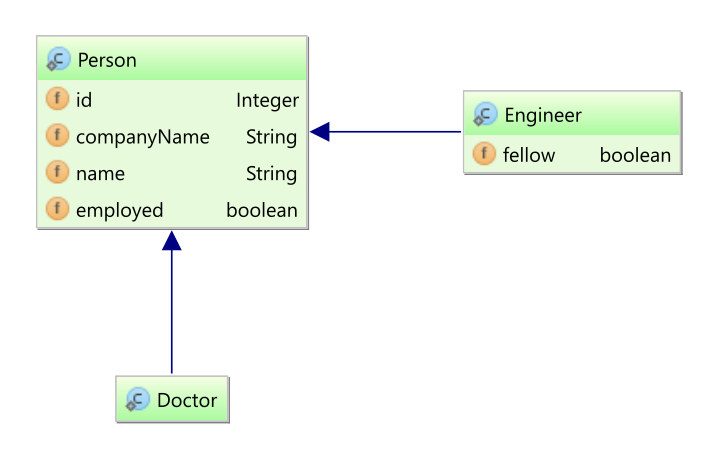
@Entity(name = "Person")
@Inheritance(strategy = InheritanceType.JOINED)
public static class Person implements Serializable {
@Id
private Integer id;
@Id
private String companyName;
private String name;
private boolean employed;
//Getters and setters are omitted for brevity
}@Entity(name = "Doctor")
public static class Doctor extends Person {
}
@Entity(name = "Engineer")
public static class Engineer extends Person {
private boolean fellow;
//Getters and setters are omitted for brevity
}Executing a hierarchy delete
int updateCount = session.createMutationQuery(
"delete from Person where employed = :employed" )
.setParameter( "employed", false )
.execute();delete from Engineer to_delete_
where (to_delete_.id, to_delete_.companyName) in (
select p.id, p.companyName
from Person p
where p.employed = ?
);
delete from Doctor to_delete_
where (to_delete_.id, to_delete_.companyName) in (
select p.id, p.companyName
from Person p
where p.employed = ?
);
delete from Person p
where p.employed = ?;The SQL illustrates the H2 test’s execution with the local temporary-table strategy selected. This particular delete does not need an identifier staging table: the root-table predicate remains valid while subclass rows are deleted, and the root rows are deleted last. More complex operations may require identifier staging. Selecting a table-based strategy does not mean that every mutation creates or uses a staging table. The illustration is not a guarantee of exact names, statement ordering, or syntax for every dialect.
Auxiliary tables and database permissions
Identifier tables conventionally use an HT_ prefix; insert staging tables conventionally use HTE_.
Their exact names and schemas depend on mapping, naming adjustments, strategy, and dialect.
Insert staging may require generated-key, row-number, or session-discriminator columns in addition to mapped attributes.
Creating one generic HTE_<root> table does not provision every update/delete and insert strategy.
Global temporary and persistent table implementations normally prepare their auxiliary tables during factory
initialization. Their create_tables settings default to true, and drop_tables defaults to false:
-
hibernate.query.mutation_strategy.global_temporary.create_tables -
hibernate.query.mutation_strategy.global_temporary.drop_tables -
hibernate.query.mutation_strategy.persistent.create_tables -
hibernate.query.mutation_strategy.persistent.drop_tables
The corresponding insert strategies share these setting names in the current implementation.
Local temporary-table creation follows the dialect’s before-use action during execution.
hibernate.query.mutation_strategy.local_temporary.drop_tables, defaulting to false, controls forced
post-use dropping; the dialect’s own after-use action also matters.
Disabling global/persistent startup creation does not disable local execution-time creation.
For restricted database permissions, arrange for the exact auxiliary tables required by the selected strategy to be provisioned by an authorized schema-management process, then configure Hibernate’s creation/drop behavior accordingly. Inspect the strategy’s actual dialect-specific DDL rather than inferring columns from a prefix. See Schema Tooling for ordinary schema tooling; do not assume its regular create/export scripts include every mutation strategy’s auxiliary table.
Inline update/delete alternative
InlineMutationStrategy selects matching identifiers into application memory and uses those values
in subsequent update/delete predicates, avoiding identifier staging tables for those mutations:
<property name="hibernate.query.mutation_strategy"
value="org.hibernate.query.sqm.mutation.internal.inline.InlineMutationStrategy"/>This can increase memory consumption and SQL size and is subject to database statement-size limits. Evaluate it for the expected affected set. It is an update/delete strategy, not an equivalent inline insert strategy; selecting it does not eliminate tables needed by an independently configured insert strategy.
select
p.id as id,
p.companyName as companyName
from
Person p
where
p.employed = ?
delete
from
Engineer
where
( id, companyName )
in (
( 2,'Red Hat USA' ),
( 4,'Red Hat USA' ),
( 6,'Red Hat Europe' ),
( 8,'Red Hat Europe' )
)
delete
from
Doctor
where
( id, companyName )
in (
( 2,'Red Hat USA' ),
( 4,'Red Hat USA' ),
( 6,'Red Hat Europe' ),
( 8,'Red Hat Europe' )
)
delete
from
Person
where
( id, companyName )
in (
( 2,'Red Hat USA' ),
( 4,'Red Hat USA' ),
( 6,'Red Hat Europe' ),
( 8,'Red Hat Europe' )
)The illustration uses the same composite identifiers, first selected from Person, in each table’s delete predicate.
9.9. Execution options
Options may be supplied through standard APIs, provider-specific setters, or query hints.
Timeout and fetch-size units differ: the standard jakarta.persistence.query.timeout hint is in milliseconds,
while Hibernate’s setTimeout(int) uses seconds; JDBC fetch size is a driver hint measured in rows.
Typed standard options such as Timeout, QueryFlushMode, and ReadOnlyMode avoid string hints where supported.
9.9.1. Using query hints to control query execution
When working with the Jakarta Persistence API, advanced control over query execution is possible via named query hints. For example, we may want to specify an execution timeout or control caching.
Query execution using a query hintPerson query = entityManager.createQuery(
"select p " +
"from Person p " +
"where p.name like :name",
Person.class)
// timeout - in milliseconds
.setHint("jakarta.persistence.query.timeout", 2000)
// flush only at commit time
.setFlushMode(FlushModeType.COMMIT)
.setParameter("name", "J%")
.getSingleResult();Jakarta Persistence defines some standard hints with the prefix jakarta.persistence, but most hints are provider specific.
Using provider-specific hints limits your program’s portability to only a small degree.
| Hint name | Interpretation | Equivalent Hibernate API |
|---|---|---|
|
The query timeout, in milliseconds. |
|
|
An |
See Applying graphs. |
|
An |
See Applying graphs. |
|
The |
|
|
|
|
|
For a cacheable query, the name of a cache region to use. |
|
|
A comment to apply to the generated SQL. |
|
|
The JDBC fetch size to use. |
|
|
The query’s |
|
|
|
|
|
For named queries, query hints may be specified using the |
9.9.2. Advanced control over query execution
When working directly with a Hibernate Session, the interface org.hibernate.query.Query is used to control the execution of the query.
Jakarta Persistence 4 also provides typed execution controls, including timeout, flush mode, read-only mode, and locking. Hibernate adds provider-specific setters for controls such as query caching, JDBC fetch size, SQL comments, and database query hints. The following table lists the Hibernate setters for both shared and provider-specific controls:
|
Sets the JDBC-level query timeout. |
|
Sets the JDBC-level fetch size. |
|
Control query caching. |
|
Overrides the session-level cache mode. |
|
Controls whether this query triggers flushing. Flushing is covered in detail in Flushing. |
|
Sets the requested lock mode. Locking is covered in detail in Locking. |
|
Overrides the session-level default for read-only state. The concept of read-only state is covered in Persistence Contexts. |
|
Adds a comment to the generated SQL. |
|
Add a hint to the generated SQL. |
|
On the other hand, |
For complete details, see the Query Javadocs.
org.hibernate.query.Query<Person> query = session.createQuery(
"select p " +
"from Person p " +
"where p.name like :name",
Person.class)
// timeout - in seconds
.setTimeout(2)
// write to L2 caches, but do not read from them
.setCacheMode(CacheMode.REFRESH)
// assuming query cache was enabled for the SessionFactory
.setCacheable(true)
// add a comment to the generated SQL if enabled via the hibernate.use_sql_comments configuration property
.setComment("+ INDEX(p idx_person_name)");9.9.3. Querying for read-only entities
As explained in entity immutability, fetching entities in read-only mode is more efficient than fetching entities whose state changes might need to be written to the database. Fortunately, even mutable entities may be fetched in read-only mode, with the benefit of reduced memory footprint and of a faster flushing process.
Dirty checking of simple properties of read-only entities is skipped, as illustrated below. Read-only loading does not make objects immutable or disable collection operations, and does not change the state of entities already managed by the persistence context.
List<Call> calls = entityManager.createQuery(
"select c " +
"from Call c " +
"join c.phone p " +
"where p.number = :phoneNumber ",
Call.class)
.setParameter("phoneNumber", "123-456-7890")
.setHint("org.hibernate.readOnly", true)
.getResultList();
calls.forEach(c -> c.setDuration(0));select
c.id,
c.duration,
c.phone_id,
c.call_timestamp
from
phone_call c
join
Phone p
on p.id=c.phone_id
where
p.phone_number='123-456-7890'In this example, no SQL UPDATE was executed.
The method Query#setReadOnly() is an alternative to using a Jakarta Persistence query hint:
List<Call> calls = entityManager.createQuery(
"select c " +
"from Call c " +
"join c.phone p " +
"where p.number = :phoneNumber ",
Call.class)
.setParameter("phoneNumber", "123-456-7890")
.unwrap( org.hibernate.query.Query.class)
.setReadOnly(true)
.getResultList();9.10. Query compilation and plan caching
Hibernate caches HQL interpretations and reusable execution plans to avoid repeating compilation work. Criteria queries already represent a query tree; they are not parsed as HQL strings. Criteria plan caching and query-tree copying have separate controls.
See the generated settings for hibernate.query.plan_cache_enabled,
hibernate.query.plan_cache_max_size,
hibernate.criteria.plan_cache_enabled, and
hibernate.criteria.copy_tree.
The older hibernate.query.plan_parameter_metadata_max_size setting no longer controls a separate parameter-metadata cache.
Plan caching does not cache query results. See Query-results caching for result caching and Query compilation and plan-cache measurements for plan-cache measurements.
10. Criteria queries
Criteria queries represent a query using Java objects instead of a query string.
Use the static metamodel to refer to mapped attributes with compile-time type checking.
Generate metamodel classes as described in Build Tool Integration.
A CriteriaBuilder, obtained from an EntityManager or its factory, creates expressions and query objects.
createQuery(Result.class) creates a selection query with the specified result type; createTupleQuery() creates a tuple query.
Pass the completed CriteriaQuery to EntityHandler.createQuery() to obtain an executable TypedQuery.
The standard EntityHandler contract is shared by EntityManager and EntityAgent.
See Query APIs and execution for execution, binding, and options.
10.1. Roots, joins, and paths
A root identifies an entity type. Joins navigate mapped associations and embeddables;
paths refer to attributes of roots or joins.
Roots and joins implement From; their attribute expressions implement Path.
A Fetch describes association fetching and does not implement Path.
10.1.1. Roots
Roots define the basis from which all joins, paths and attributes are available in the query.
A root is always an entity type. Roots are defined and added to the criteria by the overloaded from methods on jakarta.persistence.criteria.CriteriaQuery:
<X> Root<X> from( Class<X> );
<X> Root<X> from( EntityType<X> );CriteriaBuilder builder = entityManager.getCriteriaBuilder();
CriteriaQuery<Person> criteria = builder.createQuery( Person.class );
Root<Person> root = criteria.from( Person.class );Criteria queries may define multiple roots, the effect of which is to create a Cartesian Product between the newly added root and the others.
Here is an example defining a Cartesian Product between Person and Partner entities:
CriteriaBuilder builder = entityManager.getCriteriaBuilder();
CriteriaQuery<Tuple> criteria = builder.createQuery( Tuple.class );
Root<Person> personRoot = criteria.from( Person.class );
Root<Partner> partnerRoot = criteria.from( Partner.class );
criteria.multiselect( personRoot, partnerRoot );
Predicate personRestriction = builder.and(
builder.equal( personRoot.get( Person_.address ), address ),
builder.isNotEmpty( personRoot.get( Person_.phones ) )
);
Predicate partnerRestriction = builder.and(
builder.like( partnerRoot.get( Partner_.name ), prefix ),
builder.equal( partnerRoot.get( Partner_.version ), 0 )
);
criteria.where( builder.and( personRestriction, partnerRestriction ) );
List<Tuple> tuples = entityManager.createQuery( criteria ).getResultList();10.1.2. Joins
Joins allow navigation from other jakarta.persistence.criteria.From to either association or embedded attributes.
Joins are created by the numerous overloaded join methods of the jakarta.persistence.criteria.From interface.
CriteriaBuilder builder = entityManager.getCriteriaBuilder();
CriteriaQuery<Phone> criteria = builder.createQuery( Phone.class );
Root<Phone> root = criteria.from( Phone.class );
// Phone.person is a @ManyToOne
Join<Phone, Person> personJoin = root.join( Phone_.person );
// Person.addresses is an @ElementCollection
Join<Person, String> addressesJoin = personJoin.join( Person_.addresses );
criteria.where( builder.isNotEmpty( root.get( Phone_.calls ) ) );
List<Phone> phones = entityManager.createQuery( criteria ).getResultList();10.1.3. Fetches
Just like in HQL and JPQL, criteria queries can specify that associated data be fetched along with the owner.
Fetches are created by the overloaded fetch() methods of jakarta.persistence.criteria.From.
See Query fetch joins and projections for fetch-plan behavior and [fetching-query-limitations] for collection-fetch limitations.
CriteriaBuilder builder = entityManager.getCriteriaBuilder();
CriteriaQuery<Phone> criteria = builder.createQuery( Phone.class );
Root<Phone> root = criteria.from( Phone.class );
// Phone.person is a @ManyToOne
Fetch<Phone, Person> personFetch = root.fetch( Phone_.person );
// Person.addresses is an @ElementCollection
Fetch<Person, String> addressesJoin = personFetch.fetch( Person_.addresses );
criteria.where( builder.isNotEmpty( root.get( Phone_.calls ) ) );
List<Phone> phones = entityManager.createQuery( criteria ).getResultList();|
The example first fetches |
10.2. Predicates and parameters
CriteriaBuilder builder = entityManager.getCriteriaBuilder();
CriteriaQuery<Person> criteria = builder.createQuery( Person.class );
Root<Person> root = criteria.from( Person.class );
ParameterExpression<String> nickNameParameter = builder.parameter( String.class );
criteria.where( builder.equal( root.get( Person_.nickName ), nickNameParameter ) );
TypedQuery<Person> query = entityManager.createQuery( criteria );
query.setParameter( nickNameParameter, "JD" );
List<Person> persons = query.getResultList();Use the parameter method of jakarta.persistence.criteria.CriteriaBuilder to obtain a parameter reference.
Then use the parameter reference to bind the parameter value to the jakarta.persistence.Query.
Use where() to apply predicates created by the builder, such as equal(), greaterThan(), and(), and or().
Predicate expressions refer to paths from the query roots; their language semantics are described in the
Query Language guide.
10.3. Selections and result shapes
The type of the criteria query (aka the <T>) indicates the expected types in the query result.
This might be an entity, an Integer, or any other object.
10.3.1. Selecting an entity
This is probably the most common form of query. The application wants to select entity instances.
CriteriaBuilder builder = entityManager.getCriteriaBuilder();
CriteriaQuery<Person> criteria = builder.createQuery( Person.class );
Root<Person> root = criteria.from( Person.class );
criteria.select( root );
criteria.where( builder.equal( root.get( Person_.name ), "John Doe" ) );
List<Person> persons = entityManager.createQuery( criteria ).getResultList();The example uses createQuery() passing in the Person class reference as the results of the query will be Person objects.
|
The call to the The See Build Tool Integration for details on generating this static metamodel. |
10.3.2. Selecting an expression
The simplest form of selecting an expression is selecting a particular attribute from an entity. But this expression might also represent an aggregation, a mathematical operation, etc.
CriteriaBuilder builder = entityManager.getCriteriaBuilder();
CriteriaQuery<String> criteria = builder.createQuery( String.class );
Root<Person> root = criteria.from( Person.class );
criteria.select( root.get( Person_.nickName ) );
criteria.where( builder.equal( root.get( Person_.name ), "John Doe" ) );
List<String> nickNames = entityManager.createQuery( criteria ).getResultList();In this example, the query is typed as java.lang.String because that is the anticipated type of the results (the type of the Person#nickName attribute is java.lang.String).
Because a query might contain multiple references to the Person entity, attribute references always need to be qualified.
This is accomplished by the Root#get method call.
10.3.3. Selecting multiple values
There are actually a few different ways to select multiple values using criteria queries. We will explore two options here, but an alternative recommended approach is to use tuples as described in Tuple criteria queries, or consider a wrapper query, see Selecting a wrapper for details.
CriteriaBuilder builder = entityManager.getCriteriaBuilder();
CriteriaQuery<Object[]> criteria = builder.createQuery( Object[].class );
Root<Person> root = criteria.from( Person.class );
Expression<Long> idPath = root.get( Person_.id );
Expression<String> nickNamePath = root.get( Person_.nickName );
criteria.select( builder.array( idPath, nickNamePath ) );
criteria.where( builder.equal( root.get( Person_.name ), "John Doe" ) );
List<Object[]> idAndNickNames = entityManager.createQuery( criteria ).getResultList();The query is typed as Object[], so each result row is an array.
Its components are accessed by position and returned as Object; use a tuple or DTO constructor selection when those result shapes are more convenient.
The example then uses the array method of jakarta.persistence.criteria.CriteriaBuilder which explicitly combines individual selections into a jakarta.persistence.criteria.CompoundSelection.
multiselectCriteriaBuilder builder = entityManager.getCriteriaBuilder();
CriteriaQuery<Object[]> criteria = builder.createQuery( Object[].class );
Root<Person> root = criteria.from( Person.class );
Expression<Long> idPath = root.get( Person_.id );
Expression<String> nickNamePath = root.get( Person_.nickName );
criteria.multiselect( idPath, nickNamePath );
criteria.where( builder.equal( root.get( Person_.name ), "John Doe" ) );
List<Object[]> idAndNickNames = entityManager.createQuery( criteria ).getResultList();Just as we saw in Selecting an array we have a typed criteria query returning an Object array.
Both queries are functionally equivalent.
multiselect() is deprecated in Jakarta Persistence; prefer an explicit select() with array(), tuple(), or construct().
This second example illustrates multiselect(), which behaves differently based on the type given when the criteria query was first built,
but, in this case, it says to select and return an Object[].
10.3.4. Selecting a wrapper
Another alternative to Selecting multiple values is to instead select an object that will "wrap" the multiple values. Going back to the example query there, rather than returning an array of [Person#id, Person#nickName], instead declare a class that holds these values and use that as a return object.
public class PersonWrapper {
private final Long id;
private final String nickName;
public PersonWrapper(Long id, String nickName) {
this.id = id;
this.nickName = nickName;
}
public Long getId() {
return id;
}
public String getNickName() {
return nickName;
}
}
CriteriaBuilder builder = entityManager.getCriteriaBuilder();
CriteriaQuery<PersonWrapper> criteria = builder.createQuery( PersonWrapper.class );
Root<Person> root = criteria.from( Person.class );
Expression<Long> idPath = root.get( Person_.id );
Expression<String> nickNamePath = root.get( Person_.nickName );
criteria.select( builder.construct( PersonWrapper.class, idPath, nickNamePath ) );
criteria.where( builder.equal( root.get( Person_.name ), "John Doe" ) );
List<PersonWrapper> wrappers = entityManager.createQuery( criteria ).getResultList();First, we see the simple definition of the wrapper object we will be using to wrap our result values.
Specifically, notice the constructor and its argument types.
Since we will be returning PersonWrapper objects, we use PersonWrapper as the type of our criteria query.
This example illustrates the use of the jakarta.persistence.criteria.CriteriaBuilder method construct which is used to build a wrapper expression.
For every row in the result, we are saying we would like a PersonWrapper instantiated with the remaining arguments by the matching constructor.
This wrapper expression is then passed as the select.
10.3.5. Tuple criteria queries
A better approach to Selecting multiple values is to use either a wrapper (which we just saw in Selecting a wrapper) or using the jakarta.persistence.Tuple contract.
CriteriaBuilder builder = entityManager.getCriteriaBuilder();
CriteriaQuery<Tuple> criteria = builder.createQuery( Tuple.class );
Root<Person> root = criteria.from( Person.class );
Expression<Long> idPath = root.get( Person_.id );
Expression<String> nickNamePath = root.get( Person_.nickName );
criteria.multiselect( idPath, nickNamePath );
criteria.where( builder.equal( root.get( Person_.name ), "John Doe" ) );
List<Tuple> tuples = entityManager.createQuery( criteria ).getResultList();
for ( Tuple tuple : tuples ) {
Long id = tuple.get( idPath );
String nickName = tuple.get( nickNamePath );
}
//or using indices
for ( Tuple tuple : tuples ) {
Long id = (Long) tuple.get( 0 );
String nickName = (String) tuple.get( 1 );
}This example illustrates accessing the query results through the jakarta.persistence.Tuple interface.
The example uses the explicit createTupleQuery() of jakarta.persistence.criteria.CriteriaBuilder.
An alternate approach is to use createQuery( Tuple.class ).
The example uses the older multiselect() method, just like in Selecting an array using multiselect.
The difference here is that the type of the jakarta.persistence.criteria.CriteriaQuery was defined as jakarta.persistence.Tuple so the compound selections, in this case, are interpreted to be the tuple elements.
The jakarta.persistence.Tuple contract provides three forms of access to the underlying elements:
- typed
-
The Selecting a tuple example illustrates this form of access in the
tuple.get( idPath )andtuple.get( nickNamePath )calls. This allows typed access to the underlying tuple values based on thejakarta.persistence.TupleElementexpressions used to build the criteria. - positional
-
Allows access to the underlying tuple values based on the position. The simple Object get(int position) form is very similar to the access illustrated in Selecting an array and Selecting an array using
multiselect. The<X> X get(int position, Class<X> type)form allows typed positional access; the value must be assignable to the supplied type. - aliased
-
Allows access to the underlying tuple values based on (optionally) assigned alias. The example query did not apply an alias. An alias would be applied via the alias method on
jakarta.persistence.criteria.Selection. Just likepositionalaccess, there is an untypedObject get(String alias)form and a typed<X> X get(String alias, Class<X> type)form.
10.4. Grouping, aggregation, and ordering
CriteriaBuilder builder = entityManager.getCriteriaBuilder();
CriteriaQuery<Tuple> criteria = builder.createQuery( Tuple.class );
Root<Person> root = criteria.from( Person.class );
criteria.groupBy( root.get( "address" ) );
criteria.multiselect( root.get( "address" ), builder.count( root ) );
List<Tuple> tuples = entityManager.createQuery( criteria ).getResultList();
for ( Tuple tuple : tuples ) {
String name = (String) tuple.get( 0 );
Long count = (Long) tuple.get( 1 );
}Use groupBy() to group selected values, having() to restrict groups, and orderBy() to order the results.
Order expressions use builder operations such as asc() and desc().
10.5. Criteria mutation statements
CriteriaBuilder.createCriteriaUpdate() and createCriteriaDelete() create mutation statements.
Define the target root, assignments for an update, and predicates, then execute the statement using EntityHandler.createStatement().
Bulk mutations require a transaction and do not synchronize entity instances already held in a persistence context.
See Executing mutations for affected counts and persistence-context handling.
var builder = entityManager.getCriteriaBuilder();
var update = builder.createCriteriaUpdate( Book.class );
var target = update.from( Book.class );
update.set( Book_.title, "Updated" )
.where( builder.equal( target.get( Book_.id ), 1L ) );
int updated = entityManager.createStatement( update ).execute();
var delete = builder.createCriteriaDelete( Book.class );
var deletedRoot = delete.from( Book.class );
delete.where( builder.greaterThan( deletedRoot.get( Book_.id ), 1L ) );
int deleted = entityManager.createStatement( delete ).execute();10.6. Hibernate Criteria extensions
Hibernate ORM provides extensions to the JPA Criteria API to allow making use of HQL features through the Criteria API.
The Session interface gives access to the org.hibernate.query.criteria.HibernateCriteriaBuilder,
a subtype of jakarta.persistence.criteria.CriteriaBuilder,
through the Session#getCriteriaBuilder() method, which is the entry point to the extensions.
The HibernateCriteriaBuilder interface offers additional methods, but also provides covariant overridden methods,
which return subtypes of the respective jakarta.persistence.criteria.CriteriaBuilder methods return types.
The subtypes are consistently named by prefixing Jpa i.e. Expression becomes JpaExpression.
These subtypes provide additional methods and covariant overrides to ease working with the extensions.
10.6.1. Count query creation
A very common requirement is the creation of a count query based on an existing query.
This can be done by using the JpaCriteriaQuery#createCountQuery() method.
final HibernateCriteriaBuilder cb = session.getCriteriaBuilder();
final JpaCriteriaQuery<Tuple> cq = cb.createTupleQuery();
final JpaRoot<Contact> root = cq.from( Contact.class );
final JpaParameterExpression<Contact.Gender> parameter = cb.parameter( Contact.Gender.class );
cq.multiselect( root.get( "id" ), root.get( "name" ) );
cq.where( root.get( "gender" ).equalTo( parameter ) );
final Long count = session.createQuery( cq.createCountQuery() )
.setParameter( parameter, Contact.Gender.FEMALE )
.getSingleResult();For a simple query without distinct or grouping, Hibernate replaces the copied selection with count(*).
For more complex queries, it wraps a copy of the original query as a subquery and counts its rows.
HibernateCriteriaBuilder exposes HQL extensions through Java methods.
CriteriaDefinition provides a convenient construction style for Criteria queries;
see CriteriaDefinition.
Use query specifications when adding restrictions or ordering to an existing base query.
11. Programmatic query specifications
The org.hibernate.query.specification package supports iterative customization of a base query.
Use a specification to add restrictions, sorting, fetching, or projections before creating an executable query.
Unlike an executable query, a specification is not tied to a particular session.
These APIs are incubating; consult the Javadocs for their contracts.
11.1. Starting a specification
| Base | Selection factory | Mutation factory |
|---|---|---|
Root entity |
|
|
HQL |
|
|
Criteria |
|
|
Typed reference |
|
|
A selection specification returns a single root entity, possibly with fetched associations. Additional restrictions and ordering apply to that root. Use projection specifications for other result shapes. The HQL factory for mutation specifications accepts update and delete statements, not insert statements. These facilities complement Criteria queries; they do not replace the full Criteria API.
11.2. Selection specifications
restrict() adds a restriction expressed using Restriction and the static metamodel.
sort() appends ordering, while resort() replaces the existing ordering.
After customization, createQuery(EntityHandler) obtains an executable SelectionQuery associated with the given Session or StatelessSession.
var specification = SelectionSpecification.create( Book.class )
.restrict( Restriction.greaterThan( Book_.id, 1L ) )
.sort( Order.desc( Book_.id ) );
List<Book> books = specification.createQuery( session ).getResultList();11.3. Fetching and augmentation
fetch() adds an association path represented by org.hibernate.query.restriction.Path.
augment() accepts a callback with the builder, Criteria query, and root for additional Criteria customization.
When changing where() or orderBy() inside the callback, remember that these Criteria methods replace the existing clause.
See Fetching for fetching behavior and Hibernate Criteria extensions for CriteriaDefinition.
11.4. Mutation specifications
A mutation specification restricts the target of an update or delete.
UpdateSpecification also supports assigning attribute values; DeleteSpecification constructs a delete directly from an entity type.
Execution uses a MutationQuery and follows the transaction and managed-state rules in Executing mutations.
var mutation = MutationSpecification.create( Book.class, "delete GuideBook" )
.restrict( Restriction.greaterThan( Book_.id, 1L ) );
int affected = mutation.createQuery( session ).execute();11.5. Projections, counts, and existence tests
createProjection() creates a projected selection based on the specification.
Each selected attribute produces an Element for typed access to the corresponding item of an Object[] result.
The projection retains a reference to the base specification, so later customization of the base also affects the projection.
createCountProjection() and createExistsProjection() provide scalar count and existence results.
Remove unnecessary ordering from a specification used for a count projection, since ordering by a non-aggregated attribute can produce invalid SQL.
The example clears ordering before counting and restores it before projecting the titles.
specification.resort( List.of() );
long count = specification.createCountProjection().createQuery( session ).getSingleResult();
boolean exists = specification.createExistsProjection().createQuery( session ).getSingleResult();
var projection = specification.sort( Order.desc( Book_.id ) ).createProjection();
var title = projection.select( Book_.title );
var rows = projection.createQuery( session ).getResultList();
List<String> titles = rows.stream().map( title::in ).toList();11.6. Validation, Criteria conversion, and references
validate(CriteriaBuilder) checks a specification without executing it.
buildCriteria(CriteriaBuilder) produces a Criteria object; subsequent changes to that object are not reflected in the specification.
reference() exposes a typed query or statement reference that can be used as the base of another specification or passed to the standard query-creation API.
var builder = session.getCriteriaBuilder();
var criteria = builder.createQuery( Book.class );
var book = criteria.from( Book.class );
criteria.select( book ).where( builder.greaterThan( book.get( Book_.id ), 1L ) );
var fromCriteria = SelectionSpecification.create( criteria );
fromCriteria.validate( builder );
var rebuilt = fromCriteria.buildCriteria( builder );
var reference = fromCriteria.reference();
var fromReference = SelectionSpecification.create( reference );11.7. Execution and pagination
Set execution options and parameter values on the executable query returned by createQuery().
For offset pagination, a SelectionQuery accepts a Page through setPage().
See Limits and pagination and Key-based pagination for offset and key-based pagination,
and Execution options for other execution controls.
12. Native SQL Queries
You may also express queries in the native SQL dialect of your database. Use native SQL when database-specific SQL, an existing SQL statement, or a mapping not expressible through HQL is required. Many window functions and common table expressions are also available in the Query Language guide. It also provides a clean migration path from a direct SQL/JDBC based application to Hibernate/Jakarta Persistence. For calls, see Stored procedures and functions. For SQL replacing mapped entity operations, see Custom SQL for entity and collection operations.
12.1. Creating a native query using Jakarta Persistence
The standard EntityHandler.createNativeQuery(sql, Result.class) creates a typed selection and may infer its mapping from the result class.
createNativeStatement(sql) creates a mutation statement.
Both EntityManager and EntityAgent provide these methods.
A Hibernate Session additionally exposes NativeQuery mapping and synchronization APIs.
See Query APIs and execution for common execution, parameters, results, and options.
12.2. Explicit standard result mappings
For complex results, provide a named @SqlResultSetMapping or a programmatic jakarta.persistence.sql.ResultSetMapping.
Standard mappings support entity, scalar, and constructor results; programmatic mappings use factories such as entity() and field().
The example below uses static imports from jakarta.persistence.sql.ResultSetMapping and the generated entity metamodel.
var mapping = entity( Book.class,
field( Book_.id, "book_id" ),
field( Book_.title, "book_title" ) );
List<Book> books = entityManager.createNativeQuery(
"select id as book_id, title as book_title from query_guide_book order by id", mapping )
.getResultList();The selected aliases must match the mapping, and entity mappings must supply the columns needed to materialize the entity.
Entities returned through an EntityManager are managed; constructor and scalar results are not.
See Scalar queries and Entity queries for inferred mappings and Hibernate-specific refinements.
12.3. Scalar queries
The most basic SQL query is to get a list of scalars (column) values.
List<Object[]> persons = entityManager.createNativeQuery(
"SELECT * FROM Person" )
.getResultList();List<Object[]> persons = entityManager.createNativeQuery(
"SELECT id, name FROM Person" )
.getResultList();
for ( Object[] person : persons ) {
Number id = (Number) person[0];
String name = (String) person[1];
}List<Object[]> persons = session.createNativeQuery(
"SELECT * FROM Person", Object[].class )
.list();List<Object[]> persons = session.createNativeQuery(
"SELECT id, name FROM Person", Object[].class )
.list();
for ( Object[] person : persons ) {
Number id = (Number) person[0];
String name = (String) person[1];
}These will return a List of Object arrays ( Object[] ) with scalar values for each column in the PERSON table.
Hibernate will use java.sql.ResultSetMetadata to deduce the actual order and types of the returned scalar values.
To avoid the overhead of using ResultSetMetadata, or simply to be more explicit in what is returned, one can use addScalar():
List<Object[]> persons = session.createNativeQuery(
"SELECT * FROM Person", Object[].class )
.addScalar( "id", StandardBasicTypes.LONG )
.addScalar( "name", StandardBasicTypes.STRING )
.list();
for ( Object[] person : persons ) {
Long id = (Long) person[0];
String name = (String) person[1];
}Each result is an Object[] containing the explicitly selected scalars: id as a Long and name as a String.
The explicit types avoid inferring these scalar types from ResultSetMetaData.
Only these two values appear in each result, even though SELECT * also retrieves other columns.
It is possible to leave out the type information for all or some of the scalars.
List<Object[]> persons = session.createNativeQuery(
"SELECT * FROM Person", Object[].class )
.addScalar( "id", StandardBasicTypes.LONG )
.addScalar( "name" )
.list();
for ( Object[] person : persons ) {
Long id = (Long) person[0];
String name = (String) person[1];
}This is essentially the same query as before, but now ResultSetMetaData is used to determine the type of name, whereas the type of id is explicitly specified.
For inferred scalar mappings, Hibernate resolves the JDBC type reported by ResultSetMetaData through
Dialect.resolveSqlTypeDescriptor() and the JdbcTypeRegistry.
Use addScalar() to specify the required type for an individual query.
For broader customization, a custom dialect may override JDBC descriptor resolution,
or a TypeContributor may register JDBC type descriptors; see TypeContributor and JdbcType.
12.4. Entity queries
The above queries were all about returning scalar values, basically returning the raw values from the ResultSet.
List<Person> persons = entityManager.createNativeQuery(
"SELECT * FROM Person", Person.class )
.getResultList();List<Person> persons = session.createNativeQuery(
"SELECT * FROM Person", Person.class )
.list();Assuming that Person is mapped as a class with the columns id, name, nickName, address, createdOn, and version,
the following query will also return a List where each element is a Person entity.
List<Person> persons = entityManager.createNativeQuery(
"SELECT id, name, nick_name, address, created_on, version " +
"FROM Person", Person.class )
.getResultList();List<Person> persons = session.createNativeQuery(
"SELECT id, name, nick_name, address, created_on, version " +
"FROM Person", Person.class )
.list();12.5. Handling associations and collections
When an entity owns the foreign key of a many-to-one or one-to-one association,
the native query result must include the mapped foreign-key columns so Hibernate can resolve the association.
Omitting required columns can cause a column-not-found error.
This requirement does not mean that the associated entity itself must be selected or fetched by the query.
List<Phone> phones = entityManager.createNativeQuery(
"SELECT id, phone_number, phone_type, person_id " +
"FROM Phone", Phone.class )
.getResultList();List<Phone> phones = session.createNativeQuery(
"SELECT id, phone_number, phone_type, person_id " +
"FROM Phone", Phone.class )
.list();In these examples, the returned person_id column lets Hibernate resolve Phone.person according to its fetch mapping.
To fetch the associated Person in the same SQL query, select its columns as well and map the joined result.
The following Hibernate example uses addJoin() to avoid a separate query for that association.
List<Phone> tuples = session.createNativeQuery(
"SELECT {ph.*}, {pr.*} " +
"FROM Phone ph " +
"JOIN Person pr ON ph.person_id = pr.id", Phone.class, "ph" )
.addJoin( "pr", "ph.person" )
.list();
for ( Phone phone : tuples ) {
assertThat( phone.getPerson().getName() ).isNotNull();
}SELECT
*
FROM
Phone ph
JOIN
Person pr
ON ph.person_id = pr.id|
As seen in the associated SQL query, Hibernate manages to construct the entity hierarchy without requiring any extra database round trips. |
Even when using the addJoin() method, the result list will only contain the root entity.
Joined entities will only be present for their respective association.
TupleTransformerList<Phone> phones = session.createNativeQuery(
"SELECT {ph.*}, {pr.*} " +
"FROM Phone ph " +
"JOIN Person pr ON ph.person_id = pr.id", Phone.class, "ph" )
.addJoin( "pr", "ph.person" )
.setTupleTransformer( (TupleTransformer<Phone>) (tuple, aliases) -> (Phone) tuple[0] )
.list();
for ( Phone person : phones ) {
person.getPerson();
}The alias pr identifies the result columns for the joined ph.person association.
Hibernate’s addJoin() can also fetch collections such as Phone.calls.
The next standard native query joins phone_call to restrict the returned phones, but selects only ph.*.
It does not fetch or initialize Phone.calls; the collection is loaded according to its mapping when accessed.
List<Phone> phones = entityManager.createNativeQuery(
"SELECT ph.* " +
"FROM Phone ph " +
"JOIN phone_call c ON c.phone_id = ph.id", Phone.class )
.getResultList();
for ( Phone phone : phones ) {
List<Call> calls = phone.getCalls();
}SELECT *
FROM phone ph
JOIN call c ON c.phone_id = ph.idThe following Hibernate example selects the call columns and maps them using addJoin() to fetch Phone.calls
along with the phones.
List<Phone> tuples = session.createNativeQuery(
"SELECT {ph.*}, {c.*} " +
"FROM Phone ph " +
"JOIN phone_call c ON c.phone_id = ph.id", Phone.class, "ph" )
.addJoin( "c", "ph.calls" )
.list();
for ( Phone phone : tuples ) {
List<Call> calls = phone.getCalls();
}SELECT *
FROM phone ph
JOIN call c ON c.phone_id = ph.idAt this stage, you are reaching the limits of what is possible with native queries, without starting to enhance the sql queries to make them usable in Hibernate. Problems can arise when returning multiple entities of the same type or when the default alias/column names are not enough.
12.6. Returning multiple entities
Until now, the result set column names are assumed to be the same as the column names specified in the mapping document. This can be problematic for SQL queries that join multiple tables since the same column names can appear in more than one table.
Column alias injection is needed in the following query which otherwise throws NonUniqueDiscoveredSqlAliasException.
List<Person> entities = entityManager.createNativeQuery(
"SELECT * " +
"FROM Person pr, Partner pt " +
"WHERE pr.name = pt.name", Person.class )
.getResultList();List<Person> entities = session.createNativeQuery(
"SELECT * " +
"FROM Person pr, Partner pt " +
"WHERE pr.name = pt.name", Person.class )
.list();The query was intended to return all Person and Partner instances with the same name.
The query fails because there is a conflict of names since the two entities are mapped to the same column names (e.g. id, name, version).
Also, on some databases, the returned column aliases will most likely be on the form pr.id, pr.name, etc.
which are not equal to the columns specified in the mappings (id and name).
The following form is not vulnerable to column name duplication:
List<Object> entities = session.createNativeQuery(
"SELECT {pr.*}, {pt.*} " +
"FROM Person pr, Partner pt " +
"WHERE pr.name = pt.name", Object.class )
.addEntity( "pr", Person.class )
.addEntity( "pt", Partner.class )
.list();|
|
The {pr.} and {pt.} notation used above is shorthand for "all properties".
Alternatively, you can list the columns explicitly, but even in this case, Hibernate injects the SQL column aliases for each property.
The placeholder for a column alias is just the property name qualified by the table alias.
12.7. Alias and property references
In most cases, the above alias injection is needed. For queries relating to more complex mappings, like composite properties, inheritance discriminators, collections etc., you can use specific aliases that allow Hibernate to inject the proper aliases.
The following table shows the different ways you can use the alias injection. Please note that the alias names in the result are simply examples, each alias will have a unique and probably different name when used.
| Description | Syntax | Example |
|---|---|---|
A simple property |
|
|
A composite property |
|
|
Discriminator of an entity |
|
|
All properties of an entity |
|
|
A collection key |
|
|
The id of a collection |
|
|
The element of a collection |
|
|
property of the element in the collection |
|
|
All properties of the element in the collection |
|
|
All properties of the collection |
|
|
12.8. Returning DTOs (Data Transfer Objects)
Use a constructor result mapping or a result class to obtain DTOs.
Hibernate also supports TupleTransformer for transforming individual rows; see Query result transformers.
public class PersonSummaryDTO {
private Number id;
private String name;
//Getters and setters are omitted for brevity
public Number getId() {
return id;
}
public void setId(Number id) {
this.id = id;
}
public String getName() {
return name;
}
public void setName(String name) {
this.name = name;
}
}
List<PersonSummaryDTO> dtos = session.createNativeQuery(
"SELECT p.id as id, p.name as name " +
"FROM Person p", Tuple.class )
.setTupleTransformer(
(tuple, aliases) -> {
PersonSummaryDTO dto = new PersonSummaryDTO();
dto.setId( (Long) tuple[0] );
dto.setName( (String) tuple[1] );
return dto;
}
)
.list();|
Transformers are Hibernate-specific. Standard constructor and programmatic result mappings provide portable alternatives for DTO results. |
The above query will return a list of PersonSummaryDTO which has been instantiated and injected the values of id and name into its corresponding properties or fields.
12.9. Handling inheritance
A native entity query must supply the mapped columns required for the selected entity type and any subclasses it may return. A polymorphic result also needs discriminator information so Hibernate can identify each row’s concrete entity type.
For joined inheritance without an explicit discriminator mapping,
and for table-per-class inheritance, include the synthetic clazz_ select item
with values matching Hibernate’s subclass identifiers. These identifiers are assigned by the mapping metadata.
When joined inheritance uses an explicit discriminator mapping, include the mapped discriminator column instead.
The inheritance sections show the SQL Hibernate generates for polymorphic queries.
List<CreditCardPayment> payments = session.createNativeQuery(
"SELECT * " +
"FROM Payment p " +
"JOIN CreditCardPayment cp on cp.id = p.id", CreditCardPayment.class )
.list();12.10. Parameters
Hibernate supports named parameters and JDBC positional parameters in native SQL. Hibernate translates named parameters to JDBC positional markers before executing the SQL. For portability across persistence providers, prefer positional parameters. See Binding arguments to query parameters for binding and Execution options for execution options. Native-specific examples follow:
List<Person> persons = entityManager.createNativeQuery(
"SELECT * " +
"FROM Person " +
"WHERE name like :name", Person.class )
.setParameter( "name", "J%" )
.getResultList();List<Person> persons = session.createNativeQuery(
"SELECT * " +
"FROM Person " +
"WHERE name like :name", Person.class )
.setParameter( "name", "J%" )
.list();12.11. Named SQL queries
Named SQL queries can also be defined during mapping and called in exactly the same way as a named HQL query.
In this case, you do not need to call addEntity() anymore.
Jakarta Persistence defines the jakarta.persistence.NamedNativeQuery annotation for this purpose,
and Hibernate provides org.hibernate.annotations.NamedNativeQuery with additional typed execution options, including the following attributes.
Both annotations may be placed on a package-info.java or module-info.java, which is a convenient location for query declarations not specific to any particular entity.
flush()-
Controls query-triggered flushing using
QueryFlushMode. The default,QueryFlushMode.DEFAULT, follows the current persistence-context flush mode. cacheable()-
Whether the query (results) is cacheable or not. By default, queries are not cached.
cacheRegion()-
If the query results are cacheable, name the query cache region to use.
fetchSize()-
A JDBC driver hint for the number of rows to fetch at a time. The driver determines buffering and whether the hint changes database round trips. When no fetch size is specified, the driver default applies.
timeout()-
The query timeout (in seconds). By default, there’s no timeout.
comment()-
A comment added to the SQL query for tuning the execution plan.
cacheMode()-
The cache mode used for this query. This refers to entities/collections returned by the query. The default value is
CacheMode.NORMAL. readOnly()-
Whether newly loaded entities should be marked as read-only. The default is
false. Read-only entities remain managed in the persistence context; dirty checking of their simple properties is skipped. This option does not change entities already managed by the context. See read-only query results.
For named procedure calls, use @NamedStoredProcedureQuery; see Named procedure calls.
12.11.1. Named SQL queries selecting scalar values
To fetch a single column of given table, the named query looks as follows:
NamedNativeQuery@NamedNativeQuery(
name = "find_person_name",
query =
"SELECT name " +
"FROM Person ",
resultClass = String.class
)List<String> names = entityManager.createNamedQuery(
"find_person_name", String.class )
.getResultList();List<String> names = session.createNamedQuery(
"find_person_name", String.class )
.list();Selecting multiple scalar values is done like this:
NamedNativeQuery@NamedNativeQuery(
name = "find_person_name_and_nickName",
query =
"SELECT " +
" name, " +
" nick_name " +
"FROM Person "
)Without specifying an explicit result type, Hibernate will assume an Object array:
List<Object[]> tuples = entityManager.createNamedQuery(
"find_person_name_and_nickName", Object[].class )
.getResultList();
for ( Object[] tuple : tuples ) {
String name = (String) tuple[0];
String nickName = (String) tuple[1];
}List<Object[]> tuples = session.createNamedQuery(
"find_person_name_and_nickName", Object[].class )
.list();
for ( Object[] tuple : tuples ) {
String name = (String) tuple[0];
String nickName = (String) tuple[1];
}It’s possible to use a DTO to store the resulting scalar values:
public class PersonNames {
private final String name;
private final String nickName;
public PersonNames(String name, String nickName) {
this.name = name;
this.nickName = nickName;
}
public String getName() {
return name;
}
public String getNickName() {
return nickName;
}
}NamedNativeQuery with ConstructorResult@NamedNativeQuery(
name = "find_person_name_and_nickName_dto",
query =
"select " +
" name, " +
" nick_name " +
"from Person ",
resultSetMapping = "name_and_nickName_dto"
)
@SqlResultSetMapping(
name = "name_and_nickName_dto",
classes = @ConstructorResult(
targetClass = PersonNames.class,
columns = {
@ColumnResult(name = "name"),
@ColumnResult(name = "nick_name")
}
)
)List<PersonNames> personNames = entityManager.createNamedQuery(
"find_person_name_and_nickName_dto", PersonNames.class )
.getResultList();List<PersonNames> personNames = session.createNamedQuery(
"find_person_name_and_nickName_dto", PersonNames.class )
.list();You can also use the @NamedNativeQuery Hibernate annotation
to customize the named query using various configurations such as fetch mode, cacheability, time out interval.
ConstructorResult and Hibernate NamedNativeQuery@NamedNativeQuery(
name = "get_person_phone_count",
query = "select pr.name AS name, count(*) AS phone_count " +
"from Phone p " +
"join Person pr ON pr.id = p.person_id " +
"group BY pr.name",
resultSetMapping = "person_phone_count",
timeout = 1,
readOnly = true
)
@SqlResultSetMapping(
name = "person_phone_count",
classes = @ConstructorResult(
targetClass = PersonPhoneCount.class,
columns = {
@ColumnResult(name = "name"),
@ColumnResult(name = "phone_count")
}
)
)NamedNativeQuery named native query selecting multiple scalar values into a DTOList<PersonPhoneCount> personNames = session.createNamedQuery(
"get_person_phone_count", PersonPhoneCount.class )
.getResultList();12.11.2. Named SQL queries selecting entities
Considering the following named query:
NamedNativeQuery@NamedNativeQuery(
name = "find_person_by_name",
query =
"select " +
" p.id AS id, " +
" p.name AS name, " +
" p.nick_name AS nick_name, " +
" p.address AS address, " +
" p.created_on AS created_on, " +
" p.version AS version " +
"from Person p " +
"where p.name LIKE :name",
resultClass = Person.class
)The result set mapping declares the entities retrieved by this native query. Each field of the entity is bound to an SQL alias (or column name). All fields of the entity including the ones of subclasses and the foreign key columns of related entities have to be present in the SQL query. Field definitions are optional provided that they map to the same column name as the one declared on the class property.
Executing this named native query can be done as follows:
List<Person> persons = entityManager.createNamedQuery(
"find_person_by_name", Person.class )
.setParameter( "name", "J%" )
.getResultList();List<Person> persons = session.createNamedQuery(
"find_person_by_name", Person.class )
.setParameter( "name", "J%" )
.list();To join multiple entities, you need to use a SqlResultSetMapping for each entity the SQL query is going to fetch.
NamedNativeQuery@NamedNativeQuery(
name = "find_person_with_phones_by_name",
query =
"select " +
" pr.id AS pr_id, " +
" pr.name AS pr_name, " +
" pr.nick_name AS pr_nick_name, " +
" pr.address AS pr_address, " +
" pr.created_on AS pr_created_on, " +
" pr.version AS pr_version, " +
" ph.id AS ph_id, " +
" ph.person_id AS ph_person_id, " +
" ph.phone_number AS ph_number, " +
" ph.phone_type AS ph_type " +
"from Person pr " +
"join Phone ph ON pr.id = ph.person_id " +
"where pr.name LIKE :name",
resultSetMapping = "person_with_phones"
)
@SqlResultSetMapping(
name = "person_with_phones",
entities = {
@EntityResult(
entityClass = Person.class,
fields = {
@FieldResult( name = "id", column = "pr_id" ),
@FieldResult( name = "name", column = "pr_name" ),
@FieldResult( name = "nickName", column = "pr_nick_name" ),
@FieldResult( name = "address", column = "pr_address" ),
@FieldResult( name = "createdOn", column = "pr_created_on" ),
@FieldResult( name = "version", column = "pr_version" ),
}
),
@EntityResult(
entityClass = Phone.class,
fields = {
@FieldResult( name = "id", column = "ph_id" ),
@FieldResult( name = "person", column = "ph_person_id" ),
@FieldResult( name = "number", column = "ph_number" ),
@FieldResult( name = "type", column = "ph_type" ),
}
)
}
)List<Object[]> tuples = entityManager.createNamedQuery(
"find_person_with_phones_by_name", Object[].class )
.setParameter( "name", "J%" )
.getResultList();
for ( Object[] tuple : tuples ) {
Person person = (Person) tuple[0];
Phone phone = (Phone) tuple[1];
}List<Object[]> tuples = session.createNamedQuery(
"find_person_with_phones_by_name", Object[].class )
.setParameter( "name", "J%" )
.list();
for ( Object[] tuple : tuples ) {
Person person = (Person) tuple[0];
Phone phone = (Phone) tuple[1];
}Finally, if the association to a related entity involves a composite primary key, a @FieldResult element should be used for each foreign key column.
The @FieldResult name is composed of the property name for the relationship, followed by a dot ("."), followed by the name or the field or property of the primary key.
For this example, the following entities are going to be used:
@Embeddable
public class Dimensions {
private int length;
private int width;
//Getters and setters are omitted for brevity
}
@Embeddable
public class Identity implements Serializable {
private String firstname;
private String lastname;
//Getters and setters are omitted for brevity
public boolean equals(Object o) {
if (this == o) return true;
if (o == null || getClass() != o.getClass()) return false;
final Identity identity = (Identity) o;
if (!firstname.equals(identity.firstname)) return false;
if (!lastname.equals(identity.lastname)) return false;
return true;
}
public int hashCode() {
int result;
result = firstname.hashCode();
result = 29 * result + lastname.hashCode();
return result;
}
}
@Entity
public class Captain {
@EmbeddedId
private Identity id;
//Getters and setters are omitted for brevity
}
@Entity
@NamedNativeQueries({
@NamedNativeQuery(name = "find_all_spaceships",
query =
"SELECT " +
" name as name, " +
" model, " +
" speed, " +
" lname as lastn, " +
" fname as firstn, " +
" length, " +
" width, " +
" length * width as surface, " +
" length * width * 10 as volume " +
"FROM SpaceShip",
resultSetMapping = "spaceship"
)
})
@SqlResultSetMapping(
name = "spaceship",
entities = @EntityResult(
entityClass = SpaceShip.class,
fields = {
@FieldResult(name = "name", column = "name"),
@FieldResult(name = "model", column = "model"),
@FieldResult(name = "speed", column = "speed"),
@FieldResult(name = "captain.id.lastname", column = "lastn"),
@FieldResult(name = "captain.id.firstname", column = "firstn"),
@FieldResult(name = "dimensions.length", column = "length"),
@FieldResult(name = "dimensions.width", column = "width"),
}
),
columns = {
@ColumnResult(name = "surface"),
@ColumnResult(name = "volume")
}
)
public class SpaceShip {
@Id
private String name;
private String model;
private double speed;
@ManyToOne(fetch = FetchType.LAZY)
@JoinColumn(name = "fname", referencedColumnName = "firstname")
@JoinColumn(name = "lname", referencedColumnName = "lastname")
private Captain captain;
private Dimensions dimensions;
//Getters and setters are omitted for brevity
}List<Object[]> tuples = entityManager.createNamedQuery(
"find_all_spaceships", Object[].class )
.getResultList();
for ( Object[] tuple : tuples ) {
SpaceShip spaceShip = (SpaceShip) tuple[0];
Number surface = (Number) tuple[1];
Number volume = (Number) tuple[2];
}List<Object[]> tuples = session.createNamedQuery(
"find_all_spaceships", Object[].class )
.list();
for ( Object[] tuple : tuples ) {
SpaceShip spaceShip = (SpaceShip) tuple[0];
Number surface = (Number) tuple[1];
Number volume = (Number) tuple[2];
}12.12. Resolving global catalog and schema in native SQL queries
When using multiple database catalogs and schemas, Hibernate offers the possibility of setting a global catalog or schema so that you don’t have to declare it explicitly for every entity.
<property name="hibernate.default_catalog" value="crm"/>
<property name="hibernate.default_schema" value="analytics"/>This way, we can imply the global crm catalog and analytics schema in every JPQL, HQL or Criteria API query.
Hibernate does not automatically qualify table names in native SQL using these defaults. Unqualified names are resolved by the database using the connection’s current catalog, schema, or search path. When qualification is needed, include it explicitly in the SQL or use the following Hibernate placeholders to apply the configured default catalog and schema:
- {h-catalog}
-
resolves the current
hibernate.default_catalogconfiguration property value. - {h-schema}
-
resolves the current
hibernate.default_schemaconfiguration property value. - {h-domain}
-
resolves the current
hibernate.default_catalogandhibernate.default_schemaconfiguration property values (e.g. catalog.schema).
With these placeholders, you can imply the catalog, schema, or both catalog and schema for every native query.
So, when running the following native query:
@NamedNativeQuery(
name = "last_30_days_hires",
query =
"select * " +
"from {h-domain}person " +
"where age(hired_on) < '30 days'",
resultClass = Person.class
)Hibernate is going to resolve the {h-domain} placeholder according to the values of the default catalog and schema:
SELECT *
FROM crm.analytics.person
WHERE age(hired_on) < '30 days'12.13. Synchronization spaces
Hibernate cannot generally infer the tables affected by an arbitrary SQL string.
NativeQuery.addSynchronizedEntityClass(), addSynchronizedEntityName(), and addSynchronizedQuerySpace() declare the affected query spaces.
These declarations help Hibernate determine whether pending changes require flushing and which spaces are relevant to query caching.
For the flush behavior of native queries, see automatic flushing of native SQL queries.
For caching, see Query-results caching.
12.14. Native mutations
Use createNativeStatement() for a native insert, update, or delete and execute it within a transaction.
Native affected counts describe database rows; they need not have the entity-count semantics of HQL mutations.
Native SQL does not synchronize managed entity instances. See Executing mutations for handling the persistence context.
13. Stored procedures and functions
Stored procedure calls have a different execution model from native SQL queries.
Use the standard StoredProcedureQuery API for portable calls, or Hibernate’s ProcedureCall for provider-specific features.
The examples below demonstrate database-specific procedure definitions and their invocation.
13.1. Creating calls and registering parameters
EntityHandler.createStoredProcedureQuery() creates a procedure call.
Register input arguments as IN, output values as OUT, and arguments with both roles as INOUT, specifying each argument’s Java type.
Bind input values with setParameter() before execution.
Named procedure declarations may supply the parameter registrations in advance.
A procedure may return result sets directly or through REF_CURSOR parameters, depending on the database and driver.
Function return values have a separate declaration; see Function calls.
Calls that modify data require a transaction.
13.2. Named procedure calls
Just like with SQL statements, you can also use named queries to call stored procedures.
For this purpose, Jakarta Persistence defines the @NamedStoredProcedureQuery annotation.
REF_CURSOR named query stored procedure@NamedStoredProcedureQuery(
name = "sp_person_phones",
procedureName = "sp_person_phones",
parameters = {
@StoredProcedureParameter(
name = "personId",
type = Long.class,
mode = ParameterMode.IN
),
@StoredProcedureParameter(
name = "personPhones",
type = Class.class,
mode = ParameterMode.REF_CURSOR
)
}
)Calling this stored procedure is straightforward, as illustrated by the following example.
REF_CURSOR stored procedure using a Jakarta Persistence named queryList<Object[]> postComments = entityManager
.createNamedStoredProcedureQuery("sp_person_phones")
.setParameter("personId", 1L)
.getResultList();13.3. Processing results and output values
Process result sets and update counts using getResultList(), hasMoreResults(), and getUpdateCount();
when processing multiple results, retrieve output parameter values after the results and update counts.
An update count of -1 indicates that there is no current update count.
A procedure may return multiple results, and its first result need not be a result set.
13.4. Function calls
A database function usually has a return value distinct from its arguments.
The standard StoredProcedureQuery.registerResultParameter(ReturnType.class) declares the return parameter of a function call.
Hibernate’s ProcedureCall.markAsFunctionCall() is a provider-specific alternative.
JDBC call syntax and support for cursor returns depend on the database.
See ProcedureCall for the available function-call overloads.
These calls are distinct from functions used inside HQL expressions.
13.5. Resource handling
In Jakarta Persistence 4, StoredProcedureQuery implements AutoCloseable, as does Hibernate’s ProcedureCall.
Use try-with-resources to release JDBC resources after processing the results and output values.
Explicit cleanup does not require unwrapping the standard procedure query.
13.6. Database-specific examples
The following examples show procedure definitions and standard or Hibernate-specific calls for MySQL and Oracle. Database syntax, cursor support, and output conventions vary; adapt definitions to the database in use.
OUT parameter typestatement.executeUpdate(
"CREATE PROCEDURE sp_count_phones (" +
" IN personId INT, " +
" OUT phoneCount INT " +
") " +
"BEGIN " +
" SELECT COUNT(*) INTO phoneCount " +
" FROM Phone p " +
" WHERE p.person_id = personId; " +
"END"
);To use this stored procedure, you can execute the following Jakarta Persistence query:
OUT parameter type using Jakarta PersistenceStoredProcedureQuery query = entityManager.createStoredProcedureQuery( "sp_count_phones" );
query.registerStoredProcedureParameter( "personId", Long.class, ParameterMode.IN );
query.registerStoredProcedureParameter( "phoneCount", Long.class, ParameterMode.OUT );
query.setParameter( "personId", 1L );
query.execute();
Long phoneCount = (Long) query.getOutputParameterValue( "phoneCount" );OUT parameter type using HibernateSession session = entityManager.unwrap( Session.class );
ProcedureCall call = session.createStoredProcedureCall( "sp_count_phones" );
ProcedureParameter<Long> parameter = call.registerParameter( "personId", Long.class, ParameterMode.IN );
call.setParameter( parameter, 1L );
call.registerParameter( "phoneCount", Long.class, ParameterMode.OUT );
Long phoneCount = (Long) call.getOutputs().getOutputParameterValue( "phoneCount" );
assertEquals( Long.valueOf( 2 ), phoneCount );If the stored procedure outputs the result directly without an OUT parameter type:
OUT parameter typestatement.executeUpdate(
"CREATE PROCEDURE sp_phones(IN personId INT) " +
"BEGIN " +
" SELECT * " +
" FROM Phone " +
" WHERE person_id = personId; " +
"END"
);You can retrieve the results of the aforementioned MySQL stored procedure as follows:
OUT parameter type using Jakarta PersistenceStoredProcedureQuery query = entityManager.createStoredProcedureQuery( "sp_phones" );
query.registerStoredProcedureParameter( 1, Long.class, ParameterMode.IN );
query.setParameter( 1, 1L );
List<Object[]> personComments = query.getResultList();OUT parameter type using HibernateSession session = entityManager.unwrap( Session.class );
ProcedureCall call = session.createStoredProcedureCall( "sp_phones" );
ProcedureParameter<Long> parameter = call.registerParameter( 1, Long.class, ParameterMode.IN );
call.setParameter( parameter, 1L );
Output output = call.getOutputs().getCurrent();
List<Object[]> personComments = ( (ResultSetOutput) output ).getResultList();The following Oracle stored procedure returns a REF_CURSOR result set:
REF_CURSOR stored procedurestatement.executeUpdate(
"CREATE OR REPLACE PROCEDURE sp_person_phones (" +
" personId IN NUMBER, " +
" personPhones OUT SYS_REFCURSOR) " +
"AS " +
"BEGIN " +
" OPEN personPhones FOR " +
" SELECT *" +
" FROM phone " +
" WHERE person_id = personId; " +
"END;"
);|
|
Call this stored procedure using the standard Jakarta Persistence API:
REF_CURSOR stored procedure using Jakarta PersistenceStoredProcedureQuery query = entityManager.createStoredProcedureQuery("sp_person_phones");
query.registerStoredProcedureParameter(1, Long.class, ParameterMode.IN);
query.registerStoredProcedureParameter(2, Class.class, ParameterMode.REF_CURSOR);
query.setParameter(1, 1L);
query.execute();
List<Object[]> postComments = query.getResultList();REF_CURSOR stored procedure using HibernateSession session = entityManager.unwrap(Session.class);
ProcedureCall call = session.createStoredProcedureCall("sp_person_phones");
ProcedureParameter<Long> parameter = call.registerParameter(1, Long.class, ParameterMode.IN);
call.setParameter(parameter, 1L);
call.registerParameter(2, Class.class, ParameterMode.REF_CURSOR);
Output output = call.getOutputs().getCurrent();
List<Object[]> postComments = ((ResultSetOutput) output).getResultList();
assertEquals(2, postComments.size());If the database defines an SQL function:
statement.executeUpdate(
"CREATE FUNCTION fn_count_phones(personId integer) " +
"RETURNS integer " +
"DETERMINISTIC " +
"READS SQL DATA " +
"BEGIN " +
" DECLARE phoneCount integer; " +
" SELECT COUNT(*) INTO phoneCount " +
" FROM Phone p " +
" WHERE p.person_id = personId; " +
" RETURN phoneCount; " +
"END"
);For a function call through the standard API, register its return parameter as described in Function calls. The following example demonstrates direct JDBC call syntax as an alternative.
final AtomicReference<Integer> phoneCount = new AtomicReference<>();
Session session = entityManager.unwrap( Session.class );
session.doWork( connection -> {
try (CallableStatement function = connection.prepareCall(
"{ ? = call fn_count_phones(?) }" )) {
function.registerOutParameter( 1, Types.INTEGER );
function.setInt( 2, 1 );
function.execute();
phoneCount.set( function.getInt( 1 ) );
}
} );|
Stored procedure queries cannot be paged with Calls may return multiple result sets and update counts; process them as described in Processing results and output values.
For SQL Server, if you can enable |
14. Function integration
The Query Language guide describes built-in syntax and functions, including its array, JSON, and XML appendices and their dialect support tables. See set-returning functions for root/join syntax and ordinality. For execution, see Query APIs and execution; for value mappings, see Domain Model basic values.
14.1. Contributing functions
A FunctionContributor
registers custom HQL functions, including scalar, aggregate, and set-returning functions.
Its contributeFunctions() callback receives FunctionContributions, which provides access to
the SqmFunctionRegistry.
Choose a descriptor appropriate to the function’s arguments, result type, and SQL rendering:
-
namedDescriptorBuilder()creates a builder for a scalar function rendered as a database function call. -
namedAggregateDescriptorBuilder()creates a builder for an aggregate function. -
namedSetReturningDescriptorBuilder()creates a builder for a function that returns rows for use in thefromclause.
Configure the builder, then call .register() to add the descriptor to the registry.
Obtaining or configuring a builder alone does not register the function.
The registry also supports SQL-pattern descriptors and custom function descriptors. Registration describes how Hibernate validates and translates a function call; it does not create the function in the database.
Expose a contributor through Java service loading by listing its implementation class in
META-INF/services/org.hibernate.boot.model.FunctionContributor.
For programmatic registration during native bootstrap, use
Configuration.registerFunctionContributor()
or MetadataBuilder.applyFunctions().
Complete registration during contributeFunctions() and retain neither its supplied
FunctionContributions nor the mutable registry after the callback returns.
See function contribution contracts
for lifecycle and descriptor details.
14.2. Registering a scalar function
This contributor exposes the HQL name guide_lower as a call to the database’s lower function.
It requires exactly one string argument and declares a string result type.
The database must support the rendered function; this example uses an existing database function
rather than creating a new one.
public static class GuideFunctions implements FunctionContributor {
@Override
public void contributeFunctions(FunctionContributions contributions) {
var stringType = contributions.getTypeConfiguration()
.getBasicTypeRegistry().resolve( StandardBasicTypes.STRING );
contributions.getFunctionRegistry()
.namedDescriptorBuilder( "guide_lower", "lower" )
.setExactArgumentCount( 1 )
.setParameterTypes( STRING )
.setInvariantType( stringType )
.register();
}
}Here, STRING is FunctionParameterType.STRING, used to validate argument types;
StandardBasicTypes.STRING supplies the mapped result type.
Expose this class using the service descriptor described above, or supply an instance
through one of the programmatic registration APIs. An invocation can then use the HQL name:
String result = manager.createQuery( "select guide_lower(:text)", String.class )
.setParameter( "text", "Hibernate" )
.getSingleResult();
assertThat( result ).isEqualTo( "hibernate" );14.3. Registering custom set-returning functions
For a database-defined set-returning function, register its row structure and SQL rendering
using a FunctionContributor:
@Override
public void contributeFunctions(FunctionContributions functionContributions) {
functionContributions.getFunctionRegistry().namedSetReturningDescriptorBuilder(
"mySrf",
SetReturningFunctionTypeResolver.builder()
.invariant( "val", StandardBasicTypes.INTEGER, "v2" )
.build()
).register();
}The database function mySrf must already exist and return a column named v2.
The descriptor exposes that column to HQL as val, with an integer type.
The registered function can then be used in the from clause, accessing that result as e.val:
Integer singleResult = em.createQuery( "select e.val from mySrf(1) e", Integer.class )
.getSingleResult();
index(alias) accesses a returned row’s 1-based ordinal. Support for ordinality on
user-defined set-returning functions depends on the dialect. Where implemented, Hibernate
may emulate it using a lateral subquery and row_number(), with additional execution cost;
some dialect/function combinations remain unsupported. See
set-returning functions
for ordinality and query syntax.
|
Moved language reference links
The following links preserve earlier User Guide section and example URLs. The full descriptions are now in the Query Language guide.
Set-returning functions reference links
| Earlier target | Current reference |
|---|---|
Arrays reference links
| Earlier target | Current reference |
|---|---|
JSON reference links
| Earlier target | Current reference |
|---|---|
XML reference links
| Earlier target | Current reference |
|---|---|
15. Fetching
Fetching loads persistent state so the application can use it. A fetch plan determines which state a particular operation needs and how Hibernate should retrieve it. Loading unnecessary columns or rows increases transfer, processing, and memory costs; loading too little state can lead to additional queries when the application navigates associations.
This chapter explains fetching behavior and the choices used to build and verify a fetch plan. See Associations and Collections for mapping declarations, Persistence Context for entity lifecycle, and Query APIs and execution for executing queries.
15.1. Fetch timing, method, and scope
Fetch timing answers when state is needed:
-
EAGERrequests that state be available when loading completes. -
LAZYpermits loading to be delayed until the state is accessed or explicitly initialized. Jakarta Persistence defines lazy fetching as a hint, so it is not a guarantee that no state is retrieved early.
The fetch method answers how Hibernate retrieves that state:
| Method | SQL behavior |
|---|---|
Join |
Retrieve associated state with the owner using a SQL join. |
Individual select |
Retrieve an entity or collection using a secondary select. |
Batch |
Retrieve several entities or owner collections together using their identifiers. |
Subselect |
Retrieve associated state using a subquery based on the query that loaded the owners. |
An individual select may satisfy eager or lazy timing. It is susceptible to the N+1 problem: one query loads the owners, followed by many separate queries for their associated state. It does not necessarily cause N+1; associated entities might already be loaded or available from a cache. Batch and subselect fetching can reduce secondary queries without joining all associated rows into the owner query. Join fetching makes the joined state available immediately.
Mappings define default timing and methods. Session settings supply defaults for certain optimizations; query fetch joins, entity graphs, and fetch profiles customize an operation’s plan. A plan does not promise an exact number of SQL statements independent of context state, caches, dialect capabilities, and other mapping requirements. Counts shown below describe the controlled examples.
15.2. Mapping defaults and overrides
In Jakarta Persistence 4, the fetch member of @ManyToOne and @OneToOne defaults to FetchType.DEFAULT.
DEFAULT resolves against the persistence unit’s default to-one fetch type, initially EAGER.
Applications may choose LAZY as that unit default instead of repeating it on every to-one mapping:
final HibernatePersistenceConfiguration configuration = new HibernatePersistenceConfiguration( "unit" )
.defaultToOneFetchType( FetchType.LAZY )
.jdbcUrl( "jdbc:h2:mem:db_covariant_persistence_configuration" );An explicit fetch=EAGER or fetch=LAZY on an attribute overrides the unit default.
Collections default to lazy loading. Prefer lazy association defaults and request the state needed by each operation.
See Programmatic bootstrap with HibernatePersistenceConfiguration for the programmatic configuration entry point.
15.2.1. Hibernate mapping fetch methods
org.hibernate.annotations.Fetch selects a mapping-level method using org.hibernate.annotations.FetchMode:
SELECT-
Use a secondary select, with timing determined by the association mapping.
JOIN-
Join the associated state when loading the owner directly. This implies eager loading, even if the association declares
fetch=LAZY. SUBSELECT-
Use a secondary subquery for grouped loading. Hibernate supports this for collections and to-one associations; see Subselect fetching for their behavior.
Do not confuse this annotation with jakarta.persistence.Fetch, which customizes an attribute in a named entity graph;
see Node options and lazy overrides.
15.2.2. Secondary-select mappings
The following collection uses FetchMode.SELECT:
FetchMode.SELECT mapping example@Entity(name = "Department")
public static class Department {
@Id
private Long id;
@OneToMany(mappedBy = "department", fetch = FetchType.LAZY)
@Fetch(FetchMode.SELECT)
private List<Employee> employees = new ArrayList<>();
//Getters and setters omitted for brevity
}
@Entity(name = "Employee")
public static class Employee {
@Id
@GeneratedValue
private Long id;
@NaturalId
private String username;
@ManyToOne(fetch = FetchType.LAZY)
private Department department;
//Getters and setters omitted for brevity
}Accessing each unloaded collection may execute a separate select. The example illustrates the N+1 pattern without batch fetching or a preloaded collection:
FetchMode.SELECTList<Department> departments = entityManager.createQuery(
"select d from Department d", Department.class)
.getResultList();
log.infof("Fetched %d Departments", departments.size());
for (Department department : departments) {
assertEquals( 3, department.getEmployees().size() );
}SELECT
d.id as id1_0_
FROM
Department d
-- Fetched 2 Departments
SELECT
e.department_id as departme3_1_0_,
e.id as id1_1_0_,
e.id as id1_1_1_,
e.department_id as departme3_1_1_,
e.username as username2_1_1_
FROM
Employee e
WHERE
e.department_id = 1
SELECT
e.department_id as departme3_1_0_,
e.id as id1_1_0_,
e.id as id1_1_1_,
e.department_id as departme3_1_1_,
e.username as username2_1_1_
FROM
Employee e
WHERE
e.department_id = 215.2.3. Join mappings
FetchMode.JOIN is useful for direct identifier and natural-id loading.
An entity query does not automatically reproduce these mapping joins; use a query fetch join or an appropriate graph
when that query needs the associated state.
FetchMode.JOIN mapping example@OneToMany(mappedBy = "department")
@Fetch(FetchMode.JOIN)
private List<Employee> employees = new ArrayList<>();FetchMode.JOINDepartment department = entityManager.find(Department.class, 1L);
log.infof("Fetched department: %s", department.getId());
assertEquals( 3, department.getEmployees().size() );SELECT
d.id as id1_0_0_,
e.department_id as departme3_1_1_,
e.id as id1_1_1_,
e.id as id1_1_2_,
e.department_id as departme3_1_2_,
e.username as username2_1_2_
FROM
Department d
LEFT OUTER JOIN
Employee e
on d.id = e.department_id
WHERE
d.id = 1
-- Fetched department: 115.2.4. Lazy basic attributes and groups
Enhancement allows individual attributes or groups of attributes to be loaded on access. Unlike an entity proxy, which delays loading the entity itself, attribute loading can defer selected state after the entity is initialized. A lazy basic mapping needs enhancement for Hibernate to defer that attribute’s loading.
Lazy basic attributes may be loaded together as a "lazy group".
By default, lazy basic attributes belong to the same group: accessing one loads the other basic attributes in that group.
Use @LazyGroup to assign them to separate groups.
To-one associations follow separate proxy and enhanced-reference loading rules; @LazyGroup is not a general way to control their initialization.
Lazy collections normally initialize independently.
@LazyGroup example@Entity
public class Customer {
@Id
private Integer id;
private String name;
@Basic(fetch = FetchType.LAZY)
private UUID accountsPayableXrefId;
@Lob
@Basic(fetch = FetchType.LAZY)
@LazyGroup("lobs")
private Blob image;
//Getters and setters are omitted for brevity
}The example maps two lazy attributes: accountsPayableXrefId and image.
Each is part of a different fetch group (accountsPayableXrefId is part of the default fetch group),
which means that accessing accountsPayableXrefId will not force the loading of the image attribute, and vice versa.
See Bytecode Enhancement for enhancement capabilities and build-time or runtime setup.
15.2.5. Association-specific loading constraints
For an optional inverse @OneToOne, the owner’s row does not contain the associated entity’s foreign key.
Without enhanced lazy attribute loading, Hibernate may need a secondary query to determine whether the association
is absent or to obtain its state. This can produce an N+1 pattern when many owners are loaded.
Enhancement permits deferring access to the inverse attribute in a suitable lazy mapping.
The association’s optionality and identifier mapping also matter; declaring fetch=LAZY alone does not establish the loading behavior.
The following example declares a lazy inverse association; enable enhancement to defer its attribute loading:
@OneToOne lazy parent-side association@Entity(name = "Phone")
public static class Phone {
@Id
@GeneratedValue
private Long id;
@Column(name = "`number`")
private String number;
@OneToOne(
mappedBy = "phone",
cascade = CascadeType.ALL,
orphanRemoval = true,
fetch = FetchType.LAZY
)
private PhoneDetails details;
//Getters and setters are omitted for brevity
public void addDetails(PhoneDetails details) {
details.setPhone( this );
this.details = details;
}
public void removeDetails() {
if ( details != null ) {
details.setPhone( null );
this.details = null;
}
}
}
@Entity(name = "PhoneDetails")
public static class PhoneDetails {
@Id
@GeneratedValue
private Long id;
private String provider;
private String technology;
@OneToOne(fetch = FetchType.LAZY)
@JoinColumn(name = "phone_id")
private Phone phone;
//Getters and setters are omitted for brevity
}Keep the owning side and inverse side consistent as described in Bidirectional @OneToOne.
@MapsId changes the association’s identifier mapping; it is not a universal replacement for choosing a fetch plan.
Some mappings impose additional loading requirements.
To-one associations with @NotFound use eager loading to handle missing referenced rows; see @NotFound.
Hibernate rejects a lazy to-one mapping targeting a soft-deleted entity; see Entity soft delete for that mapping restriction.
15.3. Direct loading versus queries
The following Employee.department association is explicitly eager:
@Entity(name = "Department")
public static class Department {
@Id
private Long id;
//Getters and setters omitted for brevity
}
@Entity(name = "Employee")
public static class Employee {
@Id
private Long id;
@NaturalId
private String username;
@ManyToOne(fetch = FetchType.EAGER)
private Department department;
//Getters and setters omitted for brevity
}In this direct-loading example, Hibernate retrieves the department with a left outer join:
Employee employee = entityManager.find(Employee.class, 1L);select
e.id as id1_1_0_,
e.department_id as departme3_1_0_,
e.username as username2_1_0_,
d.id as id1_0_1_
from
Employee e
left outer join
Department d
on e.department_id=d.id
where
e.id = 1The ordinary entity query below has no fetch join. Hibernate retrieves the eager department using a secondary select:
Employee employee = entityManager.createQuery(
"select e " +
"from Employee e " +
"where e.id = :id", Employee.class)
.setParameter("id", 1L)
.getSingleResult();select
e.id as id1_1_,
e.department_id as departme3_1_,
e.username as username2_1_
from
Employee e
where
e.id = 1
select
d.id as id1_0_0_
from
Department d
where
d.id = 1Without an explicit fetch plan, the eager mapping still requires department state before the result is returned. An operation-specific fetch graph can change that requirement; see Entity graphs. Do not infer one secondary statement for every association: shared targets, context state, caches, and batch/subselect loading affect the SQL needed.
15.3.1. Loading only the required state
The next examples use an employee/project model with lazy associations:
@Entity(name = "Department")
public static class Department {
@Id
private Long id;
@OneToMany(mappedBy = "department")
private List<Employee> employees = new ArrayList<>();
//Getters and setters omitted for brevity
}
@Entity(name = "Employee")
public static class Employee {

	@Id
	private Long id;

	@NaturalId
	private String username;

	@Column(name = "pswd", columnDefinition = "varbinary")
	@ColumnTransformer(
		read = "trim(trailing u&'\\0000' from cast(decrypt('AES', '00', pswd ) as character varying))",
		write = "encrypt('AES', '00', ?)"
	)
	private String password;

	private int accessLevel;

	@ManyToOne(fetch = FetchType.LAZY)
	private Department department;

	@ManyToMany(mappedBy = "employees")
	private List<Project> projects = new ArrayList<>();

	//Getters and setters omitted for brevity
}
@Entity(name = "Project")
public class Project {
@Id
private Long id;
@ManyToMany
private List<Employee> employees = new ArrayList<>();
//Getters and setters omitted for brevity
}For a use case that only needs the employee, the query loads employee state without requesting the lazy associations:
Employee employee = entityManager.createQuery(
"select e " +
"from Employee e " +
"where " +
" e.username = :username and " +
" e.password = :password",
Employee.class)
.setParameter("username", username)
.setParameter("password", password)
.getSingleResult();If only a value is needed, use a scalar projection instead of materializing an entity:
Integer accessLevel = entityManager.createQuery(
"select e.accessLevel " +
"from Employee e " +
"where " +
" e.username = :username and " +
" e.password = :password",
Integer.class)
.setParameter("username", username)
.setParameter("password", password)
.getSingleResult();15.4. Query fetch joins and projections
A query fetch join requests associated state as part of the entity result. The HQL and Criteria examples below retrieve an employee and their projects:
Employee employee = entityManager.createQuery(
"select e " +
"from Employee e " +
"left join fetch e.projects " +
"where " +
" e.username = :username and " +
" e.password = :password",
Employee.class)
.setParameter("username", username)
.setParameter("password", password)
.getSingleResult();CriteriaBuilder builder = entityManager.getCriteriaBuilder();
CriteriaQuery<Employee> query = builder.createQuery(Employee.class);
Root<Employee> root = query.from(Employee.class);
root.fetch("projects", JoinType.LEFT);
query.select(root).where(
builder.and(
builder.equal(root.get("username"), username),
builder.equal(root.get("password"), password)
)
);
Employee employee = entityManager.createQuery(query).getSingleResult();These examples load the requested state in one database query. That is not a general promise for every model or fetch plan. For a use case that only needs selected values, a DTO or scalar projection can avoid the cost of loading managed entities. See Selections and result shapes for result shapes and the Query Language guide for fetch-join syntax and restrictions.
15.4.1. Collections, pagination, and row multiplication
Joining a collection repeats the owner columns for each joined collection row.
Fetching several independent collections in parallel can multiply those rows into a large Cartesian product,
even when Hibernate returns each root entity only once. Fetching multiple bags in the same plan may raise
MultipleBagFetchException; see Bags and identifier bags for bag semantics.
Choose the collections needed by the operation, and consider batch or subselect fetching for the others.
Avoid applying offset/limit pagination to a query that fetches a collection.
Limiting joined SQL rows does not provide a complete page of owners with complete collections;
Hibernate may fetch all matching rows and apply the limit in memory.
The setting hibernate.query.fail_on_pagination_over_collection_fetch
can turn this usage into an error instead.
For a page of owners with a collection, first select the ordered page of owner identifiers without the collection fetch.
Then fetch the required state for those identifiers, without applying another collection-fetch limit.
An IN restriction does not preserve the identifier list’s order: restore the intended ordering in the query or application.
The two operations do not create an atomic snapshot unless the transaction and database provide the necessary consistency.
See Limits and pagination for pagination APIs.
Collection fetch joins also complicate streaming and scrolling, since multiple rows may represent one owner. See Scrolling and streaming results for query resource handling and the Query Language guide for fetch-join restrictions.
15.5. Entity graphs
An entity graph describes an operation’s attribute paths. It is rooted at an entity type; subgraphs describe the state needed below a node. Ordinarily, adding an attribute node requests eager state. A graph does not prescribe that all requested state must come from one SQL join.
- fetch graph
-
Requested nodes override the default plan; unspecified attributes are treated as lazy, subject to mandatory state and the provider’s ability to defer loading.
- load graph
-
Requested nodes override the default plan; unspecified attributes retain their mapped timing.
Explicit node options may request lazy state, and removing a node marks it for lazy loading even in a load graph. Identifiers and required version state still identify the entity. Applying a graph does not unload state already initialized in the persistence context.
15.5.1. Construction and named graphs
Construct a graph using EntityManager.createEntityGraph(Entity.class) or declare a named graph using
@jakarta.persistence.NamedEntityGraph and @NamedAttributeNode.
Retrieve a named graph using getEntityGraph(); use the overload accepting the root class for a typed result.
The following model has a lazy author and an eager reviewer. The Book.detail graph requests the author
and declares a lazy reviewer override using jakarta.persistence.Fetch:
@Entity(name = "FetchGuideBook")
@NamedEntityGraph(name = "Book.detail", attributeNodes = @NamedAttributeNode("author"))
@Table(name = "fetch_guide_book")
public static class Book {
@Id
Long id;
String title;
@ManyToOne(fetch = FetchType.LAZY)
Person author;
@ManyToOne(fetch = FetchType.EAGER)
@jakarta.persistence.Fetch(graph = "Book.detail", type = FetchType.LAZY)
Person reviewer;
}EntityGraph<Book> graph = entityManager.getEntityGraph( Book.class, "Book.detail" );
Book book = entityManager.find( graph, 1L, GraphSemantic.LOAD );15.5.2. Applying graphs
The standard Jakarta Persistence 4 graph-based overloads apply a graph to direct, multiple-entity, or query loading.
The examples use EntityManager; their query-creation contracts are also available through EntityHandler.
Hibernate’s GraphSemantic.FETCH and LOAD options explicitly select the interpretation for find operations.
Without an explicit semantic option, Hibernate interprets a graph passed to these find/query overloads as a load graph.
EntityGraph<Book> graph = entityManager.createEntityGraph( Book.class );
graph.addAttributeNode( "author" );
Book book = entityManager.find( graph, 1L, GraphSemantic.FETCH );List<Book> books = entityManager.findMultiple( graph, List.of( 1L, 2L ) );createQuery(hql, graph) uses the graph’s root entity type as its result type,
so the HQL selection must be compatible with that entity type.
For scalar or DTO projections, use createQuery(hql, Result.class) instead.
List<Book> books = entityManager.createQuery(
"from FetchGuideBook b order by b.id", graph )
.getResultList();The multiple-id example uses the default load-graph interpretation, so the mapped eager reviewer may also load.
The standard jakarta.persistence.fetchgraph and jakarta.persistence.loadgraph hints are supported alternatives
for query and direct-loading APIs which accept hints/properties:
Book book = entityManager.createQuery( "from FetchGuideBook where id = :id", Book.class )
.setParameter( "id", 1L )
.setHint( "jakarta.persistence.loadgraph", graph )
.getSingleResult();In this load-graph example, the omitted eager reviewer still loads.
The following example applies a named fetch graph to direct loading using the jakarta.persistence.fetchgraph property:
@Entity(name = "Employee")
@NamedEntityGraph(name = "employee.projects",
attributeNodes = @NamedAttributeNode("projects")
)Employee employee = entityManager.find(
Employee.class,
userId,
Collections.singletonMap(
"jakarta.persistence.fetchgraph",
entityManager.getEntityGraph("employee.projects")
)
);15.5.3. Subgraphs and map keys
A subgraph describes attributes of a node’s managed value type. Subgraphs may describe entities or embeddables.
For a map, a key subgraph applies to a managed key, while an ordinary subgraph applies to the value.
Use @NamedSubgraph for named declarations or the graph/subgraph APIs for programmatic construction.
See [collections-map] for map mappings.
The Project.employees subgraph below requests each employee’s department:
@Entity(name = "Project")
@NamedEntityGraph(name = "project.employees",
attributeNodes = @NamedAttributeNode(
value = "employees",
subgraph = "project.employees.department"
),
subgraphs = @NamedSubgraph(
name = "project.employees.department",
attributeNodes = @NamedAttributeNode("department")
)
)
public static class Project {
@Id
private Long id;
@ManyToMany
private List<Employee> employees = new ArrayList<>();
//Getters and setters omitted for brevity
}Project project = factoryScope.fromTransaction(entityManager -> {
return entityManager.find(
Project.class,
1L,
Collections.singletonMap(
"jakarta.persistence.fetchgraph",
entityManager.getEntityGraph("project.employees")
)
);
});select
p.id as id1_2_0_, e.id as id1_1_1_, d.id as id1_0_2_,
e.accessLevel as accessLe2_1_1_,
e.department_id as departme5_1_1_,
decrypt( 'AES', '00', e.pswd ) as pswd3_1_1_,
e.username as username4_1_1_,
p_e.projects_id as projects1_3_0__,
p_e.employees_id as employee2_3_0__
from
Project p
left join
Project_Employee p_e
on p.id=p_e.projects_id
left join
Employee e
on p_e.employees_id=e.id
left join
Department d
on e.department_id=d.id
where
p.id = ?
-- binding parameter [1] as [BIGINT] - [1]15.5.4. Subtype-specific paths
Use treated subgraphs to request attributes declared by a particular entity subtype.
The standard APIs include EntityGraph.addTreatedSubgraph() for root subtypes and
AttributeNode.addTreatedSubgraph() for an attribute’s subtype.
Named declarations support corresponding subtype subgraphs.
Only instances of the relevant subtype contribute that subtype’s requested state.
15.5.5. Node options and lazy overrides
A graph node accepts standard FetchOption values through addOption().
For example, FetchType.LAZY overrides ordinary eager node timing:
EntityGraph<Book> graph = entityManager.createEntityGraph( Book.class );
graph.addAttributeNode( "reviewer" ).addOption( FetchType.LAZY );
Book book = entityManager.find( graph, 1L, GraphSemantic.LOAD );removeAttributeNode() marks an attribute lazy rather than merely restoring its mapped eager default:
EntityGraph<Book> graph = entityManager.createEntityGraph( Book.class );
graph.addAttributeNode( "author" );
graph.removeAttributeNode( "reviewer" );
Book book = entityManager.find( graph, 1L, GraphSemantic.LOAD );jakarta.persistence.Fetch declares such overrides on an attribute for a named graph, as shown in
the model above. It is distinct from org.hibernate.annotations.Fetch,
which selects a method in the default mapping.
jakarta.persistence.BatchFetch supplies a node-specific association batch size.
The following example uses a batch size of three for one author association and disables batching for the other:
final var graph = session.createEntityGraph( Book.class );
graph.addAttributeNode( Book_.batchedAuthor )
.addOption( FetchType.EAGER )
.addOption( new BatchFetch( 3 ) );
graph.addAttributeNode( Book_.singleAuthor )
.addOption( FetchType.EAGER )
.addOption( new BatchFetch( 1 ) );Per-node CacheRetrieveMode and CacheStoreMode options control cache interaction for that fetch;
see Caching for cache behavior. These options do not specify a fetch method.
Hibernate’s incubating FetchMethod option selects BY_ID, JOIN, or BY_SUBQUERY.
BY_ID uses secondary identifier loading, JOIN requests joined loading, and BY_SUBQUERY requests grouped subquery loading.
The next examples demonstrate the methods using an author/book model:
final var graph = session.createEntityGraph( Book.class );
graph.addAttributeNode( Book_.author )
.addOption( FetchMethod.BY_ID );
final var book = session.find( graph, 1L );final var graph = session.createEntityGraph( Book.class );
graph.addAttributeNode( Book_.author )
.addOption( FetchMethod.JOIN );
final var book = session.find( graph, 1L );final var graph = session.createEntityGraph( Author.class );
graph.addAttributeNode( Author_.books )
.addOption( FetchMethod.BY_SUBQUERY );
final var authors =
session.createQuery("from GraphFetchMethodAuthor a order by a.id")
.withEntityGraph( graph )
.getResultList();These options refine the plan but remain subject to the applicable loading operation and mapping constraints.
15.5.6. Textual graphs
Hibernate’s GraphParser and SessionFactory.parseEntityGraph() construct graphs from an attribute-list string.
This syntax is a Hibernate extension. Prefer overloads receiving the root entity class separately:
final EntityGraph<Project> graph = GraphParser.parse(
Project.class,
"employees(department)",
entityManager
);Attribute lists contain comma-separated names, with parentheses for subgraphs.
Map-key paths use .key:
final EntityGraph<Ticket> graph = GraphParser.parse(
Ticket.class,
"showing(id(movie(cast)))",
entityManager
);Modern and legacy syntax
The modern form places an attribute’s subtype after a colon:
responsibleParty:Corporation(ceo)
responsibleParty(taxIdNumber), responsibleParty:Corporation(ceo), responsibleParty:NonProfit(sector)For a graph rooted at LegalEntity, modern root-subtype paths may be written as:
:Corporation(ceo), :NonProfit(sector)Legacy syntax places the subtype inside the parentheses:
responsibleParty(Corporation: ceo)Repeated paths combine their requested nodes and subgraphs.
The deprecated hibernate.graph_parser_mode setting selects the syntax:
modern uses the preferred syntax, while legacy remains the current default for compatibility.
The default is not changed merely because the setting is deprecated.
Modern root-subtype syntax requires modern mode.
Deprecated parse overloads which infer the root from an entity-name prefix in the text do not support modern mode;
pass the root class separately instead.
Combining graphs
EntityGraphs.merge() combines graphs of the same root type into a union of attribute paths and subgraphs.
When input graphs specify conflicting options on the same node, an option from a later input graph
replaces an earlier option of the same type. This applies to fetch timing, fetch methods, and batch sizes,
so input order matters when combining graphs with such overrides.
A later FetchType.LAZY option also clears the node’s earlier subgraphs, so those subgraphs
are not retained in the combined graph.
final EntityGraph<Project> a = GraphParser.parse(
Project.class, "employees(username)", entityManager
);
final EntityGraph<Project> b = GraphParser.parse(
Project.class, "employees(password, accessLevel)", entityManager
);
final EntityGraph<Project> c = GraphParser.parse(
Project.class, "employees(department(employees(username)))", entityManager
);
final EntityGraph<Project> all = EntityGraphs.merge(entityManager, Project.class, a, b, c);Named textual graphs
@org.hibernate.annotations.NamedEntityGraph declares a graph using text instead of attribute-node annotations.
It may appear on an entity class, package, or module. An entity class supplies the implicit root;
for a package or module declaration, specify root explicitly:
@org.hibernate.annotations.NamedEntityGraph(
name = "Book.detail",
root = Book.class,
graph = "title,author(name)"
)
package com.example.model;The annotation uses the selected parsing syntax, not always the legacy parser. For package/module declarations, legacy compatibility permits an entity-name prefix in graph text when no root is supplied, with a deprecation warning. Omitting both an explicit root and a resolvable legacy prefix fails; modern mode requires an explicit root for these declarations.
15.6. Fetch profiles
A fetch profile is a named set of association overrides, not a graph rooted at one entity.
Its overrides apply wherever the affected association is encountered during a load influenced by that profile.
@FetchProfile declares the profile, and @FetchProfileOverride can contribute an override directly on an association.
Overrides specify both method and timing.
Enable a profile for the session using enableFetchProfile() and restore the previous activation state after the operation.
Queries and natural-id loaders provide operation-specific enableFetchProfile() and disableFetchProfile() controls.
EnabledFetchProfile may also be passed as a find option, but currently enables the profile on the session;
restore the previous activation state when using that form.
See Annotation processing and the static metamodel for generated typed profile references.
The following profile requests Employee.projects, and the load-specific activation does not leave the profile enabled on the session:
@Entity(name = "Employee")
@FetchProfile(
name = "employee.projects",
fetchOverrides = {
@FetchProfile.FetchOverride(
entity = Employee.class,
association = "projects",
mode = FetchMode.JOIN
)
}
)Employee employee = session.bySimpleNaturalId( Employee.class )
.enableFetchProfile( "employee.projects" )
.load( username );An alternative declaration contributes the override on the association itself:
@FetchProfile(name = "employee.projects.alternative")
public static class Employee {
@ManyToMany(mappedBy = "employees")
@FetchProfileOverride(profile = "employee.projects.alternative", mode = FetchMode.JOIN)
private List<Project> projects = new ArrayList<>();
}For an identifier load using EnabledFetchProfile, explicitly restore session activation after the load.
The query-specific form keeps activation on the query:
boolean profileAlreadyEnabled = session.isFetchProfileEnabled( "employee.projects.alternative" );
try {
Employee withProfile = session.find( Employee.class, 1L,
new EnabledFetchProfile( "employee.projects.alternative" ) );
}
finally {
if ( !profileAlreadyEnabled ) {
session.disableFetchProfile( "employee.projects.alternative" );
}
}List<Employee> employees = session.createSelectionQuery( "from Employee", Employee.class )
.enableFetchProfile( "employee.projects.alternative" )
.getResultList();When using session-wide activation, preserve the previous state:
boolean previouslyEnabled = session.isFetchProfileEnabled( "employee.projects.alternative" );
session.enableFetchProfile( "employee.projects.alternative" );
try {
Employee loaded = session.find( Employee.class, 1L );
}
finally {
if ( !previouslyEnabled ) {
session.disableFetchProfile( "employee.projects.alternative" );
}
}Natural-id loading also accepts graphs. Both NaturalIdLoadAccess and SimpleNaturalIdLoadAccess
provide withFetchGraph() and withLoadGraph():
var graph = session.createEntityGraph( Employee.class );
graph.addAttributeNode( "projects" );
Employee graphed = session.bySimpleNaturalId( Employee.class )
.withFetchGraph( graph )
.load( username );See Natural Ids for natural-id mapping and lookup. When an entity graph and fetch profiles apply to the same operation, Hibernate gives the graph precedence. Do not depend on a profile to augment that graph. Context state and caches can affect the SQL used to satisfy either plan.
15.7. Batch and subselect fetching
15.7.1. Batch fetching
Batch fetching groups otherwise separate loads for state already represented in the persistence context. For entities, it groups eligible unloaded entity identifiers. For collections, it groups owner identifiers for unloaded collections of the same role.
Use @BatchSize on an entity type or collection mapping,
or set hibernate.default_batch_fetch_size as the factory default.
Session.setFetchBatchSize() overrides the session default; a negative value inherits the factory default,
a value greater than one enables batching, and zero or one disables that default batching.
Explicit mapping or graph-node batch sizes can still govern particular associations.
In the following mapping, size=5 batches up to five department collections, not five employee rows:
@BatchSize mapping example@Entity(name = "Department")
public static class Department {
@Id
private Long id;
@OneToMany(mappedBy = "department")
@BatchSize(size = 5)
private List<Employee> employees = new ArrayList<>();
//Getters and setters omitted for brevity
}
@Entity(name = "Employee")
public static class Employee {
@Id
private Long id;
@NaturalId
private String name;
@ManyToOne(fetch = FetchType.LAZY)
private Department department;
//Getters and setters omitted for brevity
}The fixture has ten departments with two employees each. Loading all departments, then navigating their collections, uses one owner query plus two collection queries in this example:
@BatchSize fetching exampleList<Department> departments = entityManager.createQuery(
"select d from Department d order by d.id", Department.class)
.getResultList();
for (Department department : departments) {
log.infof(
"Department %d has %d employees",
department.getId(),
department.getEmployees().size()
);
}-- Illustrative SQL for ten departments and collection batch size five.
select d.id
from Department d
order by d.id;
select e.department_id, e.id, e.name
from Employee e
where e.department_id in (?, ?, ?, ?, ?);
select e.department_id, e.id, e.name
from Employee e
where e.department_id in (?, ?, ?, ?, ?);That is three statements in total, compared with eleven when each of the ten unloaded collections uses its own select. The SQL is illustrative; identifiers, parameter representation, batch ordering, and cache effects can vary.
This optimization is separate from findMultiple() request batching, JDBC driver fetch size,
and JDBC statement batching. A graph can supply a per-association BatchFetch option;
see Node options and lazy overrides.
For an entity load with a non-NONE lock mode, Hibernate may bypass entity batching to honor the requested lock.
The requested entity still loads through an individual operation; its proxy is not left permanently uninitialized.
See Lock modes and requesting locks for lock requests and Fetch plans and lock requests for their interaction with fetch plans.
15.7.2. Subselect fetching
Collection subselect fetching records the owner keys produced by a particular loading query. Initializing one unloaded collection can initialize the same collection role for that recorded owner group, not for every managed owner of that role from unrelated queries. The secondary select uses a subquery based on the original owner restriction. It does not simply run the application’s owner-loading operation again.
FetchMode.SUBSELECT mapping example@OneToMany(mappedBy = "department", fetch = FetchType.LAZY)
@Fetch(FetchMode.SUBSELECT)
private List<Employee> employees = new ArrayList<>();FetchMode.SUBSELECTList<Department> departments = entityManager.createQuery(
"select d " +
"from Department d " +
"where d.name like :token", Department.class)
.setParameter("token", "Department%")
.getResultList();
log.infof("Fetched %d Departments", departments.size());
for (Department department : departments) {
assertEquals( 3, department.getEmployees().size() );
}SELECT
d.id as id1_0_
FROM
Department d
where
d.name like 'Department%'
-- Fetched 2 Departments
SELECT
e.department_id as departme3_1_1_,
e.id as id1_1_1_,
e.id as id1_1_0_,
e.department_id as departme3_1_0_,
e.username as username2_1_0_
FROM
Employee e
WHERE
e.department_id in (
SELECT
fetchmodes0_.id
FROM
Department fetchmodes0_
WHERE
fetchmodes0_.name like 'Department%'
)Use @Fetch(SUBSELECT) for a collection mapping, or
hibernate.use_subselect_fetch to enable the optimization for eligible collections generally.
Session.setSubselectFetchingEnabled() changes the session-level default.
These collection defaults do not select a to-one fetch method.
To-one subselect fetching
Hibernate also supports @Fetch(SUBSELECT) on a to-one association:
@ManyToOne(fetch = FetchType.EAGER)
@Fetch(FetchMode.SUBSELECT)
private Author author;final var books = session.createQuery(
"from ToOneSubselectFetchBook b order by b.id",
FetchBook.class
).getResultList();The query loads the books and retrieves their authors using a grouped secondary subquery.
The example requests eager authors; a subselect mapping does not itself mean that every operation has a useful owner query to reuse.
For an individual identifier load or an ineligible loading path, do not rely on grouped subquery behavior.
FetchMethod.BY_SUBQUERY can request this method through a graph, and fetch profiles can select SUBSELECT too.
15.8. Choosing and verifying a fetch plan
| Use case | Starting point | Tradeoff to check |
|---|---|---|
One entity and a few to-one associations |
Direct loading with a graph or joined associations |
Required state, context/cache hits, and extra selects |
A bounded collection needed immediately |
A fetch join or graph |
Repeated owner columns and total joined rows |
Several independent collections |
Fetch the principal paths and use batch/subselect loading for others |
Cartesian multiplication and multiple-bag restrictions |
A page of owners with associated state |
Page owner identifiers, then load their required state |
Owner ordering, complete collections, and consistency between operations |
Opportunistic navigation across loaded owners |
Lazy loading with batch fetching, or subselect groups from a suitable query |
How much of each group is actually needed |
Read-only values for a screen or export |
Scalar or DTO projection |
Avoiding unnecessary entity/association materialization |
Measure both the number of statements and the number of rows transferred.
One very large joined result may cost more than several smaller queries; batching is not universally inferior to a fetch join or projection.
The hibernate.max_fetch_depth setting bounds nested outer-join fetching,
but does not replace a deliberate operation-specific plan.
15.8.1. Fetch plans and lock requests
A fetch plan selects state to retrieve; a lock request governs concurrency protection.
Applying an entity graph does not by itself lock the object graph.
PessimisticLockScope.FETCHED relates protection to state fetched by the locking operation;
see lock scope for the contract and examples. It is not a recursive lock of every reachable entity.
Lock requests can affect the available fetching methods and SQL statement count. See Batch and subselect fetching for entity batch fetching and Lock modes and requesting locks for requesting locks. Follow-on locking may issue acquisition statements after selection; these statements acquire protection rather than initialize associations, so their count is distinct from an association-loading N+1 pattern.
An agreed graph-root coordination protocol is separate from an entity graph used for loading. Choose the required state without assuming that eager loading or follow-on acquisition automatically provides the protocol’s read/lock ordering. A lock request does not refresh objects already held in the persistence context; see Refreshing entity state for reloading them.
15.8.2. Lazy state and explicit initialization
Hibernate represents unloaded associations using proxies, persistent collection wrappers, or enhanced attributes.
Navigating that state may issue SQL using the associated open persistence context.
After detachment or context closure, accessing still-unloaded state can raise LazyInitializationException.
Choose the required plan before leaving the context, or explicitly load the state while the context is available.
See Detachment, clearing, and merging for detachment and Bytecode Enhancement for enhancement mechanisms.
Use PersistenceUnitUtil.isLoaded(entity, attribute) to inspect an attribute without deliberately initializing it.
The factory utility and Hibernate helpers offer the following checks; attribute-name checks avoid accessing an attribute merely to inspect its loading state.
PersistenceUnitUtil persistenceUnitUtil = entityManager.getEntityManagerFactory().getPersistenceUnitUtil();
boolean personInitialized = persistenceUnitUtil.isLoaded( person );
boolean personBooksInitialized = persistenceUnitUtil.isLoaded( person.getBooks() );
boolean personNameInitialized = persistenceUnitUtil.isLoaded( person, "name" );boolean personInitialized = Hibernate.isInitialized( person );
boolean personBooksInitialized = Hibernate.isInitialized( person.getBooks() );
boolean personNameInitialized = Hibernate.isPropertyInitialized( person, "name" );For a factory-independent alternative to the factory utility checks,
Persistence.getPersistenceUtil() provides the same isLoaded() overloads through PersistenceUtil.
PersistenceUnitUtil.load(entity) explicitly initializes the entity or proxy passed to it.
The next example passes the associated author proxy to that overload:
Book book = entityManager.find( Book.class, 1L );
var util = entityManager.getEntityManagerFactory().getPersistenceUnitUtil();
boolean authorLoaded = util.isLoaded( book, "author" );
util.load( book.author );PersistenceUnitUtil.load(entity, attribute) loads an attribute slot, such as a lazy enhanced field.
If that slot holds an associated proxy, initialize the proxy itself when its entity state is needed.
Hibernate.isInitialized() and Hibernate.initialize() are provider-specific alternatives for a proxy or collection.
Hibernate.isPropertyInitialized() checks an enhanced attribute.
Initializing a collection loads its contents, but does not recursively initialize every association on each element.
Likewise, inspecting whether a property value is present is not the same as checking whether an associated proxy is initialized.
A graph does not reverse earlier initialization or force a reload of existing managed objects.
EntityAgent and Hibernate’s StatelessSession do not keep an associated persistence context for automatic lazy loading.
Request required state using a graph or explicitly pass an association to EntityAgent.fetch();
see the standard API and Explicit groups using EntityAgent for stateless operations.
Verify initialized state before navigating associations in examples and tests. Use SQL inspection and Statistics to measure loads, and Caching to understand cache hits. Statement counts should be collected with known initial context/cache state; fixture inserts and cleanup are separate work.
16. Batching
Processing many rows involves separate choices about persistence semantics, JDBC execution, persistence-context memory, and transaction boundaries. Choose a processing model first, then measure the batching and resource-management controls appropriate to it.
16.1. Choosing a processing model
| Model | Behavior | Typical use |
|---|---|---|
Stateful entity operations |
Managed identity, dirty checking, cascades, and lifecycle callbacks |
Work requiring ordinary entity lifecycle semantics |
Stateless commands |
Explicit operations on detached objects without a persistent first-level cache |
Processing bounded groups with explicit inserts, updates, or deletes |
Bulk mutations |
Set-based changes without loading each matching entity into the application |
Applying a common change or predicate-based deletion to many entities |
JDBC batching groups compatible SQL statement executions. It is an optimization of entity operations, not the same operation as an HQL bulk update or delete. It is also distinct from association batch fetching, multiple-id loading, and JDBC fetch size, which concerns retrieving result rows.
Three independent controls matter for a stateful workload:
-
JDBC batch size: how many compatible parameter sets are accumulated before executing a batch.
-
Flush/clear interval: how much managed state is retained before writing pending changes and detaching objects.
-
Transaction chunk size: how much work shares a commit or rollback boundary.
These values need not be equal. A large JDBC batch does not limit persistence-context memory, and clearing the context does not commit a transaction.
16.2. JDBC batching configuration and eligibility
A JDBC batch applies several sets of bound values to a compatible PreparedStatement.
It can reduce driver and network overhead, but the number of network round trips depends on the driver
and database. A batch does not guarantee one server call.
The setting hibernate.jdbc.batch_size supplies the stateful-session default.
Its default is zero; zero or a negative value disables batching. A size greater than one permits grouping
multiple executions. The configured size is an upper bound, not a promise that every batch is full.
Choose a starting size and measure representative workloads rather than assuming a universally optimal value.
The examples below use a small factory batch size of two to make full and partial groups easy to verify:
<property name="hibernate.jdbc.batch_size" value="2"/>A Session can override this default. setJdbcBatchSize(null) removes its override.
When changing the size temporarily, flush the intended work while the override still applies,
then restore the previous override:
Integer previousBatchSize = session.getJdbcBatchSize();
try {
session.setJdbcBatchSize( 5 );
for ( long id = 1; id <= 5; id++ ) {
session.persist( new Person( id, "Person " + id ) );
}
session.flush(); // execute this work before restoring the override
}
finally {
session.setJdbcBatchSize( previousBatchSize );
}16.3. Stateful inserts and updates
The following examples use a small model with assigned identifiers and an ordinary version attribute:
@Entity(name = "BatchGuidePerson")
@Table(name = "batch_guide_person")
public static class Person {
@Id
long id;
String name;
@Version
int version;
}Persisting a very large number of entities in one context without clearing retains managed objects and
persistence-context bookkeeping until they are detached or the context closes.
This increases memory use and dirty-checking work and can eventually cause an OutOfMemoryError.
The memory required depends on entity state, associations, and bookkeeping; an object count alone
cannot establish a safe heap size.
16.3.1. Inserting with regular flush and clear
Use flush() to write pending changes and clear() to detach all managed entities.
Flush before clearing when those changes must be preserved: clearing does not write pending changes.
The flush interval below bounds context state independently of the JDBC batch size:
int flushInterval = 2;
for ( long id = 1; id <= 5; id++ ) {
entityManager.persist( new Person( id, "Person " + id ) );
if ( id % flushInterval == 0 ) {
entityManager.flush();
entityManager.clear();
}
}
entityManager.flush(); // write the final, incomplete group
entityManager.clear();The final flush handles the incomplete group. Transaction commit also flushes pending state under the applicable flush mode. See Flushing for flush behavior and Persistence Context for managed state and detachment.
16.3.2. Transaction chunks
Flushing does not commit. Clearing does not release transaction locks, return the transaction’s connection, or reduce its rollback scope. Long transactions can hold locks and occupy connections for substantial periods.
If the application permits partial completion, process bounded groups in separate transactions. This changes atomicity: a later failure does not undo earlier committed groups. Define how the application records progress and resumes or handles failed groups before choosing this approach. Do not confuse a flush/clear interval with a commit interval.
16.3.3. Scrolling and updating
A stateful update loop must actually change managed state, and periodically flush and clear it. The following Hibernate example uses a forward-only, typed result and closes it with try-with-resources:
int flushInterval = 2;
try ( var results = session.createQuery( "from BatchGuidePerson order by id", Person.class )
.setCacheMode( CacheMode.IGNORE )
.setFetchSize( 20 )
.scroll( ScrollMode.FORWARD_ONLY ) ) {
int processed = 0;
while ( results.next() ) {
Person person = results.get();
person.name = "Processed " + person.id;
if ( ++processed % flushInterval == 0 ) {
session.flush();
session.clear();
}
}
session.flush();
session.clear();
}Here the context is cleared after every two processed entities, and commit retains all five updates. The query’s fetch size is a JDBC hint, not the JDBC write batch size or the flush interval. Forward-only scrolling does not by itself guarantee a server-side cursor or bounded driver buffering; those depend on the driver, database, connection settings, and transaction. See Scrolling and streaming results for scrolling and streaming resources. A result stream also requires context memory management when its results are managed entities.
16.4. Stateless processing and explicit groups
Jakarta Persistence 4 defines EntityAgent for explicit commands on detached entities.
Hibernate implements it through StatelessSession.
There is no persistent first-level cache, automatic dirty checking, or stateful transactional write-behind.
Repeated loads of the same identifier need not return the same object, so account for data aliasing.
Operations do not cascade to associated entities. Load required associations using a fetching plan
or an explicit fetch() operation; see Fetching.
Current stateless operations invoke applicable lifecycle callbacks and Hibernate event listeners.
They do not use the stateful action queue, and are not identical to stateful entity operations.
See StatelessSession for operation-specific contracts.
The standard multiple-operation methods submit a bounded group through one invocation:
List<Person> people = List.of( new Person( 1L, "First" ), new Person( 2L, "Second" ) );
try ( var agent = entityManagerFactory.createEntityAgent() ) {
var transaction = agent.getTransaction();
transaction.begin();
try {
agent.insertMultiple( people );
for ( Person person : people ) {
person.name = "Processed " + person.id;
}
agent.updateMultiple( people );
transaction.commit();
}
catch ( RuntimeException exception ) {
if ( transaction.isActive() ) {
transaction.rollback();
}
throw exception;
}
}The two objects remain detached after the calls. Updates are explicit; merely changing their fields
would not persist those changes. The same detached objects can be deleted using deleteMultiple()
through another EntityAgent in a separate transaction:
try ( var agent = entityManagerFactory.createEntityAgent() ) {
var transaction = agent.getTransaction();
transaction.begin();
try {
agent.deleteMultiple( people );
transaction.commit();
}
catch ( RuntimeException exception ) {
if ( transaction.isActive() ) {
transaction.rollback();
}
throw exception;
}
}upsertMultiple() is available for upsert workloads; its SQL and identifier requirements depend on the
mapping and dialect. See the standard EntityAgent API.
Multiple-operation methods do not promise a single SQL statement or one network round trip.
Hibernate’s stateless session uses the second-level cache by default; see Caching for cache modes and invalidation.
16.4.1. Explicit stateless JDBC batching
hibernate.jdbc.batch_size has no effect on stateless sessions.
Ordinary commands normally execute synchronously. Explicitly setting a stateless session’s JDBC batch size
can instead accumulate commands, delaying SQL execution until a batch fills or the transaction completes.
This is distinct from submitting an explicit group with insertMultiple(), updateMultiple(), or deleteMultiple().
session.setJdbcBatchSize( 2 );
session.insert( new Person( 3L, "Third" ) );
session.insert( new Person( 4L, "Fourth" ) );
session.insert( new Person( 5L, "Fifth" ) );The example runs in a transaction. An active transaction is required for this automatic batching path; do not assume the same buffering occurs outside it. Use explicit groups when their execution boundary better matches the application’s processing model.
16.5. Bulk query execution
Bulk mutation execution is distinct from JDBC batching of entity operations. See Executing mutations for affected counts, persistence-context synchronization, and multi-table mutation strategies.
16.6. Measuring and verifying batching
SQL logging and affected-row counts alone do not prove JDBC batch execution. Several statements may be added to one batch while still producing a log entry for each set of parameters. Inspect batch additions, executions, and how fully batches are populated using suitable JDBC instrumentation. Actual network behavior still depends on the driver.
Use Statistics and SQL inspection as complementary evidence, and verify the final persisted values and versions. Keep setup and cleanup outside the measured interval. Use known initial cache and context state so that reads or cached data do not obscure the operations being measured. For this chapter’s controlled five-row insert/update examples, batch size two and flush interval two produce five JDBC batch additions and three batch executions, including the final one-row group. Those counts describe the fixture, not every entity mapping, driver, or workload.
17. Caching
Caching can reduce database work when applications repeatedly access the same data. Its value depends on reuse, mutation frequency, entry size, and the cost of maintaining consistency. Measure these costs with representative workloads rather than enabling caching for every mapping or query.
17.1. Cache scopes and consistency
The persistence context, also called the first-level cache, maintains managed entity identity and state
for an EntityManager or Session. It is part of the stateful programming model, rather than an optional
cache enabled by default. Its lifetime follows the persistence context, which may span several transactions;
see Persistence Context for context lifecycle and managed state.
The second-level cache shares persistent state across persistence contexts using a configured cache provider. It may be local to a factory or shared through a distributed provider, depending on the integration and configuration. Its domain-data regions hold entity state, natural-id resolutions, and collection contents. A cache hit ordinarily hydrates a managed entity belonging to the receiving context: it does not share one managed Java object between contexts. The optional immutable reference-entry optimization is a special case.
The query-results cache stores results for particular query executions and checks their validity against changes to the query’s affected tables, called query spaces. It is separate from the domain-data cache. The query-plan cache instead reuses query interpretation and execution plans; it does not cache database results. See Query compilation and plan-cache measurements for measuring query-plan reuse.
Stateless operations have no persistent first-level cache, but Hibernate’s StatelessSession uses the
second-level cache by default. See Explicit groups using EntityAgent for that API.
|
Hibernate cannot automatically observe arbitrary changes made by other applications, direct JDBC operations, or database-trigger side effects. A trigger may change another cached row even within a table Hibernate knows about, without updating that row’s entity-cache entry. Expiry can limit how long an entry is retained, but does not guarantee immediate consistency with external writers. Coordinate invalidation or explicitly evict affected data; see Mutation and external-write boundaries. |
17.2. Enabling a cache provider
17.2.1. Region factories and regions
org.hibernate.cache.spi.RegionFactory connects Hibernate to a cache provider.
The setting hibernate.cache.region.factory_class accepts
a registered strategy name, an implementation class or class name, or an implementation instance.
The hibernate-jcache module supplies the built-in integration for JCache;
a JCache implementation must also be supplied. Infinispan supplies its own Hibernate integration.
Choose an integration compatible with the Hibernate version in use.
A region is a named grouping of cache entries with provider-defined storage and retention policies.
Entity hierarchies, collections, natural-id resolutions, and query results may have separate regions.
The setting hibernate.cache.region_prefix qualifies region names
when multiple factories share a provider. A prefix separates names; it does not create an independent cache manager.
17.2.2. Enabling caching and selecting defaults
Second-level caching is enabled by default when a caching region factory is configured;
without one, Hibernate uses NoCachingRegionFactory and caching is disabled.
hibernate.cache.use_second_level_cache=false
disables second-level caching globally, including explicit cache mappings.
Query-results caching additionally requires global enablement
and an individual query marked cacheable.
Configure the provider and the regions it will use, then select cacheable mappings and concurrency strategies. See Bootstrap for bootstrap entry points. The generated settings appendix documents minimal puts, structured entries, and the default concurrency strategy. Minimal puts reduce redundant cache writes at the cost of additional reads; providers choose suitable defaults. Structured entries make cached values easier to inspect, with a performance cost.
The deprecated hibernate.cache.keys_factory setting is honored
only by the Infinispan integration. Its key factory must preserve uniqueness across entity types and tenants;
use the integration’s documentation before changing its default.
17.3. Cache mappings and concurrency strategies
@jakarta.persistence.Cacheable selects entity caching under the persistence unit’s SharedCacheMode.
Hibernate’s default is ENABLE_SELECTIVE; UNSPECIFIED also resolves to selective behavior.
Use shared-cache-mode in persistence.xml or the setting
jakarta.persistence.sharedCache.mode to select the standard policy:
| Mode | Standard selection policy |
|---|---|
|
Cache entities explicitly marked |
|
Cache entities except those explicitly marked |
|
Select all entities, regardless of |
|
Select no entities through this standard policy. |
|
Use provider-defined behavior; Hibernate uses selective selection. |
Prefer selecting cacheable data explicitly. Hibernate’s @org.hibernate.annotations.Cache is an explicit
Hibernate cache mapping and enables a root entity independently of this standard selection policy.
Consequently, SharedCacheMode.NONE does not suppress explicit Hibernate @Cache mappings.
Use hibernate.cache.use_second_level_cache=false to disable the second-level cache globally.
@Cache specifies:
usage-
The concurrency strategy for the root entity or collection.
region-
The region name; an empty name uses the mapping’s default region.
includeLazy-
A boolean, defaulting to
true, controlling whether loaded lazy entity attributes are eligible for inclusion in an entity cache entry.falseexcludes those lazy attributes. It does not initialize unloaded attributes or specify an association fetch graph.
When an entity is selected through @Cacheable without an explicit strategy, Hibernate uses the configured
or provider-supplied default concurrency strategy. Prefer an explicit strategy appropriate to the data.
17.3.1. Choosing a concurrency strategy
| Strategy | Behavior and suitable workloads |
|---|---|
|
For entities whose state is not updated, such as immutable reference data. Updating a cached entity using this strategy is unsupported; deleting it can invalidate its entry. |
|
Invalidates entries around updates without soft locks. Concurrent access may observe stale data; use only when the application’s consistency requirements allow this. |
|
Uses soft-lock markers during updates to prevent competing cache reads and stale puts. Readers encountering a marker use the database. Use versioned entities; this is not serializable isolation. |
|
Delegates transactional cache consistency to a suitable provider and transaction integration. The strategy itself does not establish serializable database isolation. |
Supported strategies and transaction guarantees depend on the provider. A cache strategy does not replace database isolation or optimistic locking. Soft locks are cache coordination markers, not database row locks.
17.3.2. Entity inheritance
Declare Hibernate @Cache on the root entity. Subclasses share the root’s region and concurrency semantics;
placing @Cache on a subclass is rejected during bootstrap.
Jakarta Persistence allows @Cacheable to be inherited or overridden by a subclass,
which is distinct from defining a new Hibernate cache region or concurrency strategy there.
Keep caching policy consistent across a hierarchy when practical, and verify selective subclass behavior
for the actual mappings and lookup paths used by the application.
See Inheritance and polymorphism for inheritance mappings.
17.4. What the domain-data cache stores
17.4.1. Entity state
Entity entries normally contain disassembled attribute values, similar to the persistent representation, including association identifiers where applicable. They do not recursively store the state of associated entities. A hit on an entity entry therefore does not guarantee that all associated state can be obtained without SQL. See Fetching for loading requirements and operation-specific fetch plans.
The following model uses explicit regions for entity state, natural-id resolutions, and a value collection:
@Entity(name = "CacheGuidePerson")
@Table(name = "cache_guide_person")
@Cache(usage = CacheConcurrencyStrategy.READ_WRITE, region = "guide.person", includeLazy = false)
@NaturalIdCache(region = "guide.person.natural")
@QueryCacheLayout(layout = CacheLayout.SHALLOW)
public static class Person {
@Id
Long id;
@NaturalId
String code;
String name;
@Version
int version;
@ElementCollection
@OrderColumn
@Cache(usage = CacheConcurrencyStrategy.READ_WRITE, region = "guide.phones")
List<String> phones = new ArrayList<>();
}Person person = entityManager.find( Person.class, 1L );After an initial load populates the entity cache, the same identifier may be served from the cache in another persistence context. Those contexts receive distinct managed objects with the cached state. A repeat lookup in the same context would demonstrate first-level identity reuse instead.
The same find() call is available through Session.
Immutable reference entries
The opt-in setting hibernate.cache.use_reference_entries
allows direct references for eligible immutable entities without associations.
Selecting READ_ONLY alone does not make a mutable entity eligible.
The provider must be suitable for retaining these references; this is not a general alternative to disassembled
entries in a distributed cache.
17.4.2. Natural-id resolutions
The @NaturalIdCache declaration in the model above enables a separate
natural-id-to-primary-key cache. @NaturalId and entity caching alone do not enable that resolution cache.
See Natural Ids for natural-id declarations and lookup APIs.
Person person = session.byNaturalId( Person.class )
.using( "code", "A" ).load();A resolution-cache hit supplies the primary key; loading the entity state is a separate step. That step can use the current persistence context, the entity cache, or the database. Evicting entity state does not evict the natural-id resolution, and evicting the resolution does not evict entity state.
17.4.3. Collection contents
Place @Cache on a persistent collection attribute to cache that collection independently of its owner.
For value collections, the entry contains disassembled basic or embeddable values and the collection structure.
For entity associations, it contains entity references/identifiers and collection structure, not associated entity state.
The phones value collection in the model above has its own guide.phones region.
A cached collection of entities can still require entity loads when those entities are absent from the entity cache.
See Collections for collection mappings.
Person person = entityManager.find( Person.class, 1L );
List<String> phones = person.phones;
phones.size(); // initializes the collection, using its cache entry if availableCollections are populated in the cache when loaded. Changing a collection invalidates its entry rather than
writing through its complete new contents; a later load can repopulate it from the database.
For a bidirectional association, manage both sides consistently.
The optional hibernate.cache.auto_evict_collection_cache
setting tracks owning-side changes to invalidate a cached inverse collection when it was not updated in memory.
It is disabled by default and does not replace maintaining the in-memory association correctly.
17.5. Query-results caching
Use query-results caching when sufficiently frequent repeated executions outweigh cache population, validation, and invalidation costs. Results for rapidly changing tables or many distinct parameter combinations may have little reuse. Measure the workload before selecting queries.
<property name="hibernate.cache.use_query_cache" value="true"/>Global enablement does not automatically cache each query. Explicitly mark the query cacheable:
List<Person> people = entityManager.createQuery(
"from CacheGuidePerson where name = :name", Person.class )
.setParameter( "name", "Alpha" )
.setHint( "org.hibernate.cacheable", true )
.getResultList();The hint is a Hibernate extension usable through the standard query API. Hibernate also exposes a typed method for the same choice:
List<Person> cachedPeople = session.createQuery(
"from CacheGuidePerson where name = :name", Person.class )
.setParameter( "name", "Alpha" ).setCacheable( true ).getResultList();17.5.1. Result identity and invalidation
The result key distinguishes the generated SQL, bound parameters, pagination, and applicable filter/tenant context. Different parameter values or pages do not reuse one identical result entry.
Hibernate validates cached results using update timestamps for the query’s spaces. A mutation to an affected space can invalidate results even if its changed row would not match the query predicate. Hibernate does not reevaluate each cached predicate to invalidate only matching rows. See Mutation and external-write boundaries for mutations and external writers.
17.5.2. Query cache layouts
Entity and collection data in cached query results use a configurable layout:
| Layout | Cached representation |
|---|---|
|
The fetched state needed to reconstruct the query result. This does not mean every attribute and association of each entity is initialized. |
|
Entity identifiers or collection owner keys. Reconstruction may use domain-data entries or additional database loads when those entries are missing. |
|
A shallow entity representation also retaining its discriminator, which can avoid additional type-resolution work for polymorphic results. |
|
The default: shallow for cacheable entities and collections, full otherwise. |
A shallow layout works best with a high domain-cache hit rate. A query-results hit can still produce SQL when reconstructing entity or collection state. Full entries can avoid those loads at the cost of larger query-result entries and duplication of state.
The global setting hibernate.cache.query_cache_layout
selects a default. @QueryCacheLayout on an entity or persistent collection overrides it for that mapping.
The earlier Person uses SHALLOW; this entity uses FULL without a separate entity cache:
@Entity(name = "CacheGuideSnapshot")
@Table(name = "cache_guide_snapshot")
@QueryCacheLayout(layout = CacheLayout.FULL)
public static class Snapshot {
@Id
Long id;
String name;
}17.5.3. Result and timestamp regions
Enabling query-results caching creates the default regions:
default-query-results-region-
Cached query results.
default-update-timestamps-region-
Update timestamps for query spaces, used to check result validity.
Region prefixes and provider integration may qualify the physical cache names.
|
Do not configure expiry or size-based eviction for the timestamp region while dependent results can remain cached. At minimum, timestamps must outlive every dependent query-result entry. Evicting timestamps can make stale cached results appear valid; an LRU policy is unsuitable for this region. |
Named query-results regions allow different result retention policies:
List<String> names = entityManager.createQuery(
"select p.name from CacheGuidePerson p where p.id = :id", String.class )
.setParameter( "id", 1L )
.setHint( "org.hibernate.cacheable", true )
.setHint( "org.hibernate.cacheRegion", "guide.names" )
.getResultList();The Hibernate equivalent is setCacheRegion("guide.names") on a cacheable query.
Region selection does not change result-key identity or the timestamp validation rules.
17.6. Cache modes, invalidation, and eviction
17.6.1. Retrieval and storage modes
The standard CacheRetrieveMode controls shared-cache reads; CacheStoreMode controls population.
Hibernate’s CacheMode combines those choices:
| Hibernate mode | Standard modes | Loading behavior |
|---|---|---|
|
retrieve |
Read and populate shared caches. |
|
retrieve |
Read without populating cache entries. |
|
retrieve |
Bypass reads and population. |
|
retrieve |
Load and populate, subject to minimal-put optimization. |
|
retrieve |
Load and force replacement of applicable cache entries. |
|
Same shared-cache modes as |
Also refresh already managed entity state on supported loading paths. |
Cache bypass does not suppress invalidation when Hibernate changes persistent data.
In Hibernate, CacheStoreMode.REFRESH implies retrieval bypass even if retrieval USE was requested.
REFRESH forces replacement despite minimal-put optimization; PUT may avoid a redundant put.
Factory settings jakarta.persistence.cache.retrieveMode
and jakarta.persistence.cache.storeMode supply defaults.
Context-level modes and operation-specific options can override defaults.
An operation’s cache bypass also does not ordinarily bypass managed entity identity in the persistence context.
An entity graph can supply these standard cache modes for individual attribute nodes;
see Node options and lazy overrides. These options govern cache interaction for that fetch,
not whether the mapping is eligible for caching.
Person person = entityManager.find( Person.class, 1L,
CacheRetrieveMode.BYPASS, CacheStoreMode.REFRESH );Hibernate’s CacheMode may also be passed as a find option. Session-wide setCacheMode() changes
subsequent operations; restore the prior mode when temporarily changing it on a reused session.
List<Person> refreshedPeople = entityManager.createQuery( "from CacheGuidePerson", Person.class )
.setCacheRetrieveMode( CacheRetrieveMode.BYPASS )
.setCacheStoreMode( CacheStoreMode.REFRESH )
.getResultList();Hibernate queries offer setCacheMode() for the combined mode.
The same standard choices can be supplied through the jakarta.persistence.cache.retrieveMode
and jakarta.persistence.cache.storeMode hints or direct-loading properties.
17.6.2. Refreshing cached and managed state
REFRESH refreshes applicable shared-cache entries as data is loaded, but normally preserves state
of entities already managed in the current persistence context.
REFRESH_SESSION additionally overwrites existing managed entity state on supported loading paths.
It may overwrite unflushed changes; use it deliberately, like an explicit refresh operation.
See Persistence Context for refreshing managed entities.
In the next example, the database row was changed through JDBC after the entity was loaded.
The managed entity has no pending edits. REFRESH returns that same object without replacing its state;
REFRESH_SESSION then updates its state from the database:
Person unchanged = session.createQuery( "from CacheGuidePerson where id = 1", Person.class )
.setCacheMode( CacheMode.REFRESH ).getSingleResult();
assertThat( unchanged.name ).isEqualTo( "Alpha" );
Person refreshed = session.createQuery( "from CacheGuidePerson where id = 1", Person.class )
.setCacheMode( CacheMode.REFRESH_SESSION ).getSingleResult();For cached query results, a standard CacheStoreMode.REFRESH override or Hibernate’s CacheMode.REFRESH
bypasses the old result and replaces the result for the executed key.
List<String> refreshedNames = session.createQuery(
"select p.name from CacheGuidePerson p where p.id = :id", String.class )
.setParameter( "id", 1L ).setCacheable( true )
.setCacheRegion( "guide.names" ).setCacheMode( CacheMode.REFRESH )
.getResultList();This refresh affects the shown query execution, including its parameter value, not every key in guide.names.
Other cached results in that region need their own refresh, normal invalidation, or explicit eviction.
17.6.3. Mutation and external-write boundaries
Hibernate coordinates cache updates or invalidation for normal ORM changes according to the configured strategy. Bulk HQL/Criteria mutations clean up affected domain regions and invalidate query results using the known mappings and spaces. This cleanup does not update objects already managed in the persistence context; see Bulk query execution for bulk operations.
Native mutations executed through Hibernate can declare synchronization metadata, such as affected entity classes
or query spaces, using addSynchronizedEntityClass() or addSynchronizedQuerySpace().
This identifies affected regions and helps Hibernate decide what to flush and invalidate.
Without this metadata, cleanup may conservatively affect more cached mappings.
Hibernate does not parse arbitrary SQL to discover every effect of triggers or external changes.
See Native SQL Queries for native SQL APIs.
Direct JDBC or external writes do not automatically participate in this invalidation machinery. Coordinate invalidation with those writers or evict affected regions when appropriate. Expiry limits retention; it does not refresh currently managed objects or guarantee fresh results between expiry events.
17.6.4. Evicting cache entries
Shared caches are managed through EntityManagerFactory.getCache() or SessionFactory.getCache().
Standard jakarta.persistence.Cache supports entity eviction:
entityManager.getEntityManagerFactory().getCache().evict( Person.class, 1L );Hibernate distinguishes entity state, natural-id resolutions, collection contents, and query-results regions:
var cache = session.getSessionFactory().getCache();
cache.evictEntityData( Person.class, 1L );
cache.evictNaturalIdData( Person.class );
cache.evictCollectionData( Person.class.getName() + ".phones", 1L );
cache.evictQueryRegion( "guide.names" );The collection API takes its mapping role, not its configured region name, and may also take an owner identifier. Natural-id eviction removes resolutions, not entities identified by those resolutions.
evictQueryRegion() removes all cached results in that query region;
use it when the intent is region-wide eviction rather than refreshing one query key.
evictAll() implements the standard entity-only eviction contract.
Hibernate’s evictAllRegions() evicts entity state, natural-id resolutions, collection contents, and query results.
It retains the update-timestamps region.
Eviction does not detach or refresh existing managed objects. An immediate lookup in the same context may still
return their existing state; use refresh or another context when current database state is required.
17.7. Measuring cache behavior
Enable hibernate.generate_statistics to obtain Hibernate metrics
through SessionFactory.getStatistics(). See Statistics for the complete API.
Use getDomainDataRegionStatistics() for entity, collection, or natural-id regions, and
getQueryRegionStatistics() for query-result regions. A query region that has not been created may be absent.
var statistics = sessionFactory.getStatistics();
var region = statistics.getQueryRegionStatistics( "guide.names" );
long hits = region == null ? 0 : region.getHitCount();
long misses = region == null ? 0 : region.getMissCount();
double hitRatio = hits + misses == 0 ? 0.0 : (double) hits / (hits + misses);The example reports zero when no hit or miss has been recorded; that does not establish an effective cache. Measure hits, misses, puts, query executions, and SQL together. A query-results hit may still need domain-data loads, and a second-level hit is different from a repeat lookup within the persistence context.
To verify a claimed optimization, start with known cache contents and collect metrics around loads in separate contexts. Exclude fixture inserts and cleanup from the measured work. Check the returned data as well as hit counts, and account for provider retention policies and concurrent activity. Hibernate statistics are separate from provider-specific statistics and management facilities.
17.8. Provider-specific configuration
17.8.1. JCache
Supply hibernate-jcache, its dependencies, and a JCache implementation on the classpath.
JCache uses javax.cache; these API names and Hibernate’s hibernate.javax.cache.* settings have not
been renamed to jakarta.cache.
Region factory
<property name="hibernate.cache.region.factory_class" value="jcache"/>JCacheRegionFactory uses a javax.cache.CacheManager to obtain and create caches for Hibernate regions.
Provider selection and manager configuration
Without additional settings, Hibernate obtains the default JCache provider and its default manager URI/class loader. Select a provider explicitly when multiple providers are present. The configuration URI is resolved as a resource through Hibernate’s class-loader service and passed to the provider as a URI.
<property name="hibernate.javax.cache.provider" value="org.ehcache.jsr107.EhcacheCachingProvider"/>
<property name="hibernate.javax.cache.uri" value="file:/path/to/ehcache.xml"/>JCache managers are shared by provider, URI, and class loader. Reusing the same configuration URI can reuse
one manager; setting a URI does not guarantee a private manager per SessionFactory.
An explicit manager is another configuration path.
Explicit CacheManager
hibernate.javax.cache.cache_manager accepts:
-
A
CacheManagerinstance, used directly. -
An implementation
Class, instantiated using a public no-argument constructor. -
An implementation class name, loaded and instantiated using the same requirement.
|
The current JCache integration closes its manager when the region factory stops, including an explicitly supplied manager. Account for this when sharing managers across factories: stopping one factory may close a manager still used by another. Neither a region prefix nor supplying a shared manager transfers shutdown ownership elsewhere. |
Missing caches and retention policies
Preconfigure regions with appropriate capacity, expiry, and concurrency policies.
If a region’s cache is missing, hibernate.javax.cache.missing_cache_strategy selects:
| Value | Behavior |
|---|---|
|
Default. Create the cache using a |
|
Create it without the warning. |
|
Fail instead of creating a cache. |
Automatically created caches may lack suitable capacity and expiry policies. Providers can apply templates or other defaults to programmatically created caches; see Ehcache’s JCache template documentation. Configure these policies explicitly and preserve the timestamp region’s validity requirements. Provider transaction support must match the chosen concurrency strategy; selecting a strategy alone does not make an underlying cache transactional.
17.8.2. Infinispan
Infinispan supplies a Hibernate second-level cache integration for local and clustered deployments. Use a provider version compatible with the Hibernate release and follow its deployment-specific configuration. Refer to the Infinispan Hibernate integration guide for dependencies, topology, supported cache strategies, and transaction requirements.
18. Statistics
Hibernate statistics describe activity recorded by a SessionFactory: entity and collection
operations, queries, cache access, JDBC resource use, and transaction completion.
Use them to investigate behavior and compare workloads. They are cumulative measurements,
not a SQL trace or a durable audit of committed changes.
For event-based monitoring, see Monitoring with Java Flight Recorder. That integration is enabled separately from statistics collection.
18.1. Enabling and accessing statistics
Statistics collection is disabled by default because it adds processing and memory overhead.
Enable it with hibernate.generate_statistics:
configuration.property( "hibernate.generate_statistics", true );
try ( EntityManagerFactory entityManagerFactory = configuration.createEntityManagerFactory() ) {
var factory = entityManagerFactory.unwrap( SessionFactory.class );
var statistics = factory.getStatistics();
Instant recordingSince = statistics.getStart();
assertThat( statistics.isStatisticsEnabled() ).isTrue();
assertThat( recordingSince ).isNotNull();
}Here, configuration is a HibernatePersistenceConfiguration with its managed classes
and connection settings already configured. See Bootstrap for factory creation.
The unwrap() call obtains the Hibernate-specific factory API from an EntityManagerFactory.
If the application already has a SessionFactory, call getStatistics() directly.
The Statistics interface exposes
factory-wide counters and lookup methods for more detailed measurements.
These measurements aggregate activity across the factory’s sessions; they do not isolate
one request, transaction, tenant, or application node. Separate factories have separate statistics.
Session open/close counts include both stateful and stateless sessions; which other counters
change depends on the operations performed.
Session.getStatistics() has a different purpose: it describes the entities and collections
currently associated with that session’s persistence context. It does not report cumulative
factory activity. A StatelessSession has no persistence context and does not expose this API.
The examples below use an entity class named Record, mapped as StatisticsRecord, with an
assigned integer id and a string label.
factory.inTransaction( session -> {
session.find( Record.class, 1 );
var contextStatistics = session.getStatistics();
assertThat( contextStatistics.getEntityCount() ).isEqualTo( 1 );
assertThat( factory.getStatistics().getEntityLoadCount() ).isEqualTo( 1 );
session.clear();
assertThat( contextStatistics.getEntityCount() ).isZero();
assertThat( factory.getStatistics().getEntityLoadCount() ).isEqualTo( 1 );
} );18.2. Scope, lifecycle, and measurement intervals
Use isStatisticsEnabled() to check collection and setStatisticsEnabled(boolean) to
change it at runtime. Disabling collection retains previously recorded values. Enabling it
again records subsequent activity, without reconstructing work performed while disabled.
getStart() returns the Instant at which the statistics were created or last reset.
clear() resets the recorded counters and detailed statistics; it does not clear persistence
contexts, evict cached data, or empty the query-plan cache. The slow-query map has a reset
exception described in Slow SQL.
logSummary() writes a summary to the application log at INFO level.
A reset affects every user of that factory. Use it for an isolated measurement, excluding setup and cleanup. Read detailed statistics again after reset: an object obtained before reset is not a live view of its replacement.
factory.runInTransaction( manager -> manager.persist( new Record( 1, "first" ) ) );
var statistics = factory.getStatistics();
statistics.clear(); // Setup is outside the measurement interval.
factory.runInTransaction( manager -> {
var records = manager.createQuery( "from StatisticsRecord", Record.class ).getResultList();
assertThat( records ).extracting( record -> record.label ).containsExactly( "first" );
} );
assertThat( statistics.getQueryExecutionCount() ).isEqualTo( 1 );
assertThat( statistics.getEntityLoadCount() ).isEqualTo( 1 );
assertThat( statistics.getEntityStatistics( Record.class.getName() ).getLoadCount() ).isEqualTo( 1 );
long loadsBefore = statistics.getEntityLoadCount();
factory.runInTransaction( manager -> {
assertThat( manager.find( Record.class, 1 ).label ).isEqualTo( "first" );
} );
long additionalLoads = statistics.getEntityLoadCount() - loadsBefore;
assertThat( additionalLoads ).isEqualTo( 1 );The example disables second-level and query-result caching and uses fresh persistence contexts. This keeps its loads independent of previously managed or cached objects. Its assertions describe this fixture, not every mapping or workload.
For a shared factory, prefer subtracting a counter’s before value from its after value to resetting everyone else’s measurements. A delta still includes concurrent activity, and an intervening reset invalidates it. Individual reads do not form an atomic snapshot of all counters. Isolate the workload when exact attribution is required.
18.3. Interpreting activity counters
18.3.1. Sessions and flushes
getSessionOpenCount() and getSessionCloseCount() count session openings and closings.
getFlushCount() counts recorded flush operations, whether automatic or explicit.
A flush is not a commit, and a flush need not issue SQL.
See Persistence Context for persistence-context and flushing behavior.
18.3.2. JDBC statements and connections
getPrepareStatementCount() counts statement preparation attempts, including attempts
that fail before a statement is acquired. getCloseStatementCount() counts successfully
closed prepared statements. A difference between these counters does not by itself
establish a resource leak: a preparation attempt may fail, or a statement may still be in use.
These are not counts of execute() calls, affected rows, JDBC batch additions or executions,
or network round trips. In particular, a prepared statement may be reused for multiple operations.
See Measuring and verifying batching for instrumentation that verifies JDBC batching.
getConnectCount() counts connection acquisitions by sessions, not distinct physical
connections created by a pool. The same underlying connection may be acquired repeatedly.
See Connection acquisition and release for acquisition and release behavior.
18.3.3. Transactions
getTransactionCount() counts transaction completions observed by Hibernate.
getSuccessfulTransactionCount() counts successful completions, and
getFailedTransactionCount() counts unsuccessful completions.
An unsuccessful completion is not necessarily a confirmed rollback: an external transaction
manager may report an uncertain outcome. These counters are not a census of every transaction
in the database. See Completion, failures, timeouts, and concurrency for completion and failure handling.
18.3.4. Optimistic failures
getOptimisticFailureCount() counts optimistic failures recorded by Hibernate, such as
stale entity versions reported through StaleObjectStateException or
jakarta.persistence.OptimisticLockException. It is not a count of every exception thrown
by the application or database. Per-entity statistics also expose optimistic failures.
See Locking for optimistic locking.
18.4. Entity, collection, and natural-id statistics
18.4.1. Names and detailed statistics
getEntityNames() returns the mapped entity names, and getCollectionRoleNames() returns
the mapped collection roles. A collection role identifies an attribute, for example,
com.acme.Order.lines, rather than just a collection table or Java collection type.
Use the mapped Hibernate entity name for statistics lookups; for an ordinary class mapping,
this is the fully qualified class name, which may differ from its JPQL entity name.
Obtain detail with getEntityStatistics(entityName), getCollectionStatistics(role), and
getNaturalIdStatistics(rootEntityName). These return measurements for the named mapping,
not for one entity or collection instance. Use the root entity name for natural-id statistics
in an inheritance hierarchy.
18.4.2. Entity operations
The factory exposes getEntityInsertCount(), getEntityUpdateCount(),
getEntityUpsertCount(), and getEntityDeleteCount() for recorded entity mutations.
These are ORM operation counts, not committed database row counts. For example, a flushed
insert remains counted if its transaction later rolls back. A multi-table entity operation
need not correspond to just one SQL statement. Bulk mutation queries and direct JDBC work
do not generate the ordinary per-entity mutation counters.
getEntityLoadCount() counts entities loaded, while getEntityFetchCount() counts separately
recorded entity fetches, such as secondary loads used to initialize association references.
An entity loaded as part of a query can increase the load count without increasing the
fetch count. Neither counter alone gives the number of SQL statements or all lazy accesses.
A repeat lookup satisfied by the persistence context does not load another entity.
See Fetching for fetching strategies.
EntityStatistics exposes insert, update, delete, load, fetch, optimistic-failure, and cache
counts for one mapped entity. There is no corresponding per-entity upsert accessor.
18.4.3. Collection operations
getCollectionLoadCount() counts collection loads, while getCollectionFetchCount() counts
separately recorded collection fetches. As with entities, loading a collection through a join
and initializing it with a secondary fetch have different counter effects.
getCollectionUpdateCount(), getCollectionRemoveCount(), and getCollectionRecreateCount()
count collection operations, not individual affected rows. Recreating one collection may
insert many rows. CollectionStatistics provides the corresponding per-role counters and
cache access counts. See Fetching for collection fetching behavior.
18.4.4. Natural-id resolution
getNaturalIdQueryExecutionCount() counts database queries used to resolve natural identifiers.
getNaturalIdQueryExecutionMaxTime() reports their maximum recorded duration;
getNaturalIdQueryExecutionMaxTimeEntity() and getNaturalIdQueryExecutionMaxTimeRegion()
identify the associated entity and, when applicable, natural-id cache region.
These measurements are separate from ordinary query execution statistics.
NaturalIdStatistics provides per-root-entity execution counts and min/max/average durations,
as well as natural-id normalization and cache access counts. The current implementation
records these natural-id resolution durations in nanoseconds, unlike the ordinary query
execution timings in milliseconds. A cached resolution is different
from a database resolution query and from loading the resolved entity’s state.
See Natural Ids and Natural-id cache.
18.5. Query execution and slow-query measurements
getQueryExecutionCount() counts query executions recorded against the database.
It is not a count of all SQL statements, every query API invocation, or entity loads.
In particular, query-result cache hits have separate counters and do not represent another
database execution of the cached selection.
Bulk mutation statements executed with execute() or the legacy executeUpdate() do not
contribute to the current query execution count or timing statistics. Their affected counts
are returned by the execution method; they do not populate ordinary per-entity mutation counters either.
See Executing mutations for bulk mutation execution and affected-count semantics.
getQueryExecutionMaxTime() reports the maximum recorded execution time in milliseconds;
getQueryExecutionMaxTimeQueryString() identifies the corresponding query.
Use getQueryStatistics(queryString) for execution count, result count, min/max/average
and total execution time, query-result cache access, and compilation/cache measurements.
var statistics = factory.getStatistics();
statistics.clear();
String hql = "from StatisticsRecord where label = :label";
factory.runInTransaction( manager -> {
var records = manager.createQuery( hql, Record.class )
.setParameter( "label", "first" )
.getResultList();
assertThat( records ).extracting( record -> record.id ).containsExactly( 1 );
} );
var queryStatistics = statistics.getQueryStatistics( hql );
assertThat( queryStatistics.getExecutionCount() ).isEqualTo( 1 );
assertThat( queryStatistics.getExecutionRowCount() ).isEqualTo( 1 );
long totalMilliseconds = queryStatistics.getExecutionTotalTime();
double averageMilliseconds = queryStatistics.getExecutionAvgTimeAsDouble();
assertThat( totalMilliseconds ).isGreaterThanOrEqualTo( 0 );
assertThat( averageMilliseconds ).isEqualTo( (double) totalMilliseconds );The parameter values do not create separate entries for this fixed HQL string.
Query identifiers depend on the execution path: HQL is used for HQL queries, while native
queries use SQL. Do not assume every Criteria query has an equivalent rendered HQL key.
Use getQueries() to inspect retained identifiers, subject to Retention, overhead, and practical verification.
Execution timings are Hibernate’s recorded durations, not database-server-only timings
or end-to-end application latency. Result consumption and processing affect what is measured.
getExecutionRowCount() is a recorded result count; it is not a general physical JDBC row
counter. For example, result-list processing may remove duplicate results, and scroll/stream
paths do not provide a complete consumed-row count or the full time spent traversing results.
Do not interpret absent samples or a zero-millisecond duration as proof that no work occurred.
18.5.1. Slow SQL
Enable hibernate.log_slow_query with a positive threshold
in milliseconds to log SQL operations exceeding that threshold.
When statistics collection is also enabled, getSlowQueries() exposes a map from SQL strings
to their maximum recorded slow duration in milliseconds. This uses SQL keys and JDBC timing,
which differ from the query identifiers and execution timings above. It is not a list of every
slow execution or a record of bound parameter values. The threshold is configured separately
from hibernate.generate_statistics.
|
Currently, |
18.6. Query compilation and plan-cache measurements
Hibernate caches HQL interpretations and reusable execution plans. Criteria queries already represent query trees; they are not parsed as HQL strings. See Query compilation and plan caching for cache configuration and the separate Criteria controls. Plan caching is independent of query-result caching.
18.6.1. Global counters
getQueryPlanCacheHitCount() and getQueryPlanCacheMissCount() record cache activity for
HQL interpretations and execution plans. A single query can involve more than one cache
operation. Creating a query can affect these counters before executing it, and not every
query path has identical caching or instrumentation. Their ratio is not directly the fraction
of executed queries served from cache.
var statistics = factory.getStatistics();
String hql = "from StatisticsRecord where label = :label";
try ( var manager = factory.createEntityManager() ) {
manager.createQuery( hql, Record.class );
assertThat( statistics.getQueryPlanCacheMissCount() ).isGreaterThan( 0 );
assertThat( statistics.getQueryExecutionCount() ).isZero();
long hitsBefore = statistics.getQueryPlanCacheHitCount();
manager.createQuery( hql, Record.class );
assertThat( statistics.getQueryPlanCacheHitCount() ).isGreaterThan( hitsBefore );
assertThat( statistics.getQueryStatistics( hql ).getPlanCacheHitCount() ).isGreaterThan( 0 );
assertThat( statistics.getQueryExecutionCount() ).isZero();
}This example uses a fresh factory and a fixed HQL string and result type. Resetting statistics alone would not make an existing factory’s plan cache cold. Compare equivalent workloads and cache state when using these counters to investigate repeated compilation.
18.6.2. Per-query detail
QueryStatistics.getPlanCacheHitCount() and getPlanCacheMissCount() report the corresponding
activity for a retained query identifier. getPlanCompilationTotalMicroseconds() reports
accumulated compilation time in microseconds, unlike execution timings in milliseconds.
In the current implementation, HQL compilation timing covers HQL translation and associated
parameter processing; it does not measure every later execution-plan or SQL compilation stage.
Do not treat it as total query preparation cost for every query type.
18.7. Cache-region measurements
Cache counters describe separate kinds of activity:
| Counter family | What it records |
|---|---|
|
Recorded entity and collection domain-data cache activity. |
|
Natural-id resolution cache activity. |
|
Query-result cache activity. |
|
Timestamp cache activity used to check query-result validity. |
A repeat lookup in the persistence context is not a second-level cache hit. A query-result hit may still require entity loads, depending on the cached layout and available domain data. A cache miss records unsuccessful cache access, not proof that a complete application operation subsequently succeeded.
Use getDomainDataRegionStatistics(regionName) for a known entity, collection, or natural-id
region. An unknown domain-data region causes IllegalArgumentException; do not use this
method to probe arbitrary region names. getQueryRegionStatistics(regionName) returns
statistics for an existing query-result region, or null when it is absent or query caching
is disabled. getCacheRegionStatistics(regionName) checks both kinds, preferring domain data.
Use the type-specific method when the region type is known.
getSecondLevelCacheRegionNames() lists domain-data region names, not query-result regions.
CacheRegionStatistics reports regional hits, misses, puts, and removals. Its element counts
and memory-size measurements depend on provider support. Unsupported measurements return
CacheRegionStatistics.NO_EXTENDED_STAT_SUPPORT_RETURN (Long.MIN_VALUE), not zero.
These provider measurements describe current occupancy, rather than cumulative activity
since the last reset. See Measuring cache behavior for a region measurement example.
18.7.1. Natural-id cache
Use the natural-id counters and getNaturalIdStatistics(rootEntityName) to distinguish a
cached identifier resolution from a database resolution query. A hit resolves an identifier;
it does not establish that the entity state is already available. See Natural id resolution caching.
18.7.2. Query-result cache
Use the query cache counters for factory totals, QueryStatistics for one retained query,
and getQueryRegionStatistics() for one existing result region. A per-query total may span
multiple result regions. See Query-results caching for configuration, layouts, and invalidation.
18.7.3. Update-timestamps cache
Timestamp-cache hits, misses, and puts concern query-space invalidation metadata, not cached entity instances or query results. They need not match the query-result hit/miss totals. See Query-results caching for the role of timestamps in query-result validity.
18.8. Retention, overhead, and practical verification
The hibernate.statistics.query_max_size setting bounds
the number of retained QueryStatistics entries. Its default is 5000, with LRU-based
eviction to make room for new entries. This capacity is independent of query-plan-cache
capacity and does not bound every kind of statistics storage.
Evicting an entry discards its accumulated per-query detail without reducing factory-wide counters. A later lookup may create a new entry with fresh counters. Previously obtained objects do not track the replacement entry. Consequently, summing retained per-query values need not reproduce factory totals.
getQueries() exposes the currently retained identifiers, not an execution history.
Compilation, cache activity, or an explicit getQueryStatistics() lookup can create an entry
without a database execution. Choose capacity according to query diversity, required detail,
and memory cost; Criteria use alone is not a reason to increase it.
For useful comparisons:
-
Exclude fixture creation and cleanup, verify the returned or persisted data, and control persistence-context, data-cache, and plan-cache state.
-
Compare related metrics and inspect SQL when appropriate. One counter rarely establishes the cause of a performance change.
-
Account for concurrent activity and collection overhead; do not infer production latency from a small diagnostic example.
-
Use JDBC instrumentation for batch execution and provider tools for provider-specific cache behavior. See Measuring and verifying batching and Measuring cache behavior.
For integrations requiring a different statistics collector, hibernate.stats.factory selects a StatisticsFactory.
This is an extension point; applications reading the standard metrics normally use SessionFactory.getStatistics().
19. Performance Tuning and Best Practices
Tune a representative operation against its required results and consistency guarantees. A change that helps one workload can add cost to another, so use measurements to choose among Hibernate’s mapping, fetching, and execution options.
19.1. Measure and diagnose
-
Define the operation, required results, transaction semantics, and latency or throughput target. Use representative data sizes, parameter distributions, and concurrency.
-
Establish a baseline, separating setup and warmup from the work being measured.
-
Observe application latency, generated SQL, database work and rows transferred, connection occupancy, and application allocation or retained state as appropriate.
-
Identify the likely bottleneck, change one relevant choice, and repeat under comparable conditions.
-
Verify equivalent results and semantics, and retain useful regression checks.
Use database execution plans to inspect the actual predicates, joins, cardinality estimates, and index use. An index can improve relevant reads while increasing write and storage costs. Hibernate statistics, JDBC instrumentation, database metrics, and connection-pool metrics provide different observations; no single source supplies all of them. Fewer statements alone do not establish lower latency, fewer transferred rows, or lower memory use.
Control persistence-context reuse and cache state when comparing alternatives. Distinguish cold and warmed measurements, and keep database contents and concurrency comparable. Statistics aggregate activity across the factory; resetting them does not clear persistence contexts or caches. Avoid resetting a shared factory while other work is using it. See Scope, lifecycle, and measurement intervals and Measuring a controlled operation and a subsequent delta for counter scope and comparisons.
19.1.1. Worked investigation: a book-list operation
Suppose a book-list operation becomes slower as its result grows. It returns book titles and author names in book-id order. Start by defining its latency or throughput target, required transaction semantics, representative data and parameter distributions, and expected concurrency. Measure the complete operation, including accessing author names, constructing the result, and completing the transaction. Timing only the initial query can miss work done afterwards.
The following small reproduction demonstrates how to investigate its loading behavior. It does not reproduce a measured production latency problem: use application measurements under representative conditions to establish whether a change helps the real workload.
Establish a baseline
The fixture contains three books, each referencing a distinct author through a lazy,
nonoptional @ManyToOne. The model uses assigned identifiers.
Setup completes before observing either operation. Both operations use the same baseline settings:
-
Second-level caching is disabled.
-
Query caching is disabled.
-
Batch fetching is disabled.
The private factory is created with HibernatePersistenceConfiguration; see Bootstrap.
var statistics = factory.getStatistics();
statistics.clear(); // Exclude setup; this factory is private to the test.
var baseline = factory.callInTransaction( manager ->
manager.createQuery( "from BestPracticeBook b order by b.id", Book.class )
.getResultList().stream()
.map( book -> book.title + ": " + book.author.getName() )
.toList() );
long baselinePreparations = statistics.getPrepareStatementCount();The query returns books, but the operation also needs their author names.
Accessing getName() can initialize a lazy author reference, issuing additional SQL while the
transaction is active. Include that access in both the baseline and the comparison.
For the application baseline, separate setup and warmup from measurement and distinguish cold and warmed observations. The counter reset here is appropriate because the factory belongs to the test. Statistics are factory-wide, and resetting them does not clear contexts or caches; see Scope, lifecycle, and measurement intervals.
Inspect the evidence
Enable SQL logging as described in Inspect SQL and JDBC activity and inspect the complete operation. For this fixture, expect one query for books followed by three queries for their authors. This is an N+1 loading pattern: the initial query is followed by additional queries to obtain required associated state. In other workloads, their number depends on distinct unresolved references, persistence-context and cache reuse, and fetch configuration, rather than always being one extra query per book.
The preparation count corroborates the expected loading pattern in this isolated fixture. It records JDBC statement preparation attempts, not executions, network round trips, or elapsed time; see JDBC statements and connections. Combine SQL observations with application timing and database measurements to assess whether repeated loading is contributing materially to the reported cost.
Form a hypothesis and change the fetch plan
The repeated author loads suggest an opportunity to retrieve the required state together. Test the hypothesis with an operation-specific fetch join, keeping the result construction, ordering, and transaction scope the same. The mapping can remain lazy for other operations. See [fetching-plan-selection] for fetch-plan alternatives and tradeoffs.
statistics.clear();
var withFetchPlan = factory.callInTransaction( manager ->
manager.createQuery(
"from BestPracticeBook b join fetch b.author order by b.id", Book.class )
.getResultList().stream()
.map( book -> book.title + ": " + book.author.getName() )
.toList() );
long fetchPlanPreparations = statistics.getPrepareStatementCount();Each callInTransaction() uses a separate persistence context, so the first operation’s managed
authors cannot satisfy loads in the second. Disabling Hibernate caches does not guarantee a
cold database or eliminate JVM and JDBC warmup effects. Control those conditions separately
when comparing application timings.
This query fetches a single-valued association. Collection fetch joins introduce different row-multiplication and pagination considerations; see [fetching-query-limitations].
Recheck correctness and cost
First verify that the alternatives produce the same required output. Then compare their observations under the fixture’s controlled conditions:
assertThat( withFetchPlan ).isEqualTo( baseline );
assertThat( baselinePreparations ).isEqualTo( 4 ); // Books, then three distinct authors.
assertThat( fetchPlanPreparations ).isEqualTo( 1 );
assertThat( baseline ).containsExactly(
"Book 1: Author 1", "Book 2: Author 2", "Book 3: Author 3" );The fetch plan removes the additional author selects here, reducing preparation attempts from four to one. These counts belong to this fixture and configuration. They do not establish a latency improvement or a particular number of network round trips. For the application, repeat end-to-end measurements under comparable conditions and inspect rows transferred, execution plans, and memory or resource use as relevant.
Follow the remaining evidence
If the operation still misses its target, choose the next investigation from the observations:
-
If database execution remains costly, inspect the actual plan, predicates, joins, cardinality estimates, and relevant indexes. Consider write and storage costs before adding an index; an index does not remove an N+1 loading pattern.
-
If unnecessary state is being loaded, consider a projection of the fields needed for these strings; see [fetching-plan-selection]. If the application can return a bounded portion of the results, consider pagination or key-based pagination. Returning a page changes the all-results contract and needs to fit the operation’s requirements.
-
If database observations do not explain the latency, investigate application processing, connection waits and occupancy, and concurrency. See JDBC settings and Hibernate-managed pools and Connection acquisition and release for connection-related guidance.
Retain the correctness and loading checks as regression tests, and use representative workload measurements to judge whether each subsequent change improves the operation.
19.2. Inspect SQL and JDBC activity
Inspect generated SQL to check that its shape matches the intended operation. Hibernate uses a logging facade; configure the application’s logging backend to enable the categories needed for the investigation.
| Category | Level | Observation |
|---|---|---|
|
|
SQL statement text |
|
|
Values bound to JDBC parameters |
|
|
Values extracted from JDBC results |
For example, the following Log4j 2 configuration sends these categories to a console appender. Log4j 2 is one possible backend, not a Hibernate requirement.
<?xml version="1.0" encoding="UTF-8"?>
<Configuration>
<Appenders>
<Console name="CONSOLE" target="SYSTEM_OUT">
<PatternLayout pattern="%level %logger - %msg%n"/>
</Console>
</Appenders>
<Loggers>
<Logger name="org.hibernate.SQL" level="debug" additivity="false">
<AppenderRef ref="CONSOLE"/>
</Logger>
<!-- Enable value tracing selectively when investigating JDBC work. -->
<Logger name="org.hibernate.orm.jdbc.bind" level="trace" additivity="false">
<AppenderRef ref="CONSOLE"/>
</Logger>
<Logger name="org.hibernate.orm.jdbc.extract" level="trace" additivity="false">
<AppenderRef ref="CONSOLE"/>
</Logger>
<Root level="info">
<AppenderRef ref="CONSOLE"/>
</Root>
</Loggers>
</Configuration>Enable value tracing selectively: it adds output and processing overhead. For slow-query logging and its timing boundaries, see Slow SQL. The logging report lists Hibernate’s logging categories. SQL log lines do not establish the number of JDBC executions, batch executions, or network round trips.
Optional JDBC instrumentation such as datasource-proxy or p6spy can provide additional observations of JDBC activity. Choose a tool according to the events and measurements needed. Obtain pool utilization and connection-wait metrics from the pool or its integration; see JDBC settings and Hibernate-managed pools and Connection acquisition and release.
A statement-count regression check needs explicit expectations for an isolated operation. An increase can reveal additional association loads or another changed execution path; instrumentation alone does not establish an N+1 problem. For JDBC batching, observe batch additions and executions as described in Measuring and verifying batching.
19.3. Choose mappings
Choose mappings that express the domain’s identity, ownership, and lifecycle requirements, then inspect the database work for the operations the application actually performs.
19.3.1. Identifiers
A natural or business primary key derives from domain data; a synthetic primary key exists
for entity identity. An entity with a synthetic primary key can also expose a separate
@NaturalId. Assigned identifiers are supplied by the application;
that choice is distinct from mapping a separate natural identifier. See Identifiers and entity equality.
For generated synthetic identifiers, consider numeric and UUID strategies in terms of key width, generation coordination, and index locality. Their impact depends on database representation, generation strategy, and workload; UUID generation is not necessarily random. See Using UUID generation.
Where sequences are suitable, pooled allocation can reduce identifier-allocation round trips.
Keep the mapping’s allocation size, optimizer, and database sequence increment compatible;
see Using sequences and Optimizers.
For ordinary entity inserts, insert-generated identifiers, including IDENTITY, prevent JDBC
batching for the affected inserts. This does not disable batching for every statement or
processing API. See Using IDENTITY columns and JDBC batching configuration and eligibility.
The TABLE generator coordinates allocation using a table, with locking and additional
allocation work. Pooling can amortize that work, but does not make it equivalent to a native
sequence. Evaluate it against the available alternatives; see Using the table identifier generator.
19.3.2. Associations and collections
A @ManyToOne or owning @OneToOne maps a foreign-key reference directly.
An inverse collection can provide useful navigation, but is not required for every foreign-key
relationship: a filtered or paginated entity query might better fit a large collection.
Inverse @OneToOne loading depends on the mapping and enhancement; see Association-specific loading constraints.
A shared-primary-key association using @MapsId is useful when that identifier design fits
the domain; see derived identifier mapping with @MapsId.
@ElementCollection maps collections of basic or embeddable values, rather than associations
to independently persistent entities; see Element collections.
Bidirectional @ManyToMany mappings have owning and inverse sides.
A link entity is useful when the
relationship needs attributes, an independent lifecycle, or more explicit mutation control.
It is not necessary for every many-to-many relationship.
Collection costs depend on where the relationship is stored, which side controls updates,
and how individual rows can be identified. Consider collection size, ordering/index maintenance,
nullable component state, and the actual add, remove, and reorder operations.
Changing from a bag to a set or making a relationship bidirectional does not guarantee cheaper mutations.
For example, the unidirectional bag example recreates its
link-table entries when an element is removed. Inspect the owning mapping and mutation examples
in Collection Semantics and Bidirectional @OneToMany instead of ranking
all sets, lists, and bags alike.
19.3.3. Inheritance
Choose an inheritance strategy using the expected concrete-type and polymorphic operations, schema constraints, and read/write mix. Statement count alone does not capture the cost.
| Strategy | Schema and constraints | Work to investigate |
|---|---|---|
One hierarchy table. Common required columns can use |
Polymorphic access avoids hierarchy joins or unions, but row width and subtype-specific nullable columns still matter. |
|
Separate subtype tables can express subtype constraints. |
Polymorphic loading may require several joins. A to-one reference to the root is not automatically cheap; concrete-type resolution can also add work. See Concrete proxies and subtype resolution. |
|
Concrete types have their own tables, including inherited state. |
Concrete-type access differs from polymorphic access, which commonly requires unions across subtype tables. |
19.4. Choose fetch plans and query shapes
Request the state needed by the operation and measure both SQL statements and rows transferred. Managed entities and scalar or DTO projections can both be useful for read-only work; choose according to the required state and lifecycle semantics. See [fetching-plan-selection].
Use bounded result sets where the operation permits them. See Limits and pagination and Key-based pagination for pagination, and Query compilation and plan caching for query-plan reuse. Query-plan caching and caching query results solve different problems. Read-only entity options can reduce dirty-checking work, but do not remove all retained state or prevent every database write; see Querying for read-only entities and Read-only entity state.
19.4.1. Fetching associations
Prefer lazy association defaults and use operation-specific plans for required state. See Fetch timing, method, and scope for timing versus method, [fetching-mapping-defaults] for defaults and overrides, and [fetching-query-limitations] for row multiplication and collection-fetch pagination.
Load the state needed outside the persistence context before detaching it or closing the context. See [fetching-initialization] for initialization checks and explicit loading, and Detachment, clearing, and merging for detachment.
19.5. Process larger workloads
Select a processing model according to the required managed-state, callback, cascade, and transaction semantics; see Choosing a processing model. Bound persistence-context growth during managed processing with appropriate flush/clear intervals; see Inserting with regular flush and clear. Clearing managed state does not itself end a transaction or release its connection. Long transactions and connection occupancy need separate consideration; see Transactions and Connection acquisition and release.
Close streams, scrollable results, and other owned resources promptly; see Streamed result sets and Scrollable result sets. Splitting work into transaction chunks changes atomicity and recovery requirements. Stateless processing and bulk mutations have different lifecycle and persistence-context semantics from managed entity processing; evaluate those requirements before choosing them.
19.5.1. JDBC batching
JDBC batching groups compatible statement executions and can reduce database round trips. Its effectiveness depends on mappings, driver behavior, statement compatibility, and the workload. See JDBC batching configuration and eligibility for configuration and eligibility, and Execution planning and flush configuration for dependency planning.
Choose JDBC batch size, flush/clear interval, and transaction chunk size independently. Measure batch additions and executions as well as statement and row counts; SQL logging alone does not establish that batching occurred. See Measuring and verifying batching for a controlled measurement approach.
19.6. Evaluate caching
The persistence context maintains managed identity and state; it does not establish the database’s isolation level. Its lifetime can span transactions. See Persistence-context fundamentals and Transactions for context and transaction boundaries.
A second-level cache can reduce database work when state is reused across contexts. Its value depends on hit rates, mutation frequency, entry size, and consistency costs; caching is not a mandatory next step after database tuning. See Cache scopes and consistency for the cache scopes and Cache mappings and concurrency strategies for eligibility and concurrency strategies.
Choose a strategy compatible with the application’s consistency requirements and the cache provider’s capabilities. A cache strategy does not replace database isolation or optimistic locking, and stronger coordination can have a throughput cost. Distributed cache topology and transactional integration depend on the provider.
Direct JDBC, external writers, and trigger side effects need deliberate invalidation or eviction. See Mutation and external-write boundaries for those boundaries, and measure representative workloads with Measuring cache behavior.
19.7. Manage schema evolution
Hibernate can execute supported schema creation and alteration commands against a database or export them as scripts. See Schema Tooling for the available operations and Exporting schema alterations for alteration scripts.
For evolution across application versions, consider dedicated schema versioning tools such as Flyway or Liquibase. Keep reviewed migration scripts with the application source and test them against a representative existing schema and data. Versioned migrations record the intended evolution, including data transformations that cannot be inferred from mappings.
20. Multitenancy
Multitenancy lets an application serve multiple tenants while distinguishing their data. Hibernate supports tenant-specific connection routing, schema and credential selection, mapped tenant discrimination, and database row-level security where the dialect supports it. See Bootstrap for factory creation and Database Access for general connection and pool configuration.
20.1. Isolation approaches and choosing an integration
20.1.1. Separate databases
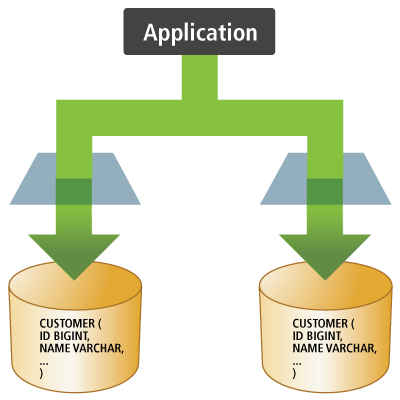
Each tenant has a separate database. A common arrangement uses a datasource or pool per tenant and a tenant-aware provider to select the appropriate source. The application controls provisioning and the lifecycle of those sources.
20.1.2. Separate schemas
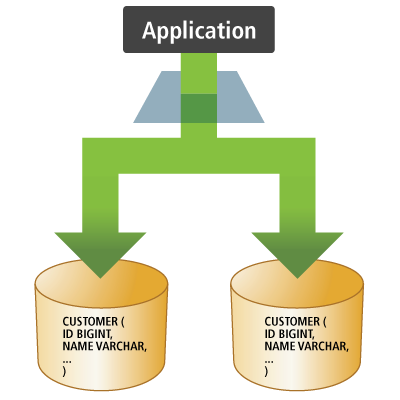
Each tenant has a separate schema in a shared database.
Use separate connection sources or a shared source with schema selection.
Hibernate can manage JDBC schema switching through TenantSchemaMapper; a custom multitenant provider is not required for that approach.
Driver support for schema operations matters.
20.1.3. Shared tables
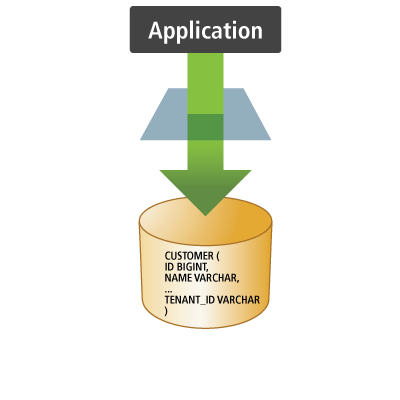
Tenants share tables, with a discriminator identifying the tenant that owns each partitioned row.
Hibernate handles tenant discrimination for supported mapped operations using @TenantId.
Applications do not need to hand-edit every ORM-generated SQL statement.
Native SQL and JDBC work have different boundaries; see ORM operations and direct SQL and Row-level security.
| Approach | Typical integration | Application responsibilities |
|---|---|---|
Separate databases |
|
Provision databases, route connections, and manage tenant sources |
Separate schemas |
|
Provision schemas and use supported schema switching with connection-state cleanup |
Shared tables |
|
Map partitioned data and design suitable keys, constraints, and database policies |
Tenant-specific database users |
|
Provision users and grants; combine with schema selection or row discrimination as needed |
These mechanisms can be combined; selecting credentials does not itself partition rows. A factory uses shared mappings and a dialect/capability model. Its tenant databases and schemas must be compatible with that model: selecting a tenant does not select a different mapping or SQL dialect.
20.2. Selecting a tenant and session lifetime
Choose the tenant when creating a session or entity manager, or configure a resolver to supply a default.
An existing session keeps its tenant across transactions and calls to clear().
Changing application tenant context does not retarget that session; open a new session or persistence context to work for another tenant.
See Persistence Context and Transactions for their separate lifetimes.
try ( var session = factory.withOptions().tenantIdentifier( "alpha" ).openSession() ) {
assertThat( session.find( Document.class, 1 ) ).isNotNull();
assertThat( session.find( Document.class, 2 ) ).isNull();
}Document is the partitioned entity used below.
For an entity manager, Hibernate supports the typed SessionCreationOption.TenantId creation option and the map-based HibernateHints.HINT_TENANT_ID hint (org.hibernate.tenantId):
try ( var entityManager = factory.createEntityManager( new SessionCreationOption.TenantId( "alpha" ) ) ) {
assertThat( entityManager.find( Document.class, 2 ) ).isNull();
}
try ( var entityManager = factory.createEntityManager( Map.of( HINT_TENANT_ID, "beta" ) ) ) {
assertThat( entityManager.find( Document.class, 1 ) ).isNull();
}These are Hibernate extensions accepted through Jakarta Persistence creation APIs. No unwrapping is needed to pass them. A stateless session also accepts an explicit tenant:
try ( var session = factory.withStatelessOptions().tenantIdentifier( "alpha" ).openStatelessSession() ) {
assertThat( session.createSelectionQuery( "from TenantDocument", Document.class ).getResultList() )
.extracting( document -> document.title ).containsExactly( "alpha document" );
}20.2.1. Resolver defaults and contextual sessions
Configure CurrentTenantIdentifierResolver<T> using hibernate.tenant_identifier_resolver (an instance, class, or class name), the factory-builder integration, or a BeanContainer.
An explicit creation-time tenant overrides the resolver default.
The following resolver also identifies a privileged root tenant:
public static class TenantResolver implements CurrentTenantIdentifierResolver<String> {
String currentTenant = "alpha";
@Override
public String resolveCurrentTenantIdentifier() {
return currentTenant;
}
@Override
public boolean validateExistingCurrentSessions() {
return true;
}
@Override
public boolean isRoot(String tenant) {
return "root".equals( tenant );
}
}The mutable currentTenant field is a test fixture. A real resolver should obtain the tenant from the application’s appropriately scoped context, not a process-wide mutable field.
Configure it with property("hibernate.tenant_identifier_resolver", resolver) when bootstrapping a factory.
Resolver changes affect newly opened sessions, not existing ones:
resolver.currentTenant = "alpha";
try ( var session = factory.openSession() ) {
resolver.currentTenant = "beta";
session.clear();
assertThat( session.getTenantIdentifierValue() ).isEqualTo( "alpha" );
try ( var next = factory.openSession() ) {
assertThat( next.getTenantIdentifierValue() ).isEqualTo( "beta" );
}
}A current-session context that opens sessions needs a way to supply their tenant, normally this resolver.
An externally managed context may instead bind an already-created session with an explicit tenant.
When validateExistingCurrentSessions() returns true, Hibernate’s contextual-session implementations check the bound session’s tenant against the resolver and report a TenantIdentifierMismatchException for a mismatch.
This validation does not change the bound session’s tenant and is not a general check before every operation on every session.
20.2.2. Root tenants
CurrentTenantIdentifierResolver.isRoot(tenant) identifies privileged sessions that may access other partitions of tenant-discriminated mappings.
It does not enumerate or connect to all tenant databases or schemas and does not grant database privileges.
try ( var session = factory.withOptions().tenantIdentifier( "root" ).openSession() ) {
assertThat( session.createSelectionQuery( "from TenantDocument", Document.class ).getResultList() )
.hasSize( 2 );
assertThat( session.find( Document.class, 2 ) ).isNotNull();
}Treat the ability to select a root tenant as privileged application behavior. Database policies can impose additional restrictions; root behavior under RLS depends on the policy’s tenant-identifier source.
20.3. Shared-table mappings with @TenantId
Map the tenant attribute of partitioned data using @TenantId.
The attribute may be inherited, and field or property access may be used according to the entity’s mapping.
All @TenantId attributes in one factory must have a consistent Java type.
@Entity(name = "TenantDocument")
public static class Document {
@Id
int id;
@TenantId
String tenant;
String title;
public Document() {}
Document(int id, String title) {
this.id = id;
this.title = title;
}
}When inserting an entity through the persistence APIs, Hibernate generates the tenant value from the session tenant.
For a nonidentifier tenant attribute such as Document.tenant, an ordinary tenant’s supplied nonnull value is rejected if it differs from the session tenant.
A root tenant may supply another tenant value for such an attribute.
Tenant attributes belonging to a composite identifier have different generation behavior; see Identifiers and database constraints.
The tenant attribute is not an application-controlled way to transfer an existing row to a different tenant.
20.3.1. ORM operations and direct SQL
Hibernate’s supported tenant-aware ORM operations include mapped queries, identifier loading, and entity mutations. Bulk updates and deletes expressed in HQL or Criteria also apply the mapped tenant restrictions. See Executing mutations for execution and persistence-context considerations.
HQL insert … values and insert … select statements do not invoke the entity’s @TenantId value generator or its supplied-value validation.
Include the tenant attribute in the insertion target list and supply an appropriate tenant value explicitly.
Tenant restrictions on a mapped source of an insert … select limit the source rows; they do not generate or validate the tenant value assigned to the target rows.
Deployed database policies and constraints may impose additional checks; see Row-level security.
Native queries, stored procedures, JDBC callbacks, and user-written SQL are not automatically rewritten to add tenant predicates. Custom loaders or custom mutation SQL must also be reviewed for their tenant restrictions; do not assume arbitrary custom SQL inherits the restrictions of generated SQL. Use explicit restrictions or appropriate deployed database policies for these paths. See Native SQL Queries, JDBC callbacks, and Row-level security.
20.3.2. Identifiers and database constraints
Adding a nonidentifier @TenantId does not add it to the database primary key.
In the Document mapping above, the simple identifier must remain unique across the table.
Tenant-local reuse of an identifier requires an appropriate key design, for example a composite identifier containing @Id @TenantId:
@Entity(name = "LocalDocument")
@IdClass(LocalKey.class)
public static class LocalDocument {
@Id
int id;
@Id @TenantId
String tenant;
String title;
public LocalDocument() {}
LocalDocument(int id, String title) {
this.id = id;
this.title = title;
}
}
public static class LocalKey implements Serializable {
int id;
String tenant;
public LocalKey() {}
LocalKey(int id, String tenant) {
this.id = id;
this.tenant = tenant;
}
@Override
public boolean equals(Object other) {
return other instanceof LocalKey key && id == key.id && Objects.equals( tenant, key.tenant );
}
@Override
public int hashCode() {
return Objects.hash( id, tenant );
}
}This mapping permits both tenants to use the same local id with different tenant components.
For the @Id @TenantId component shown here, Hibernate’s composite identifier generation replaces any supplied tenant value with the session tenant on insertion, instead of validating the supplied value as it does for a nonidentifier tenant attribute.
Leave this component unset and let Hibernate generate it; do not rely on a supplied value being rejected or preserved, including in a root session.
Tenant-scoped business uniqueness and association constraints also need suitable database definitions. Query filtering alone does not create tenant-aware foreign keys or uniqueness constraints. See Identifiers and entity equality and Associations for identifier and relationship mappings.
20.4. Schema and credentials mapping
20.4.1. TenantSchemaMapper
TenantSchemaMapper<T> maps a tenant identifier to a schema name.
Configure hibernate.multi_tenant.schema_mapper with an instance, class, or class name, use the factory-builder integration, or supply it through a BeanContainer.
It can be used with ordinary connection access, without a custom MultiTenantConnectionProvider.
The following H2 fixture uses one externally owned JDBC connection through an ordinary test provider, and rejects unrecognized tenant names.
In an application, provider would normally be an appropriate connection provider or pool.
SchemaDocument is an entity with a simple identifier and title, without @TenantId:
TenantSchemaMapper<String> schemas = tenant -> switch ( tenant ) {
case "alpha" -> "ALPHA";
case "beta" -> "BETA";
default -> throw new IllegalArgumentException( "Unknown tenant: " + tenant );
};
var schemaConfiguration = new HibernatePersistenceConfiguration( "tenant-schemas" )
.managedClasses( SchemaDocument.class )
.property( "hibernate.connection.provider_class", provider )
.property( "hibernate.multi_tenant.schema_mapper", schemas )
.property( "hibernate.hbm2ddl.auto", "none" );Hibernate records the original schema using Connection.getSchema(), switches with setSchema(), and restores the original schema before releasing the connection.
This requires functioning driver support; some drivers do not implement schema switching or treat it as a no-op.
If the provider reports handlesConnectionSchema(), it assumes schema-management responsibility instead.
A custom schema-switching provider must restore state before returning a connection to a shared pool and handle switching/reset failures appropriately.
Use a controlled tenant-to-schema mapping, not unvalidated tenant text interpolated into SQL.
inTenant( factory, "alpha", session -> {
session.persist( new SchemaDocument( 1, "alpha" ) );
session.doWork( c -> assertThat( c.getSchema() ).isEqualTo( "ALPHA" ) );
} );
assertThat( connection.getSchema() ).isEqualTo( originalSchema );
inTenant( factory, "beta", session -> {
assertThat( session.find( SchemaDocument.class, 1 ) ).isNull();
session.persist( new SchemaDocument( 1, "beta" ) );
} );
assertThat( connection.getSchema() ).isEqualTo( originalSchema );The test inspects the reused JDBC connection to verify schema restoration between tenant operations. Separate databases similarly permit local identifier reuse because the rows reside in separate tables. This differs from a shared-table simple primary key.
20.4.2. TenantCredentialsMapper
TenantCredentialsMapper<T> selects database credentials for a tenant.
Configure hibernate.multi_tenant.credentials_mapper with an instance, class, or class name, use the factory-builder integration, or supply it through a BeanContainer.
This can be combined with schema selection or row discrimination.
TenantCredentialsMapper<String> credentials = new TenantCredentialsMapper<>() {
@Override
public String user(String tenant) {
return switch ( tenant ) {
case "alpha" -> "ALPHA_USER";
case "beta" -> "BETA_USER";
default -> throw new IllegalArgumentException( "Unknown tenant: " + tenant );
};
}
@Override
public String password(String tenant) {
return lookupPassword( user( tenant ) );
}
};Register this mapper with property("hibernate.multi_tenant.credentials_mapper", credentials).
lookupPassword() represents the application’s credential source; the executable fixture uses synthetic credentials to verify routing, not actual tenant database users.
The ordinary provider must support getConnection(user, password) and the datasource must honor those credentials.
Not every pool supports credentials per acquisition; see Datasources.
The mapper does not provision users, grant privileges, or itself partition data.
This credential-based contract differs from MultiTenantConnectionProvider.getConnection(tenantId).
Both mapper interfaces are incubating APIs; consult their Javadocs when upgrading.
20.5. Custom multitenant connection providers
MultiTenantConnectionProvider<T> obtains and releases tenant-specific connections.
Pair getConnection(tenantId) with releaseConnection(tenantId, connection) and preserve the tenant’s routing and connection state.
getAnyConnection() and releaseAnyConnection() supply representative non-tenant-specific access, typically for bootstrap metadata.
This is not a request to scan every tenant database.
See Bootstrap metadata access for metadata controls and their limits.
Configure hibernate.multi_tenant_connection_provider with an instance, implementation class, or class name; register the service directly; or resolve it through a configured BeanContainer.
A datasource setting alone does not enable this service or automatically select the JNDI multitenant implementation.
When this service is configured, Hibernate uses it instead of ordinary connection-provider selection.
public class ConfigurableMultiTenantConnectionProvider
extends AbstractMultiTenantConnectionProvider<String> {
private final Map<String, ConnectionProvider> connectionProviderMap;
private final String bootstrapTenant;
public ConfigurableMultiTenantConnectionProvider(Map<String, ConnectionProvider> providers) {
this( providers, providers.keySet().stream().sorted().findFirst().orElseThrow() );
}
public ConfigurableMultiTenantConnectionProvider(Map<String, ConnectionProvider> providers, String bootstrapTenant) {
this.connectionProviderMap = Map.copyOf( providers );
this.bootstrapTenant = bootstrapTenant;
selectConnectionProvider( bootstrapTenant );
}
@Override
protected ConnectionProvider getAnyConnectionProvider() {
return selectConnectionProvider( bootstrapTenant );
}
@Override
protected ConnectionProvider selectConnectionProvider(String tenantIdentifier) {
var provider = connectionProviderMap.get( tenantIdentifier );
if ( provider == null ) {
throw new IllegalArgumentException( "Unknown tenant: " + tenantIdentifier );
}
return provider;
}
}The two-argument constructor selects an explicit bootstrap tenant and rejects unknown tenants clearly. The one-argument convenience constructor selects the first tenant in sorted order. This example delegates to externally owned providers and does not stop them when its factory closes. The application owner must release them when no longer needed. If a custom provider creates and owns pools, it must stop those owned resources exactly once during shutdown.
var tenants = new ConfigurableMultiTenantConnectionProvider(
Map.of( "alpha", alphaProvider, "beta", betaProvider ), "alpha" );
var configuration = new HibernatePersistenceConfiguration( "tenant-databases" )
.property( "hibernate.multi_tenant_connection_provider", tenants )
.property( "hibernate.hbm2ddl.auto", "none" );20.5.1. JNDI datasource routing
To use DataSourceBasedMultiTenantConnectionProviderImpl, select it explicitly using hibernate.multi_tenant_connection_provider.
It expects tenant datasources beneath a common JNDI namespace and a string hibernate.connection.datasource naming either a representative datasource or the base JNDI Context.
For a Context, also configure hibernate.multi_tenant.datasource.identifier_for_any to identify the representative tenant.
See JNDI and the provider’s Javadocs for lookup assumptions.
There is a legacy fallback when the multitenant-provider key is explicitly present with a null value and hibernate.connection.datasource is a string.
Do not rely on a datasource setting alone to select this path; explicit provider selection is clearer.
20.6. Row-level security
Database row-level security (RLS) supplements Hibernate’s ORM tenant restrictions with policies enforced by the database.
The incubating hibernate.multi_tenant.rls_enabled setting defaults to true where the dialect supports the required capabilities and the @TenantId mapping qualifies.
Unsupported databases still use Hibernate’s mapped tenant restrictions; the setting does not add RLS support to a dialect.
For eligible physical-table tenant-column mappings, Hibernate contributes policy DDL to schema tooling and establishes database-side tenant context on acquired connections. A noncolumn mapping, view, or unsupported capability must not be assumed to receive equivalent policy DDL. If a credentials mapper is configured and the dialect supports it, policies may instead obtain tenant identity from the database user. That requires compatible user/tenant values and the appropriate users and grants.
|
Policies must actually be deployed. If Hibernate does not manage schema creation, arrange equivalent policy deployment through your schema-management process. Enabling a setting alone does not retrofit policies into an existing schema. Database roles and privileges matter: a bypass role may see data that an ordinary role cannot. |
Unlike ORM predicate generation, deployed database policies can also constrain native SQL and JDBC work. This query has no tenant predicate; the existing RLS integration tests verify that installed policies restrict its results for an ordinary tenant role:
private static Long countRowsDirectly(org.hibernate.Session session) {
return session.createNativeQuery( "select count(*) from rls_document", Long.class ).uniqueResult();
}Support is dialect-dependent. For example, the tests exercise session-context policies on supported PostgreSQL and SQL Server configurations; they do not imply all dialects or database roles behave identically.
Root tenants can be represented in supported session-context policies.
A database-user policy is governed by database users and privileges; isRoot() alone does not grant a database-policy bypass.
See Schema Tooling for DDL execution/scripts and deployment considerations, and ORM operations and direct SQL for the direct-SQL boundary without database policies.
20.7. Schema management and provisioning
Hibernate can generate schema scripts and execute schema operations against selected targets. It does not generally discover and provision every tenant database or datasource automatically. Use application-controlled orchestration to choose each target and manage databases, schemas, users, and grants. See Schema Tooling for supported schema actions and migration guidance.
For schema-based tenancy, Hibernate’s SchemaManager.forSchema() targets mapped objects in a selected schema.
The example below assumes the application has already created the H2 schemas; create(false) creates mapped objects without requesting schema creation:
Obtain the factory by calling schemaConfiguration.createEntityManagerFactory() before running these operations.
// The application has already created ALPHA and BETA in this H2 database.
for ( String schema : List.of( "ALPHA", "BETA" ) ) {
factory.getSchemaManager().forSchema( schema ).create( false );
}After use, the test drops the mapped objects with forSchema(schema).drop(false); its isolated database owns the remaining schemas.
Targeting a schema does not route through every separate tenant datasource and does not provision database users or privileges.
20.8. Caching and tenant-specific session options
Hibernate’s default tenant-aware cache keys distinguish tenants. Database primary keys, persistence-context identity, and cache keying are separate concerns; a tenant-aware cache key does not change table constraints. Keep sessions scoped to their selected tenant, and verify that custom cache keys/providers preserve the required tenant separation. See Caching for provider requirements, consistency, and invalidation rather than assuming every cache configuration is interchangeable. Schema provisioning and cache eviction have separate responsibilities.
20.8.1. Tenant-specific JDBC time zones
A session may use tenant-specific options independently of the isolation mechanism.
For JDBC temporal conversion, jdbcTimeZone() selects the Calendar used by relevant JDBC binding/extraction operations; it does not store a named zone in a column or establish tenant isolation.
var configuration = configuration( ClockRecord.class )
.property( "hibernate.type.java_time_use_direct_jdbc", false );
var zones = Map.of( "alpha", TimeZone.getTimeZone( "UTC" ),
"beta", TimeZone.getTimeZone( "America/Chicago" ) );A small tenant-to-option map supplies the session setting; no separate connection pool is needed merely to choose a session’s JDBC time zone.
configuration(ClockRecord.class) is the fixture’s H2 factory configuration.
ClockRecord.createdOn is a LocalDateTime, while the alternate JDBC extraction below returns a Timestamp.
The explicit hibernate.type.java_time_use_direct_jdbc=false setting selects legacy JDBC conversion for this Java-time example; direct JDBC Java-time access has a different boundary.
See Java time at the JDBC boundary and Using a specific time zone for those details.
LocalDateTime value = LocalDateTime.of( 2020, 7, 15, 12, 0 );
try ( var session = factory.withOptions().tenantIdentifier( "beta" )
.jdbcTimeZone( zones.get( "beta" ) ).openSession() ) {
var transaction = session.beginTransaction();
session.persist( new ClockRecord( 1, value ) );
transaction.commit();
}assertThat( session.find( ClockRecord.class, 1 ).createdOn ).isEqualTo( value );This check is executed in a fresh session with the same JDBC time-zone option.
It does not claim that LocalDateTime itself represents an instant or carries a time zone.
Timestamp timestamp = session.doReturningWork( connection -> {
try ( var statement = connection.createStatement();
var results = statement.executeQuery( "select createdOn from ClockRecord" ) ) {
results.next();
return results.getTimestamp( 1, java.util.Calendar.getInstance( TimeZone.getTimeZone( "UTC" ) ) );
}
} );The test uses a fixed July 2020 date and explicit UTC/America/Chicago calendars to verify the difference between extractions. It does not depend on the JVM’s current default zone, change that global zone, or reuse a fixed historical offset from another test run.
21. Interceptors and Events
Callbacks let an application react to entity lifecycle changes and database operations, inspect or adjust state, and integrate with Hibernate’s event processing. Choose the mechanism according to the information and control the application needs.
21.1. Choosing a callback mechanism
| Mechanism | Use it for | Contract and scope |
|---|---|---|
Jakarta Persistence callbacks |
Entity initialization, state validation, and lifecycle notifications |
Standard annotations and listener registration; entity callbacks receive an entity, not Hibernate’s previous-state arrays |
Hibernate |
Inspecting or adjusting entity state and observing collection changes |
Hibernate callbacks with state arrays; shared across sessions or selected/created per session |
Native event listeners |
Integrating with or extending Hibernate’s event processing |
Hibernate SPI; listeners participate in ordered event groups and may replace essential default behavior |
Start with persistence callbacks when they provide the required information. An interceptor can also inspect the previous state supplied for dirty checking and observe collection changes. Native listeners offer more control over Hibernate processing and require more knowledge of its internals.
A notification after an insert or delete does not establish that the transaction committed. Logging changes is different from maintaining persistent revision history; see Envers for revision auditing and Completion, failures, timeouts, and concurrency for transaction completion and failures.
21.2. Jakarta Persistence callbacks
Jakarta Persistence supports callbacks declared on entities and mapped superclasses, separate listener classes, and listeners registered programmatically. The following groups distinguish managed-entity lifecycle operations from database operations.
21.2.1. Callback events and timing
| Callback | When it applies |
|---|---|
|
Before an entity becomes persistent through |
|
After the entity’s database insertion; it may be deferred until flush |
|
Before an entity is marked for removal |
|
After the entity’s database deletion; it may be deferred until flush |
|
Before state is copied from the object supplied to |
|
Before and after inserting entity data |
|
Before and after updating entity data |
|
Before and after deleting entity data |
|
Before and after the upsert operation, rather than separate insert/update notifications for its database outcome |
|
After loaded or refreshed state has been assigned to the entity instance |
The insert/delete/upsert pairs and @PreMerge are additions in Jakarta Persistence 4.0.
Database-operation callbacks also apply to the corresponding stateless operations; they do not require a managed entity in a persistence context.
Hibernate also invokes the older persist/remove callback annotations for stateless insert/delete operations.
Use the operation-specific annotations when expressing database-operation intent, and see Stateless processing and explicit groups for stateless processing.
For a stateful persistence context, @PrePersist and @PreRemove run during the lifecycle operation, while SQL and its post-operation callbacks may run later during flushing.
Primary keys generated with SEQUENCE, TABLE, or UUID are available to @PrePersist; an IDENTITY key is available after insertion.
Do not depend on a universal ordering of callbacks relative to cascades to other entities.
See Persisting new entities, Removing entities, and Merging detached data for those operations.
@Entity(name = "EventRecord")
@EntityListeners(RecordListener.class)
public static class Record {
@Id
int id;
String name;
public Record() {}
Record(int id, String name) {
this.id = id;
this.name = name;
}
}
public static class RecordListener {
@PrePersist
public void beforePersist(Record record) {
record.name = record.name.strip();
events.add( "pre-persist" );
}
@PreInsert
public void beforeInsert(Record record) {
events.add( "pre-insert" );
}
@PostPersist
public void afterPersist(Record record) {
events.add( "post-persist" );
}
@PostInsert
public void afterInsert(Record record) {
events.add( "post-insert" );
}
}Here events is the test’s invocation log.
The assigned identifier lets this example demonstrate an insertion deferred until an explicit flush:
var transaction = entityManager.getTransaction();
transaction.begin();
var record = new Record( 1, " first " );
entityManager.persist( record );
assertThat( record.name ).isEqualTo( "first" );
assertThat( events ).containsExactly( "pre-persist" );
entityManager.flush();
assertThat( events ).containsExactly( "pre-persist", "pre-insert", "post-persist", "post-insert" );
assertThat( transaction.isActive() ).isTrue();
transaction.rollback();The test verifies in a fresh entity manager that the rolled-back row does not exist.
It also verifies that @PostRemove follows deletion at flush and that rolling back restores the row.
Do not treat post-operation callbacks as a place to announce an irrevocable external outcome.
21.2.2. Declaring and registering listeners
Use @EntityListeners on an entity or mapped superclass to associate listener classes with that hierarchy.
It may also appear on package-info.java or module-info.java to declare default listeners for entities in that package or module.
XML mapping files can declare persistence-unit defaults and entity-specific listeners.
Jakarta Persistence 4.0 also discovers classes annotated with @EntityListener.
Such a listener applies to compatible entity types according to its callback parameter types, without a separate @EntityListeners declaration on every entity:
@EntityListener
public static class CreationListener {
@PrePersist
public void created(PlainRecord record) {
events.add( "discovered:" + record.id );
}
}var configuration = new HibernatePersistenceConfiguration( "discovered-listener" )
.managedClasses( PlainRecord.class, CreationListener.class );PlainRecord is a simple entity with assigned id and name attributes and no @EntityListeners declaration.
The example registers the listener class explicitly in the persistence unit’s managed classes; archive discovery is another way to make it available.
See Bootstrap for registration and discovery.
Use the standard EntityManagerFactory.addListener() API for runtime registration:
var creations = new AtomicInteger();
var registration = entityManagerFactory.addListener(
PlainRecord.class, PrePersist.class, record -> creations.incrementAndGet() );registration.cancel();Registration can target an entity class or a supertype of mapped entities. The callback runs for compatible entities until the returned registration is cancelled; cancellation affects subsequent notifications. The example’s test persists one row before and another after cancellation and verifies that the counter advances only once.
21.2.3. Entity callback contracts
A callback method returns void and may have public, protected, package, or private access, but must not be static or final.
An entity or mapped-superclass method has no arguments.
A listener method has one argument whose type is the entity class or a compatible supertype, including Object.
Listener classes have a public no-argument constructor and can receive CDI injection when the container is configured; see Managed Beans.
This support does not make the entity instances themselves CDI-managed objects.
A callback may modify the entity’s nonrelationship state, as the normalization example does. Portable callbacks should not execute entity-manager or query operations, access other entities, or modify relationships within the same persistence context. A runtime exception stops further callback processing and marks a joined transaction for rollback. Catching it does not restore the transaction or persistence context to a usable state; see Exception handling.
Listener instances can serve multiple entities and concurrent sessions. Keep mutable operation-specific state out of shared listeners; immutable configuration and thread-safe injected dependencies are appropriate fields. The invocation logs in these tests are fixtures, not examples of concurrent application storage.
Bulk HQL/Criteria mutations and direct SQL bypass ordinary per-entity lifecycle callbacks. The database-operation callback annotations do not turn a listener into a database trigger. See Executing mutations, Native SQL Queries, and JDBC callbacks for these execution boundaries.
21.2.4. Ordering and inheritance
For a given entity callback event, Hibernate invokes the following groups in order:
-
XML persistence-unit default listeners, in declaration order.
-
Discovered
@EntityListenerlisteners; do not depend on a relative order among these listeners. -
Module-level listeners, followed by package-level listeners, in each declaration’s order.
-
Listeners associated with the entity hierarchy, with superclass registrations before subclass registrations and declaration order within each registration.
-
Callback methods on the entity hierarchy, with superclass callbacks before subclass callbacks.
-
Runtime callbacks registered through
EntityManagerFactory.addListener(), in registration order, after the declared callbacks above.
Overriding a callback method changes which inherited method is eligible; annotate the overriding method for the callback event it is intended to handle. XML mappings may override annotation-based callback declarations and ordering. See the Jakarta Persistence specification’s callback ordering rules.
21.2.5. Default entity listeners
An XML default listener applies throughout the persistence unit unless excluded.
The following mapping registers a listener that assigns creation and update timestamps to entities extending BaseEntity:
public class DefaultEntityListener {
public void onPersist(Object entity) {
if (entity instanceof BaseEntity) {
BaseEntity baseEntity = (BaseEntity) entity;
baseEntity.setCreatedOn(now());
}
}
public void onUpdate(Object entity) {
if (entity instanceof BaseEntity) {
BaseEntity baseEntity = (BaseEntity) entity;
baseEntity.setUpdatedOn(now());
}
}
private Timestamp now() {
return Timestamp.from( Instant.now() );
}
}<entity-mappings xmlns="https://jakarta.ee/xml/ns/persistence/orm"
xmlns:xsi="http://www.w3.org/2001/XMLSchema-instance"
xsi:schemaLocation="https://jakarta.ee/xml/ns/persistence/orm
https://jakarta.ee/xml/ns/persistence/orm/orm_4_0.xsd"
version="4.0">
<persistence-unit-metadata>
<persistence-unit-defaults>
<entity-listeners>
<entity-listener
class="org.hibernate.orm.test.events.DefaultEntityListener">
<pre-persist method-name="onPersist"/>
<pre-update method-name="onUpdate"/>
</entity-listener>
</entity-listeners>
</persistence-unit-defaults>
</persistence-unit-metadata>
</entity-mappings>The shared attributes and entities are mapped as follows:
@MappedSuperclass
public abstract class BaseEntity {
private Timestamp createdOn;
private Timestamp updatedOn;
//Getters and setters are omitted for brevity
}@Entity(name = "Person")
public static class Person extends BaseEntity {
@Id
private Long id;
private String name;
//Getters and setters omitted for brevity
}
@Entity(name = "Book")
public static class Book extends BaseEntity {
@Id
private Long id;
private String title;
@ManyToOne
private Person author;
//Getters and setters omitted for brevity
}The listener assigns createdOn during persistence:
Person author = new Person();
author.setId( 1L );
author.setName( "Vlad Mihalcea" );
entityManager.persist( author );
Book book = new Book();
book.setId( 1L );
book.setTitle( "High-Performance Java Persistence" );
book.setAuthor( author );
entityManager.persist( book );
assertNotNull( author.getCreatedOn() );
assertNotNull( book.getCreatedOn() );Updating these entities invokes the listener’s onUpdate() method during flush and assigns updatedOn:
Person author = entityManager.find( Person.class, 1L );
author.setName( "Vlad-Alexandru Mihalcea" );
Book book = entityManager.find( Book.class, 1L );
book.setTitle( "High-Performance Java Persistence 2nd Edition" );Excluding listeners
@ExcludeDefaultListeners excludes default listeners declared in XML and on package/module descriptors.
It may be declared on an entity or mapped superclass, and the exclusion applies to its subclasses.
The equivalent XML element is <exclude-default-listeners/>.
Discovered @EntityListener registrations are separate from these defaults and are not suppressed by this exclusion.
@ExcludeSuperclassListeners excludes listeners associated with superclasses.
It does not exclude package/module or XML default listeners, or callback methods declared on the entity hierarchy itself.
Neither annotation removes the entity’s own explicitly associated listeners or callback methods.
@Entity(name = "Publisher")
@ExcludeDefaultListeners
public static class Publisher extends BaseEntity {
@Id
private Long id;
private String name;
//Getters and setters omitted for brevity
}The Publisher still inherits the mapped timestamp attributes, but its default listener is excluded:
Publisher publisher = new Publisher();
publisher.setId( 1L );
publisher.setName( "Amazon" );
entityManager.persist( publisher );The test verifies that createdOn remains null after persistence.
21.2.6. Persistence-unit lifecycle callbacks
Jakarta Persistence 4.0 also provides @PostCreate and @PreClose callbacks for the creation and closing of an EntityManagerFactory, EntityManager, or EntityAgent.
Declare these methods on a discovered @EntityListener class.
Each method returns void and takes one parameter of the specific type whose lifecycle it observes: EntityManagerFactory, EntityManager, or EntityAgent.
These callbacks observe persistence infrastructure, rather than changes to an entity or the completion of a transaction.
@EntityListener
public static class UnitLifecycleListener {
@PostCreate
public void created(EntityManagerFactory factory) {
events.add( "factory-created" );
}
@PreClose
public void closing(EntityManagerFactory factory) {
events.add( "factory-closing" );
}
@PostCreate
public void created(EntityManager manager) {
events.add( "manager-created" );
}
@PreClose
public void closing(EntityManager manager) {
events.add( "manager-closing" );
}
@PostCreate
public void created(EntityAgent agent) {
events.add( "agent-created" );
}
@PreClose
public void closing(EntityAgent agent) {
events.add( "agent-closing" );
}
}Here events is the test’s invocation log, and the listener is registered among the persistence unit’s managed classes, as in A discovered listener and its managed-class registration.
The test verifies creation/closing notifications for the factory and separately created entity manager and agent.
These annotations are different from CDI’s @PostConstruct and @PreDestroy.
The CDI annotations describe the initialization and destruction of the listener or interceptor bean itself; @PostCreate and @PreClose describe the persistence object passed to the callback.
See CDI and managed interceptor lifecycles for managed interceptor lifetimes and Bootstrap and Persistence Context for factory and persistence-context lifetimes.
21.3. Hibernate interceptors
Interceptor provides stateful callbacks such as onLoad(), onPersist(), onRemove(), and onFlushDirty(), plus collection callbacks for recreation, removal, and updates.
Stateless operations use onLoad(), onInsert(), onUpdate(), onUpsert(), and the stateless onDelete() overload.
Use the current onPersist()/onRemove() methods instead of the deprecated stateful onSave()/onDelete() callbacks.
21.3.1. Inspecting and adjusting state
The indexes of an interceptor’s state, property-name, and type arrays correspond.
For callbacks returning a boolean, return true if the callback changes the mutable state array and false when it only observes state.
Do not modify previousState, and do not assume a previous-state snapshot is always available.
public static class NormalizingInterceptor implements Interceptor {
@Override
public boolean onPersist(Object entity, Object id, Object[] state, String[] propertyNames, Type[] types) {
if ( entity instanceof PlainRecord ) {
for ( int i = 0; i < propertyNames.length; i++ ) {
if ( "name".equals( propertyNames[i] ) && state[i] instanceof String name ) {
String normalized = name.strip();
if ( !normalized.equals( name ) ) {
state[i] = normalized;
return true;
}
}
}
}
return false;
}
}The test verifies both the entity’s name and the value loaded in a fresh session. A purely observational interceptor can instead log a dirty entity without exposing all of its property values:
public static class LoggingInterceptor implements Interceptor {
@Override
public boolean onFlushDirty(
Object entity, Object id, Object[] currentState, Object[] previousState,
String[] propertyNames, Type[] types) {
LOGGER.debugv( "Dirty entity {0}#{1}", entity.getClass().getSimpleName(), id );
return false; // observing state, without changing it
}
}onFlushDirty() participates in dirty checking during flush; it is not a commit notification or a guaranteed single notification for each changed row.
An interceptor callback must not invoke operations on the session or cause lazy proxy/collection initialization.
These are interceptor restrictions, separate from the portability rules for persistence callbacks.
21.3.2. Registration, scope, and ownership
| Registration | Values | Behavior |
|---|---|---|
|
Instance, class, or class name |
One shared interceptor; classes are resolved through managed-bean support |
|
Class, class name, or |
Automatic per-session acquisition or a supplier call for each session; an instance is not accepted here |
Session/stateless-session builder |
Instance |
Explicit selection for that session, replacing the configured interceptor |
Both settings being nonnull causes ConflictingInterceptorSettingsException; they do not compose two interceptors.
Shared interceptors must be thread-safe and must not store mutable session-specific state.
A supplier should return appropriately separate instances when those instances hold session-specific state.
var interceptor = new LoggingInterceptor();
var configuration = new HibernatePersistenceConfiguration( "intercepted" )
.managedClasses( Customer.class )
.property( "hibernate.session_factory.interceptor", interceptor );Build the factory with configuration.createEntityManagerFactory() after supplying the usual connection and schema settings; see Bootstrap and Database Access.
The examples' test helpers supply those settings.
SessionFactoryBuilder.applyInterceptor(instance) is the native builder equivalent.
The historically named applyStatelessInterceptor(Class) and applyStatelessInterceptor(Supplier) methods configure automatic per-session acquisition; they are not limited to stateless sessions.
try ( var session = sessionFactory.withOptions().interceptor( interceptor ).openSession() ) {
var transaction = session.beginTransaction();
Customer customer = session.find( Customer.class, 1L );
customer.name = "Mr. John Doe";
transaction.commit();
}Here interceptor is a LoggingInterceptor instance.
An Interceptor is also a Jakarta Persistence EntityManager.CreationOption and EntityAgent.CreationOption, so an instance can be passed to their factory creation methods without unwrapping.
noInterceptor() disables interception for that session.
noSessionInterceptorCreation() only suppresses automatic session-scoped acquisition: a configured shared interceptor or an explicit instance still applies.
Apply these options deliberately; subsequent explicit selections can change an earlier choice.
An explicitly supplied instance is borrowed: Hibernate does not inject or destroy it merely because it is supplied as a setting or creation option. The application owns supplier-created instances as well; using a supplier does not automatically make its results container-managed. For automatically resolved classes, the lifecycle depends on the registration scope described below.
21.3.3. CDI and managed interceptor lifecycles
Class and class-name registrations use Hibernate’s managed-bean infrastructure.
With a configured CDI BeanManager or custom BeanContainer, this supports dependency injection and lifecycle callbacks.
Without an external container, Hibernate constructs the class itself; that fallback does not supply CDI injection.
Register the interceptor class explicitly: enabling CDI does not automatically select an Interceptor implementation.
@Dependent
public static class AuditingInterceptor implements Interceptor {
@Inject
AuditService audit;
private boolean initialized;
private boolean destroyed;
@PostConstruct
void initialize() {
initialized = true;
}
@PreDestroy
void destroy() {
destroyed = true;
}
@Override
public boolean onPersist(Object entity, Object id, Object[] state, String[] propertyNames, Type[] types) {
audit.recordCreation();
return false;
}
}AuditService is the example’s @Dependent CDI bean with a thread-safe counter; the flags let the tests verify initialization and destruction.
This example counts notifications, not committed revisions.
Hibernate’s shared/session-scoped registrations determine reuse of the managed instance.
They are not CDI request/session scopes, and do not imply reuse of an existing CDI contextual instance of the same class.
Here beanManager is the supplied CDI manager, or an ExtendedBeanManager as described in CDI integration.
The class is resolved once and shared by sessions.
Its managed bean is released through registry/container shutdown, not at each session close.
var configuration = new HibernatePersistenceConfiguration( "session-cdi-interceptor" )
.managedClasses( PlainRecord.class )
.property( "jakarta.persistence.bean.manager", beanManager )
.property( "hibernate.session_factory.session_scoped_interceptor", AuditingInterceptor.class );With this registration, each session obtains a distinct managed interceptor, and closing the session releases that bean, including its @PreDestroy callback.
This applies to stateful and stateless sessions; committing a transaction does not close the session or release its interceptor.
When the parent-session sharing API shares an automatically acquired interceptor, it stays alive until the last sharing session closes.
Explicitly passing an existing instance is borrowing; closing the borrower does not release the original owner’s bean.
CDI readiness
See CDI integration for jakarta.persistence.bean.manager, hibernate.delay_cdi_access, and extended access, or Custom bean containers for hibernate.resource.beans.container.
Class-based interceptor acquisition does not require hibernate.cdi.extensions=true.
The factory can retain a bootstrap-safe bean reference without immediately obtaining its interceptor instance.
This does not mean every access mode initializes all beans at the same time: extended access can initialize registered references when the manager signals readiness.
CDI must be usable before an interceptor instance is needed for reliable injection. Do not depend on opening sessions before CDI readiness or on fallback construction producing an injected object. The tests exercise immediate, delayed, and extended access with a real CDI container, verify shared and per-session identities, and check destruction at the appropriate lifecycle boundary.
21.4. Native event listeners
Native listeners implement interfaces such as LoadEventListener and participate in Hibernate’s event processing.
org.hibernate.event.spi.EventType is a class exposing typed constants such as LOAD, PERSIST, PRE_INSERT, and POST_LOAD.
These include both requests, such as loading an entity, and notifications around database operations; they are not a one-to-one list of public session methods.
21.4.1. Registration and ordering
Register listeners during bootstrap using an Integrator and the EventListenerRegistry.
prependListeners() adds listeners before the existing group, appendListeners() adds them after it, and setListeners() replaces the group.
If an integration may register a listener repeatedly, use the registry’s duplication handling to define whether duplicate registrations are rejected, retained, or replaced.
public static class LoadIntegrator implements Integrator {
private final Consumer<String> observer;
public LoadIntegrator(Consumer<String> observer) {
this.observer = observer;
}
@Override
public void integrate(Metadata metadata, Context context, SessionFactoryImplementor factory) {
var listeners = factory.getEventListenerRegistry();
listeners.prependListeners( EventType.LOAD, new ObservingLoadListener( observer ) );
listeners.appendListeners( EventType.POST_LOAD, event -> observer.accept( "post-load" ) );
}
}public static class ObservingLoadListener implements LoadEventListener {
private final Consumer<String> observer;
public ObservingLoadListener(Consumer<String> observer) {
this.observer = observer;
}
@Override
public void onLoad(LoadEvent event, LoadType loadType) {
observer.accept( "load-request" );
}
}The observer must be safe for concurrent use because the factory shares these listeners.
Its test uses an invocation list to verify load-request, the interceptor’s onLoad(), and post-load, in that order, while find() successfully returns the entity.
This is an observation hook; it is not a complete data-authorization mechanism.
var configuration = new HibernatePersistenceConfiguration( "native-events" )
.managedClasses( PlainRecord.class )
.property( "hibernate.integrator_provider",
(IntegratorProvider) () -> List.of( new LoadIntegrator( observed::add ) ) );An integrator may also be discovered through ServiceLoader using META-INF/services/org.hibernate.integrator.spi.Integrator.
During integrate(), the factory is still being initialized: register the integration rather than opening sessions or executing application work.
21.4.2. Preserving default event processing
Hibernate’s default listeners implement persistence behavior and invoke interceptors and persistence callbacks where appropriate.
For example, save processing calls Interceptor.onPersist(), and DefaultPreLoadEventListener calls Interceptor.onLoad() before assigning loaded state.
Prefer adding listeners around the defaults when observing an event. Replacing a group can remove loading, state-transition processing, and callback invocation. A replacement must preserve every required contract; extending or delegating a default implementation can help, but does not automatically make arbitrary replacement behavior equivalent. Do not manually invoke interceptor callbacks as an application notification API.
22. Managed Beans
Hibernate can obtain extension instances through CDI or another bean container, allowing those instances to receive dependency injection and lifecycle callbacks. This support applies to specific extension registration and acquisition paths; configuring a container does not automatically register every extension implementation or make entities CDI beans.
The ManagedBeanRegistry
service acquires bean handles. A handle exposes the instance when it is needed.
The BeanContainer
SPI connects the registry to an external container. When no external container is selected,
Hibernate uses fallback construction.
Hibernate’s managed-bean abstraction is broader than a CDI contextual bean. Injection, instance reuse, and destruction depend on the acquisition policy; see Lifetimes, caching, and fallback.
22.1. Supported extension points
The following table describes supported class-based acquisition paths. Supplying an already constructed instance can follow a different ownership contract; consult the extension’s documentation.
| Extension | Registration and related discussion | Requires hibernate.cdi.extensions=true |
|---|---|---|
|
Converters selected by mapping and converter registration. |
No |
Entity listener classes |
Listeners selected through listener registration. |
No |
|
Class and class-name registrations; shared and per-session acquisition use bootstrap-safe references. |
No |
|
JDBC type and Java type classes selected by supported mapping/registration paths. |
Yes |
|
Yes |
|
|
Custom types selected by class-based type mappings and registrations. |
Yes |
|
Yes |
|
|
Yes |
|
Identifier generators |
Supported generator class registrations. |
Yes |
Envers |
Yes |
|
|
Optional container lookup in connection-provider selection. |
Yes |
|
Optional container lookups in tenant connection routing and tenant resolution. |
Yes |
hibernate.cdi.extensions defaults to false. It enables supported additional extension
lookups, not automatic discovery and registration of arbitrary implementations.
Despite its name, the flag also gates these additional acquisition paths when using a
custom non-CDI container. Explicit settings and each extension’s default selection rules
still apply; for example, container lookup does not override an explicitly supplied tenant resolver.
22.2. Container selection and configuration
Hibernate selects its bean container in this order:
-
Use an explicit
hibernate.resource.beans.containervalue, if supplied. -
Otherwise, discover
BeanContainerservice implementations. One implementation is selected; multiple implementations cause an error unless a container is selected explicitly. -
If no service is found, use the CDI manager supplied through
jakarta.persistence.bean.manager. -
If no external container is available, use Hibernate’s fallback container and instance producer.
The settings are:
| Setting | Default | Value and purpose |
|---|---|---|
Unset |
A |
|
Unset |
A |
|
|
Delay ordinary CDI bean initialization until needed; see Delayed access. |
|
|
Allow the additional extension lookups listed in Supported extension points. |
Having CDI API classes on the classpath does not start CDI or automatically locate a
BeanManager. When no explicit or discovered BeanContainer takes precedence, supplying
a manager while CDI is unavailable to Hibernate’s class loader causes bootstrap to fail.
The deprecated javax.persistence.bean.manager name remains a compatibility
alias; use the Jakarta name in new configuration.
22.3. CDI integration
Hibernate adapts a supplied CDI BeanManager to its BeanContainer SPI.
In Jakarta EE bootstrap, the container normally
supplies the manager when CDI is enabled. For application-managed bootstrap, supply a manager
from the CDI container owned by the application or its environment; Hibernate does not create
that CDI container.
22.3.1. CDI access modes
| Mode | Selection | When ordinary bean initialization occurs |
|---|---|---|
A |
During acquisition, which may happen during bootstrap. |
|
A |
When the instance is first needed, possibly still during bootstrap. |
|
An |
Registered references can be initialized when the integration signals readiness; later acquisitions can initialize on access. |
Access mode and bootstrap-safe acquisition are separate choices. A bootstrap-safe handle can be acquired without immediately obtaining its instance, but injection requires CDI to be usable when that instance is needed. Not every extension uses bootstrap-safe acquisition. See CDI readiness for the interceptor-specific behavior.
22.3.2. Immediate access
With the default mode, ordinary acquisition initializes beans immediately. This often occurs during bootstrap, but does not mean every eligible bean is instantiated when the factory is built. Extensions using bootstrap-safe handles, including class-registered interceptors, can defer instance acquisition. If CDI and persistence bootstrap depend on each other, consider delayed access or an integration supplying extended access.
22.3.3. Delayed access
Set hibernate.delay_cdi_access=true to defer ordinary CDI bean initialization until needed.
The manager must be ready at that point. An extension can need its instance during metadata
building, so delaying access does not guarantee that CDI will only be accessed after bootstrap.
Configuration problems may consequently be detected later than with immediate access.
This mode does not receive a readiness notification. When the integration can provide reliable lifecycle callbacks, prefer extended access.
22.3.4. Extended access
An integration may supply
ExtendedBeanManager
as jakarta.persistence.bean.manager. This selects extended access regardless of the delayed flag.
Hibernate registers a LifecycleListener through registerLifecycleListener().
The integration calls beanManagerInitialized() with the usable manager and
beforeBeanManagerDestroyed() before destroying it. The initialization callback can
initialize registered bean references; the destruction callback releases Hibernate’s tracked references.
This is a lifecycle callback protocol implemented by the integration, not a CDI container
that Hibernate starts or a standard Future.
Do not depend on using instances before CDI is ready. Some early acquisition paths can fall back to direct construction, while others can fail; neither outcome guarantees injection. The extension’s acquisition and fallback policy determines the result.
22.3.5. Example: an injected converter
The following converter delegates its work to an injected service. Its @PostConstruct
and @PreDestroy callbacks use the service to record initialization and destruction:
@Converter
public static class AmountConverter implements AttributeConverter<Integer, String> {
@Inject
ConversionService service;
@PostConstruct
void initialized() {
service.initialized();
}
@PreDestroy
void destroyed() {
service.destroyed();
}
@Override
public String convertToDatabaseColumn(Integer value) {
return service.encode( value );
}
@Override
public Integer convertToEntityAttribute(String value) {
return service.decode( value );
}
}The helper is a CDI singleton. Its counters make injection, conversion calls, and lifecycle callbacks observable in the example test:
@jakarta.inject.Singleton
public static class ConversionService {
final AtomicInteger writes = new AtomicInteger();
final AtomicInteger reads = new AtomicInteger();
final AtomicInteger initializations = new AtomicInteger();
final AtomicInteger destructions = new AtomicInteger();
public void initialized() {
initializations.incrementAndGet();
}
public void destroyed() {
destructions.incrementAndGet();
}
public String encode(Integer value) {
writes.incrementAndGet();
return value == null ? null : value.toString();
}
public Integer decode(String value) {
reads.incrementAndGet();
return value == null ? null : Integer.valueOf( value );
}
}The entity explicitly selects the converter:
@Entity(name = "BeansGuideStock")
public static class Stock {
@Id
Long id;
@Convert(converter = AmountConverter.class)
Integer amount;
public Stock() {
}
Stock(Long id, Integer amount) {
this.id = id;
this.amount = amount;
}
}Given a usable manager, configure the application-managed factory with
HibernatePersistenceConfiguration:
static HibernatePersistenceConfiguration cdiConfiguration(BeanManager beanManager) {
return new HibernatePersistenceConfiguration( "managed-converter" )
.managedClasses( Stock.class )
.property( "jakarta.persistence.bean.manager", beanManager );
}Add the connection and schema settings appropriate to the application, then call
createEntityManagerFactory(). This example does not require hibernate.cdi.extensions=true.
The test writes and reads an entity in separate persistence contexts, checks injected
conversion calls, and verifies converter destruction before the application-owned CDI container closes.
See AttributeConverters for converter mapping semantics and Bootstrap for complete factory setup.
22.4. Lifetimes, caching, and fallback
Bean acquisition, reference caching, and instance lifetime are independent decisions.
A ManagedBean handle can exist before its instance is initialized. The container and
acquisition policy determine instance reuse and destruction.
22.4.1. Independent creation and CDI scopes
The built-in registry requests JPA-compliant creation: Hibernate controls independent
instance lifetimes while CDI supplies injection and lifecycle callbacks. The requested
class need not be returned as its existing CDI contextual instance. In particular,
@ApplicationScoped or @Singleton on that class does not guarantee that Hibernate uses
the application’s existing contextual instance. Injected dependencies still follow their
own CDI resolution and scope rules.
Integrators calling BeanContainer directly can request container-managed creation by
returning false from LifecycleOptions.useJpaCompliantCreation(). Returning true
requests independent, Hibernate-managed lifetimes. That policy and the external container’s
scope semantics are distinct from reference caching.
22.4.2. Caching and release
For integrations using ManagedBeanRegistry,
BeanInstanceCaching
controls handle reuse:
-
ALLOWpermits a shared cached reference. Release it only after all its users have finished. -
DISALLOWbypasses Hibernate’s reference cache. Release the returned handle withManagedBeanRegistry.releaseBean()when finished. This does not override a custom container’s contextual scope or guarantee a different underlying contextual object.
Registry/container shutdown normally releases outstanding owned references. Some consumers release them earlier: automatically acquired per-session interceptors are released at their session-related boundary. Transaction completion is not a general bean-release boundary, and registry shutdown need not coincide with closing one factory when the service registry has a different owner.
A custom adapter receives stop() from Hibernate’s bean infrastructure. It should release
the references it owns without assuming it owns the entire external container. Supplying
a BeanManager does not transfer ownership of the CDI container to Hibernate.
22.4.3. Fallback construction
Without an external container, Hibernate’s default producer normally invokes a no-argument constructor. It does not provide CDI injection or CDI lifecycle callbacks. An extension can supply a specialized fallback producer instead.
Some CDI resolution or creation failures also use the fallback producer. Do not assume that successful bootstrap proves injection occurred, or that every CDI problem is converted into fallback construction. Failures before the manager is ready can follow different paths. Optional service lookups also retain their own absence/default behavior; the fallback registry does not automatically supply every optional Hibernate service.
22.5. Custom bean containers
Integrate an external container by implementing
BeanContainer.
Supply your adapter instance through hibernate.resource.beans.container:
static HibernatePersistenceConfiguration customConfiguration(BeanContainer beanContainer) {
return new HibernatePersistenceConfiguration( "custom-bean-container" )
.managedClasses( PlainEntity.class )
.property( "hibernate.resource.beans.container", beanContainer );
}Here beanContainer is the application’s adapter; PlainEntity represents its mapped entity.
The example test supplies an adapter fixture to exercise registration and shutdown, not a
complete integration with a third-party framework. The adapter implementation depends on
that framework’s acquisition and ownership APIs.
Alternatively, provide a classpath service descriptor named
META-INF/services/org.hibernate.resource.beans.container.spi.BeanContainer containing
the adapter’s fully qualified class name. For example, the tested descriptor contains:
org.hibernate.orm.test.cdi.guide.GuideBeanContainerThe provider needs a public no-argument constructor. An explicit container setting overrides service discovery, including an ambiguous set of providers, and takes precedence over CDI. See Container selection and configuration for class/class-name registration and selection order.
An adapter must honor the supplied lifecycle options: whether cached references may be reused
and whether instances have independent or container-managed lifetimes. It must support named
and class-based lookup, bootstrap-safe handles, release, and shutdown. Use the supplied
BeanInstanceProducer for the acquisition path’s fallback behavior. Acquiring a bootstrap-safe
handle must not require the backing container to be ready; accessing its instance can.
See Lifetimes, caching, and fallback and the SPI Javadoc for the full lifecycle contract.
23. JNDI
Hibernate does optionally interact with JNDI on the application’s behalf. Generally, it does this when the application:
-
has asked the SessionFactory be bound to JNDI
-
has specified a DataSource to use by JNDI name
-
is using JTA transactions and the
JtaPlatformneeds to do JNDI lookups forTransactionManager,UserTransaction, etc
All of these JNDI calls route through a single service whose role is org.hibernate.engine.jndi.spi.JndiService.
The standard JndiService accepts a number of configuration settings:
For other settings prefixed with hibernate.jndi., Hibernate removes that prefix before passing
the property to the JNDI provider. For example, hibernate.jndi.java.naming.security.principal
becomes java.naming.security.principal in the initial-context environment.
The standard service accepts names without an explicit URI scheme and names using java: or
osgi:. It rejects other explicit URI schemes. This restriction applies to the JNDI names
Hibernate looks up or binds, not to the provider URL used to configure the initial context.
|
The standard |
24. Spatial
24.1. Overview
Hibernate Spatial was originally developed as a generic extension to Hibernate for handling geographic data. Since 5.0, Hibernate Spatial is now part of the Hibernate ORM project, and it allows you to deal with geographic data in a standardized way.
Hibernate Spatial provides a standardized, cross-database interface to geographic data storage and query functions. It supports most of the functions described by the OGC Simple Feature Specification. Supported databases are Oracle 19c/21c/23ai, PostgreSQL/PostGIS, MySQL, MariaDB, Microsoft SQL Server, CockroachDB, and H2/H2GIS. The function support table describes the registered integrations; see the database notes for legacy DB2 information.
Spatial data types are not part of the Java standard library, and they are absent from the JDBC specification. Over the years JTS has emerged as the de facto standard to fill this gap. JTS is an implementation of the Simple Feature Specification (SFS). Many databases on the other hand implement the SQL/MM - Part 3: Spatial Data specification - a related, but broader specification. The biggest difference is that SFS is limited to 2D geometries in the projected plane (although JTS supports 3D coordinates), whereas SQL/MM supports 2-, 3- or 4-dimensional coordinate spaces.
Hibernate Spatial supports two different geometry models: JTS and
geolatte-geom. As already mentioned, JTS is the de facto
standard. Geolatte-geom (also written by the lead developer of Hibernate Spatial) is a more recent library that
supports many features specified in SQL/MM but not available in JTS (such as support for 4D geometries, and support for extended WKT/WKB formats).
Geolatte-geom also implements encoders/decoders for the database native types. Geolatte-geom has good interoperability with
JTS. Converting a Geolatte geometry to a JTS geometry, for instance, doesn’t require copying of the coordinates.
It also delegates spatial processing to JTS.
Whether you use JTS or Geolatte-geom, Hibernate spatial maps the database spatial types to your geometry model of choice. It will, however, always use Geolatte-geom to decode the database native types.
Hibernate Spatial also makes a number of spatial functions available in HQL and in the Criteria Query API. These functions are specified in both SQL/MM as SFS, and are commonly implemented in databases with spatial support (see Hibernate Spatial dialect function support)
24.2. Configuration
Hibernate Spatial requires some configuration prior to start using it.
24.2.1. Dependency
You need to include the hibernate-spatial dependency in your build environment.
For Maven, you need to add the following dependency:
<dependency>
<groupId>org.hibernate.orm</groupId>
<artifactId>hibernate-spatial</artifactId>
<version>${hibernate.version}</version>
</dependency>24.3. Types
It suffices to declare a property as either a JTS or a Geolatte-geom Geometry and Hibernate Spatial will map it using the
relevant type.
Here is an example using JTS:
import org.locationtech.jts.geom.Point;
@Entity(name = "Event")
public static class Event {
@Id
private Long id;
private String name;
private Point location;
//Getters and setters are omitted for brevity
}We can now treat spatial geometries like any other type.
Event event = new Event();
event.setId( 1L);
event.setName( "Hibernate ORM presentation");
Point point = geometryFactory.createPoint( new Coordinate( 10, 5 ) );
event.setLocation( point );
entityManager.persist( event );Hibernate Spatial registers spatial query functions for the supported dialects.
The following HQL query uses within to find an entity whose location lies within a spatial window.
Polygon window = geometryFactory.createPolygon( coordinates );
Event event = entityManager.createQuery(
"select e " +
"from Event e " +
"where within(e.location, :window) = true", Event.class)
.setParameter("window", window)
.getSingleResult();24.4. Queries and functions
Spatial functions operate on mapped geometry attributes and geometry parameters. Use the geometry model associated with the mapped type when binding parameters. The same execution and parameter-binding rules apply as for other queries; see Query APIs and execution.
Hibernate defines common spatial functions uniformly over all databases. These functions largely correspond to those specified in the Simple Feature Specification. Not all databases are capable of supporting every function, however. The table below details which functions are supported by various database systems.
| Function | Description | PostgreSQL | Oracle 19c/21c/23ai | MySQL | SQL Server | H2GIS | MariaDB | CockroachDB |
|---|---|---|---|---|---|---|---|---|
Basic functions on Geometry |
||||||||
|
SFS §2.1.1.1 |
|||||||
|
SFS §2.1.1.1 |
|||||||
|
SFS §2.1.1.1 |
|||||||
|
SFS §2.1.1.1 |
|||||||
|
SFS §2.1.1.1 |
|||||||
|
SFS §2.1.1.1 |
|||||||
|
SFS §2.1.1.1 |
|||||||
|
SFS §2.1.1.1 |
|||||||
|
SFS §2.1.1.1 |
|||||||
Functions for testing Spatial Relations between geometric objects |
||||||||
|
SFS §2.1.1.2 |
|||||||
|
SFS §2.1.1.2 |
|||||||
|
SFS §2.1.1.2 |
|||||||
|
SFS §2.1.1.2 |
|||||||
|
SFS §2.1.1.2 |
|||||||
|
SFS §2.1.1.2 |
|||||||
|
SFS §2.1.1.2 |
|||||||
|
SFS §2.1.1.2 |
|||||||
|
SFS §2.1.1.2 |
|||||||
Functions that support Spatial Analysis |
||||||||
|
SFS §2.1.1.3 |
|||||||
|
SFS §2.1.1.3 |
|||||||
|
SFS §2.1.1.3 |
|||||||
|
SFS §2.1.1.3 |
|||||||
|
SFS §2.1.1.3 |
|||||||
|
SFS §2.1.1.3 |
|||||||
|
SFS §2.1.1.3 |
|||||||
Common non-SFS functions |
||||||||
|
Returns true if the geometries are within the specified distance of one another |
|||||||
|
Returns a new geometry with its coordinates transformed to the SRID referenced by the integer parameter |
|||||||
Spatial st_aggregate Functions |
||||||||
|
Returns a bounding box that bounds the set of returned geometries |
Note that beyond the common spatial functions mentioned above, Hibernate may define additional spatial functions for each database dialect. These will be documented in the Database notes below.
24.5. Database notes
- Postgresql
-
The Postgresql dialect has support for the Postgis spatial extension, but not the Geometric types mentioned in the Postgresql documentation.
In addition to the common spatial functions, the following functions are supported:
Function |
Purpose |
Syntax |
Postgis function operator |
|
2D distance between two geometries |
|
|
|
2D distance between the bounding boxes of tow geometries |
|
|
|
3D distance between 2 trajectories |
|
|
|
the n-D distance between the centroids of the bounding boxes of two geometries |
|
- MySQL
-
For more information, see this page in the MySQL reference guide (esp. the section Functions That Test Spatial Relations Between Geometry Objects)
- MariaDB
-
Hibernate Spatial contributes geometry mappings and common spatial functions for
MariaDBDialect.st_relate()is not registered for this integration.
- Oracle 19c/21c/23ai
-
There is currently only support for the
SDO_GEOMETRYtype.The
SDOGeometryTyperequires access to anOracleConnectionobject when converting a geometry to SDO_GEOMETRY. In some environments, however, theOracleConnectionis not available (e.g. because a Java EE container or connection pool proxy wraps the connection object in its ownConnectionimplementation). AConnectionFinderknows how to retrieve theOracleConnectionfrom the wrapper or proxy Connection object that is passed into prepared statements. It can be configured with thehibernate.spatial.connection_finderproperty:When the passed object is not already an
OracleConnection, the default implementation will attempt to retrieve theOracleConnectionby recursive reflection. It will search for methods that returnConnectionobjects, execute these methods and check the result. If the result is of typeOracleConnectionthe object is returned. Otherwise, it recurses on it.In may cases, this strategy will suffice. If not, you can provide your own implementation of this interface on the classpath, and configure it in the
hibernate.spatial.connection_finderproperty. Note that implementations must be thread-safe and have a default no-args constructor. - SQL Server
-
Hibernate Spatial supports both
GEOMETRYandGEOGRAPHY. Use@JdbcTypeCode(SqlTypes.GEOGRAPHY)on a geometry-valued attribute to select geography storage instead of the default geometry mapping. - CockroachDB
-
Hibernate Spatial contributes both
GEOMETRYandGEOGRAPHYmappings forCockroachDialect. Use@JdbcTypeCode(SqlTypes.GEOGRAPHY)when the attribute is stored in a geography column. - H2GIS
-
The
H2Dialectsupports H2GIS, a spatial extension of the H2 in-memory database. This dialect can be used as a replacement for theGeoDBdialect that was supported in previous versions. The major difference withGeoDBis that theGEOGRAPHYcolumn type is currently not present inH2GIS. - DB2 (legacy)
-
The current Hibernate Spatial contributor registry does not provide a DB2 integration.
DB2SpatialDialectremains as an empty compatibility subclass ofDB2Dialect; selecting it does not register spatial types or functions.The following SQL records the former DB2 LUW 11.1 setup for accepting and returning Extended WellKnown Text (EWKT). It is retained as historical reference; executing it alone does not enable DB2 support in the current Hibernate Spatial module.
create or replace function db2gse.asewkt(geometry db2gse.st_geometry)
returns clob(2G)
specific db2gse.asewkt1
language sql
deterministic
no external action
reads sql data
return 'srid=' || varchar(db2gse.st_srsid(geometry)) || ';' || db2gse.st_astext(geometry);
create or replace function db2gse.geomfromewkt(instring varchar(32000))
returns db2gse.st_geometry
specific db2gse.fromewkt1
language sql
deterministic
no external action
reads sql data
return db2gse.st_geometry(
substr(instring,posstr(instring,';')+1, length(instring) - posstr(instring,';')),
integer(substr(instring,posstr(instring,'=')+1,posstr(instring,';')-(posstr(instring,'=')+1))));
create transform for db2gse.st_geometry ewkt (
from sql with function db2gse.asewkt(db2gse.st_geometry),
to sql with function db2gse.geomfromewkt(varchar(32000)) );
drop transform db2_program for db2gse.st_geometry;
create transform for db2gse.st_geometry db2_program (
from sql with function db2gse.asewkt(db2gse.st_geometry),
to sql with function db2gse.geomfromewkt(varchar(32000)) );25. Hibernate Vector module
25.1. Overview
The Hibernate ORM Vector module contains support for mathematical vector types and functions.
This is useful for AI/ML topics like vector similarity search and Retrieval-Augmented Generation (RAG).
The module comes with support for a special vector data type that essentially represents an array of bytes, floats, or doubles.
25.2. Setup
You need to include the hibernate-vector dependency in your build environment.
For Maven, you need to add the following dependency:
<dependency>
<groupId>org.hibernate.orm</groupId>
<artifactId>hibernate-vector</artifactId>
<version>${hibernate.version}</version>
</dependency>The module contains service implementations that are picked up by the Java ServiceLoader automatically,
so no further configuration is necessary to make the features available.
25.3. Mapped vector types
Annotate a persistent attribute with one of the various vector type codes @JdbcTypeCode and specify the vector length with @Array(length = …).
Possible vector type codes and the compatible Java types are:
-
@JdbcTypeCode(SqlTypes.VECTOR_BINARY)forbyte[] -
@JdbcTypeCode(SqlTypes.VECTOR_INT8)forbyte[] -
@JdbcTypeCode(SqlTypes.VECTOR_FLOAT16)forfloat[] -
@JdbcTypeCode(SqlTypes.VECTOR_FLOAT32)forfloat[] -
@JdbcTypeCode(SqlTypes.VECTOR_FLOAT64)fordouble[] -
@JdbcTypeCode(SqlTypes.VECTOR)forfloat[]
Hibernate ORM also provides support for sparse vectors through dedicated Java types:
-
@JdbcTypeCode(SqlTypes.SPARSE_VECTOR_INT8)forSparseByteVector -
@JdbcTypeCode(SqlTypes.SPARSE_VECTOR_FLOAT32)forSparseFloatVector -
@JdbcTypeCode(SqlTypes.SPARSE_VECTOR_FLOAT64)forSparseDoubleVector
|
Vector type and function support depends on the database and dialect; the available representations and operations vary between integrations. See Database capabilities and limitations. |
@Column(name = "the_vector")
@JdbcTypeCode(SqlTypes.VECTOR)
@Array(length = 3)
private float[] theVector;To cast the string representation of a vector to the vector data type, simply use an HQL cast i.e. cast('[1,2,3]' as vector).
25.4. Similarity queries
Order by a distance expression and limit the results to find nearby vectors. Choose a distance function that matches the vector representation and the database index operator. Index support and approximate search behavior are database-specific; see Database capabilities and limitations. For execution and pagination, see Query APIs and execution.
25.5. Function reference
Expressions of the vector type can be used with various vector functions.
| Function | Purpose |
|---|---|
|
Computes the cosine distance between two vectors. |
|
Computes the euclidean distance between two vectors. |
|
Computes the squared euclidean distance between two vectors. |
|
Alias for |
|
Alias for |
|
Computes the taxicab distance between two vectors. |
|
Alias for |
|
Computes the hamming distance between two vectors. |
|
Computes the jaccard distance between two vectors. |
|
Computes the inner product between two vectors. |
|
Computes the negative inner product. |
|
Determines the dimensions of a vector. |
|
Computes the Euclidean norm of a vector. |
|
Alias for |
|
Normalizes each component of a vector by dividing it with the Euclidean norm of the vector. |
|
Reduces a vector of size N to a binary vector with N bits, using 0 for values <= 0 and 1 for values > 0. |
|
Creates a subvector from a given vector, a 1-based start index and a count. |
In addition to these special vector functions, it is also possible to use vectors with the following builtin pgvector operators:
<vector1> + <vector2> = <vector3>-
Element-wise addition of vectors.
<vector1> - <vector2> = <vector3>-
Element-wise subtraction of vectors.
<vector1> * <vector2> = <vector3>-
Element-wise multiplication of vectors.
sum(<vector1>) = <vector2>-
Aggregate function support for element-wise summation of vectors.
avg(<vector1>) = <vector2>-
Aggregate function support for element-wise average of vectors.
25.5.1. cosine_distance()
Computes the cosine distance between two vectors,
which is 1 - inner_product( v1, v2 ) / ( vector_norm( v1 ) * vector_norm( v2 ) ). Maps to the < pgvector operator.=>
final float[] vector = new float[] { 1, 1, 1 };
final List<Tuple> results = em.createSelectionQuery(
"select e.id, cosine_distance(e.theVector, :vec) from VectorEntity e order by e.id",
Tuple.class
)
.setParameter( "vec", vector )
.getResultList();25.5.2. euclidean_distance() and l2_distance()
Computes the euclidean distance between two vectors,
which is sqrt( sum( (v1_i - v2_i)^2 ) ). Maps to the < pgvector operator.
The ->l2_distance() function is an alias.
final float[] vector = new float[] { 1, 1, 1 };
final List<Tuple> results = em.createSelectionQuery(
"select e.id, euclidean_distance(e.theVector, :vec) from VectorEntity e order by e.id",
Tuple.class
)
.setParameter( "vec", vector )
.getResultList();25.5.3. euclidean_squared_distance() and l2_squared_distance()
Computes the squared euclidean distance between two vectors,
which is sum( (v1_i - v2_i)^2 ), just like the regular euclidean_distance, but without the sqrt.
The l2_squared_distance() function is an alias.
final float[] vector = new float[] { 1, 1, 1 };
final List<Tuple> results = em.createSelectionQuery(
"select e.id, euclidean_squared_distance(e.theVector, :vec) from VectorEntity e order by e.id",
Tuple.class
)
.setParameter( "vec", vector )
.getResultList();25.5.4. taxicab_distance() and l1_distance()
Computes the taxicab distance between two vectors,
which is sum( abs(v1_i - v2_i) ). Maps to the < pgvector operator.
The +>l1_distance() function is an alias.
final float[] vector = new float[] { 1, 1, 1 };
final List<Tuple> results = em.createSelectionQuery(
"select e.id, taxicab_distance(e.theVector, :vec) from VectorEntity e order by e.id",
Tuple.class
)
.setParameter( "vec", vector )
.getResultList();25.5.5. hamming_distance()
Computes the hamming distance between two binary vectors,
which is bit_count(v1 ^ v2) i.e. the amount of bits where two vectors differ.
Maps to the < operator for ~>pgvector.
final byte[] vector = new byte[]{ 1, 1, 1 };
final List<Tuple> results = em.createSelectionQuery( "select e.id, hamming_distance(e.theVector, :vec) from VectorEntity e order by e.id", Tuple.class )
.setParameter( "vec", vector )
.getResultList();25.5.6. jaccard_distance()
Computes the jaccard distance between two binary vectors,
which is 1 - bit_count(v1 & v2) / bit_count(v1 | v2).
Maps to the < operator for %>pgvector.
final byte[] vector = new byte[]{ 1, 1, 1 };
final List<Tuple> results = em.createSelectionQuery( "select e.id, jaccard_distance(e.theVector, :vec) from VectorEntity e order by e.id", Tuple.class )
.setParameter( "vec", vector )
.getResultList();25.5.7. inner_product() and negative_inner_product()
Computes the inner product between two vectors,
which is sum( v1_i * v2_i ). The negative_inner_product() function maps to the < pgvector operator,
and the #>inner_product() function as well, but multiplies the result time -1.
final float[] vector = new float[] { 1, 1, 1 };
final List<Tuple> results = em.createSelectionQuery(
"select e.id, inner_product(e.theVector, :vec), negative_inner_product(e.theVector, :vec) from VectorEntity e order by e.id",
Tuple.class
)
.setParameter( "vec", vector )
.getResultList();25.5.8. vector_dims()
Determines the dimensions of a vector.
final List<Tuple> results = em.createSelectionQuery(
"select e.id, vector_dims(e.theVector) from VectorEntity e order by e.id",
Tuple.class
)
.getResultList();25.5.9. vector_norm() and l2_norm()
Computes the Euclidean norm of a vector,
which is sqrt( sum( v_i^2 ) ).
The l2_norm() function is an alias.
final List<Tuple> results = em.createSelectionQuery(
"select e.id, vector_norm(e.theVector) from VectorEntity e order by e.id",
Tuple.class
)
.getResultList();25.5.10. l2_normalize()
Normalizes each component of a vector by dividing it with the Euclidean norm of the vector.
final List<Tuple> results = em.createSelectionQuery(
"select e.id, l2_normalize(e.theVector) from VectorEntity e order by e.id",
Tuple.class
)
.getResultList();25.6. Database capabilities and limitations
Currently, the following databases are supported:
-
PostgreSQL 13+ through the
pgvectorextension -
Cloud Spanner, using either the GoogleSQL or PostgreSQL dialect.
This list identifies integrations, not support for every vector type code or function listed above.
For example, the Spanner integrations map VECTOR, VECTOR_FLOAT32, and VECTOR_FLOAT64
to floating-point arrays. They provide distance and utility functions for those representations,
but do not provide the binary or sparse vector mappings listed in Mapped vector types.
Check the chosen representation, operations, and indexing requirements on the target database.
In theory, the vector-specific functions could be implemented to work with every database that supports arrays. Since the performance strongly depends on the existence of a vector index and the search is potentially probabilistic, no emulation has been implemented yet.
|
Per the MySQL documentation, the various vector distance functions for MySQL only work on MySQL cloud offerings like HeatWave MySQL on OCI. |
26. Schema Tooling
Hibernate’s schema tooling can create database objects from mappings, export DDL scripts, validate an existing schema, and perform supported schema alterations. Mapped objects include tables, columns, constraints, indexes, sequences, and configured auxiliary objects. Historically, this tooling has been called HBM2DDL. For explicit tenant-schema targeting and provisioning responsibilities, see Schema management and provisioning.
Generation, validation, and migration serve different purposes. Generation creates objects from the current mappings; validation checks supported aspects of existing objects. Hibernate can execute schema creation and alteration commands against a database or write them to script files for later execution. For schema evolution across application versions, consider dedicated schema versioning tools such as Flyway or Liquibase. Versioned migrations record how the schema and its data evolve and can express changes beyond those Hibernate can infer from mapping metadata.
Generated SQL depends on the dialect, mappings, naming strategies, and configuration. The SQL examples in this chapter illustrate H2 output unless another database is identified. See Schema Tooling Settings for schema-tooling settings and Naming strategies for naming strategies.
26.1. Selecting schema actions
Jakarta Persistence defines separate settings for the database and script targets:
-
jakarta.persistence.schema-generation.database.actioncontrols operations executed against the database. -
jakarta.persistence.schema-generation.scripts.actioncontrols commands written to DDL scripts.
Both targets default to no action. Configuring a script target does not, by itself, execute its commands against the database.
Hibernate also supports hibernate.hbm2ddl.auto, which selects automatic database operations during factory startup
and, for create-drop, factory shutdown.
| Operation | Jakarta Persistence action value | hibernate.hbm2ddl.auto value |
|---|---|---|
No action |
|
|
Create without an initial drop |
|
|
Drop |
|
|
Drop and recreate |
|
|
Drop and recreate at startup, then drop at shutdown |
Not a standard action |
|
Validate existing mapped objects |
Not a standard action |
|
Apply supported schema alterations |
Not a standard action |
|
The two settings interpret create differently.
Hibernate’s hibernate.hbm2ddl.auto=create first drops the mapped objects and then creates them.
The standard Jakarta Persistence create action creates objects without first dropping them.
A drop or recreation operation can destroy data in the affected objects.
Hibernate accepts additional action values through its schema tooling; those values are provider extensions. See Action for the complete list. For example, Hibernate also supports population, truncation, and generator synchronization; see Programmatic schema operations for explicit operations.
26.1.1. Defaults and precedence
An explicit standard database action takes precedence over hibernate.hbm2ddl.auto, including an explicit none.
When a standard script action other than none is selected and no standard database action is supplied,
Hibernate does not fall back to hibernate.hbm2ddl.auto for database execution.
Configure both targets explicitly when both are wanted, rather than relying on a mixture of standard and legacy defaults.
Schema-action selection happens after settings from the bootstrap sources are combined. See Bootstrap for persistence-unit configuration and property overrides.
26.1.2. Validation and update
validate checks supported aspects of the mapped database objects, such as tables, columns, compatible column types,
and sequence definitions. It does not establish complete equivalence between the mappings and the database,
and does not repair discrepancies. Additional validation of indexes and unique keys is controlled by
hibernate.tooling.schema.index_validation and hibernate.tooling.schema.unique_key_validation.
update applies supported schema alterations inferred from the current mappings and database metadata.
It does not infer arbitrary data transformations or reliably interpret a removed column and an added column as a rename.
It is not a replacement for a versioned migration history. Neither validate nor update is a portable Jakarta Persistence action.
Hibernate can also write the inferred alterations to a script without executing them; see Exporting schema alterations.
The schema-operation examples below use this model. Later sections also show separate mappings for specific DDL features:
@Entity
@Table(name = "schema_book",
check = @CheckConstraint(name = "positive_edition", constraint = "edition > 0"),
uniqueConstraints = @UniqueConstraint(name = "uk_schema_book_title_author", columnNames = { "title", "author" }),
indexes = @Index(name = "idx_schema_book_author", columnList = "author, title"))
public class SchemaGuideBook {
@Id
Long id;
@Column(nullable = false, length = 100)
String title;
@Column(nullable = false, length = 100)
String author;
@ColumnDefault("1")
@Generated
Integer edition;
@GeneratedColumn("char_length(title)")
Integer titleLength;
protected SchemaGuideBook() {
}
public SchemaGuideBook(Long id, String title, String author) {
this.id = id;
this.title = title;
this.author = author;
}
}create table schema_book (
id bigint not null,
author varchar(100) not null,
edition integer default 1,
title varchar(100) not null,
titleLength integer generated always as (char_length(title)),
primary key (id),
constraint uk_schema_book_title_author unique (title, author),
constraint positive_edition check (edition > 0)
);
create index idx_schema_book_author on schema_book (author, title);The Java examples use a shared configuration() helper to define the model and connection settings with HibernatePersistenceConfiguration:
private static HibernatePersistenceConfiguration configuration(String url) {
var configuration = new HibernatePersistenceConfiguration( "SchemaGuide" )
.managedClasses( SchemaGuideBook.class )
.jdbcUrl( url + ";DB_CLOSE_DELAY=-1" )
.jdbcUsername( "sa" )
.jdbcPassword( "" );
return configuration;
}Some examples pass this configuration to Persistence.generateSchema() to perform schema operations without an application factory.
Others create a factory and perform explicit operations through its SchemaManager; see Programmatic schema operations.
See [bootstrap-standardized-app] for application bootstrap options.
26.2. Generating DDL scripts
A script-only operation is useful for reviewing or preparing DDL before executing it separately.
The following example writes creation and drop commands to Writer instances and explicitly disables database execution:
var configuration = configuration("jdbc:h2:mem:schema_scripts");
var createScript = new StringWriter();
var dropScript = new StringWriter();
configuration.property( "jakarta.persistence.schema-generation.database.action", "none" )
.property( "jakarta.persistence.schema-generation.scripts.action", "drop-and-create" )
.property( "jakarta.persistence.schema-generation.scripts.create-target", createScript )
.property( "jakarta.persistence.schema-generation.scripts.drop-target", dropScript );
Persistence.generateSchema( configuration );The standard scripts.create-target and scripts.drop-target properties accept a Writer
or a string containing a file URL, for example Path.of("create.sql").toUri().toString().
Use fully qualified property names beginning with jakarta.persistence.schema-generation..
Hibernate defaults to appending to script files.
Set hibernate.hbm2ddl.schema-generation.script.append=false to overwrite creation and drop script files instead.
This setting applies to both file-URL targets and Hibernate’s filesystem-path target extension.
A caller-supplied writer uses the truncation or append mode selected when it was opened.
A caller-supplied writer has its own lifecycle; close it when it is no longer needed.
Generation still needs a target dialect even when commands are written only to scripts.
Hibernate may obtain database information through a connection.
For offline generation, explicitly configure the dialect and disable JDBC metadata access using
hibernate.boot.allow_jdbc_metadata_access=false; see Dialect discovery and bootstrap metadata.
The standard jakarta.persistence.database-product-name and product-version properties are another way
to supply database information. Supply enough information to select the intended dialect and version.
26.2.1. Exporting schema alterations
Hibernate also accepts update for jakarta.persistence.schema-generation.scripts.action.
This is a Hibernate extension, not a standard Jakarta Persistence action.
It compares the mappings with the existing database metadata and writes supported alterations to the
jakarta.persistence.schema-generation.scripts.create-target.
Set the database action to none to generate the script without executing the alterations.
For example, suppose the H2 database already has a schema_book table with id, title, and author columns,
but lacks the model’s edition and titleLength columns:
var configuration = configuration( "jdbc:h2:mem:schema_alterations" );
var alterationScript = new StringWriter();
configuration.property( "jakarta.persistence.schema-generation.database.action", "none" )
.property( "jakarta.persistence.schema-generation.scripts.action", "update" )
.property( "jakarta.persistence.schema-generation.scripts.create-target", alterationScript );
Persistence.generateSchema( configuration );The resulting script includes an alteration to add edition, while the existing table and data remain unchanged.
Unlike creation DDL, an update script requires information about the existing schema;
Hibernate normally obtains that information through a JDBC connection to the database being compared.
Selecting a dialect alone does not supply the existing schema metadata.
Review the script and plan any necessary data transformations separately; see Selecting schema actions for the scope of update.
26.3. DDL sources and initial data
26.3.1. Choosing creation and drop sources
The target specifies where commands go; the source specifies where they come from.
jakarta.persistence.schema-generation.create-source and jakarta.persistence.schema-generation.drop-source
select independently among:
| Source value | Commands used |
|---|---|
|
DDL derived from the ORM mappings. |
|
Commands from the configured source script. |
|
Mapping-derived DDL followed by source-script commands. |
|
Source-script commands followed by mapping-derived DDL. |
Supply the source scripts using jakarta.persistence.schema-generation.create-script-source
and jakarta.persistence.schema-generation.drop-script-source.
Each accepts a Reader or a string identifying a script URL.
Without an explicit source selection, a configured source script implies script; otherwise the source is metadata.
Thus, supplying a script alone does not automatically combine it with mapping-derived DDL.
Choose the combined source explicitly when both are needed, and choose an order that respects object dependencies.
var configuration = configuration("jdbc:h2:mem:schema_sources");
configuration.property( "jakarta.persistence.schema-generation.database.action", "drop-and-create" )
.property( "jakarta.persistence.schema-generation.create-source", "metadata-then-script" )
.property( "jakarta.persistence.schema-generation.create-script-source", getClass().getResource( "extra-create.sql" ).toExternalForm() )
.property( "jakarta.persistence.schema-generation.drop-source", "script-then-metadata" )
.property( "jakarta.persistence.schema-generation.drop-script-source", getClass().getResource( "extra-drop.sql" ).toExternalForm() )
.property( "jakarta.persistence.sql-load-script-source", getClass().getResource( "load.sql" ).toExternalForm() )
.property( "hibernate.hbm2ddl.halt_on_error", true );
Persistence.generateSchema( configuration );The creation script adds an H2 table alongside the mapped table:
create table schema_note (id bigint primary key, message varchar(100));The drop script removes that additional table before mapping-derived drop commands execute:
drop table if exists schema_note;26.3.2. Loading initial data
Prefer jakarta.persistence.sql-load-script-source for SQL that populates the schema.
It accepts a Reader or a string identifying a script URL.
Hibernate processes the load script after creation commands; explicit population and truncation operations
can also use the configured load scripts, as described in Programmatic schema operations.
Configuring a load script does not cause it to run on every factory startup, during validation, or during schema update.
insert into schema_book (id, title, author) values (1, 'Hibernate User Guide', 'Hibernate');<property name="jakarta.persistence.sql-load-script-source"
value="file:///path/to/load.sql"/>The combined-source example above locates this load script as a resource and supplies its URL. Load statements execute after the mapped objects and additional creation-script objects have been created. For a script-only creation target, the load commands are written to that target rather than executed against a database.
Hibernate’s deprecated hibernate.hbm2ddl.import_files setting accepts a comma-separated list of resource names,
processed in list order. Prefer the standard load-script property for new configuration.
Hibernate also looks for /import.sql on the classpath when no legacy import-file list is supplied.
Use hibernate.hbm2ddl.skip_default_import_file=true to skip this implicit file; explicitly configured scripts still apply.
The standard and legacy properties can both contribute load commands, so avoid configuring the same data twice.
26.3.3. Script parsing and execution options
Hibernate’s default script extractor expects one complete SQL statement per line.
For statements spanning multiple lines, select hibernate.hbm2ddl.import_files_sql_extractor=multi-line;
terminate statements with semicolons. The extractor applies to source scripts as well as load scripts.
A script is parsed by Hibernate, not by a database command-line client: client-specific commands and delimiter directives
may require a custom SqlScriptCommandExtractor or an external execution tool.
hibernate.hbm2ddl.charset_name selects the charset for script files, and hibernate.hbm2ddl.delimiter
selects the delimiter appended to generated script commands.
Set hibernate.hbm2ddl.halt_on_error=true to stop automatic schema tooling on an execution error;
otherwise Hibernate generally logs command failures and continues.
Failure does not guarantee that earlier DDL is rolled back. Database transaction and DDL behavior vary.
Mapping a table to a named database schema does not necessarily create the schema itself.
jakarta.persistence.create-database-schemas=true requests namespace creation during applicable database schema operations.
See Schema Tooling Settings for these settings and schema-filter options.
26.4. Programmatic schema operations
26.4.1. Generation without an application factory
Persistence.generateSchema(configuration) performs the configured schema operations for a programmatic persistence unit.
It does not return an application EntityManagerFactory.
The script-only and combined-source examples use this entry point.
For a named persistence unit defined in META-INF/persistence.xml, use Persistence.generateSchema(unitName, settings):
Map<String, Object> settings = Map.of(
"jakarta.persistence.schema-generation.database.action", "drop-and-create",
"jakarta.persistence.jdbc.url", "jdbc:h2:mem:schema_named;DB_CLOSE_DELAY=-1"
);
Persistence.generateSchema( "SchemaGuide", settings );The settings override the named unit’s configuration; see [bootstrap-standardized-app]. The following descriptor registers the model for this example:
<persistence xmlns="https://jakarta.ee/xml/ns/persistence"
xmlns:xsi="http://www.w3.org/2001/XMLSchema-instance"
xsi:schemaLocation="https://jakarta.ee/xml/ns/persistence https://jakarta.ee/xml/ns/persistence/persistence_4_0.xsd"
version="4.0">
<persistence-unit name="SchemaGuide" transaction-type="RESOURCE_LOCAL">
<provider>org.hibernate.jpa.HibernatePersistenceProvider</provider>
<class>org.hibernate.orm.test.schema.guide.SchemaGuideBook</class>
<exclude-unlisted-classes>true</exclude-unlisted-classes>
<properties>
<property name="jakarta.persistence.jdbc.url" value="jdbc:h2:mem:schema_descriptor;DB_CLOSE_DELAY=-1"/>
<property name="jakarta.persistence.jdbc.user" value="sa"/>
<property name="jakarta.persistence.jdbc.password" value=""/>
</properties>
</persistence-unit>
</persistence>26.4.2. Operations through SchemaManager
An existing factory provides jakarta.persistence.SchemaManager through getSchemaManager():
SchemaManager schemaManager = factory.getSchemaManager();
schemaManager.create( false );
schemaManager.validate();create(false) creates the mapped objects without first dropping them, using the configured creation sources and load scripts.
The boolean controls whether database schemas are created too. drop(false) drops mapped objects without dropping their schemas:
schemaManager.drop( false );validate() checks the existing mapped objects. It does not change them.
populate() executes the configured initial-data scripts against an existing schema without first clearing its tables.
Repeated population may fail if the data already exists.
Hibernate’s truncate() clears mapped tables, resets associated generators, and reloads configured initial data.
This differs from dropping and recreating the schema.
SessionFactory.getSchemaManager() returns Hibernate’s extended org.hibernate.relational.SchemaManager contract.
Additional operations include truncateTable(), which does not repopulate the table,
resynchronizeGenerators(), which aligns supported sequence and table generators with imported identifier values,
and schema/catalog targeting through forSchema() and forCatalog().
Population does not automatically resynchronize generators; request that separately when externally inserted identifiers require it.
See the Hibernate SchemaManager API.
These operations do not update objects already held in an entity manager or automatically invalidate all cached entity data. Run them at a deliberate lifecycle boundary, close or clear affected persistence contexts, and evict affected cache regions when needed. See Persistence Context and Caching. For integrations requiring lower-level control, see SchemaManagementTool.
26.5. Constraints, defaults, generated columns, and indexes
These mapping declarations contribute to generated DDL. They do not retrofit an existing database merely because an entity is mapped differently. Use a schema operation or a migration to apply changes. See @Column for column mapping options and Naming strategies for generated names.
26.5.1. Database-level checks
Jakarta Persistence defines @CheckConstraint for SQL check constraints, supplied through
@Table(check=…), @SecondaryTable(check=…), @Column(check=…), and related table or column annotations.
The SQL expression is interpreted by the database and must be suitable for the target dialect.
The model above declares a positive-edition check along with its unique constraint and index:
@Table(name = "schema_book",
check = @CheckConstraint(name = "positive_edition", constraint = "edition > 0"),
uniqueConstraints = @UniqueConstraint(name = "uk_schema_book_title_author", columnNames = { "title", "author" }),
indexes = @Index(name = "idx_schema_book_author", columnList = "author, title"))Hibernate’s @Check annotation remains available for legacy mappings but is deprecated in favor of the standard annotations.
The database enforces the check when the relevant SQL executes,
which may be during flush() or transaction commit rather than at the persist() call.
try (var entityManager = factory.createEntityManager()) {
entityManager.getTransaction().begin();
var book = entityManager.find( SchemaGuideBook.class, 1L );
book.edition = 0;
try {
entityManager.flush();
}
catch (jakarta.persistence.PersistenceException failure) {
entityManager.getTransaction().rollback();
}
}A recognized database constraint failure is translated to org.hibernate.exception.ConstraintViolationException,
possibly wrapped by another persistence exception.
This is distinct from jakarta.validation.ConstraintViolationException, which reports Jakarta Validation failures.
Jakarta Validation constraints can also contribute to generated DDL.
See hibernate.tooling.schema.apply_validation_constraints
and Jakarta Validation Integration Settings for validation settings.
26.5.2. Database defaults and generated values
@ColumnDefault specifies a database default expression in generated DDL.
A default normally applies when an insert omits the column; explicitly inserting SQL NULL generally does not select the default.
In the following example, @DynamicInsert omits null-valued attributes from each insert:
@Entity(name = "Person")
@DynamicInsert
public static class Person {
@Id
private Long id;
@ColumnDefault("'N/A'")
private String name;
@ColumnDefault("-1")
private Long clientId;
//Getter and setters omitted for brevity
}@ColumnDefault does not by itself assign the default to the Java attribute or fetch it after insertion.
The original entity may still contain null even though the database stores its default.
The following example observes the defaults after loading the entity in a new persistence context:
factories.inTransaction( entityManager -> {
var person = new Person();
person.setId(1L);
entityManager.persist(person);
});
factories.inTransaction( entityManager -> {
Person person = entityManager.find(Person.class, 1L);
assertEquals( "N/A", person.getName() );
assertEquals( Long.valueOf(-1L), person.getClientId() );
});To retrieve the database-generated value after inserting the entity, combine the default with @Generated:
@ColumnDefault("1")
@Generated
Integer edition;@Generated tells Hibernate that the database supplies the value and that it must be retrieved.
It does not define the database expression that generates it.
Configure its events to match the database behavior when the value is also generated on update.
See Generated properties for generated-attribute mappings.
26.5.3. Generated-column expressions
@GeneratedColumn defines a DDL generated-column expression and tells Hibernate to retrieve its value after inserts and updates.
For example, H2 computes the title length from the stored title:
@GeneratedColumn("char_length(title)")
Integer titleLength;try (var entityManager = factory.createEntityManager()) {
entityManager.getTransaction().begin();
var book = new SchemaGuideBook( 1L, "Hibernate", "Hibernate" );
entityManager.persist( book );
entityManager.flush();
book.title = "Hibernate User Guide";
entityManager.flush();
entityManager.getTransaction().commit();
}After the first flush, the database default supplies edition=1 and the generated expression supplies titleLength=9.
Changing the title to Hibernate User Guide makes the next flush retrieve titleLength=20.
Generated-column expressions and capabilities vary by database.
Use @Generated for values supplied by mechanisms such as triggers; do not substitute @GeneratedColumn unless a generated-column expression is intended.
26.5.4. Unique constraints
@UniqueConstraint declares a unique column combination on a primary, secondary, or collection/join table.
@Column(unique=true) is a convenience for a single-column unique constraint.
The column names identify database columns, not Java attribute names.
@Entity
@Table(
name = "book",
uniqueConstraints = @UniqueConstraint(
name = "uk_book_title_author",
columnNames = {
"title",
"author_id"
}
)
)
public static class Book {
@Id
@GeneratedValue
private Long id;
private String title;
@ManyToOne(fetch = FetchType.LAZY)
@JoinColumn(
name = "author_id",
foreignKey = @ForeignKey(name = "fk_book_author_id")
)
private Author author;
//Getter and setters omitted for brevity
}
@Entity
@Table(name = "author")
public static class Author {
@Id
@GeneratedValue
private Long id;
@Column(name = "first_name")
private String firstName;
@Column(name = "last_name")
private String lastName;
//Getter and setters omitted for brevity
}Author _author = factories.fromTransaction( entityManager -> {
Author author = new Author();
author.setFirstName("Vlad");
author.setLastName("Mihalcea");
entityManager.persist(author);
Book book = new Book();
book.setTitle("High-Performance Java Persistence");
book.setAuthor(author);
entityManager.persist(book);
return author;
});
try {
factories.inTransaction( entityManager -> {
Book book = new Book();
book.setTitle("High-Performance Java Persistence");
book.setAuthor(_author);
entityManager.persist(book);
});
}
catch (Exception expected) {
assertNotNull( ExceptionUtil.findCause(expected, ConstraintViolationException.class) );
}The database rejects a second book with the same non-null title and author. Null handling in unique constraints depends on the database. Hibernate may implement uniqueness using a constraint or a unique index, depending on the dialect and requested features.
26.5.5. Indexes
@Index declares an index through table mapping annotations.
Its columnList specifies database column names and can include ASC or DESC ordering.
An index is distinct from a unique constraint; setting unique=true requests uniqueness as well.
Its physical representation depends on the dialect.
@Entity
@Table(
name = "author",
indexes = @Index(
name = "idx_author_first_last_name",
columnList = "first_name, last_name",
unique = false
)
)
public static class Author {
@Id
@GeneratedValue
private Long id;
@Column(name = "first_name")
private String firstName;
@Column(name = "last_name")
private String lastName;
//Getter and setters omitted for brevity
}Hibernate can use the ordering of a redundant unique key matching all primary-key columns to influence primary-key column order.
This depends on the unique-key representation and Hibernate’s column-ordering strategy;
it is not a portable guarantee that any unique @Index will reorder the primary key.
26.6. Custom database objects
Hibernate’s mapping XML extends standard ORM mappings with database-object declarations for auxiliary objects
such as views, functions, and procedures.
The following Hibernate mapping document adds an H2 view over the mapped table:
<?xml version="1.0" encoding="UTF-8"?>
<entity-mappings xmlns="https://www.hibernate.org/xsd/orm/mapping" version="8.0">
<database-object>
<create>create view schema_book_titles as select id, title from schema_book</create>
<drop>drop view schema_book_titles</drop>
<dialect-scope name="org.hibernate.dialect.H2Dialect"/>
</database-object>
</entity-mappings>Register the mapping document alongside the entity classes:
var configuration = configuration("jdbc:h2:mem:schema_objects");
configuration.mappingFile( "org/hibernate/orm/test/schema/guide/objects.orm.xml" )
.property( "jakarta.persistence.schema-generation.database.action", "none" );
try (var factory = configuration.createEntityManagerFactory()) {
factory.getSchemaManager().create( false );
factory.getSchemaManager().drop( false );
}Registration alone does not execute the object’s creation SQL. The example disables automatic database actions, then creates and drops the mapped objects explicitly. Auxiliary objects participate in applicable schema creation/drop operations when their dialect scope matches the active dialect. For the view shown here, creation follows table creation and dropping precedes table dropping. Provide drop SQL that reverses the creation operation.
Legacy HBM mappings also provide a database-object element, but Hibernate mapping XML is preferred for new XML configuration.
For programmatic registration, use MetadataBuilder.applyAuxiliaryDatabaseObject() or Configuration.addAuxiliaryDatabaseObject()
with an implementation of AuxiliaryDatabaseObject.
The contract controls dialect applicability and ordering relative to table creation.
See The metadata-builder pipeline for the metadata-builder pipeline.
27. Bytecode Enhancement
Bytecode enhancement adds interception and state-tracking code to persistent classes. It provides the following capabilities:
| Capability | Effect | Default and status |
|---|---|---|
Intercepts access to deferred persistent attributes so their state can be loaded when needed. |
Enabled by default for managed-class enhancement. |
|
Records attribute writes to help identify changed state during dirty checking. |
Enabled by default for managed-class enhancement. |
|
Rewrites direct accesses to persistent fields into calls to Hibernate’s generated readers and writers. |
Optional; disabled by default. |
|
Adds code to keep both sides of an association synchronized as it is changed. |
Disabled by default; deprecated for removal. |
|
Supplies missing no-argument constructors and adjusts modifiers for instantiation and persistent-state access. |
Included in managed-class enhancement. |
|
Supplies hooks for efficiently maintaining persistence-context state. |
Included in managed-class enhancement. |
These defaults apply when enhancement is enabled; the integration determines when it runs.
|
Hibernate’s built-in Gradle, Maven, Ant, and container integrations use annotation-based
recognition of persistent classes through |
27.1. Lazy attribute loading
Enhancement intercepts access to deferred persistent state.
See lazy basic attributes and groups for loading behavior and the @LazyGroup example,
and association-specific loading constraints for to-one mappings.
27.2. Inline dirty tracking
Enhanced classes record attribute writes, allowing Hibernate to identify changed attributes without comparing every value.
Internally mutable values still require comparison against their snapshots: mutation inside a Date, array, or mutable document need not call an entity setter.
Hibernate combines enhanced tracking with these comparisons according to the mapping’s mutability information.
See dirty checking and mutability plans.
27.3. Client enhancement
Client enhancement rewrites direct accesses to persistent fields into calls to Hibernate’s generated field readers and writers. This allows client writes to participate in dirty tracking and client reads to trigger lazy loading. It does not make the client a managed class or add managed-class interfaces or state.
Managed classes may themselves access persistent fields of other managed objects. When client enhancement is enabled, it also processes those accesses, after managed enhancement of the class. Generated accessor methods are excluded from client rewriting.
Target classes must be selected for managed enhancement in the same build invocation, or already have compatible Hibernate enhancement. For runtime transformation, the container may instead arrange managed enhancement before defining the target classes. Without prior or scheduled managed enhancement of the targets, there is no client enhancement work to perform. Unenhanced dependency classes are not automatically enhanced.
Client enhancement uses the mapping recognition described above; listing an XML-only mapped class does not by itself make it eligible. It does not intercept reflection or method handles. Identifier accesses, static fields, nonpersistent fields, and final-field writes remain unchanged. See Build-time enhancement for build-tool activation and Runtime transformation for container integration.
27.4. Bidirectional association management
Enhancement-based bidirectional association management is deprecated for removal.
Manage both sides explicitly in new code, or use flush-time bidirectional association management,
enabled with hibernate.bidirectionality_management=true. That alternative does not require
association-management enhancement. See its discussion for owning-side responsibilities,
flush timing, and treatment of lazy inverse collections.
A bidirectional association has two Java references that must be kept consistent. Consider this Person/Book mapping:
@Entity(name = "Person")
public static class Person {
@Id
private Long id;
private String name;
@OneToMany(mappedBy = "author")
private List<Book> books = new ArrayList<>();
//Getters and setters are omitted for brevity
}
@Entity(name = "Book")
public static class Book {
@Id
private Long id;
private String title;
@NaturalId
private String isbn;
@ManyToOne
private Person author;
//Getters and setters are omitted for brevity
}Person person = new Person();
person.setName("John Doe");
Book book = new Book();
person.getBooks().add(book);
try {
book.getAuthor().getName();
}
catch (NullPointerException expected) {
// This blows up (NPE) in normal Java usage
}Changing one side does not, by itself, change the other Java reference. Update both sides:
Person person = new Person();
person.setName("John Doe");
Book book = new Book();
person.getBooks().add(book);
book.setAuthor(person);
book.getAuthor().getName();When enabled, the deprecated enhancement capability updates the other side automatically.
27.5. Constructors and final modifiers
Managed enhancement adds a public no-argument constructor when a processed entity,
embeddable, or mapped superclass has none. For entities and mapped superclasses, it also
removes final from the class and its non-generated methods. It removes final from
enhanced persistent fields so Hibernate can populate their state. Record classes are not enhanced.
These changes affect compiled bytecode; they do not change Java source-language checks.
For example, a field declared final in source still cannot be assigned by ordinary client code.
See entity constructors, final entity classes,
and final persistent fields for mapping requirements and portability considerations.
27.6. Internal performance optimizations
Enhancement also supplies hooks for maintaining persistence-context state efficiently. These internal optimizations do not change entity identity, transaction boundaries, or the need to synchronize pending changes.
27.7. Build-time enhancement
Build-time enhancement processes compiled classes before they are packaged or executed. Enhancement may also run as classes are loaded; see Runtime transformation.
For build configuration and examples, see Gradle,
Maven, or Ant.
Client enhancement is disabled by default; enable it with the build tool’s
enableClientEnhancement option and include the client classes in the selected inputs.
The deprecated enableExtendedEnhancement name remains an alias; an explicitly supplied
enableClientEnhancement value takes precedence, including false.
Tool file sets and class-name filters apply to client enhancement too.
|
Keep the enhancement tool and Hibernate runtime versions aligned. |
27.8. Runtime transformation
Container bootstrap can register a jakarta.persistence.spi.ClassTransformer to enhance
classes as the container loads them. Whether transformation is available depends on the
bootstrap integration and the container’s class-loading lifecycle. Ordinary Java SE
bootstrap does not by itself arrange transformation of already-loaded application classes.
See Bootstrap and the container’s integration documentation.
For runtime client enhancement, a container may obtain a transformer using
HibernatePersistenceProvider.getClientClassTransformer(PersistenceUnitInfo, Map)
and install it into its class-loading lifecycle. There is no runtime setting to enable
client enhancement. Obtaining the transformer neither registers it nor consumes the
managed-class transformer’s registration. This Hibernate entry point anticipates the proposed
Jakarta Persistence client-transformer API.
Targets must already have compatible managed-class enhancement from tooling, or the container must arrange it before defining them. A client may still be loaded before another class scheduled as its target; generated accessors need not be present in the original class resources. A container can therefore use runtime client enhancement with runtime managed enhancement disabled when tooling has already enhanced the targets. See Client enhancement for access limitations.
The runtime capability settings have these defaults:
-
hibernate.enhancer.enableLazyInitialization:true; disabling this capability is deprecated for removal. -
hibernate.enhancer.enableDirtyTracking:true; disabling this capability is deprecated for removal. -
hibernate.enhancer.enableAssociationManagement:false; this setting and enhancement-based association management are deprecated for removal. See flush-time bidirectional association management instead.
These settings control capabilities when runtime transformation is registered. They are separate from the options in Build Tool Integration and do not themselves provide an instrumentation agent.
28. Build Tool Integration
Hibernate provides build-time enhancement, annotation processing, and reverse engineering for Gradle, Maven, and Ant. Choose the service according to its input and required output.
28.1. Choosing build-time services
| Service | Input and output | Integration |
|---|---|---|
Compiled model classes become enhanced classes. |
The ORM Gradle plugin, Maven |
|
Model and repository sources produce metamodel classes and other generated code. |
Compiler annotation-processor configuration, independently of the enhancement plugin. |
|
An existing database schema produces entity sources or other exported artifacts. |
Gradle reverse-engineering tasks, Maven goals, or Ant exporters. |
|
Mappings produce schema commands, scripts, or validation results. |
Schema Tooling APIs and supported Maven/Ant entry points. |
|
Legacy |
Maven |
The following sections describe Gradle, Maven, and Ant integration. Shared reverse-engineering customization follows the build-tool examples.
28.1.1. Annotation processing and the static metamodel
org.hibernate.orm:hibernate-processor is a compiler annotation processor. It generates
Jakarta Persistence static metamodel classes and also supports query validation and generated
query/repository code. See the Introduction guide for its
broader capabilities and the Repositories guide for Jakarta Data.
Configure the processor separately from the runtime dependency and enhancement plugin:
see Gradle, Maven, or Ant.
Use explicit processor configuration rather than relying on discovery from the application
classpath. In particular, JDK 23 and later require annotation processing to be explicitly
configured or requested. See the
javac documentation.
Generated classes
For a managed class Order, the processor generates Order_ in the same package, annotated
with jakarta.persistence.metamodel.StaticMetamodel. It handles entities, embeddables, and
mapped superclasses, including metamodel inheritance for managed superclass relationships.
It does not generate a persistence metamodel for every arbitrary class on the classpath.
@Entity
public class Customer {
@Id
private Integer id;
@Basic
private String name;
// getters and setters omitted for brevity
}
@Entity
@Table(name = "orders")
public class Order {
@Id
Integer id;
@ManyToOne
Customer customer;
@OneToMany
Set<Item> items;
BigDecimal totalCost;
// standard setter/getter methods
}
@Entity
public class Item {
@Id
Integer id;
int quantity;
@ManyToOne
Order order;
// getters and setters omitted for brevity
}Order_package org.hibernate.testing.orm.domain.userguide.tooling;
import jakarta.annotation.Generated;
import jakarta.persistence.metamodel.EntityType;
import jakarta.persistence.metamodel.NumericAttribute;
import jakarta.persistence.metamodel.SetAttribute;
import jakarta.persistence.metamodel.SingularAttribute;
import jakarta.persistence.metamodel.StaticMetamodel;
import java.math.BigDecimal;
/**
* Static metamodel for {@link org.hibernate.testing.orm.domain.userguide.tooling.Order}
**/
@StaticMetamodel(Order.class)
@Generated("org.hibernate.processor.HibernateProcessor")
public abstract class Order_ {
/**
* @see #id
**/
public static final String ID = "id";
/**
* @see #customer
**/
public static final String CUSTOMER = "customer";
/**
* @see #items
**/
public static final String ITEMS = "items";
/**
* @see #totalCost
**/
public static final String TOTAL_COST = "totalCost";
/**
* Static metamodel type for {@link org.hibernate.testing.orm.domain.userguide.tooling.Order}
**/
public static volatile EntityType<Order> class_;
/**
* Static metamodel for attribute {@link org.hibernate.testing.orm.domain.userguide.tooling.Order#id}
**/
public static volatile NumericAttribute<Order, Integer> id;
/**
* Static metamodel for attribute {@link org.hibernate.testing.orm.domain.userguide.tooling.Order#customer}
**/
public static volatile SingularAttribute<Order, Customer> customer;
/**
* Static metamodel for attribute {@link org.hibernate.testing.orm.domain.userguide.tooling.Order#items}
**/
public static volatile SetAttribute<Order, Item> items;
/**
* Static metamodel for attribute {@link org.hibernate.testing.orm.domain.userguide.tooling.Order#totalCost}
**/
public static volatile NumericAttribute<Order, BigDecimal> totalCost;
}The generated fields describe persistent attributes. Their interfaces depend on the attribute:
for example, the numeric id uses NumericAttribute, the entity reference uses
SingularAttribute, and the set uses SetAttribute. The processor also generates attribute-name
constants and a class_ field describing the managed type. During factory bootstrap, Hibernate
populates the static metamodel fields; compiling a generated class alone does not populate them.
By default, generated classes also carry jakarta.annotation.Generated when the
jakarta.annotation package is available to compilation. The build examples below
supply that API dependency. Use addGeneratedAnnotation to override this default.
final CriteriaBuilder criteriaBuilder = session.getCriteriaBuilder();
final CriteriaQuery<Customer> criteria = criteriaBuilder.createQuery( Customer.class );
final Root<Order> root = criteria.from( Order.class );
criteria.select( root.get( Order_.customer ) );
criteria.where( criteriaBuilder.greaterThan( root.get( Order_.totalCost ), new BigDecimal( 100 ) ) );Processor options
Pass processor options through the compiler’s -Aname=value mechanism. These are processor
options, not Hibernate runtime settings. The following table summarizes commonly relevant
options; the Introduction and Repositories guides describe the associated features.
| Option | Default | Purpose |
|---|---|---|
|
|
Enable processor debug messages. |
|
|
Ignore XML mappings when |
|
|
Select the persistence XML resource. |
|
Standard ORM XML discovery |
Specify additional ORM XML resources. |
|
|
Use XML change detection to avoid unnecessary parsing. |
|
|
Generate |
|
|
Include the generation date in |
|
No suppression |
A comma-separated warning list; |
|
|
Suppress generation of the Jakarta Data metamodel. |
|
|
Include matching types; accepts comma-separated patterns with |
|
Empty |
Exclude matching types using the same pattern syntax. |
|
|
Generate/use the processor’s entity and enum index for query validation. |
|
|
Allow Jakarta Data |
28.1.2. Schema management
See Schema Tooling for creating, validating, and altering schemas, generating scripts, and choosing a schema evolution approach. Build-time integration must supply the mappings, dependencies, and database information needed by the selected operation.
The ORM Gradle plugin does not register a general-purpose schema-management task.
A build can invoke the Schema Tooling APIs through application code.
Maven provides hbm2ddl for exporting metadata obtained
by reverse engineering. Ant provides schema tooling tasks and exporters.
Generating DDL from a discovered database is distinct from exporting DDL from application mappings.
28.2. Gradle
The org.hibernate.orm plugin
provides enhancement and reverse-engineering tasks. Apply the Java plugin as well:
Hibernate’s extension and Java task integration are installed when Java support is available.
28.2.1. Enhancement and annotation processing
The following build.gradle enables default enhancement and metamodel generation:
plugins {
id 'java'
id 'org.hibernate.orm' version '8.0.0.Beta4'
}
repositories {
mavenCentral()
}
dependencies {
annotationProcessor 'org.hibernate.orm:hibernate-processor:8.0.0.Beta4'
compileOnly 'jakarta.annotation:jakarta.annotation-api:3.0.0'
}
hibernate {
enhancement {}
}Run ./gradlew classes --no-configuration-cache to compile and enhance the model. Calling enhancement {} opts into
enhancement, even if the block is empty. Applying the plugin without this block does not.
Enhancement runs after the selected language compilation tasks; it is not a separate enhance task.
By default, useSameVersion=true adds the plugin’s version of hibernate-core to the selected
source set’s implementation dependencies. This example uses that dependency. If setting
useSameVersion=false, declare the runtime dependency yourself and keep its version aligned
with the enhancement tool.
The plugin’s top-level hibernate options control input scope:
| Option | Default | Purpose |
|---|---|---|
|
|
The source set containing the model. |
|
|
The language compilation tasks to which enhancement is attached. |
|
|
Add the matching core dependency to the selected source set. |
Inside enhancement, configure these options only when the defaults do not fit the build:
| Option | Default | Purpose |
|---|---|---|
|
Empty list |
Restrict processing to the listed fully qualified class names; empty selects all candidate class files. |
|
|
Lazy-loading support. Disabling it is deprecated for removal. |
|
|
Inline dirty tracking. Disabling it is deprecated for removal. |
|
|
Enhancement-based bidirectional association management; deprecated for removal. Use flush-time bidirectional association management instead. |
|
|
Rewrite client accesses to persistent fields. See Client enhancement. |
|
Unset |
Deprecated alias for client enhancement. |
An explicit enableClientEnhancement value takes precedence over the deprecated alias,
including false. For example:
hibernate {
enhancement {
enableClientEnhancement = true
}
}Class selection applies to both managed and client processing. Include the required target model classes or supply compatibly enhanced targets as described in Client enhancement. Only the selected source set is enhanced; configure additional build invocations/integrations as needed rather than assuming test classes are processed automatically.
28.2.2. Annotation processor configuration
The annotationProcessor dependency in the first example configures Annotation processing and the static metamodel;
the ORM plugin does not add it automatically. compileOnly makes the generated
jakarta.annotation.Generated annotation available to compilation.
Gradle adds the processor’s transitive dependencies to its processor path.
Generated Java sources normally appear under build/generated/sources/annotationProcessor/java/main
and participate in compilation. Reload the Gradle model in the IDE to import this configuration.
Use testAnnotationProcessor for test sources requiring processing. Annotation processing
and enhancement have independent configuration; enabling one does not enable the other.
The Java processor configuration shown here does not by itself configure Kotlin annotation processing.
28.2.3. Reverse engineering
Reverse engineering requires an existing database, its JDBC driver on the project’s
compileClasspath, and a reveng {} configuration. This example reads
src/main/resources/hibernate.properties:
plugins {
id 'java'
id 'org.hibernate.orm' version '8.0.0.Beta4'
}
repositories {
mavenCentral()
}
dependencies {
implementation 'com.h2database:h2:2.5.252'
}
hibernate {
reveng {
hibernateProperties = 'hibernate.properties'
packageName = 'example'
outputFolder = 'build/generated/sources/reveng'
}
}
sourceSets.main.java.srcDir 'build/generated/sources/reveng'
// Run generateJava explicitly before compilation when regeneration is required.Use the JDBC properties example with a database that already
contains the tables to inspect. Do not add a catalog/schema filter unrelated to that database.
The driver must be on the compile classpath in this implementation; runtimeOnly alone is insufficient.
Tasks and execution
| Task | Purpose |
|---|---|
|
Generate annotated Java entities. |
|
Generate DAO sources. |
|
Generate |
|
Generate legacy |
|
Execute the configured |
Run generation explicitly, then compile the registered generated sources:
./gradlew --no-configuration-cache generateJava
./gradlew --no-configuration-cache classesReverse-engineering tasks currently require the configuration cache to be disabled.
This is separate from Gradle’s task-output build cache. Enhancement also uses task-graph
callbacks; use --no-configuration-cache when running the enhancement examples.
Generation is not automatically wired into every compilation. To regenerate on compilation,
add an explicit task dependency and account for its database access and output replacement.
Reverse-engineering options
| Option | Default | Purpose |
|---|---|---|
|
|
Properties file basename searched among main resources. |
|
Unset |
Reverse-engineering XML basename, also searched among main resources. |
|
|
Output path relative to the project directory. |
|
Empty |
Generated classes' default package. |
|
|
Generate Jakarta Persistence annotations. |
|
|
Use generics in generated Java. |
|
Unset |
Custom strategy class; see Custom strategies. |
|
Unset |
Custom template directory. |
|
Empty string |
SQL for |
Place custom strategies and their dependencies on the project compile classpath. See Reverse-engineering reference for filtering, type overrides, and regeneration considerations.
28.3. Maven
Use org.hibernate.orm:hibernate-maven-plugin for enhancement, reverse engineering,
and HBM XML transformation. Keep the plugin, processor, and runtime versions aligned.
28.3.1. Enhancement and compilation
The enhance goal binds to process-classes, after Java compilation. It enhances main
classes by default; it does not automatically enhance test outputs. The following POM also
configures metamodel generation and demonstrates an explicit enhancement exclusion:
<project xmlns="http://maven.apache.org/POM/4.0.0">
<modelVersion>4.0.0</modelVersion>
<groupId>example</groupId>
<artifactId>enhanced-model</artifactId>
<version>1.0-SNAPSHOT</version>
<properties>
<maven.compiler.release>17</maven.compiler.release>
<hibernate.version>8.0.0.Beta4</hibernate.version>
</properties>
<dependencies>
<dependency>
<groupId>org.hibernate.orm</groupId>
<artifactId>hibernate-core</artifactId>
<version>${hibernate.version}</version>
</dependency>
<dependency>
<groupId>jakarta.annotation</groupId>
<artifactId>jakarta.annotation-api</artifactId>
<version>3.0.0</version>
<scope>provided</scope>
</dependency>
</dependencies>
<build>
<plugins>
<plugin>
<groupId>org.apache.maven.plugins</groupId>
<artifactId>maven-compiler-plugin</artifactId>
<version>3.14.1</version>
<configuration>
<annotationProcessorPaths>
<path>
<groupId>org.hibernate.orm</groupId>
<artifactId>hibernate-processor</artifactId>
<version>${hibernate.version}</version>
</path>
</annotationProcessorPaths>
<annotationProcessorPathsUseDepMgmt>true</annotationProcessorPathsUseDepMgmt>
</configuration>
</plugin>
<plugin>
<groupId>org.hibernate.orm</groupId>
<artifactId>hibernate-maven-plugin</artifactId>
<version>${hibernate.version}</version>
<executions>
<execution>
<goals><goal>enhance</goal></goals>
<configuration>
<fileSets>
<fileSet>
<directory>${project.build.outputDirectory}</directory>
<includes><include>**/*.class</include></includes>
<excludes><exclude>**/Excluded.class</exclude></excludes>
</fileSet>
</fileSets>
</configuration>
</execution>
</executions>
</plugin>
</plugins>
</build>
</project>Run mvn process-classes to execute compilation, annotation processing, and enhancement.
The generated metamodel participates in compilation before enhancement runs. Removing the
optional fileSets configuration selects the default classes directory without that exclusion.
Enhancement options
See Bytecode Enhancement for feature semantics. The plugin accepts:
| Parameter | Default | Purpose |
|---|---|---|
|
Directory to enhance when |
|
Unset |
Explicit Maven FileSets; replaces |
|
|
Lazy-loading support; disabling it is deprecated for removal. |
|
|
Inline dirty tracking; disabling it is deprecated for removal. |
|
|
Enhancement-based bidirectional association management; deprecated for removal. Use flush-time bidirectional association management instead. |
|
|
Client field-access enhancement; see Client enhancement. |
|
Unset |
Deprecated client-enhancement alias. An explicit |
FileSets use Maven’s configuration model, not Ant fileset attributes. See the Maven FileSet reference. When selecting another output, configure the appropriate lifecycle phase explicitly and ensure the selected classes and their dependencies are available before enhancement.
28.3.2. Annotation processing
The first POM declares hibernate-processor through the compiler plugin’s
annotationProcessorPaths, including its transitive dependencies. This explicitly enables
processor discovery on current JDKs. The provided annotation dependency makes
jakarta.annotation.Generated available when compiling the generated sources.
annotationProcessorPathsUseDepMgmt applies dependency-management rules to the processor’s
transitive dependencies; it is useful when the project manages those versions. It is separate
from supplying the processor version and from the application runtime dependency.
Generated sources normally appear in target/generated-sources/annotations; the compiler
plugin includes them in compilation. See Annotation processing and the static metamodel for generated types and options.
28.3.3. Reverse engineering
The same plugin provides database reverse-engineering goals. The database must already exist, and its JDBC driver must be available to the project runtime classpath used by these goals.
<project xmlns="http://maven.apache.org/POM/4.0.0">
<modelVersion>4.0.0</modelVersion>
<groupId>example</groupId>
<artifactId>generated-model</artifactId>
<version>1.0-SNAPSHOT</version>
<properties>
<maven.compiler.release>17</maven.compiler.release>
<hibernate.version>8.0.0.Beta4</hibernate.version>
</properties>
<dependencies>
<dependency>
<groupId>org.hibernate.orm</groupId>
<artifactId>hibernate-core</artifactId>
<version>${hibernate.version}</version>
</dependency>
<dependency>
<groupId>com.h2database</groupId>
<artifactId>h2</artifactId>
<version>2.5.252</version>
</dependency>
</dependencies>
<build>
<plugins>
<plugin>
<groupId>org.hibernate.orm</groupId>
<artifactId>hibernate-maven-plugin</artifactId>
<version>${hibernate.version}</version>
<executions>
<execution>
<goals><goal>hbm2java</goal></goals>
<configuration>
<packageName>example</packageName>
<outputDirectory>${project.build.directory}/generated-sources/reveng</outputDirectory>
</configuration>
</execution>
</executions>
</plugin>
<plugin>
<groupId>org.codehaus.mojo</groupId>
<artifactId>build-helper-maven-plugin</artifactId>
<version>3.6.1</version>
<executions>
<execution>
<phase>generate-sources</phase>
<goals><goal>add-source</goal></goals>
<configuration>
<sources><source>${project.build.directory}/generated-sources/reveng</source></sources>
</configuration>
</execution>
</executions>
</plugin>
<plugin>
<groupId>org.apache.maven.plugins</groupId>
<artifactId>maven-compiler-plugin</artifactId>
<version>3.14.1</version>
</plugin>
</plugins>
</build>
</project>Supply src/main/resources/hibernate.properties as described in JDBC connection settings,
then run mvn compile. hbm2java generates sources during generate-sources; the build-helper
execution registers the output directory with the compiler. Generating files alone does not
register that directory as a compilation source root in the current Hibernate plugin.
Goals
| Goal | Default phase | Output |
|---|---|---|
|
|
Annotated Java entity classes. |
|
|
DAO sources. |
|
|
DDL exported from reverse-engineered metadata. |
|
|
Legacy |
Shared reverse-engineering parameters
| Parameter | Default | Purpose |
|---|---|---|
|
|
JDBC settings file. |
|
Unset |
Default package for generated classes. |
|
Unset |
Reverse-engineering XML file; see Reverse-engineering XML. |
|
Unset |
Custom |
|
|
Detect pure link tables. |
|
|
Detect supported primary-key/foreign-key one-to-one relationships; not every foreign key. |
|
|
Detect supported version columns. |
|
|
Generate collection sides of foreign-key associations. |
|
|
Generate many-to-one sides of foreign-key associations. |
Shared detection semantics and XML overrides are described once in Reverse-engineering reference.
Java entity output
For hbm2java, outputDirectory defaults to ${project.build.directory}/generated-sources/.
ejb3=true generates Jakarta Persistence annotations, and jdk5=true enables generics and
related Java constructs. templatePath selects custom FreeMarker templates when supplied.
The example uses a dedicated generated-source subdirectory to make ownership explicit.
DDL output
For hbm2ddl, outputDirectory defaults to ${project.build.directory}/generated-resources/
and outputFileName to schema.ddl. Its remaining parameters are:
| Parameter | Default | Purpose |
|---|---|---|
|
|
Targets: |
|
|
Action: |
|
|
SQL statement delimiter. |
|
|
Format SQL output. |
|
|
Stop on errors. |
The script default writes DDL without executing it against the database. Selecting DATABASE
performs the selected schema action. For exporting application mappings, validation, and
alteration scripts, see Schema Tooling instead of assuming reverse engineering is required.
28.3.4. HBM XML transformation
transformHbm converts legacy mappings without reverse engineering a database. It binds to
generate-resources and uses the project’s runtime classpath. With its defaults, it recursively
finds files ending in hbm.xml beneath src/main/resources, writing a sibling
.mapping.xml for a normal .hbm.xml filename.
inputFolder changes the input directory; format defaults to true and controls XML formatting.
Review the generated mappings and include them in the application configuration as needed.
This conversion is separate from generating new mappings from JDBC metadata.
28.4. Ant
Use org.hibernate.orm:hibernate-ant:8.0.0.Beta4 and its transitive dependencies for Ant
tooling. The JDBC driver is also required for operations that connect to a database.
Keep enhancement tooling and runtime versions aligned.
28.4.1. Enhancement and compilation
The enhancement task is org.hibernate.tool.enhance.EnhancementTask. This complete build
compiles with the processor and then enhances the selected classes:
<project name="enhanced-model" default="enhance">
<property name="lib.dir" location="lib"/>
<property name="processor.lib.dir" location="processor-lib"/>
<property name="src.dir" location="src/main/java"/>
<property name="classes.dir" location="target/classes"/>
<property name="generated.dir" location="target/generated-sources"/>
<path id="tooling.path">
<fileset dir="${lib.dir}" includes="*.jar"/>
</path>
<path id="processor.path">
<fileset dir="${processor.lib.dir}" includes="*.jar"/>
</path>
<target name="compile">
<mkdir dir="${classes.dir}"/>
<mkdir dir="${generated.dir}"/>
<javac srcdir="${src.dir}" destdir="${classes.dir}"
release="17" includeantruntime="false" fork="true">
<classpath refid="tooling.path"/>
<compilerarg value="-processorpath"/>
<compilerarg pathref="processor.path"/>
<compilerarg value="-s"/>
<compilerarg file="${generated.dir}"/>
</javac>
</target>
<target name="enhance" depends="compile">
<taskdef name="enhance" classname="org.hibernate.tool.enhance.EnhancementTask"
classpathref="tooling.path"/>
<enhance base="${classes.dir}">
<fileset dir="${classes.dir}" includes="**/*.class" excludes="**/Excluded.class"/>
</enhance>
</target>
</project>Put hibernate-ant and its dependency jars in lib, including the model’s compile-time APIs.
Put hibernate-processor and its dependency jars in processor-lib. In particular, the
compile classpath needs Jakarta Persistence and, with default processor options,
jakarta.annotation.Generated. A dependency resolver such as Ivy may populate those paths;
a single processor jar is not a complete processor path.
Run ant enhance. compile generates and compiles the metamodel; enhance then modifies
compiled classes, excluding Excluded.class in this example. Place the generated classes
on the application runtime classpath together with the matching Hibernate runtime.
Enhancement selection and options
| Attribute/element | Default | Purpose |
|---|---|---|
Required |
Classes root used to construct the enhancement classloader. |
|
Unset |
Directory to walk recursively; supply a path beneath |
|
Unset |
Explicit class-file selection, as in the example. Do not combine with |
|
|
Lazy-loading support; disabling it is deprecated for removal. |
|
|
Inline dirty tracking; disabling it is deprecated for removal. |
|
|
Enhancement-based bidirectional association management; deprecated for removal. Use flush-time bidirectional association management instead. |
|
|
Rewrite client field accesses. See Client enhancement for target requirements. |
|
Unset |
Deprecated alias. An explicit |
|
|
Fail the build on enhancement errors. |
Selecting no input classes performs no enhancement. If all enhancement capabilities are explicitly disabled, the task skips enhancement. Keep ordinary compiler and enhancement failures visible instead of suppressing them in the main build recipe.
28.4.2. Annotation processing
The javac task above has a separate processor path and writes generated Java to
target/generated-sources. The compiler compiles that output in the same invocation.
Both directories are explicit so IDE source roots and packaged class outputs can be configured
consistently. -proc:only would generate sources without subsequently compiling the application;
use it only when that is the intended build stage. See Annotation processing and the static metamodel for generated types.
28.4.3. Reverse engineering
Task definition
The main reverse-engineering task is org.hibernate.tool.ant.HibernateToolTask.
Its classpath needs hibernate-ant, the tool’s dependencies, the JDBC driver, and any custom
strategy dependencies. The following build uses a lib directory containing those jars.
<project name="generate-model" default="compile">
<path id="tooling.path">
<fileset dir="lib" includes="*.jar"/>
</path>
<taskdef name="hibernatetool" classname="org.hibernate.tool.ant.HibernateToolTask"
classpathref="tooling.path"/>
<target name="generate">
<hibernatetool destdir="target/generated-sources">
<classpath refid="tooling.path"/>
<jdbcconfiguration propertyfile="src/main/resources/hibernate.properties"
packagename="example"/>
<hbm2java/>
</hibernatetool>
</target>
<target name="compile" depends="generate">
<mkdir dir="target/classes"/>
<javac srcdir="target/generated-sources" destdir="target/classes"
release="17" includeantruntime="false" fork="true">
<classpath refid="tooling.path"/>
<compilerarg value="-proc:none"/>
</javac>
</target>
</project>Supply JDBC connection properties, then run ant -f reveng.xml compile for this example.
The compile target runs generation first and compiles its output with the model APIs on the
classpath. It disables annotation processing because this example only demonstrates reverse
engineering; configure a processor separately when a generated metamodel is also required.
Task inputs and output
destdir supplies the output directory; it can be overridden on individual exporters.
templatepath selects custom FreeMarker templates. A nested classpath configures tool
resolution, and property elements supply additional exporter properties.
A configuration element supplies metadata. Use jdbcconfiguration for database discovery,
with propertyfile, optional configurationfile, packagename, reversestrategy, and
revengfile. Its detection flags are detectmanytomany, detectonetoone, and
detectoptimisticlock, all defaulting to true; see Detection settings for semantics.
Other supported metadata sources include configuration for Hibernate configuration/mappings
and jpaconfiguration for a persistence unit. Choose the source appropriate to the operation.
Exporters
| Element | Output/work |
|---|---|
|
Java entities. |
|
DAO sources. |
|
Legacy HBM mapping files; prefer annotated entities for new output. |
|
Hibernate configuration XML. |
|
Schema DDL and optionally database execution; see below. |
|
HTML database documentation. |
|
Custom template output. |
|
HQL query execution against the configured metadata. |
Multiple exporters can share one metadata configuration. Check their output and database execution options before combining them; file generation and database execution are distinct.
28.4.4. Schema management
The nested hbm2ddl exporter can export DDL from the chosen metadata source. It defaults to
exporting to the database, unlike Maven’s script-only default. To write a script without
executing it, configure export="false" and a filename, for example:
<hbm2ddl export="false" console="false" outputfilename="schema.sql"/>For application mappings, the library also exposes org.hibernate.tool.hbm2ddl.SchemaExportTask,
SchemaUpdateTask, and SchemaValidatorTask. Supply the appropriate configuration/mappings,
classpath, and connection settings. See Schema Tooling for supported schema operations
and their execution/script semantics.
28.5. Reverse-engineering reference
Reverse engineering reads an existing database schema via JDBC and generates various artifacts from it. This is useful for bootstrapping a Hibernate project from a legacy database, or for regenerating model sources as a schema evolves. Generated sources are an input to application development, not a database migration or an automatic merge of application edits. Keep generated output in a dedicated directory and account for replacement of manually edited files.
See the tool-specific discussions (Gradle, Maven and Ant) for details on integrating reverse engineering into those environments.
28.5.1. Exporters
The following artifacts can be generated from a database schema:
- Java entity classes
-
Annotated Jakarta Persistence entity classes.
- Data Access Objects (DAOs)
-
DAO classes providing basic CRUD operations.
hbm.xmlmapping files-
Hibernate XML mapping files.
hibernate.cfg.xml-
A configuration file listing the generated mappings.
- DDL scripts
-
SQL schema creation and drop scripts.
- HTML documentation
-
An HTML report describing the database schema.
- Custom FreeMarker templates
-
User-defined templates for arbitrary code generation.
Which exporters are available and how they are configured depends on the build tool. See Gradle tasks, Maven goals, or Ant exporters for specifics.
28.5.2. JDBC connection settings
Reverse engineering connects to the database using settings from a hibernate.properties file:
hibernate.connection.driver_class=org.h2.Driver
hibernate.connection.url=jdbc:h2:./guide
hibernate.connection.username=sa
hibernate.connection.password=
hibernate.default_schema=PUBLICFor the build examples, create a disposable H2 database at this URL containing a simple table:
create table BOOK (ID bigint not null primary key, TITLE varchar(255));The relative database URL is resolved from the build’s working directory. Generation does not create this input schema. Do not use a catalog/schema filter that excludes the tables you intend to inspect.
28.5.3. Reverse-engineering XML
An optional XML configuration file can be used to customize how the database schema is interpreted.
The file uses the hibernate-reverse-engineering document type:
<?xml version="1.0" encoding="UTF-8"?>
<!DOCTYPE hibernate-reverse-engineering SYSTEM
"https://hibernate.org/dtd/hibernate-reverse-engineering-3.0.dtd">
<hibernate-reverse-engineering>
<!-- configuration elements go here -->
</hibernate-reverse-engineering>The path to this file is configured via the build tool plugin (e.g. revengFile in Gradle and Maven,
revengfile attribute on <jdbcconfiguration> in Ant).
Schema selection
Without explicit schema selections, reverse engineering uses hibernate.default_catalog
and hibernate.default_schema, when configured, to limit table discovery. For example,
the JDBC properties above limit discovery to the PUBLIC
schema. With neither setting configured, discovery uses the JDBC driver’s behavior
for unspecified catalog and schema patterns.
Use <schema-selection> elements to explicitly select catalogs, schemas, or tables.
These selections replace the initial selection derived from the default catalog
and schema settings:
<schema-selection match-schema="PUBLIC"/>With standard JDBC metadata discovery, match-catalog selects an exact catalog name,
while match-schema and match-table accept SQL LIKE patterns: % matches any
sequence of characters and _ matches one character. For example,
match-table="PROD%" selects table names starting with PROD. Do not assume catalog
wildcards are portable across JDBC drivers.
Type mappings
The <type-mapping> element overrides how SQL types are mapped to Hibernate types:
<type-mapping>
<sql-type jdbc-type="VARCHAR" length="1" hibernate-type="character"/>
<sql-type jdbc-type="NUMERIC" precision="10" scale="2" hibernate-type="big_decimal"/>
<sql-type jdbc-type="NUMERIC" hibernate-type="big_integer"/>
</type-mapping>Each <sql-type> element supports the following attributes:
jdbc-type-
The JDBC type name (e.g.
VARCHAR,INTEGER,NUMERIC). Required. hibernate-type-
The Hibernate type to use. Required.
length-
Match only columns with this length.
precision-
Match only columns with this precision.
scale-
Match only columns with this scale.
not-null-
Match non-nullable columns (
true) or nullable columns (false).
Mappings are grouped by JDBC type and length. An exact length bucket is selected when present; otherwise the unspecified-length bucket is used. Within that bucket, the first matching mapping wins, so put precision/scale-specific entries before a general entry. An exact-length bucket with no matching entry does not fall back to the unspecified-length bucket. Do not assume arbitrary sorting by the number of attributes.
Table filters
<table-filter> elements control which tables are included or excluded, and can assign
a package name to the generated classes:
<table-filter match-name=".*_AUD" exclude="true"/>
<table-filter match-name="PROD_.*" package="example.product"/>
<table-filter match-name=".*" exclude="false"/>The first matching filter decides whether a table is included. Here, audit tables
are excluded before the PROD_.* rule assigns a package to product tables. The final
rule includes all remaining tables. Without that final rule, an unmatched table is
excluded if any inclusion filter is present; with only exclusion filters, unmatched
tables are included.
The match-catalog, match-schema, and match-name attributes use case-sensitive,
limited wildcard matching: exact text, . for any value, PREFIX., .SUFFIX, or
.*CONTAINS.. These are not general Java regular expressions. For example, PROD_.*
matches a name starting with PROD_; arbitrary character classes and alternation are not supported.
Per-table configuration
The <table> element provides fine-grained control over individual tables:
<table name="CUSTOMER" class="Customer">
<primary-key property="id">
<generator class="sequence">
<param name="sequence_name">CUST_SEQ</param>
</generator>
</primary-key>
<column name="CUST_NAME" property="name" type="string"/>
<column name="INTERNAL_CODE" exclude="true"/>
<foreign-key constraint-name="FK_CUST_ADDR">
<many-to-one property="address"/>
<set property="customers" exclude="false"/>
</foreign-key>
</table>The <table> element supports the following attributes:
name-
The table name. Required.
catalog-
The catalog name.
schema-
The schema name.
class-
The Java class name to use instead of the default derived name.
The <primary-key> child element controls identifier generation. It accepts a property attribute
for the property name, and nested <key-column> and <generator> elements.
The <column> child element overrides individual column mappings. It accepts name (required),
property, type, and exclude attributes.
The <foreign-key> child element customizes association mappings for a specific foreign key
constraint. It accepts constraint-name and foreign-table attributes, and can contain
<many-to-one>, <set>, <one-to-one>, and <inverse-one-to-one> child elements to control
the generated association properties.
28.5.4. Detection settings
The build tool plugins expose several boolean settings that control how relationships and special columns are detected:
detectManyToMany-
When
true, pure link tables (tables whose primary key consists entirely of two foreign keys and no other columns) are mapped as@ManyToManyassociations instead of generating an entity for the link table. Default:true. detectOneToOne-
When
true, foreign keys that are also the primary key of their table are mapped as@OneToOneassociations. Default:true. detectOptimisticLock-
When
true, columns namedVERSION,TIMESTAMP, orDBTIMESTAMPwith appropriate types are mapped as@Versionproperties. Default:true.
28.5.5. Custom strategies
For programmatic control over reverse engineering, implement the
org.hibernate.tool.reveng.api.core.RevengStrategy interface. This interface provides callbacks
for customizing class names, property names, type mappings, association handling, and more.
The following example extends the supplied DelegatingStrategy helper, delegating to the
configured strategy and changing only class naming and temporary-table exclusion. This helper
is in an internal package; its use couples the implementation to Hibernate tooling versions.
The strategy interface itself is org.hibernate.tool.reveng.api.core.RevengStrategy:
package org.hibernate.tool.reveng.guide;
import org.hibernate.tool.reveng.api.core.RevengStrategy;
import org.hibernate.tool.reveng.api.core.TableIdentifier;
import org.hibernate.tool.reveng.internal.core.strategy.DelegatingStrategy;
/// Customizes generated names and excludes temporary tables while preserving other decisions.
///
/// @author Steve Ebersole
public class GuideStrategy extends DelegatingStrategy {
public GuideStrategy(RevengStrategy delegate) {
super( delegate );
}
@Override
public String tableToClassName(TableIdentifier table) {
return super.tableToClassName( table ) + "Entity";
}
@Override
public boolean excludeTable(TableIdentifier table) {
return table.getName().startsWith( "TMP_" ) || super.excludeTable( table );
}
}Configure the class using revengStrategy in Gradle/Maven or reversestrategy in Ant.
A public constructor accepting RevengStrategy preserves the configured delegate, including
XML overrides. A public no-argument constructor is also accepted, but cannot accept that
delegate; prefer the delegating constructor when combining a strategy with XML configuration.
Key methods available for override:
tableToClassName-
Controls the entity class name for a given table.
columnToPropertyName-
Controls the property name for a given column.
columnToHibernateTypeName-
Controls the Hibernate type mapping for a column.
excludeTable-
Returns
trueto skip a table entirely. excludeColumn-
Returns
trueto skip a specific column. isManyToManyTable-
Returns
trueif a table should be treated as a many-to-many link table. isOneToOne-
Returns
trueif a foreign key represents a one-to-one relationship. getTableIdentifierStrategyName-
Controls the identifier generation strategy for a table.
foreignKeyToCollectionName-
Controls the property name for a collection association.
foreignKeyToEntityName-
Controls the property name for a many-to-one association.
29. Hibernate Assistant
|
This entire module is currently incubating and may experience breaking changes at any time, including in a micro (patch) release. |
29.1. Overview
The Hibernate Assistant module serves as a bridge between your existing Hibernate ORM application and generative AI services. It provides the foundational components needed to expose your domain model and database operations to Large Language Models (LLMs), enabling natural language interactions with your data layer. Rather than prescribing a specific AI provider or implementation, this module focuses on providing flexible, reusable building blocks that can be integrated with any LLM service or framework.
This module contains:
-
The
HibernateAssistantinterface: to provide a simple, provider-agnostic, natural-language focused API to Hibernate ORM’s persistence capabilities. -
Serialization utilities: to ease the use of Hibernate ORM in the context of generative AI, for example when implementing the above.
No implementation of HibernateAssistant or integration with a particular LLM service is included.
The module does include JSON implementations of the serializer interfaces described below.
29.2. Serialization Components
To facilitate communication between Hibernate and LLM providers, the module includes two key Service Provider Interfaces (SPIs):
MetamodelSerializer-
Serializes the Jakarta Persistence metamodel. The included JSON implementation reports managed type names, Java types, inheritance, identifier attribute information where available, and attribute names and types, including collection key and element types. It does not provide a complete relational schema or database constraint model.
ResultsSerializer-
Converts query results and data into a structured textual format suitable for LLM consumption and interpretation. This enables the AI to reason about actual data from your database.
The JSON serializer implementations provide building blocks for an application-supplied assistant integration.
30. Database Portability Considerations
30.1. Portability goals and limits
Database portability can mean moving an application to another database, or supporting several database products and versions. Portability between Jakarta Persistence providers is a separate goal: a Hibernate extension might work across several databases while requiring changes when moving to another persistence provider.
Hibernate adapts SQL generation and supported operations to database capabilities. It does not eliminate differences in available features, JDBC drivers, schema constraints, comparison and collation rules, temporal precision, or transaction and locking behavior. The same mapping or query can also have different performance characteristics on different databases. Define the target environments and required behavior before choosing portable abstractions.
30.2. Dialects and database capabilities
A Dialect describes database capabilities
and how Hibernate uses them, including SQL syntax, type representations, and identifier generation.
Database-version information helps Hibernate choose the appropriate capabilities.
Selecting a dialect does not add features to the database or establish compatibility with an
unsupported database version.
For supported databases, Hibernate normally selects the dialect automatically; an explicit
hibernate.dialect setting is usually unnecessary. Custom integrations may require explicit
selection or a resolver. See Automatic discovery and custom dialects for selection and
Bootstrap metadata access for bootstrap with or without JDBC metadata access.
When supplying database information explicitly, make it match the deployment, including its version.
The Dialect guide lists supported databases and versions, community dialects requiring a separate dependency, and third-party implementations. For implementation guidance, see the Dialect Provider Guide.
30.2.1. Resolution and custom resolvers
During automatic resolution, Hibernate asks implementations of
DialectResolver
to select a dialect using database and driver information:
Dialect resolveDialect(DialectResolutionInfo info);Both interfaces are in org.hibernate.engine.jdbc.dialect.spi.
DialectResolutionInfo
provides product and version information; its optional JDBC metadata handle may be absent.
Return null when the resolver does not recognize the supplied information.
The first non-null result wins. If no resolver selects a dialect, automatic resolution fails.
Resolvers are consulted in this order:
-
Implementations named in
hibernate.dialect_resolvers, in configured order. -
Implementations discovered through Java’s
ServiceLoader. -
Hibernate’s standard resolver.
Configure hibernate.dialect_resolvers with implementation
class names separated by commas or whitespace; see
JdbcSettings.DIALECT_RESOLVERS.
For service discovery, place implementation class names in
META-INF/services/org.hibernate.engine.jdbc.dialect.spi.DialectResolver.
Do not depend on a particular ordering among independently discovered service providers.
An explicitly selected dialect bypasses this automatic resolver chain.
A JDBCConnectionException thrown by a resolver stops processing of the chain.
That exception type alone does not establish whether the underlying connection failure is
transient or whether retrying could succeed. Other exceptions caught by the chain are logged
at INFO, and resolution continues with the next resolver. Continuing does not guarantee that
a later resolver will succeed or that bootstrap will complete.
30.3. Identifier generation
Choose an identifier strategy with its availability, allocation, and insert behavior in mind.
Jakarta Persistence leaves AUTO interpretation to the provider, so it does not promise the
same physical generator across providers. See Interpreting AUTO for Hibernate’s
interpretation based on identifier type and database capabilities.
Hibernate implements the SEQUENCE strategy using SequenceStyleGenerator, as described in
Using sequences. It can use a database sequence or a table-backed structure
when sequences are unavailable. This preserves allocation before the entity insert, but does
not make database work, locking, or performance identical.
Table-based allocation has coordination costs, and pooled allocation requires compatible
mapping and database configuration; see Using the table identifier generator and
Optimizers.
With IDENTITY, the entity insert must execute before Hibernate can obtain the generated
identifier. This does not mean that every persist() call immediately executes an insert:
Hibernate can defer it where transaction state and identifier-access requirements permit.
See Using IDENTITY columns and Persisting new entities.
For ordinary entity inserts, insert-generated identifiers prevent JDBC batching for the affected
inserts, rather than disabling batching for every statement or processing API; see JDBC batching configuration and eligibility.
UUID generation provides another option, with its own generation and storage choices; see Using UUID generation. Test the chosen representation and allocation behavior on the target databases instead of assuming one strategy performs best everywhere.
30.4. Type mappings
A Java attribute type, its JDBC representation, and its database column type are related but distinct choices. The same Java type may use different SQL types on different databases. Matching DDL type names does not establish equivalent runtime behavior; see Domain model overview and Basic values for the mapping model and basic values.
Vendor-specific columnDefinition fragments and explicit vendor type selections can restrict
portability. An attribute converter can adapt values to an existing
representation, but cannot create an unsupported database feature or remove JDBC-driver requirements.
Verify both schema compatibility and the reads, writes, and predicates used by the application.
30.4.1. Boolean representations
A Boolean attribute may use native Boolean storage or a dialect-selected alternative. For an existing schema, converters can represent Boolean values using numeric or character values. See Boolean for the mapping and converter examples. Verify storage, null handling, query predicates, and generated constraints on each target. Hibernate can derive check constraints for converted Boolean values where supported; verify that an existing schema enforces the intended restrictions.
30.4.2. BLOB/CLOB mappings
LOB mappings can expose JDBC locator types, such as Blob and Clob, or materialized values,
such as String and byte[]. JDBC handling varies between drivers. Access to a locator after
the transaction in which it was obtained is not portable, while materializing a large value
has memory and transfer costs. See Handling LOB data for representations and driver limitations.
A large character or binary column does not necessarily require @Lob.
The annotation selects special LOB handling; column size or its DDL type alone does not determine
the appropriate JDBC access path. Test the mapping with the deployed driver and database.
30.4.3. Temporal values and JDBC boundaries
Databases differ in temporal precision and time-zone storage and interpretation. Verify round-trip behavior for the values and comparisons the application requires; see TimeZone for storage choices.
The setting hibernate.type.java_time_use_direct_jdbc controls direct use of supported Java-time
types at the JDBC boundary. Some drivers do not correctly implement the required support.
A database’s temporal column support does not by itself establish that a driver’s direct
Java-time access works; see Java time at the JDBC boundary for the setting and affected types.
30.4.4. Database-specific representations
Mappings for arrays, JSON, and XML depend on database and driver capabilities and Hibernate’s supported representations. Storage or mapping support is distinct from support for query operations over that state. Successful bootstrap alone does not establish equivalent predicate, indexing, mutation, or function behavior on every target. Check the operations the application actually uses.
30.5. Queries and database functions
HQL and JPQL abstract many differences in SQL syntax, and Hibernate can emulate some operations when a database lacks a corresponding native function. Support and behavior still depend on the dialect and database version. An HQL extension can be portable across databases without being portable to another Jakarta Persistence provider.
See functions in the Query Language guide for the general language. Its appendices describe array, JSON, and XML operations and dialect support. See also set-returning functions. The Spatial and Hibernate Vector module chapters cover those specialized integrations.
Calling a native function with the standard function() syntax does not make the function’s
availability or semantics portable. Registering a function does not create it in the database.
A custom translation can provide an abstraction across selected targets when its translations
are implemented and verified; see Function integration for function integration.
Handwritten SQL and SQL fragments retain their database-specific requirements; see Native SQL Queries.
30.6. Portability between Jakarta Persistence providers
Provider portability requires identifying where an application relies on Hibernate extensions or provider-selected behavior. Standard APIs and annotations help, but do not guarantee identical behavior across databases or providers.
| Area | Choice to review |
|---|---|
Queries |
Distinguish JPQL from HQL extensions and native SQL. Check required functions and result behavior; see Query APIs and execution and Native SQL Queries. |
Types and conversions |
Distinguish standard basic/converter mappings from Hibernate-specific mappings and JDBC type selections; see Basic values and AttributeConverters. |
Generated identifiers |
Check provider interpretation of |
Naming |
Hibernate naming strategies are provider-specific. Review defaults and explicit mappings against the target schema; see Naming strategies. |
Composite and derived identifiers |
Use standard |
30.6.1. Jakarta Persistence compliance settings
Hibernate’s Jakarta Persistence compliance settings constrain specific behaviors; they are not a portability certification or a substitute for testing with the intended providers. The following links lead to their entries in the Configuration Settings appendix.
The hibernate.jpa.compliance setting supplies the default for the
individual compliance flags and defaults to false. An explicitly configured individual
flag overrides that shared default.
| Setting | Behavior when enabled |
|---|---|
Applies Jakarta Persistence query validation and API behavior, restricting HQL extensions. |
|
Applies |
|
Restricts |
|
Throws |
|
Initializes an entity proxy when its identifier is accessed, allowing a missing row to be detected. |
|
Allows caching entity state instead of invalidating it solely because an unversioned entity has secondary tables. Other reasons for invalidation still apply. |
|
Treats identifier generator names as persistence-unit-wide, rejecting conflicting definitions with the same name. Disabling this flag permits legacy scoping as a temporary compatibility measure; the setting is scheduled for removal in Hibernate 9.0. |
|
Disallows coercion of identifier arguments to the mapped identifier type during lookup. |
30.7. Verify the target environments
-
Define the supported database versions, JDBC drivers, and persistence providers, if provider portability is required.
-
Test actual schema creation or reviewed migration scripts, not just metadata bootstrap; see Schema Tooling.
-
Exercise identifier generation, representative reads and writes, conversions, LOB and temporal values, and the specialized mappings and functions used by the application.
-
Verify required ordering and comparison rules, precision, constraints, transaction behavior, and locking behavior; see Transactions and Locking.
-
Measure representative workloads on each target; see Performance Tuning and Best Practices. Successful translation or a passing H2 test does not establish equivalent behavior or performance on another database.
31. Envers
31.1. Basics
|
The |
To audit changes that are performed on an entity, you only need two things:
-
the
hibernate-enversjar on the classpath, -
an
@Auditedannotation on the entity.
|
Unlike in previous versions, you no longer need to specify listeners in the Hibernate configuration file. Just putting the Envers jar on the classpath is enough because listeners will be registered automatically. |
And that’s all. You can create, modify and delete the entities as always.
|
The use of Jakarta Persistence’s |
If you look at the generated schema for your entities, or at the data persisted by Hibernate, you will notice that there are no changes.
However, for each audited entity, a new table is introduced - entity_table_AUD, which stores the historical data, whenever you commit a transaction.
|
Envers automatically creates audit tables if |
Considering we have a Customer entity, when annotating it with the Audited annotation,
Hibernate is going to generate the following tables using the hibernate.hbm2ddl.auto schema tool:
@Audited
@Entity(name = "Customer")
public static class Customer {
@Id
private Long id;
private String firstName;
private String lastName;
@Temporal(TemporalType.TIMESTAMP)
@Column(name = "created_on")
@CreationTimestamp
private Date createdOn;
//Getters and setters are omitted for brevity
}create table Customer (
id bigint not null,
created_on timestamp,
firstName varchar(255),
lastName varchar(255),
primary key (id)
)
create table Customer_AUD (
id bigint not null,
REV integer not null,
REVTYPE tinyint,
created_on timestamp,
firstName varchar(255),
lastName varchar(255),
primary key (id, REV)
)
create table REVINFO (
REV integer generated by default as identity,
REVTSTMP bigint,
primary key (REV)
)
alter table Customer_AUD
add constraint FK5ecvi1a0ykunrriib7j28vpdj
foreign key (REV)
references REVINFOInstead of annotating the whole class and auditing all properties, you can annotate only some persistent properties with @Audited.
This will cause only these properties to be audited.
Now, considering the previous Customer entity,
let’s see how Envers auditing works when inserting, updating, and deleting the entity in question.
INSERT operationCustomer customer = new Customer();
customer.setId(1L);
customer.setFirstName("John");
customer.setLastName("Doe");
entityManager.persist(customer);insert
into
Customer
(created_on, firstName, lastName, id)
values
(?, ?, ?, ?)
-- binding parameter [1] as [TIMESTAMP] - [Mon Jul 24 17:21:32 EEST 2017]
-- binding parameter [2] as [VARCHAR] - [John]
-- binding parameter [3] as [VARCHAR] - [Doe]
-- binding parameter [4] as [BIGINT] - [1]
insert
into
REVINFO
(REV, REVTSTMP)
values
(?, ?)
-- binding parameter [1] as [BIGINT] - [1]
-- binding parameter [2] as [BIGINT] - [1500906092803]
insert
into
Customer_AUD
(REVTYPE, created_on, firstName, lastName, id, REV)
values
(?, ?, ?, ?, ?, ?)
-- binding parameter [1] as [INTEGER] - [0]
-- binding parameter [2] as [TIMESTAMP] - [Mon Jul 24 17:21:32 EEST 2017]
-- binding parameter [3] as [VARCHAR] - [John]
-- binding parameter [4] as [VARCHAR] - [Doe]
-- binding parameter [5] as [BIGINT] - [1]
-- binding parameter [6] as [INTEGER] - [1]UPDATE operationCustomer customer = entityManager.find(Customer.class, 1L);
customer.setLastName("Doe Jr.");update
Customer
set
created_on=?,
firstName=?,
lastName=?
where
id=?
-- binding parameter [1] as [TIMESTAMP] - [2017-07-24 17:21:32.757]
-- binding parameter [2] as [VARCHAR] - [John]
-- binding parameter [3] as [VARCHAR] - [Doe Jr.]
-- binding parameter [4] as [BIGINT] - [1]
insert
into
REVINFO
(REV, REVTSTMP)
values
(?, ?)
-- binding parameter [1] as [BIGINT] - [2]
-- binding parameter [2] as [BIGINT] - [1500906092853]
insert
into
Customer_AUD
(REVTYPE, created_on, firstName, lastName, id, REV)
values
(?, ?, ?, ?, ?, ?)
-- binding parameter [1] as [INTEGER] - [1]
-- binding parameter [2] as [TIMESTAMP] - [2017-07-24 17:21:32.757]
-- binding parameter [3] as [VARCHAR] - [John]
-- binding parameter [4] as [VARCHAR] - [Doe Jr.]
-- binding parameter [5] as [BIGINT] - [1]
-- binding parameter [6] as [INTEGER] - [2]DELETE operationCustomer customer = entityManager.getReference(Customer.class, 1L);
entityManager.remove(customer);delete
from
Customer
where
id = ?
-- binding parameter [1] as [BIGINT] - [1]
insert
into
REVINFO
(REV, REVTSTMP)
values
(?, ?)
-- binding parameter [1] as [BIGINT] - [3]
-- binding parameter [2] as [BIGINT] - [1500906092876]
insert
into
Customer_AUD
(REVTYPE, created_on, firstName, lastName, id, REV)
values
(?, ?, ?, ?, ?, ?)
-- binding parameter [1] as [INTEGER] - [2]
-- binding parameter [2] as [TIMESTAMP] - [null]
-- binding parameter [3] as [VARCHAR] - [null]
-- binding parameter [4] as [VARCHAR] - [null]
-- binding parameter [5] as [BIGINT] - [1]
-- binding parameter [6] as [INTEGER] - [3]The REVTYPE column value is taken from the RevisionType Enum.
Database column value |
Associated |
Description |
0 |
|
A database table row was inserted. |
1 |
|
A database table row was updated. |
2 |
|
A database table row was deleted. |
The audit (history) of an entity can be accessed using the AuditReader interface, which can be obtained by having an open EntityManager or Session via the AuditReaderFactory.
Customer entityList<Number> revisions = scope.fromTransaction( entityManager -> {
return AuditReaderFactory.get(entityManager).getRevisions(
Customer.class,
1L
);
});select
c.REV as col_0_0_
from
Customer_AUD c
cross join
REVINFO r
where
c.id = ?
and c.REV = r.REV
order by
c.REV asc
-- binding parameter [1] as [BIGINT] - [1]Using the previously fetched revisions, we can now inspect the state of the Customer entity at that particular revision:
Customer entityCustomer customer = (Customer) AuditReaderFactory
.get(entityManager)
.createQuery()
.forEntitiesAtRevision(Customer.class, revisions.get(0))
.getSingleResult();
assertEquals("Doe", customer.getLastName());select
c.id as id1_1_,
c.REV as REV2_1_,
c.REVTYPE as REVTYPE3_1_,
c.created_on as created_4_1_,
c.firstName as firstNam5_1_,
c.lastName as lastName6_1_
from
Customer_AUD c
where
c.REV = (
select
max( c_max.REV )
from
Customer_AUD c_max
where
c_max.REV <= ?
and c.id = c_max.id
)
and c.REVTYPE <> ?
-- binding parameter [1] as [INTEGER] - [1]
-- binding parameter [2] as [INTEGER] - [2]When executing the aforementioned SQL query, there are two parameters:
- revision_number
-
The first parameter marks the revision number we are interested in or the latest one that exists up to this particular revision.
- revision_type
-
The second parameter specifies that we are not interested in
DELRevisionTypeso that deleted entries are filtered out.
The same goes for the second revision associated with the UPDATE statement.
Customer entityCustomer customer = (Customer) AuditReaderFactory
.get(entityManager)
.createQuery()
.forEntitiesAtRevision(Customer.class, revisions.get(1))
.getSingleResult();
assertEquals("Doe Jr.", customer.getLastName());For the deleted entity revision, Envers throws a NoResultException since the entity was no longer valid at that revision.
Customer entitytry {
Customer customer = (Customer) AuditReaderFactory
.get(entityManager)
.createQuery()
.forEntitiesAtRevision(Customer.class, revisions.get(2))
.getSingleResult();
fail("The Customer was deleted at this revision: " + revisions.get(2));
}
catch (NoResultException expected) {
}You can use the
forEntitiesAtRevision(Class<T> cls, String entityName, Number revision, boolean includeDeletions)
method to get the deleted entity revision so that, instead of a NoResultException,
all attributes, except for the entity identifier, are going to be null.
Customer entity without getting a NoResultExceptionCustomer customer = (Customer) AuditReaderFactory
.get(entityManager)
.createQuery()
.forEntitiesAtRevision(
Customer.class,
Customer.class.getName(),
revisions.get(2),
true)
.getSingleResult();
assertEquals(Long.valueOf(1L), customer.getId());
assertNull(customer.getFirstName());
assertNull(customer.getLastName());
assertNull(customer.getCreatedOn());See the Javadocs for details on other functionality offered.
31.2. Configuration Properties
It is possible to configure various aspects of Hibernate Envers behavior, such as table names, etc.
org.hibernate.envers.audit_table_prefix-
String that will be prepended to the name of an audited entity to create the name of the entity and that will hold audit information.
org.hibernate.envers.audit_table_suffix(default:_AUD)-
String that will be appended to the name of an audited entity to create the name of the entity and that will hold audit information.
If you audit an entity with a table name Person, in the default setting Envers will generate a
Person_AUDtable to store historical data. org.hibernate.envers.revision_field_name(default:REV)-
Name of a field in the audit entity that will hold the revision number.
org.hibernate.envers.revision_type_field_name(default:REVTYPE)-
Name of a field in the audit entity that will hold the type of the revision (currently, this can be:
add,mod,del). org.hibernate.envers.revision_on_collection_change(default:true)-
Should a revision be generated when a not-owned relation field changes (this can be either a collection in a one-to-many relation or the field using
mappedByattribute in a one-to-one relation). org.hibernate.envers.do_not_audit_optimistic_locking_field(default:true)-
When true, properties to be used for optimistic locking, annotated with
@Version, will not be automatically audited (their history won’t be stored; it normally doesn’t make sense to store it). org.hibernate.envers.store_data_at_delete(default:false)-
Should the entity data be stored in the revision when the entity is deleted (instead of only storing the id and all other properties as null).
This is not normally needed, as the data is present in the last-but-one revision. Sometimes, however, it is easier and more efficient to access it in the last revision (then the data that the entity contained before deletion is stored twice).
org.hibernate.envers.default_schema(default:null- same schema as the table being audited)-
The default schema name that should be used for audit tables.
Can be overridden using the
@AuditTable( schema = "…" )annotation.If not present, the schema will be the same as the schema of the table being audited.
org.hibernate.envers.default_catalog(default:null- same catalog as the table being audited)-
The default catalog name that should be used for audit tables.
Can be overridden using the
@AuditTable( catalog = "…" )annotation.If not present, the catalog will be the same as the catalog of the normal tables.
org.hibernate.envers.audit_strategy(default:org.hibernate.envers.strategy.DefaultAuditStrategy)-
The audit strategy that should be used when persisting audit data. The default stores only the revision, at which an entity was modified.
An alternative, the
org.hibernate.envers.strategy.ValidityAuditStrategystores both the start revision and the end revision. Together these define when an audit row was valid, hence the name ValidityAuditStrategy. org.hibernate.envers.audit_strategy_validity_end_rev_field_name(default:REVEND)-
The column name that will hold the end revision number in audit entities. This property is only valid if the validity audit strategy is used.
org.hibernate.envers.audit_strategy_validity_store_revend_timestamp(default:false)-
Should the timestamp of the end revision be stored, until which the data was valid, in addition to the end revision itself. This is useful to be able to purge old Audit records out of a relational database by using table partitioning.
Partitioning requires a column that exists within the table. This property is only evaluated if the
ValidityAuditStrategyis used. org.hibernate.envers.audit_strategy_validity_revend_timestamp_field_name(default:REVEND_TSTMP)-
Column name of the timestamp of the end revision until which the data was valid. Only used if the
ValidityAuditStrategyis used, andorg.hibernate.envers.audit_strategy_validity_store_revend_timestampevaluates to true. org.hibernate.envers.audit_strategy_validity_revend_timestamp_numeric(default:false)-
Boolean flag that controls whether the revision end timestamp field is treated as a
Longdata type. Only used if theValidityAuditStrategyis used, andorg.hibernate.envers.audit_strategy_validity_store_revend_timestampevaluates to true. org.hibernate.envers.audit_strategy_validity_revend_timestamp_legacy_placement(default:true)-
Boolean flag that controls whether the revision end timestamp field is propagated to the joined subclass audit tables. Only used if the
ValidityAuditStrategyis used, andorg.hibernate.envers.audit_strategy_validity_store_revend_timestampevaluates to true.When set to
true, the legacy mapping behavior is used such that the revision end timestamp is only maintained in the root entity audit table. When set tofalse, the revision end timestamp is maintained in both the root entity and joined subclass audit tables; allowing the potential to apply database partitioning to the joined subclass tables just like the root entity audit tables.
org.hibernate.envers.use_revision_entity_with_native_id(default:true)-
Boolean flag that determines the strategy of revision number generation. Default implementation of revision entity uses native identifier generator.
If the current database engine does not support identity columns, users are advised to set this property to false.
In this case revision numbers are created by a preconfigured
org.hibernate.id.enhanced.SequenceStyleGenerator.
org.hibernate.envers.track_entities_changed_in_revision(default:false)-
Should entity types, that have been modified during each revision, be tracked. The default implementation creates
REVCHANGEStable that stores entity names of modified persistent objects. Single record encapsulates the revision identifier (foreign key toREVINFOtable) and a string value. For more information, refer to Tracking entity names modified during revisions and Querying for entity types modified in a given revision. org.hibernate.envers.global_with_modified_flag(default:false, can be individually overridden with@Audited( withModifiedFlag = true ))-
Should property modification flags be stored for all audited entities and all properties.
When set to true, for all properties an additional boolean column in the audit tables will be created, filled with information if the given property changed in the given revision.
When set to false, such column can be added to selected entities or properties using the
@Auditedannotation.For more information, refer to Tracking entity changes at the property level and Querying for entity revisions that modified a given property.
org.hibernate.envers.modified_flag_suffix(default:_MOD)-
The suffix for columns storing "Modified Flags".
For example, a property called "age", will by default get modified flag with column name "age_MOD".
org.hibernate.envers.modified_column_naming_strategy(default:org.hibernate.envers.boot.internal.LegacyModifiedColumnNamingStrategy)-
The naming strategy to be used for modified flag columns in the audit metadata.
org.hibernate.envers.embeddable_set_ordinal_field_name(default:SETORDINAL)-
Name of column used for storing ordinal of the change in sets of embeddable elements.
org.hibernate.envers.cascade_delete_revision(default:false)-
While deleting revision entry, remove data of associated audited entities. Requires database support for cascade row removal.
org.hibernate.envers.allow_identifier_reuse(default:false)-
Guarantees proper validity audit strategy behavior when application reuses identifiers of deleted entities. Exactly one row with
nullend date exists for each identifier. org.hibernate.envers.original_id_prop_name(default:originalId)-
Specifies the composite-id key property name used by the audit table mappings.
org.hibernate.envers.find_by_revision_exact_match(default:false)-
Specifies whether or not
AuditReader#findmethods which accept a revision-number argument are to find results based on fuzzy-match or exact-match behavior.The old (legacy) behavior has always been to perform a fuzzy-match where these methods would return a match if any revision existed for the primary-key with a revision-number less-than or equal-to the revision method argument. This behavior is great when you want to find the snapshot of a non-related entity based on another entity’s revision number.
The new (optional) behavior when this option is enabled forces the query to perform an exact-match instead. In order for these methods to return a non-
nullvalue, a revision entry must exist for the entity with the specified primary key and revision number; otherwise the result will benull. org.hibernate.envers.global_relation_not_found_legacy_flag(default:true)-
Globally defines whether legacy relation not-found behavior should be used or not.
By specifying
true, anyEntityNotFoundExceptionerrors will be thrown unless theAuditedannotation explicitly specifies to ignore not-found relations. By specifyingfalse, anyEntityNotFoundExceptionwill be be ignored unless theAuditedannotation explicitly specifies to raise the error rather than silently ignore not-found relations.
|
The following configuration options have been added recently and should be regarded as experimental:
|
31.3. Additional mapping annotations
The name of the audit table can be set on a per-entity basis, using the @AuditTable annotation.
It may be tedious to add this annotation to every audited entity, so if possible, it’s better to use a prefix/suffix.
If you have a mapping with secondary tables, audit tables for them will be generated in the same way (by adding the prefix and suffix).
If you wish to overwrite this behavior, you can use the @SecondaryAuditTable and @SecondaryAuditTables annotations.
If you have a mapping with collection tables, the audit table for them will be generated in the same way (by using the prefix and suffix).
If you wish to overwrite this behavior, you can use the @CollectionAuditTable annotations.
If you’d like to override auditing behavior of some fields/properties inherited from @MappedSuperclass or in an embedded component,
you can apply the @AuditOverride annotation on the subtype or usage site of the component.
If you want to audit a relation mapped with @OneToMany and @JoinColumn,
please see Mapping exceptions for a description of the additional @AuditJoinTable annotation that you’ll probably want to use.
If you want to audit a relation, where the target entity is not audited (that is the case for example with dictionary-like entities, which don’t change and don’t have to be audited),
just annotate it with @Audited( targetAuditMode = RelationTargetAuditMode.NOT_AUDITED ).
Then, while reading historic versions of your entity, the relation will always point to the "current" related entity.
By default Envers throws jakarta.persistence.EntityNotFoundException when "current" entity does not exist in the database.
Apply @NotFound( action = NotFoundAction.IGNORE ) annotation to silence the exception and assign null value instead.
The hereby solution causes implicit eager loading of to-one relations.
If you’d like to audit properties of a superclass of an entity, which are not explicitly audited (they don’t have the @Audited annotation on any properties or on the class),
you can set the @AuditOverride( forClass = SomeEntity.class, isAudited = true/false ) annotation.
|
The |
31.4. Choosing an audit strategy
After the basic configuration, it is important to choose the audit strategy that will be used to persist and retrieve audit information. There is a trade-off between the performance of persisting and the performance of querying the audit information. Currently, there are two audit strategies.
-
The default audit strategy persists the audit data together with a start revision. For each row inserted, updated or deleted in an audited table, one or more rows are inserted in the audit tables, together with the start revision of its validity. Rows in the audit tables are never updated after insertion. Queries of audit information use subqueries to select the applicable rows in the audit tables.
These subqueries are notoriously slow and difficult to index. -
The alternative is a validity audit strategy. This strategy stores the start-revision and the end-revision of audit information. For each row inserted, updated or deleted in an audited table, one or more rows are inserted in the audit tables, together with the start revision of its validity. But at the same time, the end-revision field of the previous audit rows (if available) is set to this revision. Queries on the audit information can then use 'between start and end revision' instead of subqueries as used by the default audit strategy.
The consequence of this strategy is that persisting audit information will be a bit slower because of the extra updates involved, but retrieving audit information will be a lot faster.
This can be improved even further by adding extra indexes.
31.4.1. Configuring the ValidityAuditStrategy
To better visualize how the ValidityAuditStrategy works, consider the following exercise where
we replay the previous audit logging example for the Customer entity.
First, you need to configure the ValidityAuditStrategy:
ValidityAuditStrategyoptions.put(
EnversSettings.AUDIT_STRATEGY,
ValidityAuditStrategy.class.getName()
);If, you’re using the persistence.xml configuration file,
then the mapping will look as follows:
<property
name="org.hibernate.envers.audit_strategy"
value="org.hibernate.envers.strategy.ValidityAuditStrategy"
/>Once you configured the ValidityAuditStrategy, the following schema is going to be automatically generated:
ValidityAuditStrategycreate table Customer (
id bigint not null,
created_on timestamp,
firstName varchar(255),
lastName varchar(255),
primary key (id)
)
create table Customer_AUD (
id bigint not null,
REV integer not null,
REVTYPE tinyint,
REVEND integer,
created_on timestamp,
firstName varchar(255),
lastName varchar(255),
primary key (id, REV)
)
create table REVINFO (
REV integer generated by default as identity,
REVTSTMP bigint,
primary key (REV)
)
alter table Customer_AUD
add constraint FK5ecvi1a0ykunrriib7j28vpdj
foreign key (REV)
references REVINFO
alter table Customer_AUD
add constraint FKqd4fy7ww1yy95wi4wtaonre3f
foreign key (REVEND)
references REVINFOAs you can see, the REVEND column is added as well as its foreign key to the REVINFO table.
When rerunning the previous Customer audit log queries against the ValidityAuditStrategy,
we get the following results:
Customer entityselect
c.id as id1_1_,
c.REV as REV2_1_,
c.REVTYPE as REVTYPE3_1_,
c.REVEND as REVEND4_1_,
c.created_on as created_5_1_,
c.firstName as firstNam6_1_,
c.lastName as lastName7_1_
from
Customer_AUD c
where
c.REV <= ?
and c.REVTYPE <> ?
and (
c.REVEND > ?
or c.REVEND is null
)
-- binding parameter [1] as [INTEGER] - [1]
-- binding parameter [2] as [INTEGER] - [2]
-- binding parameter [3] as [INTEGER] - [1]|
Compared to the default strategy, the |
31.5. Revision Log
When Envers starts a new revision, it creates a new revision entity which stores information about the revision.
By default, that includes just:
- revision number
-
An integral value (
int/Integerorlong/Long). Essentially, the primary key of the revision.A revision number value should always be increasing and never overflows.
The default implementations provided by Envers use an
intdata type which has an upper bounds ofInteger.MAX_VALUE. It is critical that users consider whether this upper bounds is feasible for your application. If a large range is needed, consider using a custom revision entity mapping using alongdata type.In the event that the revision number reaches its upper bounds wrapping around becoming negative, an
AuditExceptionwill be thrown causing the current transaction to be rolled back. This guarantees that the audit history remains in a valid state that can be queried by the Envers Query API. - revision timestamp
-
Either a
long/Longorjava.util.Datevalue representing the instant at which the revision was made. When using ajava.util.Date, instead of along/Longfor the revision timestamp, take care not to store it to a column data type which will lose precision.
Envers handles this information as an entity.
31.5.1. Default Revision Entity
By default, Envers uses its own internal class to act as the entity, mapped to the REVINFO table.
The entity type that’s used depends on a couple configuration properties: native identifiers and entity tracking. Here is a table showing the entity type used based on the configuration values:
native-id |
native-id |
|
track-entities |
|
|
track-entities |
|
|
31.5.2. Custom Revision Entity
You can also supply your own approach to collecting this information which might be useful to capture additional details such as who made a change or the IP address from which the request came. There are two things you need to make this work:
-
First, you will need to tell Envers about the entity you wish to use. Your entity must use the
@org.hibernate.envers.RevisionEntityannotation. It must define the two attributes described above annotated with@org.hibernate.envers.RevisionNumberand@org.hibernate.envers.RevisionTimestamp, respectively. You can extend from any of the revision mapped superclass types, if you wish, to inherit all these required behaviors:org.hibernate.envers.RevisionMapping org.hibernate.envers.TrackingModifiedEntitiesRevisionMapping org.hibernate.envers.enhanced.SequenceIdRevisionMapping org.hibernate.envers.enhanced.SequenceIdTrackingModifiedEntitiesRevisionMapping
Simply add the custom revision entity as you do your normal entities and Envers will find it.
To understand which mapping you should extend based on configuration see the default revision entity paragraph.
It is an error for there to be multiple entities marked as @org.hibernate.envers.RevisionEntity. -
Second, you need to tell Envers how to create instances of your revision entity which is handled by the
newRevision( Object revisionEntity )method of theorg.hibernate.envers.RevisionListenerinterface.You tell Envers your custom
org.hibernate.envers.RevisionListenerimplementation to use by specifying it on the@org.hibernate.envers.RevisionEntityannotation, using the value attribute. If yourRevisionListenerclass is inaccessible from@RevisionEntity(e.g. it exists in a different module), setorg.hibernate.envers.revision_listenerproperty to its fully qualified class name. Class name defined by the configuration parameter overrides the revision entity’s value attribute.
Considering we have a CurrentUser utility which stores the currently logged user:
CurrentUser utilitypublic static class CurrentUser {
public static final CurrentUser INSTANCE = new CurrentUser();
private static final ThreadLocal<String> storage = new ThreadLocal<>();
public void logIn(String user) {
storage.set(user);
}
public void logOut() {
storage.remove();
}
public String get() {
return storage.get();
}
}Now, we need to provide a custom @RevisionEntity to store the currently logged user
@RevisionEntity example@Entity(name = "CustomRevisionEntity")
@Table(name = "CUSTOM_REV_INFO")
@RevisionEntity(CustomRevisionEntityListener.class)
public static class CustomRevisionEntity extends RevisionMapping {
private String username;
public String getUsername() {
return username;
}
public void setUsername(String username) {
this.username = username;
}
}With the custom RevisionEntity implementation in place,
we only need to provide the RevisionEntity implementation which acts as a factory
of RevisionEntity instances.
@RevisionListener examplepublic static class CustomRevisionEntityListener implements RevisionListener {
public void newRevision(Object revisionEntity) {
CustomRevisionEntity customRevisionEntity =
(CustomRevisionEntity) revisionEntity;
customRevisionEntity.setUsername(
CurrentUser.INSTANCE.get()
);
}
}When generating the database schema, Envers creates the following RevisionEntity table:
RevisionEntity Envers tablecreate table CUSTOM_REV_INFO (
id integer not null,
timestamp bigint not null,
username varchar(255),
primary key (id)
)You can see the username column in place.
Now, when inserting a Customer entity, Envers generates the following statements:
@RevisionEntity instanceCurrentUser.INSTANCE.logIn("Vlad Mihalcea");
scope.inTransaction( entityManager -> {
Customer customer = new Customer();
customer.setId(1L);
customer.setFirstName("John");
customer.setLastName("Doe");
entityManager.persist(customer);
});
CurrentUser.INSTANCE.logOut();insert
into
Customer
(created_on, firstName, lastName, id)
values
(?, ?, ?, ?)
-- binding parameter [1] as [TIMESTAMP] - [Thu Jul 27 15:45:00 EEST 2017]
-- binding parameter [2] as [VARCHAR] - [John]
-- binding parameter [3] as [VARCHAR] - [Doe]
-- binding parameter [4] as [BIGINT] - [1]
insert
into
CUSTOM_REV_INFO
(timestamp, username, id)
values
(?, ?, ?)
-- binding parameter [1] as [BIGINT] - [1501159500888]
-- binding parameter [2] as [VARCHAR] - [Vlad Mihalcea]
-- binding parameter [3] as [INTEGER] - [1]
insert
into
Customer_AUD
(REVTYPE, created_on, firstName, lastName, id, REV)
values
(?, ?, ?, ?, ?, ?)
-- binding parameter [1] as [INTEGER] - [0]
-- binding parameter [2] as [TIMESTAMP] - [Thu Jul 27 15:45:00 EEST 2017]
-- binding parameter [3] as [VARCHAR] - [John]
-- binding parameter [4] as [VARCHAR] - [Doe]
-- binding parameter [5] as [BIGINT] - [1]
-- binding parameter [6] as [INTEGER] - [1]As demonstrated by the example above, the username is properly set and propagated to the CUSTOM_REV_INFO table.
|
This strategy is deprecated since version 5.2. The alternative is to use dependency injection offered as of version 5.3. An alternative method to using the The method accepts a
|
|
As of Hibernate Envers 5.3, dependency injection is now supported for a This feature is up to the various dependency frameworks, such as CDI and Spring, to supply the
necessary implementation during Hibernate ORM bootstrap to support injection. If no qualifying
implementation is supplied, the |
31.6. Tracking entity names modified during revisions
By default, entity types that have been changed in each revision are not being tracked.
This implies the necessity to query all tables storing audited data in order to retrieve changes made during the specified revision.
Envers provides a simple mechanism that creates REVCHANGES table which stores entity names of modified persistent objects.
Single record encapsulates the revision identifier (foreign key to REVINFO table) and a string value.
Tracking of modified entity names can be enabled in three different ways:
-
Set
org.hibernate.envers.track_entities_changed_in_revisionparameter totrue. In this caseorg.hibernate.envers.DefaultTrackingModifiedEntitiesRevisionEntitywill be implicitly used as the revision log entity. -
Create a custom revision entity that extends
org.hibernate.envers.DefaultTrackingModifiedEntitiesRevisionEntityclass.@Entity(name = "CustomTrackingRevisionEntity") @Table(name = "TRACKING_REV_INFO") @RevisionEntity public static class CustomTrackingRevisionEntity extends TrackingModifiedEntitiesRevisionMapping { } -
Mark an appropriate field of a custom revision entity with
@org.hibernate.envers.ModifiedEntityNamesannotation. The property is required to be ofSet<String>type.@Entity(name = "CustomTrackingRevisionEntity") @Table(name = "TRACKING_REV_INFO") @RevisionEntity public static class CustomTrackingRevisionEntity extends RevisionMapping { @ElementCollection @JoinTable( name = "REVCHANGES", joinColumns = @JoinColumn(name = "REV") ) @Column(name = "ENTITYNAME") @ModifiedEntityNames private Set<String> modifiedEntityNames = new HashSet<>(); public Set<String> getModifiedEntityNames() { return modifiedEntityNames; } }
Considering we have a Customer entity illustrated by the following example:
Customer entity before renaming@Audited
@Entity(name = "Customer")
public static class Customer {
@Id
private Long id;
private String firstName;
private String lastName;
@Temporal(TemporalType.TIMESTAMP)
@Column(name = "created_on")
@CreationTimestamp
private Date createdOn;
//Getters and setters are omitted for brevity
}If the Customer entity class name is changed to ApplicationCustomer,
Envers is going to insert a new record in the REVCHANGES table with the previous entity class name:
Customer entity after renaming@Audited
@Entity(name = "Customer")
public static class ApplicationCustomer {
@Id
private Long id;
private String firstName;
private String lastName;
@Temporal(TemporalType.TIMESTAMP)
@Column(name = "created_on")
@CreationTimestamp
private Date createdOn;
//Getters and setters are omitted for brevity
}insert
into
REVCHANGES
(REV, ENTITYNAME)
values
(?, ?)
-- binding parameter [1] as [INTEGER] - [1]
-- binding parameter [2] as [VARCHAR] - [org.hibernate.userguide.envers.EntityTypeChangeAuditTest$Customer]Users, that have chosen one of the approaches listed above, can retrieve all entities modified in a specified revision by utilizing API described in Querying for entity types modified in a given revision.
Users are also allowed to implement custom mechanisms of tracking modified entity types.
In this case, they shall pass their own implementation of org.hibernate.envers.EntityTrackingRevisionListener
interface as the value of @org.hibernate.envers.RevisionEntity annotation.
EntityTrackingRevisionListener interface exposes one method that notifies whenever audited entity instance has been
added, modified or removed within current revision boundaries.
EntityTrackingRevisionListener implementationpublic static class CustomTrackingRevisionListener implements EntityTrackingRevisionListener {
@Override
public void entityChanged(Class entityClass,
String entityName,
Object entityId,
RevisionType revisionType,
Object revisionEntity) {
String type = entityClass.getName();
((CustomTrackingRevisionEntity) revisionEntity).addModifiedEntityType( type );
}
@Override
public void newRevision(Object revisionEntity) {
}
}The CustomTrackingRevisionListener adds the fully-qualified class name to the modifiedEntityTypes attribute of the CustomTrackingRevisionEntity.
RevisionEntity using the custom EntityTrackingRevisionListener@Entity(name = "CustomTrackingRevisionEntity")
@Table(name = "TRACKING_REV_INFO")
@RevisionEntity(CustomTrackingRevisionListener.class)
public static class CustomTrackingRevisionEntity {
@Id
@GeneratedValue
@RevisionNumber
private int customId;
@RevisionTimestamp
private long customTimestamp;
@OneToMany(
mappedBy = "revision",
cascade = {
CascadeType.PERSIST,
CascadeType.REMOVE
}
)
private Set<EntityType> modifiedEntityTypes = new HashSet<>();
public Set<EntityType> getModifiedEntityTypes() {
return modifiedEntityTypes;
}
public void addModifiedEntityType(String entityClassName) {
modifiedEntityTypes.add( new EntityType( this, entityClassName ) );
}
}The CustomTrackingRevisionEntity contains a @OneToMany list of ModifiedTypeRevisionEntity
EntityType encapsulates the entity type name before a class name modification@Entity(name = "EntityType")
public static class EntityType {
@Id
@GeneratedValue
private Integer id;
@ManyToOne
private CustomTrackingRevisionEntity revision;
private String entityClassName;
private EntityType() {
}
public EntityType(CustomTrackingRevisionEntity revision, String entityClassName) {
this.revision = revision;
this.entityClassName = entityClassName;
}
//Getters and setters are omitted for brevity
}Now, when fetching the CustomTrackingRevisionEntity, you can get access to the previous entity class name.
EntityType through the CustomTrackingRevisionEntityAuditReader auditReader = AuditReaderFactory.get( entityManager );
List<Number> revisions = auditReader.getRevisions(
ApplicationCustomer.class,
1L
);
CustomTrackingRevisionEntity revEntity = auditReader.findRevision(
CustomTrackingRevisionEntity.class,
revisions.get( 0 )
);
Set<EntityType> modifiedEntityTypes = revEntity.getModifiedEntityTypes();
assertThat( modifiedEntityTypes ).hasSize( 1 );
EntityType entityType = modifiedEntityTypes.iterator().next();
assertThat( entityType.getEntityClassName() ).isEqualTo( Customer.class.getName() );31.7. Tracking entity changes at the property level
By default, the only information stored by Envers are revisions of modified entities. This approach lets users create audit queries based on historical values of entity properties. Sometimes it is useful to store additional metadata for each revision, when you are interested also in the type of changes, not only about the resulting values.
The feature described in Tracking entity names modified during revisions makes it possible to tell which entities were modified in a given revision.
The feature described here takes it one step further. Modification Flags enable Envers to track which properties of audited entities were modified in a given revision.
Tracking entity changes at the property level can be enabled by:
-
setting
org.hibernate.envers.global_with_modified_flagconfiguration property totrue. This global switch will cause adding modification flags to be stored for all audited properties of all audited entities. -
using
@Audited( withModifiedFlag = true )on a property or on an entity.
The trade-off coming with this functionality is an increased size of audit tables and a very little, almost negligible, performance drop during audit writes. This is due to the fact that every tracked property has to have an accompanying boolean column in the schema that stores information about the property modifications. Of course, it is Enver’s job to fill these columns accordingly - no additional work by the developer is required. Because of costs mentioned, it is recommended to enable the feature selectively, when needed with use of the granular configuration means described above.
@Audited(withModifiedFlag = true)
@Entity(name = "Customer")
public static class Customer {
@Id
private Long id;
private String firstName;
private String lastName;
@Temporal(TemporalType.TIMESTAMP)
@Column(name = "created_on")
@CreationTimestamp
private Date createdOn;
//Getters and setters are omitted for brevity
}create table Customer_AUD (
id bigint not null,
REV integer not null,
REVTYPE tinyint,
created_on timestamp,
createdOn_MOD boolean,
firstName varchar(255),
firstName_MOD boolean,
lastName varchar(255),
lastName_MOD boolean,
primary key (id, REV)
)As you can see, every property features a _MOD column (e.g. createdOn_MOD) in the audit log.
Customer customer = entityManager.find(Customer.class, 1L);
customer.setLastName("Doe Jr.");update
Customer
set
created_on = ?,
firstName = ?,
lastName = ?
where
id = ?
-- binding parameter [1] as [TIMESTAMP] - [2017-07-31 15:58:20.342]
-- binding parameter [2] as [VARCHAR] - [John]
-- binding parameter [3] as [VARCHAR] - [Doe Jr.]
-- binding parameter [4] as [BIGINT] - [1]
insert
into
REVINFO
(REV, REVTSTMP)
values
(null, ?)
-- binding parameter [1] as [BIGINT] - [1501505900439]
insert
into
Customer_AUD
(REVTYPE, created_on, createdOn_MOD, firstName, firstName_MOD, lastName, lastName_MOD, id, REV)
values
(?, ?, ?, ?, ?, ?, ?, ?, ?)
-- binding parameter [1] as [INTEGER] - [1]
-- binding parameter [2] as [TIMESTAMP] - [2017-07-31 15:58:20.342]
-- binding parameter [3] as [BOOLEAN] - [false]
-- binding parameter [4] as [VARCHAR] - [John]
-- binding parameter [5] as [BOOLEAN] - [false]
-- binding parameter [6] as [VARCHAR] - [Doe Jr.]
-- binding parameter [7] as [BOOLEAN] - [true]
-- binding parameter [8] as [BIGINT] - [1]
-- binding parameter [9] as [INTEGER] - [2]To see how "Modified Flags" can be utilized, check out the very simple query API that uses them: Querying for entity revisions that modified a given property.
31.8. Selecting strategy for tracking property level changes
By default, Envers uses the legacy modified column naming strategy.
This strategy is designed to add columns based on the following rule-set:
-
If property is annotated with
@Auditedand the modifiedColumnName attribute is specified, the column will directly be based on the supplied name. -
If property is not annotated with
@Auditedor if no modifiedColumnName attribute is given, the column will be named after the java class property, appended with the configured suffix, the default being_MOD.
While this strategy has no performance drawbacks, it does present concerns for users who prefer consistency without verbosity. Lets take the following entity mapping as an example.
@Audited(withModifiedFlags = true)
@Entity
public class Customer {
@Id
private Integer id;
@Column(name = "customer_name")
private String name;
}This mapping will actually lead to some inconsistent naming between columns, see below for how the model’s name will be stored in customer_name but the modified column that tracks whether this column changes between revisions is named name_MOD.
CREATE TABLE Customer_AUD (
id bigint not null,
REV integer not null,
REVTYPE tinyint not null,
customer_name varchar(255),
name_MOD boolean,
primary key(id, REV)
)An additional strategy called improved, aims to address these inconsistent column naming concerns.
This strategy uses the following rule-set:
-
Property is a Basic type (Single Column valued property)
-
Use the modifiedColumnName directly if one is supplied on the property mapping
-
Otherwise use the resolved ORM column name appended with the modified flag suffix configured value
-
-
Property is an Association (to-one mapping) with a Foreign Key using a single column
-
Use the modifiedColumnName directly if one is supplied on the property mapping
-
Otherwise use the resolved ORM column name appended with the modified flag suffix configured value
-
-
Property is an Association (to-one mapping) with a Foreign Key using multiple columns
-
Use the modifiedColumnName directly if one is supplied on the property mapping
-
Otherwise use the property name appended with the modified flag suffix configured value
-
-
Property is an Embeddable
-
Use the modifiedColumnName directly if one is supplied on the property mapping
-
Otherwise use the property name appended with the modified flag suffix configured value
-
While using this strategy, the same Customer mapping will generate the following table schema:
CREATE TABLE Customer_AUD (
id bigint not null,
REV integer not null,
REVTYPE tinyint not null,
customer_name varchar(255),
customer_name_MOD boolean,
primary key(id, REV)
)When already using Envers in conjunction with the modified columns flag feature, it is advised not to enable the new strategy immediately as schema changes would be required.
You will need to either migrate your existing schema manually to adhere to the rules above or use the explicit modifiedColumnName attribute on the @Audited annotation for existing columns that use the feature.
To configure a custom strategy implementation or use the improved strategy, the configuration option org.hibernate.envers.modified_column_naming_strategy will need to be set.
This option can be the fully qualified class name of a ModifiedColumnNameStrategy implementation or legacy or improved for either of the two provided implementations.
31.9. Queries
You can think of historic data as having two dimensions:
- horizontal
-
The state of the database at a given revision. Thus, you can query for entities as they were at revision N.
- vertical
-
The revisions, at which entities changed. Hence, you can query for revisions, in which a given entity changed.
The queries in Envers are similar to Hibernate Criteria queries, so if you are familiar with them, using Envers queries will be much easier.
The main limitation of the current queries implementation is that you cannot traverse relations. You can only specify constraints on the ids of the related entities, and only on the "owning" side of the relation. This, however, will be changed in future releases.
|
The queries on the audited data will be in many cases much slower than corresponding queries on "live" data, as, especially for the default audit strategy, they involve correlated subselects. Queries are improved both in terms of speed and possibilities when using the validity audit strategy,
which stores both start and end revisions for entities. See Configuring the |
31.10. Querying for entities of a class at a given revision
The entry point for this type of queries is:
Customer entity at a given revisionCustomer customer = (Customer) AuditReaderFactory
.get(entityManager)
.createQuery()
.forEntitiesAtRevision(Customer.class, revisions.get(0))
.getSingleResult();
assertEquals("Doe", customer.getLastName());31.11. Querying for entities using filtering criteria
You can then specify constraints, which should be met by the entities returned, by adding restrictions,
which can be obtained using the AuditEntity factory class.
For example, to select only entities where the firstName property is equal to "John":
Customer audit log with a given firstName attribute valueList<Customer> customers = AuditReaderFactory
.get(entityManager)
.createQuery()
.forRevisionsOfEntity(Customer.class, true, true)
.add(AuditEntity.property("firstName").eq("John"))
.getResultList();
assertEquals(2, customers.size());
assertEquals("Doe", customers.get(0).getLastName());
assertEquals("Doe Jr.", customers.get(1).getLastName());And, to select only entities whose relationships are related to a given entity, you can use either the target entity or its identifier.
Customer entities whose address attribute matches the given entity referenceAddress address = entityManager.getReference(Address.class, 1L);
List<Customer> customers = AuditReaderFactory
.get(entityManager)
.createQuery()
.forRevisionsOfEntity(Customer.class, true, true)
.add(AuditEntity.property("address").eq(address))
.getResultList();
assertEquals(2, customers.size());select
c.id as id1_3_,
c.REV as REV2_3_,
c.REVTYPE as REVTYPE3_3_,
c.REVEND as REVEND4_3_,
c.created_on as created_5_3_,
c.firstName as firstNam6_3_,
c.lastName as lastName7_3_,
c.address_id as address_8_3_
from
Customer_AUD c
where
c.address_id = ?
order by
c.REV asc
-- binding parameter [1] as [BIGINT] - [1]The same SQL is generated even if we provide the identifier instead of the target entity reference.
Customer entities whose address identifier matches the given entity identifierList<Customer> customers = AuditReaderFactory
.get(entityManager)
.createQuery()
.forRevisionsOfEntity(Customer.class, true, true)
.add(AuditEntity.relatedId("address").eq(1L))
.getResultList();
assertEquals(2, customers.size());Apart from strict equality matching, you can also use an IN clause to provide multiple entity identifiers:
Customer entities whose address identifier matches one of the given entity identifiersList<Customer> customers = AuditReaderFactory
.get(entityManager)
.createQuery()
.forRevisionsOfEntity(Customer.class, true, true)
.add(AuditEntity.relatedId("address").in(new Object[] { 1L, 2L }))
.getResultList();
assertEquals(2, customers.size());select
c.id as id1_3_,
c.REV as REV2_3_,
c.REVTYPE as REVTYPE3_3_,
c.REVEND as REVEND4_3_,
c.created_on as created_5_3_,
c.firstName as firstNam6_3_,
c.lastName as lastName7_3_,
c.address_id as address_8_3_
from
Customer_AUD c
where
c.address_id in (
? , ?
)
order by
c.REV asc
-- binding parameter [1] as [BIGINT] - [1]
-- binding parameter [2] as [BIGINT] - [2]You can limit the number of results, order them, and set aggregations and projections (except grouping) in the usual way.
When your query is complete, you can obtain the results by calling the getSingleResult() or getResultList() methods.
A full query, can look for example like this:
Customer entities using filtering and paginationList<Customer> customers = AuditReaderFactory
.get(entityManager)
.createQuery()
.forRevisionsOfEntity(Customer.class, true, true)
.addOrder(AuditEntity.property("lastName").desc())
.add(AuditEntity.relatedId("address").eq(1L))
.setFirstResult(1)
.setMaxResults(2)
.getResultList();
assertEquals(1, customers.size());select
c.id as id1_3_,
c.REV as REV2_3_,
c.REVTYPE as REVTYPE3_3_,
c.REVEND as REVEND4_3_,
c.created_on as created_5_3_,
c.firstName as firstNam6_3_,
c.lastName as lastName7_3_,
c.address_id as address_8_3_
from
Customer_AUD c
where
c.address_id = ?
order by
c.lastName desc
limit ?
offset ?31.12. Querying for revisions, at which entities of a given class changed
The entry point for this type of queries is:
AuditQuery query = AuditReaderFactory.get(entityManager)
.createQuery()
.forRevisionsOfEntity(Customer.class, false, true);You can add constraints to this query in the same way as to the previous one.
There are some additional possibilities:
-
using
AuditEntity.revisionNumber()you can specify constraints, projections and order on the revision number, in which the audited entity was modified. -
similarly, using
AuditEntity.revisionProperty( propertyName )you can specify constraints, projections and order on a property of the revision entity, corresponding to the revision in which the audited entity was modified. -
AuditEntity.revisionType()gives you access as above to the type of the revision (ADD,MOD,DEL).
Using these methods, you can order the query results by revision number, set projection or constraint the revision number to be greater or less than a specified value, etc.
For example, the following query will select the smallest revision number, at which entity of class MyEntity with id entityId has changed, after revision number 2:
Number revision = (Number) AuditReaderFactory
.get(entityManager)
.createQuery()
.forRevisionsOfEntity(Customer.class, false, true)
.addProjection(AuditEntity.revisionNumber().min())
.add(AuditEntity.id().eq(1L))
.add(AuditEntity.revisionNumber().gt(2))
.getSingleResult();The second additional feature you can use in queries for revisions is the ability to maximize/minimize a property.
For example, if you want to select the smallest possible revision at which the value of the createdOn
attribute was larger than a given value,
you can run the following query:
Number revision = (Number) AuditReaderFactory
.get(entityManager)
.createQuery()
.forRevisionsOfEntity(Customer.class, false, true)
.addProjection(AuditEntity.revisionNumber().min())
.add(AuditEntity.id().eq(1L))
.add(
AuditEntity.property("createdOn")
.minimize()
.add(AuditEntity.property("createdOn")
.ge(
Timestamp.from(
LocalDateTime.now()
.minusDays(1)
.toInstant(ZoneOffset.UTC)
)
)
)
)
.getSingleResult();The minimize() and maximize() methods return a criterion, to which you can add constraints,
which must be met by the entities with the maximized/minimized properties.
You probably also noticed that there are two boolean parameters, passed when creating the query.
selectEntitiesOnly-
The first parameter is only valid when you don’t set an explicit projection.
If true, the result of the query will be a list of entities (which changed at revisions satisfying the specified constraints).
If false, the result will be a list of three element arrays:
-
the first element will be the changed entity instance.
-
the second will be an entity containing revision data (if no custom entity is used, this will be an instance of the default revision entity type).
-
the third will be the type of the revision (one of the values of the
RevisionTypeenumeration:ADD,MOD,DEL).
-
selectDeletedEntities-
The second parameter specifies if revisions, in which the entity was deleted should be included in the results.
If yes, such entities will have the revision type
DELand all attributes, except theid, will be set tonull.
Another useful feature is AggregatedAuditExpression#computeAggregationInInstanceContext(). This can be used to create
an aggregate query based on the entity instance primary key.
For example, if you wanted to locate all customers but only wanted to retrieve the instances with the maximum revision number, you would use the following query:
List<Customer> results = AuditReaderFactory
.get(entityManager)
.createQuery()
.forRevisionsOfEntity(Customer.class, true, false)
.add(AuditEntity.revisionNumber().maximize().computeAggregationInInstanceContext())
.getResultList();In other words, the result set would contain a list of Customer instances, one per primary key. Each instance would
hold the audited property data at the maximum revision number for each Customer primary key.
31.13. Querying for entity revisions that modified a given property
For the two types of queries described above it’s possible to use special Audit criteria called hasChanged() and hasNotChanged()
that make use of the functionality described in Tracking entity changes at the property level.
Let’s have a look at various queries that can benefit from these two criteria.
First, you must make sure that your entity can track modification flags:
@Audited(withModifiedFlag = true)The following query will return all revisions of the Customer entity with the given id,
for which the lastName property has changed.
Customer revisions for which the lastName attribute has changedList<Customer> customers = AuditReaderFactory
.get(entityManager)
.createQuery()
.forRevisionsOfEntity(Customer.class, false, true)
.add(AuditEntity.id().eq(1L))
.add(AuditEntity.property("lastName").hasChanged())
.getResultList();select
c.id as id1_3_0_,
c.REV as REV2_3_0_,
defaultrev1_.REV as REV1_4_1_,
c.REVTYPE as REVTYPE3_3_0_,
c.REVEND as REVEND4_3_0_,
c.created_on as created_5_3_0_,
c.createdOn_MOD as createdO6_3_0_,
c.firstName as firstNam7_3_0_,
c.firstName_MOD as firstNam8_3_0_,
c.lastName as lastName9_3_0_,
c.lastName_MOD as lastNam10_3_0_,
c.address_id as address11_3_0_,
c.address_MOD as address12_3_0_,
defaultrev1_.REVTSTMP as REVTSTMP2_4_1_
from
Customer_AUD c cross
join
REVINFO defaultrev1_
where
c.id = ?
and c.lastName_MOD = ?
and c.REV=defaultrev1_.REV
order by
c.REV asc
-- binding parameter [1] as [BIGINT] - [1]
-- binding parameter [2] as [BOOLEAN] - [true]Using this query we won’t get all other revisions in which lastName wasn’t touched.
From the SQL query you can see that the lastName_MOD column is being used in the WHERE clause,
hence the aforementioned requirement for tracking modification flags.
Of course, nothing prevents users from combining hasChanged condition with some additional criteria.
Customer revisions for which the lastName attribute has changed and the firstName attribute has not changedList<Customer> customers = AuditReaderFactory
.get(entityManager)
.createQuery()
.forRevisionsOfEntity(Customer.class, false, true)
.add(AuditEntity.id().eq(1L))
.add(AuditEntity.property("lastName").hasChanged())
.add(AuditEntity.property("firstName").hasNotChanged())
.getResultList();select
c.id as id1_3_0_,
c.REV as REV2_3_0_,
defaultrev1_.REV as REV1_4_1_,
c.REVTYPE as REVTYPE3_3_0_,
c.REVEND as REVEND4_3_0_,
c.created_on as created_5_3_0_,
c.createdOn_MOD as createdO6_3_0_,
c.firstName as firstNam7_3_0_,
c.firstName_MOD as firstNam8_3_0_,
c.lastName as lastName9_3_0_,
c.lastName_MOD as lastNam10_3_0_,
c.address_id as address11_3_0_,
c.address_MOD as address12_3_0_,
defaultrev1_.REVTSTMP as REVTSTMP2_4_1_
from
Customer_AUD c cross
join
REVINFO defaultrev1_
where
c.id=?
and c.lastName_MOD=?
and c.firstName_MOD=?
and c.REV=defaultrev1_.REV
order by
c.REV asc
-- binding parameter [1] as [BIGINT] - [1]
-- binding parameter [2] as [BOOLEAN] - [true]
-- binding parameter [3] as [BOOLEAN] - [false]To get the Customer entities changed at a given revisionNumber with lastName modified and firstName untouched,
we have to use the forEntitiesModifiedAtRevision query:
Customer entity for a given revision if the lastName attribute has changed and the firstName attribute has not changedCustomer customer = (Customer) AuditReaderFactory
.get(entityManager)
.createQuery()
.forEntitiesModifiedAtRevision(Customer.class, 2)
.add(AuditEntity.id().eq(1L))
.add(AuditEntity.property("lastName").hasChanged())
.add(AuditEntity.property("firstName").hasNotChanged())
.getSingleResult();select
c.id as id1_3_,
c.REV as REV2_3_,
c.REVTYPE as REVTYPE3_3_,
c.REVEND as REVEND4_3_,
c.created_on as created_5_3_,
c.createdOn_MOD as createdO6_3_,
c.firstName as firstNam7_3_,
c.firstName_MOD as firstNam8_3_,
c.lastName as lastName9_3_,
c.lastName_MOD as lastNam10_3_,
c.address_id as address11_3_,
c.address_MOD as address12_3_
from
Customer_AUD c
where
c.REV=?
and c.id=?
and c.lastName_MOD=?
and c.firstName_MOD=?
-- binding parameter [1] as [INTEGER] - [2]
-- binding parameter [2] as [BIGINT] - [1]
-- binding parameter [3] as [BOOLEAN] - [true]
-- binding parameter [4] as [BOOLEAN] - [false]31.14. Querying for revisions of entity including property names that were modified
|
This feature described here is still considered experimental. It is subject to change in future releases based on user feedback to improve its usefulness. |
Sometimes it may be useful to query entity revisions and also determine all the properties of that revision which
were modified without having to issue multiple queries using hasChanged() and hasNotChanged() criteria.
You can now obtain this information easily by using the following query:
List results = AuditReaderFactory.get( entityManager )
.createQuery()
.forRevisionsOfEntityWithChanges( Customer.class, false )
.add( AuditEntity.id().eq( 1L ) )
.getResultList();
for ( Object entry : results ) {
final Object[] array = (Object[]) entry;
final Set<String> propertiesChanged = (Set<String>) array[3];
for ( String propertyName : propertiesChanged ) {
/* Do something useful with the modified property `propertyName` */
}
}31.15. Querying for entity types modified in a given revision
|
The methods described below can be used only when the default mechanism of tracking changed entity types is enabled (see Tracking entity names modified during revisions). |
This basic query allows retrieving entity names and corresponding Java classes changed in a specified revision:
assertThat(
AuditReaderFactory
.get( entityManager )
.getCrossTypeRevisionChangesReader()
.findEntityTypes( 1 )
.iterator().next()
.getFirst()
).isEqualTo( "org.hibernate.orm.test.envers.EntityTypeChangeAuditTest$Customer" );assertThat(
AuditReaderFactory
.get( entityManager )
.getCrossTypeRevisionChangesReader()
.findEntityTypes( 2 )
.iterator().next()
.getFirst()
).isEqualTo( "org.hibernate.orm.test.envers.EntityTypeChangeAuditTest$ApplicationCustomer" );Other queries (also accessible from org.hibernate.envers.CrossTypeRevisionChangesReader):
List<Object> findEntities(Number)-
Returns snapshots of all audited entities changed (added, updated and removed) in a given revision. Executes
N + 1SQL queries, whereNis a number of different entity classes modified within specified revision. List<Object> findEntities(Number, RevisionType)-
Returns snapshots of all audited entities changed (added, updated or removed) in a given revision filtered by modification type. Executes
N + 1SQL queries, whereNis a number of different entity classes modified within specified revision. Map<RevisionType, List<Object>> findEntitiesGroupByRevisionType(Number)-
Returns a map containing lists of entity snapshots grouped by modification operation (e.g. addition, update and removal). Executes
3N + 1SQL queries, whereNis a number of different entity classes modified within specified revision.
31.16. Querying for entities using entity relation joins
|
Relation join queries are considered experimental and may change in future releases. |
Audit queries support the ability to apply constraints, projections, and sort operations based on entity relations. In order to traverse entity relations through an audit query, you must use the relation traversal API with a join type.
|
Relation joins can be applied to |
The basis for creating an entity relation join query is as follows:
AuditQuery innerJoinAuditQuery = AuditReaderFactory
.get(entityManager)
.createQuery()
.forEntitiesAtRevision(Customer.class, 1)
.traverseRelation("address", JoinType.INNER);AuditQuery innerJoinAuditQuery = AuditReaderFactory
.get(entityManager)
.createQuery()
.forEntitiesAtRevision(Customer.class, 1)
.traverseRelation("address", JoinType.LEFT);Like any other query, constraints may be added to restrict the results.
For example, to find all Customer entities at a given revision whose addresses are in România,
you can use the following query:
List<Customer> customers = AuditReaderFactory
.get(entityManager)
.createQuery()
.forEntitiesAtRevision(Customer.class, 1)
.traverseRelation("address", JoinType.INNER)
.add(AuditEntity.property("country").eq("România"))
.getResultList();select
c.id as id1_3_,
c.REV as REV2_3_,
c.REVTYPE as REVTYPE3_3_,
c.REVEND as REVEND4_3_,
c.created_on as created_5_3_,
c.firstName as firstNam6_3_,
c.lastName as lastName7_3_,
c.address_id as address_8_3_
from
Customer_AUD c
inner join
Address_AUD a
on (
c.address_id=a.id
or (
c.address_id is null
)
and (
a.id is null
)
)
where
c.REV<=?
and c.REVTYPE<>?
and (
c.REVEND>?
or c.REVEND is null
)
and a.REV<=?
and a.country=?
and (
a.REVEND>?
or a.REVEND is null
)
-- binding parameter [1] as [INTEGER] - [1]
-- binding parameter [2] as [INTEGER] - [2]
-- binding parameter [3] as [INTEGER] - [1]
-- binding parameter [4] as [INTEGER] - [1]
-- binding parameter [5] as [VARCHAR] - [România]
-- binding parameter [6] as [INTEGER] - [1]It is also possible to traverse beyond the first relation in an entity graph.
For example, to find all Customer entities at a given revision
with the country attribute of the address property being România:
List<Customer> customers = AuditReaderFactory
.get(entityManager)
.createQuery()
.forEntitiesAtRevision(Customer.class, 1)
.traverseRelation("address", JoinType.INNER)
.traverseRelation("country", JoinType.INNER)
.add(AuditEntity.property("name").eq("România"))
.getResultList();
assertEquals(1, customers.size());select
cu.id as id1_5_,
cu.REV as REV2_5_,
cu.REVTYPE as REVTYPE3_5_,
cu.REVEND as REVEND4_5_,
cu.created_on as created_5_5_,
cu.firstName as firstNam6_5_,
cu.lastName as lastName7_5_,
cu.address_id as address_8_5_
from
Customer_AUD cu
inner join
Address_AUD a
on (
cu.address_id=a.id
or (
cu.address_id is null
)
and (
a.id is null
)
)
inner join
Country_AUD co
on (
a.country_id=co.id
or (
a.country_id is null
)
and (
co.id is null
)
)
where
cu.REV<=?
and cu.REVTYPE<>?
and (
cu.REVEND>?
or cu.REVEND is null
)
and a.REV<=?
and (
a.REVEND>?
or a.REVEND is null
)
and co.REV<=?
and co.name=?
and (
co.REVEND>?
or co.REVEND is null
)
-- binding parameter [1] as [INTEGER] - [1]
-- binding parameter [2] as [INTEGER] - [2]
-- binding parameter [3] as [INTEGER] - [1]
-- binding parameter [4] as [INTEGER] - [1]
-- binding parameter [5] as [INTEGER] - [1]
-- binding parameter [6] as [INTEGER] - [1]
-- binding parameter [7] as [VARCHAR] - [România]
-- binding parameter [8] as [INTEGER] - [1]Constraints may also be added to the properties of nested joined relations, such as testing for null.
For example, the following query illustrates how to find all Customer entities at a given revision
having the address in Cluj-Napoca or the address does not have any country entity reference:
List<Customer> customers = AuditReaderFactory
.get(entityManager)
.createQuery()
.forEntitiesAtRevision(Customer.class, 1)
.traverseRelation("address", JoinType.LEFT, "a")
.add(
AuditEntity.or(
AuditEntity.property("a", "city").eq("Cluj-Napoca"),
AuditEntity.relatedId("country").eq(null)
)
)
.getResultList();select
c.id as id1_5_,
c.REV as REV2_5_,
c.REVTYPE as REVTYPE3_5_,
c.REVEND as REVEND4_5_,
c.created_on as created_5_5_,
c.firstName as firstNam6_5_,
c.lastName as lastName7_5_,
c.address_id as address_8_5_
from
Customer_AUD c
left outer join
Address_AUD a
on (
c.address_id=a.id
or (
c.address_id is null
)
and (
a.id is null
)
)
where
c.REV<=?
and c.REVTYPE<>?
and (
c.REVEND>?
or c.REVEND is null
)
and (
a.REV is null
or a.REV<=?
and (
a.REVEND>?
or a.REVEND is null
)
)
and (
a.city=?
or a.country_id is null
)
-- binding parameter [1] as [INTEGER] - [1]
-- binding parameter [2] as [INTEGER] - [2]
-- binding parameter [3] as [INTEGER] - [1]
-- binding parameter [4] as [INTEGER] - [1]
-- binding parameter [5] as [INTEGER] - [1]
-- binding parameter [6] as [VARCHAR] - [Cluj-Napoca]|
Queries can use the |
Disjunction criterion may also be applied to relation join queries.
For example, the following query will find all Customer entities at a given revision
where the country name is România or that the Customer lives in Cluj-Napoca:
List<Customer> customers = AuditReaderFactory
.get(entityManager)
.createQuery()
.forEntitiesAtRevision(Customer.class, 1)
.traverseRelation("address", JoinType.INNER, "a")
.traverseRelation("country", JoinType.INNER, "cn")
.up()
.up()
.add(
AuditEntity.disjunction()
.add(AuditEntity.property("a", "city").eq("Cluj-Napoca"))
.add(AuditEntity.property("cn", "name").eq("România"))
)
.addOrder(AuditEntity.property("createdOn").asc())
.getResultList();select
cu.id as id1_5_,
cu.REV as REV2_5_,
cu.REVTYPE as REVTYPE3_5_,
cu.REVEND as REVEND4_5_,
cu.created_on as created_5_5_,
cu.firstName as firstNam6_5_,
cu.lastName as lastName7_5_,
cu.address_id as address_8_5_
from
Customer_AUD cu
inner join
Address_AUD a
on (
cu.address_id=a.id
or (
cu.address_id is null
)
and (
a.id is null
)
)
inner join
Country_AUD co
on (
a.country_id=co.id
or (
a.country_id is null
)
and (
co.id is null
)
)
where
cu.REV<=?
and cu.REVTYPE<>?
and (
cu.REVEND>?
or cu.REVEND is null
)
and (
a.city=?
or co.name=?
)
and a.REV<=?
and (
a.REVEND>?
or a.REVEND is null
)
and co.REV<=?
and (
co.REVEND>?
or co.REVEND is null
)
order by
cu.created_on asc
-- binding parameter [1] as [INTEGER] - [1]
-- binding parameter [2] as [INTEGER] - [2]
-- binding parameter [3] as [INTEGER] - [1]
-- binding parameter [4] as [VARCHAR] - [Cluj-Napoca]
-- binding parameter [5] as [VARCHAR] - [România]
-- binding parameter [6] as [INTEGER] - [1]
-- binding parameter [7] as [INTEGER] - [1]
-- binding parameter [8] as [INTEGER] - [1]
-- binding parameter [9] as [INTEGER] - [1]Lastly, this example illustrates how related entity properties can be compared in a single constraint.
Assuming the Customer and the Address were previously changed as follows:
Address to match the Country nameCustomer customer = entityManager.createQuery(
"select c " +
"from Customer c " +
"join fetch c.address a " +
"join fetch a.country " +
"where c.id = :id", Customer.class)
.setParameter("id", 1L)
.getSingleResult();
customer.setLastName("Doe Sr.");
customer.getAddress().setCity(
customer.getAddress().getCountry().getName()
);The following query shows how to find the Customer entities
where the city property of the address attribute equals the name of the associated country attribute.
List<Number> revisions = AuditReaderFactory.get(entityManager).getRevisions(
Customer.class,
1L
);
List<Customer> customers = AuditReaderFactory
.get(entityManager)
.createQuery()
.forEntitiesAtRevision(Customer.class, revisions.get(revisions.size() - 1))
.traverseRelation("address", JoinType.INNER, "a")
.traverseRelation("country", JoinType.INNER, "cn")
.up()
.up()
.add(AuditEntity.property("a", "city").eqProperty("cn", "name"))
.getResultList();select
cu.id as id1_5_,
cu.REV as REV2_5_,
cu.REVTYPE as REVTYPE3_5_,
cu.REVEND as REVEND4_5_,
cu.created_on as created_5_5_,
cu.firstName as firstNam6_5_,
cu.lastName as lastName7_5_,
cu.address_id as address_8_5_
from
Customer_AUD cu
inner join
Address_AUD a
on (
cu.address_id=a.id
or (
cu.address_id is null
)
and (
a.id is null
)
)
inner join
Country_AUD cr
on (
a.country_id=cr.id
or (
a.country_id is null
)
and (
cr.id is null
)
)
where
cu.REV<=?
and cu.REVTYPE<>?
and a.city=cr.name
and (
cu.REVEND>?
or cu.REVEND is null
)
and a.REV<=?
and (
a.REVEND>?
or a.REVEND is null
)
and cr.REV<=?
and (
cr.REVEND>?
or cr.REVEND is null
)
-- binding parameter [1] as [INTEGER] - [2]
-- binding parameter [2] as [INTEGER] - [2]
-- binding parameter [3] as [INTEGER] - [2]
-- binding parameter [4] as [INTEGER] - [2]
-- binding parameter [5] as [INTEGER] - [2]
-- binding parameter [6] as [INTEGER] - [2]
-- binding parameter [7] as [INTEGER] - [2]31.17. Querying for revision information without loading entities
Sometimes, it may be useful to load information about revisions to find out who performed specific revisions or to know what entity names were modified but the change log about the related audited entities isn’t needed. This API allows an efficient way to get the revision information entity log without instantiating the actual entities themselves.
Here is a simple example:
AuditQuery query = getAuditReader().createQuery()
.forRevisionsOfEntity( Customer.class, true )
.add( AuditEntity.revisionNumber().between( 1, 25 ) );This query will return all information for revisions between 1 and 25 including those which are
related to deletions. If deletions are not of interest, you would pass false as the second argument.
Note that this query produces @RevisionEntity instances. The obtained instance type will vary depending on the
configuration properties used to configure Envers, like showed in this paragraph,
or if you supply your own revision entity.
31.18. Directly querying revision information
You can also directly query all revision information available on the database by writing HQL or Criteria queries which select from the revision entity used by your application. For example:
List<DefaultRevisionEntity> resultList = session.createQuery( "from DefaultRevisionEntity where id = 1", DefaultRevisionEntity.class ).getResultList();This query will return all revision entity information for revision numbers equal to 1 (the first revision of each entity). Often, users who will take advantage of this functionality will be providing a custom revision entity implementation to obtain additional information being maintained per revision.
31.19. Conditional auditing
Envers persists audit data in reaction to various Hibernate events (e.g. post update, post insert, and so on),
using a series of event listeners from the org.hibernate.envers.event.spi package.
By default, if the Envers jar is in the classpath, the event listeners are auto-registered with Hibernate.
Conditional auditing can be implemented by overriding some of the Envers event listeners. To use customized Envers event listeners, the following steps are needed:
-
Turn off automatic Envers event listeners registration by setting the
hibernate.envers.autoRegisterListenersHibernate property tofalse. -
Create subclasses for appropriate event listeners. For example, if you want to conditionally audit entity insertions, extend the
org.hibernate.envers.event.spi.EnversPostInsertEventListenerImplclass. Place the conditional-auditing logic in the subclasses, call the super method if auditing should be performed. -
Create your own implementation of
org.hibernate.integrator.spi.Integrator, similar toorg.hibernate.envers.boot.internal.EnversIntegrator. Use your event listener classes instead of the default ones. -
For the integrator to be automatically used when Hibernate starts up, you will need to add a
META-INF/services/org.hibernate.integrator.spi.Integratorfile to your jar. The file should contain the fully qualified name of the class implementing the interface.
|
The use of |
31.20. Understanding the Envers Schema
For each audited entity (that is, for each entity containing at least one audited field), an audit table is created.
By default, the audit table’s name is created by adding an "_AUD" suffix to the original table name,
but this can be overridden by specifying a different suffix/prefix in the configuration properties or per-entity using the @org.hibernate.envers.AuditTable annotation.
The audit table contains the following columns:
- id
-
idof the original entity (this can be more then one column in the case of composite primary keys). - revision number
-
an integer, which matches to the revision number in the revision entity table.
- revision type
-
The
org.hibernate.envers.RevisionTypeenumeration ordinal stating if the change represents an INSERT, UPDATE or DELETE. - audited fields
-
properties from the original entity being audited.
The primary key of the audit table is the combination of the original id of the entity and the revision number, so there can be at most one historic entry for a given entity instance at a given revision.
The current entity data is stored in the original table and in the audit table. This is a duplication of data, however, as this solution makes the query system much more powerful, and as memory is cheap, hopefully, this won’t be a major drawback for the users.
A row in the audit table with entity id ID, revision N, and data D means: entity with id ID has data D from revision N upwards.
Hence, if we want to find an entity at revision M, we have to search for a row in the audit table, which has the revision number smaller or equal to M, but as large as possible.
If no such row is found, or a row with a "deleted" marker is found, it means that the entity didn’t exist at that revision.
The "revision type" field can currently have three values: 0, 1 and 2, which means ADD, MOD, and DEL, respectively.
A row with a revision of type DEL will only contain the id of the entity and no data (all fields NULL), as it only serves as a marker saying "this entity was deleted at that revision".
Additionally, there is a revision entity table which contains the information about the global revision.
By default, the generated table is named REVINFO and contains just two columns: ID and TIMESTAMP.
A row is inserted into this table on each new revision, that is, on each commit of a transaction, which changes audited data.
The name of this table can be configured, the name of its columns as well as adding additional columns can be achieved as discussed in Revision Log.
|
While global revisions are a good way to provide correct auditing of relations, some people have pointed out that this may be a bottleneck in systems where data is very often modified. One viable solution is to introduce an option to have an entity "locally revisioned", that is revisions would be created for it independently.
This would not enable correct versioning of relations, but it would work without the Another possibility is to introduce a notion of "revisioning groups", which would group entities sharing the same revision numbering. Each such group would have to consist of one or more strongly connected components belonging to the entity graph induced by relations between entities. Your opinions on the subject are very welcome on the forum. |
31.21. Generating Envers schema with Hibernate hbm2ddl tool
If you would like to generate the database schema file with Hibernate, you simply need to use the hbm2ddl tool.
This task will generate the definitions of all entities, both of those which are audited by Envers and those which are not.
See the Schema generation chapter for more info.
For the following entities, Hibernate is going to generate the following database schema:
@Audited
@Entity(name = "Customer")
public static class Customer {
@Id
private Long id;
private String firstName;
private String lastName;
@Temporal(TemporalType.TIMESTAMP)
@Column(name = "created_on")
@CreationTimestamp
private Date createdOn;
@ManyToOne(fetch = FetchType.LAZY)
private Address address;
//Getters and setters omitted for brevity
}
@Audited
@Entity(name = "Address")
public static class Address {
@Id
private Long id;
@ManyToOne(fetch = FetchType.LAZY)
private Country country;
private String city;
private String street;
private String streetNumber;
//Getters and setters omitted for brevity
}
@Audited
@Entity(name = "Country")
public static class Country {
@Id
private Long id;
private String name;
//Getters and setters omitted for brevity
}create table Address (
id bigint not null,
city varchar(255),
street varchar(255),
streetNumber varchar(255),
country_id bigint,
primary key (id)
)
create table Address_AUD (
id bigint not null,
REV integer not null,
REVTYPE tinyint,
REVEND integer,
city varchar(255),
street varchar(255),
streetNumber varchar(255),
country_id bigint,
primary key (id, REV)
)
create table Country (
id bigint not null,
name varchar(255),
primary key (id)
)
create table Country_AUD (
id bigint not null,
REV integer not null,
REVTYPE tinyint,
REVEND integer,
name varchar(255),
primary key (id, REV)
)
create table Customer (
id bigint not null,
created_on timestamp,
firstName varchar(255),
lastName varchar(255),
address_id bigint,
primary key (id)
)
create table Customer_AUD (
id bigint not null,
REV integer not null,
REVTYPE tinyint,
REVEND integer,
created_on timestamp,
firstName varchar(255),
lastName varchar(255),
address_id bigint,
primary key (id, REV)
)
create table REVINFO (
REV integer generated by default as identity,
REVTSTMP bigint,
primary key (REV)
)
alter table Address
add constraint FKpr4rl83u5fv832kdihl6w3kii
foreign key (country_id)
references Country
alter table Address_AUD
add constraint FKgwp5sek4pjb4awy66sp184hrv
foreign key (REV)
references REVINFO
alter table Address_AUD
add constraint FK52pqkpismfxg2b9tmwtncnk0d
foreign key (REVEND)
references REVINFO
alter table Country_AUD
add constraint FKrix4g8hm9ui6sut5sy86ujggr
foreign key (REV)
references REVINFO
alter table Country_AUD
add constraint FKpjeqmdccv22y1lbtswjb84ghi
foreign key (REVEND)
references REVINFO
alter table Customer
add constraint FKfok4ytcqy7lovuiilldbebpd9
foreign key (address_id)
references Address
alter table Customer_AUD
add constraint FK5ecvi1a0ykunrriib7j28vpdj
foreign key (REV)
references REVINFO
alter table Customer_AUD
add constraint FKqd4fy7ww1yy95wi4wtaonre3f
foreign key (REVEND)
references REVINFO31.22. Mapping exceptions
31.22.1. What isn’t and will not be supported
Bags are not supported because they can contain non-unique elements. Persisting a bag of `String`s violates the relational database principle that each table is a set of tuples.
In case of bags, however (which require a join table), if there is a duplicate element, the two tuples corresponding to the elements will be the same. Although Hibernate allows this, Envers (or more precisely the database connector) will throw an exception when trying to persist two identical elements because of a unique constraint violation.
There are at least two ways out if you need bag semantics:
-
use an indexed collection, with the
@jakarta.persistence.OrderColumnannotation. -
provide a unique id for your elements with the
@CollectionIdannotation.
31.22.2. What isn’t and will be supported
-
Bag style collections with a
@CollectionIdidentifier column (see HHH-3950).
31.23. @OneToMany with @JoinColumn
When a collection is mapped using these two annotations, Hibernate doesn’t generate a join table. Envers, however, has to do this so that when you read the revisions in which the related entity has changed, you don’t get false results.
To be able to name the additional join table, there is a special annotation: @AuditJoinTable, which has similar semantics to Jakarta Persistence @JoinTable.
One special case is to have relations mapped with @OneToMany with @JoinColumn on the one side, and @ManyToOne and @JoinColumn( insertable = false, updatable = false) on the many side.
Such relations are, in fact, bidirectional, but the owning side is the collection.
To properly audit such relations with Envers, you can use the @AuditMappedBy annotation.
It enables you to specify the reverse property (using the mappedBy element).
In case of indexed collections, the index column must also be mapped in the referenced entity (using @Column( insertable = false, updatable = false ), and specified using positionMappedBy.
This annotation will affect only the way Envers works.
Please note that the annotation is experimental and may change in the future.
31.25. Benefits of audit table partitioning
Because audit tables tend to grow indefinitely, they can quickly become really large. When the audit tables have grown to a certain limit (varying per RDBMS and/or operating system) it makes sense to start using table partitioning. SQL table partitioning offers a lot of advantages including, but certainly not limited to:
-
Improved query performance by selectively moving rows to various partitions (or even purging old rows).
-
Faster data loads, index creation, etc.
31.26. Suitable columns for audit table partitioning
Generally, SQL tables must be partitioned on a column that exists within the table. As a rule, it makes sense to use either the end revision or the end revision timestamp column for partitioning of audit tables.
|
End revision information is not available for the default Therefore the following Envers configuration options are required:
Optionally, you can also override the default values using following properties:
For more information, see Configuration Properties. |
The reason why the end revision information should be used for audit table partitioning is based on the assumption that audit tables should be partitioned on an 'increasing level of relevancy', like so:
-
A couple of partitions with audit data that is not very (or no longer) relevant. This can be stored on slow media, and perhaps even be purged eventually.
-
Some partitions for audit data that is potentially relevant.
-
One partition for audit data that is most likely to be relevant. This should be stored on the fastest media, both for reading and writing.
31.27. Audit table partitioning example
In order to determine a suitable column for the 'increasing level of relevancy', consider a simplified example of a salary registration for an unnamed agency.
Currently, the salary table contains the following rows for a certain person X:
| Year | Salary (USD) |
|---|---|
2006 |
3300 |
2007 |
3500 |
2008 |
4000 |
2009 |
4500 |
The salary for the current fiscal year (2010) is unknown. The agency requires that all changes in registered salaries for a fiscal year are recorded (i.e., an audit trail). The rationale behind this is that decisions made at a certain date are based on the registered salary at that time. And at any time it must be possible to reproduce the reason why a certain decision was made at a certain date.
The following audit information is available, sorted in order of occurrence:
| Year | Revision type | Revision timestamp | Salary (USD) | End revision timestamp |
|---|---|---|---|---|
2006 |
ADD |
2007-04-01 |
3300 |
null |
2007 |
ADD |
2008-04-01 |
35 |
2008-04-02 |
2007 |
MOD |
2008-04-02 |
3500 |
null |
2008 |
ADD |
2009-04-01 |
3700 |
2009-07-01 |
2008 |
MOD |
2009-07-01 |
4100 |
2010-02-01 |
2008 |
MOD |
2010-02-01 |
4000 |
null |
2009 |
ADD |
2010-04-01 |
4500 |
null |
31.28. Determining a suitable partitioning column
To partition this data, the level of relevancy must be defined. Consider the following:
-
For the fiscal year 2006, there is only one revision. It has the oldest revision timestamp of all audit rows, but should still be regarded as relevant because it’s the latest modification for this fiscal year in the salary table (its end revision timestamp is null).
Also, note that it would be very unfortunate if in 2011 there would be an update of the salary for the fiscal year 2006 (which is possible until at least 10 years after the fiscal year), and the audit information would have been moved to a slow disk (based on the age of the revision timestamp). Remember that, in this case, Envers will have to update the end revision timestamp of the most recent audit row.
-
There are two revisions in the salary of the fiscal year 2007 which both have nearly the same revision timestamp and a different end revision timestamp.
On first sight, it is evident that the first revision was a mistake and probably not relevant. The only relevant revision for 2007 is the one with end revision timestamp value of null.
Based on the above, it is evident that only the end revision timestamp is suitable for audit table partitioning. The revision timestamp is not suitable.
31.29. Determining a suitable partitioning scheme
A possible partitioning scheme for the salary table would be as follows:
- end revision timestamp year = 2008
-
This partition contains audit data that is not very (or no longer) relevant.
- end revision timestamp year = 2009
-
This partition contains audit data that is potentially relevant.
- end revision timestamp year >= 2010 or null
-
This partition contains the most relevant audit data.
This partitioning scheme also covers the potential problem of the update of the end revision timestamp, which occurs if a row in the audited table is modified. Even though Envers will update the end revision timestamp of the audit row to the system date at the instant of modification, the audit row will remain in the same partition (the 'extension bucket').
And sometime in 2011, the last partition (or 'extension bucket') is split into two new partitions:
-
end revision timestamp year = 2010: This partition contains audit data that is potentially relevant (in 2011).
-
end revision timestamp year >= 2011 or null: This partition contains the most interesting audit data and is the new 'extension bucket'.
31.30. Envers links
-
JIRA issue tracker (when adding issues concerning Envers, be sure to select the "envers" component!)
Appendix A: Configuration Settings
Configuration settings can be broadly broken down into 3 categories -
- Jakarta Persistence
-
Settings which are standardized by the Jakarta Persistence specification for configuring any persistence provider. These settings are defined by the
jakarta.persistence.namespace - Hibernate
-
Hibernate-specific settings which control various Hibernate behaviors which are extensions to or outside the scope of the Jakarta Persistence specification. These settings are defined by the
hibernate.namespace - Legacy JPA
-
Settings which were standardized by Java Persistence, the legacy version of the Jakarta Persistence specification (prior to version 3.1). These settings are defined by the
javax.persistence.namespace
|
For the time being, Hibernate continues to support the legacy Java Persistence settings in addition to the Jakarta Persistence forms. Applications should strongly consider migrating to the new Jakarta Persistence as support for the legacy Java Persistence will likely be removed at some point. For (legacy) Hibernate settings which have a direct Jakarta Persistence corollary, the Jakarta Persistence
form should be preferred - e.g. |
A.1. Jakarta Persistence Compliance Settings
A.1.1. hibernate.jpa.compliance
Specifies a default value for all JpaCompliance flags. Each individual flag may still be overridden by explicitly specifying its specific configuration property.
See: JpaComplianceSettings.JPA_COMPLIANCE
A.1.2. hibernate.jpa.compliance.caching
By default, Hibernate uses second-level cache invalidation for entities with secondary tables in order to avoid the possibility of inconsistent cached data in the case where different transactions simultaneously update different table rows corresponding to the same entity instance. The Jakarta Persistence TCK, requires that entities with secondary tables be immediately cached in the second-level cache rather than invalidated and re-cached on a subsequent read.
A.1.3. hibernate.jpa.compliance.closed
JPA specifies that an IllegalStateException must be thrown by EntityHandler.close() and EntityManagerFactory.close() if the object has already been closed. By default, Hibernate treats any additional call to close() as a noop.
See: JpaComplianceSettings.JPA_CLOSED_COMPLIANCE
A.1.4. hibernate.jpa.compliance.global_id_generators
Determines whether the scope of any identifier generator name specified via TableGenerator.name() or SequenceGenerator.name() is considered global to the persistence unit, or local to the entity in which identifier generator is defined.
See: JpaComplianceSettings.JPA_ID_GENERATOR_GLOBAL_SCOPE_COMPLIANCE
A.1.5. hibernate.jpa.compliance.load_by_id
Determines if an identifier value passed to EntityManager.find(Class, Object, Map) or EntityManager.getReference(Class, Object) may be coerced to the identifier type declared by the entity. For example, an Integer argument might be widened to Long.
See: JpaComplianceSettings.JPA_LOAD_BY_ID_COMPLIANCE
A.1.6. hibernate.jpa.compliance.orderby
JPA specifies that items occurring in OrderBy lists must be references to entity attributes, whereas Hibernate, by default, allows more complex expressions.
See: JpaComplianceSettings.JPA_ORDER_BY_MAPPING_COMPLIANCE
A.1.7. hibernate.jpa.compliance.proxy
The JPA specification insists that an EntityNotFoundException must be thrown whenever an uninitialized entity proxy with no corresponding row in the database is accessed. For most programs, this results in many completely unnecessary round trips to the database. Traditionally, Hibernate does not initialize an entity proxy when its identifier attribute is accessed, since the identifier value is already known and held in the proxy instance. This behavior saves the round trip to the database.
A.1.8. hibernate.jpa.compliance.query
Controls whether Hibernate’s handling of Query (JPQL, Criteria and native) should strictly follow the requirements defined in the Jakarta Persistence specification, both in terms of JPQL validation and behavior of Query method implementations.
See: JpaComplianceSettings.JPA_QUERY_COMPLIANCE
A.1.9. hibernate.jpa.compliance.transaction
When enabled, specifies that the Hibernate Transaction should behave according to the semantics defined by the JPA specification for an EntityTransaction.
See: JpaComplianceSettings.JPA_TRANSACTION_COMPLIANCE
A.2. Persistence Unit Settings
A.2.1. jakarta.persistence.provider
Specifies a class implementing PersistenceProvider. Naturally, this should always be HibernatePersistenceProvider, which is the best damn persistence provider ever. There’s no need to explicitly specify this setting when there are no inferior persistence providers floating about. See JPA 2 sections 9.4.3 and 8.2.1.4
A.2.2. jakarta.persistence.transactionType
Specifies the type of transactions supported by the entity managers. The default depends on whether the program is considered to be executing in a Java SE or EE environment:
-
For Java SE, the default is
RESOURCE_LOCAL. -
For Java EE, the default is
JTA. See JPA 2 sections 9.4.3 and 8.2.1.2
A.2.3. hibernate.archive.interpreter
Specifies an ArchiveDescriptorFactory to use in the scanning process, either:
-
an instance of
ArchiveDescriptorFactory, -
a
Classrepresenting a class that implementsArchiveDescriptorFactory, or -
the name of a class that implements
ArchiveDescriptorFactory. See: PersistenceSettings.SCANNER_ARCHIVE_INTERPRETER
A.2.4. hibernate.archive.scanner
Specifies an implementation of Scanner, either:
-
an instance of
Scanner, -
a
Classrepresenting a class that implementsScanner -
the name of a class that implements
Scanner. See: PersistenceSettings.SCANNER
A.2.5. hibernate.archive.scanning
Specifies an implementation of ScanningProvider, either:
-
an instance of
ScanningProvider, -
a
Classrepresenting a class that implementsScanningProvider -
the name of a class that implements
ScanningProvider. See: PersistenceSettings.SCANNING
A.2.6. hibernate.bidirectionality_management
Enables flush-time management of bidirectional associations in the managed object graph. When enabled, Hibernate treats the owning side of each bidirectional association as authoritative during flush preparation, and updates the inverse side for managed entities and initialized managed persistent collections as if application code had made those changes before flushing. Uninitialized lazy inverse collections are not initialized solely for this synchronization.
A.2.7. hibernate.jpa_callbacks.enabled
Allows JPA callbacks (via PreUpdate and friends) to be completely disabled. Mostly useful to save some memory when they are not used. JPA callbacks are enabled by default. Set this property to false to disable them.
Experimental and will likely be removed as soon as the memory overhead is resolved.
A.2.8. hibernate.persistenceUnitName
Specifies the name of the persistence unit. See: PersistenceSettings.PERSISTENCE_UNIT_NAME
A.2.9. hibernate.session_factory_jndi_name
An optional name used to bind the SessionFactory into JNDI. If SESSION_FACTORY_NAME_IS_JNDI is set to true, SESSION_FACTORY_NAME will be used as the JNDI name
A.2.10. hibernate.session_factory_name
Setting used to name the Hibernate SessionFactory. Naming the SessionFactory allows for it to be properly serialized across JVMs as long as the same name is used on each JVM.
If SESSION_FACTORY_NAME_IS_JNDI is set to true, this name will also be used as SESSION_FACTORY_JNDI_NAME.
A.2.11. hibernate.session_factory_name_is_jndi
Does the value defined by SESSION_FACTORY_NAME represent a JNDI namespace into which the SessionFactory should be bound and made accessible? Defaults to true for backwards compatibility.
Set this to false if naming a SessionFactory is needed for serialization purposes, but no writable JNDI context exists in the runtime environment or if the user simply does not want JNDI to be used.
A.2.12. hibernate.session_factory_observer
Specifies a class which implements SessionFactoryObserver and has a constructor with no parameters.
See: PersistenceSettings.SESSION_FACTORY_OBSERVER
A.2.13. hibernate.unowned_association_transient_check
Specifies whether unowned (i.e. mapped-by) associations should be considered when validating transient entity instance references.
See: PersistenceSettings.UNOWNED_ASSOCIATION_TRANSIENT_CHECK
A.3. JDBC Settings
A.3.1. jakarta.persistence.database-major-version
Used in conjunction with "jakarta.persistence.database-product-name" for the purpose of determining the Dialect to use when the name does not provide enough information. The value is expected to match what would be returned from DatabaseMetaData.getDatabaseMajorVersion()) for the underlying database.
A.3.2. jakarta.persistence.database-minor-version
Used in conjunction with "jakarta.persistence.database-product-name" for the purpose of determining the Dialect to use when the name does not provide enough information. The value is expected to match what would be returned from DatabaseMetaData.getDatabaseMinorVersion()) for the underlying database.
A.3.3. jakarta.persistence.database-product-name
Specifies the name of the database vendor (as would be reported by DatabaseMetaData.getDatabaseProductName()) for the purpose of determining the Dialect to use. For cases when the name of the database vendor is not enough alone, a combination of "jakarta.persistence.database-product-version", "jakarta.persistence.database-major-version" "jakarta.persistence.database-minor-version" can be used instead
A.3.4. jakarta.persistence.database-product-version
Used in conjunction with "jakarta.persistence.database-product-name" for the purpose of determining the Dialect to use when the name does not provide enough information. The value is expected to match what would be returned from DatabaseMetaData.getDatabaseProductVersion()) for the underlying database.
A.3.5. jakarta.persistence.jdbc.driver
Specifies the name of a JDBC driver to use to connect to the database. Used in conjunction with JAKARTA_JDBC_URL, JAKARTA_JDBC_USER and JAKARTA_JDBC_PASSWORD to specify how to connect to the database.
When connections are obtained from a DataSource, use either JAKARTA_JTA_DATASOURCE or JAKARTA_NON_JTA_DATASOURCE instead.
See section 8.2.1.9
A.3.6. jakarta.persistence.jdbc.password
Specifies the password to use when connecting via JDBC. Used in conjunction with JAKARTA_JDBC_DRIVER, JAKARTA_JDBC_URL and JAKARTA_JDBC_USER to specify how to connect to the database.
See JPA 2 section 8.2.1.9
A.3.7. jakarta.persistence.jdbc.url
Specifies the JDBC connection URL to use to connect to the database. Used in conjunction with JAKARTA_JDBC_DRIVER, JAKARTA_JDBC_USER and JAKARTA_JDBC_PASSWORD to specify how to connect to the database.
When connections are obtained from a DataSource, use either JAKARTA_JTA_DATASOURCE or JAKARTA_NON_JTA_DATASOURCE instead.
See section 8.2.1.9
A.3.8. jakarta.persistence.jdbc.user
Specifies the database user to use when connecting via JDBC. Used in conjunction with JAKARTA_JDBC_DRIVER, JAKARTA_JDBC_URL and JAKARTA_JDBC_PASSWORD to specify how to connect to the database.
Depending on the configured ConnectionProvider, the specified username might be used to:
-
create a JDBC connection using
DriverManager.getConnection(String,java.util.Properties)orDriver.connect(String,java.util.Properties), or -
obtain a JDBC connection from a datasource, using
DataSource.getConnection(String, String). See section 8.2.1.9
A.3.9. jakarta.persistence.jtaDataSource
Specifies a JTA DataSource to use for Connections. Hibernate allows either
-
an instance of
DataSource -
a JNDI name under which to obtain the
DataSource; see alsoEnvironmentSettings.JNDI_URL,EnvironmentSettings.JNDI_CLASS,EnvironmentSettings.JNDI_PREFIXSee JPA 2 sections 9.4.3 and 8.2.1.5
A.3.10. jakarta.persistence.nonJtaDataSource
Specifies a non-JTA DataSource to use for Connections. Hibernate allows either
-
an instance of
DataSource -
a JNDI name under which to obtain the
DataSource; see alsoEnvironmentSettings.JNDI_URL,EnvironmentSettings.JNDI_CLASS,EnvironmentSettings.JNDI_PREFIXSee JPA 2 sections 9.4.3 and 8.2.1.5
A.3.11. jakarta.persistence.schema-generation-connection
Allows passing a specific Connection instance to be used by SchemaManagementTool for the purpose of determining the Dialect, and for performing database actions if requested. For Dialect resolution, "jakarta.persistence.database-product-name" and, optionally, "jakarta.persistence.database-product-version", "jakarta.persistence.database-major-version", and "jakarta.persistence.database-minor-version" can be used instead
A.3.12. hibernate.boot.allow_jdbc_metadata_access
Whether access to JDBC metadata is allowed during bootstrap. Allowable options are defined by JdbcMetadataOnBoot. For configuration, any of the following forms are accepted:
-
an instance of JdbcMetadataOnBoot
-
case-insensitive JdbcMetadataOnBoot option name
-
for legacy purposes,
trueorfalse-trueis mapped to JdbcMetadataOnBoot.ALLOW andfalseis mapped to JdbcMetadataOnBoot.DISALLOW See: JdbcSettings.ALLOW_METADATA_ON_BOOT
A.3.13. hibernate.connection
A prefix for properties specifying arbitrary JDBC connection properties. These properties are simply passed along to the provider when creating a connection. For example, declaring hibernate.connection.foo=bar tells Hibernate to append foo=bar to the JDBC connection URL.
A.3.14. hibernate.connection.autocommit
Controls the autocommit mode of JDBC connections obtained from any ConnectionProvider implementation which respects this setting, including every built-in implementation except for DataSourceConnectionProvider.
See: JdbcSettings.AUTOCOMMIT
A.3.15. hibernate.connection.handling_mode
Specifies how Hibernate should manage JDBC connections in terms of acquisition and release, either:
-
an instance of the enumeration
PhysicalConnectionHandlingMode, or -
the name of one of its instances. The default is
DELAYED_ACQUISITION_AND_RELEASE_AFTER_TRANSACTION.
A.3.16. hibernate.connection.isolation
Specifies the JDBC transaction isolation level for connections obtained from any ConnectionProvider implementation which respects this setting, including every built-in implementation except for DataSourceConnectionProvider. Possible values are enumerated by Connection: READ_UNCOMMITTED, READ_COMMITTED, REPEATABLE_READ, SERIALIZABLE.
If this setting is not explicitly specified, Hibernate does not modify the transaction isolation level of the JDBC connection.
A.3.17. hibernate.connection.login_timeout
Controls the login timeout in seconds for JDBC connections obtained from any ConnectionProvider implementation which respects this setting. If this setting is not explicitly specified, Hibernate does not modify the login timeout of the JDBC DriverManager.
A.3.18. hibernate.connection.pool_size
Specifies the maximum number of inactive connections for any connection pool which respects this setting, including every built-in implementation except for DataSourceConnectionProvider. The default pool size depends on the connection provider.
A.3.19. hibernate.connection.provider_class
Specifies a ConnectionProvider to use for obtaining JDBC connections, either:
-
a short strategy name like
agroal,hikaricp,c3p0, -
an instance of
ConnectionProvider, -
a
Classobject representing a class that implementsConnectionProvider, or -
the name of a class that implements
ConnectionProvider. If this property is not explicitly set, a connection provider is chosen automatically: -
if
JAKARTA_JTA_DATASOURCEorJAKARTA_NON_JTA_DATASOURCEis set, a datasource-based implementation is used; -
otherwise, a
ConnectionProvideris loaded automatically as a Java service; -
but if no service is found, or if more than one service is available, a default implementation is used as a fallback. The default implementation is not recommended for use in production.
A.3.20. hibernate.connection.provider_disables_autocommit
Indicates that connections obtained from the configured ConnectionProvider have auto-commit already disabled when they are acquired. It is inappropriate to set this value to true when the connections returned by the provider do not, in fact, have auto-commit disabled. Doing so may lead to Hibernate executing SQL operations outside the scope of any transaction.
A.3.22. hibernate.dialect.native_param_markers
Controls whether to use JDBC markers (?) or dialect native markers for parameters within preparable SQL statements.
See: JdbcSettings.DIALECT_NATIVE_PARAM_MARKERS
A.3.23. hibernate.dialect_resolvers
Specifies additional DialectResolver implementations to register with the standard DialectFactory.
See: JdbcSettings.DIALECT_RESOLVERS
A.3.25. hibernate.highlight_sql
Enables highlighting of SQL logged to the console using ANSI escape codes. See: JdbcSettings.HIGHLIGHT_SQL
A.3.26. hibernate.jdbc.fetch_size
Gives the JDBC driver a hint as to the number of rows that should be fetched from the database when more rows are needed. If 0, the JDBC driver’s default settings will be used.
See: JdbcSettings.STATEMENT_FETCH_SIZE
A.3.27. hibernate.jdbc.lob.non_contextual_creation
When enabled, specifies that Hibernate should not use contextual LOB creation. See: JdbcSettings.NON_CONTEXTUAL_LOB_CREATION
A.3.28. hibernate.jdbc.log.errors
When enabled, specifies that JDBC errors should be logged before being rethrown. Logging of JDBC errors may also be controlled via the log category "org.hibernate.orm.jdbc.error".
A.3.29. hibernate.jdbc.log.warnings
When enabled, specifies that JDBC statement warnings should be logged. Logging of JDBC warnings may also be controlled via the log category "org.hibernate.orm.jdbc.warn".
The default is determined by Dialect.isJdbcLogWarningsEnabledByDefault().
A.3.30. hibernate.jdbc.time_zone
Specifies the time zone to use in the JDBC driver, which is supposed to match the database timezone. This is the timezone what will be passed to PreparedStatement.setTimestamp(int, java.sql.Timestamp, java.util.Calendar) PreparedStatement.setTime(int, java.sql.Time, java.util.Calendar), ResultSet.getTimestamp(int, Calendar), and ResultSet.getTime(int, Calendar) when binding parameters.
The time zone may be given as:
-
an instance of
TimeZone, -
an instance of
ZoneId, or -
a time zone ID string to be passed to
ZoneId.of(String). By default, the JVM default time zone is assumed by the JDBC driver.
A.3.31. hibernate.jdbc.use_get_generated_keys
Specifies that generated primary keys may be retrieved using the JDBC 3 Statement.getGeneratedKeys() operation. Usually, performance will be improved if this behavior is enabled, assuming the JDBC driver supports getGeneratedKeys().
A.3.32. hibernate.jdbc.use_scrollable_resultset
Controls how Hibernate should handle scrollable results:
-
trueindicates that insensitive scrolling can be used; -
falseindicates that forward-only scrolling must be used. See: JdbcSettings.USE_SCROLLABLE_RESULTSET
A.3.33. hibernate.log_slow_query
Specifies a duration in milliseconds defining the minimum query execution time that characterizes a "slow" query. Any SQL query which takes longer than this amount of time to execute will be logged. A value of 0, the default, disables logging of "slow" queries.
A.3.34. hibernate.session_factory.statement_inspector
Specifies a StatementInspector implementation associated with the SessionFactory, either:
-
an instance of
StatementInspector, -
a
Classrepresenting a class that implementsStatementInspector, or -
the name of a class that implements
StatementInspector. See: JdbcSettings.STATEMENT_INSPECTOR
A.3.35. hibernate.show_sql
Enables logging of generated SQL to the console. See: JdbcSettings.SHOW_SQL
A.3.36. hibernate.statement_observer
Specifies an observer for JDBC statements. Applied at the SessionFactory level. May be defined as:
-
instance of StatementObserver
-
Class reference for a StatementObserver implementation
-
name of a class implementing StatementObserver See: JdbcSettings.STATEMENT_OBSERVER
A.3.37. hibernate.use_sql_comments
Specifies that comments should be added to the generated SQL. See: JdbcSettings.USE_SQL_COMMENTS
A.4. C3P0 Connection Pool Settings
A.4.1. hibernate.c3p0
A setting prefix used to indicate settings that target the hibernate-c3p0 integration See: C3p0Settings.C3P0_CONFIG_PREFIX
A.4.2. hibernate.c3p0.acquire_increment
Number of connections acquired when pool is exhausted See: C3p0Settings.C3P0_ACQUIRE_INCREMENT
A.4.3. hibernate.c3p0.idle_test_period
Idle time before a C3P0 pooled connection is validated See: C3p0Settings.C3P0_IDLE_TEST_PERIOD
A.4.5. hibernate.c3p0.max_statements
Maximum size of C3P0 statement cache See: C3p0Settings.C3P0_MAX_STATEMENTS
A.4.7. hibernate.c3p0.timeout
Maximum idle time for C3P0 connection pool See: C3p0Settings.C3P0_TIMEOUT
A.5. Transaction Environment Settings
A.5.1. hibernate.allow_update_outside_transaction
When enabled, allows update operations outside a transaction. Since version 5.2 Hibernate conforms with the JPA specification and disallows flushing any update outside a transaction.
Values are true, which allows flushing outside a transaction, and false, which does not.
The default behavior is to disallow update operations outside a transaction.
A.5.2. hibernate.enable_lazy_load_no_trans
Allows a detached proxy or lazy collection to be fetched even when not associated with an open persistence context, by creating a temporary persistence context when the proxy or collection is accessed. This behavior is not recommended since it can easily break transaction isolation or lead to data aliasing; it is therefore disabled by default. See: TransactionSettings.ENABLE_LAZY_LOAD_NO_TRANS
A.5.3. hibernate.jta.allowTransactionAccess
When enabled, allows access to the Transaction even when using a JTA for transaction management. Values are true, which grants access, and false, which does not.
A.5.4. hibernate.jta.cacheTransactionManager
When enabled, indicates that it is safe to cache TransactionManager references in the JtaPlatform
See: TransactionSettings.JTA_CACHE_TM
A.5.5. hibernate.jta.cacheUserTransaction
When enabled, indicates that it is safe to cache UserTransaction references in the JtaPlatform
See: TransactionSettings.JTA_CACHE_UT
A.5.6. hibernate.jta.prefer_user_transaction
When enabled, specifies that the UserTransaction should be used in preference to the TransactionManager for JTA transaction management. By default, the TransactionManager is preferred.
A.5.7. hibernate.jta.track_by_thread
A transaction can be rolled back by another thread ("tracking by thread") — not the original application. Examples of this include a JTA transaction timeout handled by a background reaper thread. The ability to handle this situation requires checking the Thread ID every time Session is called. This can certainly have performance considerations. See: TransactionSettings.JTA_TRACK_BY_THREAD
A.5.8. hibernate.transaction.auto_close_session
When enabled, specifies that the Session should be closed automatically at the end of each transaction.
See: TransactionSettings.AUTO_CLOSE_SESSION
A.5.9. hibernate.transaction.concurrency
Declares the factory’s transaction concurrency baseline without changing connection settings. Accepts an TransactionConcurrency instance or a textual name recognized by the dialect’s TransactionConcurrencyResolver.
A supplied descriptor is used as-is, bypassing concurrency resolution, probing, and validation. The caller is responsible for its accuracy and immutability. Other bootstrap JDBC metadata access is unaffected.
The built-in resolvers accept the following names, ignoring case and leading or trailing whitespace:
-
READ_UNCOMMITTED: declares JDBC read-uncommitted isolation. -
READ_COMMITTED: declares JDBC read-committed isolation, leaving the choice of locking or versioned ordinary reads to database observations and established dialect facts. The name alone does not resolve that choice. -
LOCKING_READ_COMMITTED: declares read-committed isolation with locking ordinary reads. -
READ_COMMITTED_SNAPSHOT: declares read-committed isolation with versioned ordinary reads. This is distinct from transaction-levelSNAPSHOT. -
REPEATABLE_READ: declares JDBC repeatable-read isolation, with behavior resolved for the dialect. -
SERIALIZABLE: declares JDBC serializable isolation, with behavior resolved for the dialect. -
SNAPSHOT: declares the dialect’s transaction-level snapshot configuration. The corresponding dialect resolver maps this to the native snapshot isolation value for SQL Server and H2, repeatable-read for PostgreSQL and MySQL, and serializable for Oracle. The Firebird and TiDB community resolvers map it to repeatable-read. Resolvers without a snapshot mapping reject this name. These names declare configurations, not portable sets of identical guarantees. A dialect-specific resolver may recognize additional names. Unknown names and named declarations contradicting known observations or established dialect facts fail bootstrap. The declaration supplies facts unavailable during bootstrap, especially when JDBC metadata access is disabled. If omitted, resolution uses only available observations and established dialect facts, leaving missing information unknown. This setting does not imply that a connection provider honors the separate connection-isolation setting.
A.5.10. hibernate.transaction.coordinator_class
Specify the TransactionCoordinatorBuilder implementation to use for creating instances of TransactionCoordinator which the interface Hibernate uses to manage transactions. Accepts either:
-
an instance of
TransactionCoordinatorBuilder, -
a
Classrepresenting a class that implementsTransactionCoordinatorBuilder, -
the name of a class that implements
TransactionCoordinatorBuilder, -
jtaorjdbcSee: TransactionSettings.TRANSACTION_COORDINATOR_STRATEGY
A.5.11. hibernate.transaction.flush_before_completion
When enabled, specifies that automatic flushing should occur during the JTA Synchronization.beforeCompletion() callback.
See: TransactionSettings.FLUSH_BEFORE_COMPLETION
A.5.12. hibernate.transaction.jta.platform
Specifies the JtaPlatform implementation to use for integrating with JTA, either:
-
an instance of
JtaPlatform, or -
the name of a class that implements
JtaPlatform. -
short name of a class (sans package name) that implements
JtaPlatform. See: TransactionSettings.JTA_PLATFORM
A.5.13. hibernate.transaction.jta.platform_resolver
Specifies a JtaPlatformResolver implementation that should be used to obtain an instance of JtaPlatform.
See: TransactionSettings.JTA_PLATFORM_RESOLVER
A.6. Domain Mapping Settings
A.6.1. hibernate.auto_quote_keyword
Specifies whether to automatically quote any names that are deemed keywords on the underlying database. See: MappingSettings.KEYWORD_AUTO_QUOTING_ENABLED
A.6.2. hibernate.column_ordering_strategy
Used to specify the ColumnOrderingStrategy class to use. The following shortcut names are defined for this setting:
-
"default"is an abbreviations forColumnOrderingStrategyStandard -
"legacy"is an abbreviation forColumnOrderingStrategyLegacySee: MappingSettings.COLUMN_ORDERING_STRATEGY
A.6.3. hibernate.default_catalog
A default database catalog name to use for unqualified database object (table, sequence, …) names See: MappingSettings.DEFAULT_CATALOG
A.6.4. hibernate.default_schema
A default database schema (owner) name to use for unqualified database object (table, sequence, …) names See: MappingSettings.DEFAULT_SCHEMA
A.6.5. hibernate.discriminator.force_in_select
Specifies that Hibernate should always restrict by discriminator values in SQL select statements, even when querying the root entity of an entity inheritance hierarchy. By default, Hibernate only restricts by discriminator values when querying a subtype, or when the root entity is explicitly annotated DiscriminatorOptions(force=true).
A.6.6. hibernate.discriminator.ignore_explicit_for_joined
Controls whether Hibernate should ignore explicit discriminator metadata with joined inheritance. Hibernate does not need a discriminator with joined inheritance. Historically it simply ignored discriminator metadata. When enabled (true), any discriminator metadata (DiscriminatorColumn, e.g.) is ignored allowing for backwards compatibility.
A.6.7. hibernate.discriminator.implicit_for_joined
Controls whether Hibernate should infer a discriminator for entity hierarchies defined with joined inheritance. Hibernate does not need a discriminator with joined inheritance. Therefore, its legacy behavior is to not infer a discriminator. However, some JPA providers do require discriminators with joined inheritance, so in the interest of portability this option has been added to Hibernate. When enabled (true), Hibernate will treat the absence of discriminator metadata as an indication to use the JPA defined defaults for discriminators.
A.6.8. hibernate.globally_quoted_identifiers
When enabled, all database identifiers are quoted. Corollary to the JPA <delimited-identifiers/> element within the orm.xml <persistence-unit-defaults/> element, but offered as a global flag.
A.6.9. hibernate.globally_quoted_identifiers_skip_column_definitions
Controls whether column-definitions (Column.columnDefinition(), JoinColumn.columnDefinition(), etc.) should be auto-quoted as part of global quoting. When global quoting is enabled, JPA states that column-definitions are subject to quoting. However, this can lead to problems with definitions such as @Column(…, columnDefinition="INTEGER DEFAULT 20").
A.6.10. hibernate.id.db_structure_naming_strategy
An implicit naming strategy for database structures (tables, sequences) related to identifier generators. Resolution uses the StrategySelector service and accepts any of the forms discussed on StrategySelector.resolveDefaultableStrategy(Class, Object, java.util.concurrent.Callable).
The recognized short names being:
A.6.11. hibernate.id.generator.stored_last_used
Determines if the identifier value stored in the database table backing a table generator is the last value returned by the identifier generator, or the next value to be returned. See: MappingSettings.TABLE_GENERATOR_STORE_LAST_USED
A.6.12. hibernate.id.optimizer.pooled.preferred
Specifies an optimizer which should be used when a generator specifies an allocationSize and no optimizer is not explicitly specified, either:
-
a class implementing
Optimizer, -
the name of a class implementing
Optimizer, or -
an optimizer short name. See: MappingSettings.PREFERRED_POOLED_OPTIMIZER
A.6.13. hibernate.id.sequence.increment_size_mismatch_strategy
This setting defines the SequenceMismatchStrategy used when Hibernate detects a mismatch between a sequence configuration in an entity mapping and its database sequence object counterpart. Possible values are SequenceMismatchStrategy.EXCEPTION, SequenceMismatchStrategy.LOG, SequenceMismatchStrategy.FIX and SequenceMismatchStrategy.NONE.
A.6.14. hibernate.implicit_naming_strategy
Used to specify the ImplicitNamingStrategy class to use. The following shortcut names are defined for this setting:
-
"default"and"jpa"are abbreviations forImplicitNamingStrategyJpaCompliantImpl -
"legacy-jpa"is an abbreviation forImplicitNamingStrategyLegacyJpaImpl -
"legacy-hbm"is an abbreviation forImplicitNamingStrategyLegacyHbmImpl -
"component-path"is an abbreviation forImplicitNamingStrategyComponentPathImplSee: MappingSettings.IMPLICIT_NAMING_STRATEGY
A.6.15. hibernate.jpa.metamodel.population
Setting that indicates whether to build the JPA types, either:
-
enabled— do the build -
disabled— do not do the build -
ignoreUnsupported— do the build, but ignore any non-JPA features that would otherwise result in a failure. See: MappingSettings.JPA_METAMODEL_POPULATION
A.6.16. hibernate.jpa.static_metamodel.population
Setting that controls whether we seek out JPA static metamodel classes and populate them, either:
-
enabled— do populate the static metamodel, -
disabled— do not populate the static metamodel, or -
skipUnsupported— do populate the static metamodel, but ignore any non-JPA features that would otherwise result in the process failing. See: MappingSettings.STATIC_METAMODEL_POPULATION
A.6.17. hibernate.mapping.default_list_semantics
Specifies the CollectionClassification to use for a plural attribute typed as List with no explicit list index details (OrderColumn, ListIndexBase, etc.). Accepts any of:
-
an instance of
CollectionClassification -
the (case-insensitive) name of a
CollectionClassification(list e.g.) -
a
Classrepresenting eitherListorCollectionSee: MappingSettings.DEFAULT_LIST_SEMANTICS
A.6.18. hibernate.mapping.final_persistent_fields
Specifies how to handle persistent fields declared final that will need to be set through reflection. Such reflective mutation of final fields is deprecated starting with JDK 26 and will be denied in a future JDK version.
Valid values are defined by CheckHandling:
-
CheckHandling.WARN(the default) — log a warning on boot -
CheckHandling.ERROR— throw an exception, preventing boot -
CheckHandling.IGNORE— suppress the check entirely Enable bytecode enhancement to resolve these warnings: the enhancer automatically removes thefinalmodifier from persistent fields.
A.6.19. hibernate.physical_naming_strategy
Specifies the PhysicalNamingStrategy to use.
See: MappingSettings.PHYSICAL_NAMING_STRATEGY
A.6.20. hibernate.timezone.default_storage
Specifies the default strategy for storage of the timezone information for the zoned datetime types OffsetDateTime and ZonedDateTime. The possible options for this setting are enumerated by TimeZoneStorageType.
See: MappingSettings.TIMEZONE_DEFAULT_STORAGE
A.6.21. hibernate.transform_hbm_xml.enabled
Enables processing hbm.xml mappings by transforming them to mapping.xml and using that processor.
See: MappingSettings.TRANSFORM_HBM_XML
A.6.22. hibernate.transform_hbm_xml.unsupported_feature_handling
How features in a hbm.xml file which are not supported for transformation should be handled. Valid values are defined by UnsupportedFeatureHandling
See: MappingSettings.TRANSFORM_HBM_XML_FEATURE_HANDLING
A.6.23. hibernate.type.java_time_use_direct_jdbc
Indicates whether to use Java Time references at the JDBC boundary for binding and extracting temporal values to/from the database using the support added in JDBC 4.2 via PreparedStatement.setObject(int, Object, int) and ResultSet.getObject(int, Class). Used to set the value across the entire system as opposed to scattered, individual JdbcTypeCode and JdbcType naming specific JavaTimeJdbcType implementations. The setting is a preference which is applied only when the configured Dialect reports support for the Java Time class used at the JDBC boundary.
A.6.24. hibernate.type.json_format_mapper
Specifies a FormatMapper used for JSON serialization and deserialization, either:
-
an instance of
FormatMapper, -
a
Classrepresenting a class that implementsFormatMapper, -
the name of a class that implements
FormatMapper, or -
one of the shorthand constants
jacksonorjsonb. By default, the first of the possible providers that is available at runtime is used, according to the listing order.
A.6.25. hibernate.type.prefer_locale_language_tag
Indicates whether Locale.toLanguageTag() should be preferred over Locale.toString() when converting a Locale to a String. This configuration property is used to specify a global preference, but Hibernate ORM can always read both formats, so no data needs to be migrated. The setting only affects how Locale data is stored.
A.6.26. hibernate.type.prefer_native_enum_types
Indicates that named SQL enum types should be used by default instead of varchar on databases which support named enum types. A named enum type is declared in DDL using create type … as enum or create type … as domain.
This configuration property is used to specify a global preference, as an alternative to the use of @JdbcTypeCode(SqlTypes.NAMED_ENUM) at the field or property level.
A.6.27. hibernate.type.preferred_array_jdbc_type
Specifies the preferred JDBC type for storing plural i.e. array/collection values. Can be overridden locally using JdbcType, JdbcTypeCode, and friends.
Can also specify the name of the SqlTypes constant field, for example, hibernate.type.preferred_array_jdbc_type=ARRAY or hibernate.type.preferred_array_jdbc_type=TABLE.
A.6.28. hibernate.type.preferred_boolean_jdbc_type
Specifies the preferred JDBC type for storing boolean values. Can be overridden locally using JdbcType, JdbcTypeCode, and friends.
Can also specify the name of the SqlTypes constant field, for example, hibernate.type.preferred_boolean_jdbc_type=BIT.
A.6.29. hibernate.type.preferred_duration_jdbc_type
The preferred JDBC type to use for storing Duration values. Can be overridden locally using JdbcType, JdbcTypeCode, and friends.
Can also specify the name of the SqlTypes constant field, for example, hibernate.type.preferred_duration_jdbc_type=INTERVAL_SECOND.
A.6.30. hibernate.type.preferred_instant_jdbc_type
Specifies the preferred JDBC type for storing Instant values. Can be overridden locally using JdbcType, JdbcTypeCode, and friends.
Can also specify the name of the SqlTypes constant field, for example, hibernate.type.preferred_instant_jdbc_type=TIMESTAMP or hibernate.type.preferred_instant_jdbc_type=INSTANT.
A.6.31. hibernate.type.preferred_uuid_jdbc_type
The preferred JDBC type to use for storing UUID values. Can be overridden locally using JdbcType, JdbcTypeCode, and friends.
Can also specify the name of the SqlTypes constant field, for example, hibernate.type.preferred_uuid_jdbc_type=CHAR.
A.6.32. hibernate.type.wrapper_array_handling
Configurable control over how to handle Byte[] and Character[] types encountered in the application domain model. Allowable semantics are defined by WrapperArrayHandling. Accepted values include:
-
WrapperArrayHandlinginstance -
case-insensitive name of a
WrapperArrayHandlinginstance (e.g.allow) See: MappingSettings.WRAPPER_ARRAY_HANDLING
A.6.33. hibernate.type.xml_format_mapper
Specifies a FormatMapper used for XML serialization and deserialization, either:
-
an instance of
FormatMapper, -
a
Classrepresenting a class that implementsFormatMapper, -
the name of a class that implements
FormatMapper, or -
one of the shorthand constants
jacksonorjaxb. By default, the first of the possible providers that is available at runtime is used, according to the listing order.
A.6.34. hibernate.type.xml_format_mapper.legacy_format
Specifies whether to use the legacy provider-specific and non-portable XML format for collections and byte arrays for XML serialization/deserialization. false by default. This property only exists for backwards compatibility.
A.6.35. hibernate.use_nationalized_character_data
By default, Hibernate maps character data represented by Strings and Clobs to the JDBC types Types.VARCHAR and Types.CLOB. This setting, when enabled, turns on the use of explicit nationalized character support for mappings involving character data, specifying that the JDBC types Types.NVARCHAR and Types.NCLOB should be used instead. This setting is relevant for use with databases with explicit nationalization support, and it is not needed for databases whose native varchar and clob types support Unicode data. (If you’re not sure how your database handles Unicode, check out the implementation of Dialect.getNationalizationSupport() for its SQL dialect.)
Enabling this setting has two effects:
-
when interacting with JDBC, Hibernate uses operations like
PreparedStatement.setNString(int, String)PreparedStatement.setNClob(int, java.sql.NClob)to pass character data, and -
when generating DDL, the schema export tool uses
nchar,nvarchar, ornclobas the generated column type when no column type is explicitly specified usingColumn.columnDefinition(). See: MappingSettings.USE_NATIONALIZED_CHARACTER_DATA
A.6.36. hibernate.validate_xml
Whether XML should be validated against their schema as Hibernate reads them. See: MappingSettings.VALIDATE_XML
A.6.37. hibernate.xml_mapping_enabled
Whether XML mappings should be processed. When disabled, mapping XML resources are not accessed or bound. Native source registration checks the setting at registration time: disabling it later does not undo earlier binding, and skipped registrations are not replayed when enabled. Configuration XML is still read, including class and package mapping references.
A.6.38. true
The default value for JAVA_TIME_USE_DIRECT_JDBC.
See: MappingSettings.JAVA_TIME_USE_DIRECT_JDBC_DEFAULT
A.7. Fetch Related Settings
A.7.1. hibernate.default_batch_fetch_size
Specifies the default value for batch fetching. By default, Hibernate only uses batch fetching for entities and collections explicitly annotated @BatchSize.
A.7.2. hibernate.max_fetch_depth
Specifies the maximum depth of nested outer join fetching. See: FetchSettings.MAX_FETCH_DEPTH
A.7.3. hibernate.use_subselect_fetch
When enabled, Hibernate will use subselect fetching, when possible, to fetch any collection. Subselect fetching involves fetching the collection based on the restriction used to load it owner(s). By default, Hibernate only uses subselect fetching for collections explicitly annotated @Fetch(SUBSELECT).
A.8. JDBC Batch Settings
A.8.1. hibernate.jdbc.batch.builder
Names the BatchBuilder implementation to use.
See: BatchSettings.BUILDER
A.8.2. hibernate.jdbc.batch_size
Specifies the maximum number of statements to batch together in a stateful session. Any positive value enables batching. This setting has no effect on stateless sessions.
A.8.3. hibernate.order_inserts
Enable ordering of entity insert statements by entity type and primary key value, for the purpose of more efficient JDBC batching. The sort order respects foreign key dependencies between entities, and therefore does not increase the chance of a foreign key violation.
A.8.4. hibernate.order_updates
Enable ordering of entity update statements by entity type and primary key value, and of statements relating to collection modification by collection role and foreign key value, for the purpose of more efficient JDBC batching. The sort order also reduces the chance of a unique key violation when a collection element is moved from one parent to a different parent, by executing collection updates involving removals before collection updates which don’t involve removals.
A.9. Bytecode Manipulation Settings
A.9.1. hibernate.bytecode.provider
Selects a bytecode enhancement library. At present only bytebuddy is supported, bytebuddy being the default since version 5.3.
A.9.2. hibernate.enhancer.bytecodeprovider.instance
This is similar to the now deprecated legacy property hibernate.bytecode.provider except it’s used specifically to pass an existing instance of a BytecodeProvider; this happens to also allow to override the implementation, but is primarily intended to allow reusing a specific instance; this could be useful when the implementation benefits from internal caches. When not set, Hibernate will create its default implementation.
See: BytecodeSettings.BYTECODE_PROVIDER_INSTANCE
A.9.3. hibernate.enhancer.enableAssociationManagement
Enable association management feature in runtime bytecode enhancement See: BytecodeSettings.ENHANCER_ENABLE_ASSOCIATION_MANAGEMENT
A.10. Second-level Cache Settings
A.10.1. jakarta.persistence.cache.retrieveMode
Set a default value for SpecHints.HINT_SPEC_CACHE_RETRIEVE_MODE, used when the hint is not explicitly specified. It does not usually make sense to change the default from CacheRetrieveMode.USE.
A.10.2. jakarta.persistence.cache.storeMode
Set a default value for SpecHints.HINT_SPEC_CACHE_STORE_MODE, used when the hint is not explicitly specified. It does not usually make sense to change the default from CacheStoreMode.USE.
A.10.3. jakarta.persistence.sharedCache.mode
Specifies the SharedCacheMode. Hibernate is designed to be used with ENABLE_SELECTIVE, and we strongly discourage the use of ALL or DISABLE_SELECTIVE, since in any multiuser system a cache is always a potential source of bugs which are difficult to isolate and reproduce. Caching should never be turned on "by accident".
Setting the shared cache mode to SharedCacheMode.NONE has very nearly the same effect as disabling the second-level cache, globally suppressing every occurrence of the Cacheable and Cache annotations.
A.10.4. hibernate.cache.auto_evict_collection_cache
Enables the automatic eviction of a bidirectional association’s collection cache when an element in the ManyToOne collection is added, updated, or removed without properly managing the change on the OneToMany side.
See: CacheSettings.AUTO_EVICT_COLLECTION_CACHE
A.10.5. hibernate.cache.default_cache_concurrency_strategy
Specifies the CacheConcurrencyStrategy to use by default when an entity is marked @Cacheable, but no concurrency strategy is explicitly specified via the Cache annotation. An explicit strategy may be specified using @Cache(usage=…).
A.10.6. hibernate.cache.keys_factory
Specifies the CacheKeysFactory to use, either:
-
an instance of
CacheKeysFactory, -
a
ClassimplementingCacheKeysFactory, -
the name of a class implementing
CacheKeysFactory, -
"default"as a short name forDefaultCacheKeysFactory, or -
"simple"as a short name forSimpleCacheKeysFactory. See: CacheSettings.CACHE_KEYS_FACTORY
A.10.7. hibernate.cache.query_cache_factory
Specifies the TimestampsCacheFactory to use.
See: CacheSettings.QUERY_CACHE_FACTORY
A.10.8. hibernate.cache.query_cache_layout
Specifies the default CacheLayout to use for the query cache.
See: CacheSettings.QUERY_CACHE_LAYOUT
A.10.9. hibernate.cache.region.factory_class
The RegionFactory implementation, either:
-
a short strategy name, for example,
jcacheorinfinispan, -
an instance of
RegionFactory, -
a
Classobject representing a class that implementsRegionFactory, or -
the name of a class implementing
RegionFactory. See: CacheSettings.CACHE_REGION_FACTORY
A.10.10. hibernate.cache.region_prefix
The CacheProvider region name prefix
See: CacheSettings.CACHE_REGION_PREFIX
A.10.11. hibernate.cache.use_minimal_puts
Optimize interaction with the second-level cache to minimize writes, at the cost of an additional read before each write. This setting is useful if writes to the cache are much more expensive than reads from the cache, for example, if the cache is a distributed cache. It’s not usually necessary to set this explicitly because, by default, it’s set to a sensible value by the second-level cache implementation.
A.10.12. hibernate.cache.use_query_cache
Enable the query results cache See: CacheSettings.USE_QUERY_CACHE
A.10.13. hibernate.cache.use_reference_entries
Enable direct storage of entity references into the second level cache when applicable. This is appropriate only for immutable entities. By default, entities are always stored in a "disassembled" form, that is, as a tuple of attribute values.
A.10.14. hibernate.cache.use_second_level_cache
When enabled, specifies that the second-level cache may be used. By default, if the configured RegionFactory is not the NoCachingRegionFactory, then the second-level cache is enabled. Otherwise, the second-level cache is disabled.
A.10.15. hibernate.cache.use_structured_entries
Enables the use of structured second-level cache entries. This makes the cache entries human-readable, but carries a performance cost. See: CacheSettings.USE_STRUCTURED_CACHE
A.10.16. hibernate.classcache
Entity cache configuration properties follow the pattern hibernate.classcache.packagename.ClassName usage[, region] where usage is the cache strategy used and region the cache region name
See: CacheSettings.CLASS_CACHE_PREFIX
A.10.17. hibernate.collectioncache
Collection cache configuration properties follow the pattern hibernate.collectioncache.packagename.ClassName.role usage[, region] where usage is the cache strategy used and region the cache region name
See: CacheSettings.COLLECTION_CACHE_PREFIX
A.11. CDI Settings
A.11.1. jakarta.persistence.bean.manager
Used to pass a CDI BeanManager to Hibernate. According to the JPA specification, the BeanManager should be passed at boot time and be ready for immediate use at that time. But not all environments can do this (WildFly, for example). To accommodate such environments, Hibernate provides two options:
-
A proprietary CDI extension SPI (which has been proposed to the CDI spec group as a standard option) which can be used to provide delayed
BeanManageraccess: to use this solution, the reference passed as theBeanManagerduring bootstrap should be typed asExtendedBeanManager. -
Delayed access to the
BeanManagerreference: here, Hibernate will not access the reference passed as theBeanManagerduring bootstrap until it is first needed. Note, however, that this has the effect of delaying the detection of any deployment problems until after bootstrapping. This setting is used to configure access to theBeanManager, either directly, or viaExtendedBeanManager. See: ManagedBeanSettings.JAKARTA_CDI_BEAN_MANAGER
A.11.2. hibernate.cdi.extensions
Controls whether Hibernate can try to create beans other than converters and listeners using CDI. Only meaningful when a CDI container is used. By default, Hibernate will only attempt to create converter and listener beans using CDI.
A.11.3. hibernate.delay_cdi_access
Used in conjunction with "hibernate.resource.beans.container" when CDI is used. By default, to be JPA spec compliant, Hibernate should access the CDI BeanManager while bootstrapping the SessionFactory. In some cases however this can lead to a chicken/egg situation where the JPA provider immediately accesses the BeanManager when managed beans are awaiting JPA PU injection.
This setting tells Hibernate to delay accessing until first use.
This setting has the decided downside that bean config problems will not be done at deployment time, but will instead manifest at runtime. For this reason, the preferred means for supplying a CDI BeanManager is to provide an implementation of ExtendedBeanManager which gives Hibernate a callback when the BeanManager is ready for use.
A.11.4. hibernate.resource.beans.container
Identifies a BeanContainer to be used. Note that for CDI-based containers setting this is not necessary - simply pass the BeanManager to use via JAKARTA_CDI_BEAN_MANAGER and optionally specify DELAY_CDI_ACCESS. This setting is useful to integrate non-CDI bean containers such as Spring.
A.12. Dialect Specific Settings
A.12.1. hibernate.dialect.cockroach.version_string
Specifies a custom CockroachDB version string. The expected format of the string is the one returned from the version() function, e.g.: "CockroachDB CCL v23.1.8 (x86_64-pc-linux-gnu, built 2023/08/04 18:11:44, go1.19.10)" Ignored if Hibernate is able to obtain the version string by querying the server at startup.
A.12.2. hibernate.dialect.hana.max_lob_prefetch_size
Specifies the LOB prefetch size. LOBs larger than this value will be read into memory as the HANA JDBC driver closes the LOB when the result set is closed. Ignored if Hibernate is able to determine this by querying the server at startup.
A.12.3. hibernate.dialect.mysql.bytes_per_character
Specifies the bytes per character to use based on the database’s configured charset. Ignored if Hibernate is able to determine the character set by querying the server @@character_set_database at startup.
A.12.4. hibernate.dialect.mysql.no_backslash_escapes
Specifies whether the NO_BACKSLASH_ESCAPES sql mode is enabled. Ignored if Hibernate is able to determine this by querying the server @@sql_mode at startup.
A.12.5. hibernate.dialect.oracle.application_continuity
Specifies whether this database is accessed using a database service protected by Application Continuity. Ignored if Hibernate is able to determine this by querying the Oracle server at startup.
A.12.6. hibernate.dialect.oracle.extended_string_size
Specifies whether MAX_STRING_SIZE is set to EXTENDED on Oracle. Ignored if Hibernate is able to determine the value of MAX_STRING_SIZE by querying the Oracle server at startup.
A.12.7. hibernate.dialect.oracle.is_autonomous
Specifies whether this database is running on an Autonomous Database Cloud Service. Ignored if Hibernate is able to determine this by querying the Oracle server at startup.
A.12.8. hibernate.dialect.oracle.oson_format_disabled
Specifies whether usage of the Oracle JSON binary format (also known as OSON) should be disabled. Starting in 21c, if the ojdbc-provider-jackson-oson extension is available, JSON data in an oracle database is stored using the OSON binary format. This setting can be used to fallback to the old implementation based on String serialization.
A.12.9. hibernate.dialect.oracle.use_binary_floats
Specifies whether the dialect should use the binary IEEE Oracle SQL types binary_float/binary_double over float(p)/real/double precision when generating DDL or SQL casts for float types.
See: DialectSpecificSettings.ORACLE_USE_BINARY_FLOATS
A.12.10. hibernate.dialect.oracle.value_lob_enabled
Specifies whether lob(column) query as value should be used in DDL for LOB columns on Oracle 23c and above.
See: DialectSpecificSettings.ORACLE_VALUE_LOB_ENABLED
A.12.11. hibernate.dialect.sqlserver.compatibility_level
Specifies the compatibility level of the SQL Server database as returned by select compatibility_level from sys.databases. The number has three digits: the first two digits are the major version, the last digit is the minor version.
Ignored if Hibernate is able to determine this by querying the sys.databases table at startup.
A.12.12. hibernate.dialect.sybase.extended_string_size
Specifies whether the ansinull setting is enabled on Sybase. Ignored if Hibernate is able to determine the value of ansinull by querying the server @@options at startup.
A.13. Audit/History Settings
A.13.1. org.hibernate.envers.allow_identifier_reuse
Guarantees proper validity audit strategy behavior when application reuses identifiers of deleted entities. Exactly one row with null end date exists for each identifier.
See: EnversSettings.ALLOW_IDENTIFIER_REUSE
A.13.2. org.hibernate.envers.audit_strategy
Audit strategy. Defaults to DefaultAuditStrategy.
See: EnversSettings.AUDIT_STRATEGY
A.13.3. org.hibernate.envers.audit_strategy_validity_end_rev_field_name
Column name that will hold the end revision number in audit entities. Defaults to REVEND. See: EnversSettings.AUDIT_STRATEGY_VALIDITY_END_REV_FIELD_NAME
A.13.4. org.hibernate.envers.audit_strategy_validity_revend_timestamp_field_name
Column name of the timestamp of the end revision until which the data was valid. Defaults to REVEND_TSTMP. See: EnversSettings.AUDIT_STRATEGY_VALIDITY_REVEND_TIMESTAMP_FIELD_NAME
A.13.5. org.hibernate.envers.audit_strategy_validity_revend_timestamp_legacy_placement
Whether to use legacy validity audit strategy revision end timestamp behavior where the field is not included as part of the joined entity inheritance subclass audit tables. Defaults to true.
See: EnversSettings.AUDIT_STRATEGY_VALIDITY_REVEND_TIMESTAMP_LEGACY_PLACEMENT
A.13.6. org.hibernate.envers.audit_strategy_validity_revend_timestamp_numeric
Determines whether the timestamp of the end revision is stored as a numeric data type. Defaults to false. See: EnversSettings.AUDIT_STRATEGY_VALIDITY_REVEND_TIMESTAMP_NUMERIC
A.13.7. org.hibernate.envers.audit_strategy_validity_store_revend_timestamp
Store the timestamp of the end revision, until which the data was valid, in addition to the end revision itself. Defaults to false.
See: EnversSettings.AUDIT_STRATEGY_VALIDITY_STORE_REVEND_TIMESTAMP
A.13.8. org.hibernate.envers.audit_table_prefix
Audit table prefix. Empty by default. See: EnversSettings.AUDIT_TABLE_PREFIX
A.13.9. org.hibernate.envers.audit_table_suffix
Audit table suffix. Defaults to _AUD. See: EnversSettings.AUDIT_TABLE_SUFFIX
A.13.10. org.hibernate.envers.cascade_delete_revision
Deletion of a revision entity will cause a foreign key constraint database error when at least one audit record exists for that revision. By enabling this feature, deletion of the revision entity will also force all audit records associated to that revision to be deleted via cascade. Defaults to false. See: EnversSettings.CASCADE_DELETE_REVISION
A.13.11. org.hibernate.envers.default_catalog
Default name of the catalog containing audit tables. See: EnversSettings.DEFAULT_CATALOG
A.13.12. org.hibernate.envers.default_schema
Default name of the schema containing audit tables. See: EnversSettings.DEFAULT_SCHEMA
A.13.13. org.hibernate.envers.do_not_audit_optimistic_locking_field
Treats optimistic locking properties as unversioned. Defaults to true.
See: EnversSettings.DO_NOT_AUDIT_OPTIMISTIC_LOCKING_FIELD
A.13.14. org.hibernate.envers.embeddable_set_ordinal_field_name
Name of column used for storing ordinal of the change in sets of embeddable elements. Defaults to SETORDINAL. See: EnversSettings.EMBEDDABLE_SET_ORDINAL_FIELD_NAME
A.13.15. org.hibernate.envers.find_by_revision_exact_match
Forces AuditReader#find implementations that accept a revision-number argument to perform an exact match against the supplied revision number rather than potentially returning hits that are less-than or equal-to the supplied revision number. This option is meant to maintain backward compatibility while attempting to correct a bug in behavior without impacting existing users who may use the current behavior. Defaults to false.
See: EnversSettings.FIND_BY_REVISION_EXACT_MATCH
A.13.16. org.hibernate.envers.global_relation_not_found_legacy_flag
Globally defines whether legacy relation not-found behavior should be used or not. Defaults to true. By specifying true, any EntityNotFoundException will be thrown unless the containing class or property explicitly specifies that use case to be ignored. Conversely, when specifying the value false, the inverse applies and requires explicitly specifying the use case as error so that the exception is thrown.
See: EnversSettings.GLOBAL_RELATION_NOT_FOUND_LEGACY_FLAG
A.13.17. org.hibernate.envers.global_with_modified_flag
Globally activates modified properties flag feature. Defaults to false.
See: EnversSettings.GLOBAL_WITH_MODIFIED_FLAG
A.13.18. org.hibernate.envers.modified_column_naming_strategy
Specifies the ModifiedColumnNamingStrategy to use Defaults to LegacyModifiedColumnNamingStrategy.
See: EnversSettings.MODIFIED_COLUMN_NAMING_STRATEGY
A.13.19. org.hibernate.envers.modified_flag_suffix
Suffix of modified flag columns. Defaults to _MOD. See: EnversSettings.MODIFIED_FLAG_SUFFIX
A.13.20. org.hibernate.envers.original_id_prop_name
Original id property name name. Defaults to originalId. See: EnversSettings.ORIGINAL_ID_PROP_NAME
A.13.21. org.hibernate.envers.revision_field_name
Revision field name. Defaults to REV. See: EnversSettings.REVISION_FIELD_NAME
A.13.22. org.hibernate.envers.revision_listener
Fully qualified class name of user defined revision listener. See: EnversSettings.REVISION_LISTENER
A.13.23. org.hibernate.envers.revision_on_collection_change
Triggers revision generation when not-owned relation field changes. Defaults to true.
See: EnversSettings.REVISION_ON_COLLECTION_CHANGE
A.13.24. org.hibernate.envers.revision_sequence_nocache
Whether to apply a nocache configuration for the revision sequence. This is mostly interesting for testing. See: EnversSettings.REVISION_SEQUENCE_NOCACHE
A.13.25. org.hibernate.envers.revision_type_field_name
Revision type field name. Defaults to REVTYPE. See: EnversSettings.REVISION_TYPE_FIELD_NAME
A.13.26. org.hibernate.envers.store_data_at_delete
Indicates whether entity data should be stored during removal. Defaults to false.
See: EnversSettings.STORE_DATA_AT_DELETE
A.13.27. org.hibernate.envers.track_entities_changed_in_revision
Track entity names that have been changed during each revision. Defaults to false.
See: EnversSettings.TRACK_ENTITIES_CHANGED_IN_REVISION
A.13.28. org.hibernate.envers.use_revision_entity_with_native_id
Use revision entity with native identifier generator. Defaults to true for backward compatibility.
See: EnversSettings.USE_REVISION_ENTITY_WITH_NATIVE_ID
A.14. Runtime Environment Settings
A.14.1. hibernate.classLoader.tccl_lookup_precedence
Specifies how the thread context class loader must be used for class lookup. See: EnvironmentSettings.TC_CLASSLOADER
A.14.2. hibernate.classLoaders
Specifies a collection of the ClassLoader instances Hibernate should use for classloading and resource loading.
See: EnvironmentSettings.CLASSLOADERS
A.14.3. hibernate.jndi
A prefix for properties specifying arbitrary JNDI InitialContext properties. These properties are simply passed along to the constructor InitialContext(java.util.Hashtable).
See: EnvironmentSettings.JNDI_PREFIX
A.14.4. hibernate.jndi.class
Specifies the JNDI InitialContextFactory implementation class to use. Passed along to InitialContext(Hashtable) as "java.naming.factory.initial".
See: EnvironmentSettings.JNDI_CLASS
A.14.5. hibernate.jndi.url
Specifies the JNDI provider/connection URL. Passed along to InitialContext(Hashtable) as "java.naming.provider.url".
See: EnvironmentSettings.JNDI_URL
A.15. Miscellaneous Settings
A.15.1. jakarta.persistence.lock.scope
Set a default value for the hint SpecHints.HINT_SPEC_LOCK_SCOPE, used when the hint is not explicitly specified. See JPA 2 sections 8.2.1.9 and 3.4.4.3
A.15.2. jakarta.persistence.lock.timeout
Set a default value for the hint SpecHints.HINT_SPEC_LOCK_TIMEOUT, used when the hint is not explicitly specified. See JPA 2 sections 8.2.1.9 and 3.4.4.3
A.15.3. hibernate.current_session_context_class
Specifies a CurrentSessionContext for scoping the current session, either:
-
jta,thread, ormanaged, or -
the name of a class implementing
org.hibernate.context.spi.CurrentSessionContext. If this property is not set, but JTA support is enabled, thenJTASessionContextis used by default. See: AvailableSettings.CURRENT_SESSION_CONTEXT_CLASS
A.15.4. hibernate.entity_dirtiness_strategy
Setting to identify a CustomEntityDirtinessStrategy to use. May specify either a class name or an instance.
See: AvailableSettings.CUSTOM_ENTITY_DIRTINESS_STRATEGY
A.15.5. hibernate.event.listener
Event listener configuration properties follow the pattern hibernate.event.listener.eventType packageName.ClassName1, packageName.ClassName2
See: AvailableSettings.EVENT_LISTENER_PREFIX
A.15.6. hibernate.event.merge.entity_copy_observer
Specifies how Hibernate should behave when multiple representations of the same persistent entity instance, that is, multiple detached objects with the same persistent identity, are encountered while cascading a merge() operation. The possible values are:
-
disallow(the default): throwIllegalStateExceptionif multiple copies of the same entity are encountered -
allow: perform the merge operation for every copy encountered, making no attempt to reconcile conflicts (this may result in lost updates) -
log: (provided for testing only) perform the merge operation for every copy encountered and log information about the copies. This setting requires thatDEBUGlogging be enabled forEntityCopyAllowedLoggedObserver. Alternatively, the application may customize the behavior by providing a custom implementation ofEntityCopyObserverand setting the property "hibernate.event.merge.entity_copy_observer" to the class name. This, in principle, allows the application program to specify rules for reconciling conflicts. When this property is set toalloworlog, Hibernate will merge each entity copy detected while cascading the merge operation. In the process of merging each entity copy, Hibernate will cascade the merge operation from each entity copy to its associations withCascadeType.MERGEorCascadeType.ALL. The entity state resulting from merging an entity copy will be overwritten when another entity copy is merged.
A.15.7. hibernate.use_identifier_rollback
When enabled, specifies that the generated identifier of an entity is unset when the entity is deleted. If the entity is versioned, the version is also reset to its default value. See: AvailableSettings.USE_IDENTIFIER_ROLLBACK
A.16. Query Settings
A.16.1. hibernate.criteria.copy_tree
When enabled, specifies that queries created via EntityHandler.createQuery(CriteriaSelect) or EntityHandler.createStatement(CriteriaStatement) must create a copy of the passed criteria query object such that the resulting Query object is not affected by mutation of the original criteria query. If disabled, it’s assumed that the client does not mutate the criteria query after calling createQuery(). Thus, in the interest of performance, no copy is created.
The default behavior depends on how Hibernate is bootstrapped:
-
When bootstrapping Hibernate through the native bootstrap APIs, this setting is disabled, that is, no copy of the criteria query object is made.
-
When bootstrapping Hibernate through the JPA SPI, this setting is enabled so that criteria query objects are copied, as required by the JPA specification. See: QuerySettings.CRITERIA_COPY_TREE
A.16.2. hibernate.criteria.plan_cache_enabled
When enabled, specifies that queries created via EntityHandler.createQuery(CriteriaSelect) or EntityHandler.createStatement(CriteriaStatement) cache their interpretations in the query plan cache. If disabled, queries are interpreted on first access without caching.
A.16.3. hibernate.criteria.value_handling_mode
By default, a criteria query produces SQL with a JDBC bind parameter for any value specified via the criteria query API, except when the value is passed via CriteriaBuilder.literal(Object), in which case the value is "inlined" as a SQL literal. This setting may be used to override this default behavior:
-
the
"bind"mode uses bind parameters to pass such values to JDBC, but -
the
"inline"mode inlines values as SQL literals. In both modes: -
values specified using
literal()are inlined, and -
values specified using
CriteriaBuilder.parameter(Class)to create acriteria parameterandQuery.setParameter(jakarta.persistence.Parameter,Object)to specify its argument are passed to JDBC using a bind parameter. See: QuerySettings.CRITERIA_VALUE_HANDLING_MODE
A.16.4. hibernate.order_by.default_null_ordering
Specifies the default precedence of null values sorted via the HQL ORDER BY clause, either none, first, or last, or an instance of the enumeration Nulls.
See: QuerySettings.DEFAULT_NULL_ORDERING
A.16.5. hibernate.query.fail_on_pagination_over_collection_fetch
When pagination is used in combination with a fetch join applied to a collection or many-valued association, and the database does not support LIMIT inside a subquery, the limit must be applied in-memory instead of on the database. This typically has terrible performance characteristics and should be avoided. When enabled, this setting specifies that an exception should be thrown for any query which would result in the limit being applied in-memory.
A.16.6. hibernate.query.hql.portable_integer_division
Specifies that division of two integers should produce an integer on all databases. By default, integer division in HQL can produce a non-integer on Oracle, MySQL, or MariaDB. See: QuerySettings.PORTABLE_INTEGER_DIVISION
A.16.7. hibernate.query.hql.translator
Specifies a HqlTranslator to use for HQL query translation.
See: QuerySettings.SEMANTIC_QUERY_PRODUCER
A.16.8. hibernate.query.immutable_entity_update_query_handling_mode
Controls how immutable entities are handled when executing a bulk update or delete query. Valid options are enumerated by ImmutableEntityUpdateQueryHandlingMode:
-
"allow"specifies that bulk updates and deletes of immutable entities are allowed, and -
"exception"specifies that aHibernateExceptionis thrown. See: QuerySettings.IMMUTABLE_ENTITY_UPDATE_QUERY_HANDLING_MODE
A.16.9. hibernate.query.in_clause_parameter_padding
Determines how parameters occurring in a SQL IN predicate are expanded. By default, the IN predicate expands to include sufficient bind parameters to accommodate the specified arguments. However, for database systems supporting execution plan caching, there’s a better chance of hitting the cache if the number of possible IN clause parameter list lengths is smaller.
When this setting is enabled, we expand the number of bind parameters to an integer power of two: 4, 8, 16, 32, 64. Thus, if 5, 6, or 7 arguments are bound to a parameter, a SQL statement with 8 bind parameters in the IN clause will be used, and null will be bound to the left-over parameters.
A.16.10. hibernate.query.insert_strategy
Defines the "global" strategy to use for handling HQL and Criteria insert queries. Specifies a SqmMultiTableInsertStrategy.
See: QuerySettings.QUERY_MULTI_TABLE_INSERT_STRATEGY
A.16.11. hibernate.query.mutation_strategy
Defines the "global" strategy to use for handling HQL and Criteria mutation queries. Specifies a SqmMultiTableMutationStrategy.
See: QuerySettings.QUERY_MULTI_TABLE_MUTATION_STRATEGY
A.16.12. hibernate.query.native.ignore_jdbc_parameters
When enabled, ordinal parameters (represented by the ? placeholder) in native queries will be ignored.
See: QuerySettings.NATIVE_IGNORE_JDBC_PARAMETERS
A.16.13. hibernate.query.native.prefer_jdbc_datetime_types
When enabled, native queries will return Date, Time, and Timestamp instead of the datetime types from java.time, recovering the behavior of native queries in Hibernate 6 and earlier.
See: QuerySettings.NATIVE_PREFER_JDBC_DATETIME_TYPES
A.16.14. hibernate.query.pass_procedure_parameter_names
For databases supporting name parameters this setting allows the use of named parameters in the procedure call. By default, this is set to false
A.16.15. hibernate.query.plan_cache_enabled
When enabled, specifies that query plans should be cached. By default, the query plan cache is enabled. It is also enabled if the configuration property "hibernate.query.plan_cache_max_size" is set.
A.16.16. hibernate.query.plan_cache_max_size
The maximum number of entries in the query interpretation cache. The default maximum is 2048.
A.16.17. hibernate.query.proc.callable_named_params_enabled
When enabled, specifies that Hibernate should attempt to map parameter names given in a ProcedureCall or StoredProcedureQuery to named parameters of the JDBC CallableStatement.
See: QuerySettings.CALLABLE_NAMED_PARAMS_ENABLED
A.16.18. hibernate.query.safe_mode_enabled
Boolean setting to control whether safe mode validation for HQL and Criteria queries is enabled. When safe mode is enabled using unknown functions will result in an exception. To use custom functions, you can contribute them explicitly
See: QuerySettings.SAFE_MODE_ENABLED
A.16.19. hibernate.query.sqm.translator
Specifies a SqmTranslatorFactory to use for HQL query translation.
See: QuerySettings.SEMANTIC_QUERY_TRANSLATOR
A.17. Schema Tooling Settings
A.17.1. jakarta.persistence.create-database-schemas
The JPA variant of HBM2DDL_CREATE_NAMESPACES used to specify whether database schemas used in the mapping model should be created on export in addition to creating the tables, sequences, etc. The default is false, meaning to not create schemas
A.17.2. jakarta.persistence.schema-generation.create-script-source
Specifies the CREATE script file as either a Reader configured for reading the DDL script file or a string designating a file URL for the DDL script. The script should contain mostly DDL CREATE statements. For importing data using DML, use JAKARTA_HBM2DDL_LOAD_SCRIPT_SOURCE.
A.17.3. jakarta.persistence.schema-generation.create-source
Specifies whether schema generation commands for schema creation are to be determined based on object/relational mapping metadata, DDL scripts, or a combination of the two. See SourceType for the list of legal values. If no value is specified, a default is inferred as follows:
-
if source scripts are specified via "jakarta.persistence.schema-generation.create-script-source", then
"script"is assumed, or -
otherwise,
"metadata"is assumed. See: SchemaToolingSettings.JAKARTA_HBM2DDL_CREATE_SOURCE
A.17.4. jakarta.persistence.schema-generation.database.action
Specifies what type of schema tooling action should be performed against the database specified using either "jakarta.persistence.schema-generation-connection" or the configured ConnectionProvider for the SessionFactory. Valid options are enumerated by Action.
This setting takes precedence over "hibernate.hbm2ddl.auto".
If no value is specified, the default is "none".
A.17.5. jakarta.persistence.schema-generation.drop-script-source
Specifies the DROP script file as either a Reader configured for reading the DDL script file or a string designating a file URL for the DDL script. The script should contain mostly DDL DROP statements.
A.17.6. jakarta.persistence.schema-generation.drop-source
Specifies whether schema generation commands for schema dropping are to be determined based on object/relational mapping metadata, DDL scripts, or a combination of the two. See SourceType for the list of legal values. If no value is specified, a default is inferred as follows:
-
if source scripts are specified via "jakarta.persistence.schema-generation.drop-script-source", then "script" is assumed, or
-
otherwise, "metadata" is assumed. See: SchemaToolingSettings.JAKARTA_HBM2DDL_DROP_SOURCE
A.17.7. jakarta.persistence.schema-generation.scripts.action
Specifies what type of schema tooling action should be written to script files. Valid options are enumerated by Action.
The script file is identified using "jakarta.persistence.schema-generation.scripts.create-target".
If no value is specified, the default is "none".
A.17.8. jakarta.persistence.schema-generation.scripts.create-target
For cases where "jakarta.persistence.schema-generation.scripts.action" indicates that schema creation commands should be written to a script file, this setting specifies either a Writer configured for output of the DDL script or a string specifying the file URL for the DDL script.
See: SchemaToolingSettings.JAKARTA_HBM2DDL_SCRIPTS_CREATE_TARGET
A.17.9. jakarta.persistence.schema-generation.scripts.drop-target
For cases where "jakarta.persistence.schema-generation.scripts.action" indicates that schema drop commands should be written to a script file, this setting specifies either a Writer configured for output of the DDL script or a string specifying the file URL for the DDL script.
See: SchemaToolingSettings.JAKARTA_HBM2DDL_SCRIPTS_DROP_TARGET
A.17.10. jakarta.persistence.sql-load-script-source
JPA-standard variant of HBM2DDL_IMPORT_FILES for specifying a database initialization script to be run after exporting or truncating the database schema. Specifies a Reader configured for reading of the SQL load script or a string designating the URL for the SQL load script.
The script should contain mostly DML INSERT statements. For DDL schema creation, use JAKARTA_HBM2DDL_CREATE_SCRIPT_SOURCE
Hibernate historically also accepted HBM2DDL_IMPORT_FILES for a similar purpose. This setting is now preferred.
A.17.11. hibernate.dialect.storage_engine
Specifies the default storage engine for a relational database that supports multiple storage engines. This property can be set as an Environment variable, a JVM System Property or a configuration property. For MySQL, the legal values are innodb (the default) and myisam.
A.17.12. hibernate.hbm2ddl.auto
Setting to perform SchemaManagementTool actions automatically as part of the SessionFactory lifecycle. Valid options are enumerated by Action. Interpreted in combination with JAKARTA_HBM2DDL_DATABASE_ACTION and JAKARTA_HBM2DDL_SCRIPTS_ACTION. If no value is specified, the default is "none".
A.17.13. hibernate.hbm2ddl.charset_name
The name of the charset used by the schema generation resource. By default, the JVM default charset is used.
A.17.14. hibernate.hbm2ddl.create_namespaces
Specifies whether to automatically create also the database schema/catalog. The default is false. See: SchemaToolingSettings.HBM2DDL_CREATE_NAMESPACES
A.17.15. hibernate.hbm2ddl.default_constraint_mode
Used with the ConstraintMode.PROVIDER_DEFAULT strategy for foreign key mapping. Valid values are ConstraintMode.CONSTRAINT and ConstraintMode.NO_CONSTRAINT.
A.17.16. hibernate.hbm2ddl.delimiter
Identifies the delimiter to use to separate schema management statements in script outputs. See: SchemaToolingSettings.HBM2DDL_DELIMITER
A.17.17. hibernate.hbm2ddl.extra_physical_table_types
Specifies a comma-separated list of extra table types, in addition to the default types "TABLE" and "VIEW", to recognize as physical tables when performing schema update, creation, and validation.
See: SchemaToolingSettings.EXTRA_PHYSICAL_TABLE_TYPES
A.17.18. hibernate.hbm2ddl.halt_on_error
When enabled, specifies that the schema migration tool should halt on any error, terminating the bootstrap process. See: SchemaToolingSettings.HBM2DDL_HALT_ON_ERROR
A.17.19. hibernate.hbm2ddl.import_files
Specifies a comma-separated list of file names of scripts containing SQL DML statements that should be executed after schema export completes. The order of the scripts is significant, with the first script in the list being executed first. The scripts are only executed if the schema is created by Hibernate, that is, if "hibernate.hbm2ddl.auto" is set to create or create-drop.
The default value is /import.sql.
A.17.20. hibernate.hbm2ddl.import_files_sql_extractor
The SqlScriptCommandExtractor implementation to use for parsing source/import files specified by JAKARTA_HBM2DDL_CREATE_SCRIPT_SOURCE, JAKARTA_HBM2DDL_DROP_SCRIPT_SOURCE or HBM2DDL_IMPORT_FILES. Either:
-
an instance of
SqlScriptCommandExtractor, -
a
Classobject representing a class that implementsSqlScriptCommandExtractor, or -
the name of a class that implements
SqlScriptCommandExtractor. The correct extractor to use depends on the format of the SQL script: -
if the script has one complete SQL statement per line, use
single-lineorSingleLineSqlScriptExtractor, or -
if a script contains statements spread over multiple lines, use
multi-lineorMultiLineSqlScriptExtractor. See: SchemaToolingSettings.HBM2DDL_IMPORT_FILES_SQL_EXTRACTOR
A.17.21. hibernate.hbm2ddl.jdbc_metadata_extraction_strategy
Setting to choose the strategy used to access the JDBC Metadata. Valid options are defined by JdbcMetadataAccessStrategy. JdbcMetadataAccessStrategy.GROUPED is the default.
A.17.22. hibernate.hbm2ddl.schema-generation.script.append
For cases where the "jakarta.persistence.schema-generation.scripts.action" value indicates that schema commands should be written to a DDL script file, specifies if schema commands should be appended to the end of the file rather than written at the beginning of the file. Values are: true for appending schema commands to the end of the file, false for writing schema commands at the beginning.
A.17.23. hibernate.hbm2ddl.schema_filter_provider
Used to specify the SchemaFilterProvider to be used by create, drop, migrate, and validate operations on the database schema. A SchemaFilterProvider provides filters that can be used to limit the scope of these operations to specific namespaces, tables, and sequences. All objects are included by default.
See: SchemaToolingSettings.HBM2DDL_FILTER_PROVIDER
A.17.24. hibernate.hbm2ddl.skip_default_import_file
Specifies that the default /import.sql script file should not be executed when HBM2DDL_IMPORT_FILES is not specified and "hibernate.hbm2ddl.auto" is set to create or create-drop.
See: SchemaToolingSettings.HBM2DDL_SKIP_DEFAULT_IMPORT_FILE
A.17.25. hibernate.query.mutation_strategy.global_temporary.create_tables
Allows creation of global temporary tables at application startup to be disabled. By default, table creation is enabled. See: SchemaToolingSettings.BULK_ID_STRATEGY_GLOBAL_TEMPORARY_CREATE_TABLES
A.17.26. hibernate.query.mutation_strategy.global_temporary.drop_tables
Allows dropping of global temporary tables at application shutdown to be disabled. By default, table dropping is enabled. See: SchemaToolingSettings.BULK_ID_STRATEGY_GLOBAL_TEMPORARY_DROP_TABLES
A.17.27. hibernate.query.mutation_strategy.local_temporary.drop_tables
Allows dropping of local temporary tables at transaction commit to be enabled. By default, table dropping is disabled, and the database will drop the temporary tables automatically. See: SchemaToolingSettings.BULK_ID_STRATEGY_LOCAL_TEMPORARY_DROP_TABLES
A.17.28. hibernate.query.mutation_strategy.persistent.create_tables
Allows creation of persistent temporary tables at application startup to be disabled. By default, table creation is enabled. See: SchemaToolingSettings.BULK_ID_STRATEGY_PERSISTENT_TEMPORARY_CREATE_TABLES
A.17.29. hibernate.query.mutation_strategy.persistent.drop_tables
Allows dropping of persistent temporary tables at application shutdown to be disabled. By default, table dropping is enabled. See: SchemaToolingSettings.BULK_ID_STRATEGY_PERSISTENT_TEMPORARY_DROP_TABLES
A.17.30. hibernate.schema_management_tool
Specifies the SchemaManagementTool to use for performing schema management. By default, HibernateSchemaManagementTool is used.
A.17.31. hibernate.schema_update.unique_constraint_strategy
Unique columns and unique keys both use unique constraints in most dialects. The schema exporter must create these constraints, but database support for finding existing constraints is extremely inconsistent. Worse, unique constraints without explicit names are assigned names with randomly generated characters. Therefore, select from these strategies:
-
DROP_RECREATE_QUIETLY: Attempt to drop, then (re-)create each unique constraint, ignoring any exceptions thrown. This is the default.
-
RECREATE_QUIETLY: Attempt to (re-)create unique constraints, ignoring exceptions thrown if the constraint already existed.
-
SKIP: Do not attempt to create unique constraints on a schema update. See: SchemaToolingSettings.UNIQUE_CONSTRAINT_SCHEMA_UPDATE_STRATEGY
A.17.32. hibernate.synonyms
If enabled, allows schema update and validation to support synonyms. Due to the possibility that this would return duplicate tables (especially in Oracle), this is disabled by default. See: SchemaToolingSettings.ENABLE_SYNONYMS
A.17.33. hibernate.tooling.schema.apply_validation_constraints
Whether constraints from Jakarta Validation annotations (for example, @NotNull, @Size, @Digits) should influence the generated DDL schema — for example, by making a column non-nullable or setting its length, precision, or scale.
Valid values are defined by ValidationConstraintDdlInfluence.
A.17.34. hibernate.tooling.schema.index_validation
Whether indexes should be validated when performing schema validation. Valid values are defined by ConstraintValidationType.
See: SchemaToolingSettings.INDEX_VALIDATION
A.17.35. hibernate.tooling.schema.unique_key_validation
Whether unique keys should be validated when performing schema validation. Valid values are defined by ConstraintValidationType.
See: SchemaToolingSettings.UNIQUE_KEY_VALIDATION
A.18. Session Event Settings
A.18.1. hibernate.session.events.auto
Defines a default SessionEventListener to be applied to newly-opened Sessions.
See: SessionEventSettings.AUTO_SESSION_EVENTS_LISTENER
A.18.2. hibernate.session_factory.interceptor
Specifies an Interceptor implementation associated with the SessionFactory and propagated to each Session created from the SessionFactory. Either:
-
an instance of
Interceptor, -
a
Classrepresenting a class that implementsInterceptor, or -
the name of a class that implements
Interceptor. This setting identifies anInterceptorwhich is effectively a singleton across all the sessions opened from theSessionFactoryto which it is applied; the same instance will be passed to eachSession. If there should be a separate instance ofInterceptorfor eachSession, useSESSION_SCOPED_INTERCEPTORinstead.
A.18.3. hibernate.session_factory.session_scoped_interceptor
Specifies an Interceptor implementation associated with the SessionFactory and propagated to each Session created from the SessionFactory. Either:
-
a
Classrepresenting a class that implementsInterceptor, -
the name of a class that implements
Interceptor, or -
an instance of
Supplierused to obtain the interceptor. Note that this setting cannot specify anInterceptorinstance. This setting identifies anInterceptorimplementation that is to be applied to everySessionopened from theSessionFactory, but unlikeINTERCEPTOR, a separate instance created for eachSession.
A.19. Hibernate Spatial Settings
A.19.1. hibernate.integration.spatial.enabled
The name of the configuration setting used to control whether the spatial integration is enabled. Default is true See: SpatialService.INTEGRATION_ENABLED
A.19.2. hibernate.spatial.connection_finder
The canonical class name of the Oracle ConnectionFinder implementation that will be used by the Oracle spatial dialects See: HibernateSpatialConfigurationSettings.CONNECTION_FINDER
A.19.3. hibernate.spatial.db2.srid
SRID to use for the DB2 Spatial Dialects. See: HibernateSpatialConfigurationSettings.DB2_DEFAULT_SRID
A.20. Statistics Settings
A.20.1. hibernate.generate_statistics
When enabled, specifies that statistics should be collected. See: StatisticsSettings.GENERATE_STATISTICS
A.20.2. hibernate.statistics.query_max_size
This setting controls the number of QueryStatistics entries that will be stored by the Hibernate Statistics object. The default value is 5000.
A.20.3. hibernate.stats.factory
When statistics are enabled, names the StatisticsFactory to use. Recognizes a class name as well as an instance of StatisticsFactory. Allows customization of how the Hibernate Statistics are collected.
A.21. Multi-tenancy Settings
A.21.1. hibernate.multi_tenant.credentials_mapper
Specifies a TenantCredentialsMapper to use, either:
-
an instance of
TenantCredentialsMapper, -
a
Classrepresenting a class that implementsTenantCredentialsMapper, or -
the name of a class that implements
TenantCredentialsMapper. When a tenant credentials mapper is set,ConnectionProvider.getConnection(String, String)is used to acquire JDBC connections. This typically requires that the JDBCDataSourcecorrectly implements the methodDataSource.getConnection(String, String). By default, there is no tenant credentials mapper.
A.21.2. hibernate.multi_tenant.datasource.identifier_for_any
During bootstrap, Hibernate needs access to a Connection for access to the DatabaseMetaData. This setting configures the tenant id to use when obtaining the DataSource to use for this access.
See: MultiTenancySettings.TENANT_IDENTIFIER_TO_USE_FOR_ANY_KEY
A.21.3. hibernate.multi_tenant.rls_enabled
Specifies whether database-level row-level security (RLS) for multi-tenancy is enabled. By default, row-level security is used if the database supports it.
A.21.4. hibernate.multi_tenant.schema_mapper
Specifies a TenantSchemaMapper to use, either:
-
an instance of
TenantSchemaMapper, -
a
Classrepresenting a class that implementsTenantSchemaMapper, or -
the name of a class that implements
TenantSchemaMapper. When a tenant schema mapper is set,Connection.setSchema(String)} is called on newly acquired JDBC connections with the schema name returned byTenantSchemaMapper.schemaName(T). By default, there is no tenant schema mapper.
A.21.5. hibernate.multi_tenant_connection_provider
Specifies a MultiTenantConnectionProvider to use, either:
-
an instance of
MultiTenantConnectionProvider, -
a
Classrepresenting a class that implementsMultiTenantConnectionProvider, or -
the name of a class that implements
MultiTenantConnectionProvider. SinceMultiTenantConnectionProvideris also a service, it may be configured directly via theStandardServiceRegistryBuilder. See: MultiTenancySettings.MULTI_TENANT_CONNECTION_PROVIDER
A.21.6. hibernate.tenant_identifier_resolver
Specifies a CurrentTenantIdentifierResolver to use, either:
-
an instance of
CurrentTenantIdentifierResolver, -
a
Classrepresenting a class that implementsCurrentTenantIdentifierResolver, or -
the name of a class that implements
CurrentTenantIdentifierResolver. See: MultiTenancySettings.MULTI_TENANT_IDENTIFIER_RESOLVER
A.22. Jakarta Validation Integration Settings
A.22.1. jakarta.persistence.validation.factory
Used to pass along any discovered ValidatorFactory.
See: ValidationSettings.JAKARTA_VALIDATION_FACTORY
A.22.2. jakarta.persistence.validation.group.pre-delete
Target groups for validation at PreDelete.
See: ValidationSettings.JAKARTA_DELETE_VALIDATION_GROUP
A.22.3. jakarta.persistence.validation.group.pre-insert
Target groups for validation at PreInsert.
See: ValidationSettings.JAKARTA_INSERT_VALIDATION_GROUP
A.22.4. jakarta.persistence.validation.group.pre-merge
Target groups for validation at PreMerge.
See: ValidationSettings.JAKARTA_MERGE_VALIDATION_GROUP
A.22.5. jakarta.persistence.validation.group.pre-persist
Target groups for validation at PrePersist.
See: ValidationSettings.JAKARTA_PERSIST_VALIDATION_GROUP
A.22.6. jakarta.persistence.validation.group.pre-remove
Target groups for validation at PreRemove.
See: ValidationSettings.JAKARTA_REMOVE_VALIDATION_GROUP
A.22.7. jakarta.persistence.validation.group.pre-update
Target groups for validation at PreUpdate.
See: ValidationSettings.JAKARTA_UPDATE_VALIDATION_GROUP
A.22.8. jakarta.persistence.validation.group.pre-upsert
Target groups for validation at PreUpsert.
See: ValidationSettings.JAKARTA_UPSERT_VALIDATION_GROUP
A.22.9. jakarta.persistence.validation.mode
Indicates which form of automatic validation is in effect as per the rules defined in JPA 2 section 3.6.1.1. See JPA 2 sections 9.4.3 and 8.2.1.8
A.22.10. hibernate.check_nullability
Enable nullability checking, raises an exception if an attribute marked as not null is null at runtime. Defaults to disabled if Bean Validation is present in the classpath and annotations are used, or enabled otherwise.
Appendix B: Monitoring with Java Flight Recorder
Hibernate can provide an integration with Java Flight Recorder in order to monitor low level events.
The Events that can be monitored are :
-
org.hibernate.orm.SessionOpenandorg.hibernate.orm.SessionClosedto respectively monitor the opening and closing of a Hibernate Session -
org.hibernate.orm.JdbcConnectionAcquisitionandorg.hibernate.orm.JdbcConnectionReleaseto respectively monitor the acquisition and release of a JDBC connection -
org.hibernate.orm.JdbcPreparedStatementCreationandorg.hibernate.orm.JdbcPreparedStatementExecutionto respectively monitorPreparedStatements creation and execution -
org.hibernate.orm.JdbcBatchExecutionto monitor batching execution -
org.hibernate.orm.CachePutandorg.hibernate.orm.CacheGetto respectively monitor second level cache PUT and GET operations -
org.hibernate.orm.FlushEventto monitor flush execution andorg.hibernate.orm.PartialFlushEventto monitor a partial flush execution -
org.hibernate.orm.DirtyCalculationEventto monitor dirty check calculations
|
To use the Java Flight Recorder integration, the application must include the |
|
The |
Appendix C: Legacy BasicType resolution
Versions prior to 6.0 statically combined the JavaType, JdbcType, BasicValueConverter and
MutabilityPlan aspects within the org.hibernate.type.BasicType contract. Hibernate’s legacy strategy for resolving
a basic type is based on finding the implementation of org.hibernate.type.BasicType to use.
This appendix will describe the legacy approach for influencing the mapping of basic types.
Generally speaking, this resolution uses an internal registry of BasicType implementations
registered under one-or-more "registration keys". The tables in Hibernate-provided BasicTypeReferences describe
the initial set of BasicType references registered by Hibernate. BasicTypeRegistry
describes this BasicTypeRegistry.
Users can also override mappings in the BasicTypeRegistry or extend them to map new types, as described
in Custom BasicTypes.
C.1. Hibernate-provided BasicTypeReferences
| StandardBasicTypes constant | JDBC type | Java type | BasicTypeRegistry key(s) |
|---|---|---|---|
STRING |
VARCHAR |
java.lang.String |
string, java.lang.String |
MATERIALIZED_CLOB |
CLOB |
java.lang.String |
materialized_clob |
MATERIALIZED_CLOB_CHAR_ARRAY |
CHAR |
char[] |
materialized_clob_char_array |
MATERIALIZED_CLOB_CHARACTER_ARRAY |
CLOB |
java.lang.Character[] |
materialized_clob_character_array |
TEXT |
LONGVARCHAR |
java.lang.String |
text |
CHARACTER |
CHAR |
char, java.lang.Character |
character, char, java.lang.Character |
BOOLEAN |
BOOLEAN |
boolean, java.lang.Boolean |
boolean, java.lang.Boolean |
NUMERIC_BOOLEAN |
TINYINT, 0 is false, 1 is true |
boolean, java.lang.Boolean |
numeric_boolean |
YES_NO |
CHAR, 'N'/'n' is false, 'Y'/'y' is true. The uppercase value is written to the database. |
boolean, java.lang.Boolean |
yes_no |
TRUE_FALSE |
CHAR, 'F'/'f' is false, 'T'/'t' is true. The uppercase value is written to the database. |
boolean, java.lang.Boolean |
true_false |
BYTE |
TINYINT |
byte, java.lang.Byte |
byte, java.lang.Byte |
SHORT |
SMALLINT |
short, java.lang.Short |
short, java.lang.Short |
INTEGER |
INTEGER |
int, java.lang.Integer |
integer, int, java.lang.Integer |
LONG |
BIGINT |
long, java.lang.Long |
long, java.lang.Long |
FLOAT |
FLOAT |
float, java.lang.Float |
float, java.lang.Float |
DOUBLE |
DOUBLE |
double, java.lang.Double |
double, java.lang.Double |
BIG_INTEGER |
NUMERIC |
java.math.BigInteger |
big_integer, java.math.BigInteger |
BIG_DECIMAL |
NUMERIC |
java.math.BigDecimal |
big_decimal, java.math.bigDecimal |
TIMESTAMP |
TIMESTAMP |
java.util.Date |
timestamp, java.sql.Timestamp, java.util.Date |
TIME |
TIME |
java.util.Date |
time, java.sql.Time |
DATE |
DATE |
java.util.Date |
date, java.sql.Date |
CALENDAR |
TIMESTAMP |
java.util.Calendar |
calendar, java.util.Calendar, java.util.GregorianCalendar |
CALENDAR_DATE |
DATE |
java.util.Calendar |
calendar_date |
CALENDAR_TIME |
TIME |
java.util.Calendar |
calendar_time |
CURRENCY |
VARCHAR |
java.util.Currency |
currency, java.util.Currency |
LOCALE |
VARCHAR |
java.util.Locale |
locale, java.util.Locale |
TIMEZONE |
VARCHAR, using the TimeZone ID |
java.util.TimeZone |
timezone, java.util.TimeZone |
URL |
VARCHAR |
java.net.URL |
url, java.net.URL |
CLASS |
VARCHAR (class FQN) |
java.lang.Class |
class, java.lang.Class |
BLOB |
BLOB |
java.sql.Blob |
blob, java.sql.Blob |
CLOB |
CLOB |
java.sql.Clob |
clob, java.sql.Clob |
BINARY |
VARBINARY |
byte[] |
binary, byte[] |
MATERIALIZED_BLOB |
BLOB |
byte[] |
materialized_blob |
IMAGE |
LONGVARBINARY |
byte[] |
image |
BINARY_WRAPPER |
VARBINARY |
java.lang.Byte[] |
binary_wrapper, wrapper-binary, Byte[], java.lang.Byte[] |
MATERIALIZED_BLOB_WRAPPER |
BLOB |
java.lang.Byte[] |
materialized_blob_wrapper |
CHAR_ARRAY |
VARCHAR |
char[] |
characters, char[] |
CHARACTER_ARRAY |
VARCHAR |
java.lang.Character[] |
wrapper-characters, Character[], java.lang.Character[] |
UUID |
UUID or BINARY |
java.util.UUID |
uuid, java.util.UUID, pg-uuid |
UUID_BINARY |
BINARY |
java.util.UUID |
uuid-binary, java.util.UUID |
UUID_CHAR |
CHAR, can also read VARCHAR |
java.util.UUID |
uuid-char |
SERIALIZABLE |
VARBINARY |
implementors of java.lang.Serializable |
Unlike the other value types, multiple instances of this type are registered. It is registered once under java.io.Serializable, and registered under the specific java.io.Serializable implementation class names. |
NSTRING |
NVARCHAR |
java.lang.String |
nstring |
NTEXT |
LONGNVARCHAR |
java.lang.String |
ntext |
NCLOB |
NCLOB |
java.sql.NClob |
nclob, java.sql.NClob |
MATERIALIZED_NCLOB |
NCLOB |
java.lang.String |
materialized_nclob |
MATERIALIZED_NCLOB_CHAR_ARRAY |
NCHAR |
char[] |
materialized_nclob_char_array |
CHARACTER_NCHAR |
NCHAR |
java.lang.Character |
ncharacter |
MATERIALIZED_NCLOB_CHARACTER_ARRAY |
NCLOB |
java.lang.Character[] |
materialized_nclob_character_array |
ROW_VERSION |
VARBINARY |
byte[] |
row_version |
OBJECT_TYPE |
VARCHAR |
implementors of java.lang.Serializable |
object, java.lang.Object |
| Hibernate type (org.hibernate.type package) | JDBC type | Java type | BasicTypeRegistry key(s) |
|---|---|---|---|
DURATION |
NUMERIC |
java.time.Duration |
Duration, java.time.Duration |
INSTANT |
TIMESTAMP_UTC |
java.time.Instant |
Instant, java.time.Instant |
LOCAL_DATE_TIME |
TIMESTAMP |
java.time.LocalDateTime |
LocalDateTime, java.time.LocalDateTime |
LOCAL_DATE |
DATE |
java.time.LocalDate |
LocalDate, java.time.LocalDate |
LOCAL_TIME |
TIME |
java.time.LocalTime |
LocalTime, java.time.LocalTime |
OFFSET_DATE_TIME |
TIMESTAMP_WITH_TIMEZONE |
java.time.OffsetDateTime |
OffsetDateTime, java.time.OffsetDateTime |
OFFSET_DATE_TIME_WITH_TIMEZONE |
TIMESTAMP_WITH_TIMEZONE |
java.time.OffsetDateTime |
OffsetDateTime, java.time.OffsetDateTime |
OFFSET_DATE_TIME_WITHOUT_TIMEZONE |
TIMESTAMP |
java.time.OffsetDateTime |
OffsetDateTime, java.time.OffsetDateTime |
OFFSET_TIME |
TIME |
java.time.OffsetTime |
OffsetTime, java.time.OffsetTime |
ZONED_DATE_TIME |
TIMESTAMP_WITH_TIMEZONE |
java.time.ZonedDateTime |
ZonedDateTime, java.time.ZonedDateTime |
ZONED_DATE_TIME_WITH_TIMEZONE |
TIMESTAMP_WITH_TIMEZONE |
java.time.ZonedDateTime |
ZonedDateTimeWithTimezone |
ZONED_DATE_TIME_WITHOUT_TIMEZONE |
TIMESTAMP |
java.time.ZonedDateTime |
ZonedDateTimeWithoutTimezone |
ZONE_OFFSET |
VARCHAR |
java.time.ZoneOffset |
ZoneOffset, java.time.ZoneOffset |
C.2. BasicTypeRegistry
We said before that a Hibernate type is not a Java type, nor an SQL type, but that it understands both and performs the marshalling between them.
But looking at the basic type mappings from the previous examples,
how did Hibernate know to use its org.hibernate.type.StandardBasicTypes.STRING for mapping for java.lang.String attributes,
or its org.hibernate.type.StandardBasicTypes.INTEGER for mapping java.lang.Integer attributes?
The answer lies in a service inside Hibernate called the org.hibernate.type.BasicTypeRegistry, which maintains a
map of org.hibernate.type.BasicType and org.hibernate.type.BasicTypeReference instances keyed by a name.
We will see later, in the Explicit BasicTypes section, that we can explicitly tell Hibernate which BasicType to use for a particular attribute. But first, let’s explore how implicit resolution works and how applications can adjust the implicit resolution.
|
A thorough discussion of Please see the Integration Guide for complete details. |
As an example, take a String attribute such as we saw before with Product#sku.
Since there is no explicit type mapping, Hibernate looks to the BasicTypeRegistry to find the registered
mapping for java.lang.String.
As a baseline within BasicTypeRegistry, Hibernate follows the recommended mappings of JDBC for Java types.
JDBC recommends mapping Strings to VARCHAR, which is the exact mapping that StringType handles.
So that is the baseline mapping within BasicTypeRegistry for Strings.
Applications can also extend (add new BasicType registrations) or override (replace an existing BasicType registration) using one of the
MetadataBuilder#applyBasicType methods or the MetadataBuilder#applyTypes method during bootstrap.
For more details, see Custom BasicTypes section.
C.3. Explicit BasicTypes
Sometimes you want a particular attribute to be handled differently.
Occasionally Hibernate will implicitly pick a BasicType that you do not want (and for some reason you do not want to adjust the BasicTypeRegistry).
In these cases, you must explicitly tell Hibernate the BasicType to use, via the org.hibernate.annotations.Type annotation.
@org.hibernate.annotations.Type@Entity(name = "Product")
public static class Product {
@Id
private Integer id;
private String sku;
@Type(
value = UserTypeLegacyBridge.class,
parameters = @Parameter(name = UserTypeLegacyBridge.TYPE_NAME_PARAM_KEY, value = "nstring")
)
private String name;
@Type(
value = UserTypeLegacyBridge.class,
parameters = @Parameter(name = UserTypeLegacyBridge.TYPE_NAME_PARAM_KEY, value = "materialized_nclob")
)
private String description;
}This tells Hibernate to store the Strings as nationalized data. This is just for illustration purposes; for better ways to indicate nationalized character data see Handling nationalized character data section.
Additionally, the description is to be handled as a LOB. Again, for better ways to indicate LOBs see Handling LOB data section.
The org.hibernate.annotations.Type#value attribute can refers to a org.hibernate.type.UserType class
which can be configured further by specifying org.hibernate.annotations.Type#parameters.
The special user type org.hibernate.usertype.UserTypeLegacyBridge provides a way to bridge the gap between the named
type use before Hibernate 6.0 and the new strongly typed nature of org.hibernate.annotations.Type.
C.4. Custom BasicTypes
Hibernate makes it relatively easy for developers to create their own basic type mappings type.
For example, you might want to persist properties of type java.util.BigInteger to VARCHAR columns, or support completely new types.
There are two approaches to developing a custom type:
-
implementing a
BasicTypeand registering it -
implementing a
UserTypewhich doesn’t require type registration
As a means of illustrating the different approaches, let’s consider a use case where we need to support a java.util.BitSet mapping that’s stored as a VARCHAR.
C.4.1. Implementing a BasicType
The first approach is to directly implement the BasicType interface.
|
Because the |
First, we need to extend the AbstractSingleColumnStandardBasicType like this:
BasicType implementationpublic class BitSetType
extends AbstractSingleColumnStandardBasicType<BitSet> {
public static final BitSetType INSTANCE = new BitSetType();
public BitSetType() {
super( VarcharJdbcType.INSTANCE, BitSetJavaType.INSTANCE );
}
@Override
public String getName() {
return "bitset";
}
}The AbstractSingleColumnStandardBasicType requires an jdbcType and a javaType.
The jdbcType is VarcharJdbcType.INSTANCE because the database column is a VARCHAR.
On the Java side, we need to use a BitSetJavaType instance which can be implemented like this:
JavaType implementationpublic class BitSetJavaType extends AbstractClassJavaType<BitSet> {
public static final BitSetJavaType INSTANCE = new BitSetJavaType();
public BitSetJavaType() {
super(BitSet.class);
}
@Override
public MutabilityPlan<BitSet> getMutabilityPlan() {
return BitSetMutabilityPlan.INSTANCE;
}
@Override
public JdbcType getRecommendedJdbcType(JdbcTypeIndicators indicators) {
return indicators.getTypeConfiguration()
.getJdbcTypeRegistry()
.getDescriptor(Types.VARCHAR);
}
@Override
public String toString(BitSet value) {
return BitSetHelper.bitSetToString(value);
}
@Override
public BitSet fromString(CharSequence string) {
return BitSetHelper.stringToBitSet(string.toString());
}
@SuppressWarnings("unchecked")
public <X> X unwrap(BitSet value, Class<X> type, WrapperOptions options) {
if (value == null) {
return null;
}
if (BitSet.class.isAssignableFrom(type)) {
return (X) value;
}
if (String.class.isAssignableFrom(type)) {
return (X) toString(value);
}
if (type.isArray()) {
if (type.getComponentType() == byte.class) {
return (X) value.toByteArray();
}
}
throw unknownUnwrap(type);
}
public <X> BitSet wrap(X value, WrapperOptions options) {
if (value == null) {
return null;
}
if (value instanceof CharSequence) {
return fromString((CharSequence) value);
}
if (value instanceof BitSet) {
return (BitSet) value;
}
throw unknownWrap(value.getClass());
}
}The unwrap() method is used when passing a BitSet as a PreparedStatement bind parameter, while the wrap() method is used to transform the JDBC column value object (e.g. String in our case) to the actual mapping object type (e.g. BitSet in this example).
The BasicType must be registered, and this can be done at bootstrapping time:
BasicType implementationMetadataSources sources = new MetadataSources( standardRegistry );
MetadataBuilder metadataBuilder = sources.getMetadataBuilder();
metadataBuilder.applyBasicType( BitSetType.INSTANCE );or using the MetadataBuilder
ServiceRegistry standardRegistry =
new StandardServiceRegistryBuilder().build();
MetadataSources sources = new MetadataSources( standardRegistry );
MetadataBuilder metadataBuilder = sources.getMetadataBuilder();
metadataBuilder.applyBasicType( BitSetType.INSTANCE );With the new BitSetType being registered as bitset, the entity mapping looks like this:
BasicType mapping@Entity(name = "Product")
public static class Product {
@Id
private Integer id;
@Type(
value = UserTypeLegacyBridge.class,
parameters = @Parameter(name = UserTypeLegacyBridge.TYPE_NAME_PARAM_KEY, value = "bitset")
)
private BitSet bitSet;
public Integer getId() {
return id;
}
//Getters and setters are omitted for brevity
}To validate this new BasicType implementation, we can test it as follows:
BasicTypeBitSet bitSet = BitSet.valueOf( new long[] {1, 2, 3} );
scope.inTransaction( session -> {
Product product = new Product( );
product.setId( 1 );
product.setBitSet( bitSet );
session.persist( product );
} );
scope.inTransaction( session -> {
Product product = session.find( Product.class, 1 );
assertEquals(bitSet, product.getBitSet());
} );When executing this unit test, Hibernate generates the following SQL statements:
BasicTypeDEBUG SQL:92 -
insert
into
Product
(bitSet, id)
values
(?, ?)
TRACE BasicBinder:65 - binding parameter [1] as [VARCHAR] - [{0, 65, 128, 129}]
TRACE BasicBinder:65 - binding parameter [2] as [INTEGER] - [1]
DEBUG SQL:92 -
select
bitsettype0_.id as id1_0_0_,
bitsettype0_.bitSet as bitSet2_0_0_
from
Product bitsettype0_
where
bitsettype0_.id=?
TRACE BasicBinder:65 - binding parameter [1] as [INTEGER] - [1]
TRACE BasicExtractor:61 - extracted value ([bitSet2_0_0_] : [VARCHAR]) - [{0, 65, 128, 129}]As you can see, the BitSetType takes care of the Java-to-SQL and SQL-to-Java type conversion.
C.4.2. Implementing a UserType
The second approach is to implement the UserType interface.
UserType implementationpublic class BitSetUserType implements UserType<BitSet> {
private static final Logger log = Logger.getLogger(BitSetUserType.class);
@Override
public int getSqlType() {
return Types.VARCHAR;
}
@Override
public Class<BitSet> returnedClass() {
return BitSet.class;
}
@Override
public boolean equals(BitSet x, BitSet y) {
return Objects.equals(x, y);
}
@Override
public int hashCode(BitSet x) {
return Objects.hashCode(x);
}
@Override
public BitSet nullSafeGet(ResultSet rs, int position,
WrapperOptions options)
throws SQLException {
String columnValue = rs.getString(position);
if (rs.wasNull()) {
columnValue = null;
}
log.debugv("Result set column {0} value is {1}", position, columnValue);
return BitSetHelper.stringToBitSet(columnValue);
}
@Override
public void nullSafeSet(PreparedStatement st, BitSet value, int index,
WrapperOptions options)
throws SQLException {
if (value == null) {
log.debugv("Binding null to parameter {0} ",index);
st.setNull(index, Types.VARCHAR);
}
else {
String stringValue = BitSetHelper.bitSetToString(value);
log.debugv("Binding {0} to parameter {1} ", stringValue, index);
st.setString(index, stringValue);
}
}
@Override
public BitSet deepCopy(BitSet bitSet) {
return bitSet == null ? null : (BitSet) bitSet.clone();
}
@Override
public boolean isMutable() {
return true;
}
@Override
public Serializable disassemble(BitSet value) {
return deepCopy(value);
}
@Override
public BitSet assemble(Serializable cached, Object owner) {
return deepCopy((BitSet) cached);
}
}The entity mapping looks as follows:
UserType mapping@Entity(name = "Product")
public static class Product {
@Id
private Integer id;
@Type(BitSetUserType.class)
@Column(name = "bitset_col")
private BitSet bitSet;
//Constructors, getters, and setters are omitted for brevity
}In this example, the UserType is registered under the bitset name, and this is done like this:
UserType implementationconfiguration.registerTypeContributor( (typeContributions, serviceRegistry) -> {
typeContributions.contributeType( BitSetUserType.INSTANCE, "bitset");
} );or using the MetadataBuilder
ServiceRegistry standardRegistry =
new StandardServiceRegistryBuilder().build();
MetadataSources sources = new MetadataSources(standardRegistry);
MetadataBuilder metadataBuilder = sources.getMetadataBuilder();
metadataBuilder.applyBasicType(new BitSetUserType(), "bitset");When running the previous test case against the BitSetUserType entity mapping, Hibernate executed the following SQL statements:
BasicTypeDEBUG SQL:92 -
insert
into
Product
(bitSet, id)
values
(?, ?)
DEBUG BitSetUserType:71 - Binding 1,10,11 to parameter 1
TRACE BasicBinder:65 - binding parameter [2] as [INTEGER] - [1]
DEBUG SQL:92 -
select
bitsetuser0_.id as id1_0_0_,
bitsetuser0_.bitSet as bitSet2_0_0_
from
Product bitsetuser0_
where
bitsetuser0_.id=?
TRACE BasicBinder:65 - binding parameter [1] as [INTEGER] - [1]
DEBUG BitSetUserType:56 - Result set column bitSet2_0_0_ value is 1,10,11Appendix D: Legacy Hibernate Native Queries
This appendix describes legacy hbm.xml mapping declarations and older native-query APIs.
For current APIs and mappings, see Native SQL Queries and Stored procedures and functions.
Examples using legacy Session methods are historical and may require adaptation;
prefer the current methods described in Query APIs and execution.
D.1. Legacy named SQL queries
Named SQL queries can also be defined during mapping and called in exactly the same way as a named HQL query.
In this case, you do not need to call addEntity() anymore.
<sql-query> mapping element<sql-query name = "persons">
<return alias="person" class="eg.Person"/>
SELECT person.NAME AS {person.name},
person.AGE AS {person.age},
person.SEX AS {person.sex}
FROM PERSON person
WHERE person.NAME LIKE :namePattern
</sql-query>List people = session
.getNamedQuery( "persons" )
.setParameter( "namePattern", namePattern )
.setMaxResults( 50 )
.list();The <return-join> element is use to join associations and the <load-collection> element is used to define queries which initialize collections.
<sql-query name = "personsWith">
<return alias="person" class="eg.Person"/>
<return-join alias="address" property="person.mailingAddress"/>
SELECT person.NAME AS {person.name},
person.AGE AS {person.age},
person.SEX AS {person.sex},
address.STREET AS {address.street},
address.CITY AS {address.city},
address.STATE AS {address.state},
address.ZIP AS {address.zip}
FROM PERSON person
JOIN ADDRESS address
ON person.ID = address.PERSON_ID AND address.TYPE='MAILING'
WHERE person.NAME LIKE :namePattern
</sql-query>A named SQL query may return a scalar value.
You must declare the column alias and Hibernate type using the <return-scalar> element:
<sql-query name = "mySqlQuery">
<return-scalar column = "name" type="string"/>
<return-scalar column = "age" type="long"/>
SELECT p.NAME AS name,
p.AGE AS age,
FROM PERSON p WHERE p.NAME LIKE 'Hiber%'
</sql-query>You can externalize the resultset mapping information in a <resultset> element which will allow you to either reuse them across several named queries or through the setResultSetMapping() API.
<resultset name = "personAddress">
<return alias="person" class="eg.Person"/>
<return-join alias="address" property="person.mailingAddress"/>
</resultset>
<sql-query name = "personsWith" resultset-ref="personAddress">
SELECT person.NAME AS {person.name},
person.AGE AS {person.age},
person.SEX AS {person.sex},
address.STREET AS {address.street},
address.CITY AS {address.city},
address.STATE AS {address.state},
address.ZIP AS {address.zip}
FROM PERSON person
JOIN ADDRESS address
ON person.ID = address.PERSON_ID AND address.TYPE='MAILING'
WHERE person.NAME LIKE :namePattern
</sql-query>You can, alternatively, use the resultset mapping information in your hbm files directly in Java code.
List cats = session
.createSQLQuery( "select {cat.*}, {kitten.*} from cats cat, cats kitten where kitten.mother = cat.id" )
.setResultSetMapping( "catAndKitten" )
.list();D.2. Legacy return-property to explicitly specify column/alias names
You can explicitly tell Hibernate what column aliases to use with <return-property>, instead of using the {} syntax to let Hibernate inject its own aliases.
For example:
<sql-query name = "mySqlQuery">
<return alias = "person" class = "eg.Person">
<return-property name = "name" column = "myName"/>
<return-property name = "age" column = "myAge"/>
<return-property name = "sex" column = "mySex"/>
</return>
SELECT person.NAME AS myName,
person.AGE AS myAge,
person.SEX AS mySex,
FROM PERSON person WHERE person.NAME LIKE :name
</sql-query><return-property> also works with multiple columns.
This solves a limitation with the {} syntax which cannot allow fine grained control of multi-column properties.
<sql-query name = "organizationCurrentEmployments">
<return alias = "emp" class = "Employment">
<return-property name = "salary">
<return-column name = "VALUE"/>
<return-column name = "CURRENCY"/>
</return-property>
<return-property name = "endDate" column = "myEndDate"/>
</return>
SELECT EMPLOYEE AS {emp.employee}, EMPLOYER AS {emp.employer},
STARTDATE AS {emp.startDate}, ENDDATE AS {emp.endDate},
REGIONCODE as {emp.regionCode}, EID AS {emp.id}, VALUE, CURRENCY
FROM EMPLOYMENT
WHERE EMPLOYER = :id AND ENDDATE IS NULL
ORDER BY STARTDATE ASC
</sql-query>In this example <return-property> was used in combination with the {} syntax for injection.
This allows users to choose how they want to refer column and properties.
If your mapping has a discriminator you must use <return-discriminator> to specify the discriminator column.
D.3. Legacy stored procedures for querying
Hibernate provides support for queries via stored procedures and functions. Most of the following documentation is equivalent for both. The stored procedure/function must return a resultset as the first out-parameter to be able to work with Hibernate. An example of such a stored function in Oracle 19c and higher is as follows:
CREATE OR REPLACE FUNCTION selectAllEmployments
RETURN SYS_REFCURSOR
AS
st_cursor SYS_REFCURSOR;
BEGIN
OPEN st_cursor FOR
SELECT EMPLOYEE, EMPLOYER,
STARTDATE, ENDDATE,
REGIONCODE, EID, VALUE, CURRENCY
FROM EMPLOYMENT;
RETURN st_cursor;
END;To use this query in Hibernate you need to map it via a named query.
<sql-query name = "selectAllEmployees_SP" callable = "true">
<return alias="emp" class="Employment">
<return-property name = "employee" column = "EMPLOYEE"/>
<return-property name = "employer" column = "EMPLOYER"/>
<return-property name = "startDate" column = "STARTDATE"/>
<return-property name = "endDate" column = "ENDDATE"/>
<return-property name = "regionCode" column = "REGIONCODE"/>
<return-property name = "id" column = "EID"/>
<return-property name = "salary">
<return-column name = "VALUE"/>
<return-column name = "CURRENCY"/>
</return-property>
</return>
{ ? = call selectAllEmployments() }
</sql-query>Stored procedures currently only return scalars and entities.
<return-join> and <load-collection> are not supported.
D.4. Legacy rules/limitations for using stored procedures
You cannot use stored procedures with Hibernate unless you follow some procedure/function rules.
If they do not follow those rules they are not usable with Hibernate.
If you still want to use these procedures you have to execute them via session.doWork().
The rules are different for each database since database vendors have different stored procedure semantics/syntax.
Stored procedure queries cannot be paged with setFirstResult()/setMaxResults().
The recommended call form is standard SQL92: { ? = call functionName(<parameters>) } or { ? = call procedureName(<parameters>}.
Native call syntax is not supported.
For Oracle the following rules apply:
-
A function must return a result set.
-
The first parameter of a procedure must be an
OUTthat returns a result set. This is done by using aSYS_REFCURSORtype in Oracle 9 or 10. In Oracle you need to define aREF CURSORtype. See Oracle literature for further information.
For Sybase or MS SQL server the following rules apply:
-
The procedure must return a result set. Note that since these servers can return multiple result sets and update counts, Hibernate will iterate the results and take the first result that is a result set as its return value. Everything else will be discarded.
-
If you can enable
SET NOCOUNT ONin your procedure it will probably be more efficient, but this is not a requirement.
D.5. Legacy custom SQL for create, update and delete
Hibernate can use custom SQL for create, update, and delete operations. The SQL can be overridden at the statement level or individual column level. This section describes statement overrides. For columns, see Column transformers: read and write expressions. The following example shows how to define custom SQL operations using annotations.
<class name = "Person">
<id name = "id">
<generator class = "increment"/>
</id>
<property name = "name" not-null = "true"/>
<sql-insert>INSERT INTO PERSON (NAME, ID) VALUES ( UPPER(?), ? )</sql-insert>
<sql-update>UPDATE PERSON SET NAME=UPPER(?) WHERE ID=?</sql-update>
<sql-delete>DELETE FROM PERSON WHERE ID=?</sql-delete>
</class>|
If you expect to call a stored procedure, be sure to set the |
To check that the execution happens correctly, Hibernate allows you to define one of those three strategies:
-
none: no check is performed; the store procedure is expected to fail upon issues
-
count: use of rowcount to check that the update is successful
-
param: like COUNT but using an output parameter rather that the standard mechanism
To define the result check style, use the check parameter which is again available in annotations as well as in xml.
Last but not least, stored procedures are in most cases required to return the number of rows inserted, updated and deleted. Hibernate always registers the first statement parameter as a numeric output parameter for the CUD operations:
CREATE OR REPLACE FUNCTION updatePerson (uid IN NUMBER, uname IN VARCHAR2)
RETURN NUMBER IS
BEGIN
update PERSON
set
NAME = uname,
where
ID = uid;
return SQL%ROWCOUNT;
END updatePerson;D.6. Legacy custom SQL for loading
You can also declare your own SQL (or HQL) queries for entity loading. As with inserts, updates, and deletes, this can be done at the individual column level as described in For columns, see Column transformers: read and write expressions or at the statement level. Here is an example of a statement level override:
<sql-query name = "person">
<return alias = "pers" class = "Person" lock-mode= "upgrade"/>
SELECT NAME AS {pers.name}, ID AS {pers.id}
FROM PERSON
WHERE ID=?
FOR UPDATE
</sql-query>This is just a named query declaration, as discussed earlier. You can reference this named query in a class mapping:
<class name = "Person">
<id name = "id">
<generator class = "increment"/>
</id>
<property name = "name" not-null = "true"/>
<loader query-ref = "person"/>
</class>This even works with stored procedures.
You can even define a query for collection loading:
<set name = "employments" inverse = "true">
<key/>
<one-to-many class = "Employment"/>
<loader query-ref = "employments"/>
</set><sql-query name = "employments">
<load-collection alias = "emp" role = "Person.employments"/>
SELECT {emp.*}
FROM EMPLOYMENT emp
WHERE EMPLOYER = :id
ORDER BY STARTDATE ASC, EMPLOYEE ASC
</sql-query>You can also define an entity loader that loads a collection by join fetching:
<sql-query name = "person">
<return alias = "pers" class = "Person"/>
<return-join alias = "emp" property = "pers.employments"/>
SELECT NAME AS {pers.*}, {emp.*}
FROM PERSON pers
LEFT OUTER JOIN EMPLOYMENT emp
ON pers.ID = emp.PERSON_ID
WHERE ID=?
</sql-query>References
-
[PoEAA] Martin Fowler. Patterns of Enterprise Application Architecture. Addison-Wesley Professional. 2002.
-
[JPwH] Christian Bauer & Gavin King. Java Persistence with Hibernate, Second Edition. Manning Publications Co. 2015.
Credits
The full list of contributors to Hibernate ORM can be found on the GitHub repository.
The following contributors were involved in this documentation:
-
Gail Badner
-
Christian Bauer
-
Christian Beikov
-
Marco Belladelli
-
Emmanuel Bernard
-
Andrea Boriero
-
Chris Cranford
-
Steve Ebersole
-
Hardy Ferentschik
-
Sanne Grinovero
-
Louis Jacomet
-
Gavin King
-
Karel Maesen
-
Brett Meyer
-
Vlad Mihalcea
-
Gunnar Morling
-
Yoann Rodière
-
Max Rydahl Andersen
-
Jan Schatteman
-
Fábio Ueno
-
Radim Vansa
-
Nathan Xu