Hibernate.orgCommunity Documentation
Hibernate Reference Documentation
3.5.6-Final
Copyright © 2004 Red Hat, Inc.
September 15, 2010
- Preface
- 1. Tutorial
- 2. Architecture
- 3. Configuration
- 4. Persistent Classes
- 5. Basic O/R Mapping
- 5.1. Mapping declaration
- 5.1.1. Doctype
- 5.1.2. Hibernate-mapping
- 5.1.3. Class
- 5.1.4. id
- 5.1.5. Enhanced identifier generators
- 5.1.6. Identifier generator optimization
- 5.1.7. composite-id
- 5.1.8. Discriminator
- 5.1.9. Version (optional)
- 5.1.10. Timestamp (optional)
- 5.1.11. Property
- 5.1.12. Many-to-one
- 5.1.13. One-to-one
- 5.1.14. Natural-id
- 5.1.15. Component and dynamic-component
- 5.1.16. Properties
- 5.1.17. Subclass
- 5.1.18. Joined-subclass
- 5.1.19. Union-subclass
- 5.1.20. Join
- 5.1.21. Key
- 5.1.22. Column and formula elements
- 5.1.23. Import
- 5.1.24. Any
- 5.2. Hibernate types
- 5.3. Mapping a class more than once
- 5.4. SQL quoted identifiers
- 5.5. Metadata alternatives
- 5.6. Generated properties
- 5.7. Column read and write expressions
- 5.8. Auxiliary database objects
- 6. Collection mapping
- 7. Association Mappings
- 8. Component Mapping
- 9. Inheritance mapping
- 9.1. The three strategies
- 9.1.1. Table per class hierarchy
- 9.1.2. Table per subclass
- 9.1.3. Table per subclass: using a discriminator
- 9.1.4. Mixing table per class hierarchy with table per subclass
- 9.1.5. Table per concrete class
- 9.1.6. Table per concrete class using implicit polymorphism
- 9.1.7. Mixing implicit polymorphism with other inheritance mappings
- 9.2. Limitations
- 10. Working with objects
- 10.1. Hibernate object states
- 10.2. Making objects persistent
- 10.3. Loading an object
- 10.4. Querying
- 10.5. Modifying persistent objects
- 10.6. Modifying detached objects
- 10.7. Automatic state detection
- 10.8. Deleting persistent objects
- 10.9. Replicating object between two different datastores
- 10.10. Flushing the Session
- 10.11. Transitive persistence
- 10.12. Using metadata
- 11. Read-only entities
- 12. Transactions and Concurrency
- 13. Interceptors and events
- 14. Batch processing
- 15. HQL: The Hibernate Query Language
- 15.1. Case Sensitivity
- 15.2. The from clause
- 15.3. Associations and joins
- 15.4. Forms of join syntax
- 15.5. Referring to identifier property
- 15.6. The select clause
- 15.7. Aggregate functions
- 15.8. Polymorphic queries
- 15.9. The where clause
- 15.10. Expressions
- 15.11. The order by clause
- 15.12. The group by clause
- 15.13. Subqueries
- 15.14. HQL examples
- 15.15. Bulk update and delete
- 15.16. Tips & Tricks
- 15.17. Components
- 15.18. Row value constructor syntax
- 16. Criteria Queries
- 17. Native SQL
- 18. Filtering data
- 19. XML Mapping
- 20. Improving performance
- 21. Toolset Guide
- 22. Example: Parent/Child
- 23. Example: Weblog Application
- 24. Example: Various Mappings
- 25. Best Practices
- 26. Database Portability Considerations
- References
Working with object-oriented software and a relational database can be cumbersome and time consuming in today's enterprise environments. Hibernate is an Object/Relational Mapping tool for Java environments. The term Object/Relational Mapping (ORM) refers to the technique of mapping a data representation from an object model to a relational data model with a SQL-based schema.
Hibernate not only takes care of the mapping from Java classes to database tables (and from Java data types to SQL data types), but also provides data query and retrieval facilities. It can also significantly reduce development time otherwise spent with manual data handling in SQL and JDBC.
Hibernate's goal is to relieve the developer from 95 percent of common data persistence related programming tasks. Hibernate may not be the best solution for data-centric applications that only use stored-procedures to implement the business logic in the database, it is most useful with object-oriented domain models and business logic in the Java-based middle-tier. However, Hibernate can certainly help you to remove or encapsulate vendor-specific SQL code and will help with the common task of result set translation from a tabular representation to a graph of objects.
If you are new to Hibernate and Object/Relational Mapping or even Java, please follow these steps:
Read Chapter 1, Tutorial for a tutorial with step-by-step instructions. The source code for the tutorial is included in the distribution in the
doc/reference/tutorial/directory.Read Chapter 2, Architecture to understand the environments where Hibernate can be used.
View the
eg/directory in the Hibernate distribution. It contains a simple standalone application. Copy your JDBC driver to thelib/directory and editetc/hibernate.properties, specifying correct values for your database. From a command prompt in the distribution directory, typeant eg(using Ant), or under Windows, typebuild eg.Use this reference documentation as your primary source of information. Consider reading [JPwH] if you need more help with application design, or if you prefer a step-by-step tutorial. Also visit http://caveatemptor.hibernate.org and download the example application from [JPwH].
FAQs are answered on the Hibernate website.
Links to third party demos, examples, and tutorials are maintained on the Hibernate website.
The Community Area on the Hibernate website is a good resource for design patterns and various integration solutions (Tomcat, JBoss AS, Struts, EJB, etc.).
If you have questions, use the user forum linked on the Hibernate website. We also provide a JIRA issue tracking system for bug reports and feature requests. If you are interested in the development of Hibernate, join the developer mailing list. If you are interested in translating this documentation into your language, contact us on the developer mailing list.
Commercial development support, production support, and training for Hibernate is available through JBoss Inc. (see http://www.hibernate.org/SupportTraining/). Hibernate is a Professional Open Source project and a critical component of the JBoss Enterprise Middleware System (JEMS) suite of products.
Intended for new users, this chapter provides an step-by-step introduction
to Hibernate, starting with a simple application using an in-memory database. The
tutorial is based on an earlier tutorial developed by Michael Gloegl. All
code is contained in the tutorials/web directory of the project
source.
Important
This tutorial expects the user have knowledge of both Java and SQL. If you have a limited knowledge of JAVA or SQL, it is advised that you start with a good introduction to that technology prior to attempting to learn Hibernate.
Note
The distribution contains another example application under
the tutorial/eg project source
directory.
For this example, we will set up a small database application that can store events we want to attend and information about the host(s) of these events.
Note
Although you can use whatever database you feel comfortable using, we will use HSQLDB (an in-memory, Java database) to avoid describing installation/setup of any particular database servers.
The first thing we need to do is to set up the development environment. We
will be using the "standard layout" advocated by alot of build tools such
as Maven. Maven, in particular, has a
good resource describing this layout.
As this tutorial is to be a web application, we will be creating and making
use of src/main/java, src/main/resources
and src/main/webapp directories.
We will be using Maven in this tutorial, taking advantage of its transitive dependency management capabilities as well as the ability of many IDEs to automatically set up a project for us based on the maven descriptor.
<project xmlns="http://maven.apache.org/POM/4.0.0"

         xmlns:xsi="http://www.w3.org/2001/XMLSchema-instance"

         xsi:schemaLocation="http://maven.apache.org/POM/4.0.0 http://maven.apache.org/xsd/maven-4.0.0.xsd">


    <modelVersion>4.0.0</modelVersion>


    <groupId>org.hibernate.tutorials</groupId>

    <artifactId>hibernate-tutorial</artifactId>

    <version>1.0.0-SNAPSHOT</version>

    <name>First Hibernate Tutorial</name>


    <build>

         <!-- we dont want the version to be part of the generated war file name -->

         <finalName>${artifactId}</finalName>

    </build>


    <dependencies>

        <dependency>

            <groupId>org.hibernate</groupId>

            <artifactId>hibernate-core</artifactId>

        </dependency>


        <!-- Because this is a web app, we also have a dependency on the servlet api. -->

        <dependency>

            <groupId>javax.servlet</groupId>

            <artifactId>servlet-api</artifactId>

        </dependency>


        <!-- Hibernate uses slf4j for logging, for our purposes here use the simple backend -->

        <dependency>

            <groupId>org.slf4j</groupId>

            <artifactId>slf4j-simple</artifactId>

        </dependency>


        <!-- Hibernate gives you a choice of bytecode providers between cglib and javassist -->

        <dependency>

            <groupId>javassist</groupId>

            <artifactId>javassist</artifactId>

        </dependency>

    </dependencies>


</project>
Tip
It is not a requirement to use Maven. If you wish to use something else to
build this tutorial (such as Ant), the layout will remain the same. The only
change is that you will need to manually account for all the needed
dependencies. If you use something like Ivy
providing transitive dependency management you would still use the dependencies
mentioned below. Otherwise, you'd need to grab all
dependencies, both explicit and transitive, and add them to the project's
classpath. If working from the Hibernate distribution bundle, this would mean
hibernate3.jar, all artifacts in the
lib/required directory and all files from either the
lib/bytecode/cglib or lib/bytecode/javassist
directory; additionally you will need both the servlet-api jar and one of the slf4j
logging backends.
Save this file as pom.xml in the project root directory.
Next, we create a class that represents the event we want to store in the database; it is a simple JavaBean class with some properties:
package org.hibernate.tutorial.domain;


import java.util.Date;


public class Event {

    private Long id;


    private String title;

    private Date date;


    public Event() {}


    public Long getId() {

        return id;

    }


    private void setId(Long id) {

        this.id = id;

    }


    public Date getDate() {

        return date;

    }


    public void setDate(Date date) {

        this.date = date;

    }


    public String getTitle() {

        return title;

    }


    public void setTitle(String title) {

        this.title = title;

    }

}
This class uses standard JavaBean naming conventions for property getter and setter methods, as well as private visibility for the fields. Although this is the recommended design, it is not required. Hibernate can also access fields directly, the benefit of accessor methods is robustness for refactoring.
The id property holds a unique identifier value
for a particular event. All persistent entity classes (there are
less important dependent classes as well) will need such an identifier
property if we want to use the full feature set of Hibernate. In fact,
most applications, especially web applications, need to distinguish
objects by identifier, so you should consider this a feature rather
than a limitation. However, we usually do not manipulate the identity
of an object, hence the setter method should be private. Only Hibernate
will assign identifiers when an object is saved. Hibernate can access
public, private, and protected accessor methods, as well as public,
private and protected fields directly. The choice is up to you and
you can match it to fit your application design.
The no-argument constructor is a requirement for all persistent classes; Hibernate has to create objects for you, using Java Reflection. The constructor can be private, however package or public visibility is required for runtime proxy generation and efficient data retrieval without bytecode instrumentation.
Save this file to the src/main/java/org/hibernate/tutorial/domain
directory.
Hibernate needs to know how to load and store objects of the persistent class. This is where the Hibernate mapping file comes into play. The mapping file tells Hibernate what table in the database it has to access, and what columns in that table it should use.
The basic structure of a mapping file looks like this:
<?xml version="1.0"?>

<!DOCTYPE hibernate-mapping PUBLIC

        "-//Hibernate/Hibernate Mapping DTD 3.0//EN"

        "http://hibernate.sourceforge.net/hibernate-mapping-3.0.dtd">


<hibernate-mapping package="org.hibernate.tutorial.domain">

[...]

</hibernate-mapping>
Hibernate DTD is sophisticated. You can use it for auto-completion
of XML mapping elements and attributes in your editor or IDE.
Opening up the DTD file in your text editor is the easiest way to
get an overview of all elements and attributes, and to view the
defaults, as well as some comments. Hibernate will not load the
DTD file from the web, but first look it up from the classpath of
the application. The DTD file is included in
hibernate-core.jar (it is also included in the
hibernate3.jar, if using the distribution bundle).
Important
We will omit the DTD declaration in future examples to shorten the code. It is, of course, not optional.
Between the two hibernate-mapping tags, include a
class element. All persistent entity classes (again, there
might be dependent classes later on, which are not first-class entities) need
a mapping to a table in the SQL database:
<hibernate-mapping package="org.hibernate.tutorial.domain">


    <class name="Event" table="EVENTS">


    </class>


</hibernate-mapping>
So far we have told Hibernate how to persist and load object of
class Event to the table
EVENTS. Each instance is now represented by a
row in that table. Now we can continue by mapping the unique
identifier property to the tables primary key. As we do not want
to care about handling this identifier, we configure Hibernate's
identifier generation strategy for a surrogate primary key column:
<hibernate-mapping package="org.hibernate.tutorial.domain">


    <class name="Event" table="EVENTS">

        <id name="id" column="EVENT_ID">

            <generator class="native"/>

        </id>

    </class>


</hibernate-mapping>
The id element is the declaration of the
identifier property. The name="id" mapping
attribute declares the name of the JavaBean property and tells
Hibernate to use the getId() and
setId() methods to access the property. The
column attribute tells Hibernate which column of the
EVENTS table holds the primary key value.
The nested generator element specifies the
identifier generation strategy (aka how are identifier values
generated?). In this case we choose native,
which offers a level of portability depending on the configured
database dialect. Hibernate supports database generated, globally
unique, as well as application assigned, identifiers. Identifier
value generation is also one of Hibernate's many extension points
and you can plugin in your own strategy.
Tip
native is no longer consider the best strategy in terms of portability. for further
discussion, see Section 26.4, “Identifier generation”
Lastly, we need to tell Hibernate about the remaining entity class properties. By default, no properties of the class are considered persistent:
<hibernate-mapping package="org.hibernate.tutorial.domain">


    <class name="Event" table="EVENTS">

        <id name="id" column="EVENT_ID">

            <generator class="native"/>

        </id>

        <property name="date" type="timestamp" column="EVENT_DATE"/>

        <property name="title"/>

    </class>


</hibernate-mapping>
Similar to the id element, the
name attribute of the
property element tells Hibernate which getter
and setter methods to use. In this case, Hibernate will search
for getDate(), setDate(),
getTitle() and setTitle()
methods.
Note
Why does the date property mapping include the
column attribute, but the title
does not? Without the column attribute, Hibernate
by default uses the property name as the column name. This works for
title, however, date is a reserved
keyword in most databases so you will need to map it to a different name.
The title mapping also lacks a type attribute. The
types declared and used in the mapping files are not Java data types; they are not SQL
database types either. These types are called Hibernate mapping types,
converters which can translate from Java to SQL data types and vice versa. Again,
Hibernate will try to determine the correct conversion and mapping type itself if
the type attribute is not present in the mapping. In some cases this
automatic detection using Reflection on the Java class might not have the default you
expect or need. This is the case with the date property. Hibernate cannot
know if the property, which is of java.util.Date, should map to a
SQL date, timestamp, or time column.
Full date and time information is preserved by mapping the property with a
timestamp converter.
Tip
Hibernate makes this mapping type determination using reflection when the mapping files are processed. This can take time and resources, so if startup performance is important you should consider explicitly defining the type to use.
Save this mapping file as
src/main/resources/org/hibernate/tutorial/domain/Event.hbm.xml.
At this point, you should have the persistent class and its mapping file in place. It is now time to configure Hibernate. First let's set up HSQLDB to run in "server mode"
Note
We do this do that the data remains between runs.
We will utilize the Maven exec plugin to launch the HSQLDB server
by running:
mvn exec:java -Dexec.mainClass="org.hsqldb.Server" -Dexec.args="-database.0 file:target/data/tutorial"
You will see it start up and bind to a TCP/IP socket; this is where
our application will connect later. If you want to start
with a fresh database during this tutorial, shutdown HSQLDB, delete
all files in the target/data directory,
and start HSQLDB again.
Hibernate will be connecting to the database on behalf of your application, so it needs to know
how to obtain connections. For this tutorial we will be using a standalone connection
pool (as opposed to a javax.sql.DataSource). Hibernate comes with
support for two third-party open source JDBC connection pools:
c3p0 and
proxool. However, we will be using the
Hibernate built-in connection pool for this tutorial.
Caution
The built-in Hibernate connection pool is in no way intended for production use. It lacks several features found on any decent connection pool.
For Hibernate's configuration, we can use a simple hibernate.properties file, a
more sophisticated hibernate.cfg.xml file, or even complete
programmatic setup. Most users prefer the XML configuration file:
<?xml version='1.0' encoding='utf-8'?>

<!DOCTYPE hibernate-configuration PUBLIC

        "-//Hibernate/Hibernate Configuration DTD 3.0//EN"

        "http://hibernate.sourceforge.net/hibernate-configuration-3.0.dtd">


<hibernate-configuration>


    <session-factory>


        <!-- Database connection settings -->

        <property name="connection.driver_class">org.hsqldb.jdbcDriver</property>

        <property name="connection.url">jdbc:hsqldb:hsql://localhost</property>

        <property name="connection.username">sa</property>

        <property name="connection.password"></property>


        <!-- JDBC connection pool (use the built-in) -->

        <property name="connection.pool_size">1</property>


        <!-- SQL dialect -->

        <property name="dialect">org.hibernate.dialect.HSQLDialect</property>


        <!-- Enable Hibernate's automatic session context management -->

        <property name="current_session_context_class">thread</property>


        <!-- Disable the second-level cache  -->

        <property name="cache.provider_class">org.hibernate.cache.NoCacheProvider</property>


        <!-- Echo all executed SQL to stdout -->

        <property name="show_sql">true</property>


        <!-- Drop and re-create the database schema on startup -->

        <property name="hbm2ddl.auto">update</property>


        <mapping resource="org/hibernate/tutorial/domain/Event.hbm.xml"/>


    </session-factory>


</hibernate-configuration>
Note
Notice that this configuration file specifies a different DTD
You configure Hibernate's SessionFactory. SessionFactory is a global
factory responsible for a particular database. If you have several databases, for easier
startup you should use several <session-factory> configurations in
several configuration files.
The first four property elements contain the necessary
configuration for the JDBC connection. The dialect property
element specifies the particular SQL variant Hibernate generates.
Tip
In most cases, Hibernate is able to properly determine which dialect to use. See Section 26.3, “Dialect resolution” for more information.
Hibernate's automatic session management for persistence contexts is particularly useful
in this context. The hbm2ddl.auto option turns on automatic generation of
database schemas directly into the database. This can also be turned
off by removing the configuration option, or redirected to a file with the help of
the SchemaExport Ant task. Finally, add the mapping file(s)
for persistent classes to the configuration.
Save this file as hibernate.cfg.xml into the
src/main/resources directory.
We will now build the tutorial with Maven. You will need to
have Maven installed; it is available from the
Maven download page.
Maven will read the /pom.xml file we created
earlier and know how to perform some basic project tasks. First,
lets run the compile goal to make sure we can compile
everything so far:
[hibernateTutorial]$ mvn compile
[INFO] Scanning for projects...
[INFO] ------------------------------------------------------------------------
[INFO] Building First Hibernate Tutorial
[INFO]    task-segment: [compile]
[INFO] ------------------------------------------------------------------------
[INFO] [resources:resources]
[INFO] Using default encoding to copy filtered resources.
[INFO] [compiler:compile]
[INFO] Compiling 1 source file to /home/steve/projects/sandbox/hibernateTutorial/target/classes
[INFO] ------------------------------------------------------------------------
[INFO] BUILD SUCCESSFUL
[INFO] ------------------------------------------------------------------------
[INFO] Total time: 2 seconds
[INFO] Finished at: Tue Jun 09 12:25:25 CDT 2009
[INFO] Final Memory: 5M/547M
[INFO] ------------------------------------------------------------------------
It is time to load and store some Event
objects, but first you have to complete the setup with some
infrastructure code. You have to startup Hibernate by building
a global org.hibernate.SessionFactory
object and storing it somewhere for easy access in application code. A
org.hibernate.SessionFactory is used to
obtain org.hibernate.Session instances.
A org.hibernate.Session represents a
single-threaded unit of work. The
org.hibernate.SessionFactory is a
thread-safe global object that is instantiated once.
We will create a HibernateUtil helper class that
takes care of startup and makes accessing the
org.hibernate.SessionFactory more convenient.
package org.hibernate.tutorial.util;


import org.hibernate.SessionFactory;

import org.hibernate.cfg.Configuration;


public class HibernateUtil {


    private static final SessionFactory sessionFactory = buildSessionFactory();


    private static SessionFactory buildSessionFactory() {

        try {

            // Create the SessionFactory from hibernate.cfg.xml

            return new Configuration().configure().buildSessionFactory();

        }

        catch (Throwable ex) {

            // Make sure you log the exception, as it might be swallowed

            System.err.println("Initial SessionFactory creation failed." + ex);

            throw new ExceptionInInitializerError(ex);

        }

    }


    public static SessionFactory getSessionFactory() {

        return sessionFactory;

    }


}
Save this code as
src/main/java/org/hibernate/tutorial/util/HibernateUtil.java
This class not only produces the global
org.hibernate.SessionFactory reference in
its static initializer; it also hides the fact that it uses a
static singleton. We might just as well have looked up the
org.hibernate.SessionFactory reference from
JNDI in an application server or any other location for that matter.
If you give the org.hibernate.SessionFactory
a name in your configuration, Hibernate will try to bind it to
JNDI under that name after it has been built. Another, better option is to
use a JMX deployment and let the JMX-capable container instantiate and bind
a HibernateService to JNDI. Such advanced options are
discussed later.
You now need to configure a logging
system. Hibernate uses commons logging and provides two choices: Log4j and
JDK 1.4 logging. Most developers prefer Log4j: copy log4j.properties
from the Hibernate distribution in the etc/ directory to
your src directory, next to hibernate.cfg.xml.
If you prefer to have
more verbose output than that provided in the example configuration, you can change the settings. By default, only the Hibernate startup message is shown on stdout.
The tutorial infrastructure is complete and you are now ready to do some real work with Hibernate.
We are now ready to start doing some real work with Hibernate.
Let's start by writing an EventManager class
with a main() method:
package org.hibernate.tutorial;


import org.hibernate.Session;


import java.util.*;


import org.hibernate.tutorial.domain.Event;

import org.hibernate.tutorial.util.HibernateUtil;


public class EventManager {


    public static void main(String[] args) {

        EventManager mgr = new EventManager();


        if (args[0].equals("store")) {

            mgr.createAndStoreEvent("My Event", new Date());

        }


        HibernateUtil.getSessionFactory().close();

    }


    private void createAndStoreEvent(String title, Date theDate) {

        Session session = HibernateUtil.getSessionFactory().getCurrentSession();

        session.beginTransaction();


        Event theEvent = new Event();

        theEvent.setTitle(title);

        theEvent.setDate(theDate);

        session.save(theEvent);


        session.getTransaction().commit();

    }


}
In createAndStoreEvent() we created a new
Event object and handed it over to Hibernate.
At that point, Hibernate takes care of the SQL and executes an
INSERT on the database.
A org.hibernate.Session is designed to
represent a single unit of work (a single atomic piece of work
to be performed). For now we will keep things simple and assume
a one-to-one granularity between a Hibernate
org.hibernate.Session and a database
transaction. To shield our code from the actual underlying
transaction system we use the Hibernate
org.hibernate.Transaction API.
In this particular case we are using JDBC-based transactional
semantics, but it could also run with JTA.
What does sessionFactory.getCurrentSession() do?
First, you can call it as many times and anywhere you like
once you get hold of your
org.hibernate.SessionFactory.
The getCurrentSession() method always returns
the "current" unit of work. Remember that we switched
the configuration option for this mechanism to "thread" in our
src/main/resources/hibernate.cfg.xml?
Due to that setting, the context of a current unit of work is bound
to the current Java thread that executes the application.
Important
Hibernate offers three methods of current session tracking. The "thread" based method is not intended for production use; it is merely useful for prototyping and tutorials such as this one. Current session tracking is discussed in more detail later on.
A org.hibernate.Session begins when the
first call to getCurrentSession() is made for
the current thread. It is then bound by Hibernate to the current
thread. When the transaction ends, either through commit or
rollback, Hibernate automatically unbinds the
org.hibernate.Session from the thread
and closes it for you. If you call
getCurrentSession() again, you get a new
org.hibernate.Session and can start a
new unit of work.
Related to the unit of work scope, should the Hibernate org.hibernate.Session be used to execute one or several database operations? The above example uses one org.hibernate.Session for one operation. However this is pure coincidence; the example is just not complex enough to show any other approach. The scope of a Hibernate org.hibernate.Session is flexible but you should never design your application to use a new Hibernate org.hibernate.Session for every database operation. Even though it is used in the following examples, consider session-per-operation an anti-pattern. A real web application is shown later in the tutorial which will help illustrate this.
See Chapter 12, Transactions and Concurrency for more information about transaction handling and demarcation. The previous example also skipped any error handling and rollback.
To run this, we will make use of the Maven exec plugin to call our class
with the necessary classpath setup:
mvn exec:java -Dexec.mainClass="org.hibernate.tutorial.EventManager" -Dexec.args="store"
Note
You may need to perform mvn compile first.
You should see Hibernate starting up and, depending on your configuration, lots of log output. Towards the end, the following line will be displayed:
[java] Hibernate: insert into EVENTS (EVENT_DATE, title, EVENT_ID) values (?, ?, ?)
This is the INSERT executed by Hibernate.
To list stored events an option is added to the main method:
        if (args[0].equals("store")) {

            mgr.createAndStoreEvent("My Event", new Date());

        }

        else if (args[0].equals("list")) {

            List events = mgr.listEvents();

            for (int i = 0; i < events.size(); i++) {

                Event theEvent = (Event) events.get(i);

                System.out.println(

                        "Event: " + theEvent.getTitle() + " Time: " + theEvent.getDate()

                );

            }

        }
A new listEvents() method is also added:
    private List listEvents() {

        Session session = HibernateUtil.getSessionFactory().getCurrentSession();

        session.beginTransaction();

        List result = session.createQuery("from Event").list();

        session.getTransaction().commit();

        return result;

    }
Here, we are using a Hibernate Query Language (HQL) query to load all existing
Event objects from the database. Hibernate will generate the
appropriate SQL, send it to the database and populate Event objects
with the data. You can create more complex queries with HQL. See Chapter 15, HQL: The Hibernate Query Language
for more information.
Now we can call our new functionality, again using the Maven exec plugin:
mvn exec:java -Dexec.mainClass="org.hibernate.tutorial.EventManager" -Dexec.args="list"
So far we have mapped a single persistent entity class to a table in isolation. Let's expand on that a bit and add some class associations. We will add people to the application and store a list of events in which they participate.
The first cut of the Person class looks like this:
package org.hibernate.tutorial.domain;


public class Person {


    private Long id;

    private int age;

    private String firstname;

    private String lastname;


    public Person() {}


    // Accessor methods for all properties, private setter for 'id'


}
Save this to a file named
src/main/java/org/hibernate/tutorial/domain/Person.java
Next, create the new mapping file as
src/main/resources/org/hibernate/tutorial/domain/Person.hbm.xml
<hibernate-mapping package="org.hibernate.tutorial.domain">


    <class name="Person" table="PERSON">

        <id name="id" column="PERSON_ID">

            <generator class="native"/>

        </id>

        <property name="age"/>

        <property name="firstname"/>

        <property name="lastname"/>

    </class>


</hibernate-mapping>
Finally, add the new mapping to Hibernate's configuration:
<mapping resource="events/Event.hbm.xml"/>

<mapping resource="events/Person.hbm.xml"/>
Create an association between these two entities. Persons can participate in events, and events have participants. The design questions you have to deal with are: directionality, multiplicity, and collection behavior.
By adding a collection of events to the Person
class, you can easily navigate to the events for a particular person,
without executing an explicit query - by calling
Person#getEvents. Multi-valued associations
are represented in Hibernate by one of the Java Collection Framework
contracts; here we choose a java.util.Set
because the collection will not contain duplicate elements and the ordering
is not relevant to our examples:
public class Person {


    private Set events = new HashSet();


    public Set getEvents() {

        return events;

    }


    public void setEvents(Set events) {

        this.events = events;

    }

}
Before mapping this association, let's consider the other side.
We could just keep this unidirectional or create another
collection on the Event, if we wanted to be
able to navigate it from both directions. This is not necessary,
from a functional perspective. You can always execute an explicit
query to retrieve the participants for a particular event. This
is a design choice left to you, but what is clear from this
discussion is the multiplicity of the association: "many" valued
on both sides is called a many-to-many
association. Hence, we use Hibernate's many-to-many mapping:
<class name="Person" table="PERSON">

    <id name="id" column="PERSON_ID">

        <generator class="native"/>

    </id>

    <property name="age"/>

    <property name="firstname"/>

    <property name="lastname"/>


    <set name="events" table="PERSON_EVENT">

        <key column="PERSON_ID"/>

        <many-to-many column="EVENT_ID" class="Event"/>

    </set>


</class>
Hibernate supports a broad range of collection mappings, a
set being most common. For a many-to-many
association, or n:m entity relationship, an
association table is required. Each row in this table represents
a link between a person and an event. The table name is
decalred using the table attribute of the
set element. The identifier column name in
the association, for the person side, is defined with the
key element, the column name for the event's
side with the column attribute of the
many-to-many. You also have to tell Hibernate
the class of the objects in your collection (the class on the
other side of the collection of references).
The database schema for this mapping is therefore:
    _____________        __________________
   |             |      |                  |       _____________
   |   EVENTS    |      |   PERSON_EVENT   |      |             |
   |_____________|      |__________________|      |    PERSON   |
   |             |      |                  |      |_____________|
   | *EVENT_ID   | <--> | *EVENT_ID        |      |             |
   |  EVENT_DATE |      | *PERSON_ID       | <--> | *PERSON_ID  |
   |  TITLE      |      |__________________|      |  AGE        |
   |_____________|                                |  FIRSTNAME  |
                                                  |  LASTNAME   |
                                                  |_____________|
Now we will bring some people and events together in a new method in EventManager:
    private void addPersonToEvent(Long personId, Long eventId) {

        Session session = HibernateUtil.getSessionFactory().getCurrentSession();

        session.beginTransaction();


        Person aPerson = (Person) session.load(Person.class, personId);

        Event anEvent = (Event) session.load(Event.class, eventId);

        aPerson.getEvents().add(anEvent);


        session.getTransaction().commit();

    }
After loading a Person and an
Event, simply modify the collection using the
normal collection methods. There is no explicit call to
update() or save();
Hibernate automatically detects that the collection has been modified
and needs to be updated. This is called
automatic dirty checking. You can also try
it by modifying the name or the date property of any of your
objects. As long as they are in persistent
state, that is, bound to a particular Hibernate
org.hibernate.Session, Hibernate
monitors any changes and executes SQL in a write-behind fashion.
The process of synchronizing the memory state with the database,
usually only at the end of a unit of work, is called
flushing. In our code, the unit of work
ends with a commit, or rollback, of the database transaction.
You can load person and event in different units of work. Or
you can modify an object outside of a
org.hibernate.Session, when it
is not in persistent state (if it was persistent before, this
state is called detached). You can even
modify a collection when it is detached:
    private void addPersonToEvent(Long personId, Long eventId) {

        Session session = HibernateUtil.getSessionFactory().getCurrentSession();

        session.beginTransaction();


        Person aPerson = (Person) session

                .createQuery("select p from Person p left join fetch p.events where p.id = :pid")

                .setParameter("pid", personId)

                .uniqueResult(); // Eager fetch the collection so we can use it detached

        Event anEvent = (Event) session.load(Event.class, eventId);


        session.getTransaction().commit();


        // End of first unit of work


        aPerson.getEvents().add(anEvent); // aPerson (and its collection) is detached


        // Begin second unit of work


        Session session2 = HibernateUtil.getSessionFactory().getCurrentSession();

        session2.beginTransaction();

        session2.update(aPerson); // Reattachment of aPerson


        session2.getTransaction().commit();

    }
The call to update makes a detached object
persistent again by binding it to a new unit of work, so any
modifications you made to it while detached can be saved to
the database. This includes any modifications
(additions/deletions) you made to a collection of that entity
object.
This is not much use in our example, but it is an important concept you can
incorporate into your own application. Complete this exercise by adding a new action
to the main method of the EventManager and call it from the command line. If
you need the identifiers of a person and an event - the save() method
returns it (you might have to modify some of the previous methods to return that identifier):
        else if (args[0].equals("addpersontoevent")) {

            Long eventId = mgr.createAndStoreEvent("My Event", new Date());

            Long personId = mgr.createAndStorePerson("Foo", "Bar");

            mgr.addPersonToEvent(personId, eventId);

            System.out.println("Added person " + personId + " to event " + eventId);

        }
This is an example of an association between two equally important
classes : two entities. As mentioned earlier, there are other
classes and types in a typical model, usually "less important".
Some you have already seen, like an int or a
java.lang.String. We call these classes
value types, and their instances
depend on a particular entity. Instances of
these types do not have their own identity, nor are they shared
between entities. Two persons do not reference the same
firstname object, even if they have the same
first name. Value types cannot only be found in the JDK , but
you can also write dependent classes yourself
such as an Address or
MonetaryAmount class. In fact, in a Hibernate
application all JDK classes are considered value types.
You can also design a collection of value types. This is conceptually different from a collection of references to other entities, but looks almost the same in Java.
Let's add a collection of email addresses to the
Person entity. This will be represented as a
java.util.Set of
java.lang.String instances:
    private Set emailAddresses = new HashSet();


    public Set getEmailAddresses() {

        return emailAddresses;

    }


    public void setEmailAddresses(Set emailAddresses) {

        this.emailAddresses = emailAddresses;

    }
The mapping of this Set is as follows:
        <set name="emailAddresses" table="PERSON_EMAIL_ADDR">

            <key column="PERSON_ID"/>

            <element type="string" column="EMAIL_ADDR"/>

        </set>
The difference compared with the earlier mapping is the use of
the element part which tells Hibernate that the
collection does not contain references to another entity, but is
rather a collection whose elements are values types, here specifically
of type string. The lowercase name tells you
it is a Hibernate mapping type/converter. Again the
table attribute of the set
element determines the table name for the collection. The
key element defines the foreign-key column
name in the collection table. The column
attribute in the element element defines the
column name where the email address values will actually
be stored.
Here is the updated schema:
  _____________        __________________
 |             |      |                  |       _____________
 |   EVENTS    |      |   PERSON_EVENT   |      |             |       ___________________
 |_____________|      |__________________|      |    PERSON   |      |                   |
 |             |      |                  |      |_____________|      | PERSON_EMAIL_ADDR |
 | *EVENT_ID   | <--> | *EVENT_ID        |      |             |      |___________________|
 |  EVENT_DATE |      | *PERSON_ID       | <--> | *PERSON_ID  | <--> |  *PERSON_ID       |
 |  TITLE      |      |__________________|      |  AGE        |      |  *EMAIL_ADDR      |
 |_____________|                                |  FIRSTNAME  |      |___________________|
                                                |  LASTNAME   |
                                                |_____________|
You can see that the primary key of the collection table is in fact a composite key that uses both columns. This also implies that there cannot be duplicate email addresses per person, which is exactly the semantics we need for a set in Java.
You can now try to add elements to this collection, just like we did before by linking persons and events. It is the same code in Java:
    private void addEmailToPerson(Long personId, String emailAddress) {

        Session session = HibernateUtil.getSessionFactory().getCurrentSession();

        session.beginTransaction();


        Person aPerson = (Person) session.load(Person.class, personId);

        // adding to the emailAddress collection might trigger a lazy load of the collection

        aPerson.getEmailAddresses().add(emailAddress);


        session.getTransaction().commit();

    }
This time we did not use a fetch query to initialize the collection. Monitor the SQL log and try to optimize this with an eager fetch.
Next you will map a bi-directional association. You will make the association between person and event work from both sides in Java. The database schema does not change, so you will still have many-to-many multiplicity.
Note
A relational database is more flexible than a network programming language, in that it does not need a navigation direction; data can be viewed and retrieved in any possible way.
First, add a collection of participants to the
Event class:
    private Set participants = new HashSet();


    public Set getParticipants() {

        return participants;

    }


    public void setParticipants(Set participants) {

        this.participants = participants;

    }
Now map this side of the association in Event.hbm.xml.
        <set name="participants" table="PERSON_EVENT" inverse="true">

            <key column="EVENT_ID"/>

            <many-to-many column="PERSON_ID" class="events.Person"/>

        </set>
These are normal set mappings in both mapping documents.
Notice that the column names in key and many-to-many
swap in both mapping documents. The most important addition here is the
inverse="true" attribute in the set element of the
Event's collection mapping.
What this means is that Hibernate should take the other side, the Person class,
when it needs to find out information about the link between the two. This will be a lot easier to
understand once you see how the bi-directional link between our two entities is created.
First, keep in mind that Hibernate does not affect normal Java semantics. How did we create a
link between a Person and an Event in the unidirectional
example? You add an instance of Event to the collection of event references,
of an instance of Person. If you want to make this link
bi-directional, you have to do the same on the other side by adding a Person
reference to the collection in an Event. This process of "setting the link on both sides"
is absolutely necessary with bi-directional links.
Many developers program defensively and create link management methods to
correctly set both sides (for example, in Person):
    protected Set getEvents() {

        return events;

    }


    protected void setEvents(Set events) {

        this.events = events;

    }


    public void addToEvent(Event event) {

        this.getEvents().add(event);

        event.getParticipants().add(this);

    }


    public void removeFromEvent(Event event) {

        this.getEvents().remove(event);

        event.getParticipants().remove(this);

    }
The get and set methods for the collection are now protected. This allows classes in the same package and subclasses to still access the methods, but prevents everybody else from altering the collections directly. Repeat the steps for the collection on the other side.
What about the inverse mapping attribute? For you, and for Java, a bi-directional
link is simply a matter of setting the references on both sides correctly. Hibernate, however, does not
have enough information to correctly arrange SQL INSERT and UPDATE
statements (to avoid constraint violations). Making one side of the association inverse tells Hibernate to consider it a mirror of the other side. That is all that is necessary
for Hibernate to resolve any issues that arise when transforming a directional navigation model to
a SQL database schema. The rules are straightforward: all bi-directional associations
need one side as inverse. In a one-to-many association it has to be the many-side,
and in many-to-many association you can select either side.
A Hibernate web application uses Session and Transaction
almost like a standalone application. However, some common patterns are useful. You can now write
an EventManagerServlet. This servlet can list all events stored in the
database, and it provides an HTML form to enter new events.
First we need create our basic processing servlet. Since our
servlet only handles HTTP GET requests, we
will only implement the doGet() method:
package org.hibernate.tutorial.web;


// Imports


public class EventManagerServlet extends HttpServlet {


    protected void doGet(

            HttpServletRequest request,

            HttpServletResponse response) throws ServletException, IOException {


        SimpleDateFormat dateFormatter = new SimpleDateFormat( "dd.MM.yyyy" );


        try {

            // Begin unit of work

            HibernateUtil.getSessionFactory().getCurrentSession().beginTransaction();


            // Process request and render page...


            // End unit of work

            HibernateUtil.getSessionFactory().getCurrentSession().getTransaction().commit();

        }

        catch (Exception ex) {

            HibernateUtil.getSessionFactory().getCurrentSession().getTransaction().rollback();

            if ( ServletException.class.isInstance( ex ) ) {

                throw ( ServletException ) ex;

            }

            else {

                throw new ServletException( ex );

            }

        }

    }


}
Save this servlet as
src/main/java/org/hibernate/tutorial/web/EventManagerServlet.java
The pattern applied here is called session-per-request.
When a request hits the servlet, a new Hibernate Session is
opened through the first call to getCurrentSession() on the
SessionFactory. A database transaction is then started. All
data access occurs inside a transaction irrespective of whether the data is read or written.
Do not use the auto-commit mode in applications.
Do not use a new Hibernate Session for
every database operation. Use one Hibernate Session that is
scoped to the whole request. Use getCurrentSession(), so that
it is automatically bound to the current Java thread.
Next, the possible actions of the request are processed and the response HTML is rendered. We will get to that part soon.
Finally, the unit of work ends when processing and rendering are complete. If any
problems occurred during processing or rendering, an exception will be thrown
and the database transaction rolled back. This completes the
session-per-request pattern. Instead of the transaction
demarcation code in every servlet, you could also write a servlet filter.
See the Hibernate website and Wiki for more information about this pattern
called Open Session in View. You will need it as soon
as you consider rendering your view in JSP, not in a servlet.
Now you can implement the processing of the request and the rendering of the page.
        // Write HTML header

        PrintWriter out = response.getWriter();

        out.println("<html><head><title>Event Manager</title></head><body>");


        // Handle actions

        if ( "store".equals(request.getParameter("action")) ) {


            String eventTitle = request.getParameter("eventTitle");

            String eventDate = request.getParameter("eventDate");


            if ( "".equals(eventTitle) || "".equals(eventDate) ) {

                out.println("<b><i>Please enter event title and date.</i></b>");

            }

            else {

                createAndStoreEvent(eventTitle, dateFormatter.parse(eventDate));

                out.println("<b><i>Added event.</i></b>");

            }

        }


        // Print page

       printEventForm(out);

       listEvents(out, dateFormatter);


       // Write HTML footer

       out.println("</body></html>");

       out.flush();

       out.close();
This coding style, with a mix of Java and HTML, would not scale in a more complex application-keep in mind that we are only illustrating basic Hibernate concepts in this tutorial. The code prints an HTML header and a footer. Inside this page, an HTML form for event entry and a list of all events in the database are printed. The first method is trivial and only outputs HTML:
    private void printEventForm(PrintWriter out) {

        out.println("<h2>Add new event:</h2>");

        out.println("<form>");

        out.println("Title: <input name='eventTitle' length='50'/><br/>");

        out.println("Date (e.g. 24.12.2009): <input name='eventDate' length='10'/><br/>");

        out.println("<input type='submit' name='action' value='store'/>");

        out.println("</form>");

    }
The listEvents() method uses the Hibernate
Session bound to the current thread to execute
a query:
    private void listEvents(PrintWriter out, SimpleDateFormat dateFormatter) {


        List result = HibernateUtil.getSessionFactory()

                .getCurrentSession().createCriteria(Event.class).list();

        if (result.size() > 0) {

            out.println("<h2>Events in database:</h2>");

            out.println("<table border='1'>");

            out.println("<tr>");

            out.println("<th>Event title</th>");

            out.println("<th>Event date</th>");

            out.println("</tr>");

            Iterator it = result.iterator();

            while (it.hasNext()) {

                Event event = (Event) it.next();

                out.println("<tr>");

                out.println("<td>" + event.getTitle() + "</td>");

                out.println("<td>" + dateFormatter.format(event.getDate()) + "</td>");

                out.println("</tr>");

            }

            out.println("</table>");

        }

    }
Finally, the store action is dispatched to the
createAndStoreEvent() method, which also uses
the Session of the current thread:
    protected void createAndStoreEvent(String title, Date theDate) {

        Event theEvent = new Event();

        theEvent.setTitle(title);

        theEvent.setDate(theDate);


        HibernateUtil.getSessionFactory()

                .getCurrentSession().save(theEvent);

    }
The servlet is now complete. A request to the servlet will be processed
in a single Session and Transaction. As
earlier in the standalone application, Hibernate can automatically bind these
objects to the current thread of execution. This gives you the freedom to layer
your code and access the SessionFactory in any way you like.
Usually you would use a more sophisticated design and move the data access code
into data access objects (the DAO pattern). See the Hibernate Wiki for more
examples.
To deploy this application for testing we must create a
Web ARchive (WAR). First we must define the WAR descriptor
as src/main/webapp/WEB-INF/web.xml
<?xml version="1.0" encoding="UTF-8"?>

<web-app version="2.4"

    xmlns="http://java.sun.com/xml/ns/j2ee"

    xmlns:xsi="http://www.w3.org/2001/XMLSchema-instance"

    xsi:schemaLocation="http://java.sun.com/xml/ns/j2ee http://java.sun.com/xml/ns/j2ee/web-app_2_4.xsd">


    <servlet>

        <servlet-name>Event Manager</servlet-name>

        <servlet-class>org.hibernate.tutorial.web.EventManagerServlet</servlet-class>

    </servlet>


    <servlet-mapping>

        <servlet-name>Event Manager</servlet-name>

        <url-pattern>/eventmanager</url-pattern>

    </servlet-mapping>

</web-app>
To build and deploy call mvn package in your
project directory and copy the hibernate-tutorial.war
file into your Tomcat webapps directory.
Note
If you do not have Tomcat installed, download it from http://tomcat.apache.org/ and follow the installation instructions. Our application requires no changes to the standard Tomcat configuration.
Once deployed and Tomcat is running, access the application at
http://localhost:8080/hibernate-tutorial/eventmanager. Make
sure you watch the Tomcat log to see Hibernate initialize when the first
request hits your servlet (the static initializer in HibernateUtil
is called) and to get the detailed output if any exceptions occurs.
This tutorial covered the basics of writing a simple standalone Hibernate application and a small web application. More tutorials are available from the Hibernate website.
The diagram below provides a high-level view of the Hibernate architecture:
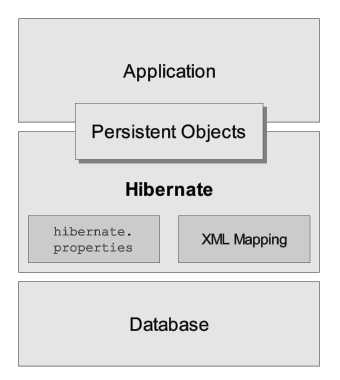
We do not have the scope in this document to provide a more detailed view of all the runtime architectures available; Hibernate is flexible and supports several different approaches. We will, however, show the two extremes: "minimal" architecture and "comprehensive" architecture.
This next diagram illustrates how Hibernate utilizes database and configuration data to provide persistence services, and persistent objects, to the application.
The "minimal" architecture has the application provide its own JDBC connections and manage its own transactions. This approach uses a minimal subset of Hibernate's APIs:
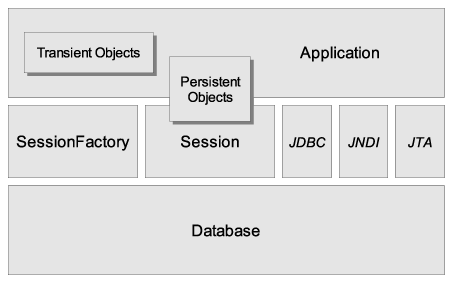
The "comprehensive" architecture abstracts the application away from the underlying JDBC/JTA APIs and allows Hibernate to manage the details.
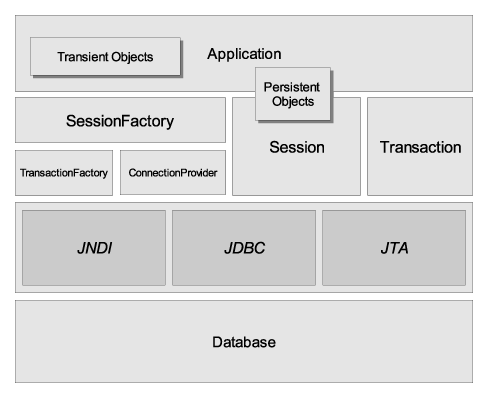
Here are some definitions of the objects depicted in the diagrams:
- SessionFactory (
org.hibernate.SessionFactory) A threadsafe, immutable cache of compiled mappings for a single database. A factory for
Sessionand a client ofConnectionProvider,SessionFactorycan hold an optional (second-level) cache of data that is reusable between transactions at a process, or cluster, level.- Session (
org.hibernate.Session) A single-threaded, short-lived object representing a conversation between the application and the persistent store. It wraps a JDBC connection and is a factory for
Transaction.Sessionholds a mandatory first-level cache of persistent objects that are used when navigating the object graph or looking up objects by identifier.- Persistent objects and collections
Short-lived, single threaded objects containing persistent state and business function. These can be ordinary JavaBeans/POJOs. They are associated with exactly one
Session. Once theSessionis closed, they will be detached and free to use in any application layer (for example, directly as data transfer objects to and from presentation).- Transient and detached objects and collections
Instances of persistent classes that are not currently associated with a
Session. They may have been instantiated by the application and not yet persisted, or they may have been instantiated by a closedSession.- Transaction (
org.hibernate.Transaction) (Optional) A single-threaded, short-lived object used by the application to specify atomic units of work. It abstracts the application from the underlying JDBC, JTA or CORBA transaction. A
Sessionmight span severalTransactions in some cases. However, transaction demarcation, either using the underlying API orTransaction, is never optional.- ConnectionProvider (
org.hibernate.connection.ConnectionProvider) (Optional) A factory for, and pool of, JDBC connections. It abstracts the application from underlying
DatasourceorDriverManager. It is not exposed to application, but it can be extended and/or implemented by the developer.- TransactionFactory (
org.hibernate.TransactionFactory) (Optional) A factory for
Transactioninstances. It is not exposed to the application, but it can be extended and/or implemented by the developer.- Extension Interfaces
Hibernate offers a range of optional extension interfaces you can implement to customize the behavior of your persistence layer. See the API documentation for details.
Given a "minimal" architecture, the application bypasses the
Transaction/TransactionFactory and/or
ConnectionProvider APIs to communicate with JTA or JDBC directly.
An instance of a persistent class can be in one of three different states. These states are
defined in relation to a persistence context.
The Hibernate Session object is the persistence context. The three different states are as follows:
- transient
The instance is not associated with any persistence context. It has no persistent identity or primary key value.
- persistent
The instance is currently associated with a persistence context. It has a persistent identity (primary key value) and can have a corresponding row in the database. For a particular persistence context, Hibernate guarantees that persistent identity is equivalent to Java identity in relation to the in-memory location of the object.
- detached
The instance was once associated with a persistence context, but that context was closed, or the instance was serialized to another process. It has a persistent identity and can have a corresponding row in the database. For detached instances, Hibernate does not guarantee the relationship between persistent identity and Java identity.
JMX is the J2EE standard for the management of Java components. Hibernate can be managed via
a JMX standard service. AN MBean implementation is provided in the distribution:
org.hibernate.jmx.HibernateService.
For an example of how to deploy Hibernate as a JMX service on the JBoss Application Server, please see the JBoss User Guide. JBoss AS also provides these benefits if you deploy using JMX:
Session Management: the Hibernate
Session's life cycle can be automatically bound to the scope of a JTA transaction. This means that you no longer have to manually open and close theSession; this becomes the job of a JBoss EJB interceptor. You also do not have to worry about transaction demarcation in your code (if you would like to write a portable persistence layer use the optional HibernateTransactionAPI for this). You call theHibernateContextto access aSession.HAR deployment: the Hibernate JMX service is deployed using a JBoss service deployment descriptor in an EAR and/or SAR file, as it supports all the usual configuration options of a Hibernate
SessionFactory. However, you still need to name all your mapping files in the deployment descriptor. If you use the optional HAR deployment, JBoss will automatically detect all mapping files in your HAR file.
Consult the JBoss AS user guide for more information about these options.
Another feature available as a JMX service is runtime Hibernate statistics. See Section 3.4.6, “Hibernate statistics” for more information.
Hibernate can also be configured as a JCA connector. Please see the website for more information. Please note, however, that at this stage Hibernate JCA support is under development.
Most applications using Hibernate need some form of "contextual" session, where a given
session is in effect throughout the scope of a given context. However, across applications
the definition of what constitutes a context is typically different; different contexts
define different scopes to the notion of current. Applications using Hibernate prior
to version 3.0 tended to utilize either home-grown ThreadLocal-based
contextual sessions, helper classes such as HibernateUtil, or utilized
third-party frameworks, such as Spring or Pico, which provided proxy/interception-based contextual sessions.
Starting with version 3.0.1, Hibernate added the SessionFactory.getCurrentSession()
method. Initially, this assumed usage of JTA transactions, where the
JTA transaction defined both the scope and context of a current session.
Given the maturity of the numerous stand-alone
JTA TransactionManager implementations, most, if not all,
applications should be using JTA transaction management, whether or not
they are deployed into a J2EE container. Based on that, the
JTA-based contextual sessions are all you need to use.
However, as of version 3.1, the processing behind
SessionFactory.getCurrentSession() is now pluggable. To that
end, a new extension interface, org.hibernate.context.CurrentSessionContext,
and a new configuration parameter, hibernate.current_session_context_class,
have been added to allow pluggability of the scope and context of defining current sessions.
See the Javadocs for the org.hibernate.context.CurrentSessionContext
interface for a detailed discussion of its contract. It defines a single method,
currentSession(), by which the implementation is responsible for
tracking the current contextual session. Out-of-the-box, Hibernate comes with three
implementations of this interface:
org.hibernate.context.JTASessionContext: current sessions are tracked and scoped by aJTAtransaction. The processing here is exactly the same as in the older JTA-only approach. See the Javadocs for details.org.hibernate.context.ThreadLocalSessionContext:current sessions are tracked by thread of execution. See the Javadocs for details.org.hibernate.context.ManagedSessionContext: current sessions are tracked by thread of execution. However, you are responsible to bind and unbind aSessioninstance with static methods on this class: it does not open, flush, or close aSession.
The first two implementations provide a "one session - one database transaction" programming
model. This is also known and used as session-per-request. The beginning
and end of a Hibernate session is defined by the duration of a database transaction.
If you use programmatic transaction demarcation in plain JSE without JTA, you are advised to
use the Hibernate Transaction API to hide the underlying transaction system
from your code. If you use JTA, you can utilize the JTA interfaces to demarcate transactions. If you
execute in an EJB container that supports CMT, transaction boundaries are defined declaratively
and you do not need any transaction or session demarcation operations in your code.
Refer to Chapter 12, Transactions and Concurrency for more information and code examples.
The hibernate.current_session_context_class configuration parameter
defines which org.hibernate.context.CurrentSessionContext implementation
should be used. For backwards compatibility, if this configuration parameter is not set
but a org.hibernate.transaction.TransactionManagerLookup is configured,
Hibernate will use the org.hibernate.context.JTASessionContext.
Typically, the value of this parameter would just name the implementation class to
use. For the three out-of-the-box implementations, however, there are three corresponding
short names: "jta", "thread", and "managed".
Hibernate is designed to operate in many different environments and, as such, there
is a broad range of configuration parameters. Fortunately, most have sensible
default values and Hibernate is distributed with an example
hibernate.properties file in etc/ that displays
the various options. Simply put the example file in your classpath and customize it to suit your needs.
An instance of org.hibernate.cfg.Configuration represents an entire set of mappings
of an application's Java types to an SQL database. The org.hibernate.cfg.Configuration
is used to build an immutable org.hibernate.SessionFactory. The mappings
are compiled from various XML mapping files.
You can obtain a org.hibernate.cfg.Configuration instance by instantiating
it directly and specifying XML mapping documents. If the mapping files are in the classpath,
use addResource(). For example:
Configuration cfg = new Configuration()

    .addResource("Item.hbm.xml")

    .addResource("Bid.hbm.xml");
An alternative way is to specify the mapped class and allow Hibernate to find the mapping document for you:
Configuration cfg = new Configuration()

    .addClass(org.hibernate.auction.Item.class)

    .addClass(org.hibernate.auction.Bid.class);
Hibernate will then search for mapping files named /org/hibernate/auction/Item.hbm.xml
and /org/hibernate/auction/Bid.hbm.xml in the classpath. This approach eliminates any
hardcoded filenames.
A org.hibernate.cfg.Configuration also allows you to specify configuration
properties. For example:
Configuration cfg = new Configuration()

    .addClass(org.hibernate.auction.Item.class)

    .addClass(org.hibernate.auction.Bid.class)

    .setProperty("hibernate.dialect", "org.hibernate.dialect.MySQLInnoDBDialect")

    .setProperty("hibernate.connection.datasource", "java:comp/env/jdbc/test")

    .setProperty("hibernate.order_updates", "true");
This is not the only way to pass configuration properties to Hibernate. Some alternative options include:
Pass an instance of
java.util.PropertiestoConfiguration.setProperties().Place a file named
hibernate.propertiesin a root directory of the classpath.Set
Systemproperties usingjava -Dproperty=value.Include
<property>elements inhibernate.cfg.xml(this is discussed later).
If you want to get started quicklyhibernate.properties is the easiest approach.
The org.hibernate.cfg.Configuration is intended as a startup-time object that will
be discarded once a SessionFactory is created.
When all mappings have been parsed by the org.hibernate.cfg.Configuration,
the application must obtain a factory for org.hibernate.Session instances.
This factory is intended to be shared by all application threads:
SessionFactory sessions = cfg.buildSessionFactory();
Hibernate does allow your application to instantiate more than one
org.hibernate.SessionFactory. This is useful if you are using more than
one database.
It is advisable to have the org.hibernate.SessionFactory create and pool
JDBC connections for you. If you take this approach, opening a org.hibernate.Session
is as simple as:
Session session = sessions.openSession(); // open a new Session
Once you start a task that requires access to the database, a JDBC connection will be obtained from the pool.
Before you can do this, you first need to pass some JDBC connection properties to Hibernate. All Hibernate property
names and semantics are defined on the class org.hibernate.cfg.Environment.
The most important settings for JDBC connection configuration are outlined below.
Hibernate will obtain and pool connections using java.sql.DriverManager
if you set the following properties:
Table 3.1. Hibernate JDBC Properties
| Property name | Purpose |
|---|---|
| hibernate.connection.driver_class | JDBC driver class |
| hibernate.connection.url | JDBC URL |
| hibernate.connection.username | database user |
| hibernate.connection.password | database user password |
| hibernate.connection.pool_size | maximum number of pooled connections |
Hibernate's own connection pooling algorithm is, however, quite rudimentary. It is intended to help you get started and is not intended for use in a production system, or even for performance testing. You should use a third party pool for best performance and stability. Just replace the hibernate.connection.pool_size property with connection pool specific settings. This will turn off Hibernate's internal pool. For example, you might like to use c3p0.
C3P0 is an open source JDBC connection pool distributed along with Hibernate in the lib
directory. Hibernate will use its org.hibernate.connection.C3P0ConnectionProvider
for connection pooling if you set hibernate.c3p0.* properties. If you would like to use Proxool,
refer to the packaged hibernate.properties and the Hibernate web site for more
information.
The following is an example hibernate.properties file for c3p0:
hibernate.connection.driver_class = org.postgresql.Driver
hibernate.connection.url = jdbc:postgresql://localhost/mydatabase
hibernate.connection.username = myuser
hibernate.connection.password = secret
hibernate.c3p0.min_size=5
hibernate.c3p0.max_size=20
hibernate.c3p0.timeout=1800
hibernate.c3p0.max_statements=50
hibernate.dialect = org.hibernate.dialect.PostgreSQLDialect
For use inside an application server, you should almost always configure Hibernate to obtain connections
from an application server javax.sql.Datasource registered in JNDI. You will
need to set at least one of the following properties:
Table 3.2. Hibernate Datasource Properties
| Property name | Purpose |
|---|---|
| hibernate.connection.datasource | datasource JNDI name |
| hibernate.jndi.url | URL of the JNDI provider (optional) |
| hibernate.jndi.class |
class of the JNDI InitialContextFactory (optional)
|
| hibernate.connection.username | database user (optional) |
| hibernate.connection.password | database user password (optional) |
Here is an example hibernate.properties file for an application server provided JNDI
datasource:
hibernate.connection.datasource = java:/comp/env/jdbc/test
hibernate.transaction.factory_class = \
    org.hibernate.transaction.JTATransactionFactory
hibernate.transaction.manager_lookup_class = \
    org.hibernate.transaction.JBossTransactionManagerLookup
hibernate.dialect = org.hibernate.dialect.PostgreSQLDialect
JDBC connections obtained from a JNDI datasource will automatically participate in the container-managed transactions of the application server.
Arbitrary connection properties can be given by prepending "hibernate.connection" to the
connection property name. For example, you can specify a charSet
connection property using hibernate.connection.charSet.
You can define your own plugin strategy for obtaining JDBC connections by implementing the
interface org.hibernate.connection.ConnectionProvider, and specifying your
custom implementation via the hibernate.connection.provider_class property.
There are a number of other properties that control the behavior of Hibernate at runtime. All are optional and have reasonable default values.
Warning
Some of these properties are "system-level" only. System-level properties can
be set only via java -Dproperty=value or hibernate.properties. They
cannot be set by the other techniques described above.
Table 3.3. Hibernate Configuration Properties
| Property name | Purpose |
|---|---|
| hibernate.dialect |
The classname of a Hibernate org.hibernate.dialect.Dialect which
allows Hibernate to generate SQL optimized for a particular relational database.
e.g.
In most cases Hibernate will actually be able to choose the correct
|
| hibernate.show_sql |
Write all SQL statements to console. This is an alternative
to setting the log category org.hibernate.SQL
to debug.
e.g.
|
| hibernate.format_sql |
Pretty print the SQL in the log and console.
e.g.
|
| hibernate.default_schema |
Qualify unqualified table names with the given schema/tablespace
in generated SQL.
e.g.
|
| hibernate.default_catalog |
Qualifies unqualified table names with the given catalog
in generated SQL.
e.g.
|
| hibernate.session_factory_name |
The org.hibernate.SessionFactory will be automatically
bound to this name in JNDI after it has been created.
e.g.
|
| hibernate.max_fetch_depth |
Sets a maximum "depth" for the outer join fetch tree
for single-ended associations (one-to-one, many-to-one).
A 0 disables default outer join fetching.
e.g.
recommended values between |
| hibernate.default_batch_fetch_size |
Sets a default size for Hibernate batch fetching of associations.
e.g.
recommended values |
| hibernate.default_entity_mode |
Sets a default mode for entity representation for all sessions
opened from this SessionFactory
|
| hibernate.order_updates |
Forces Hibernate to order SQL updates by the primary key value
of the items being updated. This will result in fewer transaction
deadlocks in highly concurrent systems.
e.g.
|
| hibernate.generate_statistics |
If enabled, Hibernate will collect statistics useful for
performance tuning.
e.g.
|
| hibernate.use_identifier_rollback |
If enabled, generated identifier properties will be
reset to default values when objects are deleted.
e.g.
|
| hibernate.use_sql_comments |
If turned on, Hibernate will generate comments inside the SQL, for
easier debugging, defaults to false.
e.g.
|
Table 3.4. Hibernate JDBC and Connection Properties
| Property name | Purpose |
|---|---|
| hibernate.jdbc.fetch_size |
A non-zero value determines the JDBC fetch size (calls
Statement.setFetchSize()).
|
| hibernate.jdbc.batch_size |
A non-zero value enables use of JDBC2 batch updates by Hibernate.
e.g.
recommended values between |
| hibernate.jdbc.batch_versioned_data |
Set this property to true if your JDBC driver returns
correct row counts from executeBatch(). It is usually
safe to turn this option on. Hibernate will then use batched DML for
automatically versioned data. Defaults to false.
e.g.
|
| hibernate.jdbc.factory_class |
Select a custom org.hibernate.jdbc.Batcher. Most applications
will not need this configuration property.
e.g.
|
| hibernate.jdbc.use_scrollable_resultset |
Enables use of JDBC2 scrollable resultsets by Hibernate.
This property is only necessary when using user-supplied
JDBC connections. Hibernate uses connection metadata otherwise.
e.g.
|
| hibernate.jdbc.use_streams_for_binary |
Use streams when writing/reading binary or serializable
types to/from JDBC. *system-level property*
e.g.
|
| hibernate.jdbc.use_get_generated_keys |
Enables use of JDBC3 PreparedStatement.getGeneratedKeys()
to retrieve natively generated keys after insert. Requires JDBC3+ driver
and JRE1.4+, set to false if your driver has problems with the Hibernate
identifier generators. By default, it tries to determine the driver capabilities
using connection metadata.
e.g.
|
| hibernate.connection.provider_class |
The classname of a custom org.hibernate.connection.ConnectionProvider
which provides JDBC connections to Hibernate.
e.g.
|
| hibernate.connection.isolation |
Sets the JDBC transaction isolation level. Check java.sql.Connection
for meaningful values, but note that most databases do not support all isolation levels and some
define additional, non-standard isolations.
e.g.
|
| hibernate.connection.autocommit |
Enables autocommit for JDBC pooled connections (it is not recommended).
e.g.
|
| hibernate.connection.release_mode |
Specifies when Hibernate should release JDBC connections. By default,
a JDBC connection is held until the session is explicitly closed or
disconnected. For an application server JTA datasource, use
after_statement to aggressively release connections
after every JDBC call. For a non-JTA connection, it often makes sense to
release the connection at the end of each transaction, by using
after_transaction. auto will
choose after_statement for the JTA and CMT transaction
strategies and after_transaction for the JDBC
transaction strategy.
e.g.
This setting only affects |
| hibernate.connection.<propertyName> |
Pass the JDBC property <propertyName>
to DriverManager.getConnection().
|
| hibernate.jndi.<propertyName> |
Pass the property <propertyName> to
the JNDI InitialContextFactory.
|
Table 3.5. Hibernate Cache Properties
| Property name | Purpose |
|---|---|
hibernate.cache.provider_class
|
The classname of a custom CacheProvider.
e.g.
|
hibernate.cache.use_minimal_puts
|
Optimizes second-level cache operation to minimize writes, at the
cost of more frequent reads. This setting is most useful for
clustered caches and, in Hibernate3, is enabled by default for
clustered cache implementations.
e.g.
|
hibernate.cache.use_query_cache
|
Enables the query cache. Individual queries still have to be set cachable.
e.g.
|
hibernate.cache.use_second_level_cache
|
Can be used to completely disable the second level cache, which is enabled
by default for classes which specify a <cache>
mapping.
e.g.
|
hibernate.cache.query_cache_factory
|
The classname of a custom QueryCache interface,
defaults to the built-in StandardQueryCache.
e.g.
|
hibernate.cache.region_prefix
|
A prefix to use for second-level cache region names.
e.g.
|
hibernate.cache.use_structured_entries
|
Forces Hibernate to store data in the second-level cache
in a more human-friendly format.
e.g.
|
Table 3.6. Hibernate Transaction Properties
| Property name | Purpose |
|---|---|
hibernate.transaction.factory_class
|
The classname of a TransactionFactory
to use with Hibernate Transaction API
(defaults to JDBCTransactionFactory).
e.g.
|
jta.UserTransaction
|
A JNDI name used by JTATransactionFactory to
obtain the JTA UserTransaction from the
application server.
e.g.
|
hibernate.transaction.manager_lookup_class
|
The classname of a TransactionManagerLookup. It is
required when JVM-level caching is enabled or when using hilo
generator in a JTA environment.
e.g.
|
hibernate.transaction.flush_before_completion
|
If enabled, the session will be automatically flushed during the
before completion phase of the transaction. Built-in and
automatic session context management is preferred, see
Section 2.5, “Contextual sessions”.
e.g.
|
hibernate.transaction.auto_close_session
|
If enabled, the session will be automatically closed during the
after completion phase of the transaction. Built-in and
automatic session context management is preferred, see
Section 2.5, “Contextual sessions”.
e.g.
|
Table 3.7. Miscellaneous Properties
| Property name | Purpose |
|---|---|
hibernate.current_session_context_class
|
Supply a custom strategy for the scoping of the "current"
Session. See
Section 2.5, “Contextual sessions” for more
information about the built-in strategies.
e.g.
|
hibernate.query.factory_class
|
Chooses the HQL parser implementation.
e.g.
|
hibernate.query.substitutions
|
Is used to map from tokens in Hibernate queries to SQL tokens
(tokens might be function or literal names, for example).
e.g.
|
hibernate.hbm2ddl.auto
|
Automatically validates or exports schema DDL to the database
when the SessionFactory is created. With
create-drop, the database schema will be
dropped when the SessionFactory is closed
explicitly.
e.g.
|
hibernate.bytecode.use_reflection_optimizer
|
Enables the use of bytecode manipulation instead of
runtime reflection. This is a System-level property and cannot be set
in e.g. |
hibernate.bytecode.provider
| Both javassist or cglib can be used as byte manipulation
engines; the default is e.g. |
Always set the hibernate.dialect property to the correct
org.hibernate.dialect.Dialect subclass for your database. If you
specify a dialect, Hibernate will use sensible defaults for some of the
other properties listed above. This means that you will not have to specify them manually.
Table 3.8. Hibernate SQL Dialects (hibernate.dialect)
| RDBMS | Dialect |
|---|---|
| DB2 | org.hibernate.dialect.DB2Dialect |
| DB2 AS/400 | org.hibernate.dialect.DB2400Dialect |
| DB2 OS390 | org.hibernate.dialect.DB2390Dialect |
| PostgreSQL | org.hibernate.dialect.PostgreSQLDialect |
| MySQL | org.hibernate.dialect.MySQLDialect |
| MySQL with InnoDB | org.hibernate.dialect.MySQLInnoDBDialect |
| MySQL with MyISAM | org.hibernate.dialect.MySQLMyISAMDialect |
| Oracle (any version) | org.hibernate.dialect.OracleDialect |
| Oracle 9i | org.hibernate.dialect.Oracle9iDialect |
| Oracle 10g | org.hibernate.dialect.Oracle10gDialect |
| Sybase | org.hibernate.dialect.SybaseDialect |
| Sybase Anywhere | org.hibernate.dialect.SybaseAnywhereDialect |
| Microsoft SQL Server | org.hibernate.dialect.SQLServerDialect |
| SAP DB | org.hibernate.dialect.SAPDBDialect |
| Informix | org.hibernate.dialect.InformixDialect |
| HypersonicSQL | org.hibernate.dialect.HSQLDialect |
| Ingres | org.hibernate.dialect.IngresDialect |
| Progress | org.hibernate.dialect.ProgressDialect |
| Mckoi SQL | org.hibernate.dialect.MckoiDialect |
| Interbase | org.hibernate.dialect.InterbaseDialect |
| Pointbase | org.hibernate.dialect.PointbaseDialect |
| FrontBase | org.hibernate.dialect.FrontbaseDialect |
| Firebird | org.hibernate.dialect.FirebirdDialect |
If your database supports ANSI, Oracle or Sybase style outer joins, outer join
fetching will often increase performance by limiting the number of round
trips to and from the database. This is, however, at the cost of possibly more work performed by
the database itself. Outer join fetching allows a whole graph of objects connected
by many-to-one, one-to-many, many-to-many and one-to-one associations to be retrieved
in a single SQL SELECT.
Outer join fetching can be disabled globally by setting
the property hibernate.max_fetch_depth to 0.
A setting of 1 or higher enables outer join fetching for
one-to-one and many-to-one associations that have been mapped with
fetch="join".
See Section 20.1, “Fetching strategies” for more information.
Oracle limits the size of byte arrays that can
be passed to and/or from its JDBC driver. If you wish to use large instances of
binary or serializable type, you should
enable hibernate.jdbc.use_streams_for_binary.
This is a system-level setting only.
The properties prefixed by hibernate.cache
allow you to use a process or cluster scoped second-level cache system
with Hibernate. See the Section 20.2, “The Second Level Cache” for
more information.
You can define new Hibernate query tokens using hibernate.query.substitutions.
For example:
hibernate.query.substitutions true=1, false=0
This would cause the tokens true and false to be translated to
integer literals in the generated SQL.
hibernate.query.substitutions toLowercase=LOWER
This would allow you to rename the SQL LOWER function.
If you enable hibernate.generate_statistics, Hibernate
exposes a number of metrics that are useful when tuning a running system via
SessionFactory.getStatistics(). Hibernate can even be configured
to expose these statistics via JMX. Read the Javadoc of the interfaces in
org.hibernate.stats for more information.
Hibernate utilizes Simple Logging Facade for Java
(SLF4J) in order to log various system events. SLF4J can direct your logging output to
several logging frameworks (NOP, Simple, log4j version 1.2, JDK 1.4 logging, JCL or logback) depending on your
chosen binding. In order to setup logging you will need slf4j-api.jar in
your classpath together with the jar file for your preferred binding - slf4j-log4j12.jar
in the case of Log4J. See the SLF4J documentation for more detail.
To use Log4j you will also need to place a log4j.properties file in your classpath.
An example properties file is distributed with Hibernate in the src/ directory.
It is recommended that you familiarize yourself with Hibernate's log messages. A lot of work has been put into making the Hibernate log as detailed as possible, without making it unreadable. It is an essential troubleshooting device. The most interesting log categories are the following:
Table 3.9. Hibernate Log Categories
| Category | Function |
|---|---|
org.hibernate.SQL | Log all SQL DML statements as they are executed |
org.hibernate.type | Log all JDBC parameters |
org.hibernate.tool.hbm2ddl | Log all SQL DDL statements as they are executed |
org.hibernate.pretty | Log the state of all entities (max 20 entities) associated with the session at flush time |
org.hibernate.cache | Log all second-level cache activity |
org.hibernate.transaction | Log transaction related activity |
org.hibernate.jdbc | Log all JDBC resource acquisition |
org.hibernate.hql.ast.AST | Log HQL and SQL ASTs during query parsing |
org.hibernate.secure | Log all JAAS authorization requests |
org.hibernate | Log everything. This is a lot of information but it is useful for troubleshooting |
When developing applications with Hibernate, you should almost always work with
debug enabled for the category org.hibernate.SQL,
or, alternatively, the property hibernate.show_sql enabled.
The interface org.hibernate.cfg.NamingStrategy allows you
to specify a "naming standard" for database objects and schema elements.
You can provide rules for automatically generating database identifiers from
Java identifiers or for processing "logical" column and table names given in
the mapping file into "physical" table and column names. This feature helps
reduce the verbosity of the mapping document, eliminating repetitive noise
(TBL_ prefixes, for example). The default strategy used by
Hibernate is quite minimal.
You can specify a different strategy by calling
Configuration.setNamingStrategy() before adding mappings:
SessionFactory sf = new Configuration()

    .setNamingStrategy(ImprovedNamingStrategy.INSTANCE)

    .addFile("Item.hbm.xml")

    .addFile("Bid.hbm.xml")

    .buildSessionFactory();
org.hibernate.cfg.ImprovedNamingStrategy is a built-in
strategy that might be a useful starting point for some applications.
An alternative approach to configuration is to specify a full configuration in
a file named hibernate.cfg.xml. This file can be used as a
replacement for the hibernate.properties file or, if both
are present, to override properties.
The XML configuration file is by default expected to be in the root of
your CLASSPATH. Here is an example:
<?xml version='1.0' encoding='utf-8'?>

<!DOCTYPE hibernate-configuration PUBLIC

    "-//Hibernate/Hibernate Configuration DTD//EN"

    "http://hibernate.sourceforge.net/hibernate-configuration-3.0.dtd">


<hibernate-configuration>


    <!-- a SessionFactory instance listed as /jndi/name -->

    <session-factory

        name="java:hibernate/SessionFactory">


        <!-- properties -->

        <property name="connection.datasource">java:/comp/env/jdbc/MyDB</property>

        <property name="dialect">org.hibernate.dialect.MySQLDialect</property>

        <property name="show_sql">false</property>

        <property name="transaction.factory_class">

            org.hibernate.transaction.JTATransactionFactory

        </property>

        <property name="jta.UserTransaction">java:comp/UserTransaction</property>


        <!-- mapping files -->

        <mapping resource="org/hibernate/auction/Item.hbm.xml"/>

        <mapping resource="org/hibernate/auction/Bid.hbm.xml"/>


        <!-- cache settings -->

        <class-cache class="org.hibernate.auction.Item" usage="read-write"/>

        <class-cache class="org.hibernate.auction.Bid" usage="read-only"/>

        <collection-cache collection="org.hibernate.auction.Item.bids" usage="read-write"/>


    </session-factory>


</hibernate-configuration>
The advantage of this approach is the externalization of the
mapping file names to configuration. The hibernate.cfg.xml
is also more convenient once you have to tune the Hibernate cache. It is
your choice to use either hibernate.properties or
hibernate.cfg.xml. Both are equivalent, except for the above
mentioned benefits of using the XML syntax.
With the XML configuration, starting Hibernate is then as simple as:
SessionFactory sf = new Configuration().configure().buildSessionFactory();
You can select a different XML configuration file using:
SessionFactory sf = new Configuration()

    .configure("catdb.cfg.xml")

    .buildSessionFactory();
Hibernate has the following integration points for J2EE infrastructure:
Container-managed datasources: Hibernate can use JDBC connections managed by the container and provided through JNDI. Usually, a JTA compatible
TransactionManagerand aResourceManagertake care of transaction management (CMT), especially distributed transaction handling across several datasources. You can also demarcate transaction boundaries programmatically (BMT), or you might want to use the optional HibernateTransactionAPI for this to keep your code portable.
Automatic JNDI binding: Hibernate can bind its
SessionFactoryto JNDI after startup.
JTA Session binding: the Hibernate
Sessioncan be automatically bound to the scope of JTA transactions. Simply lookup theSessionFactoryfrom JNDI and get the currentSession. Let Hibernate manage flushing and closing theSessionwhen your JTA transaction completes. Transaction demarcation is either declarative (CMT) or programmatic (BMT/UserTransaction).
JMX deployment: if you have a JMX capable application server (e.g. JBoss AS), you can choose to deploy Hibernate as a managed MBean. This saves you the one line startup code to build your
SessionFactoryfrom aConfiguration. The container will startup yourHibernateServiceand also take care of service dependencies (datasource has to be available before Hibernate starts, etc).
Depending on your environment, you might have to set the configuration option
hibernate.connection.aggressive_release to true if your
application server shows "connection containment" exceptions.
The Hibernate Session API is independent of any transaction
demarcation system in your architecture. If you let Hibernate use JDBC directly
through a connection pool, you can begin and end your transactions by calling
the JDBC API. If you run in a J2EE application server, you might want to use bean-managed
transactions and call the JTA API and UserTransaction when needed.
To keep your code portable between these two (and other) environments we recommend the optional
Hibernate Transaction API, which wraps and hides the underlying system.
You have to specify a factory class for Transaction instances by setting the
Hibernate configuration property hibernate.transaction.factory_class.
There are three standard, or built-in, choices:
org.hibernate.transaction.JDBCTransactionFactorydelegates to database (JDBC) transactions (default)
org.hibernate.transaction.JTATransactionFactorydelegates to container-managed transactions if an existing transaction is underway in this context (for example, EJB session bean method). Otherwise, a new transaction is started and bean-managed transactions are used.
org.hibernate.transaction.CMTTransactionFactorydelegates to container-managed JTA transactions
You can also define your own transaction strategies (for a CORBA transaction service, for example).
Some features in Hibernate (i.e., the second level cache, Contextual Sessions with JTA, etc.)
require access to the JTA TransactionManager in a managed environment.
In an application server, since J2EE does not standardize a single mechanism, you have to specify how Hibernate should obtain a reference to the
TransactionManager:
Table 3.10. JTA TransactionManagers
| Transaction Factory | Application Server |
|---|---|
org.hibernate.transaction.JBossTransactionManagerLookup | JBoss |
org.hibernate.transaction.WeblogicTransactionManagerLookup | Weblogic |
org.hibernate.transaction.WebSphereTransactionManagerLookup | WebSphere |
org.hibernate.transaction.WebSphereExtendedJTATransactionLookup | WebSphere 6 |
org.hibernate.transaction.OrionTransactionManagerLookup | Orion |
org.hibernate.transaction.ResinTransactionManagerLookup | Resin |
org.hibernate.transaction.JOTMTransactionManagerLookup | JOTM |
org.hibernate.transaction.JOnASTransactionManagerLookup | JOnAS |
org.hibernate.transaction.JRun4TransactionManagerLookup | JRun4 |
org.hibernate.transaction.BESTransactionManagerLookup | Borland ES |
A JNDI-bound Hibernate SessionFactory can simplify the lookup
function of the factory and create new Sessions. This
is not, however, related to a JNDI bound Datasource; both simply use the
same registry.
If you wish to have the SessionFactory bound to a JNDI namespace, specify
a name (e.g. java:hibernate/SessionFactory) using the property
hibernate.session_factory_name. If this property is omitted, the
SessionFactory will not be bound to JNDI. This is especially useful in
environments with a read-only JNDI default implementation (in Tomcat, for example).
When binding the SessionFactory to JNDI, Hibernate will use the values of
hibernate.jndi.url, hibernate.jndi.class to instantiate
an initial context. If they are not specified, the default InitialContext
will be used.
Hibernate will automatically place the SessionFactory in JNDI after
you call cfg.buildSessionFactory(). This means you will have
this call in some startup code, or utility class in your application, unless you use
JMX deployment with the HibernateService (this is discussed later in greater detail).
If you use a JNDI SessionFactory, an EJB or any other class, you can
obtain the SessionFactory using a JNDI lookup.
It is recommended that you bind the SessionFactory to JNDI in
a managed environment and use a static singleton otherwise.
To shield your application code from these details, we also recommend to hide the
actual lookup code for a SessionFactory in a helper class,
such as HibernateUtil.getSessionFactory(). Note that such a
class is also a convenient way to startup Hibernate—see chapter 1.
The easiest way to handle Sessions and transactions is
Hibernate's automatic "current" Session management.
For a discussion of contextual sessions see Section 2.5, “Contextual sessions”.
Using the "jta" session context, if there is no Hibernate
Session associated with the current JTA transaction, one will
be started and associated with that JTA transaction the first time you call
sessionFactory.getCurrentSession(). The Sessions
retrieved via getCurrentSession() in the "jta" context
are set to automatically flush before the transaction completes, close
after the transaction completes, and aggressively release JDBC connections
after each statement. This allows the Sessions to
be managed by the life cycle of the JTA transaction to which it is associated,
keeping user code clean of such management concerns. Your code can either use
JTA programmatically through UserTransaction, or (recommended
for portable code) use the Hibernate Transaction API to set
transaction boundaries. If you run in an EJB container, declarative transaction
demarcation with CMT is preferred.
The line cfg.buildSessionFactory() still has to be executed
somewhere to get a SessionFactory into JNDI. You can do this
either in a static initializer block, like the one in
HibernateUtil, or you can deploy Hibernate as a managed
service.
Hibernate is distributed with org.hibernate.jmx.HibernateService
for deployment on an application server with JMX capabilities, such as JBoss AS.
The actual deployment and configuration is vendor-specific. Here is an example
jboss-service.xml for JBoss 4.0.x:
<?xml version="1.0"?>

<server>


<mbean code="org.hibernate.jmx.HibernateService"

    name="jboss.jca:service=HibernateFactory,name=HibernateFactory">


    <!-- Required services -->

    <depends>jboss.jca:service=RARDeployer</depends>

    <depends>jboss.jca:service=LocalTxCM,name=HsqlDS</depends>


    <!-- Bind the Hibernate service to JNDI -->

    <attribute name="JndiName">java:/hibernate/SessionFactory</attribute>


    <!-- Datasource settings -->

    <attribute name="Datasource">java:HsqlDS</attribute>

    <attribute name="Dialect">org.hibernate.dialect.HSQLDialect</attribute>


    <!-- Transaction integration -->

    <attribute name="TransactionStrategy">

        org.hibernate.transaction.JTATransactionFactory</attribute>

    <attribute name="TransactionManagerLookupStrategy">

        org.hibernate.transaction.JBossTransactionManagerLookup</attribute>

    <attribute name="FlushBeforeCompletionEnabled">true</attribute>

    <attribute name="AutoCloseSessionEnabled">true</attribute>


    <!-- Fetching options -->

    <attribute name="MaximumFetchDepth">5</attribute>


    <!-- Second-level caching -->

    <attribute name="SecondLevelCacheEnabled">true</attribute>

    <attribute name="CacheProviderClass">org.hibernate.cache.EhCacheProvider</attribute>

    <attribute name="QueryCacheEnabled">true</attribute>


    <!-- Logging -->

    <attribute name="ShowSqlEnabled">true</attribute>


    <!-- Mapping files -->

    <attribute name="MapResources">auction/Item.hbm.xml,auction/Category.hbm.xml</attribute>


</mbean>


</server>
This file is deployed in a directory called META-INF and packaged
in a JAR file with the extension .sar (service archive). You also need
to package Hibernate, its required third-party libraries, your compiled persistent classes,
as well as your mapping files in the same archive. Your enterprise beans (usually session
beans) can be kept in their own JAR file, but you can include this EJB JAR file in the
main service archive to get a single (hot-)deployable unit. Consult the JBoss AS
documentation for more information about JMX service and EJB deployment.
Persistent classes are classes in an application that implement the entities of the business problem (e.g. Customer and Order in an E-commerce application). Not all instances of a persistent class are considered to be in the persistent state. For example, an instance can instead be transient or detached.
Hibernate works best if these classes follow some simple rules, also known
as the Plain Old Java Object (POJO) programming model. However, none of these
rules are hard requirements. Indeed, Hibernate3 assumes very little about
the nature of your persistent objects. You can express a domain model in other
ways (using trees of Map instances, for example).
Most Java applications require a persistent class representing felines. For example:
package eg;

import java.util.Set;

import java.util.Date;


public class Cat {

    private Long id; // identifier


    private Date birthdate;

    private Color color;

    private char sex;

    private float weight;

    private int litterId;


    private Cat mother;

    private Set kittens = new HashSet();


    private void setId(Long id) {

        this.id=id;

    }

    public Long getId() {

        return id;

    }


    void setBirthdate(Date date) {

        birthdate = date;

    }

    public Date getBirthdate() {

        return birthdate;

    }


    void setWeight(float weight) {

        this.weight = weight;

    }

    public float getWeight() {

        return weight;

    }


    public Color getColor() {

        return color;

    }

    void setColor(Color color) {

        this.color = color;

    }


    void setSex(char sex) {

        this.sex=sex;

    }

    public char getSex() {

        return sex;

    }


    void setLitterId(int id) {

        this.litterId = id;

    }

    public int getLitterId() {

        return litterId;

    }


    void setMother(Cat mother) {

        this.mother = mother;

    }

    public Cat getMother() {

        return mother;

    }

    void setKittens(Set kittens) {

        this.kittens = kittens;

    }

    public Set getKittens() {

        return kittens;

    }


    // addKitten not needed by Hibernate

    public void addKitten(Cat kitten) {

        kitten.setMother(this);

    kitten.setLitterId( kittens.size() );

        kittens.add(kitten);

    }

}
The four main rules of persistent classes are explored in more detail in the following sections.
Cat has a no-argument constructor. All persistent classes must
have a default constructor (which can be non-public) so that Hibernate can instantiate
them using Constructor.newInstance(). It is recommended that you have a
default constructor with at least package visibility for runtime proxy
generation in Hibernate.
Cat has a property called id. This property
maps to the primary key column of a database table. The property might have been called
anything, and its type might have been any primitive type, any primitive "wrapper"
type, java.lang.String or java.util.Date. If
your legacy database table has composite keys, you can use a user-defined class
with properties of these types (see the section on composite identifiers later in the chapter.)
The identifier property is strictly optional. You can leave them off and let Hibernate keep track of object identifiers internally. We do not recommend this, however.
In fact, some functionality is available only to classes that declare an identifier property:
Transitive reattachment for detached objects (cascade update or cascade merge) - see Section 10.11, “Transitive persistence”
Session.saveOrUpdate()Session.merge()
We recommend that you declare consistently-named identifier properties on persistent classes and that you use a nullable (i.e., non-primitive) type.
A central feature of Hibernate, proxies, depends upon the persistent class being either non-final, or the implementation of an interface that declares all public methods.
You can persist final classes that do not implement an interface
with Hibernate. You will not, however, be able to use proxies for lazy association fetching which
will ultimately limit your options for performance tuning.
You should also avoid declaring public final methods on the
non-final classes. If you want to use a class with a public final
method, you must explicitly disable proxying by setting lazy="false".
Cat declares accessor methods for all its persistent fields.
Many other ORM tools directly persist instance variables. It is
better to provide an indirection between the relational schema and internal
data structures of the class. By default, Hibernate persists JavaBeans style
properties and recognizes method names of the form getFoo,
isFoo and setFoo. If required, you can switch to direct
field access for particular properties.
Properties need not be declared public - Hibernate can
persist a property with a default, protected or
private get / set pair.
A subclass must also observe the first and second rules. It inherits its
identifier property from the superclass, Cat. For example:
package eg;


public class DomesticCat extends Cat {

        private String name;


        public String getName() {

                return name;

        }

        protected void setName(String name) {

                this.name=name;

        }

}
You have to override the equals() and hashCode()
methods if you:
intend to put instances of persistent classes in a
Set(the recommended way to represent many-valued associations); andintend to use reattachment of detached instances
Hibernate guarantees equivalence of persistent identity (database row) and Java identity
only inside a particular session scope. When you mix instances retrieved in
different sessions, you must implement equals() and
hashCode() if you wish to have meaningful semantics for
Sets.
The most obvious way is to implement equals()/hashCode()
by comparing the identifier value of both objects. If the value is the same, both must
be the same database row, because they are equal. If both are added to a Set,
you will only have one element in the Set). Unfortunately, you cannot use that
approach with generated identifiers. Hibernate will only assign identifier values to objects
that are persistent; a newly created instance will not have any identifier value. Furthermore,
if an instance is unsaved and currently in a Set, saving it will assign
an identifier value to the object. If equals() and hashCode()
are based on the identifier value, the hash code would change, breaking the contract of the
Set. See the Hibernate website for a full discussion of this problem. This is not
a Hibernate issue, but normal Java semantics of object identity and equality.
It is recommended that you implement equals() and hashCode()
using Business key equality. Business key equality means that the
equals() method compares only the properties that form the business
key. It is a key that would identify our instance in the real world (a
natural candidate key):
public class Cat {


    ...

    public boolean equals(Object other) {

        if (this == other) return true;

        if ( !(other instanceof Cat) ) return false;


        final Cat cat = (Cat) other;


        if ( !cat.getLitterId().equals( getLitterId() ) ) return false;

        if ( !cat.getMother().equals( getMother() ) ) return false;


        return true;

    }


    public int hashCode() {

        int result;

        result = getMother().hashCode();

        result = 29 * result + getLitterId();

        return result;

    }


}
A business key does not have to be as solid as a database primary key candidate (see Section 12.1.3, “Considering object identity”). Immutable or unique properties are usually good candidates for a business key.
Note
The following features are currently considered experimental and may change in the near future.
Persistent entities do not necessarily have to be represented as POJO classes
or as JavaBean objects at runtime. Hibernate also supports dynamic models
(using Maps of Maps at runtime) and the
representation of entities as DOM4J trees. With this approach, you do not
write persistent classes, only mapping files.
By default, Hibernate works in normal POJO mode. You can set a default entity
representation mode for a particular SessionFactory using the
default_entity_mode configuration option (see
Table 3.3, “Hibernate Configuration Properties”).
The following examples demonstrate the representation using Maps.
First, in the mapping file an entity-name has to be declared
instead of, or in addition to, a class name:
<hibernate-mapping>


    <class entity-name="Customer">


        <id name="id"

            type="long"

            column="ID">

            <generator class="sequence"/>

        </id>


        <property name="name"

            column="NAME"

            type="string"/>


        <property name="address"

            column="ADDRESS"

            type="string"/>


        <many-to-one name="organization"

            column="ORGANIZATION_ID"

            class="Organization"/>


        <bag name="orders"

            inverse="true"

            lazy="false"

            cascade="all">

            <key column="CUSTOMER_ID"/>

            <one-to-many class="Order"/>

        </bag>


    </class>


</hibernate-mapping>
Even though associations are declared using target class names, the target type of associations can also be a dynamic entity instead of a POJO.
After setting the default entity mode to dynamic-map
for the SessionFactory, you can, at runtime, work with
Maps of Maps:
Session s = openSession();

Transaction tx = s.beginTransaction();


// Create a customer

Map david = new HashMap();

david.put("name", "David");


// Create an organization

Map foobar = new HashMap();

foobar.put("name", "Foobar Inc.");


// Link both

david.put("organization", foobar);


// Save both

s.save("Customer", david);

s.save("Organization", foobar);


tx.commit();

s.close();
One of the main advantages of dynamic mapping is quick turnaround time for prototyping, without the need for entity class implementation. However, you lose compile-time type checking and will likely deal with many exceptions at runtime. As a result of the Hibernate mapping, the database schema can easily be normalized and sound, allowing to add a proper domain model implementation on top later on.
Entity representation modes can also be set on a per Session
basis:
Session dynamicSession = pojoSession.getSession(EntityMode.MAP);


// Create a customer

Map david = new HashMap();

david.put("name", "David");

dynamicSession.save("Customer", david);

...

dynamicSession.flush();

dynamicSession.close()

...

// Continue on pojoSession
Please note that the call to getSession() using an
EntityMode is on the Session API, not the
SessionFactory. That way, the new Session
shares the underlying JDBC connection, transaction, and other context
information. This means you do not have to call flush()
and close() on the secondary Session, and
also leave the transaction and connection handling to the primary unit of work.
More information about the XML representation capabilities can be found in Chapter 19, XML Mapping.
org.hibernate.tuple.Tuplizer, and its sub-interfaces, are responsible
for managing a particular representation of a piece of data given that representation's
org.hibernate.EntityMode. If a given piece of data is thought of as
a data structure, then a tuplizer is the thing that knows how to create such a data structure
and how to extract values from and inject values into such a data structure. For example,
for the POJO entity mode, the corresponding tuplizer knows how create the POJO through its
constructor. It also knows how to access the POJO properties using the defined property accessors.
There are two high-level types of Tuplizers, represented by the
org.hibernate.tuple.entity.EntityTuplizer and org.hibernate.tuple.component.ComponentTuplizer
interfaces. EntityTuplizers are responsible for managing the above mentioned
contracts in regards to entities, while ComponentTuplizers do the same for
components.
Users can also plug in their own tuplizers. Perhaps you require that a java.util.Map
implementation other than java.util.HashMap be used while in the
dynamic-map entity-mode. Or perhaps you need to define a different proxy generation strategy
than the one used by default. Both would be achieved by defining a custom tuplizer
implementation. Tuplizer definitions are attached to the entity or component mapping they
are meant to manage. Going back to the example of our customer entity:
<hibernate-mapping>

    <class entity-name="Customer">

        <!--

            Override the dynamic-map entity-mode

            tuplizer for the customer entity

        -->

        <tuplizer entity-mode="dynamic-map"

                class="CustomMapTuplizerImpl"/>


        <id name="id" type="long" column="ID">

            <generator class="sequence"/>

        </id>


        <!-- other properties -->

        ...

    </class>

</hibernate-mapping>


public class CustomMapTuplizerImpl

        extends org.hibernate.tuple.entity.DynamicMapEntityTuplizer {

    // override the buildInstantiator() method to plug in our custom map...

    protected final Instantiator buildInstantiator(

            org.hibernate.mapping.PersistentClass mappingInfo) {

        return new CustomMapInstantiator( mappingInfo );

    }


    private static final class CustomMapInstantiator

            extends org.hibernate.tuple.DynamicMapInstantitor {

        // override the generateMap() method to return our custom map...

        protected final Map generateMap() {

            return new CustomMap();

        }

    }

}
The org.hibernate.EntityNameResolver interface is a contract for resolving the
entity name of a given entity instance. The interface defines a single method resolveEntityName
which is passed the entity instance and is expected to return the appropriate entity name (null is allowed and
would indicate that the resolver does not know how to resolve the entity name of the given entity instance).
Generally speaking, an org.hibernate.EntityNameResolver is going to be most
useful in the case of dynamic models. One example might be using proxied interfaces as your domain model. The
hibernate test suite has an example of this exact style of usage under the
org.hibernate.test.dynamicentity.tuplizer2. Here is some of the code from that package
for illustration.
/**

 * A very trivial JDK Proxy InvocationHandler implementation where we proxy an interface as

 * the domain model and simply store persistent state in an internal Map.  This is an extremely

 * trivial example meant only for illustration.

 */

public final class DataProxyHandler implements InvocationHandler {

    private String entityName;

    private HashMap data = new HashMap();


    public DataProxyHandler(String entityName, Serializable id) {

        this.entityName = entityName;

        data.put( "Id", id );

    }


    public Object invoke(Object proxy, Method method, Object[] args) throws Throwable {

        String methodName = method.getName();

        if ( methodName.startsWith( "set" ) ) {

            String propertyName = methodName.substring( 3 );

            data.put( propertyName, args[0] );

        }

        else if ( methodName.startsWith( "get" ) ) {

            String propertyName = methodName.substring( 3 );

            return data.get( propertyName );

        }

        else if ( "toString".equals( methodName ) ) {

            return entityName + "#" + data.get( "Id" );

        }

        else if ( "hashCode".equals( methodName ) ) {

            return new Integer( this.hashCode() );

        }

        return null;

    }


    public String getEntityName() {

        return entityName;

    }


    public HashMap getData() {

        return data;

    }

}


/**

 *

 */

public class ProxyHelper {

    public static String extractEntityName(Object object) {

        // Our custom java.lang.reflect.Proxy instances actually bundle

        // their appropriate entity name, so we simply extract it from there

        // if this represents one of our proxies; otherwise, we return null

        if ( Proxy.isProxyClass( object.getClass() ) ) {

            InvocationHandler handler = Proxy.getInvocationHandler( object );

            if ( DataProxyHandler.class.isAssignableFrom( handler.getClass() ) ) {

                DataProxyHandler myHandler = ( DataProxyHandler ) handler;

                return myHandler.getEntityName();

            }

        }

        return null;

    }


    // various other utility methods ....


}


/**

 * The EntityNameResolver implementation.

 * IMPL NOTE : An EntityNameResolver really defines a strategy for how entity names should be

 * resolved.  Since this particular impl can handle resolution for all of our entities we want to

 * take advantage of the fact that SessionFactoryImpl keeps these in a Set so that we only ever

 * have one instance registered.  Why?  Well, when it comes time to resolve an entity name,

 * Hibernate must iterate over all the registered resolvers.  So keeping that number down

 * helps that process be as speedy as possible.  Hence the equals and hashCode impls

 */

public class MyEntityNameResolver implements EntityNameResolver {

    public static final MyEntityNameResolver INSTANCE = new MyEntityNameResolver();


    public String resolveEntityName(Object entity) {

        return ProxyHelper.extractEntityName( entity );

    }


    public boolean equals(Object obj) {

        return getClass().equals( obj.getClass() );

    }


    public int hashCode() {

        return getClass().hashCode();

    }

}


public class MyEntityTuplizer extends PojoEntityTuplizer {

    public MyEntityTuplizer(EntityMetamodel entityMetamodel, PersistentClass mappedEntity) {

        super( entityMetamodel, mappedEntity );

    }


    public EntityNameResolver[] getEntityNameResolvers() {

        return new EntityNameResolver[] { MyEntityNameResolver.INSTANCE };

    }


    public String determineConcreteSubclassEntityName(Object entityInstance, SessionFactoryImplementor factory) {

        String entityName = ProxyHelper.extractEntityName( entityInstance );

        if ( entityName == null ) {

            entityName = super.determineConcreteSubclassEntityName( entityInstance, factory );

        }

        return entityName;

    }


    ...

}
In order to register an org.hibernate.EntityNameResolver users must either:
Implement a custom Tuplizer, implementing the
getEntityNameResolversmethod.Register it with the
org.hibernate.impl.SessionFactoryImpl(which is the implementation class fororg.hibernate.SessionFactory) using theregisterEntityNameResolvermethod.
- 5.1. Mapping declaration
- 5.1.1. Doctype
- 5.1.2. Hibernate-mapping
- 5.1.3. Class
- 5.1.4. id
- 5.1.5. Enhanced identifier generators
- 5.1.6. Identifier generator optimization
- 5.1.7. composite-id
- 5.1.8. Discriminator
- 5.1.9. Version (optional)
- 5.1.10. Timestamp (optional)
- 5.1.11. Property
- 5.1.12. Many-to-one
- 5.1.13. One-to-one
- 5.1.14. Natural-id
- 5.1.15. Component and dynamic-component
- 5.1.16. Properties
- 5.1.17. Subclass
- 5.1.18. Joined-subclass
- 5.1.19. Union-subclass
- 5.1.20. Join
- 5.1.21. Key
- 5.1.22. Column and formula elements
- 5.1.23. Import
- 5.1.24. Any
- 5.2. Hibernate types
- 5.3. Mapping a class more than once
- 5.4. SQL quoted identifiers
- 5.5. Metadata alternatives
- 5.6. Generated properties
- 5.7. Column read and write expressions
- 5.8. Auxiliary database objects
Object/relational mappings are usually defined in an XML document. The mapping document is designed to be readable and hand-editable. The mapping language is Java-centric, meaning that mappings are constructed around persistent class declarations and not table declarations.
Please note that even though many Hibernate users choose to write the XML by hand, a number of tools exist to generate the mapping document. These include XDoclet, Middlegen and AndroMDA.
Here is an example mapping:
<?xml version="1.0"?>

<!DOCTYPE hibernate-mapping PUBLIC

      "-//Hibernate/Hibernate Mapping DTD 3.0//EN"

          "http://hibernate.sourceforge.net/hibernate-mapping-3.0.dtd">


<hibernate-mapping package="eg">


        <class name="Cat"

            table="cats"

            discriminator-value="C">


                <id name="id">

                        <generator class="native"/>

                </id>


                <discriminator column="subclass"

                     type="character"/>


                <property name="weight"/>


                <property name="birthdate"

                    type="date"

                    not-null="true"

                    update="false"/>


                <property name="color"

                    type="eg.types.ColorUserType"

                    not-null="true"

                    update="false"/>


                <property name="sex"

                    not-null="true"

                    update="false"/>


                <property name="litterId"

                    column="litterId"

                    update="false"/>


                <many-to-one name="mother"

                    column="mother_id"

                    update="false"/>


                <set name="kittens"

                    inverse="true"

                    order-by="litter_id">

                        <key column="mother_id"/>

                        <one-to-many class="Cat"/>

                </set>


                <subclass name="DomesticCat"

                    discriminator-value="D">


                        <property name="name"

                            type="string"/>


                </subclass>


        </class>


        <class name="Dog">

                <!-- mapping for Dog could go here -->

        </class>


</hibernate-mapping>
We will now discuss the content of the mapping document. We will only describe, however, the
document elements and attributes that are used by Hibernate at runtime. The mapping
document also contains some extra optional attributes and elements that affect the
database schemas exported by the schema export tool (for example, the
not-null attribute).
All XML mappings should declare the doctype shown. The actual DTD can be found
at the URL above, in the directory hibernate-x.x.x/src/org/hibernate
, or in hibernate3.jar. Hibernate will always look for
the DTD in its classpath first. If you experience lookups of the DTD using an
Internet connection, check the DTD declaration against the contents of your
classpath.
Hibernate will first attempt to resolve DTDs in its classpath.
It does this is by registering a custom org.xml.sax.EntityResolver
implementation with the SAXReader it uses to read in the xml files. This custom
EntityResolver recognizes two different systemId namespaces:
a
hibernate namespaceis recognized whenever the resolver encounters a systemId starting withhttp://hibernate.sourceforge.net/. The resolver attempts to resolve these entities via the classloader which loaded the Hibernate classes.a
user namespaceis recognized whenever the resolver encounters a systemId using aclasspath://URL protocol. The resolver will attempt to resolve these entities via (1) the current thread context classloader and (2) the classloader which loaded the Hibernate classes.
The following is an example of utilizing user namespacing:
<?xml version="1.0"?>

<!DOCTYPE hibernate-mapping PUBLIC '-//Hibernate/Hibernate Mapping DTD 3.0//EN' 'http://hibernate.sourceforge.net/hibernate-mapping-3.0.dtd' [

<!ENTITY version "3.5.6-Final">

<!ENTITY today "September 15, 2010">


    <!ENTITY types SYSTEM "classpath://your/domain/types.xml">


]>


<hibernate-mapping package="your.domain">

    <class name="MyEntity">

        <id name="id" type="my-custom-id-type">

            ...

        </id>

    <class>

    &types;

</hibernate-mapping>
Where types.xml is a resource in the your.domain
package and contains a custom typedef.
This element has several optional attributes. The schema and
catalog attributes specify that tables referred to in this mapping
belong to the named schema and/or catalog. If they are specified, tablenames will be qualified
by the given schema and catalog names. If they are missing, tablenames will be unqualified.
The default-cascade attribute specifies what cascade style
should be assumed for properties and collections that do not specify a
cascade attribute. By default, the auto-import attribute allows you
to use unqualified class names in the query language.
<hibernate-mapping
schem a="schemaName"
catal
a="schemaName"
catal og="catalogName"
defau
og="catalogName"
defau lt-cascade="cascade_style"
defau
lt-cascade="cascade_style"
defau lt-access="field|property|ClassName"
defau
lt-access="field|property|ClassName"
defau lt-lazy="true|false"
auto-
lt-lazy="true|false"
auto- import="true|false"
packa
import="true|false"
packa ge="package.name"
/>
ge="package.name"
/>
|
|
|
|
|
|
|
|
|
|
|
|
|
|
If you have two persistent classes with the same unqualified name, you should set
auto-import="false". An exception will result if you attempt
to assign two classes to the same "imported" name.
The hibernate-mapping element allows you to nest
several persistent <class> mappings, as shown above.
It is, however, good practice (and expected by some tools) to map only a single
persistent class, or a single class hierarchy, in one mapping file and name
it after the persistent superclass. For example, Cat.hbm.xml,
Dog.hbm.xml, or if using inheritance,
Animal.hbm.xml.
You can declare a persistent class using the class element. For example:
<class
name="ClassName"
table="tableName"
discriminator-value="discriminator_value"
mutable="true|false"
schema="owner"
catalog="catalog"
proxy="ProxyInterface"
dynami c-update="true|false"
dynami
c-update="true|false"
dynami c-insert="true|false"
select
c-insert="true|false"
select -before-update="true|false"
polymo
-before-update="true|false"
polymo rphism="implicit|explicit"
where=
rphism="implicit|explicit"
where= "arbitrary sql where condition"
persis
"arbitrary sql where condition"
persis ter="PersisterClass"
batch-
ter="PersisterClass"
batch- size="N"
optimi
size="N"
optimi stic-lock="none|version|dirty|all"
lazy="(16)true|false"
entity(17)-name="EntityName"
check=(18)"arbitrary sql check condition"
rowid=(19)"rowid"
subsel(20)ect="SQL expression"
abstra(21)ct="true|false"
node="element-name"
/>
stic-lock="none|version|dirty|all"
lazy="(16)true|false"
entity(17)-name="EntityName"
check=(18)"arbitrary sql check condition"
rowid=(19)"rowid"
subsel(20)ect="SQL expression"
abstra(21)ct="true|false"
node="element-name"
/>
|
|
|
|
|
|
|
|
|
|
|
|
|
|
|
|
|
|
|
|
|
|
|
|
|
|
|
|
|
|
(16) |
|
(17) |
|
(18) |
|
(19) |
|
(20) |
|
(21) |
|
It is acceptable for the named persistent class to be an interface. You can
declare implementing classes of that interface using the <subclass>
element. You can persist any static inner class. Specify the
class name using the standard form i.e. e.g.Foo$Bar.
Immutable classes, mutable="false", cannot be updated or deleted by the
application. This allows Hibernate to make some minor performance optimizations.
The optional proxy attribute enables lazy initialization of persistent
instances of the class. Hibernate will initially return CGLIB proxies that implement
the named interface. The persistent object will load when a method of the
proxy is invoked. See "Initializing collections and proxies" below.
Implicit polymorphism means that instances of the class will be returned
by a query that names any superclass or implemented interface or class, and that instances
of any subclass of the class will be returned by a query that names the class itself.
Explicit polymorphism means that class instances will be returned only
by queries that explicitly name that class. Queries that name the class will return
only instances of subclasses mapped inside this <class> declaration
as a <subclass> or <joined-subclass>. For
most purposes, the default polymorphism="implicit" is appropriate.
Explicit polymorphism is useful when two different classes are mapped to the same table
This allows a "lightweight" class that contains a subset of the table columns.
The persister attribute lets you customize the persistence strategy used for
the class. You can, for example, specify your own subclass of
org.hibernate.persister.EntityPersister, or you can even provide a
completely new implementation of the interface
org.hibernate.persister.ClassPersister that implements, for example, persistence via
stored procedure calls, serialization to flat files or LDAP. See
org.hibernate.test.CustomPersister for a simple example of "persistence"
to a Hashtable.
The dynamic-update and dynamic-insert
settings are not inherited by subclasses, so they can also be specified on the
<subclass> or <joined-subclass> elements.
Although these settings can increase performance in some cases, they can actually decrease
performance in others.
Use of select-before-update will usually decrease performance. It is
useful to prevent a database update trigger being called unnecessarily if you reattach a
graph of detached instances to a Session.
If you enable dynamic-update, you will have a choice of optimistic
locking strategies:
version: check the version/timestamp columnsall: check all columnsdirty: check the changed columns, allowing some concurrent updatesnone: do not use optimistic locking
It is strongly recommended that you use version/timestamp
columns for optimistic locking with Hibernate.
This strategy optimizes performance and correctly handles modifications
made to detached instances (i.e. when Session.merge() is used).
There is no difference between a view and a base table for a Hibernate mapping. This is transparent at the database level, although some DBMS do not support views properly, especially with updates. Sometimes you want to use a view, but you cannot create one in the database (i.e. with a legacy schema). In this case, you can map an immutable and read-only entity to a given SQL subselect expression:
<class name="Summary">

    <subselect>

        select item.name, max(bid.amount), count(*)

        from item

        join bid on bid.item_id = item.id

        group by item.name

    </subselect>

    <synchronize table="item"/>

    <synchronize table="bid"/>

    <id name="name"/>

    ...

</class>
Declare the tables to synchronize this entity with, ensuring that auto-flush happens
correctly and that queries against the derived entity do not return stale data.
The <subselect> is available both as an attribute and
a nested mapping element.
Mapped classes must declare the primary key column of the database
table. Most classes will also have a JavaBeans-style property holding the unique identifier
of an instance. The <id> element defines the mapping from that
property to the primary key column.
<id
        name="propertyName"
        type="typename"
        column="column_name"
        unsaved-value="null|any|none|undefined|id_value"
        access="field|property|ClassName">
        node="element-name|@attribute-name|element/@attribute|."

        <generator class="generatorClass"/>
</id>
|
|
|
|
|
|
|
|
|
|
If the name attribute is missing, it is assumed that the class has no
identifier property.
The unsaved-value attribute is almost never needed in Hibernate3.
There is an alternative <composite-id> declaration that allows access to
legacy data with composite keys. Its use is strongly discouraged for anything else.
The optional <generator> child element names a Java class used
to generate unique identifiers for instances of the persistent class. If any parameters
are required to configure or initialize the generator instance, they are passed using the
<param> element.
<id name="id" type="long" column="cat_id">

        <generator class="org.hibernate.id.TableHiLoGenerator">

                <param name="table">uid_table</param>

                <param name="column">next_hi_value_column</param>

        </generator>

</id>
All generators implement the interface org.hibernate.id.IdentifierGenerator.
This is a very simple interface. Some applications can choose to provide their own specialized
implementations, however, Hibernate provides a range of built-in implementations. The shortcut
names for the built-in generators are as follows:
incrementgenerates identifiers of type
long,shortorintthat are unique only when no other process is inserting data into the same table. Do not use in a cluster.identitysupports identity columns in DB2, MySQL, MS SQL Server, Sybase and HypersonicSQL. The returned identifier is of type
long,shortorint.sequenceuses a sequence in DB2, PostgreSQL, Oracle, SAP DB, McKoi or a generator in Interbase. The returned identifier is of type
long,shortorinthilouses a hi/lo algorithm to efficiently generate identifiers of type
long,shortorint, given a table and column (by defaulthibernate_unique_keyandnext_hirespectively) as a source of hi values. The hi/lo algorithm generates identifiers that are unique only for a particular database.seqhilouses a hi/lo algorithm to efficiently generate identifiers of type
long,shortorint, given a named database sequence.uuiduses a 128-bit UUID algorithm to generate identifiers of type string that are unique within a network (the IP address is used). The UUID is encoded as a string of 32 hexadecimal digits in length.
guiduses a database-generated GUID string on MS SQL Server and MySQL.
nativeselects
identity,sequenceorhilodepending upon the capabilities of the underlying database.assignedlets the application assign an identifier to the object before
save()is called. This is the default strategy if no<generator>element is specified.selectretrieves a primary key, assigned by a database trigger, by selecting the row by some unique key and retrieving the primary key value.
foreignuses the identifier of another associated object. It is usually used in conjunction with a
<one-to-one>primary key association.sequence-identitya specialized sequence generation strategy that utilizes a database sequence for the actual value generation, but combines this with JDBC3 getGeneratedKeys to return the generated identifier value as part of the insert statement execution. This strategy is only supported on Oracle 10g drivers targeted for JDK 1.4. Comments on these insert statements are disabled due to a bug in the Oracle drivers.
The hilo and seqhilo generators provide two alternate
implementations of the hi/lo algorithm. The
first implementation requires a "special" database table to hold the next available "hi" value.
Where supported, the second uses an Oracle-style sequence.
<id name="id" type="long" column="cat_id">

        <generator class="hilo">

                <param name="table">hi_value</param>

                <param name="column">next_value</param>

                <param name="max_lo">100</param>

        </generator>

</id>
<id name="id" type="long" column="cat_id">

        <generator class="seqhilo">

                <param name="sequence">hi_value</param>

                <param name="max_lo">100</param>

        </generator>

</id>
Unfortunately, you cannot use hilo when supplying your own
Connection to Hibernate. When Hibernate uses an application
server datasource to obtain connections enlisted with JTA, you must configure
the hibernate.transaction.manager_lookup_class.
The UUID contains: IP address, startup time of the JVM that is accurate to a quarter second, system time and a counter value that is unique within the JVM. It is not possible to obtain a MAC address or memory address from Java code, so this is the best option without using JNI.
For databases that support identity columns (DB2, MySQL, Sybase, MS SQL), you
can use identity key generation. For databases that support
sequences (DB2, Oracle, PostgreSQL, Interbase, McKoi, SAP DB) you can use
sequence style key generation. Both of these strategies require
two SQL queries to insert a new object. For example:
<id name="id" type="long" column="person_id">

        <generator class="sequence">

                <param name="sequence">person_id_sequence</param>

        </generator>

</id>
<id name="id" type="long" column="person_id" unsaved-value="0">

        <generator class="identity"/>

</id>
For cross-platform development, the native strategy will, depending on the capabilities of the underlying database,
choose from the identity, sequence and
hilo strategies.
If you want the application to assign identifiers, as opposed to having
Hibernate generate them, you can use the assigned generator.
This special generator uses the identifier value already assigned to the
object's identifier property. The generator is used when the primary key
is a natural key instead of a surrogate key. This is the default behavior
if you do not specify a <generator> element.
The assigned generator makes Hibernate use
unsaved-value="undefined". This forces Hibernate to go to
the database to determine if an instance is transient or detached, unless
there is a version or timestamp property, or you define
Interceptor.isUnsaved().
Hibernate does not generate DDL with triggers. It is for legacy schemas only.
<id name="id" type="long" column="person_id">

        <generator class="select">

                <param name="key">socialSecurityNumber</param>

        </generator>

</id>
In the above example, there is a unique valued property named
socialSecurityNumber. It is defined by the class, as a
natural key and a surrogate key named person_id,
whose value is generated by a trigger.
Starting with release 3.2.3, there are 2 new generators which represent a re-thinking of 2 different aspects of identifier generation. The first aspect is database portability; the second is optimization Optimization means that you do not have to query the database for every request for a new identifier value. These two new generators are intended to take the place of some of the named generators described above, starting in 3.3.x. However, they are included in the current releases and can be referenced by FQN.
The first of these new generators is org.hibernate.id.enhanced.SequenceStyleGenerator
which is intended, firstly, as a replacement for the sequence generator and, secondly, as
a better portability generator than native. This is because native
generally chooses between identity and sequence which have
largely different semantics that can cause subtle issues in applications eyeing portability.
org.hibernate.id.enhanced.SequenceStyleGenerator, however, achieves portability in
a different manner. It chooses between a table or a sequence in the database to store its
incrementing values, depending on the capabilities of the dialect being used. The difference between this
and native is that table-based and sequence-based storage have the same exact
semantic. In fact, sequences are exactly what Hibernate tries to emulate with its table-based
generators. This generator has a number of configuration parameters:
sequence_name(optional, defaults tohibernate_sequence): the name of the sequence or table to be used.initial_value(optional, defaults to1): the initial value to be retrieved from the sequence/table. In sequence creation terms, this is analogous to the clause typically named "STARTS WITH".increment_size(optional - defaults to1): the value by which subsequent calls to the sequence/table should differ. In sequence creation terms, this is analogous to the clause typically named "INCREMENT BY".force_table_use(optional - defaults tofalse): should we force the use of a table as the backing structure even though the dialect might support sequence?value_column(optional - defaults tonext_val): only relevant for table structures, it is the name of the column on the table which is used to hold the value.optimizer(optional - defaults tonone): See Section 5.1.6, “Identifier generator optimization”
The second of these new generators is org.hibernate.id.enhanced.TableGenerator, which
is intended, firstly, as a replacement for the table generator, even though it actually
functions much more like org.hibernate.id.MultipleHiLoPerTableGenerator, and secondly,
as a re-implementation of org.hibernate.id.MultipleHiLoPerTableGenerator that utilizes the
notion of pluggable optimizers. Essentially this generator defines a table capable of holding
a number of different increment values simultaneously by using multiple distinctly keyed rows. This
generator has a number of configuration parameters:
table_name(optional - defaults tohibernate_sequences): the name of the table to be used.value_column_name(optional - defaults tonext_val): the name of the column on the table that is used to hold the value.segment_column_name(optional - defaults tosequence_name): the name of the column on the table that is used to hold the "segment key". This is the value which identifies which increment value to use.segment_value(optional - defaults todefault): The "segment key" value for the segment from which we want to pull increment values for this generator.segment_value_length(optional - defaults to255): Used for schema generation; the column size to create this segment key column.initial_value(optional - defaults to1): The initial value to be retrieved from the table.increment_size(optional - defaults to1): The value by which subsequent calls to the table should differ.optimizer(optional - defaults to): See Section 5.1.6, “Identifier generator optimization”
For identifier generators that store values in the database, it is inefficient for them to hit the database on each and every call to generate a new identifier value. Instead, you can group a bunch of them in memory and only hit the database when you have exhausted your in-memory value group. This is the role of the pluggable optimizers. Currently only the two enhanced generators (Section 5.1.5, “Enhanced identifier generators” support this operation.
none(generally this is the default if no optimizer was specified): this will not perform any optimizations and hit the database for each and every request.hilo: applies a hi/lo algorithm around the database retrieved values. The values from the database for this optimizer are expected to be sequential. The values retrieved from the database structure for this optimizer indicates the "group number". Theincrement_sizeis multiplied by that value in memory to define a group "hi value".pooled: as with the case ofhilo, this optimizer attempts to minimize the number of hits to the database. Here, however, we simply store the starting value for the "next group" into the database structure rather than a sequential value in combination with an in-memory grouping algorithm. Here,increment_sizerefers to the values coming from the database.
<composite-id

        name="propertyName"

        class="ClassName"

        mapped="true|false"

        access="field|property|ClassName">

        node="element-name|."


        <key-property name="propertyName" type="typename" column="column_name"/>

        <key-many-to-one name="propertyName" class="ClassName" column="column_name"/>

        ......

</composite-id>
A table with a composite key can be mapped with multiple properties of the class
as identifier properties. The <composite-id> element
accepts <key-property> property mappings and
<key-many-to-one> mappings as child elements.
<composite-id>

        <key-property name="medicareNumber"/>

        <key-property name="dependent"/>

</composite-id>
The persistent class must override equals()
and hashCode() to implement composite identifier equality. It must
also implement Serializable.
Unfortunately, this approach means that a persistent object
is its own identifier. There is no convenient "handle" other than the object itself.
You must instantiate an instance of the persistent class itself and populate its
identifier properties before you can load() the persistent state
associated with a composite key. We call this approach an embedded
composite identifier, and discourage it for serious applications.
A second approach is what we call a mapped composite identifier,
where the identifier properties named inside the <composite-id>
element are duplicated on both the persistent class and a separate identifier class.
<composite-id class="MedicareId" mapped="true">

        <key-property name="medicareNumber"/>

        <key-property name="dependent"/>

</composite-id>
In this example, both the composite identifier class, MedicareId,
and the entity class itself have properties named medicareNumber
and dependent. The identifier class must override
equals() and hashCode() and implement
Serializable. The main disadvantage of this approach is
code duplication.
The following attributes are used to specify a mapped composite identifier:
mapped(optional - defaults tofalse): indicates that a mapped composite identifier is used, and that the contained property mappings refer to both the entity class and the composite identifier class.class(optional - but required for a mapped composite identifier): the class used as a composite identifier.
We will describe a third, even more convenient approach, where the composite identifier is implemented as a component class in Section 8.4, “Components as composite identifiers”. The attributes described below apply only to this alternative approach:
name(optional - required for this approach): a property of component type that holds the composite identifier. Please see chapter 9 for more information.access(optional - defaults toproperty): the strategy Hibernate uses for accessing the property value.class(optional - defaults to the property type determined by reflection): the component class used as a composite identifier. Please see the next section for more information.
The third approach, an identifier component, is recommended for almost all applications.
The <discriminator> element is required for polymorphic persistence
using the table-per-class-hierarchy mapping strategy. It declares a discriminator column of the
table. The discriminator column contains marker values that tell the persistence layer what
subclass to instantiate for a particular row. A restricted set of types can be used:
string, character, integer,
byte, short, boolean,
yes_no, true_false.
<discriminator
        column="discriminator_column"
        type="discriminator_type"
        force="true|false"
        insert="true|false"
        formula="arbitrary sql expression"
/>
|
|
|
|
|
|
|
|
|
|
Actual values of the discriminator column are specified by the
discriminator-value attribute of the <class> and
<subclass> elements.
The force attribute is only useful if the table contains rows with
"extra" discriminator values that are not mapped to a persistent class. This will not
usually be the case.
The formula attribute allows you to declare an arbitrary SQL expression
that will be used to evaluate the type of a row. For example:
<discriminator

    formula="case when CLASS_TYPE in ('a', 'b', 'c') then 0 else 1 end"

    type="integer"/>
The <version> element is optional and indicates that
the table contains versioned data. This is particularly useful if you plan to
use long transactions. See below for more information:
<version
        column="version_column"
        name="propertyName"
        type="typename"
        access="field|property|ClassName"
        unsaved-value="null|negative|undefined"
        generated="never|always"
        insert="true|false"
        node="element-name|@attribute-name|element/@attribute|."
/>
|
|
|
|
|
|
|
|
|
|
|
|
|
|
Version numbers can be of Hibernate type long, integer,
short, timestamp or calendar.
A version or timestamp property should never be null for a detached instance.
Hibernate will detect any instance with a null version or timestamp as transient,
irrespective of what other unsaved-value strategies are specified.
Declaring a nullable version or timestamp property is an easy way to avoid
problems with transitive reattachment in Hibernate. It is especially useful for people
using assigned identifiers or composite keys.
The optional <timestamp> element indicates that the table contains
timestamped data. This provides an alternative to versioning. Timestamps are
a less safe implementation of optimistic locking. However, sometimes the application might
use the timestamps in other ways.
<timestamp
        column="timestamp_column"
        name="propertyName"
        access="field|property|ClassName"
        unsaved-value="null|undefined"
        source="vm|db"
        generated="never|always"
        node="element-name|@attribute-name|element/@attribute|."
/>
|
|
|
|
|
|
|
|
|
|
|
|
Note
<Timestamp> is equivalent to
<version type="timestamp">. And
<timestamp source="db"> is equivalent to
<version type="dbtimestamp">
The <property> element declares a persistent JavaBean style
property of the class.
<property
        name="propertyName"
        column="column_name"
        type="typename"
        update="true|false"
        insert="true|false"
        formula="arbitrary SQL expression"
        access="field|property|ClassName"
        lazy="true|false"
        unique="true|false"
        not-null="true|false"
        optimistic-lock="true|false"
        generated="never|insert|always"
        node="element-name|@attribute-name|element/@attribute|."
        index="index_name"
        unique_key="unique_key_id"
        length="L"
        precision="P"
        scale="S"
/>
|
|
|
|
|
|
|
|
|
|
|
|
|
|
|
|
|
|
|
|
|
|
typename could be:
The name of a Hibernate basic type:
integer, string, character, date, timestamp, float, binary, serializable, object, blobetc.The name of a Java class with a default basic type:
int, float, char, java.lang.String, java.util.Date, java.lang.Integer, java.sql.Clobetc.The name of a serializable Java class.
The class name of a custom type:
com.illflow.type.MyCustomTypeetc.
If you do not specify a type, Hibernate will use reflection upon the named
property and guess the correct Hibernate type. Hibernate will attempt to
interpret the name of the return class of the property getter using, in order, rules 2, 3,
and 4.
In certain cases you will need the type
attribute. For example, to distinguish between Hibernate.DATE and
Hibernate.TIMESTAMP, or to specify a custom type.
The access attribute allows you to control how Hibernate accesses
the property at runtime. By default, Hibernate will call the property get/set pair.
If you specify access="field", Hibernate will bypass the get/set
pair and access the field directly using reflection. You can specify your own
strategy for property access by naming a class that implements the interface
org.hibernate.property.PropertyAccessor.
A powerful feature is derived properties. These properties are by
definition read-only. The property value is computed at load time. You declare
the computation as an SQL expression. This then translates to a SELECT
clause subquery in the SQL query that loads an instance:
<property name="totalPrice"

    formula="( SELECT SUM (li.quantity*p.price) FROM LineItem li, Product p

                WHERE li.productId = p.productId

                AND li.customerId = customerId

                AND li.orderNumber = orderNumber )"/>
You can reference the entity table by not declaring an alias on
a particular column. This would be customerId in the given example. You can also use
the nested <formula> mapping element
if you do not want to use the attribute.
An ordinary association to another persistent class is declared using a
many-to-one element. The relational model is a
many-to-one association; a foreign key in one table is referencing
the primary key column(s) of the target table.
<many-to-one
        name="propertyName"
        column="column_name"
        class="ClassName"
        cascade="cascade_style"
        fetch="join|select"
        update="true|false"
        insert="true|false"
        property-ref="propertyNameFromAssociatedClass"
        access="field|property|ClassName"
        unique="true|false"
        not-null="true|false"
        optimistic-lock="true|false"
        lazy="proxy|no-proxy|false"
        not-found="ignore|exception"
        entity-name="EntityName"
        formula="arbitrary SQL expression"
        node="element-name|@attribute-name|element/@attribute|."
        embed-xml="true|false"
        index="index_name"
        unique_key="unique_key_id"
        foreign-key="foreign_key_name"
/>
|
|
|
|
|
|
|
|
|
|
|
|
|
|
|
|
|
|
|
|
|
|
|
|
|
|
|
|
|
|
Setting a value of the cascade attribute to any meaningful
value other than none will propagate certain operations to the
associated object. The meaningful values are divided into three categories. First, basic
operations, which include: persist, merge, delete, save-update, evict, replicate, lock and
refresh; second, special values: delete-orphan;
and third, all comma-separated combinations of operation
names: cascade="persist,merge,evict" or
cascade="all,delete-orphan". See Section 10.11, “Transitive persistence”
for a full explanation. Note that single valued, many-to-one and
one-to-one, associations do not support orphan delete.
Here is an example of a typical many-to-one declaration:
<many-to-one name="product" class="Product" column="PRODUCT_ID"/>
The property-ref attribute should only be used for mapping legacy
data where a foreign key refers to a unique key of the associated table other than
the primary key. This is a complicated and confusing relational model. For example, if the
Product class had a unique serial number that is not the primary
key. The unique attribute controls Hibernate's DDL generation with
the SchemaExport tool.
<property name="serialNumber" unique="true" type="string" column="SERIAL_NUMBER"/>
Then the mapping for OrderItem might use:
<many-to-one name="product" property-ref="serialNumber" column="PRODUCT_SERIAL_NUMBER"/>
This is not encouraged, however.
If the referenced unique key comprises multiple properties of the associated entity, you should
map the referenced properties inside a named <properties> element.
If the referenced unique key is the property of a component, you can specify a property path:
<many-to-one name="owner" property-ref="identity.ssn" column="OWNER_SSN"/>
A one-to-one association to another persistent class is declared using a
one-to-one element.
<one-to-one
        name="propertyName"
        class="ClassName"
        cascade="cascade_style"
        constrained="true|false"
        fetch="join|select"
        property-ref="propertyNameFromAssociatedClass"
        access="field|property|ClassName"
        formula="any SQL expression"
        lazy="proxy|no-proxy|false"
        entity-name="EntityName"
        node="element-name|@attribute-name|element/@attribute|."
        embed-xml="true|false"
        foreign-key="foreign_key_name"
/>
|
|
|
|
|
|
|
|
|
|
|
|
|
|
|
|
|
|
|
|
There are two varieties of one-to-one associations:
primary key associations
unique foreign key associations
Primary key associations do not need an extra table column. If two rows are related by the association, then the two table rows share the same primary key value. To relate two objects by a primary key association, ensure that they are assigned the same identifier value.
For a primary key association, add the following mappings to Employee and
Person respectively:
<one-to-one name="person" class="Person"/>
<one-to-one name="employee" class="Employee" constrained="true"/>
Ensure that the primary keys of the related rows in the PERSON and
EMPLOYEE tables are equal. You use a special Hibernate identifier generation strategy
called foreign:
<class name="person" table="PERSON">

    <id name="id" column="PERSON_ID">

        <generator class="foreign">

            <param name="property">employee</param>

        </generator>

    </id>

    ...

    <one-to-one name="employee"

        class="Employee"

        constrained="true"/>

</class>
A newly saved instance of Person is assigned the same primary
key value as the Employee instance referred with the employee
property of that Person.
Alternatively, a foreign key with a unique constraint, from Employee to
Person, can be expressed as:
<many-to-one name="person" class="Person" column="PERSON_ID" unique="true"/>
This association can be made bidirectional by adding the following to the
Person mapping:
<one-to-one name="employee" class="Employee" property-ref="person"/>
<natural-id mutable="true|false"/>

        <property ... />

        <many-to-one ... />

        ......

</natural-id>
Although we recommend the use of surrogate keys as primary keys, you should try
to identify natural keys for all entities. A natural key is a property or combination of
properties that is unique and non-null. It is also immutable. Map the
properties of the natural key inside the <natural-id> element.
Hibernate will generate the necessary unique key and nullability constraints and, as a result, your
mapping will be more self-documenting.
It is recommended that you implement equals() and
hashCode() to compare the natural key properties of the entity.
This mapping is not intended for use with entities that have natural primary keys.
mutable(optional - defaults tofalse): by default, natural identifier properties are assumed to be immutable (constant).
The <component> element maps properties of a
child object to columns of the table of a parent class. Components can, in
turn, declare their own properties, components or collections. See
the "Component" examples below:
<component
        name="propertyName"
        class="className"
        insert="true|false"
        update="true|false"
        access="field|property|ClassName"
        lazy="true|false"
        optimistic-lock="true|false"
        unique="true|false"
        node="element-name|."
>

        <property ...../>
        <many-to-one .... />
        ........
</component>
|
|
|
|
|
|
|
|
|
|
|
|
|
|
|
|
The child <property> tags map properties of the
child class to table columns.
The <component> element allows a <parent>
subelement that maps a property of the component class as a reference back to the
containing entity.
The <dynamic-component> element allows a Map
to be mapped as a component, where the property names refer to keys of the map. See
Section 8.5, “Dynamic components” for more information.
The <properties> element allows the definition of a named,
logical grouping of the properties of a class. The most important use of the construct
is that it allows a combination of properties to be the target of a
property-ref. It is also a convenient way to define a multi-column
unique constraint. For example:
<properties
        name="logicalName"
        insert="true|false"
        update="true|false"
        optimistic-lock="true|false"
        unique="true|false"
>

        <property ...../>
        <many-to-one .... />
        ........
</properties>
|
|
|
|
|
|
|
|
|
|
For example, if we have the following <properties> mapping:
<class name="Person">

    <id name="personNumber"/>


    ...

    <properties name="name"

            unique="true" update="false">

        <property name="firstName"/>

        <property name="initial"/>

        <property name="lastName"/>

    </properties>

</class>
You might have some legacy data association that refers to this unique key of
the Person table, instead of to the primary key:
<many-to-one name="person"

         class="Person" property-ref="name">

    <column name="firstName"/>

    <column name="initial"/>

    <column name="lastName"/>

</many-to-one>
The use of this outside the context of mapping legacy data is not recommended.
Polymorphic persistence requires the declaration of each subclass of
the root persistent class. For the table-per-class-hierarchy
mapping strategy, the <subclass> declaration is used. For example:
<subclass
        name="ClassName"
        discriminator-value="discriminator_value"
        proxy="ProxyInterface"
        lazy="true|false"
        dynamic-update="true|false"
        dynamic-insert="true|false"
        entity-name="EntityName"
        node="element-name"
        extends="SuperclassName">

        <property .... />
        .....
</subclass>
|
|
|
|
|
|
|
|
Each subclass declares its own persistent properties and subclasses.
<version> and <id> properties
are assumed to be inherited from the root class. Each subclass in a hierarchy must
define a unique discriminator-value. If this is not specified, the
fully qualified Java class name is used.
For information about inheritance mappings see Chapter 9, Inheritance mapping.
Each subclass can also be mapped to its own table. This is called the table-per-subclass
mapping strategy. An inherited state is retrieved by joining with the table of the
superclass. To do this you use the <joined-subclass> element. For example:
<joined-subclass
        name="ClassName"
        table="tablename"
        proxy="ProxyInterface"
        lazy="true|false"
        dynamic-update="true|false"
        dynamic-insert="true|false"
        schema="schema"
        catalog="catalog"
        extends="SuperclassName"
        persister="ClassName"
        subselect="SQL expression"
        entity-name="EntityName"
        node="element-name">

        <key .... >

        <property .... />
        .....
</joined-subclass>
|
|
|
|
|
|
|
|
A discriminator column is not required for this mapping strategy. Each subclass must,
however, declare a table column holding the object identifier using the
<key> element. The mapping at the start of the chapter
would then be re-written as:
<?xml version="1.0"?>

<!DOCTYPE hibernate-mapping PUBLIC

        "-//Hibernate/Hibernate Mapping DTD//EN"

        "http://hibernate.sourceforge.net/hibernate-mapping-3.0.dtd">


<hibernate-mapping package="eg">


        <class name="Cat" table="CATS">

                <id name="id" column="uid" type="long">

                        <generator class="hilo"/>

                </id>

                <property name="birthdate" type="date"/>

                <property name="color" not-null="true"/>

                <property name="sex" not-null="true"/>

                <property name="weight"/>

                <many-to-one name="mate"/>

                <set name="kittens">

                        <key column="MOTHER"/>

                        <one-to-many class="Cat"/>

                </set>

                <joined-subclass name="DomesticCat" table="DOMESTIC_CATS">

                    <key column="CAT"/>

                    <property name="name" type="string"/>

                </joined-subclass>

        </class>


        <class name="eg.Dog">

                <!-- mapping for Dog could go here -->

        </class>


</hibernate-mapping>
For information about inheritance mappings see Chapter 9, Inheritance mapping.
A third option is to map only the concrete classes of an inheritance hierarchy
to tables. This is called the table-per-concrete-class strategy. Each table defines all
persistent states of the class, including the inherited state. In Hibernate, it is
not necessary to explicitly map such inheritance hierarchies. You
can map each class with a separate <class>
declaration. However, if you wish use polymorphic associations (e.g. an association
to the superclass of your hierarchy), you need to
use the <union-subclass> mapping. For example:
<union-subclass
        name="ClassName"
        table="tablename"
        proxy="ProxyInterface"
        lazy="true|false"
        dynamic-update="true|false"
        dynamic-insert="true|false"
        schema="schema"
        catalog="catalog"
        extends="SuperclassName"
        abstract="true|false"
        persister="ClassName"
        subselect="SQL expression"
        entity-name="EntityName"
        node="element-name">

        <property .... />
        .....
</union-subclass>
|
|
|
|
|
|
|
|
No discriminator column or key column is required for this mapping strategy.
For information about inheritance mappings see Chapter 9, Inheritance mapping.
Using the <join> element, it is possible to map
properties of one class to several tables that have a one-to-one relationship. For example:
<join
        table="tablename"
        schema="owner"
        catalog="catalog"
        fetch="join|select"
        inverse="true|false"
        optional="true|false">

        <key ... />

        <property ... />
        ...
</join>
|
|
|
|
|
|
|
|
|
|
|
|
For example, address information for a person can be mapped to a separate table while preserving value type semantics for all properties:
<class name="Person"

    table="PERSON">


    <id name="id" column="PERSON_ID">...</id>


    <join table="ADDRESS">

        <key column="ADDRESS_ID"/>

        <property name="address"/>

        <property name="zip"/>

        <property name="country"/>

    </join>

    ...
This feature is often only useful for legacy data models. We recommend fewer tables than classes and a fine-grained domain model. However, it is useful for switching between inheritance mapping strategies in a single hierarchy, as explained later.
The <key> element has featured a few times within this guide.
It appears anywhere the parent mapping element defines a join to
a new table that references
the primary key of the original table. It also defines the foreign key in the joined table:
<key
        column="columnname"
        on-delete="noaction|cascade"
        property-ref="propertyName"
        not-null="true|false"
        update="true|false"
        unique="true|false"
/>
|
|
|
|
|
|
|
|
|
|
|
|
For systems where delete performance is important, we recommend that all keys should be
defined on-delete="cascade". Hibernate uses a database-level
ON CASCADE DELETE constraint, instead of many individual
DELETE statements. Be aware that this feature bypasses Hibernate's
usual optimistic locking strategy for versioned data.
The not-null and update attributes are useful when
mapping a unidirectional one-to-many association. If you map a unidirectional one-to-many association
to a non-nullable foreign key, you must declare the key column using
<key not-null="true">.
Mapping elements which accept a column attribute will alternatively
accept a <column> subelement. Likewise, <formula>
is an alternative to the formula attribute. For example:
<column

        name="column_name"

        length="N"

        precision="N"

        scale="N"

        not-null="true|false"

        unique="true|false"

        unique-key="multicolumn_unique_key_name"

        index="index_name"

        sql-type="sql_type_name"

        check="SQL expression"

        default="SQL expression"

        read="SQL expression"

        write="SQL expression"/>
<formula>SQL expression</formula>
Most of the attributes on column provide a means of tailoring the
DDL during automatic schema generation. The read and write
attributes allow you to specify custom SQL that Hibernate will use to access the column's value.
For more on this, see the discussion of
column read and write expressions.
The column and formula elements can even be combined
within the same property or association mapping to express, for example, exotic join
conditions.
<many-to-one name="homeAddress" class="Address"

        insert="false" update="false">

    <column name="person_id" not-null="true" length="10"/>

    <formula>'MAILING'</formula>

</many-to-one>
If your application has two persistent classes with the same name, and you do not want to
specify the fully qualified package name in Hibernate queries, classes can be "imported"
explicitly, rather than relying upon auto-import="true". You can also import
classes and interfaces that are not explicitly mapped:
<import class="java.lang.Object" rename="Universe"/>
<import
        class="ClassName"
        rename="ShortName"
/>
|
|
|
|
There is one more type of property mapping. The <any> mapping element
defines a polymorphic association to classes from multiple tables. This type of mapping
requires more than one column. The first column contains the type of the associated entity.
The remaining columns contain the identifier. It is impossible to specify a foreign key constraint
for this kind of association. This is not the usual way of mapping
polymorphic associations and you should use this only in special cases. For example, for audit logs,
user session data, etc.
The meta-type attribute allows the application to specify a custom type that
maps database column values to persistent classes that have identifier properties of the
type specified by id-type. You must specify the mapping from values of
the meta-type to class names.
<any name="being" id-type="long" meta-type="string">

    <meta-value value="TBL_ANIMAL" class="Animal"/>

    <meta-value value="TBL_HUMAN" class="Human"/>

    <meta-value value="TBL_ALIEN" class="Alien"/>

    <column name="table_name"/>

    <column name="id"/>

</any>
<any
        name="propertyName"
        id-type="idtypename"
        meta-type="metatypename"
        cascade="cascade_style"
        access="field|property|ClassName"
        optimistic-lock="true|false"
>
        <meta-value ... />
        <meta-value ... />
        .....
        <column .... />
        <column .... />
        .....
</any>
|
|
|
|
|
|
|
|
|
|
|
|
In relation to the persistence service, Java language-level objects are classified into two groups:
An entity exists independently of any other objects holding references to the entity. Contrast this with the usual Java model, where an unreferenced object is garbage collected. Entities must be explicitly saved and deleted. Saves and deletions, however, can be cascaded from a parent entity to its children. This is different from the ODMG model of object persistence by reachability and corresponds more closely to how application objects are usually used in large systems. Entities support circular and shared references. They can also be versioned.
An entity's persistent state consists of references to other entities and instances of value types. Values are primitives: collections (not what is inside a collection), components and certain immutable objects. Unlike entities, values in particular collections and components, are persisted and deleted by reachability. Since value objects and primitives are persisted and deleted along with their containing entity, they cannot be independently versioned. Values have no independent identity, so they cannot be shared by two entities or collections.
Until now, we have been using the term "persistent class" to refer to
entities. We will continue to do that. Not all
user-defined classes with a persistent state, however, are entities. A
component is a user-defined class with value semantics.
A Java property of type java.lang.String also has value
semantics. Given this definition, all types (classes) provided
by the JDK have value type semantics in Java, while user-defined types can
be mapped with entity or value type semantics. This decision is up to the
application developer. An entity class in a domain model will normally have
shared references to a single instance of that class, while composition or
aggregation usually translates to a value type.
We will revisit both concepts throughout this reference guide.
The challenge is to map the Java type system, and the developers' definition of
entities and value types, to the SQL/database type system. The bridge between
both systems is provided by Hibernate. For entities,
<class>, <subclass> and so on are used.
For value types we use <property>,
<component>etc., that usually have a type
attribute. The value of this attribute is the name of a Hibernate
mapping type. Hibernate provides a range of mappings for standard
JDK value types out of the box. You can write your own mapping types and implement your own
custom conversion strategies.
With the exception of collections, all built-in Hibernate types support null semantics.
The built-in basic mapping types can be roughly categorized into the following:
integer, long, short, float, double, character, byte,
                            boolean, yes_no, true_false
Type mappings from Java primitives or wrapper classes to appropriate (vendor-specific) SQL column types.
boolean, yes_noandtrue_falseare all alternative encodings for a Javabooleanorjava.lang.Boolean.stringA type mapping from
java.lang.StringtoVARCHAR(or OracleVARCHAR2).date, time, timestampType mappings from
java.util.Dateand its subclasses to SQL typesDATE,TIMEandTIMESTAMP(or equivalent).calendar, calendar_dateType mappings from
java.util.Calendarto SQL typesTIMESTAMPandDATE(or equivalent).big_decimal, big_integerType mappings from
java.math.BigDecimalandjava.math.BigIntegertoNUMERIC(or OracleNUMBER).locale, timezone, currencyType mappings from
java.util.Locale,java.util.TimeZoneandjava.util.CurrencytoVARCHAR(or OracleVARCHAR2). Instances ofLocaleandCurrencyare mapped to their ISO codes. Instances ofTimeZoneare mapped to theirID.classA type mapping from
java.lang.ClasstoVARCHAR(or OracleVARCHAR2). AClassis mapped to its fully qualified name.binaryMaps byte arrays to an appropriate SQL binary type.
textMaps long Java strings to a SQL
CLOBorTEXTtype.serializableMaps serializable Java types to an appropriate SQL binary type. You can also indicate the Hibernate type
serializablewith the name of a serializable Java class or interface that does not default to a basic type.clob, blobType mappings for the JDBC classes
java.sql.Clobandjava.sql.Blob. These types can be inconvenient for some applications, since the blob or clob object cannot be reused outside of a transaction. Driver support is patchy and inconsistent.-
imm_date, imm_time, imm_timestamp, imm_calendar, imm_calendar_date,
                            imm_serializable, imm_binary
Type mappings for what are considered mutable Java types. This is where Hibernate makes certain optimizations appropriate only for immutable Java types, and the application treats the object as immutable. For example, you should not call
Date.setTime()for an instance mapped asimm_timestamp. To change the value of the property, and have that change made persistent, the application must assign a new, nonidentical, object to the property.
Unique identifiers of entities and collections can be of any basic type except
binary, blob and clob.
Composite identifiers are also allowed. See below for more information.
The basic value types have corresponding Type constants defined on
org.hibernate.Hibernate. For example, Hibernate.STRING
represents the string type.
It is relatively easy for developers to create their own value types. For example,
you might want to persist properties of type java.lang.BigInteger
to VARCHAR columns. Hibernate does not provide a built-in type
for this. Custom types are not limited to mapping a property, or collection element,
to a single table column. So, for example, you might have a Java property
getName()/setName() of type
java.lang.String that is persisted to the columns
FIRST_NAME, INITIAL, SURNAME.
To implement a custom type, implement either org.hibernate.UserType
or org.hibernate.CompositeUserType and declare properties using the
fully qualified classname of the type. View
org.hibernate.test.DoubleStringType to see the kind of things that
are possible.
<property name="twoStrings" type="org.hibernate.test.DoubleStringType">

    <column name="first_string"/>

    <column name="second_string"/>

</property>
Notice the use of <column> tags to map a property to multiple
columns.
The CompositeUserType, EnhancedUserType,
UserCollectionType, and UserVersionType
interfaces provide support for more specialized uses.
You can even supply parameters to a UserType in the mapping file. To
do this, your UserType must implement the
org.hibernate.usertype.ParameterizedType interface. To supply parameters
to your custom type, you can use the <type> element in your mapping
files.
<property name="priority">

    <type name="com.mycompany.usertypes.DefaultValueIntegerType">

        <param name="default">0</param>

    </type>

</property>
The UserType can now retrieve the value for the parameter named
default from the Properties object passed to it.
If you regularly use a certain UserType, it is useful to define a
shorter name for it. You can do this using the <typedef> element.
Typedefs assign a name to a custom type, and can also contain a list of default
parameter values if the type is parameterized.
<typedef class="com.mycompany.usertypes.DefaultValueIntegerType" name="default_zero">

    <param name="default">0</param>

</typedef>
<property name="priority" type="default_zero"/>
It is also possible to override the parameters supplied in a typedef on a case-by-case basis by using type parameters on the property mapping.
Even though Hibernate's rich range of built-in types and support for components means you
will rarely need to use a custom type, it is
considered good practice to use custom types for non-entity classes that occur frequently
in your application. For example, a MonetaryAmount class is a good
candidate for a CompositeUserType, even though it could be mapped
as a component. One reason for this is abstraction. With a custom type, your mapping
documents would be protected against changes to the way
monetary values are represented.
It is possible to provide more than one mapping for a particular persistent class. In this case, you must specify an entity name to disambiguate between instances of the two mapped entities. By default, the entity name is the same as the class name. Hibernate lets you specify the entity name when working with persistent objects, when writing queries, or when mapping associations to the named entity.
<class name="Contract" table="Contracts"
        entity-name="CurrentContract">
    ...
    <set name="history" inverse="true"
            order-by="effectiveEndDate desc">
        <key column="currentContractId"/>
        <one-to-many entity-name="HistoricalContract"/>
    </set>
</class>

<class name="Contract" table="ContractHistory"
        entity-name="HistoricalContract">
    ...
    <many-to-one name="currentContract"
            column="currentContractId"
            entity-name="CurrentContract"/>
</class>
Associations are now specified using entity-name instead of
class.
You can force Hibernate to quote an identifier in the generated SQL by enclosing the table or
column name in backticks in the mapping document. Hibernate will use the correct quotation
style for the SQL Dialect. This is usually double quotes, but the SQL
Server uses brackets and MySQL uses backticks.
<class name="LineItem" table="`Line Item`">

    <id name="id" column="`Item Id`"/><generator class="assigned"/></id>

    <property name="itemNumber" column="`Item #`"/>

    ...

</class>
XML does not suit all users so there are some alternative ways to define O/R mapping metadata in Hibernate.
Many Hibernate users prefer to embed mapping information directly in sourcecode using
XDoclet @hibernate.tags. We do not cover this approach in this
reference guide since it is considered part of XDoclet. However, we include the
following example of the Cat class with XDoclet mappings:
package eg;

import java.util.Set;

import java.util.Date;


/**

 * @hibernate.class

 *  table="CATS"

 */

public class Cat {

    private Long id; // identifier

    private Date birthdate;

    private Cat mother;

    private Set kittens

    private Color color;

    private char sex;

    private float weight;


    /*

     * @hibernate.id

     *  generator-class="native"

     *  column="CAT_ID"

     */

    public Long getId() {

        return id;

    }

    private void setId(Long id) {

        this.id=id;

    }


    /**

     * @hibernate.many-to-one

     *  column="PARENT_ID"

     */

    public Cat getMother() {

        return mother;

    }

    void setMother(Cat mother) {

        this.mother = mother;

    }


    /**

     * @hibernate.property

     *  column="BIRTH_DATE"

     */

    public Date getBirthdate() {

        return birthdate;

    }

    void setBirthdate(Date date) {

        birthdate = date;

    }

    /**

     * @hibernate.property

     *  column="WEIGHT"

     */

    public float getWeight() {

        return weight;

    }

    void setWeight(float weight) {

        this.weight = weight;

    }


    /**

     * @hibernate.property

     *  column="COLOR"

     *  not-null="true"

     */

    public Color getColor() {

        return color;

    }

    void setColor(Color color) {

        this.color = color;

    }

    /**

     * @hibernate.set

     *  inverse="true"

     *  order-by="BIRTH_DATE"

     * @hibernate.collection-key

     *  column="PARENT_ID"

     * @hibernate.collection-one-to-many

     */

    public Set getKittens() {

        return kittens;

    }

    void setKittens(Set kittens) {

        this.kittens = kittens;

    }

    // addKitten not needed by Hibernate

    public void addKitten(Cat kitten) {

        kittens.add(kitten);

    }


    /**

     * @hibernate.property

     *  column="SEX"

     *  not-null="true"

     *  update="false"

     */

    public char getSex() {

        return sex;

    }

    void setSex(char sex) {

        this.sex=sex;

    }

}
See the Hibernate website for more examples of XDoclet and Hibernate.
JDK 5.0 introduced XDoclet-style annotations at the language level that are type-safe and
checked at compile time. This mechanism is more powerful than XDoclet annotations and
better supported by tools and IDEs. IntelliJ IDEA, for example, supports auto-completion
and syntax highlighting of JDK 5.0 annotations. The new revision of the EJB specification
(JSR-220) uses JDK 5.0 annotations as the primary metadata mechanism for entity beans.
Hibernate3 implements the EntityManager of JSR-220 (the persistence API).
Support for mapping metadata is available via the Hibernate Annotations
package as a separate download. Both EJB3 (JSR-220) and Hibernate3 metadata is supported.
This is an example of a POJO class annotated as an EJB entity bean:
@Entity(access = AccessType.FIELD)

public class Customer implements Serializable {


    @Id;

    Long id;


    String firstName;

    String lastName;

    Date birthday;


    @Transient

    Integer age;


    @Embedded

    private Address homeAddress;


    @OneToMany(cascade=CascadeType.ALL)

    @JoinColumn(name="CUSTOMER_ID")

    Set<Order> orders;


    // Getter/setter and business methods

}
Note
Support for JDK 5.0 Annotations (and JSR-220) is currently under development. Please refer to the Hibernate Annotations module for more details.
Generated properties are properties that have their values generated by the
database. Typically, Hibernate applications needed to refresh
objects that contain any properties for which the database was generating values.
Marking properties as generated, however, lets the application delegate this
responsibility to Hibernate. When Hibernate issues an SQL INSERT
or UPDATE for an entity that has defined generated properties, it immediately
issues a select afterwards to retrieve the generated values.
Properties marked as generated must additionally be non-insertable and non-updateable. Only versions, timestamps, and simple properties, can be marked as generated.
never (the default): the given property value
is not generated within the database.
insert: the given property value is generated on
insert, but is not regenerated on subsequent updates. Properties like created-date
fall into this category. Even though
version and
timestamp properties can
be marked as generated, this option is not available.
always: the property value is generated both
on insert and on update.
Hibernate allows you to customize the SQL it uses to read and write the values of columns mapped to simple properties. For example, if your database provides a set of data encryption functions, you can invoke them for individual columns like this:
<!-- XML : generated by JHighlight v1.0 (http://jhighlight.dev.java.net) --> <span class="xml_tag_symbols"><</span><span class="xml_tag_name">property</span><span class="xml_plain"> </span><span class="xml_attribute_name">name</span><span class="xml_tag_symbols">=</span><span class="xml_attribute_value">"creditCardNumber"</span><span class="xml_tag_symbols">></span><span class="xml_plain"></span><br /> <span class="xml_plain"> </span><span class="xml_tag_symbols"><</span><span class="xml_tag_name">column</span><span class="xml_plain"> </span><br /> <span class="xml_plain"> </span><span class="xml_attribute_name">name</span><span class="xml_tag_symbols">=</span><span class="xml_attribute_value">"credit_card_num"</span><span class="xml_plain"></span><br /> <span class="xml_plain"> </span><span class="xml_attribute_name">read</span><span class="xml_tag_symbols">=</span><span class="xml_attribute_value">"decrypt(credit_card_num)"</span><span class="xml_plain"></span><br /> <span class="xml_plain"> </span><span class="xml_attribute_name">write</span><span class="xml_tag_symbols">=</span><span class="xml_attribute_value">"encrypt(?)"</span><span class="xml_tag_symbols">/></span><span class="xml_plain"></span><br /> <span class="xml_tag_symbols"></</span><span class="xml_tag_name">property</span><span class="xml_tag_symbols">></span><span class="xml_plain"></span><br />
Hibernate applies the custom expressions automatically whenever the property is
referenced in a query. This functionality is similar to a derived-property
formula with two differences:
The property is backed by one or more columns that are exported as part of automatic schema generation.
The property is read-write, not read-only.
The write expression, if specified, must contain exactly one '?' placeholder
for the value.
Auxiliary database objects allow for the CREATE and DROP of arbitrary database objects. In conjunction with
Hibernate's schema evolution tools, they have the ability to fully define
a user schema within the Hibernate mapping files. Although designed specifically
for creating and dropping things like triggers or stored procedures, any
SQL command that can be run via a java.sql.Statement.execute()
method is valid (for example, ALTERs, INSERTS, etc.). There are essentially two modes for
defining auxiliary database objects:
The first mode is to explicitly list the CREATE and DROP commands in the mapping file:
<hibernate-mapping>

    ...

    <database-object>

        <create>CREATE TRIGGER my_trigger ...</create>

        <drop>DROP TRIGGER my_trigger</drop>

    </database-object>

</hibernate-mapping>
The second mode is to supply a custom class that constructs the
CREATE and DROP commands. This custom class must implement the
org.hibernate.mapping.AuxiliaryDatabaseObject interface.
<hibernate-mapping>

    ...

    <database-object>

        <definition class="MyTriggerDefinition"/>

    </database-object>

</hibernate-mapping>
Additionally, these database objects can be optionally scoped so that they only apply when certain dialects are used.
<hibernate-mapping>

    ...

    <database-object>

        <definition class="MyTriggerDefinition"/>

        <dialect-scope name="org.hibernate.dialect.Oracle9iDialect"/>

        <dialect-scope name="org.hibernate.dialect.Oracle10gDialect"/>

    </database-object>

</hibernate-mapping>
Hibernate requires that persistent collection-valued fields be declared as an interface type. For example:
public class Product {

    private String serialNumber;

    private Set parts = new HashSet();


    public Set getParts() { return parts; }

    void setParts(Set parts) { this.parts = parts; }

    public String getSerialNumber() { return serialNumber; }

    void setSerialNumber(String sn) { serialNumber = sn; }

}
The actual interface might be java.util.Set,
java.util.Collection, java.util.List,
java.util.Map, java.util.SortedSet,
java.util.SortedMap or anything you like
("anything you like" means you will have to write an implementation of
org.hibernate.usertype.UserCollectionType.)
Notice how the instance variable was initialized with an instance of
HashSet. This is the best way to initialize collection
valued properties of newly instantiated (non-persistent) instances. When
you make the instance persistent, by calling persist()
for example, Hibernate will actually replace the HashSet
with an instance of Hibernate's own implementation of Set.
Be aware of the following errors:
Cat cat = new DomesticCat();

Cat kitten = new DomesticCat();

....

Set kittens = new HashSet();

kittens.add(kitten);

cat.setKittens(kittens);

session.persist(cat);

kittens = cat.getKittens(); // Okay, kittens collection is a Set

(HashSet) cat.getKittens(); // Error!
The persistent collections injected by Hibernate behave like
HashMap, HashSet,
TreeMap, TreeSet or
ArrayList, depending on the interface type.
Collections instances have the usual behavior of value types. They are automatically persisted when referenced by a persistent object and are automatically deleted when unreferenced. If a collection is passed from one persistent object to another, its elements might be moved from one table to another. Two entities cannot share a reference to the same collection instance. Due to the underlying relational model, collection-valued properties do not support null value semantics. Hibernate does not distinguish between a null collection reference and an empty collection.
Use persistent collections the same way you use ordinary Java collections. However, please ensure you understand the semantics of bidirectional associations (these are discussed later).
Tip
There are quite a range of mappings that can be generated for collections that cover many common relational models. We suggest you experiment with the schema generation tool so that you understand how various mapping declarations translate to database tables.
The Hibernate mapping element used for mapping a collection depends upon
the type of interface. For example, a <set>
element is used for mapping properties of type Set.
<class name="Product">

    <id name="serialNumber" column="productSerialNumber"/>

    <set name="parts">

        <key column="productSerialNumber" not-null="true"/>

        <one-to-many class="Part"/>

    </set>

</class>
Apart from <set>, there is also
<list>, <map>,
<bag>, <array> and
<primitive-array> mapping elements. The
<map> element is representative:
<map
    name="propertyName"
    table="table_name"
    schema="schema_name"
    lazy="true|extra|false"
    inverse="true|false"
    cascade="all|none|save-update|delete|all-delete-orphan|delete-orphan"
    sort="unsorted|natural|comparatorClass"
    order-by="column_name asc|desc"
    where="arbitrary sql where condition"
    fetch="join|select|subselect"
    batch-size="N"
    access="field|property|ClassName"
    optimistic-lock="true|false"
    mutable="true|false"
    node="element-name|."
    embed-xml="true|false"
>

    <key .... />
    <map-key .... />
    <element .... />
</map>
|
|
|
|
|
|
|
|
|
|
|
|
|
|
|
|
|
|
|
|
|
|
|
|
|
|
|
|
Collection instances are distinguished in the database by the foreign key of
the entity that owns the collection. This foreign key is referred to as the
collection key column, or columns, of the collection
table. The collection key column is mapped by the <key>
element.
There can be a nullability constraint on the foreign key column. For most
collections, this is implied. For unidirectional one-to-many associations,
the foreign key column is nullable by default, so you may need to specify
not-null="true".
<key column="productSerialNumber" not-null="true"/>
The foreign key constraint can use ON DELETE CASCADE.
<key column="productSerialNumber" on-delete="cascade"/>
See the previous chapter for a full definition of the <key>
element.
Collections can contain almost any other Hibernate type, including: basic types, custom types, components and references to other entities. This is an important distinction. An object in a collection might be handled with "value" semantics (its life cycle fully depends on the collection owner), or it might be a reference to another entity with its own life cycle. In the latter case, only the "link" between the two objects is considered to be a state held by the collection.
The contained type is referred to as the collection element type.
Collection elements are mapped by <element> or
<composite-element>, or in the case of entity references,
with <one-to-many> or <many-to-many>.
The first two map elements with value semantics, the next two are used to map entity
associations.
All collection mappings, except those with set and bag semantics, need an
index column in the collection table. An index column is a column that maps to an
array index, or List index, or Map key. The
index of a Map may be of any basic type, mapped with
<map-key>. It can be an entity reference mapped with
<map-key-many-to-many>, or it can be a composite type
mapped with <composite-map-key>. The index of an array or
list is always of type integer and is mapped using the
<list-index> element. The mapped column contains
sequential integers that are numbered from zero by default.
<list-index
        column="column_name"
        base="0|1|..."/>
|
|
|
|
<map-key
        column="column_name"
        formula="any SQL expression"
        type="type_name"
        node="@attribute-name"
        length="N"/>
|
|
|
|
|
|
<map-key-many-to-many
        column="column_name"
        formula="any SQL expression"
        class="ClassName"
/>
|
|
|
|
|
|
If your table does not have an index column, and you still wish to use List
as the property type, you can map the property as a Hibernate <bag>.
A bag does not retain its order when it is retrieved from the database, but it can be
optionally sorted or ordered.
Any collection of values or many-to-many associations requires a dedicated collection table with a foreign key column or columns, collection element column or columns, and possibly an index column or columns.
For a collection of values use the <element> tag. For example:
<element
        column="column_name"
        formula="any SQL expression"
        type="typename"
        length="L"
        precision="P"
        scale="S"
        not-null="true|false"
        unique="true|false"
        node="element-name"
/>
|
|
|
|
|
|
A many-to-many association is specified using the
<many-to-many> element.
<many-to-many
        column="column_name"
        formula="any SQL expression"
        class="ClassName"
        fetch="select|join"
        unique="true|false"
        not-found="ignore|exception"
        entity-name="EntityName"
        property-ref="propertyNameFromAssociatedClass"
        node="element-name"
        embed-xml="true|false"
    />
|
|
|
|
|
|
|
|
|
|
|
|
|
|
|
|
Here are some examples.
A set of strings:
<set name="names" table="person_names">

    <key column="person_id"/>

    <element column="person_name" type="string"/>

</set>
A bag containing integers with an iteration order determined by the
order-by attribute:
<bag name="sizes"

        table="item_sizes"

        order-by="size asc">

    <key column="item_id"/>

    <element column="size" type="integer"/>

</bag>
An array of entities, in this case, a many-to-many association:
<array name="addresses"

        table="PersonAddress"

        cascade="persist">

    <key column="personId"/>

    <list-index column="sortOrder"/>

    <many-to-many column="addressId" class="Address"/>

</array>
A map from string indices to dates:
<map name="holidays"

        table="holidays"

        schema="dbo"

        order-by="hol_name asc">

    <key column="id"/>

    <map-key column="hol_name" type="string"/>

    <element column="hol_date" type="date"/>

</map>
A list of components (this is discussed in the next chapter):
<list name="carComponents"

        table="CarComponents">

    <key column="carId"/>

    <list-index column="sortOrder"/>

    <composite-element class="CarComponent">

        <property name="price"/>

        <property name="type"/>

        <property name="serialNumber" column="serialNum"/>

    </composite-element>

</list>
A one-to-many association links the tables of two classes via a foreign key with no intervening collection table. This mapping loses certain semantics of normal Java collections:
An instance of the contained entity class cannot belong to more than one instance of the collection.
An instance of the contained entity class cannot appear at more than one value of the collection index.
An association from Product to Part requires
the existence of a foreign key column and possibly an index column to the Part
table. A <one-to-many> tag indicates that this is a one-to-many
association.
<one-to-many
        class="ClassName"
        not-found="ignore|exception"
        entity-name="EntityName"
        node="element-name"
        embed-xml="true|false"
    />
|
|
|
|
|
|
The <one-to-many> element does not need to
declare any columns. Nor is it necessary to specify the table
name anywhere.
Warning
If the foreign key column of a
<one-to-many> association is declared NOT NULL,
you must declare the <key> mapping
not-null="true" or use a bidirectional association
with the collection mapping marked inverse="true". See the discussion
of bidirectional associations later in this chapter for more information.
The following example shows a map of Part entities by name, where
partName is a persistent property of Part.
Notice the use of a formula-based index:
<map name="parts"

        cascade="all">

    <key column="productId" not-null="true"/>

    <map-key formula="partName"/>

    <one-to-many class="Part"/>

</map>
Hibernate supports collections implementing java.util.SortedMap and
java.util.SortedSet. You must specify a comparator in the mapping file:
<set name="aliases"

            table="person_aliases"

            sort="natural">

    <key column="person"/>

    <element column="name" type="string"/>

</set>


<map name="holidays" sort="my.custom.HolidayComparator">

    <key column="year_id"/>

    <map-key column="hol_name" type="string"/>

    <element column="hol_date" type="date"/>

</map>
Allowed values of the sort attribute are unsorted,
natural and the name of a class implementing
java.util.Comparator.
Sorted collections actually behave like java.util.TreeSet or
java.util.TreeMap.
If you want the database itself to order the collection elements, use the
order-by attribute of set, bag
or map mappings. This solution is only available under
JDK 1.4 or higher and is implemented using LinkedHashSet or
LinkedHashMap. This performs the ordering in the SQL query and
not in the memory.
<set name="aliases" table="person_aliases" order-by="lower(name) asc">

    <key column="person"/>

    <element column="name" type="string"/>

</set>


<map name="holidays" order-by="hol_date, hol_name">

    <key column="year_id"/>

    <map-key column="hol_name" type="string"/>

    <element column="hol_date type="date"/>

</map>
Note
The value of the order-by attribute is an SQL ordering, not
an HQL ordering.
Associations can even be sorted by arbitrary criteria at runtime using a collection
filter():
sortedUsers = s.createFilter( group.getUsers(), "order by this.name" ).list();
A bidirectional association allows navigation from both "ends" of the association. Two kinds of bidirectional association are supported:
- one-to-many
set or bag valued at one end and single-valued at the other
- many-to-many
set or bag valued at both ends
You can specify a bidirectional many-to-many association by mapping two many-to-many associations to the same database table and declaring one end as inverse. You cannot select an indexed collection.
Here is an example of a bidirectional many-to-many association that illustrates how each category can have many items and each item can be in many categories:
<class name="Category">

    <id name="id" column="CATEGORY_ID"/>

    ...

    <bag name="items" table="CATEGORY_ITEM">

        <key column="CATEGORY_ID"/>

        <many-to-many class="Item" column="ITEM_ID"/>

    </bag>

</class>


<class name="Item">

    <id name="id" column="ITEM_ID"/>

    ...


    <!-- inverse end -->

    <bag name="categories" table="CATEGORY_ITEM" inverse="true">

        <key column="ITEM_ID"/>

        <many-to-many class="Category" column="CATEGORY_ID"/>

    </bag>

</class>
Changes made only to the inverse end of the association are not persisted. This means that Hibernate has two representations in memory for every bidirectional association: one link from A to B and another link from B to A. This is easier to understand if you think about the Java object model and how a many-to-many relationship in Javais created:
category.getItems().add(item);          // The category now "knows" about the relationship

item.getCategories().add(category);     // The item now "knows" about the relationship


session.persist(item);                   // The relationship won't be saved!

session.persist(category);               // The relationship will be saved
The non-inverse side is used to save the in-memory representation to the database.
You can define a bidirectional one-to-many association by mapping a one-to-many association
to the same table column(s) as a many-to-one association and declaring the many-valued
end inverse="true".
<class name="Parent">

    <id name="id" column="parent_id"/>

    ....

    <set name="children" inverse="true">

        <key column="parent_id"/>

        <one-to-many class="Child"/>

    </set>

</class>


<class name="Child">

    <id name="id" column="child_id"/>

    ....

    <many-to-one name="parent"

        class="Parent"

        column="parent_id"

        not-null="true"/>

</class>
Mapping one end of an association with inverse="true" does not
affect the operation of cascades as these are orthogonal concepts.
A bidirectional association where one end is represented as a <list>
or <map>, requires special consideration. If there is a property of
the child class that maps to the index column you can use
inverse="true" on the collection mapping:
<class name="Parent">

    <id name="id" column="parent_id"/>

    ....

    <map name="children" inverse="true">

        <key column="parent_id"/>

        <map-key column="name"

            type="string"/>

        <one-to-many class="Child"/>

    </map>

</class>


<class name="Child">

    <id name="id" column="child_id"/>

    ....

    <property name="name"

        not-null="true"/>

    <many-to-one name="parent"

        class="Parent"

        column="parent_id"

        not-null="true"/>

</class>
If there is no such property on the child class, the association cannot be considered
truly bidirectional. That is, there is information available at one end of the association that is
not available at the other end. In this case, you cannot map the collection
inverse="true". Instead, you could use the following mapping:
<class name="Parent">

    <id name="id" column="parent_id"/>

    ....

    <map name="children">

        <key column="parent_id"

            not-null="true"/>

        <map-key column="name"

            type="string"/>

        <one-to-many class="Child"/>

    </map>

</class>


<class name="Child">

    <id name="id" column="child_id"/>

    ....

    <many-to-one name="parent"

        class="Parent"

        column="parent_id"

        insert="false"

        update="false"

        not-null="true"/>

</class>
Note that in this mapping, the collection-valued end of the association is responsible for updates to the foreign key.
There are three possible approaches to mapping a ternary association. One approach is to use a
Map with an association as its index:
<map name="contracts">

    <key column="employer_id" not-null="true"/>

    <map-key-many-to-many column="employee_id" class="Employee"/>

    <one-to-many class="Contract"/>

</map>
<map name="connections">

    <key column="incoming_node_id"/>

    <map-key-many-to-many column="outgoing_node_id" class="Node"/>

    <many-to-many column="connection_id" class="Connection"/>

</map>
A second approach is to remodel the association as an entity class. This is the most common approach.
A final alternative is to use composite elements, which will be discussed later.
The majority of the many-to-many associations and collections of values shown previously all map to tables with composite keys, even though it has been have suggested that entities should have synthetic identifiers (surrogate keys). A pure association table does not seem to benefit much from a surrogate key, although a collection of composite values might. It is for this reason that Hibernate provides a feature that allows you to map many-to-many associations and collections of values to a table with a surrogate key.
The <idbag> element lets you map a List
(or Collection) with bag semantics. For example:
<idbag name="lovers" table="LOVERS">

    <collection-id column="ID" type="long">

        <generator class="sequence"/>

    </collection-id>

    <key column="PERSON1"/>

    <many-to-many column="PERSON2" class="Person" fetch="join"/>

</idbag>
An <idbag> has a synthetic id generator,
just like an entity class. A different surrogate key is assigned to each collection
row. Hibernate does not, however, provide any mechanism for discovering the surrogate key value
of a particular row.
The update performance of an <idbag> supersedes a regular <bag>.
Hibernate can locate individual rows efficiently and update or delete them
individually, similar to a list, map or set.
In the current implementation, the native identifier generation
strategy is not supported for <idbag> collection identifiers.
This section covers collection examples.
The following class has a collection of Child instances:
package eg;

import java.util.Set;


public class Parent {

    private long id;

    private Set children;


    public long getId() { return id; }

    private void setId(long id) { this.id=id; }


    private Set getChildren() { return children; }

    private void setChildren(Set children) { this.children=children; }


    ....

    ....

}
If each child has, at most, one parent, the most natural mapping is a one-to-many association:
<hibernate-mapping>


    <class name="Parent">

        <id name="id">

            <generator class="sequence"/>

        </id>

        <set name="children">

            <key column="parent_id"/>

            <one-to-many class="Child"/>

        </set>

    </class>


    <class name="Child">

        <id name="id">

            <generator class="sequence"/>

        </id>

        <property name="name"/>

    </class>


</hibernate-mapping>
This maps to the following table definitions:
create table parent ( id bigint not null primary key )

create table child ( id bigint not null primary key, name varchar(255), parent_id bigint )

alter table child add constraint childfk0 (parent_id) references parent
If the parent is required, use a bidirectional one-to-many association:
<hibernate-mapping>


    <class name="Parent">

        <id name="id">

            <generator class="sequence"/>

        </id>

        <set name="children" inverse="true">

            <key column="parent_id"/>

            <one-to-many class="Child"/>

        </set>

    </class>


    <class name="Child">

        <id name="id">

            <generator class="sequence"/>

        </id>

        <property name="name"/>

        <many-to-one name="parent" class="Parent" column="parent_id" not-null="true"/>

    </class>


</hibernate-mapping>
Notice the NOT NULL constraint:
create table parent ( id bigint not null primary key )

create table child ( id bigint not null

                     primary key,

                     name varchar(255),

                     parent_id bigint not null )

alter table child add constraint childfk0 (parent_id) references parent
Alternatively, if this association must be unidirectional
you can declare the NOT NULL constraint on the <key>
mapping:
<hibernate-mapping>


    <class name="Parent">

        <id name="id">

            <generator class="sequence"/>

        </id>

        <set name="children">

            <key column="parent_id" not-null="true"/>

            <one-to-many class="Child"/>

        </set>

    </class>


    <class name="Child">

        <id name="id">

            <generator class="sequence"/>

        </id>

        <property name="name"/>

    </class>


</hibernate-mapping>
On the other hand, if a child has multiple parents, a many-to-many association is appropriate:
<hibernate-mapping>


    <class name="Parent">

        <id name="id">

            <generator class="sequence"/>

        </id>

        <set name="children" table="childset">

            <key column="parent_id"/>

            <many-to-many class="Child" column="child_id"/>

        </set>

    </class>


    <class name="Child">

        <id name="id">

            <generator class="sequence"/>

        </id>

        <property name="name"/>

    </class>


</hibernate-mapping>
Table definitions:
create table parent ( id bigint not null primary key )
create table child ( id bigint not null primary key, name varchar(255) )
create table childset ( parent_id bigint not null,
                        child_id bigint not null,
                        primary key ( parent_id, child_id ) )
alter table childset add constraint childsetfk0 (parent_id) references parent
alter table childset add constraint childsetfk1 (child_id) references child
For more examples and a complete explanation of a parent/child relationship mapping, see Chapter 22, Example: Parent/Child for more information.
Even more complex association mappings are covered in the next chapter.
Association mappings are often the most difficult thing to implement correctly. In
this section we examine some canonical cases one by one, starting
with unidirectional mappings and then bidirectional cases.
We will use Person and Address in all
the examples.
Associations will be classified by multiplicity and whether or not they map to an intervening join table.
Nullable foreign keys are not considered to be good practice in traditional data modelling, so our examples do not use nullable foreign keys. This is not a requirement of Hibernate, and the mappings will work if you drop the nullability constraints.
A unidirectional many-to-one association is the most common kind of unidirectional association.
<class name="Person">

    <id name="id" column="personId">

        <generator class="native"/>

    </id>

    <many-to-one name="address"

        column="addressId"

        not-null="true"/>

</class>


<class name="Address">

    <id name="id" column="addressId">

        <generator class="native"/>

    </id>

</class>
create table Person ( personId bigint not null primary key, addressId bigint not null )
create table Address ( addressId bigint not null primary key )
A unidirectional one-to-one association on a foreign key is almost identical. The only difference is the column unique constraint.
<class name="Person">

    <id name="id" column="personId">

        <generator class="native"/>

    </id>

    <many-to-one name="address"

        column="addressId"

        unique="true"

        not-null="true"/>

</class>


<class name="Address">

    <id name="id" column="addressId">

        <generator class="native"/>

    </id>

</class>
create table Person ( personId bigint not null primary key, addressId bigint not null unique )
create table Address ( addressId bigint not null primary key )
A unidirectional one-to-one association on a primary key usually uses a special id generator In this example, however, we have reversed the direction of the association:
<class name="Person">

    <id name="id" column="personId">

        <generator class="native"/>

    </id>

</class>


<class name="Address">

    <id name="id" column="personId">

        <generator class="foreign">

            <param name="property">person</param>

        </generator>

    </id>

    <one-to-one name="person" constrained="true"/>

</class>
create table Person ( personId bigint not null primary key )
create table Address ( personId bigint not null primary key )
A unidirectional one-to-many association on a foreign key is an unusual case, and is not recommended.
<class name="Person">

    <id name="id" column="personId">

        <generator class="native"/>

    </id>

    <set name="addresses">

        <key column="personId"

            not-null="true"/>

        <one-to-many class="Address"/>

    </set>

</class>


<class name="Address">

    <id name="id" column="addressId">

        <generator class="native"/>

    </id>

</class>
create table Person ( personId bigint not null primary key )
create table Address ( addressId bigint not null primary key, personId bigint not null )
You should instead use a join table for this kind of association.
A unidirectional one-to-many association on a join table
is the preferred option. Specifying unique="true",
changes the multiplicity from many-to-many to one-to-many.
<class name="Person">

    <id name="id" column="personId">

        <generator class="native"/>

    </id>

    <set name="addresses" table="PersonAddress">

        <key column="personId"/>

        <many-to-many column="addressId"

            unique="true"

            class="Address"/>

    </set>

</class>


<class name="Address">

    <id name="id" column="addressId">

        <generator class="native"/>

    </id>

</class>
create table Person ( personId bigint not null primary key )
create table PersonAddress ( personId not null, addressId bigint not null primary key )
create table Address ( addressId bigint not null primary key )
A unidirectional many-to-one association on a join table is common when the association is optional. For example:
<class name="Person">

    <id name="id" column="personId">

        <generator class="native"/>

    </id>

    <join table="PersonAddress"

        optional="true">

        <key column="personId" unique="true"/>

        <many-to-one name="address"

            column="addressId"

            not-null="true"/>

    </join>

</class>


<class name="Address">

    <id name="id" column="addressId">

        <generator class="native"/>

    </id>

</class>
create table Person ( personId bigint not null primary key )
create table PersonAddress ( personId bigint not null primary key, addressId bigint not null )
create table Address ( addressId bigint not null primary key )
A unidirectional one-to-one association on a join table is possible, but extremely unusual.
<class name="Person">

    <id name="id" column="personId">

        <generator class="native"/>

    </id>

    <join table="PersonAddress"

        optional="true">

        <key column="personId"

            unique="true"/>

        <many-to-one name="address"

            column="addressId"

            not-null="true"

            unique="true"/>

    </join>

</class>


<class name="Address">

    <id name="id" column="addressId">

        <generator class="native"/>

    </id>

</class>
create table Person ( personId bigint not null primary key )
create table PersonAddress ( personId bigint not null primary key, addressId bigint not null unique )
create table Address ( addressId bigint not null primary key )
Finally, here is an example of a unidirectional many-to-many association.
<class name="Person">

    <id name="id" column="personId">

        <generator class="native"/>

    </id>

    <set name="addresses" table="PersonAddress">

        <key column="personId"/>

        <many-to-many column="addressId"

            class="Address"/>

    </set>

</class>


<class name="Address">

    <id name="id" column="addressId">

        <generator class="native"/>

    </id>

</class>
create table Person ( personId bigint not null primary key )
create table PersonAddress ( personId bigint not null, addressId bigint not null, primary key (personId, addressId) )
create table Address ( addressId bigint not null primary key )
A bidirectional many-to-one association is the most common kind of association. The following example illustrates the standard parent/child relationship.
<class name="Person">

    <id name="id" column="personId">

        <generator class="native"/>

    </id>

    <many-to-one name="address"

        column="addressId"

        not-null="true"/>

</class>


<class name="Address">

    <id name="id" column="addressId">

        <generator class="native"/>

    </id>

    <set name="people" inverse="true">

        <key column="addressId"/>

        <one-to-many class="Person"/>

    </set>

</class>
create table Person ( personId bigint not null primary key, addressId bigint not null )
create table Address ( addressId bigint not null primary key )
If you use a List, or other indexed collection,
set the key column of the foreign key to not null.
Hibernate will manage the association from the collections side to maintain the index
of each element, making the other side virtually inverse by setting
update="false" and insert="false":
<class name="Person">

   <id name="id"/>

   ...

   <many-to-one name="address"

      column="addressId"

      not-null="true"

      insert="false"

      update="false"/>

</class>


<class name="Address">

   <id name="id"/>

   ...

   <list name="people">

      <key column="addressId" not-null="true"/>

      <list-index column="peopleIdx"/>

      <one-to-many class="Person"/>

   </list>

</class>
If the underlying foreign key column is NOT NULL, it
is important that you define not-null="true" on the
<key> element of the collection mapping.
Do not only
declare not-null="true" on a possible nested
<column> element, but on the <key>
element.
A bidirectional one-to-one association on a foreign key is common:
<class name="Person">

    <id name="id" column="personId">

        <generator class="native"/>

    </id>

    <many-to-one name="address"

        column="addressId"

        unique="true"

        not-null="true"/>

</class>


<class name="Address">

    <id name="id" column="addressId">

        <generator class="native"/>

    </id>

   <one-to-one name="person"

        property-ref="address"/>

</class>
create table Person ( personId bigint not null primary key, addressId bigint not null unique )
create table Address ( addressId bigint not null primary key )
A bidirectional one-to-one association on a primary key uses the special id generator:
<class name="Person">

    <id name="id" column="personId">

        <generator class="native"/>

    </id>

    <one-to-one name="address"/>

</class>


<class name="Address">

    <id name="id" column="personId">

        <generator class="foreign">

            <param name="property">person</param>

        </generator>

    </id>

    <one-to-one name="person"

        constrained="true"/>

</class>
create table Person ( personId bigint not null primary key )
create table Address ( personId bigint not null primary key )
The following is an example of a bidirectional one-to-many association on a join table.
The inverse="true" can go on either end of the
association, on the collection, or on the join.
<class name="Person">

    <id name="id" column="personId">

        <generator class="native"/>

    </id>

    <set name="addresses"

        table="PersonAddress">

        <key column="personId"/>

        <many-to-many column="addressId"

            unique="true"

            class="Address"/>

    </set>

</class>


<class name="Address">

    <id name="id" column="addressId">

        <generator class="native"/>

    </id>

    <join table="PersonAddress"

        inverse="true"

        optional="true">

        <key column="addressId"/>

        <many-to-one name="person"

            column="personId"

            not-null="true"/>

    </join>

</class>
create table Person ( personId bigint not null primary key )
create table PersonAddress ( personId bigint not null, addressId bigint not null primary key )
create table Address ( addressId bigint not null primary key )
A bidirectional one-to-one association on a join table is possible, but extremely unusual.
<class name="Person">

    <id name="id" column="personId">

        <generator class="native"/>

    </id>

    <join table="PersonAddress"

        optional="true">

        <key column="personId"

            unique="true"/>

        <many-to-one name="address"

            column="addressId"

            not-null="true"

            unique="true"/>

    </join>

</class>


<class name="Address">

    <id name="id" column="addressId">

        <generator class="native"/>

    </id>

    <join table="PersonAddress"

        optional="true"

        inverse="true">

        <key column="addressId"

            unique="true"/>

        <many-to-one name="person"

            column="personId"

            not-null="true"

            unique="true"/>

    </join>

</class>
create table Person ( personId bigint not null primary key )
create table PersonAddress ( personId bigint not null primary key, addressId bigint not null unique )
create table Address ( addressId bigint not null primary key )
Here is an example of a bidirectional many-to-many association.
<class name="Person">

    <id name="id" column="personId">

        <generator class="native"/>

    </id>

    <set name="addresses" table="PersonAddress">

        <key column="personId"/>

        <many-to-many column="addressId"

            class="Address"/>

    </set>

</class>


<class name="Address">

    <id name="id" column="addressId">

        <generator class="native"/>

    </id>

    <set name="people" inverse="true" table="PersonAddress">

        <key column="addressId"/>

        <many-to-many column="personId"

            class="Person"/>

    </set>

</class>
create table Person ( personId bigint not null primary key )
create table PersonAddress ( personId bigint not null, addressId bigint not null, primary key (personId, addressId) )
create table Address ( addressId bigint not null primary key )
More complex association joins are extremely rare.
Hibernate handles more complex situations by using
SQL fragments embedded in the mapping document. For example, if a table
with historical account information data defines
accountNumber, effectiveEndDate
and effectiveStartDatecolumns, it would be mapped as follows:
<properties name="currentAccountKey">

    <property name="accountNumber" type="string" not-null="true"/>

    <property name="currentAccount" type="boolean">

        <formula>case when effectiveEndDate is null then 1 else 0 end</formula>

    </property>

</properties>

<property name="effectiveEndDate" type="date"/>

<property name="effectiveStateDate" type="date" not-null="true"/>
You can then map an association to the current instance,
the one with null effectiveEndDate, by using:
<many-to-one name="currentAccountInfo"

        property-ref="currentAccountKey"

        class="AccountInfo">

    <column name="accountNumber"/>

    <formula>'1'</formula>

</many-to-one>
In a more complex example, imagine that the association between
Employee and Organization is maintained
in an Employment table full of historical employment data.
An association to the employee's most recent employer,
the one with the most recent startDate, could be mapped in the following way:
<join>

    <key column="employeeId"/>

    <subselect>

        select employeeId, orgId

        from Employments

        group by orgId

        having startDate = max(startDate)

    </subselect>

    <many-to-one name="mostRecentEmployer"

            class="Organization"

            column="orgId"/>

</join>
This functionality allows a degree of creativity and flexibility, but it is more practical to handle these kinds of cases using HQL or a criteria query.
The notion of a component is re-used in several different contexts and purposes throughout Hibernate.
A component is a contained object that is persisted as a value type and not an entity reference. The term "component" refers to the object-oriented notion of composition and not to architecture-level components. For example, you can model a person like this:
public class Person {

    private java.util.Date birthday;

    private Name name;

    private String key;

    public String getKey() {

        return key;

    }

    private void setKey(String key) {

        this.key=key;

    }

    public java.util.Date getBirthday() {

        return birthday;

    }

    public void setBirthday(java.util.Date birthday) {

        this.birthday = birthday;

    }

    public Name getName() {

        return name;

    }

    public void setName(Name name) {

        this.name = name;

    }

    ......

    ......

}
public class Name {

    char initial;

    String first;

    String last;

    public String getFirst() {

        return first;

    }

    void setFirst(String first) {

        this.first = first;

    }

    public String getLast() {

        return last;

    }

    void setLast(String last) {

        this.last = last;

    }

    public char getInitial() {

        return initial;

    }

    void setInitial(char initial) {

        this.initial = initial;

    }

}
Now Name can be persisted as a component of
Person. Name defines getter
and setter methods for its persistent properties, but it does not need to declare
any interfaces or identifier properties.
Our Hibernate mapping would look like this:
<class name="eg.Person" table="person">

    <id name="Key" column="pid" type="string">

        <generator class="uuid"/>

    </id>

    <property name="birthday" type="date"/>

    <component name="Name" class="eg.Name"> <!-- class attribute optional -->

        <property name="initial"/>

        <property name="first"/>

        <property name="last"/>

    </component>

</class>
The person table would have the columns pid,
birthday,
initial,
first and
last.
Like value types, components do not support shared references. In other words, two persons could have the same name, but the two person objects would contain two independent name objects that were only "the same" by value. The null value semantics of a component are ad hoc. When reloading the containing object, Hibernate will assume that if all component columns are null, then the entire component is null. This is suitable for most purposes.
The properties of a component can be of any Hibernate type (collections, many-to-one associations, other components, etc). Nested components should not be considered an exotic usage. Hibernate is intended to support a fine-grained object model.
The <component> element allows a <parent>
subelement that maps a property of the component class as a reference back to the
containing entity.
<class name="eg.Person" table="person">

    <id name="Key" column="pid" type="string">

        <generator class="uuid"/>

    </id>

    <property name="birthday" type="date"/>

    <component name="Name" class="eg.Name" unique="true">

        <parent name="namedPerson"/> <!-- reference back to the Person -->

        <property name="initial"/>

        <property name="first"/>

        <property name="last"/>

    </component>

</class>
Collections of components are supported (e.g. an array of type
Name). Declare your component collection by
replacing the <element> tag with a
<composite-element> tag:
<set name="someNames" table="some_names" lazy="true">

    <key column="id"/>

    <composite-element class="eg.Name"> <!-- class attribute required -->

        <property name="initial"/>

        <property name="first"/>

        <property name="last"/>

    </composite-element>

</set>
Important
If you define a Set of composite elements, it is
important to implement equals() and
hashCode() correctly.
Composite elements can contain components but not collections. If your
composite element contains
components, use the <nested-composite-element>
tag. This case is a collection of components which
themselves have components. You may want to consider if
a one-to-many association is more appropriate. Remodel the
composite element as an entity, but be aware that even though the Java model
is the same, the relational model and persistence semantics are still
slightly different.
A composite element mapping does not support null-able properties
if you are using a <set>. There is no separate primary key column
in the composite element table. Hibernate
uses each column's value to identify a record when deleting objects,
which is not possible with null values. You have to either use only
not-null properties in a composite-element or choose a
<list>, <map>,
<bag> or <idbag>.
A special case of a composite element is a composite element with a nested
<many-to-one> element. This mapping allows
you to map extra columns of a many-to-many association table to the
composite element class. The following is a many-to-many association
from Order to Item, where
purchaseDate, price and
quantity are properties of the association:
<class name="eg.Order" .... >

    ....

    <set name="purchasedItems" table="purchase_items" lazy="true">

        <key column="order_id">

        <composite-element class="eg.Purchase">

            <property name="purchaseDate"/>

            <property name="price"/>

            <property name="quantity"/>

            <many-to-one name="item" class="eg.Item"/> <!-- class attribute is optional -->

        </composite-element>

    </set>

</class>
There cannot be a reference to the purchase on the other side for
bidirectional association navigation. Components are value types and
do not allow shared references. A single Purchase can be in the
set of an Order, but it cannot be referenced by the Item
at the same time.
Even ternary (or quaternary, etc) associations are possible:
<class name="eg.Order" .... >

    ....

    <set name="purchasedItems" table="purchase_items" lazy="true">

        <key column="order_id">

        <composite-element class="eg.OrderLine">

            <many-to-one name="purchaseDetails class="eg.Purchase"/>

            <many-to-one name="item" class="eg.Item"/>

        </composite-element>

    </set>

</class>
Composite elements can appear in queries using the same syntax as associations to other entities.
The <composite-map-key> element allows you to map a
component class as the key of a Map. Ensure that you override
hashCode() and equals() correctly on
the component class.
You can use a component as an identifier of an entity class. Your component class must satisfy certain requirements:
It must implement
java.io.Serializable.It must re-implement
equals()andhashCode()consistently with the database's notion of composite key equality.
Note
In Hibernate3, although the second requirement is not an absolutely hard requirement of Hibernate, it is recommended.
You cannot use an IdentifierGenerator to generate composite keys.
Instead the application must assign its own identifiers.
Use the <composite-id> tag, with nested
<key-property> elements, in place of the usual
<id> declaration. For example, the
OrderLine class has a primary key that depends upon
the (composite) primary key of Order.
<class name="OrderLine">


    <composite-id name="id" class="OrderLineId">

        <key-property name="lineId"/>

        <key-property name="orderId"/>

        <key-property name="customerId"/>

    </composite-id>


    <property name="name"/>


    <many-to-one name="order" class="Order"

            insert="false" update="false">

        <column name="orderId"/>

        <column name="customerId"/>

    </many-to-one>

    ....


</class>
Any foreign keys referencing the OrderLine table are now
composite. Declare this in your mappings for other classes. An association
to OrderLine is mapped like this:
<many-to-one name="orderLine" class="OrderLine">

<!-- the "class" attribute is optional, as usual -->

    <column name="lineId"/>

    <column name="orderId"/>

    <column name="customerId"/>

</many-to-one>
Tip
The column element is an alternative to the
column attribute everywhere. Using the
column element just gives more declaration
options, which are mostly useful when utilizing
hbm2ddl
A many-to-many association to OrderLine also
uses the composite foreign key:
<set name="undeliveredOrderLines">

    <key column name="warehouseId"/>

    <many-to-many class="OrderLine">

        <column name="lineId"/>

        <column name="orderId"/>

        <column name="customerId"/>

    </many-to-many>

</set>
The collection of OrderLines in Order would
use:
<set name="orderLines" inverse="true">

    <key>

        <column name="orderId"/>

        <column name="customerId"/>

    </key>

    <one-to-many class="OrderLine"/>

</set>
The <one-to-many> element declares no columns.
If OrderLine itself owns a collection, it also has a composite
foreign key.
<class name="OrderLine">

    ....

    ....

    <list name="deliveryAttempts">

        <key>   <!-- a collection inherits the composite key type -->

            <column name="lineId"/>

            <column name="orderId"/>

            <column name="customerId"/>

        </key>

        <list-index column="attemptId" base="1"/>

        <composite-element class="DeliveryAttempt">

            ...

        </composite-element>

    </set>

</class>
You can also map a property of type Map:
<dynamic-component name="userAttributes">

    <property name="foo" column="FOO" type="string"/>

    <property name="bar" column="BAR" type="integer"/>

    <many-to-one name="baz" class="Baz" column="BAZ_ID"/>

</dynamic-component>
The semantics of a <dynamic-component> mapping are identical
to <component>. The advantage of this kind of mapping is
the ability to determine the actual properties of the bean at deployment time just
by editing the mapping document. Runtime manipulation of the mapping document is
also possible, using a DOM parser. You can also access, and change, Hibernate's
configuration-time metamodel via the Configuration object.
- 9.1. The three strategies
- 9.1.1. Table per class hierarchy
- 9.1.2. Table per subclass
- 9.1.3. Table per subclass: using a discriminator
- 9.1.4. Mixing table per class hierarchy with table per subclass
- 9.1.5. Table per concrete class
- 9.1.6. Table per concrete class using implicit polymorphism
- 9.1.7. Mixing implicit polymorphism with other inheritance mappings
- 9.2. Limitations
Hibernate supports the three basic inheritance mapping strategies:
table per class hierarchy
table per subclass
table per concrete class
In addition, Hibernate supports a fourth, slightly different kind of polymorphism:
implicit polymorphism
It is possible to use different mapping strategies for different
branches of the same inheritance hierarchy. You can then make use of implicit
polymorphism to achieve polymorphism across the whole hierarchy. However,
Hibernate does not support mixing <subclass>,
<joined-subclass> and
<union-subclass> mappings under the same root
<class> element. It is possible to mix together
the table per hierarchy and table per subclass strategies under the
the same <class> element, by combining the
<subclass> and <join>
elements (see below for an example).
It is possible to define subclass, union-subclass,
and joined-subclass mappings in separate mapping documents directly beneath
hibernate-mapping. This allows you to extend a class hierarchy by adding
a new mapping file. You must specify an extends attribute in the subclass mapping,
naming a previously mapped superclass. Previously this feature made the ordering of the mapping
documents important. Since Hibernate3, the ordering of mapping files is irrelevant when using the
extends keyword. The ordering inside a single mapping file still needs to be defined as superclasses
before subclasses.
 <hibernate-mapping>

     <subclass name="DomesticCat" extends="Cat" discriminator-value="D">

          <property name="name" type="string"/>

     </subclass>

 </hibernate-mapping>
Suppose we have an interface Payment with the implementors
CreditCardPayment, CashPayment,
and ChequePayment. The table per hierarchy mapping would
display in the following way:
<class name="Payment" table="PAYMENT">

    <id name="id" type="long" column="PAYMENT_ID">

        <generator class="native"/>

    </id>

    <discriminator column="PAYMENT_TYPE" type="string"/>

    <property name="amount" column="AMOUNT"/>

    ...

    <subclass name="CreditCardPayment" discriminator-value="CREDIT">

        <property name="creditCardType" column="CCTYPE"/>

        ...

    </subclass>

    <subclass name="CashPayment" discriminator-value="CASH">

        ...

    </subclass>

    <subclass name="ChequePayment" discriminator-value="CHEQUE">

        ...

    </subclass>

</class>
Exactly one table is required. There is a limitation of this mapping
strategy: columns declared by the subclasses, such as CCTYPE,
cannot have NOT NULL constraints.
A table per subclass mapping looks like this:
<class name="Payment" table="PAYMENT">

    <id name="id" type="long" column="PAYMENT_ID">

        <generator class="native"/>

    </id>

    <property name="amount" column="AMOUNT"/>

    ...

    <joined-subclass name="CreditCardPayment" table="CREDIT_PAYMENT">

        <key column="PAYMENT_ID"/>

        <property name="creditCardType" column="CCTYPE"/>

        ...

    </joined-subclass>

    <joined-subclass name="CashPayment" table="CASH_PAYMENT">

        <key column="PAYMENT_ID"/>

        ...

    </joined-subclass>

    <joined-subclass name="ChequePayment" table="CHEQUE_PAYMENT">

        <key column="PAYMENT_ID"/>

        ...

    </joined-subclass>

</class>
Four tables are required. The three subclass tables have primary key associations to the superclass table so the relational model is actually a one-to-one association.
Hibernate's implementation of table per subclass
does not require a discriminator column. Other object/relational mappers use a
different implementation of table per subclass that requires a type
discriminator column in the superclass table. The approach taken by
Hibernate is much more difficult to implement, but arguably more
correct from a relational point of view. If you want to use
a discriminator column with the table per subclass strategy, you
can combine the use of <subclass> and
<join>, as follows:
<class name="Payment" table="PAYMENT">

    <id name="id" type="long" column="PAYMENT_ID">

        <generator class="native"/>

    </id>

    <discriminator column="PAYMENT_TYPE" type="string"/>

    <property name="amount" column="AMOUNT"/>

    ...

    <subclass name="CreditCardPayment" discriminator-value="CREDIT">

        <join table="CREDIT_PAYMENT">

            <key column="PAYMENT_ID"/>

            <property name="creditCardType" column="CCTYPE"/>

            ...

        </join>

    </subclass>

    <subclass name="CashPayment" discriminator-value="CASH">

        <join table="CASH_PAYMENT">

            <key column="PAYMENT_ID"/>

            ...

        </join>

    </subclass>

    <subclass name="ChequePayment" discriminator-value="CHEQUE">

        <join table="CHEQUE_PAYMENT" fetch="select">

            <key column="PAYMENT_ID"/>

            ...

        </join>

    </subclass>

</class>
The optional fetch="select" declaration tells Hibernate
not to fetch the ChequePayment subclass data using an
outer join when querying the superclass.
You can even mix the table per hierarchy and table per subclass strategies using the following approach:
<class name="Payment" table="PAYMENT">

    <id name="id" type="long" column="PAYMENT_ID">

        <generator class="native"/>

    </id>

    <discriminator column="PAYMENT_TYPE" type="string"/>

    <property name="amount" column="AMOUNT"/>

    ...

    <subclass name="CreditCardPayment" discriminator-value="CREDIT">

        <join table="CREDIT_PAYMENT">

            <property name="creditCardType" column="CCTYPE"/>

            ...

        </join>

    </subclass>

    <subclass name="CashPayment" discriminator-value="CASH">

        ...

    </subclass>

    <subclass name="ChequePayment" discriminator-value="CHEQUE">

        ...

    </subclass>

</class>
For any of these mapping strategies, a polymorphic association to the root
Payment class is mapped using
<many-to-one>.
<many-to-one name="payment" column="PAYMENT_ID" class="Payment"/>
There are two ways we can map the table per concrete class
strategy. First, you can use <union-subclass>.
<class name="Payment">

    <id name="id" type="long" column="PAYMENT_ID">

        <generator class="sequence"/>

    </id>

    <property name="amount" column="AMOUNT"/>

    ...

    <union-subclass name="CreditCardPayment" table="CREDIT_PAYMENT">

        <property name="creditCardType" column="CCTYPE"/>

        ...

    </union-subclass>

    <union-subclass name="CashPayment" table="CASH_PAYMENT">

        ...

    </union-subclass>

    <union-subclass name="ChequePayment" table="CHEQUE_PAYMENT">

        ...

    </union-subclass>

</class>
Three tables are involved for the subclasses. Each table defines columns for all properties of the class, including inherited properties.
The limitation of this approach is that if a property is mapped on the superclass, the column name must be the same on all subclass tables. The identity generator strategy is not allowed in union subclass inheritance. The primary key seed has to be shared across all unioned subclasses of a hierarchy.
If your superclass is abstract, map it with abstract="true".
If it is not abstract, an additional table (it defaults to
PAYMENT in the example above), is needed to hold instances
of the superclass.
An alternative approach is to make use of implicit polymorphism:
<class name="CreditCardPayment" table="CREDIT_PAYMENT">

    <id name="id" type="long" column="CREDIT_PAYMENT_ID">

        <generator class="native"/>

    </id>

    <property name="amount" column="CREDIT_AMOUNT"/>

    ...

</class>


<class name="CashPayment" table="CASH_PAYMENT">

    <id name="id" type="long" column="CASH_PAYMENT_ID">

        <generator class="native"/>

    </id>

    <property name="amount" column="CASH_AMOUNT"/>

    ...

</class>


<class name="ChequePayment" table="CHEQUE_PAYMENT">

    <id name="id" type="long" column="CHEQUE_PAYMENT_ID">

        <generator class="native"/>

    </id>

    <property name="amount" column="CHEQUE_AMOUNT"/>

    ...

</class>
Notice that the Payment interface
is not mentioned explicitly. Also notice that properties of Payment are
mapped in each of the subclasses. If you want to avoid duplication, consider
using XML entities
(for example, [ <!ENTITY allproperties SYSTEM "allproperties.xml"> ]
in the DOCTYPE declaration and
&allproperties; in the mapping).
The disadvantage of this approach is that Hibernate does not generate SQL
UNIONs when performing polymorphic queries.
For this mapping strategy, a polymorphic association to Payment
is usually mapped using <any>.
<any name="payment" meta-type="string" id-type="long">

    <meta-value value="CREDIT" class="CreditCardPayment"/>

    <meta-value value="CASH" class="CashPayment"/>

    <meta-value value="CHEQUE" class="ChequePayment"/>

    <column name="PAYMENT_CLASS"/>

    <column name="PAYMENT_ID"/>

</any>
Since the subclasses
are each mapped in their own <class> element, and since
Payment is just an interface), each of the subclasses could
easily be part of another inheritance hierarchy. You can still use polymorphic
queries against the Payment interface.
<class name="CreditCardPayment" table="CREDIT_PAYMENT">

    <id name="id" type="long" column="CREDIT_PAYMENT_ID">

        <generator class="native"/>

    </id>

    <discriminator column="CREDIT_CARD" type="string"/>

    <property name="amount" column="CREDIT_AMOUNT"/>

    ...

    <subclass name="MasterCardPayment" discriminator-value="MDC"/>

    <subclass name="VisaPayment" discriminator-value="VISA"/>

</class>


<class name="NonelectronicTransaction" table="NONELECTRONIC_TXN">

    <id name="id" type="long" column="TXN_ID">

        <generator class="native"/>

    </id>

    ...

    <joined-subclass name="CashPayment" table="CASH_PAYMENT">

        <key column="PAYMENT_ID"/>

        <property name="amount" column="CASH_AMOUNT"/>

        ...

    </joined-subclass>

    <joined-subclass name="ChequePayment" table="CHEQUE_PAYMENT">

        <key column="PAYMENT_ID"/>

        <property name="amount" column="CHEQUE_AMOUNT"/>

        ...

    </joined-subclass>

</class>
Once again, Payment is not mentioned explicitly. If we
execute a query against the Payment interface, for
example from Payment, Hibernate
automatically returns instances of CreditCardPayment
(and its subclasses, since they also implement Payment),
CashPayment and ChequePayment, but
not instances of NonelectronicTransaction.
There are limitations to the "implicit polymorphism" approach to
the table per concrete-class mapping strategy. There are somewhat less
restrictive limitations to <union-subclass>
mappings.
The following table shows the limitations of table per concrete-class mappings, and of implicit polymorphism, in Hibernate.
Table 9.1. Features of inheritance mappings
| Inheritance strategy | Polymorphic many-to-one | Polymorphic one-to-one | Polymorphic one-to-many | Polymorphic many-to-many | Polymorphic load()/get() | Polymorphic queries | Polymorphic joins | Outer join fetching |
|---|---|---|---|---|---|---|---|---|
| table per class-hierarchy | <many-to-one> | <one-to-one> | <one-to-many> | <many-to-many> | s.get(Payment.class, id) | from Payment p | from Order o join o.payment p | supported |
| table per subclass | <many-to-one> | <one-to-one> | <one-to-many> | <many-to-many> | s.get(Payment.class, id) | from Payment p | from Order o join o.payment p | supported |
| table per concrete-class (union-subclass) | <many-to-one> | <one-to-one> | <one-to-many> (for inverse="true" only) | <many-to-many> | s.get(Payment.class, id) | from Payment p | from Order o join o.payment p | supported |
| table per concrete class (implicit polymorphism) | <any> | not supported | not supported | <many-to-any> | s.createCriteria(Payment.class).add( Restrictions.idEq(id) ).uniqueResult() | from Payment p | not supported | not supported |
- 10.1. Hibernate object states
- 10.2. Making objects persistent
- 10.3. Loading an object
- 10.4. Querying
- 10.5. Modifying persistent objects
- 10.6. Modifying detached objects
- 10.7. Automatic state detection
- 10.8. Deleting persistent objects
- 10.9. Replicating object between two different datastores
- 10.10. Flushing the Session
- 10.11. Transitive persistence
- 10.12. Using metadata
Hibernate is a full object/relational mapping solution that not only shields
the developer from the details of the underlying database management
system, but also offers state management of objects. This is,
contrary to the management of SQL statements in common JDBC/SQL
persistence layers, a natural object-oriented view of persistence in Java
applications.
In other words, Hibernate application developers should always think about the state of their objects, and not necessarily about the execution of SQL statements. This part is taken care of by Hibernate and is only relevant for the application developer when tuning the performance of the system.
Hibernate defines and supports the following object states:
Transient - an object is transient if it has just been instantiated using the
newoperator, and it is not associated with a HibernateSession. It has no persistent representation in the database and no identifier value has been assigned. Transient instances will be destroyed by the garbage collector if the application does not hold a reference anymore. Use the HibernateSessionto make an object persistent (and let Hibernate take care of the SQL statements that need to be executed for this transition).Persistent - a persistent instance has a representation in the database and an identifier value. It might just have been saved or loaded, however, it is by definition in the scope of a
Session. Hibernate will detect any changes made to an object in persistent state and synchronize the state with the database when the unit of work completes. Developers do not execute manualUPDATEstatements, orDELETEstatements when an object should be made transient.Detached - a detached instance is an object that has been persistent, but its
Sessionhas been closed. The reference to the object is still valid, of course, and the detached instance might even be modified in this state. A detached instance can be reattached to a newSessionat a later point in time, making it (and all the modifications) persistent again. This feature enables a programming model for long running units of work that require user think-time. We call them application transactions, i.e., a unit of work from the point of view of the user.
We will now discuss the states and state transitions (and the Hibernate methods that trigger a transition) in more detail.
Newly instantiated instances of a persistent class are considered transient by Hibernate. We can make a transient instance persistent by associating it with a session:
DomesticCat fritz = new DomesticCat();

fritz.setColor(Color.GINGER);

fritz.setSex('M');

fritz.setName("Fritz");

Long generatedId = (Long) sess.save(fritz);
If Cat has a generated identifier, the identifier is
generated and assigned to the cat when save()
is called. If Cat has an assigned
identifier, or a composite key, the identifier should be assigned to
the cat instance before calling save().
You can also use persist() instead of save(),
with the semantics defined in the EJB3 early draft.
persist()makes a transient instance persistent. However, it does not guarantee that the identifier value will be assigned to the persistent instance immediately, the assignment might happen at flush time.persist()also guarantees that it will not execute anINSERTstatement if it is called outside of transaction boundaries. This is useful in long-running conversations with an extended Session/persistence context.save()does guarantee to return an identifier. If an INSERT has to be executed to get the identifier ( e.g. "identity" generator, not "sequence"), this INSERT happens immediately, no matter if you are inside or outside of a transaction. This is problematic in a long-running conversation with an extended Session/persistence context.
Alternatively, you can assign the identifier using an overloaded version
of save().
DomesticCat pk = new DomesticCat();

pk.setColor(Color.TABBY);

pk.setSex('F');

pk.setName("PK");

pk.setKittens( new HashSet() );

pk.addKitten(fritz);

sess.save( pk, new Long(1234) );
If the object you make persistent has associated objects (e.g. the
kittens collection in the previous example),
these objects can be made persistent in any order you like unless you
have a NOT NULL constraint upon a foreign key column.
There is never a risk of violating foreign key constraints. However, you
might violate a NOT NULL constraint if you
save() the objects in the wrong order.
Usually you do not bother with this detail, as you will normally use Hibernate's
transitive persistence feature to save the associated
objects automatically. Then, even NOT NULL
constraint violations do not occur - Hibernate will take care of everything.
Transitive persistence is discussed later in this chapter.
The load() methods of Session provide
a way of retrieving a persistent instance if you know its identifier.
load() takes a class object and loads the state into
a newly instantiated instance of that class in a persistent state.
Cat fritz = (Cat) sess.load(Cat.class, generatedId);
// you need to wrap primitive identifiers

long id = 1234;

DomesticCat pk = (DomesticCat) sess.load( DomesticCat.class, new Long(id) );
Alternatively, you can load state into a given instance:
Cat cat = new DomesticCat();

// load pk's state into cat

sess.load( cat, new Long(pkId) );

Set kittens = cat.getKittens();
Be aware that load() will throw an unrecoverable exception if
there is no matching database row. If the class is mapped with a proxy,
load() just returns an uninitialized proxy and does not
actually hit the database until you invoke a method of the proxy. This
is useful if you wish to create an association to an object
without actually loading it from the database. It also allows multiple
instances to be loaded as a batch if batch-size is
defined for the class mapping.
If you are not certain that a matching row exists, you should use the
get() method which hits the database immediately and
returns null if there is no matching row.
Cat cat = (Cat) sess.get(Cat.class, id);
if (cat==null) {
cat = new Cat();
sess.save(cat, id);
}
return cat;
You can even load an object using an SQL SELECT ... FOR UPDATE,
using a LockMode. See the API documentation for more information.
Cat cat = (Cat) sess.get(Cat.class, id, LockMode.UPGRADE);
Any associated instances or contained collections will
not be selected FOR UPDATE, unless you decide
to specify lock or all as a
cascade style for the association.
It is possible to re-load an object and all its collections at any time, using the
refresh() method. This is useful when database triggers are used to
initialize some of the properties of the object.
sess.save(cat);
sess.flush(); //force the SQL INSERT
sess.refresh(cat); //re-read the state (after the trigger executes)
How much does Hibernate load
from the database and how many SQL SELECTs will it use? This
depends on the fetching strategy. This is explained in
Section 20.1, “Fetching strategies”.
If you do not know the identifiers of the objects you are looking for, you need a query. Hibernate supports an easy-to-use but powerful object oriented query language (HQL). For programmatic query creation, Hibernate supports a sophisticated Criteria and Example query feature (QBC and QBE). You can also express your query in the native SQL of your database, with optional support from Hibernate for result set conversion into objects.
HQL and native SQL queries are represented with an instance of org.hibernate.Query.
This interface offers methods for parameter binding, result set handling, and for the execution
of the actual query. You always obtain a Query using the current
Session:
List cats = session.createQuery(
"from Cat as cat where cat.birthdate < ?")
.setDate(0, date)
.list();
List mothers = session.createQuery(
"select mother from Cat as cat join cat.mother as mother where cat.name = ?")
.setString(0, name)
.list();
List kittens = session.createQuery(
"from Cat as cat where cat.mother = ?")
.setEntity(0, pk)
.list();
Cat mother = (Cat) session.createQuery(
"select cat.mother from Cat as cat where cat = ?")
.setEntity(0, izi)
.uniqueResult();]]
Query mothersWithKittens = (Cat) session.createQuery(
"select mother from Cat as mother left join fetch mother.kittens");
Set uniqueMothers = new HashSet(mothersWithKittens.list());
A query is usually executed by invoking list(). The
result of the query will be loaded completely into a collection in memory.
Entity instances retrieved by a query are in a persistent state. The
uniqueResult() method offers a shortcut if you
know your query will only return a single object. Queries that
make use of eager fetching of collections usually return duplicates of
the root objects, but with their collections initialized. You can filter
these duplicates through a Set.
Occasionally, you might be able to achieve better performance by
executing the query using the iterate() method.
This will usually be the case if you expect that the actual
entity instances returned by the query will already be in the session
or second-level cache. If they are not already cached,
iterate() will be slower than list()
and might require many database hits for a simple query, usually
1 for the initial select which only returns identifiers,
and n additional selects to initialize the actual instances.
// fetch ids
Iterator iter = sess.createQuery("from eg.Qux q order by q.likeliness").iterate();
while ( iter.hasNext() ) {
Qux qux = (Qux) iter.next(); // fetch the object
// something we couldnt express in the query
if ( qux.calculateComplicatedAlgorithm() ) {
// delete the current instance
iter.remove();
// dont need to process the rest
break;
}
}
Hibernate queries sometimes return tuples of objects. Each tuple is returned as an array:
Iterator kittensAndMothers = sess.createQuery(
"select kitten, mother from Cat kitten join kitten.mother mother")
.list()
.iterator();
while ( kittensAndMothers.hasNext() ) {
Object[] tuple = (Object[]) kittensAndMothers.next();
Cat kitten = (Cat) tuple[0];
Cat mother = (Cat) tuple[1];
....
}
Queries can specify a property of a class in the select clause.
They can even call SQL aggregate functions. Properties or aggregates are considered
"scalar" results and not entities in persistent state.
Iterator results = sess.createQuery(
"select cat.color, min(cat.birthdate), count(cat) from Cat cat " +
"group by cat.color")
.list()
.iterator();
while ( results.hasNext() ) {
Object[] row = (Object[]) results.next();
Color type = (Color) row[0];
Date oldest = (Date) row[1];
Integer count = (Integer) row[2];
.....
}
Methods on Query are provided for binding values to
named parameters or JDBC-style ? parameters.
Contrary to JDBC, Hibernate numbers parameters from zero.
Named parameters are identifiers of the form :name in
the query string. The advantages of named parameters are as follows:
named parameters are insensitive to the order they occur in the query string
they can occur multiple times in the same query
they are self-documenting
//named parameter (preferred)
Query q = sess.createQuery("from DomesticCat cat where cat.name = :name");
q.setString("name", "Fritz");
Iterator cats = q.iterate();
//positional parameter
Query q = sess.createQuery("from DomesticCat cat where cat.name = ?");
q.setString(0, "Izi");
Iterator cats = q.iterate();
//named parameter list
List names = new ArrayList();
names.add("Izi");
names.add("Fritz");
Query q = sess.createQuery("from DomesticCat cat where cat.name in (:namesList)");
q.setParameterList("namesList", names);
List cats = q.list();
If you need to specify bounds upon your result set, that is, the maximum number of rows
you want to retrieve and/or the first row you want to retrieve, you can
use methods of the Query interface:
Query q = sess.createQuery("from DomesticCat cat");
q.setFirstResult(20);
q.setMaxResults(10);
List cats = q.list();
Hibernate knows how to translate this limit query into the native SQL of your DBMS.
If your JDBC driver supports scrollable ResultSets, the
Query interface can be used to obtain a
ScrollableResults object that allows flexible
navigation of the query results.
Query q = sess.createQuery("select cat.name, cat from DomesticCat cat " +
"order by cat.name");
ScrollableResults cats = q.scroll();
if ( cats.first() ) {
// find the first name on each page of an alphabetical list of cats by name
firstNamesOfPages = new ArrayList();
do {
String name = cats.getString(0);
firstNamesOfPages.add(name);
}
while ( cats.scroll(PAGE_SIZE) );
// Now get the first page of cats
pageOfCats = new ArrayList();
cats.beforeFirst();
int i=0;
while( ( PAGE_SIZE > i++ ) && cats.next() ) pageOfCats.add( cats.get(1) );
}
cats.close()
Note that an open database connection and cursor is required for this
functionality. Use setMaxResult()/setFirstResult()
if you need offline pagination functionality.
You can also define named queries in the mapping document. Remember to use a
CDATA section if your query contains characters that could
be interpreted as markup.
<query name="ByNameAndMaximumWeight"><![CDATA[
from eg.DomesticCat as cat
where cat.name = ?
and cat.weight > ?
] ]></query>
Parameter binding and executing is done programatically:
Query q = sess.getNamedQuery("ByNameAndMaximumWeight");
q.setString(0, name);
q.setInt(1, minWeight);
List cats = q.list();
The actual program code is independent of the query language that is used. You can also define native SQL queries in metadata, or migrate existing queries to Hibernate by placing them in mapping files.
Also note that a query declaration inside a <hibernate-mapping>
element requires a global unique name for the query, while a query declaration inside a
<class> element is made unique automatically by prepending the
fully qualified name of the class. For example
eg.Cat.ByNameAndMaximumWeight.
A collection filter is a special type of query that can be applied to
a persistent collection or array. The query string can refer to this,
meaning the current collection element.
Collection blackKittens = session.createFilter(
pk.getKittens(),
"where this.color = ?")
.setParameter( Color.BLACK, Hibernate.custom(ColorUserType.class) )
.list()
);
The returned collection is considered a bag that is a copy of the given collection. The original collection is not modified. This is contrary to the implication of the name "filter", but consistent with expected behavior.
Observe that filters do not require a from clause, although they can have
one if required. Filters are not limited to returning the collection elements themselves.
Collection blackKittenMates = session.createFilter(
pk.getKittens(),
"select this.mate where this.color = eg.Color.BLACK.intValue")
.list();
Even an empty filter query is useful, e.g. to load a subset of elements in a large collection:
Collection tenKittens = session.createFilter(
mother.getKittens(), "")
.setFirstResult(0).setMaxResults(10)
.list();
HQL is extremely powerful, but some developers prefer to build queries dynamically
using an object-oriented API, rather than building query strings. Hibernate provides
an intuitive Criteria query API for these cases:
Criteria crit = session.createCriteria(Cat.class);
crit.add( Restrictions.eq( "color", eg.Color.BLACK ) );
crit.setMaxResults(10);
List cats = crit.list();
The Criteria and the associated Example
API are discussed in more detail in Chapter 16, Criteria Queries.
You can express a query in SQL, using createSQLQuery() and
let Hibernate manage the mapping from result sets to objects.
You can at any time call session.connection() and
use the JDBC Connection directly. If you choose to use the
Hibernate API, you must enclose SQL aliases in braces:
List cats = session.createSQLQuery("SELECT {cat.*} FROM CAT {cat} WHERE ROWNUM<10")
.addEntity("cat", Cat.class)
.list();
List cats = session.createSQLQuery(
"SELECT {cat}.ID AS {cat.id}, {cat}.SEX AS {cat.sex}, " +
"{cat}.MATE AS {cat.mate}, {cat}.SUBCLASS AS {cat.class}, ... " +
"FROM CAT {cat} WHERE ROWNUM<10")
.addEntity("cat", Cat.class)
.list()
SQL queries can contain named and positional parameters, just like Hibernate queries. More information about native SQL queries in Hibernate can be found in Chapter 17, Native SQL.
Transactional persistent instances (i.e. objects loaded, saved, created or
queried by the Session) can be manipulated by the application,
and any changes to persistent state will be persisted when the Session
is flushed. This is discussed later in this chapter. There is no need
to call a particular method (like update(), which has a different
purpose) to make your modifications persistent. The most straightforward way to update
the state of an object is to load() it
and then manipulate it directly while the Session is open:
DomesticCat cat = (DomesticCat) sess.load( Cat.class, new Long(69) );
cat.setName("PK");
sess.flush(); // changes to cat are automatically detected and persisted
Sometimes this programming model is inefficient, as it requires in the same session both an SQL
SELECT to load an object and an SQL UPDATE
to persist its updated state. Hibernate offers an
alternate approach by using detached instances.
Important
Hibernate does not offer its own API for direct execution of
UPDATE or DELETE statements. Hibernate is a
state management service, you do not have to think in
statements to use it. JDBC is a perfect API for executing
SQL statements, you can get a JDBC Connection at any time
by calling session.connection(). Furthermore, the notion
of mass operations conflicts with object/relational mapping for online
transaction processing-oriented applications. Future versions of Hibernate
can, however, provide special mass operation functions. See Chapter 14, Batch processing
for some possible batch operation tricks.
Many applications need to retrieve an object in one transaction, send it to the UI layer for manipulation, then save the changes in a new transaction. Applications that use this kind of approach in a high-concurrency environment usually use versioned data to ensure isolation for the "long" unit of work.
Hibernate supports this model by providing for reattachment of detached instances
using the Session.update() or Session.merge()
methods:
// in the first session
Cat cat = (Cat) firstSession.load(Cat.class, catId);
Cat potentialMate = new Cat();
firstSession.save(potentialMate);
// in a higher layer of the application
cat.setMate(potentialMate);
// later, in a new session
secondSession.update(cat); // update cat
secondSession.update(mate); // update mate
If the Cat with identifier catId had already
been loaded by secondSession when the application tried to
reattach it, an exception would have been thrown.
Use update() if you are certain that the session does
not contain an already persistent instance with the same identifier. Use
merge() if you want to merge your modifications at any time
without consideration of the state of the session. In other words, update()
is usually the first method you would call in a fresh session, ensuring that
the reattachment of your detached instances is the first operation that is executed.
The application should individually update() detached instances
that are reachable from the given detached instance only if it wants
their state to be updated. This can be automated using transitive
persistence. See Section 10.11, “Transitive persistence” for more information.
The lock() method also allows an application to reassociate
an object with a new session. However, the detached instance has to be unmodified.
//just reassociate:
sess.lock(fritz, LockMode.NONE);
//do a version check, then reassociate:
sess.lock(izi, LockMode.READ);
//do a version check, using SELECT ... FOR UPDATE, then reassociate:
sess.lock(pk, LockMode.UPGRADE);
Note that lock() can be used with various
LockModes. See the API documentation and the
chapter on transaction handling for more information. Reattachment is not
the only usecase for lock().
Other models for long units of work are discussed in Section 12.3, “Optimistic concurrency control”.
Hibernate users have requested a general purpose method that either saves a
transient instance by generating a new identifier or updates/reattaches
the detached instances associated with its current identifier.
The saveOrUpdate() method implements this functionality.
// in the first session
Cat cat = (Cat) firstSession.load(Cat.class, catID);
// in a higher tier of the application
Cat mate = new Cat();
cat.setMate(mate);
// later, in a new session
secondSession.saveOrUpdate(cat); // update existing state (cat has a non-null id)
secondSession.saveOrUpdate(mate); // save the new instance (mate has a null id)
The usage and semantics of saveOrUpdate() seems to be confusing
for new users. Firstly, so long as you are not trying to use instances from one session
in another new session, you should not need to use update(),
saveOrUpdate(), or merge(). Some whole
applications will never use either of these methods.
Usually update() or saveOrUpdate() are used in
the following scenario:
the application loads an object in the first session
the object is passed up to the UI tier
some modifications are made to the object
the object is passed back down to the business logic tier
the application persists these modifications by calling
update()in a second session
saveOrUpdate() does the following:
if the object is already persistent in this session, do nothing
if another object associated with the session has the same identifier, throw an exception
if the object has no identifier property,
save()itif the object's identifier has the value assigned to a newly instantiated object,
save()itif the object is versioned by a
<version>or<timestamp>, and the version property value is the same value assigned to a newly instantiated object,save()itotherwise
update()the object
and merge() is very different:
if there is a persistent instance with the same identifier currently associated with the session, copy the state of the given object onto the persistent instance
if there is no persistent instance currently associated with the session, try to load it from the database, or create a new persistent instance
the persistent instance is returned
the given instance does not become associated with the session, it remains detached
Session.delete() will remove an object's state from the database.
Your application, however, can still hold a reference to a deleted object.
It is best to think of delete() as making a persistent instance,
transient.
sess.delete(cat);
You can delete objects in any order, without risk of foreign key
constraint violations. It is still possible to violate a NOT
NULL constraint on a foreign key column by deleting objects in
the wrong order, e.g. if you delete the parent, but forget to delete the
children.
It is sometimes useful to be able to take a graph of persistent instances and make them persistent in a different datastore, without regenerating identifier values.
//retrieve a cat from one database
Session session1 = factory1.openSession();
Transaction tx1 = session1.beginTransaction();
Cat cat = session1.get(Cat.class, catId);
tx1.commit();
session1.close();
//reconcile with a second database
Session session2 = factory2.openSession();
Transaction tx2 = session2.beginTransaction();
session2.replicate(cat, ReplicationMode.LATEST_VERSION);
tx2.commit();
session2.close();
The ReplicationMode determines how replicate()
will deal with conflicts with existing rows in the database:
ReplicationMode.IGNORE: ignores the object when there is an existing database row with the same identifierReplicationMode.OVERWRITE: overwrites any existing database row with the same identifierReplicationMode.EXCEPTION: throws an exception if there is an existing database row with the same identifierReplicationMode.LATEST_VERSION: overwrites the row if its version number is earlier than the version number of the object, or ignore the object otherwise
Usecases for this feature include reconciling data entered into different database instances, upgrading system configuration information during product upgrades, rolling back changes made during non-ACID transactions and more.
Sometimes the Session will execute the SQL statements
needed to synchronize the JDBC connection's state with the state of objects held in
memory. This process, called flush, occurs by default at the following
points:
before some query executions
from
org.hibernate.Transaction.commit()from
Session.flush()
The SQL statements are issued in the following order:
all entity insertions in the same order the corresponding objects were saved using
Session.save()all entity updates
all collection deletions
all collection element deletions, updates and insertions
all collection insertions
all entity deletions in the same order the corresponding objects were deleted using
Session.delete()
An exception is that objects using native ID generation are
inserted when they are saved.
Except when you explicitly flush(), there are absolutely no
guarantees about when the Session executes
the JDBC calls, only the order in which they are executed.
However, Hibernate does guarantee that the Query.list(..)
will never return stale or incorrect data.
It is possible to change the default behavior so that flush occurs less frequently.
The FlushMode class defines three different modes: only flush
at commit time when the Hibernate Transaction API
is used, flush automatically using the explained routine, or never flush unless
flush() is called explicitly. The last mode is useful for long running
units of work, where a Session is kept open and disconnected for
a long time (see Section 12.3.2, “Extended session and automatic versioning”).
sess = sf.openSession();
Transaction tx = sess.beginTransaction();
sess.setFlushMode(FlushMode.COMMIT); // allow queries to return stale state
Cat izi = (Cat) sess.load(Cat.class, id);
izi.setName(iznizi);
// might return stale data
sess.find("from Cat as cat left outer join cat.kittens kitten");
// change to izi is not flushed!
...
tx.commit(); // flush occurs
sess.close();
During flush, an exception might occur (e.g. if a DML operation violates a constraint). Since handling exceptions involves some understanding of Hibernate's transactional behavior, we discuss it in Chapter 12, Transactions and Concurrency.
It is quite cumbersome to save, delete, or reattach individual objects, especially if you deal with a graph of associated objects. A common case is a parent/child relationship. Consider the following example:
If the children in a parent/child relationship would be value typed (e.g. a collection of addresses or strings), their life cycle would depend on the parent and no further action would be required for convenient "cascading" of state changes. When the parent is saved, the value-typed child objects are saved and when the parent is deleted, the children will be deleted, etc. This works for operations such as the removal of a child from the collection. Since value-typed objects cannot have shared references, Hibernate will detect this and delete the child from the database.
Now consider the same scenario with parent and child objects being entities, not value-types (e.g. categories and items, or parent and child cats). Entities have their own life cycle and support shared references. Removing an entity from the collection does not mean it can be deleted), and there is by default no cascading of state from one entity to any other associated entities. Hibernate does not implement persistence by reachability by default.
For each basic operation of the Hibernate session - including persist(), merge(),
saveOrUpdate(), delete(), lock(), refresh(), evict(), replicate() - there is a
corresponding cascade style. Respectively, the cascade styles are named create,
merge, save-update, delete, lock, refresh, evict, replicate. If you want an
operation to be cascaded along an association, you must indicate that in the mapping
document. For example:
<one-to-one name="person" cascade="persist"/>
Cascade styles my be combined:
<one-to-one name="person" cascade="persist,delete,lock"/>
You can even use cascade="all" to specify that all
operations should be cascaded along the association. The default cascade="none"
specifies that no operations are to be cascaded.
A special cascade style, delete-orphan, applies only to one-to-many
associations, and indicates that the delete() operation should
be applied to any child object that is removed from the association.
Recommendations:
It does not usually make sense to enable cascade on a
<many-to-one>or<many-to-many>association. Cascade is often useful for<one-to-one>and<one-to-many>associations.If the child object's lifespan is bounded by the lifespan of the parent object, make it a life cycle object by specifying
cascade="all,delete-orphan".Otherwise, you might not need cascade at all. But if you think that you will often be working with the parent and children together in the same transaction, and you want to save yourself some typing, consider using
cascade="persist,merge,save-update".
Mapping an association (either a single valued association, or a collection) with
cascade="all" marks the association as a
parent/child style relationship where save/update/delete of the
parent results in save/update/delete of the child or children.
Furthermore, a mere reference to a child from a persistent parent will result in
save/update of the child. This metaphor is incomplete, however. A child which becomes
unreferenced by its parent is not automatically deleted, except
in the case of a <one-to-many> association mapped with
cascade="delete-orphan". The precise semantics of cascading
operations for a parent/child relationship are as follows:
If a parent is passed to
persist(), all children are passed topersist()If a parent is passed to
merge(), all children are passed tomerge()If a parent is passed to
save(),update()orsaveOrUpdate(), all children are passed tosaveOrUpdate()If a transient or detached child becomes referenced by a persistent parent, it is passed to
saveOrUpdate()If a parent is deleted, all children are passed to
delete()If a child is dereferenced by a persistent parent, nothing special happens - the application should explicitly delete the child if necessary - unless
cascade="delete-orphan", in which case the "orphaned" child is deleted.
Finally, note that cascading of operations can be applied to an object graph at
call time or at flush time. All operations,
if enabled, are cascaded to associated entities reachable when the operation is
executed. However, save-update and delete-orphan
are transitive for all associated entities reachable during flush of the
Session.
Hibernate requires a rich meta-level model of all entity and value types. This model can be useful to the application itself. For example, the application might use Hibernate's metadata to implement a "smart" deep-copy algorithm that understands which objects should be copied (eg. mutable value types) and which objects that should not (e.g. immutable value types and, possibly, associated entities).
Hibernate exposes metadata via the ClassMetadata and
CollectionMetadata interfaces and the Type
hierarchy. Instances of the metadata interfaces can be obtained from the
SessionFactory.
Cat fritz = ......;
ClassMetadata catMeta = sessionfactory.getClassMetadata(Cat.class);
Object[] propertyValues = catMeta.getPropertyValues(fritz);
String[] propertyNames = catMeta.getPropertyNames();
Type[] propertyTypes = catMeta.getPropertyTypes();
// get a Map of all properties which are not collections or associations
Map namedValues = new HashMap();
for ( int i=0; i<propertyNames.length; i++ ) {
if ( !propertyTypes[i].isEntityType() && !propertyTypes[i].isCollectionType() ) {
namedValues.put( propertyNames[i], propertyValues[i] );
}
}
Important
Hibernate's treatment of read-only entities may differ from what you may have encountered elsewhere. Incorrect usage may cause unexpected results.
When an entity is read-only:
Hibernate does not dirty-check the entity's simple properties or single-ended associations;
Hibernate will not update simple properties or updatable single-ended associations;
Hibernate will not update the version of the read-only entity if only simple properties or single-ended updatable associations are changed;
In some ways, Hibernate treats read-only entities the same as entities that are not read-only:
Hibernate cascades operations to associations as defined in the entity mapping.
Hibernate updates the version if the entity has a collection with changes that dirties the entity;
A read-only entity can be deleted.
Even if an entity is not read-only, its collection association can be affected if it contains a read-only entity.
For details about the affect of read-only entities on different property and association types, see Section 11.2, “Read-only affect on property type”.
For details about how to make entities read-only, see Section 11.1, “Making persistent entities read-only”
Hibernate does some optimizing for read-only entities:
It saves execution time by not dirty-checking simple properties or single-ended associations.
It saves memory by deleting database snapshots.
Only persistent entities can be made read-only. Transient and detached entities must be put in persistent state before they can be made read-only.
Hibernate provides the following ways to make persistent entities read-only:
you can map an entity class as immutable; when an entity of an immutable class is made persistent, Hibernate automatically makes it read-only. see Section 11.1.1, “Entities of immutable classes” for details
you can change a default so that entities loaded into the session by Hibernate are automatically made read-only; see Section 11.1.2, “Loading persistent entities as read-only” for details
you can make an HQL query or criteria read-only so that entities loaded when the query or criteria executes, scrolls, or iterates, are automatically made read-only; see Section 11.1.3, “Loading read-only entities from an HQL query/criteria” for details
you can make a persistent entity that is already in the in the session read-only; see Section 11.1.4, “Making a persistent entity read-only” for details
When an entity instance of an immutable class is made persistent, Hibernate automatically makes it read-only.
An entity of an immutable class can created and deleted the same as an entity of a mutable class.
Hibernate treats a persistent entity of an immutable class the same way as a read-only persistent entity of a mutable class. The only exception is that Hibernate will not allow an entity of an immutable class to be changed so it is not read-only.
Note
Entities of immutable classes are automatically loaded as read-only.
To change the default behavior so Hibernate loads entity instances of mutable classes into the session and automatically makes them read-only, call:
Session.setDefaultReadOnly( true );
To change the default back so entities loaded by Hibernate are not made read-only, call:
Session.setDefaultReadOnly( false );
You can determine the current setting by calling:
Session.isDefaultReadOnly();
If Session.isDefaultReadOnly() returns true, entities loaded by the following are automatically made read-only:
Session.load()
Session.get()
Session.merge()
executing, scrolling, or iterating HQL queries and criteria; to override this setting for a particular HQL query or criteria see Section 11.1.3, “Loading read-only entities from an HQL query/criteria”
Changing this default has no effect on:
persistent entities already in the session when the default was changed
persistent entities that are refreshed via Session.refresh(); a refreshed persistent entity will only be read-only if it was read-only before refreshing
persistent entities added by the application via Session.persist(), Session.save(), and Session.update() Session.saveOrUpdate()
Note
Entities of immutable classes are automatically loaded as read-only.
If Session.isDefaultReadOnly() returns false (the default) when an HQL query or criteria executes, then entities and proxies of mutable classes loaded by the query will not be read-only.
You can override this behavior so that entities and proxies loaded by an HQL query or criteria are automatically made read-only.
For an HQL query, call:
Query.setReadOnly( true );
Query.setReadOnly( true ) must be called before
Query.list(), Query.uniqueResult(),
Query.scroll(), or Query.iterate()
For an HQL criteria, call:
Criteria.setReadOnly( true );
Criteria.setReadOnly( true ) must be called before
Criteria.list(), Criteria.uniqueResult(),
or Criteria.scroll()
Entities and proxies that exist in the session before being returned by an HQL query or criteria are not affected.
Uninitialized persistent collections returned by the query are not affected. Later, when the collection is initialized, entities loaded into the session will be read-only if Session.isDefaultReadOnly() returns true.
Using Query.setReadOnly( true ) or
Criteria.setReadOnly( true ) works well
when a single HQL query or criteria loads all the entities and
intializes all the proxies and collections that the application
needs to be read-only.
When it is not possible to load and initialize all necessary entities in a single query or criteria, you can temporarily change the session default to load entities as read-only before the query is executed. Then you can explicitly initialize proxies and collections before restoring the session default.
Session session = factory.openSession();
Transaction tx = session.beginTransaction();
setDefaultReadOnly( true );
Contract contract =
( Contract ) session.createQuery(
"from Contract where customerName = 'Sherman'" )
.uniqueResult();
Hibernate.initialize( contract.getPlan() );
Hibernate.initialize( contract.getVariations() );
Hibernate.initialize( contract.getNotes() );
setDefaultReadOnly( false );
...
tx.commit();
session.close();
If Session.isDefaultReadOnly() returns true, then you can use Query.setReadOnly( false ) and Criteria.setReadOnly( false ) to override this session setting and load entities that are not read-only.
Note
Persistent entities of immutable classes are automatically made read-only.
To make a persistent entity or proxy read-only, call:
Session.setReadOnly(entityOrProxy, true)
To change a read-only entity or proxy of a mutable class so it is no longer read-only, call:
Session.setReadOnly(entityOrProxy, false)
Important
When a read-only entity or proxy is changed so it is no longer read-only, Hibernate assumes that the current state of the read-only entity is consistent with its database representation. If this is not true, then any non-flushed changes made before or while the entity was read-only, will be ignored.
To throw away non-flushed changes and make the persistent entity consistent with its database representation, call:
session.refresh( entity );
To flush changes made before or while the entity was read-only and make the database representation consistent with the current state of the persistent entity:
// evict the read-only entity so it is detached session.evict( entity ); // make the detached entity (with the non-flushed changes) persistent session.update( entity ); // now entity is no longer read-only and its changes can be flushed s.flush();
The following table summarizes how different property types are affected by making an entity read-only.
Table 11.1. Affect of read-only entity on property types
| Property/Association Type | Changes flushed to DB? |
|---|---|
| Simple | no* |
|
Unidirectional one-to-one Unidirectional many-to-one (Section 11.2.2.1, “Unidirectional one-to-one and many-to-one”) |
no* no* |
|
Unidirectional one-to-many Unidirectional many-to-many (Section 11.2.2.2, “Unidirectional one-to-many and many-to-many”) |
yes yes |
|
Bidirectional one-to-one | only if the owning entity is not read-only* |
|
Bidirectional one-to-many/many-to-one inverse collection non-inverse collection |
only added/removed entities that are not read-only* yes |
|
Bidirectional many-to-many | yes |
* Behavior is different when the entity having the property/association is read-only, compared to when it is not read-only.
When a persistent object is read-only, Hibernate does not dirty-check simple properties.
Hibernate will not synchronize simple property state changes to the database. If you have automatic versioning, Hibernate will not increment the version if any simple properties change.
Session session = factory.openSession();
Transaction tx = session.beginTransaction();
// get a contract and make it read-only
Contract contract = ( Contract ) session.get( Contract.class, contractId );
session.setReadOnly( contract, true );
// contract.getCustomerName() is "Sherman"
contract.setCustomerName( "Yogi" );
tx.commit();
tx = session.beginTransaction();
contract = ( Contract ) session.get( Contract.class, contractId );
// contract.getCustomerName() is still "Sherman"
...
tx.commit();
session.close();
Hibernate treats unidirectional one-to-one and many-to-one associations in the same way when the owning entity is read-only.
We use the term unidirectional single-ended association when referring to functionality that is common to unidirectional one-to-one and many-to-one associations.
Hibernate does not dirty-check unidirectional single-ended associations when the owning entity is read-only.
If you change a read-only entity's reference to a unidirectional single-ended association to null, or to refer to a different entity, that change will not be flushed to the database.
Note
If an entity is of an immutable class, then its references to unidirectional single-ended associations must be assigned when that entity is first created. Because the entity is automatically made read-only, these references can not be updated.
If automatic versioning is used, Hibernate will not increment the version due to local changes to unidirectional single-ended associations.
In the following examples, Contract has a unidirectional many-to-one association with Plan. Contract cascades save and update operations to the association.
The following shows that changing a read-only entity's many-to-one association reference to null has no effect on the entity's database representation.
// get a contract with an existing plan; // make the contract read-only and set its plan to null tx = session.beginTransaction(); Contract contract = ( Contract ) session.get( Contract.class, contractId ); session.setReadOnly( contract, true ); contract.setPlan( null ); tx.commit(); // get the same contract tx = session.beginTransaction(); contract = ( Contract ) session.get( Contract.class, contractId ); // contract.getPlan() still refers to the original plan; tx.commit(); session.close();
The following shows that, even though an update to a read-only entity's many-to-one association has no affect on the entity's database representation, flush still cascades the save-update operation to the locally changed association.
// get a contract with an existing plan; // make the contract read-only and change to a new plan tx = session.beginTransaction(); Contract contract = ( Contract ) session.get( Contract.class, contractId ); session.setReadOnly( contract, true ); Plan newPlan = new Plan( "new plan" contract.setPlan( newPlan); tx.commit(); // get the same contract tx = session.beginTransaction(); contract = ( Contract ) session.get( Contract.class, contractId ); newPlan = ( Contract ) session.get( Plan.class, newPlan.getId() ); // contract.getPlan() still refers to the original plan; // newPlan is non-null because it was persisted when // the previous transaction was committed; tx.commit(); session.close();
Hibernate treats unidirectional one-to-many and many-to-many associations owned by a read-only entity the same as when owned by an entity that is not read-only.
Hibernate dirty-checks unidirectional one-to-many and many-to-many associations;
The collection can contain entities that are read-only, as well as entities that are not read-only.
Entities can be added and removed from the collection; changes are flushed to the database.
If automatic versioning is used, Hibernate will update the version due to changes in the collection if they dirty the owning entity.
If a read-only entity owns a bidirectional one-to-one association:
Hibernate does not dirty-check the association.
updates that change the association reference to null or to refer to a different entity will not be flushed to the database.
If automatic versioning is used, Hibernate will not increment the version due to local changes to the association.
Note
If an entity is of an immutable class, and it owns a bidirectional one-to-one association, then its reference must be assigned when that entity is first created. Because the entity is automatically made read-only, these references cannot be updated.
When the owner is not read-only, Hibernate treats an association with a read-only entity the same as when the association is with an entity that is not read-only.
A read-only entity has no impact on a bidirectional one-to-many/many-to-one association if:
the read-only entity is on the one-to-many side using an inverse collection;
the read-only entity is on the one-to-many side using a non-inverse collection;
the one-to-many side uses a non-inverse collection that contains the read-only entity
When the one-to-many side uses an inverse collection:
a read-only entity can only be added to the collection when it is created;
a read-only entity can only be removed from the collection by an orphan delete or by explicitly deleting the entity.
Hibernate treats bidirectional many-to-many associations owned by a read-only entity the same as when owned by an entity that is not read-only.
Hibernate dirty-checks bidirectional many-to-many associations.
The collection on either side of the association can contain entities that are read-only, as well as entities that are not read-only.
Entities are added and removed from both sides of the collection; changes are flushed to the database.
If automatic versioning is used, Hibernate will update the version due to changes in both sides of the collection if they dirty the entity owning the respective collections.
The most important point about Hibernate and concurrency control is that it is easy to understand. Hibernate directly uses JDBC connections and JTA resources without adding any additional locking behavior. It is recommended that you spend some time with the JDBC, ANSI, and transaction isolation specification of your database management system.
Hibernate does not lock objects in memory. Your application can expect the behavior as
defined by the isolation level of your database transactions. Through
Session, which is also a transaction-scoped cache, Hibernate
provides repeatable reads for lookup by identifier and entity queries and not
reporting queries that return scalar values.
In addition to versioning for automatic optimistic concurrency control, Hibernate also
offers, using the
SELECT FOR UPDATE syntax, a (minor) API for pessimistic locking of rows. Optimistic concurrency control and
this API are discussed later in this chapter.
The discussion of concurrency control in Hibernate begins with the granularity of
Configuration, SessionFactory, and
Session, as well as database transactions and long conversations.
A SessionFactory is an expensive-to-create, threadsafe object,
intended to be shared by all application threads. It is created once, usually on
application startup, from a Configuration instance.
A Session is an inexpensive, non-threadsafe object that should be
used once and then discarded for: a single request, a conversation or a single unit of work.
A Session will not obtain a JDBC Connection,
or a Datasource, unless it is needed. It will not consume any
resources until used.
In order to reduce lock contention in the database, a database transaction has to be as short as possible. Long database transactions will prevent your application from scaling to a highly concurrent load. It is not recommended that you hold a database transaction open during user think time until the unit of work is complete.
What is the scope of a unit of work? Can a single Hibernate Session
span several database transactions, or is this a one-to-one relationship of scopes? When
should you open and close a Session and how do you demarcate the
database transaction boundaries? These questions are addressed in the following sections.
First, let's define a unit of work. A unit of work is a design pattern described by Martin Fowler as “ [maintaining] a list of objects affected by a business transaction and coordinates the writing out of changes and the resolution of concurrency problems. ”[PoEAA] In other words, its a series of operations we wish to carry out against the database together. Basically, it is a transaction, though fulfilling a unit of work will often span multiple physical database transactions (see Section 12.1.2, “Long conversations”). So really we are talking about a more abstract notion of a transaction. The term "business transaction" is also sometimes used in lieu of unit of work.
Do not use the session-per-operation antipattern:
do not open and close a Session for every simple database call in
a single thread. The same is true for database transactions. Database calls
in an application are made using a planned sequence; they are grouped into atomic
units of work. This also means that auto-commit after every single
SQL statement is useless in an application as this mode is intended for ad-hoc SQL
console work. Hibernate disables, or expects the application server to disable,
auto-commit mode immediately. Database transactions are never optional. All
communication with a database has to occur inside a transaction. Auto-commit behavior for reading data
should be avoided, as many small transactions are unlikely to perform better than
one clearly defined unit of work. The latter is also more maintainable
and extensible.
The most common pattern in a multi-user client/server application is
session-per-request. In this model, a request from the client
is sent to the server, where the Hibernate persistence layer runs. A new Hibernate
Session is opened, and all database operations are executed in this unit
of work. On completion of the work, and once the response for the client has been prepared,
the session is flushed and closed. Use a single database transaction to
serve the clients request, starting and committing it when you open and close the
Session. The relationship between the two is one-to-one and this
model is a perfect fit for many applications.
The challenge lies in the implementation. Hibernate provides built-in management of
the "current session" to simplify this pattern. Start a
transaction when a server request has to be processed, and end the transaction
before the response is sent to the client. Common solutions are ServletFilter, AOP interceptor with a
pointcut on the service methods, or a proxy/interception container. An EJB container
is a standardized way to implement cross-cutting aspects such as transaction
demarcation on EJB session beans, declaratively with CMT. If you
use programmatic transaction demarcation, for ease of use and code portability use the Hibernate Transaction
API shown later in this chapter.
Your application code can access a "current session" to process the request
by calling sessionFactory.getCurrentSession().
You will always get a Session scoped
to the current database transaction. This has to be configured for either
resource-local or JTA environments, see Section 2.5, “Contextual sessions”.
You can extend the scope of a Session and
database transaction until the "view has been rendered". This is especially useful
in servlet applications that utilize a separate rendering phase after the request
has been processed. Extending the database transaction until view rendering, is achieved by implementing
your own interceptor. However, this will be difficult
if you rely on EJBs with container-managed transactions. A
transaction will be completed when an EJB method returns, before rendering of any
view can start. See the Hibernate website and forum for tips and examples relating to
this Open Session in View pattern.
The session-per-request pattern is not the only way of designing units of work. Many business processes require a whole series of interactions with the user that are interleaved with database accesses. In web and enterprise applications, it is not acceptable for a database transaction to span a user interaction. Consider the following example:
The first screen of a dialog opens. The data seen by the user has been loaded in a particular
Sessionand database transaction. The user is free to modify the objects.The user clicks "Save" after 5 minutes and expects their modifications to be made persistent. The user also expects that they were the only person editing this information and that no conflicting modification has occurred.
From the point of view of the user, we call this unit of work a long-running conversation or application transaction. There are many ways to implement this in your application.
A first naive implementation might keep the Session and database
transaction open during user think time, with locks held in the database to prevent
concurrent modification and to guarantee isolation and atomicity. This is
an anti-pattern, since lock contention would not allow the application to scale with
the number of concurrent users.
You have to use several database transactions to implement the conversation. In this case, maintaining isolation of business processes becomes the partial responsibility of the application tier. A single conversation usually spans several database transactions. It will be atomic if only one of these database transactions (the last one) stores the updated data. All others simply read data (for example, in a wizard-style dialog spanning several request/response cycles). This is easier to implement than it might sound, especially if you utilize some of Hibernate's features:
Automatic Versioning: Hibernate can perform automatic optimistic concurrency control for you. It can automatically detect if a concurrent modification occurred during user think time. Check for this at the end of the conversation.
Detached Objects: if you decide to use the session-per-request pattern, all loaded instances will be in the detached state during user think time. Hibernate allows you to reattach the objects and persist the modifications. The pattern is called session-per-request-with-detached-objects. Automatic versioning is used to isolate concurrent modifications.
Extended (or Long) Session: the Hibernate
Sessioncan be disconnected from the underlying JDBC connection after the database transaction has been committed and reconnected when a new client request occurs. This pattern is known as session-per-conversation and makes even reattachment unnecessary. Automatic versioning is used to isolate concurrent modifications and theSessionwill not be allowed to be flushed automatically, but explicitly.
Both session-per-request-with-detached-objects and session-per-conversation have advantages and disadvantages. These disadvantages are discussed later in this chapter in the context of optimistic concurrency control.
An application can concurrently access the same persistent state in two
different Sessions. However, an instance of a persistent class
is never shared between two Session instances. It is for this reason that there are
two different notions of identity:
- Database Identity
foo.getId().equals( bar.getId() )- JVM Identity
foo==bar
For objects attached to a particular Session
(i.e., in the scope of a Session), the two notions are equivalent and
JVM identity for database identity is guaranteed by Hibernate. While the application
might concurrently access the "same" (persistent identity) business object in two different
sessions, the two instances will actually be "different" (JVM identity). Conflicts are
resolved using an optimistic approach and automatic versioning at flush/commit time.
This approach leaves Hibernate and the database to worry about concurrency. It also provides
the best scalability, since guaranteeing identity in single-threaded units of work means that it does not
need expensive locking or other means of synchronization. The application does not need to
synchronize on any business object, as long as it maintains a single thread per
Session. Within a Session the application can safely use
== to compare objects.
However, an application that uses == outside of a Session
might produce unexpected results. This might occur even in some unexpected places. For example,
if you put two detached instances into the same Set, both might have the same
database identity (i.e., they represent the same row). JVM identity, however, is by definition not
guaranteed for instances in a detached state. The developer has to override the equals()
and hashCode() methods in persistent classes and implement
their own notion of object equality. There is one caveat: never use the database
identifier to implement equality. Use a business key that is a combination of unique, usually
immutable, attributes. The database identifier will change if a transient object is made
persistent. If the transient instance (usually together with detached instances) is held in a
Set, changing the hashcode breaks the contract of the Set.
Attributes for business keys do not have to be as stable as database primary keys; you only
have to guarantee stability as long as the objects are in the same Set. See
the Hibernate website for a more thorough discussion of this issue. Please note that this is not
a Hibernate issue, but simply how Java object identity and equality has to be implemented.
Do not use the anti-patterns session-per-user-session or session-per-application (there are, however, rare exceptions to this rule). Some of the following issues might also arise within the recommended patterns, so ensure that you understand the implications before making a design decision:
A
Sessionis not thread-safe. Things that work concurrently, like HTTP requests, session beans, or Swing workers, will cause race conditions if aSessioninstance is shared. If you keep your HibernateSessionin yourHttpSession(this is discussed later in the chapter), you should consider synchronizing access to your Http session. Otherwise, a user that clicks reload fast enough can use the sameSessionin two concurrently running threads.An exception thrown by Hibernate means you have to rollback your database transaction and close the
Sessionimmediately (this is discussed in more detail later in the chapter). If yourSessionis bound to the application, you have to stop the application. Rolling back the database transaction does not put your business objects back into the state they were at the start of the transaction. This means that the database state and the business objects will be out of sync. Usually this is not a problem, because exceptions are not recoverable and you will have to start over after rollback anyway.The
Sessioncaches every object that is in a persistent state (watched and checked for dirty state by Hibernate). If you keep it open for a long time or simply load too much data, it will grow endlessly until you get an OutOfMemoryException. One solution is to callclear()andevict()to manage theSessioncache, but you should consider a Stored Procedure if you need mass data operations. Some solutions are shown in Chapter 14, Batch processing. Keeping aSessionopen for the duration of a user session also means a higher probability of stale data.
Database, or system, transaction boundaries are always necessary. No communication with the database can occur outside of a database transaction (this seems to confuse many developers who are used to the auto-commit mode). Always use clear transaction boundaries, even for read-only operations. Depending on your isolation level and database capabilities this might not be required, but there is no downside if you always demarcate transactions explicitly. Certainly, a single database transaction is going to perform better than many small transactions, even for reading data.
A Hibernate application can run in non-managed (i.e., standalone, simple Web- or Swing applications) and managed J2EE environments. In a non-managed environment, Hibernate is usually responsible for its own database connection pool. The application developer has to manually set transaction boundaries (begin, commit, or rollback database transactions) themselves. A managed environment usually provides container-managed transactions (CMT), with the transaction assembly defined declaratively (in deployment descriptors of EJB session beans, for example). Programmatic transaction demarcation is then no longer necessary.
However, it is often desirable to keep your persistence layer portable between non-managed
resource-local environments, and systems that can rely on JTA but use BMT instead of CMT.
In both cases use programmatic transaction demarcation. Hibernate offers a wrapper
API called Transaction that translates into the native transaction system of
your deployment environment. This API is actually optional, but we strongly encourage its use
unless you are in a CMT session bean.
Ending a Session usually involves four distinct phases:
flush the session
commit the transaction
close the session
handle exceptions
We discussed Flushing the session earlier, so we will now have a closer look at transaction demarcation and exception handling in both managed and non-managed environments.
If a Hibernate persistence layer runs in a non-managed environment, database connections are usually handled by simple (i.e., non-DataSource) connection pools from which Hibernate obtains connections as needed. The session/transaction handling idiom looks like this:
// Non-managed environment idiom
Session sess = factory.openSession();
Transaction tx = null;
try {
tx = sess.beginTransaction();
// do some work
...
tx.commit();
}
catch (RuntimeException e) {
if (tx != null) tx.rollback();
throw e; // or display error message
}
finally {
sess.close();
}
You do not have to flush() the Session explicitly:
the call to commit() automatically triggers the synchronization depending
on the FlushMode for the session.
A call to close() marks the end of a session. The main implication
of close() is that the JDBC connection will be relinquished by the
session. This Java code is portable and runs in both non-managed and JTA environments.
As outlined earlier, a much more flexible solution is Hibernate's built-in "current session" context management:
// Non-managed environment idiom with getCurrentSession()
try {
factory.getCurrentSession().beginTransaction();
// do some work
...
factory.getCurrentSession().getTransaction().commit();
}
catch (RuntimeException e) {
factory.getCurrentSession().getTransaction().rollback();
throw e; // or display error message
}
You will not see these code snippets in a regular application;
fatal (system) exceptions should always be caught at the "top". In other words, the
code that executes Hibernate calls in the persistence layer, and the code that handles
RuntimeException (and usually can only clean up and exit), are in
different layers. The current context management by Hibernate can significantly
simplify this design by accessing a SessionFactory.
Exception handling is discussed later in this chapter.
You should select org.hibernate.transaction.JDBCTransactionFactory,
which is the default, and for the second example select "thread" as your
hibernate.current_session_context_class.
If your persistence layer runs in an application server (for example, behind EJB session beans), every datasource connection obtained by Hibernate will automatically be part of the global JTA transaction. You can also install a standalone JTA implementation and use it without EJB. Hibernate offers two strategies for JTA integration.
If you use bean-managed transactions (BMT), Hibernate will tell the application server to start
and end a BMT transaction if you use the Transaction API. The
transaction management code is identical to the non-managed environment.
// BMT idiom
Session sess = factory.openSession();
Transaction tx = null;
try {
tx = sess.beginTransaction();
// do some work
...
tx.commit();
}
catch (RuntimeException e) {
if (tx != null) tx.rollback();
throw e; // or display error message
}
finally {
sess.close();
}
If you want to use a transaction-bound Session, that is, the
getCurrentSession() functionality for easy context propagation,
use the JTA UserTransaction API directly:
// BMT idiom with getCurrentSession()
try {
UserTransaction tx = (UserTransaction)new InitialContext()
.lookup("java:comp/UserTransaction");
tx.begin();
// Do some work on Session bound to transaction
factory.getCurrentSession().load(...);
factory.getCurrentSession().persist(...);
tx.commit();
}
catch (RuntimeException e) {
tx.rollback();
throw e; // or display error message
}
With CMT, transaction demarcation is completed in session bean deployment descriptors, not programmatically. The code is reduced to:
// CMT idiom
Session sess = factory.getCurrentSession();
// do some work
...
In a CMT/EJB, even rollback happens automatically. An unhandled RuntimeException
thrown by a session bean method tells the container to set the global transaction to rollback.
You do not need to use the Hibernate Transaction API at
all with BMT or CMT, and you get automatic propagation of the "current" Session bound to the
transaction.
When configuring Hibernate's transaction factory, choose org.hibernate.transaction.JTATransactionFactory
if you use JTA directly (BMT), and org.hibernate.transaction.CMTTransactionFactory
in a CMT session bean. Remember to also set
hibernate.transaction.manager_lookup_class. Ensure
that your hibernate.current_session_context_class is either unset (backwards
compatibility), or is set to "jta".
The getCurrentSession() operation has one downside in a JTA environment.
There is one caveat to the use of after_statement connection release
mode, which is then used by default. Due to a limitation of the JTA spec, it is not
possible for Hibernate to automatically clean up any unclosed ScrollableResults or
Iterator instances returned by scroll() or
iterate(). You must release the underlying database
cursor by calling ScrollableResults.close() or
Hibernate.close(Iterator) explicitly from a finally
block. Most applications can easily avoid using scroll() or
iterate() from the JTA or CMT code.)
If the Session throws an exception, including any
SQLException, immediately rollback the database
transaction, call Session.close() and discard the
Session instance. Certain methods of Session
will not leave the session in a consistent state. No
exception thrown by Hibernate can be treated as recoverable. Ensure that the
Session will be closed by calling close()
in a finally block.
The HibernateException, which wraps most of the errors that
can occur in a Hibernate persistence layer, is an unchecked exception. It was not
in older versions of Hibernate. In our opinion, we should not force the application
developer to catch an unrecoverable exception at a low layer. In most systems, unchecked
and fatal exceptions are handled in one of the first frames of the method call
stack (i.e., in higher layers) and either an error message is presented to the application
user or some other appropriate action is taken. Note that Hibernate might also throw
other unchecked exceptions that are not a HibernateException. These
are not recoverable and appropriate action should be taken.
Hibernate wraps SQLExceptions thrown while interacting with the database
in a JDBCException. In fact, Hibernate will attempt to convert the exception
into a more meaningful subclass of JDBCException. The underlying
SQLException is always available via JDBCException.getCause().
Hibernate converts the SQLException into an appropriate
JDBCException subclass using the SQLExceptionConverter
attached to the SessionFactory. By default, the
SQLExceptionConverter is defined by the configured dialect. However, it is
also possible to plug in a custom implementation. See the javadocs for the
SQLExceptionConverterFactory class for details. The standard
JDBCException subtypes are:
JDBCConnectionException: indicates an error with the underlying JDBC communication.SQLGrammarException: indicates a grammar or syntax problem with the issued SQL.ConstraintViolationException: indicates some form of integrity constraint violation.LockAcquisitionException: indicates an error acquiring a lock level necessary to perform the requested operation.GenericJDBCException: a generic exception which did not fall into any of the other categories.
An important feature provided by a managed environment like EJB,
that is never provided for non-managed code, is transaction timeout. Transaction
timeouts ensure that no misbehaving transaction can indefinitely tie up
resources while returning no response to the user. Outside a managed (JTA)
environment, Hibernate cannot fully provide this functionality. However,
Hibernate can at least control data access operations, ensuring that database
level deadlocks and queries with huge result sets are limited by a defined
timeout. In a managed environment, Hibernate can delegate transaction timeout
to JTA. This functionality is abstracted by the Hibernate
Transaction object.
Session sess = factory.openSession();
try {
//set transaction timeout to 3 seconds
sess.getTransaction().setTimeout(3);
sess.getTransaction().begin();
// do some work
...
sess.getTransaction().commit()
}
catch (RuntimeException e) {
sess.getTransaction().rollback();
throw e; // or display error message
}
finally {
sess.close();
}
setTimeout() cannot be called in a CMT bean,
where transaction timeouts must be defined declaratively.
The only approach that is consistent with high concurrency and high scalability, is optimistic concurrency control with versioning. Version checking uses version numbers, or timestamps, to detect conflicting updates and to prevent lost updates. Hibernate provides three possible approaches to writing application code that uses optimistic concurrency. The use cases we discuss are in the context of long conversations, but version checking also has the benefit of preventing lost updates in single database transactions.
In an implementation without much help from Hibernate, each interaction with the
database occurs in a new Session and the developer is responsible
for reloading all persistent instances from the database before manipulating them.
The application is forced to carry out its own version checking to ensure
conversation transaction isolation. This approach is the least efficient in terms of
database access. It is the approach most similar to entity EJBs.
// foo is an instance loaded by a previous Session
session = factory.openSession();
Transaction t = session.beginTransaction();
int oldVersion = foo.getVersion();
session.load( foo, foo.getKey() ); // load the current state
if ( oldVersion != foo.getVersion() ) throw new StaleObjectStateException();
foo.setProperty("bar");
t.commit();
session.close();
The version property is mapped using <version>,
and Hibernate will automatically increment it during flush if the entity is
dirty.
If you are operating in a low-data-concurrency environment, and do not require version checking, you can use this approach and skip the version check. In this case, last commit wins is the default strategy for long conversations. Be aware that this might confuse the users of the application, as they might experience lost updates without error messages or a chance to merge conflicting changes.
Manual version checking is only feasible in trivial circumstances
and not practical for most applications. Often not only single instances, but
complete graphs of modified objects, have to be checked. Hibernate offers automatic
version checking with either an extended Session or detached instances
as the design paradigm.
A single Session instance and its persistent instances that are
used for the whole conversation are known as session-per-conversation.
Hibernate checks instance versions at flush time, throwing an exception if concurrent
modification is detected. It is up to the developer to catch and handle this exception.
Common options are the opportunity for the user to merge changes or to restart the
business conversation with non-stale data.
The Session is disconnected from any underlying JDBC connection
when waiting for user interaction. This approach is the most efficient in terms
of database access. The application does not version check or
reattach detached instances, nor does it have to reload instances in every
database transaction.
// foo is an instance loaded earlier by the old session
Transaction t = session.beginTransaction(); // Obtain a new JDBC connection, start transaction
foo.setProperty("bar");
session.flush(); // Only for last transaction in conversation
t.commit(); // Also return JDBC connection
session.close(); // Only for last transaction in conversation
The foo object knows which Session it was
loaded in. Beginning a new database transaction on an old session obtains a new connection
and resumes the session. Committing a database transaction disconnects a session
from the JDBC connection and returns the connection to the pool. After reconnection, to
force a version check on data you are not updating, you can call Session.lock()
with LockMode.READ on any objects that might have been updated by another
transaction. You do not need to lock any data that you are updating.
Usually you would set FlushMode.MANUAL on an extended Session,
so that only the last database transaction cycle is allowed to actually persist all
modifications made in this conversation. Only this last database transaction
will include the flush() operation, and then
close() the session to end the conversation.
This pattern is problematic if the Session is too big to
be stored during user think time (for example, an HttpSession should
be kept as small as possible). As the Session is also the
first-level cache and contains all loaded objects, we can probably
use this strategy only for a few request/response cycles. Use a
Session only for a single conversation as it will soon
have stale data.
Note
Earlier versions of Hibernate required explicit disconnection and reconnection
of a Session. These methods are deprecated, as beginning and
ending a transaction has the same effect.
Keep the disconnected Session close
to the persistence layer. Use an EJB stateful session bean to
hold the Session in a three-tier environment. Do not transfer
it to the web layer, or even serialize it to a separate tier, to store it in the
HttpSession.
The extended session pattern, or session-per-conversation, is
more difficult to implement with automatic current session context management.
You need to supply your own implementation of the CurrentSessionContext
for this. See the Hibernate Wiki for examples.
Each interaction with the persistent store occurs in a new Session.
However, the same persistent instances are reused for each interaction with the database.
The application manipulates the state of detached instances originally loaded in another
Session and then reattaches them using Session.update(),
Session.saveOrUpdate(), or Session.merge().
// foo is an instance loaded by a previous Session
foo.setProperty("bar");
session = factory.openSession();
Transaction t = session.beginTransaction();
session.saveOrUpdate(foo); // Use merge() if "foo" might have been loaded already
t.commit();
session.close();
Again, Hibernate will check instance versions during flush, throwing an exception if conflicting updates occurred.
You can also call lock() instead of update(),
and use LockMode.READ (performing a version check and bypassing all
caches) if you are sure that the object has not been modified.
You can disable Hibernate's automatic version increment for particular properties and
collections by setting the optimistic-lock mapping attribute to
false. Hibernate will then no longer increment versions if the
property is dirty.
Legacy database schemas are often static and cannot be modified. Or, other applications
might access the same database and will not know how to handle version numbers or
even timestamps. In both cases, versioning cannot rely on a particular column in a table.
To force a version check with a
comparison of the state of all fields in a row but without a version or timestamp property mapping,
turn on optimistic-lock="all"
in the <class> mapping. This conceptually only works
if Hibernate can compare the old and the new state (i.e., if you use a single long
Session and not session-per-request-with-detached-objects).
Concurrent modification can be permitted in instances where the changes that have been
made do not overlap. If you set optimistic-lock="dirty" when mapping the
<class>, Hibernate will only compare dirty fields during flush.
In both cases, with dedicated version/timestamp columns or with a full/dirty field
comparison, Hibernate uses a single UPDATE statement, with an
appropriate WHERE clause, per entity to execute the version check
and update the information. If you use transitive persistence to cascade reattachment
to associated entities, Hibernate may execute unnecessary updates. This is usually
not a problem, but on update triggers in the database might be
executed even when no changes have been made to detached instances. You can customize
this behavior by setting select-before-update="true" in the
<class> mapping, forcing Hibernate to SELECT
the instance to ensure that changes did occur before updating the row.
It is not intended that users spend much time worrying about locking strategies. It is usually enough to specify an isolation level for the JDBC connections and then simply let the database do all the work. However, advanced users may wish to obtain exclusive pessimistic locks or re-obtain locks at the start of a new transaction.
Hibernate will always use the locking mechanism of the database; it never lock objects in memory.
The LockMode class defines the different lock levels that can be acquired
by Hibernate. A lock is obtained by the following mechanisms:
LockMode.WRITEis acquired automatically when Hibernate updates or inserts a row.LockMode.UPGRADEcan be acquired upon explicit user request usingSELECT ... FOR UPDATEon databases which support that syntax.LockMode.UPGRADE_NOWAITcan be acquired upon explicit user request using aSELECT ... FOR UPDATE NOWAITunder Oracle.LockMode.READis acquired automatically when Hibernate reads data under Repeatable Read or Serializable isolation level. It can be re-acquired by explicit user request.LockMode.NONErepresents the absence of a lock. All objects switch to this lock mode at the end of aTransaction. Objects associated with the session via a call toupdate()orsaveOrUpdate()also start out in this lock mode.
The "explicit user request" is expressed in one of the following ways:
A call to
Session.load(), specifying aLockMode.A call to
Session.lock().A call to
Query.setLockMode().
If Session.load() is called with UPGRADE or
UPGRADE_NOWAIT, and the requested object was not yet loaded by
the session, the object is loaded using SELECT ... FOR UPDATE.
If load() is called for an object that is already loaded with
a less restrictive lock than the one requested, Hibernate calls
lock() for that object.
Session.lock() performs a version number check if the specified lock
mode is READ, UPGRADE or
UPGRADE_NOWAIT. In the case of UPGRADE or
UPGRADE_NOWAIT, SELECT ... FOR UPDATE is used.
If the requested lock mode is not supported by the database, Hibernate uses an appropriate alternate mode instead of throwing an exception. This ensures that applications are portable.
One of the legacies of Hibernate 2.x JDBC connection management
meant that a Session would obtain a connection when it was first
required and then maintain that connection until the session was closed.
Hibernate 3.x introduced the notion of connection release modes that would instruct a session
how to handle its JDBC connections. The following discussion is pertinent
only to connections provided through a configured ConnectionProvider.
User-supplied connections are outside the breadth of this discussion. The different
release modes are identified by the enumerated values of
org.hibernate.ConnectionReleaseMode:
ON_CLOSE: is the legacy behavior described above. The Hibernate session obtains a connection when it first needs to perform some JDBC access and maintains that connection until the session is closed.AFTER_TRANSACTION: releases connections after aorg.hibernate.Transactionhas been completed.AFTER_STATEMENT(also referred to as aggressive release): releases connections after every statement execution. This aggressive releasing is skipped if that statement leaves open resources associated with the given session. Currently the only situation where this occurs is through the use oforg.hibernate.ScrollableResults.
The configuration parameter hibernate.connection.release_mode is used
to specify which release mode to use. The possible values are as follows:
auto(the default): this choice delegates to the release mode returned by theorg.hibernate.transaction.TransactionFactory.getDefaultReleaseMode()method. For JTATransactionFactory, this returns ConnectionReleaseMode.AFTER_STATEMENT; for JDBCTransactionFactory, this returns ConnectionReleaseMode.AFTER_TRANSACTION. Do not change this default behavior as failures due to the value of this setting tend to indicate bugs and/or invalid assumptions in user code.on_close: uses ConnectionReleaseMode.ON_CLOSE. This setting is left for backwards compatibility, but its use is discouraged.after_transaction: uses ConnectionReleaseMode.AFTER_TRANSACTION. This setting should not be used in JTA environments. Also note that with ConnectionReleaseMode.AFTER_TRANSACTION, if a session is considered to be in auto-commit mode, connections will be released as if the release mode were AFTER_STATEMENT.after_statement: uses ConnectionReleaseMode.AFTER_STATEMENT. Additionally, the configuredConnectionProvideris consulted to see if it supports this setting (supportsAggressiveRelease()). If not, the release mode is reset to ConnectionReleaseMode.AFTER_TRANSACTION. This setting is only safe in environments where we can either re-acquire the same underlying JDBC connection each time you make a call intoConnectionProvider.getConnection()or in auto-commit environments where it does not matter if we re-establish the same connection.
It is useful for the application to react to certain events that occur inside Hibernate. This allows for the implementation of generic functionality and the extension of Hibernate functionality.
The Interceptor interface provides callbacks from the session to the
application, allowing the application to inspect and/or manipulate properties of a
persistent object before it is saved, updated, deleted or loaded. One
possible use for this is to track auditing information. For example, the following
Interceptor automatically sets the createTimestamp
when an Auditable is created and updates the
lastUpdateTimestamp property when an Auditable is
updated.
You can either implement Interceptor directly or extend
EmptyInterceptor.
package org.hibernate.test;
import java.io.Serializable;
import java.util.Date;
import java.util.Iterator;
import org.hibernate.EmptyInterceptor;
import org.hibernate.Transaction;
import org.hibernate.type.Type;
public class AuditInterceptor extends EmptyInterceptor {
private int updates;
private int creates;
private int loads;
public void onDelete(Object entity,
Serializable id,
Object[] state,
String[] propertyNames,
Type[] types) {
// do nothing
}
public boolean onFlushDirty(Object entity,
Serializable id,
Object[] currentState,
Object[] previousState,
String[] propertyNames,
Type[] types) {
if ( entity instanceof Auditable ) {
updates++;
for ( int i=0; i < propertyNames.length; i++ ) {
if ( "lastUpdateTimestamp".equals( propertyNames[i] ) ) {
currentState[i] = new Date();
return true;
}
}
}
return false;
}
public boolean onLoad(Object entity,
Serializable id,
Object[] state,
String[] propertyNames,
Type[] types) {
if ( entity instanceof Auditable ) {
loads++;
}
return false;
}
public boolean onSave(Object entity,
Serializable id,
Object[] state,
String[] propertyNames,
Type[] types) {
if ( entity instanceof Auditable ) {
creates++;
for ( int i=0; i<propertyNames.length; i++ ) {
if ( "createTimestamp".equals( propertyNames[i] ) ) {
state[i] = new Date();
return true;
}
}
}
return false;
}
public void afterTransactionCompletion(Transaction tx) {
if ( tx.wasCommitted() ) {
System.out.println("Creations: " + creates + ", Updates: " + updates, "Loads: " + loads);
}
updates=0;
creates=0;
loads=0;
}
}
There are two kinds of inteceptors: Session-scoped and
SessionFactory-scoped.
A Session-scoped interceptor is specified
when a session is opened using one of the overloaded SessionFactory.openSession()
methods accepting an Interceptor.
Session session = sf.openSession( new AuditInterceptor() );
A SessionFactory-scoped interceptor is registered with the Configuration
object prior to building the SessionFactory. Unless
a session is opened explicitly specifying the interceptor to use, the supplied interceptor
will be applied to all sessions opened from that SessionFactory. SessionFactory-scoped
interceptors must be thread safe. Ensure that you do not store session-specific states, since multiple
sessions will use this interceptor potentially concurrently.
new Configuration().setInterceptor( new AuditInterceptor() );
If you have to react to particular events in your persistence layer, you can also use the Hibernate3 event architecture. The event system can be used in addition, or as a replacement, for interceptors.
All the methods of the Session interface correlate
to an event. You have a LoadEvent, a FlushEvent, etc.
Consult the XML configuration-file DTD or the org.hibernate.event
package for the full list of defined event types. When a request is made of one of
these methods, the Hibernate Session generates an appropriate
event and passes it to the configured event listeners for that type. Out-of-the-box,
these listeners implement the same processing in which those methods always resulted.
However, you are free to implement a customization of one of the listener interfaces
(i.e., the LoadEvent is processed by the registered implementation
of the LoadEventListener interface), in which case their
implementation would be responsible for processing any load() requests
made of the Session.
The listeners should be considered singletons. This means they are shared between requests, and should not save any state as instance variables.
A custom listener implements the appropriate interface for the event it wants to
process and/or extend one of the convenience base classes (or even the default event
listeners used by Hibernate out-of-the-box as these are declared non-final for this
purpose). Custom listeners can either be registered programmatically through the
Configuration object, or specified in the Hibernate configuration
XML. Declarative configuration through the properties file is not supported. Here is an
example of a custom load event listener:
public class MyLoadListener implements LoadEventListener {
// this is the single method defined by the LoadEventListener interface
public void onLoad(LoadEvent event, LoadEventListener.LoadType loadType)
throws HibernateException {
if ( !MySecurity.isAuthorized( event.getEntityClassName(), event.getEntityId() ) ) {
throw MySecurityException("Unauthorized access");
}
}
}
You also need a configuration entry telling Hibernate to use the listener in addition to the default listener:
<hibernate-configuration>
<session-factory>
...
<event type="load">
<listener class="com.eg.MyLoadListener"/>
<listener class="org.hibernate.event.def.DefaultLoadEventListener"/>
</event>
</session-factory>
</hibernate-configuration>
Instead, you can register it programmatically:
Configuration cfg = new Configuration();
LoadEventListener[] stack = { new MyLoadListener(), new DefaultLoadEventListener() };
cfg.EventListeners().setLoadEventListeners(stack);
Listeners registered declaratively cannot share instances. If the same class name is
used in multiple <listener/> elements, each reference will
result in a separate instance of that class. If you need to share
listener instances between listener types you must use the programmatic registration
approach.
Why implement an interface and define the specific type during configuration? A listener implementation could implement multiple event listener interfaces. Having the type additionally defined during registration makes it easier to turn custom listeners on or off during configuration.
Usually, declarative security in Hibernate applications is managed in a session facade layer. Hibernate3 allows certain actions to be permissioned via JACC, and authorized via JAAS. This is an optional functionality that is built on top of the event architecture.
First, you must configure the appropriate event listeners, to enable the use of JAAS authorization.
<listener type="pre-delete" class="org.hibernate.secure.JACCPreDeleteEventListener"/>
<listener type="pre-update" class="org.hibernate.secure.JACCPreUpdateEventListener"/>
<listener type="pre-insert" class="org.hibernate.secure.JACCPreInsertEventListener"/>
<listener type="pre-load" class="org.hibernate.secure.JACCPreLoadEventListener"/>
Note that <listener type="..." class="..."/> is shorthand
for <event type="..."><listener class="..."/></event>
when there is exactly one listener for a particular event type.
Next, while still in hibernate.cfg.xml, bind the permissions to roles:
<grant role="admin" entity-name="User" actions="insert,update,read"/>
<grant role="su" entity-name="User" actions="*"/>
The role names are the roles understood by your JACC provider.
A naive approach to inserting 100,000 rows in the database using Hibernate might look like this:
Session session = sessionFactory.openSession();
Transaction tx = session.beginTransaction();
for ( int i=0; i<100000; i++ ) {
Customer customer = new Customer(.....);
session.save(customer);
}
tx.commit();
session.close();
This would fall over with an OutOfMemoryException somewhere
around the 50,000th row. That is because Hibernate caches all the newly inserted
Customer instances in the session-level cache. In this chapter
we will show you how to avoid this problem.
If you are undertaking batch processing you will need to enable the use of JDBC batching. This is absolutely essential if you want to achieve optimal performance. Set the JDBC batch size to a reasonable number (10-50, for example):
hibernate.jdbc.batch_size 20
Hibernate disables insert batching at the JDBC level transparently if you
use an identity identifier generator.
You can also do this kind of work in a process where interaction with the second-level cache is completely disabled:
hibernate.cache.use_second_level_cache false
However, this is not absolutely necessary, since we can explicitly set the
CacheMode to disable interaction with the second-level cache.
When making new objects persistent flush() and
then clear() the session regularly in order to control the size of
the first-level cache.
Session session = sessionFactory.openSession();
Transaction tx = session.beginTransaction();
for ( int i=0; i<100000; i++ ) {
Customer customer = new Customer(.....);
session.save(customer);
if ( i % 20 == 0 ) { //20, same as the JDBC batch size
//flush a batch of inserts and release memory:
session.flush();
session.clear();
}
}
tx.commit();
session.close();
For retrieving and updating data, the same ideas apply. In addition, you need to
use scroll() to take advantage of server-side cursors for
queries that return many rows of data.
Session session = sessionFactory.openSession();
Transaction tx = session.beginTransaction();
ScrollableResults customers = session.getNamedQuery("GetCustomers")
.setCacheMode(CacheMode.IGNORE)
.scroll(ScrollMode.FORWARD_ONLY);
int count=0;
while ( customers.next() ) {
Customer customer = (Customer) customers.get(0);
customer.updateStuff(...);
if ( ++count % 20 == 0 ) {
//flush a batch of updates and release memory:
session.flush();
session.clear();
}
}
tx.commit();
session.close();
Alternatively, Hibernate provides a command-oriented API that can be used for
streaming data to and from the database in the form of detached objects. A
StatelessSession has no persistence context associated
with it and does not provide many of the higher-level life cycle semantics.
In particular, a stateless session does not implement a first-level cache nor
interact with any second-level or query cache. It does not implement
transactional write-behind or automatic dirty checking. Operations performed
using a stateless session never cascade to associated instances. Collections
are ignored by a stateless session. Operations performed via a stateless session
bypass Hibernate's event model and interceptors. Due to the lack of a first-level cache,
Stateless sessions are vulnerable to data aliasing effects. A stateless
session is a lower-level abstraction that is much closer to the underlying JDBC.
StatelessSession session = sessionFactory.openStatelessSession();
Transaction tx = session.beginTransaction();
ScrollableResults customers = session.getNamedQuery("GetCustomers")
.scroll(ScrollMode.FORWARD_ONLY);
while ( customers.next() ) {
Customer customer = (Customer) customers.get(0);
customer.updateStuff(...);
session.update(customer);
}
tx.commit();
session.close();
In this code example, the Customer instances returned
by the query are immediately detached. They are never associated with any persistence
context.
The insert(), update() and delete() operations
defined by the StatelessSession interface are considered to be
direct database row-level operations. They result in the immediate execution of a SQL
INSERT, UPDATE or DELETE respectively.
They have different semantics to the save(), saveOrUpdate()
and delete() operations defined by the Session
interface.
As already discussed, automatic and transparent object/relational mapping is concerned
with the management of the object state. The object state is available in memory. This means that manipulating data directly in the database (using the SQL Data Manipulation Language
(DML) the statements: INSERT, UPDATE, DELETE)
will not affect in-memory state. However, Hibernate provides methods
for bulk SQL-style DML statement execution that is performed through the
Hibernate Query Language (HQL).
The pseudo-syntax for UPDATE and DELETE statements
is: ( UPDATE | DELETE ) FROM? EntityName (WHERE where_conditions)?.
Some points to note:
In the from-clause, the FROM keyword is optional
There can only be a single entity named in the from-clause. It can, however, be aliased. If the entity name is aliased, then any property references must be qualified using that alias. If the entity name is not aliased, then it is illegal for any property references to be qualified.
No joins, either implicit or explicit, can be specified in a bulk HQL query. Sub-queries can be used in the where-clause, where the subqueries themselves may contain joins.
The where-clause is also optional.
As an example, to execute an HQL UPDATE, use the
Query.executeUpdate() method. The method is named for
those familiar with JDBC's PreparedStatement.executeUpdate():
Session session = sessionFactory.openSession();
Transaction tx = session.beginTransaction();
String hqlUpdate = "update Customer c set c.name = :newName where c.name = :oldName";
// or String hqlUpdate = "update Customer set name = :newName where name = :oldName";
int updatedEntities = s.createQuery( hqlUpdate )
.setString( "newName", newName )
.setString( "oldName", oldName )
.executeUpdate();
tx.commit();
session.close();
In keeping with the EJB3 specification, HQL UPDATE statements, by default, do not effect the
version
or the timestamp property values
for the affected entities. However,
you can force Hibernate to reset the version or
timestamp property values through the use of a versioned update.
This is achieved by adding the VERSIONED keyword after the UPDATE
keyword.
Session session = sessionFactory.openSession();
Transaction tx = session.beginTransaction();
String hqlVersionedUpdate = "update versioned Customer set name = :newName where name = :oldName";
int updatedEntities = s.createQuery( hqlUpdate )
.setString( "newName", newName )
.setString( "oldName", oldName )
.executeUpdate();
tx.commit();
session.close();
Custom version types, org.hibernate.usertype.UserVersionType,
are not allowed in conjunction with a update versioned statement.
To execute an HQL DELETE, use the same Query.executeUpdate()
method:
Session session = sessionFactory.openSession();
Transaction tx = session.beginTransaction();
String hqlDelete = "delete Customer c where c.name = :oldName";
// or String hqlDelete = "delete Customer where name = :oldName";
int deletedEntities = s.createQuery( hqlDelete )
.setString( "oldName", oldName )
.executeUpdate();
tx.commit();
session.close();
The int value returned by the Query.executeUpdate()
method indicates the number of entities effected by the operation. This may or may not
correlate to the number of rows effected in the database. An HQL bulk operation might result in
multiple actual SQL statements being executed (for joined-subclass, for example). The returned
number indicates the number of actual entities affected by the statement. Going back to the
example of joined-subclass, a delete against one of the subclasses may actually result
in deletes against not just the table to which that subclass is mapped, but also the "root"
table and potentially joined-subclass tables further down the inheritance hierarchy.
The pseudo-syntax for INSERT statements is:
INSERT INTO EntityName properties_list select_statement. Some
points to note:
Only the INSERT INTO ... SELECT ... form is supported; not the INSERT INTO ... VALUES ... form.
The properties_list is analogous to the
column specificationin the SQLINSERTstatement. For entities involved in mapped inheritance, only properties directly defined on that given class-level can be used in the properties_list. Superclass properties are not allowed and subclass properties do not make sense. In other words,INSERTstatements are inherently non-polymorphic.select_statement can be any valid HQL select query, with the caveat that the return types must match the types expected by the insert. Currently, this is checked during query compilation rather than allowing the check to relegate to the database. This might, however, cause problems between Hibernate
Types which are equivalent as opposed to equal. This might cause issues with mismatches between a property defined as aorg.hibernate.type.DateTypeand a property defined as aorg.hibernate.type.TimestampType, even though the database might not make a distinction or might be able to handle the conversion.For the id property, the insert statement gives you two options. You can either explicitly specify the id property in the properties_list, in which case its value is taken from the corresponding select expression, or omit it from the properties_list, in which case a generated value is used. This latter option is only available when using id generators that operate in the database; attempting to use this option with any "in memory" type generators will cause an exception during parsing. For the purposes of this discussion, in-database generators are considered to be
org.hibernate.id.SequenceGenerator(and its subclasses) and any implementers oforg.hibernate.id.PostInsertIdentifierGenerator. The most notable exception here isorg.hibernate.id.TableHiLoGenerator, which cannot be used because it does not expose a selectable way to get its values.For properties mapped as either
versionortimestamp, the insert statement gives you two options. You can either specify the property in the properties_list, in which case its value is taken from the corresponding select expressions, or omit it from the properties_list, in which case theseed valuedefined by theorg.hibernate.type.VersionTypeis used.
The following is an example of an HQL INSERT statement execution:
Session session = sessionFactory.openSession();
Transaction tx = session.beginTransaction();
String hqlInsert = "insert into DelinquentAccount (id, name) select c.id, c.name from Customer c where ...";
int createdEntities = s.createQuery( hqlInsert )
.executeUpdate();
tx.commit();
session.close();
- 15.1. Case Sensitivity
- 15.2. The from clause
- 15.3. Associations and joins
- 15.4. Forms of join syntax
- 15.5. Referring to identifier property
- 15.6. The select clause
- 15.7. Aggregate functions
- 15.8. Polymorphic queries
- 15.9. The where clause
- 15.10. Expressions
- 15.11. The order by clause
- 15.12. The group by clause
- 15.13. Subqueries
- 15.14. HQL examples
- 15.15. Bulk update and delete
- 15.16. Tips & Tricks
- 15.17. Components
- 15.18. Row value constructor syntax
Hibernate uses a powerful query language (HQL) that is similar in appearance to SQL. Compared with SQL, however, HQL is fully object-oriented and understands notions like inheritance, polymorphism and association.
With the exception of names of Java classes and properties, queries are case-insensitive.
So SeLeCT is the same as
sELEct is the same as
SELECT, but
org.hibernate.eg.FOO is not
org.hibernate.eg.Foo, and
foo.barSet is not
foo.BARSET.
This manual uses lowercase HQL keywords. Some users find queries with uppercase keywords more readable, but this convention is unsuitable for queries embedded in Java code.
The simplest possible Hibernate query is of the form:
from eg.Cat
This returns all instances of the class eg.Cat.
You do not usually need to qualify the class name, since auto-import
is the default. For example:
from Cat
In order to refer to the Cat in other parts of the
query, you will need to assign an alias. For example:
from Cat as cat
This query assigns the alias cat to Cat
instances, so you can use that alias later in the query. The as
keyword is optional. You could also write:
from Cat cat
Multiple classes can appear, resulting in a cartesian product or "cross" join.
from Formula, Parameter
from Formula as form, Parameter as param
It is good practice to name query aliases using an initial lowercase as this is
consistent with Java naming standards for local variables
(e.g. domesticCat).
You can also assign aliases to associated entities or to elements of a
collection of values using a join. For example:
from Cat as cat
inner join cat.mate as mate
left outer join cat.kittens as kittenfrom Cat as cat left join cat.mate.kittens as kittens
from Formula form full join form.parameter param
The supported join types are borrowed from ANSI SQL:
inner joinleft outer joinright outer joinfull join(not usually useful)
The inner join, left outer join and
right outer join constructs may be abbreviated.
from Cat as cat
join cat.mate as mate
left join cat.kittens as kitten
You may supply extra join conditions using the HQL with
keyword.
from Cat as cat
left join cat.kittens as kitten
with kitten.bodyWeight > 10.0A "fetch" join allows associations or collections of values to be initialized along with their parent objects using a single select. This is particularly useful in the case of a collection. It effectively overrides the outer join and lazy declarations of the mapping file for associations and collections. See Section 20.1, “Fetching strategies” for more information.
from Cat as cat
inner join fetch cat.mate
left join fetch cat.kittens
A fetch join does not usually need to assign an alias, because the associated objects
should not be used in the where clause (or any other clause).
The associated objects are also not returned directly in the query results. Instead, they may
be accessed via the parent object. The only reason you might need an alias is if you are
recursively join fetching a further collection:
from Cat as cat
inner join fetch cat.mate
left join fetch cat.kittens child
left join fetch child.kittens
The fetch construct cannot be used in queries called using
iterate() (though scroll() can be used).
Fetch should be used together with setMaxResults() or
setFirstResult(), as these operations are based on the result rows which
usually contain duplicates for eager collection fetching, hence, the number of rows is not what
you would expect.
Fetch should also not be used together with impromptu with condition.
It is possible to create a cartesian product by join fetching more than one collection in a
query, so take care in this case. Join fetching multiple collection roles can produce
unexpected results for bag mappings, so user discretion is advised when formulating queries in this
case. Finally, note that full join fetch and right join fetch
are not meaningful.
If you are using property-level lazy fetching (with bytecode instrumentation), it is
possible to force Hibernate to fetch the lazy properties in the first query immediately
using fetch all properties.
from Document fetch all properties order by name
from Document doc fetch all properties where lower(doc.name) like '%cats%'
HQL supports two forms of association joining: implicit and explicit.
The queries shown in the previous section all use the explicit form, that is, where
the join keyword is explicitly used in the from clause. This is the recommended form.
The implicit form does not use the join keyword. Instead, the
associations are "dereferenced" using dot-notation. implicit joins
can appear in any of the HQL clauses. implicit join result
in inner joins in the resulting SQL statement.
from Cat as cat where cat.mate.name like '%s%'
There are 2 ways to refer to an entity's identifier property:
The special property (lowercase)
idmay be used to reference the identifier property of an entity provided that the entity does not define a non-identifier property named id.If the entity defines a named identifier property, you can use that property name.
References to composite identifier properties follow the same naming rules. If the
entity has a non-identifier property named id, the composite identifier property can only
be referenced by its defined named. Otherwise, the special id property
can be used to reference the identifier property.
Important
Please note that, starting in version 3.2.2, this has changed significantly. In previous versions,
id always referred to the identifier property
regardless of its actual name. A ramification of that decision was that non-identifier
properties named id could never be referenced in Hibernate queries.
The select clause picks which objects and properties to return in
the query result set. Consider the following:
select mate
from Cat as cat
inner join cat.mate as mate
The query will select mates of other Cats.
You can express this query more compactly as:
select cat.mate from Cat cat
Queries can return properties of any value type including properties of component type:
select cat.name from DomesticCat cat where cat.name like 'fri%'
select cust.name.firstName from Customer as cust
Queries can return multiple objects and/or properties as an array of type
Object[]:
select mother, offspr, mate.name
from DomesticCat as mother
inner join mother.mate as mate
left outer join mother.kittens as offspr
Or as a List:
select new list(mother, offspr, mate.name)
from DomesticCat as mother
inner join mother.mate as mate
left outer join mother.kittens as offspr
Or - assuming that the class Family has an appropriate constructor - as an actual typesafe Java object:
select new Family(mother, mate, offspr)
from DomesticCat as mother
join mother.mate as mate
left join mother.kittens as offspr
You can assign aliases to selected expressions using as:
select max(bodyWeight) as max, min(bodyWeight) as min, count(*) as n from Cat cat
This is most useful when used together with select new map:
select new map( max(bodyWeight) as max, min(bodyWeight) as min, count(*) as n ) from Cat cat
This query returns a Map from aliases to selected values.
HQL queries can even return the results of aggregate functions on properties:
select avg(cat.weight), sum(cat.weight), max(cat.weight), count(cat) from Cat cat
The supported aggregate functions are:
avg(...), sum(...), min(...), max(...)count(*)count(...), count(distinct ...), count(all...)
You can use arithmetic operators, concatenation, and recognized SQL functions in the select clause:
select cat.weight + sum(kitten.weight)
from Cat cat
join cat.kittens kitten
group by cat.id, cat.weightselect firstName||' '||initial||' '||upper(lastName) from Person
The distinct and all keywords can be used and
have the same semantics as in SQL.
select distinct cat.name from Cat cat select count(distinct cat.name), count(cat) from Cat cat
A query like:
from Cat as cat
returns instances not only of Cat, but also of subclasses like
DomesticCat. Hibernate queries can name any Java
class or interface in the from clause. The query will return instances
of all persistent classes that extend that class or implement the interface. The following
query would return all persistent objects:
from java.lang.Object o
The interface Named might be implemented by various persistent
classes:
from Named n, Named m where n.name = m.name
These last two queries will require more than one SQL SELECT. This
means that the order by clause does not correctly order the whole result set.
It also means you cannot call these queries using Query.scroll().
The where clause allows you to refine the list of instances returned.
If no alias exists, you can refer to properties by name:
from Cat where name='Fritz'
If there is an alias, use a qualified property name:
from Cat as cat where cat.name='Fritz'
This returns instances of Cat named 'Fritz'.
The following query:
select foo from Foo foo, Bar bar where foo.startDate = bar.date
returns all instances of Foo with an
instance of bar with a
date property equal to the
startDate property of the
Foo. Compound path expressions make the
where clause extremely powerful. Consider the following:
from Cat cat where cat.mate.name is not null
This query translates to an SQL query with a table (inner) join. For example:
from Foo foo where foo.bar.baz.customer.address.city is not null
would result in a query that would require four table joins in SQL.
The = operator can be used to compare not only properties, but also
instances:
from Cat cat, Cat rival where cat.mate = rival.mate
select cat, mate from Cat cat, Cat mate where cat.mate = mate
The special property (lowercase) id can be used to reference the
unique identifier of an object. See Section 15.5, “Referring to identifier property”
for more information.
from Cat as cat where cat.id = 123 from Cat as cat where cat.mate.id = 69
The second query is efficient and does not require a table join.
Properties of composite identifiers can also be used. Consider the following example where Person
has composite identifiers consisting of country and
medicareNumber:
from bank.Person person
where person.id.country = 'AU'
and person.id.medicareNumber = 123456from bank.Account account
where account.owner.id.country = 'AU'
and account.owner.id.medicareNumber = 123456Once again, the second query does not require a table join.
See Section 15.5, “Referring to identifier property” for more information regarding referencing identifier properties)
The special property class accesses the discriminator value
of an instance in the case of polymorphic persistence. A Java class name embedded in the
where clause will be translated to its discriminator value.
from Cat cat where cat.class = DomesticCat
You can also use components or composite user types, or properties of said component types. See Section 15.17, “Components” for more information.
An "any" type has the special properties id and class that allows you
to express a join in the following way (where AuditLog.item
is a property mapped with <any>):
from AuditLog log, Payment payment where log.item.class = 'Payment' and log.item.id = payment.id
The log.item.class and payment.class
would refer to the values of completely different database columns in the above query.
Expressions used in the where clause include the following:
mathematical operators:
+, -, *, /binary comparison operators:
=, >=, <=, <>, !=, likelogical operations
and, or, notParentheses
( )that indicates groupingin,not in,between,is null,is not null,is empty,is not empty,member ofandnot member of"Simple" case,
case ... when ... then ... else ... end, and "searched" case,case when ... then ... else ... endstring concatenation
...||...orconcat(...,...)current_date(),current_time(), andcurrent_timestamp()second(...),minute(...),hour(...),day(...),month(...), andyear(...)Any function or operator defined by EJB-QL 3.0:
substring(), trim(), lower(), upper(), length(), locate(), abs(), sqrt(), bit_length(), mod()coalesce()andnullif()str()for converting numeric or temporal values to a readable stringcast(... as ...), where the second argument is the name of a Hibernate type, andextract(... from ...)if ANSIcast()andextract()is supported by the underlying databasethe HQL
index()function, that applies to aliases of a joined indexed collectionHQL functions that take collection-valued path expressions:
size(), minelement(), maxelement(), minindex(), maxindex(), along with the specialelements()andindicesfunctions that can be quantified usingsome, all, exists, any, in.Any database-supported SQL scalar function like
sign(),trunc(),rtrim(), andsin()JDBC-style positional parameters
?named parameters
:name,:start_date, and:x1SQL literals
'foo',69,6.66E+2,'1970-01-01 10:00:01.0'Java
public static finalconstantseg.Color.TABBY
in and between can be used as follows:
from DomesticCat cat where cat.name between 'A' and 'B'
from DomesticCat cat where cat.name in ( 'Foo', 'Bar', 'Baz' )
The negated forms can be written as follows:
from DomesticCat cat where cat.name not between 'A' and 'B'
from DomesticCat cat where cat.name not in ( 'Foo', 'Bar', 'Baz' )
Similarly, is null and is not null can be used to test
for null values.
Booleans can be easily used in expressions by declaring HQL query substitutions in Hibernate configuration:
<property name="hibernate.query.substitutions">true 1, false 0</property>
This will replace the keywords true and false with the
literals 1 and 0 in the translated SQL from this HQL:
from Cat cat where cat.alive = true
You can test the size of a collection with the special property size or
the special size() function.
from Cat cat where cat.kittens.size > 0
from Cat cat where size(cat.kittens) > 0
For indexed collections, you can refer to the minimum and maximum indices using
minindex and maxindex functions. Similarly,
you can refer to the minimum and maximum elements of a collection of basic type
using the minelement and maxelement
functions. For example:
from Calendar cal where maxelement(cal.holidays) > current_date
from Order order where maxindex(order.items) > 100
from Order order where minelement(order.items) > 10000
The SQL functions any, some, all, exists, in are supported when passed the element
or index set of a collection (elements and indices functions)
or the result of a subquery (see below):
select mother from Cat as mother, Cat as kit where kit in elements(foo.kittens)
select p from NameList list, Person p where p.name = some elements(list.names)
from Cat cat where exists elements(cat.kittens)
from Player p where 3 > all elements(p.scores)
from Show show where 'fizard' in indices(show.acts)
Note that these constructs - size, elements,
indices, minindex, maxindex,
minelement, maxelement - can only be used in
the where clause in Hibernate3.
Elements of indexed collections (arrays, lists, and maps) can be referred to by index in a where clause only:
from Order order where order.items[0].id = 1234
select person from Person person, Calendar calendar
where calendar.holidays['national day'] = person.birthDay
and person.nationality.calendar = calendarselect item from Item item, Order order where order.items[ order.deliveredItemIndices[0] ] = item and order.id = 11
select item from Item item, Order order where order.items[ maxindex(order.items) ] = item and order.id = 11
The expression inside [] can even be an arithmetic expression:
select item from Item item, Order order where order.items[ size(order.items) - 1 ] = item
HQL also provides the built-in index() function for elements
of a one-to-many association or collection of values.
select item, index(item) from Order order
join order.items item
where index(item) < 5Scalar SQL functions supported by the underlying database can be used:
from DomesticCat cat where upper(cat.name) like 'FRI%'
Consider how much longer and less readable the following query would be in SQL:
select cust
from Product prod,
Store store
inner join store.customers cust
where prod.name = 'widget'
and store.location.name in ( 'Melbourne', 'Sydney' )
and prod = all elements(cust.currentOrder.lineItems)Hint: something like
SELECT cust.name, cust.address, cust.phone, cust.id, cust.current_order
FROM customers cust,
stores store,
locations loc,
store_customers sc,
product prod
WHERE prod.name = 'widget'
AND store.loc_id = loc.id
AND loc.name IN ( 'Melbourne', 'Sydney' )
AND sc.store_id = store.id
AND sc.cust_id = cust.id
AND prod.id = ALL(
SELECT item.prod_id
FROM line_items item, orders o
WHERE item.order_id = o.id
AND cust.current_order = o.id
)The list returned by a query can be ordered by any property of a returned class or components:
from DomesticCat cat order by cat.name asc, cat.weight desc, cat.birthdate
The optional asc or desc indicate ascending or descending order
respectively.
A query that returns aggregate values can be grouped by any property of a returned class or components:
select cat.color, sum(cat.weight), count(cat) from Cat cat group by cat.color
select foo.id, avg(name), max(name) from Foo foo join foo.names name group by foo.id
A having clause is also allowed.
select cat.color, sum(cat.weight), count(cat) from Cat cat group by cat.color having cat.color in (eg.Color.TABBY, eg.Color.BLACK)
SQL functions and aggregate functions are allowed in the having
and order by clauses if they are supported by the underlying database
(i.e., not in MySQL).
select cat
from Cat cat
join cat.kittens kitten
group by cat.id, cat.name, cat.other, cat.properties
having avg(kitten.weight) > 100
order by count(kitten) asc, sum(kitten.weight) desc
Neither the group by clause nor the
order by clause can contain arithmetic expressions.
Hibernate also does not currently expand a grouped entity,
so you cannot write group by cat if all properties
of cat are non-aggregated. You have to list all
non-aggregated properties explicitly.
For databases that support subselects, Hibernate supports subqueries within queries. A subquery must be surrounded by parentheses (often by an SQL aggregate function call). Even correlated subqueries (subqueries that refer to an alias in the outer query) are allowed.
from Cat as fatcat
where fatcat.weight > (
select avg(cat.weight) from DomesticCat cat
)from DomesticCat as cat
where cat.name = some (
select name.nickName from Name as name
)from Cat as cat
where not exists (
from Cat as mate where mate.mate = cat
)from DomesticCat as cat
where cat.name not in (
select name.nickName from Name as name
)select cat.id, (select max(kit.weight) from cat.kitten kit) from Cat as cat
Note that HQL subqueries can occur only in the select or where clauses.
Note that subqueries can also utilize row value constructor syntax. See
Section 15.18, “Row value constructor syntax” for more information.
Hibernate queries can be quite powerful and complex. In fact, the power of the query language is one of Hibernate's main strengths. The following example queries are similar to queries that have been used on recent projects. Please note that most queries you will write will be much simpler than the following examples.
The following query returns the order id, number of items, the given minimum total value and the total value of the order for all
unpaid orders for a particular customer. The results are ordered by
total value. In determining the prices, it uses the current catalog. The resulting SQL query,
against the ORDER, ORDER_LINE, PRODUCT,
CATALOG and PRICE tables has four inner joins and an
(uncorrelated) subselect.
select order.id, sum(price.amount), count(item)
from Order as order
join order.lineItems as item
join item.product as product,
Catalog as catalog
join catalog.prices as price
where order.paid = false
and order.customer = :customer
and price.product = product
and catalog.effectiveDate < sysdate
and catalog.effectiveDate >= all (
select cat.effectiveDate
from Catalog as cat
where cat.effectiveDate < sysdate
)
group by order
having sum(price.amount) > :minAmount
order by sum(price.amount) descWhat a monster! Actually, in real life, I'm not very keen on subqueries, so my query was really more like this:
select order.id, sum(price.amount), count(item)
from Order as order
join order.lineItems as item
join item.product as product,
Catalog as catalog
join catalog.prices as price
where order.paid = false
and order.customer = :customer
and price.product = product
and catalog = :currentCatalog
group by order
having sum(price.amount) > :minAmount
order by sum(price.amount) desc
The next query counts the number of payments in each status, excluding all payments in the
AWAITING_APPROVAL status where the most recent status change was made by the
current user. It translates to an SQL query with two inner joins and a correlated subselect
against the PAYMENT, PAYMENT_STATUS and
PAYMENT_STATUS_CHANGE tables.
select count(payment), status.name
from Payment as payment
join payment.currentStatus as status
join payment.statusChanges as statusChange
where payment.status.name <> PaymentStatus.AWAITING_APPROVAL
or (
statusChange.timeStamp = (
select max(change.timeStamp)
from PaymentStatusChange change
where change.payment = payment
)
and statusChange.user <> :currentUser
)
group by status.name, status.sortOrder
order by status.sortOrder
If the statusChanges collection was mapped as a list, instead of a set,
the query would have been much simpler to write.
select count(payment), status.name
from Payment as payment
join payment.currentStatus as status
where payment.status.name <> PaymentStatus.AWAITING_APPROVAL
or payment.statusChanges[ maxIndex(payment.statusChanges) ].user <> :currentUser
group by status.name, status.sortOrder
order by status.sortOrder
The next query uses the MS SQL Server isNull() function to return all
the accounts and unpaid payments for the organization to which the current user belongs.
It translates to an SQL query with three inner joins, an outer join and a subselect against
the ACCOUNT, PAYMENT, PAYMENT_STATUS,
ACCOUNT_TYPE, ORGANIZATION and
ORG_USER tables.
select account, payment
from Account as account
left outer join account.payments as payment
where :currentUser in elements(account.holder.users)
and PaymentStatus.UNPAID = isNull(payment.currentStatus.name, PaymentStatus.UNPAID)
order by account.type.sortOrder, account.accountNumber, payment.dueDateFor some databases, we would need to do away with the (correlated) subselect.
select account, payment
from Account as account
join account.holder.users as user
left outer join account.payments as payment
where :currentUser = user
and PaymentStatus.UNPAID = isNull(payment.currentStatus.name, PaymentStatus.UNPAID)
order by account.type.sortOrder, account.accountNumber, payment.dueDate
HQL now supports update, delete and
insert ... select ... statements.
See Section 14.4, “DML-style operations” for more information.
You can count the number of query results without returning them:
( (Integer) session.createQuery("select count(*) from ....").iterate().next() ).intValue()
To order a result by the size of a collection, use the following query:
select usr.id, usr.name
from User as usr
left join usr.messages as msg
group by usr.id, usr.name
order by count(msg)If your database supports subselects, you can place a condition upon selection size in the where clause of your query:
from User usr where size(usr.messages) >= 1
If your database does not support subselects, use the following query:
select usr.id, usr.name
from User usr
join usr.messages msg
group by usr.id, usr.name
having count(msg) >= 1
As this solution cannot return a User with zero messages
because of the inner join, the following form is also useful:
select usr.id, usr.name
from User as usr
left join usr.messages as msg
group by usr.id, usr.name
having count(msg) = 0Properties of a JavaBean can be bound to named query parameters:
Query q = s.createQuery("from foo Foo as foo where foo.name=:name and foo.size=:size");
q.setProperties(fooBean); // fooBean has getName() and getSize()
List foos = q.list();
Collections are pageable by using the Query interface with a filter:
Query q = s.createFilter( collection, "" ); // the trivial filter
q.setMaxResults(PAGE_SIZE);
q.setFirstResult(PAGE_SIZE * pageNumber);
List page = q.list();
Collection elements can be ordered or grouped using a query filter:
Collection orderedCollection = s.filter( collection, "order by this.amount" );
Collection counts = s.filter( collection, "select this.type, count(this) group by this.type" );
You can find the size of a collection without initializing it:
( (Integer) session.createQuery("select count(*) from ....").iterate().next() ).intValue();
Components can be used similarly to the simple value types that are used in HQL
queries. They can appear in the select clause as follows:
select p.name from Person p
select p.name.first from Person p
where the Person's name property is a component. Components can also be used
in the where clause:
from Person p where p.name = :name
from Person p where p.name.first = :firstName
Components can also be used in the order by clause:
from Person p order by p.name
from Person p order by p.name.first
Another common use of components is in row value constructors.
HQL supports the use of ANSI SQL row value constructor syntax, sometimes
referred to AS tuple syntax, even though the underlying database may not support
that notion. Here, we are generally referring to multi-valued comparisons, typically associated
with components. Consider an entity Person which defines a name component:
from Person p where p.name.first='John' and p.name.last='Jingleheimer-Schmidt'
That is valid syntax although it is a little verbose. You can make this more concise by using
row value constructor syntax:
from Person p where p.name=('John', 'Jingleheimer-Schmidt')
It can also be useful to specify this in the select clause:
select p.name from Person p
Using row value constructor syntax can also be beneficial
when using subqueries that need to compare against multiple values:
from Cat as cat
where not ( cat.name, cat.color ) in (
select cat.name, cat.color from DomesticCat cat
)One thing to consider when deciding if you want to use this syntax, is that the query will be dependent upon the ordering of the component sub-properties in the metadata.
Hibernate features an intuitive, extensible criteria query API.
The interface org.hibernate.Criteria represents a query against
a particular persistent class. The Session is a factory for
Criteria instances.
Criteria crit = sess.createCriteria(Cat.class);
crit.setMaxResults(50);
List cats = crit.list();
An individual query criterion is an instance of the interface
org.hibernate.criterion.Criterion. The class
org.hibernate.criterion.Restrictions defines
factory methods for obtaining certain built-in
Criterion types.
List cats = sess.createCriteria(Cat.class)
.add( Restrictions.like("name", "Fritz%") )
.add( Restrictions.between("weight", minWeight, maxWeight) )
.list();
Restrictions can be grouped logically.
List cats = sess.createCriteria(Cat.class)
.add( Restrictions.like("name", "Fritz%") )
.add( Restrictions.or(
Restrictions.eq( "age", new Integer(0) ),
Restrictions.isNull("age")
) )
.list();
List cats = sess.createCriteria(Cat.class)
.add( Restrictions.in( "name", new String[] { "Fritz", "Izi", "Pk" } ) )
.add( Restrictions.disjunction()
.add( Restrictions.isNull("age") )
.add( Restrictions.eq("age", new Integer(0) ) )
.add( Restrictions.eq("age", new Integer(1) ) )
.add( Restrictions.eq("age", new Integer(2) ) )
) )
.list();
There are a range of built-in criterion types (Restrictions
subclasses). One of the most useful allows you to specify SQL directly.
List cats = sess.createCriteria(Cat.class)
.add( Restrictions.sqlRestriction("lower({alias}.name) like lower(?)", "Fritz%", Hibernate.STRING) )
.list();
The {alias} placeholder with be replaced by the row alias
of the queried entity.
You can also obtain a criterion from a
Property instance. You can create a Property
by calling Property.forName():
Property age = Property.forName("age");
List cats = sess.createCriteria(Cat.class)
.add( Restrictions.disjunction()
.add( age.isNull() )
.add( age.eq( new Integer(0) ) )
.add( age.eq( new Integer(1) ) )
.add( age.eq( new Integer(2) ) )
) )
.add( Property.forName("name").in( new String[] { "Fritz", "Izi", "Pk" } ) )
.list();
You can order the results using org.hibernate.criterion.Order.
List cats = sess.createCriteria(Cat.class)
.add( Restrictions.like("name", "F%")
.addOrder( Order.asc("name") )
.addOrder( Order.desc("age") )
.setMaxResults(50)
.list();
List cats = sess.createCriteria(Cat.class)
.add( Property.forName("name").like("F%") )
.addOrder( Property.forName("name").asc() )
.addOrder( Property.forName("age").desc() )
.setMaxResults(50)
.list();
By navigating
associations using createCriteria() you can specify constraints upon related entities:
List cats = sess.createCriteria(Cat.class)
.add( Restrictions.like("name", "F%") )
.createCriteria("kittens")
.add( Restrictions.like("name", "F%") )
.list();
The second createCriteria() returns a new
instance of Criteria that refers to the elements of
the kittens collection.
There is also an alternate form that is useful in certain circumstances:
List cats = sess.createCriteria(Cat.class)
.createAlias("kittens", "kt")
.createAlias("mate", "mt")
.add( Restrictions.eqProperty("kt.name", "mt.name") )
.list();
(createAlias() does not create a new instance of
Criteria.)
The kittens collections held by the Cat instances
returned by the previous two queries are not pre-filtered
by the criteria. If you want to retrieve just the kittens that match the
criteria, you must use a ResultTransformer.
List cats = sess.createCriteria(Cat.class)
.createCriteria("kittens", "kt")
.add( Restrictions.eq("name", "F%") )
.setResultTransformer(Criteria.ALIAS_TO_ENTITY_MAP)
.list();
Iterator iter = cats.iterator();
while ( iter.hasNext() ) {
Map map = (Map) iter.next();
Cat cat = (Cat) map.get(Criteria.ROOT_ALIAS);
Cat kitten = (Cat) map.get("kt");
}
Additionally you may manipulate the result set using a left outer join:
List cats = session.createCriteria( Cat.class )
.createAlias("mate", "mt", Criteria.LEFT_JOIN, Restrictions.like("mt.name", "good%") )
.addOrder(Order.asc("mt.age"))
.list();
This will return all of the Cats with a mate whose name starts with "good"
ordered by their mate's age, and all cats who do not have a mate.
This is useful when there is a need to order or limit in the database
prior to returning complex/large result sets, and removes many instances where
multiple queries would have to be performed and the results unioned
by java in memory.
Without this feature, first all of the cats without a mate would need to be loaded in one query.
A second query would need to retreive the cats with mates who's name started with "good" sorted by the mates age.
Thirdly, in memory; the lists would need to be joined manually.
You can specify association fetching semantics at runtime using
setFetchMode().
List cats = sess.createCriteria(Cat.class)
.add( Restrictions.like("name", "Fritz%") )
.setFetchMode("mate", FetchMode.EAGER)
.setFetchMode("kittens", FetchMode.EAGER)
.list();
This query will fetch both mate and kittens
by outer join. See Section 20.1, “Fetching strategies” for more information.
The class org.hibernate.criterion.Example allows
you to construct a query criterion from a given instance.
Cat cat = new Cat();
cat.setSex('F');
cat.setColor(Color.BLACK);
List results = session.createCriteria(Cat.class)
.add( Example.create(cat) )
.list();
Version properties, identifiers and associations are ignored. By default, null valued properties are excluded.
You can adjust how the Example is applied.
Example example = Example.create(cat)
.excludeZeroes() //exclude zero valued properties
.excludeProperty("color") //exclude the property named "color"
.ignoreCase() //perform case insensitive string comparisons
.enableLike(); //use like for string comparisons
List results = session.createCriteria(Cat.class)
.add(example)
.list();
You can even use examples to place criteria upon associated objects.
List results = session.createCriteria(Cat.class)
.add( Example.create(cat) )
.createCriteria("mate")
.add( Example.create( cat.getMate() ) )
.list();
The class org.hibernate.criterion.Projections is a
factory for Projection instances. You can apply a
projection to a query by calling setProjection().
List results = session.createCriteria(Cat.class)
.setProjection( Projections.rowCount() )
.add( Restrictions.eq("color", Color.BLACK) )
.list();
List results = session.createCriteria(Cat.class)
.setProjection( Projections.projectionList()
.add( Projections.rowCount() )
.add( Projections.avg("weight") )
.add( Projections.max("weight") )
.add( Projections.groupProperty("color") )
)
.list();
There is no explicit "group by" necessary in a criteria query. Certain
projection types are defined to be grouping projections,
which also appear in the SQL group by clause.
An alias can be assigned to a projection so that the projected value can be referred to in restrictions or orderings. Here are two different ways to do this:
List results = session.createCriteria(Cat.class)
.setProjection( Projections.alias( Projections.groupProperty("color"), "colr" ) )
.addOrder( Order.asc("colr") )
.list();
List results = session.createCriteria(Cat.class)
.setProjection( Projections.groupProperty("color").as("colr") )
.addOrder( Order.asc("colr") )
.list();
The alias() and as() methods simply wrap a
projection instance in another, aliased, instance of Projection.
As a shortcut, you can assign an alias when you add the projection to a
projection list:
List results = session.createCriteria(Cat.class)
.setProjection( Projections.projectionList()
.add( Projections.rowCount(), "catCountByColor" )
.add( Projections.avg("weight"), "avgWeight" )
.add( Projections.max("weight"), "maxWeight" )
.add( Projections.groupProperty("color"), "color" )
)
.addOrder( Order.desc("catCountByColor") )
.addOrder( Order.desc("avgWeight") )
.list();
List results = session.createCriteria(Domestic.class, "cat")
.createAlias("kittens", "kit")
.setProjection( Projections.projectionList()
.add( Projections.property("cat.name"), "catName" )
.add( Projections.property("kit.name"), "kitName" )
)
.addOrder( Order.asc("catName") )
.addOrder( Order.asc("kitName") )
.list();
You can also use Property.forName() to express projections:
List results = session.createCriteria(Cat.class)
.setProjection( Property.forName("name") )
.add( Property.forName("color").eq(Color.BLACK) )
.list();
List results = session.createCriteria(Cat.class)
.setProjection( Projections.projectionList()
.add( Projections.rowCount().as("catCountByColor") )
.add( Property.forName("weight").avg().as("avgWeight") )
.add( Property.forName("weight").max().as("maxWeight") )
.add( Property.forName("color").group().as("color" )
)
.addOrder( Order.desc("catCountByColor") )
.addOrder( Order.desc("avgWeight") )
.list();
The DetachedCriteria class allows you to create a query outside the scope
of a session and then execute it using an arbitrary Session.
DetachedCriteria query = DetachedCriteria.forClass(Cat.class)
.add( Property.forName("sex").eq('F') );
Session session = ....;
Transaction txn = session.beginTransaction();
List results = query.getExecutableCriteria(session).setMaxResults(100).list();
txn.commit();
session.close();
A DetachedCriteria can also be used to express a subquery. Criterion
instances involving subqueries can be obtained via Subqueries or
Property.
DetachedCriteria avgWeight = DetachedCriteria.forClass(Cat.class)
.setProjection( Property.forName("weight").avg() );
session.createCriteria(Cat.class)
.add( Property.forName("weight").gt(avgWeight) )
.list();
DetachedCriteria weights = DetachedCriteria.forClass(Cat.class)
.setProjection( Property.forName("weight") );
session.createCriteria(Cat.class)
.add( Subqueries.geAll("weight", weights) )
.list();
Correlated subqueries are also possible:
DetachedCriteria avgWeightForSex = DetachedCriteria.forClass(Cat.class, "cat2")
.setProjection( Property.forName("weight").avg() )
.add( Property.forName("cat2.sex").eqProperty("cat.sex") );
session.createCriteria(Cat.class, "cat")
.add( Property.forName("weight").gt(avgWeightForSex) )
.list();
For most queries, including criteria queries, the query cache is not efficient because query cache invalidation occurs too frequently. However, there is a special kind of query where you can optimize the cache invalidation algorithm: lookups by a constant natural key. In some applications, this kind of query occurs frequently. The criteria API provides special provision for this use case.
First, map the natural key of your entity using
<natural-id> and enable use of the second-level cache.
<class name="User">
<cache usage="read-write"/>
<id name="id">
<generator class="increment"/>
</id>
<natural-id>
<property name="name"/>
<property name="org"/>
</natural-id>
<property name="password"/>
</class>
This functionality is not intended for use with entities with mutable natural keys.
Once you have enabled the Hibernate query cache,
the Restrictions.naturalId() allows you to make use of
the more efficient cache algorithm.
session.createCriteria(User.class)
.add( Restrictions.naturalId()
.set("name", "gavin")
.set("org", "hb")
).setCacheable(true)
.uniqueResult();
You can also express queries in the native SQL dialect of your
database. This is useful if you want to utilize database-specific features
such as query hints or the CONNECT keyword in Oracle. It
also provides a clean migration path from a direct SQL/JDBC based
application to Hibernate.
Hibernate3 allows you to specify handwritten SQL, including stored procedures, for all create, update, delete, and load operations.
Execution of native SQL queries is controlled via the
SQLQuery interface, which is obtained by calling
Session.createSQLQuery(). The following sections describe how
to use this API for querying.
The most basic SQL query is to get a list of scalars (values).
sess.createSQLQuery("SELECT * FROM CATS").list();
sess.createSQLQuery("SELECT ID, NAME, BIRTHDATE FROM CATS").list();
These will return a List of Object arrays (Object[]) with scalar values for each column in the CATS table. Hibernate will use ResultSetMetadata to deduce the actual order and types of the returned scalar values.
To avoid the overhead of using
ResultSetMetadata, or simply to be more explicit in
what is returned, one can use addScalar():
sess.createSQLQuery("SELECT * FROM CATS")
.addScalar("ID", Hibernate.LONG)
.addScalar("NAME", Hibernate.STRING)
.addScalar("BIRTHDATE", Hibernate.DATE)
This query specified:
the SQL query string
the columns and types to return
This will return Object arrays, but now it will not use
ResultSetMetadata but will instead explicitly get the
ID, NAME and BIRTHDATE column as respectively a Long, String and a Short
from the underlying resultset. This also means that only these three
columns will be returned, even though the query is using
* and could return more than the three listed
columns.
It is possible to leave out the type information for all or some of the scalars.
sess.createSQLQuery("SELECT * FROM CATS")
.addScalar("ID", Hibernate.LONG)
.addScalar("NAME")
.addScalar("BIRTHDATE")
This is essentially the same query as before, but now
ResultSetMetaData is used to determine the type of NAME
and BIRTHDATE, where as the type of ID is explicitly specified.
How the java.sql.Types returned from ResultSetMetaData is mapped
to Hibernate types is controlled by the Dialect. If a specific type is
not mapped, or does not result in the expected type, it is possible to
customize it via calls to registerHibernateType in
the Dialect.
The above queries were all about returning scalar values,
basically returning the "raw" values from the resultset. The following
shows how to get entity objects from a native sql query via
addEntity().
sess.createSQLQuery("SELECT * FROM CATS").addEntity(Cat.class);
sess.createSQLQuery("SELECT ID, NAME, BIRTHDATE FROM CATS").addEntity(Cat.class);
This query specified:
the SQL query string
the entity returned by the query
Assuming that Cat is mapped as a class with the columns ID, NAME and BIRTHDATE the above queries will both return a List where each element is a Cat entity.
If the entity is mapped with a many-to-one to
another entity it is required to also return this when performing the
native query, otherwise a database specific "column not found" error
will occur. The additional columns will automatically be returned when
using the * notation, but we prefer to be explicit as in the following
example for a many-to-one to a
Dog:
sess.createSQLQuery("SELECT ID, NAME, BIRTHDATE, DOG_ID FROM CATS").addEntity(Cat.class);
This will allow cat.getDog() to function properly.
It is possible to eagerly join in the Dog to
avoid the possible extra roundtrip for initializing the proxy. This is
done via the addJoin() method, which allows you to
join in an association or collection.
sess.createSQLQuery("SELECT c.ID, NAME, BIRTHDATE, DOG_ID, D_ID, D_NAME FROM CATS c, DOGS d WHERE c.DOG_ID = d.D_ID")
.addEntity("cat", Cat.class)
.addJoin("cat.dog");
In this example, the returned Cat's will have
their dog property fully initialized without any
extra roundtrip to the database. Notice that you added an alias name
("cat") to be able to specify the target property path of the join. It
is possible to do the same eager joining for collections, e.g. if the
Cat had a one-to-many to Dog
instead.
sess.createSQLQuery("SELECT ID, NAME, BIRTHDATE, D_ID, D_NAME, CAT_ID FROM CATS c, DOGS d WHERE c.ID = d.CAT_ID")
.addEntity("cat", Cat.class)
.addJoin("cat.dogs");
At this stage you are reaching the limits of what is possible with native queries, without starting to enhance the sql queries to make them usable in Hibernate. Problems can arise when returning multiple entities of the same type or when the default alias/column names are not enough.
Until now, the result set column names are assumed to be the same as the column names specified in the mapping document. This can be problematic for SQL queries that join multiple tables, since the same column names can appear in more than one table.
Column alias injection is needed in the following query (which most likely will fail):
sess.createSQLQuery("SELECT c.*, m.* FROM CATS c, CATS m WHERE c.MOTHER_ID = c.ID")
.addEntity("cat", Cat.class)
.addEntity("mother", Cat.class)
The query was intended to return two Cat instances per row: a cat and its mother. The query will, however, fail because there is a conflict of names; the instances are mapped to the same column names. Also, on some databases the returned column aliases will most likely be on the form "c.ID", "c.NAME", etc. which are not equal to the columns specified in the mappings ("ID" and "NAME").
The following form is not vulnerable to column name duplication:
sess.createSQLQuery("SELECT {cat.*}, {mother.*} FROM CATS c, CATS m WHERE c.MOTHER_ID = c.ID")
.addEntity("cat", Cat.class)
.addEntity("mother", Cat.class)
This query specified:
the SQL query string, with placeholders for Hibernate to inject column aliases
the entities returned by the query
The {cat.*} and {mother.*} notation used above is a shorthand for "all properties". Alternatively, you can list the columns explicitly, but even in this case Hibernate injects the SQL column aliases for each property. The placeholder for a column alias is just the property name qualified by the table alias. In the following example, you retrieve Cats and their mothers from a different table (cat_log) to the one declared in the mapping metadata. You can even use the property aliases in the where clause.
String sql = "SELECT ID as {c.id}, NAME as {c.name}, " +
"BIRTHDATE as {c.birthDate}, MOTHER_ID as {c.mother}, {mother.*} " +
"FROM CAT_LOG c, CAT_LOG m WHERE {c.mother} = c.ID";
List loggedCats = sess.createSQLQuery(sql)
.addEntity("cat", Cat.class)
.addEntity("mother", Cat.class).list()
In most cases the above alias injection is needed. For queries relating to more complex mappings, like composite properties, inheritance discriminators, collections etc., you can use specific aliases that allow Hibernate to inject the proper aliases.
The following table shows the different ways you can use the alias injection. Please note that the alias names in the result are simply examples; each alias will have a unique and probably different name when used.
Table 17.1. Alias injection names
| Description | Syntax | Example |
|---|---|---|
| A simple property | {[aliasname].[propertyname] | A_NAME as {item.name} |
| A composite property | {[aliasname].[componentname].[propertyname]} | CURRENCY as {item.amount.currency}, VALUE as
{item.amount.value} |
| Discriminator of an entity | {[aliasname].class} | DISC as {item.class} |
| All properties of an entity | {[aliasname].*} | {item.*} |
| A collection key | {[aliasname].key} | ORGID as {coll.key} |
| The id of an collection | {[aliasname].id} | EMPID as {coll.id} |
| The element of an collection | {[aliasname].element} | XID as {coll.element} |
| property of the element in the collection | {[aliasname].element.[propertyname]} | NAME as {coll.element.name} |
| All properties of the element in the collection | {[aliasname].element.*} | {coll.element.*} |
| All properties of the collection | {[aliasname].*} | {coll.*} |
It is possible to apply a ResultTransformer to native SQL queries, allowing it to return non-managed entities.
sess.createSQLQuery("SELECT NAME, BIRTHDATE FROM CATS")
.setResultTransformer(Transformers.aliasToBean(CatDTO.class))
This query specified:
the SQL query string
a result transformer
The above query will return a list of CatDTO which has been instantiated and injected the values of NAME and BIRTHNAME into its corresponding
properties or fields.
Native SQL queries which query for entities that are mapped as part of an inheritance must include all properties for the baseclass and all its subclasses.
Native SQL queries support positional as well as named parameters:
Query query = sess.createSQLQuery("SELECT * FROM CATS WHERE NAME like ?").addEntity(Cat.class);
List pusList = query.setString(0, "Pus%").list();
query = sess.createSQLQuery("SELECT * FROM CATS WHERE NAME like :name").addEntity(Cat.class);
List pusList = query.setString("name", "Pus%").list();
Named SQL queries can be defined in the mapping document and called
in exactly the same way as a named HQL query. In this case, you do
not need to call
addEntity().
<sql-query name="persons">
<return alias="person" class="eg.Person"/>
SELECT person.NAME AS {person.name},
person.AGE AS {person.age},
person.SEX AS {person.sex}
FROM PERSON person
WHERE person.NAME LIKE :namePattern
</sql-query>
List people = sess.getNamedQuery("persons")
.setString("namePattern", namePattern)
.setMaxResults(50)
.list();
The <return-join> element is use to join associations and
the <load-collection> element is used to define queries which initialize collections,
<sql-query name="personsWith">
<return alias="person" class="eg.Person"/>
<return-join alias="address" property="person.mailingAddress"/>
SELECT person.NAME AS {person.name},
person.AGE AS {person.age},
person.SEX AS {person.sex},
address.STREET AS {address.street},
address.CITY AS {address.city},
address.STATE AS {address.state},
address.ZIP AS {address.zip}
FROM PERSON person
JOIN ADDRESS address
ON person.ID = address.PERSON_ID AND address.TYPE='MAILING'
WHERE person.NAME LIKE :namePattern
</sql-query>
A named SQL query may return a scalar value. You must declare the
column alias and Hibernate type using the
<return-scalar> element:
<sql-query name="mySqlQuery">
<return-scalar column="name" type="string"/>
<return-scalar column="age" type="long"/>
SELECT p.NAME AS name,
p.AGE AS age,
FROM PERSON p WHERE p.NAME LIKE 'Hiber%'
</sql-query>
You can externalize the resultset mapping information in a
<resultset> element which will allow you to either reuse them across
several named queries or through the
setResultSetMapping() API.
<resultset name="personAddress">
<return alias="person" class="eg.Person"/>
<return-join alias="address" property="person.mailingAddress"/>
</resultset>
<sql-query name="personsWith" resultset-ref="personAddress">
SELECT person.NAME AS {person.name},
person.AGE AS {person.age},
person.SEX AS {person.sex},
address.STREET AS {address.street},
address.CITY AS {address.city},
address.STATE AS {address.state},
address.ZIP AS {address.zip}
FROM PERSON person
JOIN ADDRESS address
ON person.ID = address.PERSON_ID AND address.TYPE='MAILING'
WHERE person.NAME LIKE :namePattern
</sql-query>
You can, alternatively, use the resultset mapping information in your hbm files directly in java code.
List cats = sess.createSQLQuery(
"select {cat.*}, {kitten.*} from cats cat, cats kitten where kitten.mother = cat.id"
)
.setResultSetMapping("catAndKitten")
.list();
You can explicitly
tell Hibernate what column aliases to use with <return-property>, instead of using the
{}-syntax to let Hibernate inject its own
aliases.For example:
<sql-query name="mySqlQuery">
<return alias="person" class="eg.Person">
<return-property name="name" column="myName"/>
<return-property name="age" column="myAge"/>
<return-property name="sex" column="mySex"/>
</return>
SELECT person.NAME AS myName,
person.AGE AS myAge,
person.SEX AS mySex,
FROM PERSON person WHERE person.NAME LIKE :name
</sql-query>
<return-property> also works with
multiple columns. This solves a limitation with the
{}-syntax which cannot allow fine grained control of
multi-column properties.
<sql-query name="organizationCurrentEmployments">
<return alias="emp" class="Employment">
<return-property name="salary">
<return-column name="VALUE"/>
<return-column name="CURRENCY"/>
</return-property>
<return-property name="endDate" column="myEndDate"/>
</return>
SELECT EMPLOYEE AS {emp.employee}, EMPLOYER AS {emp.employer},
STARTDATE AS {emp.startDate}, ENDDATE AS {emp.endDate},
REGIONCODE as {emp.regionCode}, EID AS {emp.id}, VALUE, CURRENCY
FROM EMPLOYMENT
WHERE EMPLOYER = :id AND ENDDATE IS NULL
ORDER BY STARTDATE ASC
</sql-query>
In this example
<return-property> was used in combination with the
{}-syntax for injection. This allows users to choose how
they want to refer column and properties.
If your mapping has a discriminator you must use
<return-discriminator> to specify the
discriminator column.
Hibernate3 provides support for queries via stored procedures and functions. Most of the following documentation is equivalent for both. The stored procedure/function must return a resultset as the first out-parameter to be able to work with Hibernate. An example of such a stored function in Oracle 9 and higher is as follows:
CREATE OR REPLACE FUNCTION selectAllEmployments
RETURN SYS_REFCURSOR
AS
st_cursor SYS_REFCURSOR;
BEGIN
OPEN st_cursor FOR
SELECT EMPLOYEE, EMPLOYER,
STARTDATE, ENDDATE,
REGIONCODE, EID, VALUE, CURRENCY
FROM EMPLOYMENT;
RETURN st_cursor;
END;
To use this query in Hibernate you need to map it via a named query.
<sql-query name="selectAllEmployees_SP" callable="true">
<return alias="emp" class="Employment">
<return-property name="employee" column="EMPLOYEE"/>
<return-property name="employer" column="EMPLOYER"/>
<return-property name="startDate" column="STARTDATE"/>
<return-property name="endDate" column="ENDDATE"/>
<return-property name="regionCode" column="REGIONCODE"/>
<return-property name="id" column="EID"/>
<return-property name="salary">
<return-column name="VALUE"/>
<return-column name="CURRENCY"/>
</return-property>
</return>
{ ? = call selectAllEmployments() }
</sql-query>
Stored procedures currently only return scalars and
entities. <return-join> and
<load-collection> are not supported.
You cannot use stored procedures with Hibernate unless you follow some procedure/function
rules. If they do not follow those rules they are
not usable with Hibernate. If you still want to use these procedures
you have to execute them via session.connection().
The rules are different for each database, since database vendors have
different stored procedure semantics/syntax.
Stored procedure queries cannot be paged with
setFirstResult()/setMaxResults().
The recommended call form is standard SQL92: { ? = call
functionName(<parameters>) } or { ? = call
procedureName(<parameters>}. Native call syntax is not
supported.
For Oracle the following rules apply:
A function must return a result set. The first parameter of a procedure must be an
OUTthat returns a result set. This is done by using aSYS_REFCURSORtype in Oracle 9 or 10. In Oracle you need to define aREF CURSORtype. See Oracle literature for further information.
For Sybase or MS SQL server the following rules apply:
The procedure must return a result set. Note that since these servers can return multiple result sets and update counts, Hibernate will iterate the results and take the first result that is a result set as its return value. Everything else will be discarded.
If you can enable
SET NOCOUNT ONin your procedure it will probably be more efficient, but this is not a requirement.
Hibernate3 can use custom SQL for create, update, and delete operations. The SQL can be overridden at the statement level or inidividual column level. This section describes statement overrides. For columns, see Section 5.7, “Column read and write expressions”.
The class and collection persisters in Hibernate already contain a set of
configuration time generated strings (insertsql, deletesql, updatesql etc.).
The mapping tags
<sql-insert>,
<sql-delete>, and
<sql-update> override these strings:
<class name="Person">
<id name="id">
<generator class="increment"/>
</id>
<property name="name" not-null="true"/>
<sql-insert>INSERT INTO PERSON (NAME, ID) VALUES ( UPPER(?), ? )</sql-insert>
<sql-update>UPDATE PERSON SET NAME=UPPER(?) WHERE ID=?</sql-update>
<sql-delete>DELETE FROM PERSON WHERE ID=?</sql-delete>
</class>
The SQL is directly executed in your database, so you can use any dialect you like. This will reduce the portability of your mapping if you use database specific SQL.
Stored procedures are supported if the callable
attribute is set:
<class name="Person">
<id name="id">
<generator class="increment"/>
</id>
<property name="name" not-null="true"/>
<sql-insert callable="true">{call createPerson (?, ?)}</sql-insert>
<sql-delete callable="true">{? = call deletePerson (?)}</sql-delete>
<sql-update callable="true">{? = call updatePerson (?, ?)}</sql-update>
</class>
The order of the positional parameters is vital, as they must be in the same sequence as Hibernate expects them.
You can view the expected order by enabling debug logging for the
org.hibernate.persister.entity level. With this level
enabled, Hibernate will print out the static SQL that is used to create,
update, delete etc. entities. To view the expected sequence, do
not include your custom SQL in the mapping files, as this will override the
Hibernate generated static SQL.
The stored procedures are in most cases required to return the number of rows inserted, updated and deleted, as Hibernate has some runtime checks for the success of the statement. Hibernate always registers the first statement parameter as a numeric output parameter for the CUD operations:
CREATE OR REPLACE FUNCTION updatePerson (uid IN NUMBER, uname IN VARCHAR2)
RETURN NUMBER IS
BEGIN
update PERSON
set
NAME = uname,
where
ID = uid;
return SQL%ROWCOUNT;
END updatePerson;You can also declare your own SQL (or HQL) queries for entity loading. As with inserts, updates, and deletes, this can be done at the individual column level as described in Section 5.7, “Column read and write expressions” or at the statement level. Here is an example of a statement level override:
<sql-query name="person">
<return alias="pers" class="Person" lock-mode="upgrade"/>
SELECT NAME AS {pers.name}, ID AS {pers.id}
FROM PERSON
WHERE ID=?
FOR UPDATE
</sql-query>
This is just a named query declaration, as discussed earlier. You can reference this named query in a class mapping:
<class name="Person">
<id name="id">
<generator class="increment"/>
</id>
<property name="name" not-null="true"/>
<loader query-ref="person"/>
</class>
This even works with stored procedures.
You can even define a query for collection loading:
<set name="employments" inverse="true">
<key/>
<one-to-many class="Employment"/>
<loader query-ref="employments"/>
</set>
<sql-query name="employments">
<load-collection alias="emp" role="Person.employments"/>
SELECT {emp.*}
FROM EMPLOYMENT emp
WHERE EMPLOYER = :id
ORDER BY STARTDATE ASC, EMPLOYEE ASC
</sql-query>
You can also define an entity loader that loads a collection by join fetching:
<sql-query name="person">
<return alias="pers" class="Person"/>
<return-join alias="emp" property="pers.employments"/>
SELECT NAME AS {pers.*}, {emp.*}
FROM PERSON pers
LEFT OUTER JOIN EMPLOYMENT emp
ON pers.ID = emp.PERSON_ID
WHERE ID=?
</sql-query>
Hibernate3 provides an innovative new approach to handling data with "visibility" rules. A Hibernate filter is a global, named, parameterized filter that can be enabled or disabled for a particular Hibernate session.
Hibernate3 has the ability to pre-define filter criteria and attach those filters at both a class level and a collection level. A filter criteria allows you to define a restriction clause similar to the existing "where" attribute available on the class and various collection elements. These filter conditions, however, can be parameterized. The application can then decide at runtime whether certain filters should be enabled and what their parameter values should be. Filters can be used like database views, but they are parameterized inside the application.
In order to use filters, they must first be defined and then attached to the appropriate
mapping elements. To define a filter, use the <filter-def/> element
within a <hibernate-mapping/> element:
<filter-def name="myFilter">
<filter-param name="myFilterParam" type="string"/>
</filter-def>
This filter can then be attached to a class:
<class name="myClass" ...>
...
<filter name="myFilter" condition=":myFilterParam = MY_FILTERED_COLUMN"/>
</class>
Or, to a collection:
<set ...>
<filter name="myFilter" condition=":myFilterParam = MY_FILTERED_COLUMN"/>
</set>
Or, to both or multiples of each at the same time.
The methods on Session are: enableFilter(String filterName),
getEnabledFilter(String filterName), and disableFilter(String filterName).
By default, filters are not enabled for a given session. Filters must be
enabled through use of the Session.enableFilter() method, which returns an
instance of the Filter interface. If you used the simple filter defined above, it would
look like this:
session.enableFilter("myFilter").setParameter("myFilterParam", "some-value");
Methods on the org.hibernate.Filter interface do allow the method-chaining common to much of Hibernate.
The following is a full example, using temporal data with an effective record date pattern:
<filter-def name="effectiveDate">
<filter-param name="asOfDate" type="date"/>
</filter-def>
<class name="Employee" ...>
...
<many-to-one name="department" column="dept_id" class="Department"/>
<property name="effectiveStartDate" type="date" column="eff_start_dt"/>
<property name="effectiveEndDate" type="date" column="eff_end_dt"/>
...
<!--
Note that this assumes non-terminal records have an eff_end_dt set to
a max db date for simplicity-sake
-->
<filter name="effectiveDate"
condition=":asOfDate BETWEEN eff_start_dt and eff_end_dt"/>
</class>
<class name="Department" ...>
...
<set name="employees" lazy="true">
<key column="dept_id"/>
<one-to-many class="Employee"/>
<filter name="effectiveDate"
condition=":asOfDate BETWEEN eff_start_dt and eff_end_dt"/>
</set>
</class>
In order to ensure that you are provided with currently effective records, enable the filter on the session prior to retrieving employee data:
Session session = ...;
session.enableFilter("effectiveDate").setParameter("asOfDate", new Date());
List results = session.createQuery("from Employee as e where e.salary > :targetSalary")
.setLong("targetSalary", new Long(1000000))
.list();
Even though a salary constraint was mentioned explicitly on the results in the above HQL, because of the enabled filter, the query will return only currently active employees who have a salary greater than one million dollars.
If you want to use filters with outer joining, either through HQL or load fetching, be careful of the direction of the condition expression. It is safest to set this up for left outer joining. Place the parameter first followed by the column name(s) after the operator.
After being defined, a filter might be attached to multiple entities and/or
collections each with its own condition. This can be problematic when the
conditions are the same each time. Using <filter-def/>
allows you to definine a default condition, either as an attribute or CDATA:
<filter-def name="myFilter" condition="abc > xyz">...</filter-def>
<filter-def name="myOtherFilter">abc=xyz</filter-def>
This default condition will be used whenever the filter is attached to something without specifying a condition. This means you can give a specific condition as part of the attachment of the filter that overrides the default condition in that particular case.
XML Mapping is an experimental feature in Hibernate 3.0 and is currently under active development.
Hibernate allows you to work with persistent XML data in much the same way you work with persistent POJOs. A parsed XML tree can be thought of as another way of representing the relational data at the object level, instead of POJOs.
Hibernate supports dom4j as API for manipulating XML trees. You can write
queries that retrieve dom4j trees from the database and have any
modification you make to the tree automatically synchronized to the
database. You can even take an XML document, parse it using dom4j, and
write it to the database with any of Hibernate's basic operations:
persist(), saveOrUpdate(), merge(), delete(), replicate()
(merging is not yet supported).
This feature has many applications including data import/export, externalization of entity data via JMS or SOAP and XSLT-based reporting.
A single mapping can be used to simultaneously map properties of a class and nodes of an XML document to the database, or, if there is no class to map, it can be used to map just the XML.
Here is an example of mapping a POJO and XML simultaneously:
<class name="Account"
table="ACCOUNTS"
node="account">
<id name="accountId"
column="ACCOUNT_ID"
node="@id"/>
<many-to-one name="customer"
column="CUSTOMER_ID"
node="customer/@id"
embed-xml="false"/>
<property name="balance"
column="BALANCE"
node="balance"/>
...
</class>
Here is an example where there is no POJO class:
<class entity-name="Account"
table="ACCOUNTS"
node="account">
<id name="id"
column="ACCOUNT_ID"
node="@id"
type="string"/>
<many-to-one name="customerId"
column="CUSTOMER_ID"
node="customer/@id"
embed-xml="false"
entity-name="Customer"/>
<property name="balance"
column="BALANCE"
node="balance"
type="big_decimal"/>
...
</class>
This mapping allows you to access the data as a dom4j tree, or as a graph of
property name/value pairs or java Maps. The property names
are purely logical constructs that can be referred to in HQL queries.
A range of Hibernate mapping elements accept the node attribute.
This lets you specify the name of an XML attribute or element that holds the
property or entity data. The format of the node attribute
must be one of the following:
"element-name": map to the named XML element"@attribute-name": map to the named XML attribute".": map to the parent element"element-name/@attribute-name": map to the named attribute of the named element
For collections and single valued associations, there is an additional
embed-xml attribute. If embed-xml="true",
the default, the XML tree for the associated entity (or collection of value type)
will be embedded directly in the XML tree for the entity that owns the association.
Otherwise, if embed-xml="false", then only the referenced
identifier value will appear in the XML for single point associations and
collections will not appear at all.
Do not leave embed-xml="true" for
too many associations, since XML does not deal well with circularity.
<class name="Customer"
table="CUSTOMER"
node="customer">
<id name="id"
column="CUST_ID"
node="@id"/>
<map name="accounts"
node="."
embed-xml="true">
<key column="CUSTOMER_ID"
not-null="true"/>
<map-key column="SHORT_DESC"
node="@short-desc"
type="string"/>
<one-to-many entity-name="Account"
embed-xml="false"
node="account"/>
</map>
<component name="name"
node="name">
<property name="firstName"
node="first-name"/>
<property name="initial"
node="initial"/>
<property name="lastName"
node="last-name"/>
</component>
...
</class>
In this case, the collection of account ids is embedded, but not the actual account data. The following HQL query:
from Customer c left join fetch c.accounts where c.lastName like :lastName
would return datasets such as this:
<customer id="123456789">
<account short-desc="Savings">987632567</account>
<account short-desc="Credit Card">985612323</account>
<name>
<first-name>Gavin</first-name>
<initial>A</initial>
<last-name>King</last-name>
</name>
...
</customer>
If you set embed-xml="true" on the <one-to-many>
mapping, the data might look more like this:
<customer id="123456789">
<account id="987632567" short-desc="Savings">
<customer id="123456789"/>
<balance>100.29</balance>
</account>
<account id="985612323" short-desc="Credit Card">
<customer id="123456789"/>
<balance>-2370.34</balance>
</account>
<name>
<first-name>Gavin</first-name>
<initial>A</initial>
<last-name>King</last-name>
</name>
...
</customer>
You can also re-read and update XML documents in the application. You can do this by obtaining a dom4j session:
Document doc = ....;
Session session = factory.openSession();
Session dom4jSession = session.getSession(EntityMode.DOM4J);
Transaction tx = session.beginTransaction();
List results = dom4jSession
.createQuery("from Customer c left join fetch c.accounts where c.lastName like :lastName")
.list();
for ( int i=0; i<results.size(); i++ ) {
//add the customer data to the XML document
Element customer = (Element) results.get(i);
doc.add(customer);
}
tx.commit();
session.close();
Session session = factory.openSession();
Session dom4jSession = session.getSession(EntityMode.DOM4J);
Transaction tx = session.beginTransaction();
Element cust = (Element) dom4jSession.get("Customer", customerId);
for ( int i=0; i<results.size(); i++ ) {
Element customer = (Element) results.get(i);
//change the customer name in the XML and database
Element name = customer.element("name");
name.element("first-name").setText(firstName);
name.element("initial").setText(initial);
name.element("last-name").setText(lastName);
}
tx.commit();
session.close();
When implementing XML-based data import/export, it is useful to combine this feature with Hibernate's replicate()
operation.
Hibernate uses a fetching strategy to
retrieve associated objects if the application needs to navigate the association.
Fetch strategies can be declared in the O/R mapping metadata, or over-ridden by a
particular HQL or Criteria query.
Hibernate3 defines the following fetching strategies:
Join fetching: Hibernate retrieves the associated instance or collection in the same
SELECT, using anOUTER JOIN.Select fetching: a second
SELECTis used to retrieve the associated entity or collection. Unless you explicitly disable lazy fetching by specifyinglazy="false", this second select will only be executed when you access the association.Subselect fetching: a second
SELECTis used to retrieve the associated collections for all entities retrieved in a previous query or fetch. Unless you explicitly disable lazy fetching by specifyinglazy="false", this second select will only be executed when you access the association.Batch fetching: an optimization strategy for select fetching. Hibernate retrieves a batch of entity instances or collections in a single
SELECTby specifying a list of primary or foreign keys.
Hibernate also distinguishes between:
Immediate fetching: an association, collection or attribute is fetched immediately when the owner is loaded.
Lazy collection fetching: a collection is fetched when the application invokes an operation upon that collection. This is the default for collections.
"Extra-lazy" collection fetching: individual elements of the collection are accessed from the database as needed. Hibernate tries not to fetch the whole collection into memory unless absolutely needed. It is suitable for large collections.
Proxy fetching: a single-valued association is fetched when a method other than the identifier getter is invoked upon the associated object.
"No-proxy" fetching: a single-valued association is fetched when the instance variable is accessed. Compared to proxy fetching, this approach is less lazy; the association is fetched even when only the identifier is accessed. It is also more transparent, since no proxy is visible to the application. This approach requires buildtime bytecode instrumentation and is rarely necessary.
Lazy attribute fetching: an attribute or single valued association is fetched when the instance variable is accessed. This approach requires buildtime bytecode instrumentation and is rarely necessary.
We have two orthogonal notions here: when is the association
fetched and how is it fetched. It is important that you do not
confuse them. We use fetch to tune performance. We can use
lazy to define a contract for what data is always available
in any detached instance of a particular class.
By default, Hibernate3 uses lazy select fetching for collections and lazy proxy fetching for single-valued associations. These defaults make sense for most associations in the majority of applications.
If you set
hibernate.default_batch_fetch_size, Hibernate will use the
batch fetch optimization for lazy fetching. This optimization can also be enabled
at a more granular level.
Please be aware that access to a lazy association outside of the context of an open Hibernate session will result in an exception. For example:
s = sessions.openSession();
Transaction tx = s.beginTransaction();
User u = (User) s.createQuery("from User u where u.name=:userName")
.setString("userName", userName).uniqueResult();
Map permissions = u.getPermissions();
tx.commit();
s.close();
Integer accessLevel = (Integer) permissions.get("accounts"); // Error!
Since the permissions collection was not initialized when the
Session was closed, the collection will not be able to
load its state. Hibernate does not support lazy initialization
for detached objects. This can be fixed by moving the code that reads
from the collection to just before the transaction is committed.
Alternatively, you can use a non-lazy collection or association,
by specifying lazy="false" for the association mapping.
However, it is intended that lazy initialization be used for almost all
collections and associations. If you define too many non-lazy associations
in your object model, Hibernate will fetch the entire
database into memory in every transaction.
On the other hand, you can use join fetching, which is non-lazy by nature, instead of select fetching in a particular transaction. We will now explain how to customize the fetching strategy. In Hibernate3, the mechanisms for choosing a fetch strategy are identical for single-valued associations and collections.
Select fetching (the default) is extremely vulnerable to N+1 selects problems, so we might want to enable join fetching in the mapping document:
<set name="permissions"
fetch="join">
<key column="userId"/>
<one-to-many class="Permission"/>
</set
<many-to-one name="mother" class="Cat" fetch="join"/>
The fetch strategy defined in the mapping document affects:
retrieval via
get()orload()retrieval that happens implicitly when an association is navigated
CriteriaqueriesHQL queries if
subselectfetching is used
Irrespective of the fetching strategy you use, the defined non-lazy graph is guaranteed to be loaded into memory. This might, however, result in several immediate selects being used to execute a particular HQL query.
Usually, the mapping document is not used to customize fetching. Instead, we
keep the default behavior, and override it for a particular transaction, using
left join fetch in HQL. This tells Hibernate to fetch
the association eagerly in the first select, using an outer join. In the
Criteria query API, you would use
setFetchMode(FetchMode.JOIN).
If you want to change the fetching strategy used by
get() or load(), you can use a
Criteria query. For example:
User user = (User) session.createCriteria(User.class)
.setFetchMode("permissions", FetchMode.JOIN)
.add( Restrictions.idEq(userId) )
.uniqueResult();
This is Hibernate's equivalent of what some ORM solutions call a "fetch plan".
A completely different approach to problems with N+1 selects is to use the second-level cache.
Lazy fetching for collections is implemented using Hibernate's own implementation of persistent collections. However, a different mechanism is needed for lazy behavior in single-ended associations. The target entity of the association must be proxied. Hibernate implements lazy initializing proxies for persistent objects using runtime bytecode enhancement which is accessed via the CGLIB library.
At startup, Hibernate3 generates proxies by default for all persistent classes
and uses them to enable lazy fetching of many-to-one and
one-to-one associations.
The mapping file may declare an interface to use as the proxy interface for that
class, with the proxy attribute. By default, Hibernate uses a subclass
of the class. The proxied class must implement a default constructor
with at least package visibility. This constructor is recommended for all persistent classes.
There are potential problems to note when extending this approach to polymorphic classes.For example:
<class name="Cat" proxy="Cat">
......
<subclass name="DomesticCat">
.....
</subclass>
</class>
Firstly, instances of Cat will never be castable to
DomesticCat, even if the underlying instance is an
instance of DomesticCat:
Cat cat = (Cat) session.load(Cat.class, id); // instantiate a proxy (does not hit the db)
if ( cat.isDomesticCat() ) { // hit the db to initialize the proxy
DomesticCat dc = (DomesticCat) cat; // Error!
....
}
Secondly, it is possible to break proxy ==:
Cat cat = (Cat) session.load(Cat.class, id); // instantiate a Cat proxy
DomesticCat dc =
(DomesticCat) session.load(DomesticCat.class, id); // acquire new DomesticCat proxy!
System.out.println(cat==dc); // false
However, the situation is not quite as bad as it looks. Even though we now have two references to different proxy objects, the underlying instance will still be the same object:
cat.setWeight(11.0); // hit the db to initialize the proxy
System.out.println( dc.getWeight() ); // 11.0
Third, you cannot use a CGLIB proxy for a final class or a class
with any final methods.
Finally, if your persistent object acquires any resources upon instantiation (e.g. in initializers or default constructor), then those resources will also be acquired by the proxy. The proxy class is an actual subclass of the persistent class.
These problems are all due to fundamental limitations in Java's single inheritance model.
To avoid these problems your persistent classes must each implement an interface
that declares its business methods. You should specify these interfaces in the mapping file where
CatImpl implements the interface Cat and DomesticCatImpl
implements the interface DomesticCat. For example:
<class name="CatImpl" proxy="Cat">
......
<subclass name="DomesticCatImpl" proxy="DomesticCat">
.....
</subclass>
</class>
Then proxies for instances of Cat and DomesticCat can be returned
by load() or iterate().
Cat cat = (Cat) session.load(CatImpl.class, catid);
Iterator iter = session.createQuery("from CatImpl as cat where cat.name='fritz'").iterate();
Cat fritz = (Cat) iter.next();
Note
list() does not usually return proxies.
Relationships are also lazily initialized. This means you must declare any properties to be of
type Cat, not CatImpl.
Certain operations do not require proxy initialization:
equals(): if the persistent class does not overrideequals()hashCode(): if the persistent class does not overridehashCode()The identifier getter method
Hibernate will detect persistent classes that override equals() or
hashCode().
By choosing lazy="no-proxy" instead of the default
lazy="proxy", you can avoid problems associated with typecasting.
However, buildtime bytecode instrumentation is required, and all operations
will result in immediate proxy initialization.
A LazyInitializationException will be thrown by Hibernate if an uninitialized
collection or proxy is accessed outside of the scope of the Session, i.e., when
the entity owning the collection or having the reference to the proxy is in the detached state.
Sometimes a proxy or collection needs to be initialized before closing the
Session. You can force initialization by calling
cat.getSex() or cat.getKittens().size(), for example.
However, this can be confusing to readers of the code and it is not convenient for generic code.
The static methods Hibernate.initialize() and Hibernate.isInitialized(),
provide the application with a convenient way of working with lazily initialized collections or
proxies. Hibernate.initialize(cat) will force the initialization of a proxy,
cat, as long as its Session is still open.
Hibernate.initialize( cat.getKittens() ) has a similar effect for the collection
of kittens.
Another option is to keep the Session open until all required
collections and proxies have been loaded. In some application architectures,
particularly where the code that accesses data using Hibernate, and the code that
uses it are in different application layers or different physical processes, it
can be a problem to ensure that the Session is open when a
collection is initialized. There are two basic ways to deal with this issue:
In a web-based application, a servlet filter can be used to close the
Sessiononly at the end of a user request, once the rendering of the view is complete (the Open Session in View pattern). Of course, this places heavy demands on the correctness of the exception handling of your application infrastructure. It is vitally important that theSessionis closed and the transaction ended before returning to the user, even when an exception occurs during rendering of the view. See the Hibernate Wiki for examples of this "Open Session in View" pattern.In an application with a separate business tier, the business logic must "prepare" all collections that the web tier needs before returning. This means that the business tier should load all the data and return all the data already initialized to the presentation/web tier that is required for a particular use case. Usually, the application calls
Hibernate.initialize()for each collection that will be needed in the web tier (this call must occur before the session is closed) or retrieves the collection eagerly using a Hibernate query with aFETCHclause or aFetchMode.JOINinCriteria. This is usually easier if you adopt the Command pattern instead of a Session Facade.You can also attach a previously loaded object to a new
Sessionwithmerge()orlock()before accessing uninitialized collections or other proxies. Hibernate does not, and certainly should not, do this automatically since it would introduce impromptu transaction semantics.
Sometimes you do not want to initialize a large collection, but still need some information about it, like its size, for example, or a subset of the data.
You can use a collection filter to get the size of a collection without initializing it:
( (Integer) s.createFilter( collection, "select count(*)" ).list().get(0) ).intValue()
The createFilter() method is also used to efficiently retrieve subsets
of a collection without needing to initialize the whole collection:
s.createFilter( lazyCollection, "").setFirstResult(0).setMaxResults(10).list();
Using batch fetching, Hibernate can load several uninitialized proxies if one proxy is accessed. Batch fetching is an optimization of the lazy select fetching strategy. There are two ways you can configure batch fetching: on the class level and the collection level.
Batch fetching for classes/entities is easier to understand. Consider the following example:
at runtime you have 25 Cat instances loaded in a Session, and each
Cat has a reference to its owner, a Person.
The Person class is mapped with a proxy, lazy="true". If you now
iterate through all cats and call getOwner() on each, Hibernate will, by default,
execute 25 SELECT statements to retrieve the proxied owners. You can tune this
behavior by specifying a batch-size in the mapping of Person:
<class name="Person" batch-size="10">...</class>
Hibernate will now execute only three queries: the pattern is 10, 10, 5.
You can also enable batch fetching of collections. For example, if each Person has
a lazy collection of Cats, and 10 persons are currently loaded in the
Session, iterating through all persons will generate 10 SELECTs,
one for every call to getCats(). If you enable batch fetching for the
cats collection in the mapping of Person, Hibernate can pre-fetch
collections:
<class name="Person">
<set name="cats" batch-size="3">
...
</set>
</class>
With a batch-size of 3, Hibernate will load 3, 3, 3, 1 collections in four
SELECTs. Again, the value of the attribute depends on the expected number of
uninitialized collections in a particular Session.
Batch fetching of collections is particularly useful if you have a nested tree of items, i.e. the typical bill-of-materials pattern. However, a nested set or a materialized path might be a better option for read-mostly trees.
If one lazy collection or single-valued proxy has to be fetched, Hibernate will load all of them, re-running the original query in a subselect. This works in the same way as batch-fetching but without the piecemeal loading.
Another way to affect the fetching strategy for loading associated objects is through something
called a fetch profile, which is a named configuration associated with the
org.hibernate.SessionFactory but enabled, by name, on the
org.hibernate.Session. Once enabled on a
org.hibernate.Session, the fetch profile wull be in affect for
that org.hibernate.Session until it is explicitly disabled.
So what does that mean? Well lets explain that by way of an example. Say we have the following mappings:
<hibernate-mapping>
<class name="Customer">
...
<set name="orders" inverse="true">
<key column="cust_id"/>
<one-to-many class="Order"/>
</set>
</class>
<class name="Order">
...
</class>
</hibernate-mapping>
Now normally when you get a reference to a particular customer, that customer's set of orders will be lazy meaning we will not yet have loaded those orders from the database. Normally this is a good thing. Now lets say that you have a certain use case where it is more efficient to load the customer and their orders together. One way certainly is to use "dynamic fetching" strategies via an HQL or criteria queries. But another option is to use a fetch profile to achieve that. Just add the following to your mapping:
<hibernate-mapping>
...
<fetch-profile name="customer-with-orders">
<fetch entity="Customer" association="orders" style="join"/>
</fetch-profile>
</hibernate-mapping>
or even:
<hibernate-mapping>
<class name="Customer">
...
<fetch-profile name="customer-with-orders">
<fetch association="orders" style="join"/>
</fetch-profile>
</class>
...
</hibernate-mapping>
Now the following code will actually load both the customer and their orders:
Session session = ...;
session.enableFetchProfile( "customer-with-orders" ); // name matches from mapping
Customer customer = (Customer) session.get( Customer.class, customerId );
Currently only join style fetch profiles are supported, but they plan is to support additional styles. See HHH-3414 for details.
Hibernate3 supports the lazy fetching of individual properties. This optimization technique is also known as fetch groups. Please note that this is mostly a marketing feature; optimizing row reads is much more important than optimization of column reads. However, only loading some properties of a class could be useful in extreme cases. For example, when legacy tables have hundreds of columns and the data model cannot be improved.
To enable lazy property loading, set the lazy attribute on your
particular property mappings:
<class name="Document">
<id name="id">
<generator class="native"/>
</id>
<property name="name" not-null="true" length="50"/>
<property name="summary" not-null="true" length="200" lazy="true"/>
<property name="text" not-null="true" length="2000" lazy="true"/>
</class>
Lazy property loading requires buildtime bytecode instrumentation. If your persistent classes are not enhanced, Hibernate will ignore lazy property settings and return to immediate fetching.
For bytecode instrumentation, use the following Ant task:
<target name="instrument" depends="compile">
<taskdef name="instrument" classname="org.hibernate.tool.instrument.InstrumentTask">
<classpath path="${jar.path}"/>
<classpath path="${classes.dir}"/>
<classpath refid="lib.class.path"/>
</taskdef>
<instrument verbose="true">
<fileset dir="${testclasses.dir}/org/hibernate/auction/model">
<include name="*.class"/>
</fileset>
</instrument>
</target>
A different way of avoiding unnecessary column reads, at least for read-only transactions, is to use the projection features of HQL or Criteria queries. This avoids the need for buildtime bytecode processing and is certainly a preferred solution.
You can force the usual eager fetching of properties using fetch all
properties in HQL.
A Hibernate Session is a transaction-level cache of persistent data. It is
possible to configure a cluster or JVM-level (SessionFactory-level) cache on
a class-by-class and collection-by-collection basis. You can even plug in a clustered cache. Be
aware that caches are not aware of changes made to the persistent store by another application.
They can, however, be configured to regularly expire cached data.
You have the option to tell Hibernate which caching implementation to use by
specifying the name of a class that implements org.hibernate.cache.CacheProvider
using the property hibernate.cache.provider_class. Hibernate
is bundled with a number of built-in integrations with the open-source cache providers
that are listed below. You can also implement your own and plug it in as
outlined above. Note that versions prior to 3.2 use EhCache as the default
cache provider.
Table 20.1. Cache Providers
| Cache | Provider class | Type | Cluster Safe | Query Cache Supported |
|---|---|---|---|---|
| Hashtable (not intended for production use) | org.hibernate.cache.HashtableCacheProvider | memory | yes | |
| EHCache | org.hibernate.cache.EhCacheProvider | memory, disk | yes | |
| OSCache | org.hibernate.cache.OSCacheProvider | memory, disk | yes | |
| SwarmCache | org.hibernate.cache.SwarmCacheProvider | clustered (ip multicast) | yes (clustered invalidation) | |
| JBoss Cache 1.x | org.hibernate.cache.TreeCacheProvider | clustered (ip multicast), transactional | yes (replication) | yes (clock sync req.) |
| JBoss Cache 2 | org.hibernate.cache.jbc.JBossCacheRegionFactory | clustered (ip multicast), transactional | yes (replication or invalidation) | yes (clock sync req.) |
The <cache> element of a class or collection mapping has the
following form:
<cache
usage="transactional|read-write|nonstrict-read-write|read-only"
region="RegionName"
include="all|non-lazy"
/>
|
|
|
|
|
|
Alternatively, you can specify <class-cache> and
<collection-cache> elements in hibernate.cfg.xml.
The usage attribute specifies a cache concurrency strategy.
If your application needs to read, but not modify, instances of a persistent class, a
read-only cache can be used. This is the simplest and optimal performing
strategy. It is even safe for use in a cluster.
<class name="eg.Immutable" mutable="false">
<cache usage="read-only"/>
....
</class>
If the application needs to update data, a read-write cache might be appropriate.
This cache strategy should never be used if serializable transaction isolation level is required.
If the cache is used in a JTA environment, you must specify the property
hibernate.transaction.manager_lookup_class and naming a strategy for obtaining the
JTA TransactionManager. In other environments, you should ensure that the transaction
is completed when Session.close() or Session.disconnect() is called.
If you want to use this strategy in a cluster, you should ensure that the underlying cache implementation
supports locking. The built-in cache providers do not support locking.
<class name="eg.Cat" .... >
<cache usage="read-write"/>
....
<set name="kittens" ... >
<cache usage="read-write"/>
....
</set>
</class>
If the application only occasionally needs to update data (i.e. if it is extremely unlikely that two
transactions would try to update the same item simultaneously), and strict transaction isolation is
not required, a nonstrict-read-write cache might be appropriate. If the cache is
used in a JTA environment, you must specify hibernate.transaction.manager_lookup_class.
In other environments, you should ensure that the transaction is completed when
Session.close() or Session.disconnect() is called.
The transactional cache strategy provides support for fully transactional cache
providers such as JBoss TreeCache. Such a cache can only be used in a JTA environment and you must
specify hibernate.transaction.manager_lookup_class.
Important
None of the cache providers support all of the cache concurrency strategies.
The following table shows which providers are compatible with which concurrency strategies.
Table 20.2. Cache Concurrency Strategy Support
| Cache | read-only | nonstrict-read-write | read-write | transactional |
|---|---|---|---|---|
| Hashtable (not intended for production use) | yes | yes | yes | |
| EHCache | yes | yes | yes | |
| OSCache | yes | yes | yes | |
| SwarmCache | yes | yes | ||
| JBoss Cache 1.x | yes | yes | ||
| JBoss Cache 2 | yes | yes |
Whenever you pass an object to save(), update()
or saveOrUpdate(), and whenever you retrieve an object using
load(), get(), list(),
iterate() or scroll(), that object is added
to the internal cache of the Session.
When flush() is subsequently called, the state of that object will
be synchronized with the database. If you do not want this synchronization to occur, or
if you are processing a huge number of objects and need to manage memory efficiently,
the evict() method can be used to remove the object and its collections
from the first-level cache.
ScrollableResult cats = sess.createQuery("from Cat as cat").scroll(); //a huge result set
while ( cats.next() ) {
Cat cat = (Cat) cats.get(0);
doSomethingWithACat(cat);
sess.evict(cat);
}
The Session also provides a contains() method to determine
if an instance belongs to the session cache.
To evict all objects from the session cache, call Session.clear()
For the second-level cache, there are methods defined on SessionFactory for
evicting the cached state of an instance, entire class, collection instance or entire collection
role.
sessionFactory.evict(Cat.class, catId); //evict a particular Cat
sessionFactory.evict(Cat.class); //evict all Cats
sessionFactory.evictCollection("Cat.kittens", catId); //evict a particular collection of kittens
sessionFactory.evictCollection("Cat.kittens"); //evict all kitten collections
The CacheMode controls how a particular session interacts with the second-level
cache:
CacheMode.NORMAL: will read items from and write items to the second-level cacheCacheMode.GET: will read items from the second-level cache. Do not write to the second-level cache except when updating dataCacheMode.PUT: will write items to the second-level cache. Do not read from the second-level cacheCacheMode.REFRESH: will write items to the second-level cache. Do not read from the second-level cache. Bypass the effect ofhibernate.cache.use_minimal_putsforcing a refresh of the second-level cache for all items read from the database
To browse the contents of a second-level or query cache region, use the Statistics
API:
Map cacheEntries = sessionFactory.getStatistics()
.getSecondLevelCacheStatistics(regionName)
.getEntries();
You will need to enable statistics and, optionally, force Hibernate to keep the cache entries in a more readable format:
hibernate.generate_statistics true hibernate.cache.use_structured_entries true
Query result sets can also be cached. This is only useful for queries that are run frequently with the same parameters.
Caching of query results introduces some overhead in terms of your applications normal transactional processing. For example, if you cache results of a query against Person Hibernate will need to keep track of when those results should be invalidated because changes have been committed against Person. That, coupled with the fact that most applications simply gain no benefit from caching query results, leads Hibernate to disable caching of query results by default. To use query caching, you will first need to enable the query cache:
hibernate.cache.use_query_cache true
This setting creates two new cache regions:
org.hibernate.cache.StandardQueryCache, holding the cached query resultsorg.hibernate.cache.UpdateTimestampsCache, holding timestamps of the most recent updates to queryable tables. These are used to validate the results as they are served from the query cache.
Important
If you configure your underlying cache implementation to use expiry or timeouts is very important that the cache timeout of the underlying cache region for the UpdateTimestampsCache be set to a higher value than the timeouts of any of the query caches. In fact, we recommend that the the UpdateTimestampsCache region not be configured for expiry at all. Note, in particular, that an LRU cache expiry policy is never appropriate.
As mentioned above, most queries do not benefit from caching or their results. So by
default, individual queries are not cached even after enabling query caching. To enable
results caching for a particular query, call
org.hibernate.Query.setCacheable(true). This call allows the query
to look for existing cache results or add its results to the cache when it is executed.
Note
The query cache does not cache the state of the actual entities in the cache; it caches only identifier values and results of value type. For this reaso, the query cache should always be used in conjunction with the second-level cache for those entities expected to be cached as part of a query result cache (just as with collection caching).
If you require fine-grained control over query cache expiration policies, you can
specify a named cache region for a particular query by calling
Query.setCacheRegion().
List blogs = sess.createQuery("from Blog blog where blog.blogger = :blogger")
.setEntity("blogger", blogger)
.setMaxResults(15)
.setCacheable(true)
.setCacheRegion("frontpages")
.list();
If you want to force the query cache to refresh one of its regions (disregard any
cached results it finds there) you can use
org.hibernate.Query.setCacheMode(CacheMode.REFRESH). In conjunction
with the region you have defined for the given query, Hibernate will selectively force
the results cached in that particular region to be refreshed. This is particularly useful
in cases where underlying data may have been updated via a separate process and is a far more
efficient alternative to bulk eviction of the region via
org.hibernate.SessionFactory.evictQueries().
In the previous sections we have covered collections and their applications. In this section we explore some more issues in relation to collections at runtime.
Hibernate defines three basic kinds of collections:
collections of values
one-to-many associations
many-to-many associations
This classification distinguishes the various table and foreign key relationships but does not tell us quite everything we need to know about the relational model. To fully understand the relational structure and performance characteristics, we must also consider the structure of the primary key that is used by Hibernate to update or delete collection rows. This suggests the following classification:
indexed collections
sets
bags
All indexed collections (maps, lists, and arrays) have a primary key consisting
of the <key> and <index>
columns. In this case, collection updates are extremely efficient.
The primary key can be efficiently indexed and a particular row can be efficiently
located when Hibernate tries to update or delete it.
Sets have a primary key consisting of <key> and element
columns. This can be less efficient for some types of collection element, particularly
composite elements or large text or binary fields, as the database may not be able to index
a complex primary key as efficiently. However, for one-to-many or many-to-many
associations, particularly in the case of synthetic identifiers, it is likely to be just
as efficient. If you want SchemaExport to actually create
the primary key of a <set>, you must declare all columns
as not-null="true".
<idbag> mappings define a surrogate key, so they are
efficient to update. In fact, they are the best case.
Bags are the worst case since they permit duplicate element values and, as they have no
index column, no primary key can be defined. Hibernate has no way of distinguishing
between duplicate rows. Hibernate resolves this problem by completely removing
in a single DELETE and recreating the collection whenever it
changes. This can be inefficient.
For a one-to-many association, the "primary key" may not be the physical primary key of the database table. Even in this case, the above classification is still useful. It reflects how Hibernate "locates" individual rows of the collection.
From the discussion above, it should be clear that indexed collections and sets allow the most efficient operation in terms of adding, removing and updating elements.
There is, arguably, one more advantage that indexed collections have over sets for
many-to-many associations or collections of values. Because of the structure of a
Set, Hibernate does not UPDATE a row when
an element is "changed". Changes to a Set always work via
INSERT and DELETE of individual rows. Once
again, this consideration does not apply to one-to-many associations.
After observing that arrays cannot be lazy, you can conclude that lists, maps and idbags are the most performant (non-inverse) collection types, with sets not far behind. You can expect sets to be the most common kind of collection in Hibernate applications. This is because the "set" semantics are most natural in the relational model.
However, in well-designed Hibernate domain models, most collections
are in fact one-to-many associations with inverse="true". For these
associations, the update is handled by the many-to-one end of the association, and so
considerations of collection update performance simply do not apply.
There is a particular case, however, in which bags, and also lists,
are much more performant than sets. For a collection with inverse="true",
the standard bidirectional one-to-many relationship idiom, for example, we can add elements
to a bag or list without needing to initialize (fetch) the bag elements. This is because, unlike a set,
Collection.add() or Collection.addAll() must always
return true for a bag or List. This can
make the following common code much faster:
Parent p = (Parent) sess.load(Parent.class, id);
Child c = new Child();
c.setParent(p);
p.getChildren().add(c); //no need to fetch the collection!
sess.flush();
Deleting collection elements one by one can sometimes be extremely inefficient. Hibernate
knows not to do that in the case of an newly-empty collection
(if you called list.clear(), for example). In this case, Hibernate will
issue a single DELETE.
Suppose you added a single element to a collection of size twenty and then remove two elements.
Hibernate will issue one INSERT statement and two DELETE
statements, unless the collection is a bag. This is certainly desirable.
However, suppose that we remove eighteen elements, leaving two and then add thee new elements. There are two possible ways to proceed
delete eighteen rows one by one and then insert three rows
remove the whole collection in one SQL
DELETEand insert all five current elements one by one
Hibernate cannot know that the second option is probably quicker. It would probably be undesirable for Hibernate to be that intuitive as such behavior might confuse database triggers, etc.
Fortunately, you can force this behavior (i.e. the second strategy) at any time by discarding (i.e. dereferencing) the original collection and returning a newly instantiated collection with all the current elements.
One-shot-delete does not apply to collections mapped inverse="true".
Optimization is not much use without monitoring and access to performance numbers.
Hibernate provides a full range of figures about its internal operations.
Statistics in Hibernate are available per SessionFactory.
You can access SessionFactory metrics in two ways.
Your first option is to call sessionFactory.getStatistics() and
read or display the Statistics yourself.
Hibernate can also use JMX to publish metrics if you enable the
StatisticsService MBean. You can enable a single MBean for all your
SessionFactory or one per factory. See the following code for
minimalistic configuration examples:
// MBean service registration for a specific SessionFactory
Hashtable tb = new Hashtable();
tb.put("type", "statistics");
tb.put("sessionFactory", "myFinancialApp");
ObjectName on = new ObjectName("hibernate", tb); // MBean object name
StatisticsService stats = new StatisticsService(); // MBean implementation
stats.setSessionFactory(sessionFactory); // Bind the stats to a SessionFactory
server.registerMBean(stats, on); // Register the Mbean on the server
// MBean service registration for all SessionFactory's
Hashtable tb = new Hashtable();
tb.put("type", "statistics");
tb.put("sessionFactory", "all");
ObjectName on = new ObjectName("hibernate", tb); // MBean object name
StatisticsService stats = new StatisticsService(); // MBean implementation
server.registerMBean(stats, on); // Register the MBean on the server
You can activate and deactivate the monitoring for a SessionFactory:
at configuration time, set
hibernate.generate_statisticstofalse
at runtime:
sf.getStatistics().setStatisticsEnabled(true)orhibernateStatsBean.setStatisticsEnabled(true)
Statistics can be reset programmatically using the clear() method.
A summary can be sent to a logger (info level) using the logSummary()
method.
Hibernate provides a number of metrics, from basic information to more specialized information
that is only relevant in certain scenarios. All available counters are described in the
Statistics interface API, in three categories:
Metrics related to the general
Sessionusage, such as number of open sessions, retrieved JDBC connections, etc.Metrics related to the entities, collections, queries, and caches as a whole (aka global metrics).
Detailed metrics related to a particular entity, collection, query or cache region.
For example, you can check the cache hit, miss, and put ratio of entities, collections and queries, and the average time a query needs. Be aware that the number of milliseconds is subject to approximation in Java. Hibernate is tied to the JVM precision and on some platforms this might only be accurate to 10 seconds.
Simple getters are used to access the global metrics (i.e. not tied to a particular entity,
collection, cache region, etc.). You can access the metrics of a particular entity, collection
or cache region through its name, and through its HQL or SQL representation for queries. Please
refer to the Statistics, EntityStatistics,
CollectionStatistics, SecondLevelCacheStatistics,
and QueryStatistics API Javadoc for more information. The following
code is a simple example:
Statistics stats = HibernateUtil.sessionFactory.getStatistics();
double queryCacheHitCount = stats.getQueryCacheHitCount();
double queryCacheMissCount = stats.getQueryCacheMissCount();
double queryCacheHitRatio =
queryCacheHitCount / (queryCacheHitCount + queryCacheMissCount);
log.info("Query Hit ratio:" + queryCacheHitRatio);
EntityStatistics entityStats =
stats.getEntityStatistics( Cat.class.getName() );
long changes =
entityStats.getInsertCount()
+ entityStats.getUpdateCount()
+ entityStats.getDeleteCount();
log.info(Cat.class.getName() + " changed " + changes + "times" );
You can work on all entities, collections, queries and region caches, by retrieving
the list of names of entities, collections, queries and region caches using the
following methods: getQueries(), getEntityNames(),
getCollectionRoleNames(), and
getSecondLevelCacheRegionNames().
Roundtrip engineering with Hibernate is possible using a set of Eclipse plugins, commandline tools, and Ant tasks.
Hibernate Tools currently include plugins for the Eclipse IDE as well as Ant tasks for reverse engineering of existing databases:
Mapping Editor: an editor for Hibernate XML mapping files that supports auto-completion and syntax highlighting. It also supports semantic auto-completion for class names and property/field names, making it more versatile than a normal XML editor.
Console: the console is a new view in Eclipse. In addition to a tree overview of your console configurations, you are also provided with an interactive view of your persistent classes and their relationships. The console allows you to execute HQL queries against your database and browse the result directly in Eclipse.
Development Wizards: several wizards are provided with the Hibernate Eclipse tools. You can use a wizard to quickly generate Hibernate configuration (cfg.xml) files, or to reverse engineer an existing database schema into POJO source files and Hibernate mapping files. The reverse engineering wizard supports customizable templates.
Please refer to the Hibernate Tools package documentation for more information.
However, the Hibernate main package comes bundled with an integrated tool : SchemaExport aka
hbm2ddl.It can even
be used from "inside" Hibernate.
DDL can be generated from your mapping files by a Hibernate utility. The generated schema includes referential integrity constraints, primary and foreign keys, for entity and collection tables. Tables and sequences are also created for mapped identifier generators.
You must specify a SQL Dialect via the
hibernate.dialect property when using this tool, as DDL
is highly vendor-specific.
First, you must customize your mapping files to improve the generated schema. The next section covers schema customization.
Many Hibernate mapping elements define optional attributes named length,
precision and scale. You can set the length, precision
and scale of a column with this attribute.
<property name="zip" length="5"/>
<property name="balance" precision="12" scale="2"/>
Some tags also accept a not-null attribute for generating a
NOT NULL constraint on table columns, and a unique
attribute for generating UNIQUE constraint on table columns.
<many-to-one name="bar" column="barId" not-null="true"/>
<element column="serialNumber" type="long" not-null="true" unique="true"/>
A unique-key attribute can be used to group columns in
a single, unique key constraint. Currently, the specified value of the
unique-key attribute is not used
to name the constraint in the generated DDL. It is only used to group the columns in
the mapping file.
<many-to-one name="org" column="orgId" unique-key="OrgEmployeeId"/>
<property name="employeeId" unique-key="OrgEmployee"/>
An index attribute specifies the name of an index that
will be created using the mapped column or columns. Multiple columns can be
grouped into the same index by simply specifying the same index name.
<property name="lastName" index="CustName"/>
<property name="firstName" index="CustName"/>
A foreign-key attribute can be used to override the name
of any generated foreign key constraint.
<many-to-one name="bar" column="barId" foreign-key="FKFooBar"/>
Many mapping elements also accept a child <column> element.
This is particularly useful for mapping multi-column types:
<property name="name" type="my.customtypes.Name"/>
<column name="last" not-null="true" index="bar_idx" length="30"/>
<column name="first" not-null="true" index="bar_idx" length="20"/>
<column name="initial"/>
</property>
The default attribute allows you to specify a default value for
a column.You should assign the same value to the mapped property before
saving a new instance of the mapped class.
<property name="credits" type="integer" insert="false">
<column name="credits" default="10"/>
</property>
<version name="version" type="integer" insert="false">
<column name="version" default="0"/>
</property>
The sql-type attribute allows the user to override the default
mapping of a Hibernate type to SQL datatype.
<property name="balance" type="float">
<column name="balance" sql-type="decimal(13,3)"/>
</property>
The check attribute allows you to specify a check constraint.
<property name="foo" type="integer">
<column name="foo" check="foo > 10"/>
</property>
<class name="Foo" table="foos" check="bar < 100.0">
...
<property name="bar" type="float"/>
</class>
The following table summarizes these optional attributes.
Table 21.1. Summary
| Attribute | Values | Interpretation |
|---|---|---|
length | number | column length |
precision | number | column decimal precision |
scale | number | column decimal scale |
not-null | true|false | specifies that the column should be non-nullable |
unique | true|false | specifies that the column should have a unique constraint |
index | index_name | specifies the name of a (multi-column) index |
unique-key | unique_key_name | specifies the name of a multi-column unique constraint |
foreign-key | foreign_key_name |
specifies the name of the foreign key constraint generated
for an association, for a <one-to-one>,
<many-to-one>, <key>,
or <many-to-many> mapping element. Note that
inverse="true" sides will not be considered
by SchemaExport.
|
sql-type | SQL column type |
overrides the default column type (attribute of
<column> element only)
|
default | SQL expression | specify a default value for the column |
check | SQL expression | create an SQL check constraint on either column or table |
The <comment> element allows you to specify comments
for the generated schema.
<class name="Customer" table="CurCust">
<comment>Current customers only</comment>
...
</class>
<property name="balance">
<column name="bal">
<comment>Balance in USD</comment>
</column>
</property>
This results in a comment on table or
comment on column statement in the generated
DDL where supported.
The SchemaExport tool writes a DDL script to standard out and/or
executes the DDL statements.
The following table displays the SchemaExport command line options
java -cp hibernate_classpaths
org.hibernate.tool.hbm2ddl.SchemaExport options mapping_files
Table 21.2. SchemaExport Command Line Options
| Option | Description |
|---|---|
--quiet | do not output the script to stdout |
--drop | only drop the tables |
--create | only create the tables |
--text | do not export to the database |
--output=my_schema.ddl | output the ddl script to a file |
--naming=eg.MyNamingStrategy | select a NamingStrategy |
--config=hibernate.cfg.xml | read Hibernate configuration from an XML file |
--properties=hibernate.properties | read database properties from a file |
--format | format the generated SQL nicely in the script |
--delimiter=; | set an end of line delimiter for the script |
You can even embed SchemaExport in your application:
Configuration cfg = ....;
new SchemaExport(cfg).create(false, true);
Database properties can be specified:
as system properties with
-D<property>in
hibernate.propertiesin a named properties file with
--properties
The needed properties are:
Table 21.3. SchemaExport Connection Properties
| Property Name | Description |
|---|---|
hibernate.connection.driver_class | jdbc driver class |
hibernate.connection.url | jdbc url |
hibernate.connection.username | database user |
hibernate.connection.password | user password |
hibernate.dialect | dialect |
You can call SchemaExport from your Ant build script:
<target name="schemaexport">
<taskdef name="schemaexport"
classname="org.hibernate.tool.hbm2ddl.SchemaExportTask"
classpathref="class.path"/>
<schemaexport
properties="hibernate.properties"
quiet="no"
text="no"
drop="no"
delimiter=";"
output="schema-export.sql">
<fileset dir="src">
<include name="**/*.hbm.xml"/>
</fileset>
</schemaexport>
</target>
The SchemaUpdate tool will update an existing schema with "incremental" changes.
The SchemaUpdate depends upon the JDBC metadata API and, as such, will
not work with all JDBC drivers.
java -cp hibernate_classpaths
org.hibernate.tool.hbm2ddl.SchemaUpdate options mapping_files
Table 21.4. SchemaUpdate Command Line Options
| Option | Description |
|---|---|
--quiet | do not output the script to stdout |
--text | do not export the script to the database |
--naming=eg.MyNamingStrategy | select a NamingStrategy |
--properties=hibernate.properties | read database properties from a file |
--config=hibernate.cfg.xml | specify a .cfg.xml file |
You can embed SchemaUpdate in your application:
Configuration cfg = ....;
new SchemaUpdate(cfg).execute(false);
You can call SchemaUpdate from the Ant script:
<target name="schemaupdate">
<taskdef name="schemaupdate"
classname="org.hibernate.tool.hbm2ddl.SchemaUpdateTask"
classpathref="class.path"/>
<schemaupdate
properties="hibernate.properties"
quiet="no">
<fileset dir="src">
<include name="**/*.hbm.xml"/>
</fileset>
</schemaupdate>
</target>
The SchemaValidator tool will validate that the existing database schema "matches"
your mapping documents. The SchemaValidator depends heavily upon the JDBC
metadata API and, as such, will not work with all JDBC drivers. This tool is extremely useful for testing.
java -cp hibernate_classpaths
org.hibernate.tool.hbm2ddl.SchemaValidator options mapping_files
The following table displays the SchemaValidator command line options:
Table 21.5. SchemaValidator Command Line Options
| Option | Description |
|---|---|
--naming=eg.MyNamingStrategy | select a NamingStrategy |
--properties=hibernate.properties | read database properties from a file |
--config=hibernate.cfg.xml | specify a .cfg.xml file |
You can embed SchemaValidator in your application:
Configuration cfg = ....;
new SchemaValidator(cfg).validate();
You can call SchemaValidator from the Ant script:
<target name="schemavalidate">
<taskdef name="schemavalidator"
classname="org.hibernate.tool.hbm2ddl.SchemaValidatorTask"
classpathref="class.path"/>
<schemavalidator
properties="hibernate.properties">
<fileset dir="src">
<include name="**/*.hbm.xml"/>
</fileset>
</schemavalidator>
</target>
One of the first things that new users want to do with Hibernate is to model a parent/child type
relationship. There are two different approaches to this. The most convenient
approach, especially for new users, is to model both Parent and Child
as entity classes with a <one-to-many> association from Parent
to Child. The alternative approach is to declare the Child as a
<composite-element>. The default semantics of a one-to-many
association in Hibernate are much less close to the usual semantics of a parent/child relationship than
those of a composite element mapping. We will explain how to use a bidirectional one-to-many
association with cascades to model a parent/child relationship efficiently and elegantly.
Hibernate collections are considered to be a logical part of their owning entity and not of the contained entities. Be aware that this is a critical distinction that has the following consequences:
When you remove/add an object from/to a collection, the version number of the collection owner is incremented.
If an object that was removed from a collection is an instance of a value type (e.g. a composite element), that object will cease to be persistent and its state will be completely removed from the database. Likewise, adding a value type instance to the collection will cause its state to be immediately persistent.
Conversely, if an entity is removed from a collection (a one-to-many or many-to-many association), it will not be deleted by default. This behavior is completely consistent; a change to the internal state of another entity should not cause the associated entity to vanish. Likewise, adding an entity to a collection does not cause that entity to become persistent, by default.
Adding an entity to a collection, by default, merely creates a link between the two entities. Removing the entity will remove the link. This is appropriate for all sorts of cases. However, it is not appropriate in the case of a parent/child relationship. In this case, the life of the child is bound to the life cycle of the parent.
Suppose we start with a simple <one-to-many> association from
Parent to Child.
<set name="children">
<key column="parent_id"/>
<one-to-many class="Child"/>
</set>
If we were to execute the following code:
Parent p = .....;
Child c = new Child();
p.getChildren().add(c);
session.save(c);
session.flush();
Hibernate would issue two SQL statements:
an
INSERTto create the record forcan
UPDATEto create the link fromptoc
This is not only inefficient, but also violates any NOT NULL constraint on the
parent_id column. You can fix the nullability constraint violation by specifying
not-null="true" in the collection mapping:
<set name="children">
<key column="parent_id" not-null="true"/>
<one-to-many class="Child"/>
</set>
However, this is not the recommended solution.
The underlying cause of this behavior is that the link (the foreign key parent_id)
from p to c is not considered part of the state of the
Child object and is therefore not created in the INSERT. The
solution is to make the link part of the Child mapping.
<many-to-one name="parent" column="parent_id" not-null="true"/>
You also need to add the parent property to the Child class.
Now that the Child entity is managing the state of the link, we tell the collection
not to update the link. We use the inverse attribute to do this:
<set name="children" inverse="true">
<key column="parent_id"/>
<one-to-many class="Child"/>
</set>
The following code would be used to add a new Child:
Parent p = (Parent) session.load(Parent.class, pid);
Child c = new Child();
c.setParent(p);
p.getChildren().add(c);
session.save(c);
session.flush();
Only one SQL INSERT would now be issued.
You could also create an addChild() method of
Parent.
public void addChild(Child c) {
c.setParent(this);
children.add(c);
}
The code to add a Child looks like this:
Parent p = (Parent) session.load(Parent.class, pid);
Child c = new Child();
p.addChild(c);
session.save(c);
session.flush();
You can address the frustrations of the explicit call to save() by
using cascades.
<set name="children" inverse="true" cascade="all">
<key column="parent_id"/>
<one-to-many class="Child"/>
</set>
This simplifies the code above to:
Parent p = (Parent) session.load(Parent.class, pid);
Child c = new Child();
p.addChild(c);
session.flush();
Similarly, we do not need to iterate over the children when saving or deleting a Parent.
The following removes p and all its children from the database.
Parent p = (Parent) session.load(Parent.class, pid);
session.delete(p);
session.flush();
However, the following code:
Parent p = (Parent) session.load(Parent.class, pid);
Child c = (Child) p.getChildren().iterator().next();
p.getChildren().remove(c);
c.setParent(null);
session.flush();
will not remove c from the database. In this case, it will only remove the link to p
and cause a NOT NULL constraint violation. You need to explicitly
delete() the Child.
Parent p = (Parent) session.load(Parent.class, pid);
Child c = (Child) p.getChildren().iterator().next();
p.getChildren().remove(c);
session.delete(c);
session.flush();
In our case, a Child cannot exist without its parent. So if we remove
a Child from the collection, we do want it to be deleted. To do this, we must
use cascade="all-delete-orphan".
<set name="children" inverse="true" cascade="all-delete-orphan">
<key column="parent_id"/>
<one-to-many class="Child"/>
</set>
Even though the collection mapping specifies inverse="true", cascades are
still processed by iterating the collection elements. If you need an object be saved,
deleted or updated by cascade, you must add it to the collection. It is not enough to simply call
setParent().
Suppose we loaded up a Parent in one Session, made some changes
in a UI action and wanted to persist these changes in a new session by calling update().
The Parent will contain a collection of children and, since the cascading update is enabled,
Hibernate needs to know which children are newly instantiated and which represent existing rows in the
database. We will also assume that both Parent and Child have generated
identifier properties of type Long. Hibernate will use the identifier and
version/timestamp property value to determine which of the children are new. (See
Section 10.7, “Automatic state detection”.) In Hibernate3, it is no longer necessary to specify
an unsaved-value explicitly.
The following code will update parent and child and insert
newChild:
//parent and child were both loaded in a previous session
parent.addChild(child);
Child newChild = new Child();
parent.addChild(newChild);
session.update(parent);
session.flush();
This may be suitable for the case of a generated identifier, but what about assigned identifiers and composite identifiers? This is more difficult, since Hibernate cannot use the identifier property to distinguish between a newly instantiated object, with an identifier assigned by the user, and an object loaded in a previous session. In this case, Hibernate will either use the timestamp or version property, or will actually query the second-level cache or, worst case, the database, to see if the row exists.
The sections we have just covered can be a bit confusing. However, in practice, it all works out nicely. Most Hibernate applications use the parent/child pattern in many places.
We mentioned an alternative in the first paragraph. None of the above issues exist in the case of
<composite-element> mappings, which have exactly the semantics of a parent/child
relationship. Unfortunately, there are two big limitations with composite element classes: composite elements
cannot own collections and they should not be the child of any entity other than the unique parent.
The persistent classes here represent a weblog and an item posted in a weblog. They are to be modelled as a standard parent/child relationship, but we will use an ordered bag, instead of a set:
package eg;
import java.util.List;
public class Blog {
private Long _id;
private String _name;
private List _items;
public Long getId() {
return _id;
}
public List getItems() {
return _items;
}
public String getName() {
return _name;
}
public void setId(Long long1) {
_id = long1;
}
public void setItems(List list) {
_items = list;
}
public void setName(String string) {
_name = string;
}
}
package eg;
import java.text.DateFormat;
import java.util.Calendar;
public class BlogItem {
private Long _id;
private Calendar _datetime;
private String _text;
private String _title;
private Blog _blog;
public Blog getBlog() {
return _blog;
}
public Calendar getDatetime() {
return _datetime;
}
public Long getId() {
return _id;
}
public String getText() {
return _text;
}
public String getTitle() {
return _title;
}
public void setBlog(Blog blog) {
_blog = blog;
}
public void setDatetime(Calendar calendar) {
_datetime = calendar;
}
public void setId(Long long1) {
_id = long1;
}
public void setText(String string) {
_text = string;
}
public void setTitle(String string) {
_title = string;
}
}
The XML mappings are now straightforward. For example:
<?xml version="1.0"?>
<!DOCTYPE hibernate-mapping PUBLIC
"-//Hibernate/Hibernate Mapping DTD 3.0//EN"
"http://hibernate.sourceforge.net/hibernate-mapping-3.0.dtd">
<hibernate-mapping package="eg">
<class
name="Blog"
table="BLOGS">
<id
name="id"
column="BLOG_ID">
<generator class="native"/>
</id>
<property
name="name"
column="NAME"
not-null="true"
unique="true"/>
<bag
name="items"
inverse="true"
order-by="DATE_TIME"
cascade="all">
<key column="BLOG_ID"/>
<one-to-many class="BlogItem"/>
</bag>
</class>
</hibernate-mapping>
<?xml version="1.0"?>
<!DOCTYPE hibernate-mapping PUBLIC
"-//Hibernate/Hibernate Mapping DTD 3.0//EN"
"http://hibernate.sourceforge.net/hibernate-mapping-3.0.dtd">
<hibernate-mapping package="eg">
<class
name="BlogItem"
table="BLOG_ITEMS"
dynamic-update="true">
<id
name="id"
column="BLOG_ITEM_ID">
<generator class="native"/>
</id>
<property
name="title"
column="TITLE"
not-null="true"/>
<property
name="text"
column="TEXT"
not-null="true"/>
<property
name="datetime"
column="DATE_TIME"
not-null="true"/>
<many-to-one
name="blog"
column="BLOG_ID"
not-null="true"/>
</class>
</hibernate-mapping>
The following class demonstrates some of the kinds of things we can do with these classes using Hibernate:
package eg;
import java.util.ArrayList;
import java.util.Calendar;
import java.util.Iterator;
import java.util.List;
import org.hibernate.HibernateException;
import org.hibernate.Query;
import org.hibernate.Session;
import org.hibernate.SessionFactory;
import org.hibernate.Transaction;
import org.hibernate.cfg.Configuration;
import org.hibernate.tool.hbm2ddl.SchemaExport;
public class BlogMain {
private SessionFactory _sessions;
public void configure() throws HibernateException {
_sessions = new Configuration()
.addClass(Blog.class)
.addClass(BlogItem.class)
.buildSessionFactory();
}
public void exportTables() throws HibernateException {
Configuration cfg = new Configuration()
.addClass(Blog.class)
.addClass(BlogItem.class);
new SchemaExport(cfg).create(true, true);
}
public Blog createBlog(String name) throws HibernateException {
Blog blog = new Blog();
blog.setName(name);
blog.setItems( new ArrayList() );
Session session = _sessions.openSession();
Transaction tx = null;
try {
tx = session.beginTransaction();
session.persist(blog);
tx.commit();
}
catch (HibernateException he) {
if (tx!=null) tx.rollback();
throw he;
}
finally {
session.close();
}
return blog;
}
public BlogItem createBlogItem(Blog blog, String title, String text)
throws HibernateException {
BlogItem item = new BlogItem();
item.setTitle(title);
item.setText(text);
item.setBlog(blog);
item.setDatetime( Calendar.getInstance() );
blog.getItems().add(item);
Session session = _sessions.openSession();
Transaction tx = null;
try {
tx = session.beginTransaction();
session.update(blog);
tx.commit();
}
catch (HibernateException he) {
if (tx!=null) tx.rollback();
throw he;
}
finally {
session.close();
}
return item;
}
public BlogItem createBlogItem(Long blogid, String title, String text)
throws HibernateException {
BlogItem item = new BlogItem();
item.setTitle(title);
item.setText(text);
item.setDatetime( Calendar.getInstance() );
Session session = _sessions.openSession();
Transaction tx = null;
try {
tx = session.beginTransaction();
Blog blog = (Blog) session.load(Blog.class, blogid);
item.setBlog(blog);
blog.getItems().add(item);
tx.commit();
}
catch (HibernateException he) {
if (tx!=null) tx.rollback();
throw he;
}
finally {
session.close();
}
return item;
}
public void updateBlogItem(BlogItem item, String text)
throws HibernateException {
item.setText(text);
Session session = _sessions.openSession();
Transaction tx = null;
try {
tx = session.beginTransaction();
session.update(item);
tx.commit();
}
catch (HibernateException he) {
if (tx!=null) tx.rollback();
throw he;
}
finally {
session.close();
}
}
public void updateBlogItem(Long itemid, String text)
throws HibernateException {
Session session = _sessions.openSession();
Transaction tx = null;
try {
tx = session.beginTransaction();
BlogItem item = (BlogItem) session.load(BlogItem.class, itemid);
item.setText(text);
tx.commit();
}
catch (HibernateException he) {
if (tx!=null) tx.rollback();
throw he;
}
finally {
session.close();
}
}
public List listAllBlogNamesAndItemCounts(int max)
throws HibernateException {
Session session = _sessions.openSession();
Transaction tx = null;
List result = null;
try {
tx = session.beginTransaction();
Query q = session.createQuery(
"select blog.id, blog.name, count(blogItem) " +
"from Blog as blog " +
"left outer join blog.items as blogItem " +
"group by blog.name, blog.id " +
"order by max(blogItem.datetime)"
);
q.setMaxResults(max);
result = q.list();
tx.commit();
}
catch (HibernateException he) {
if (tx!=null) tx.rollback();
throw he;
}
finally {
session.close();
}
return result;
}
public Blog getBlogAndAllItems(Long blogid)
throws HibernateException {
Session session = _sessions.openSession();
Transaction tx = null;
Blog blog = null;
try {
tx = session.beginTransaction();
Query q = session.createQuery(
"from Blog as blog " +
"left outer join fetch blog.items " +
"where blog.id = :blogid"
);
q.setParameter("blogid", blogid);
blog = (Blog) q.uniqueResult();
tx.commit();
}
catch (HibernateException he) {
if (tx!=null) tx.rollback();
throw he;
}
finally {
session.close();
}
return blog;
}
public List listBlogsAndRecentItems() throws HibernateException {
Session session = _sessions.openSession();
Transaction tx = null;
List result = null;
try {
tx = session.beginTransaction();
Query q = session.createQuery(
"from Blog as blog " +
"inner join blog.items as blogItem " +
"where blogItem.datetime > :minDate"
);
Calendar cal = Calendar.getInstance();
cal.roll(Calendar.MONTH, false);
q.setCalendar("minDate", cal);
result = q.list();
tx.commit();
}
catch (HibernateException he) {
if (tx!=null) tx.rollback();
throw he;
}
finally {
session.close();
}
return result;
}
}
This chapters explores some more complex association mappings.
The following model of the relationship between Employer and
Employee uses an entity class (Employment)
to represent the association. You can do this when there might be more than one
period of employment for the same two parties. Components are used to model monetary
values and employee names.
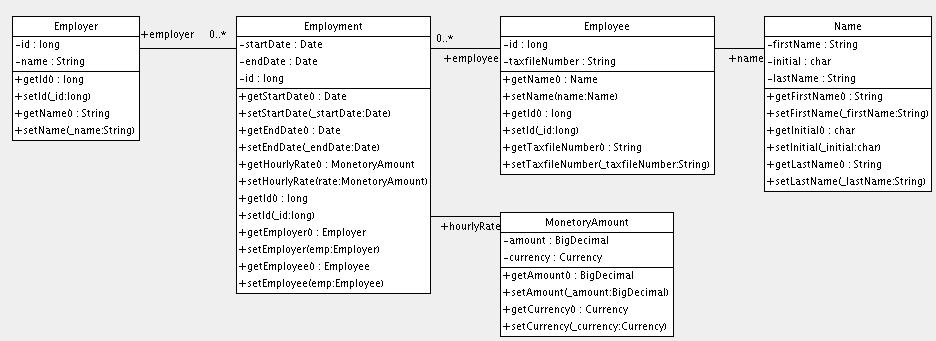
Here is a possible mapping document:
<hibernate-mapping>
<class name="Employer" table="employers">
<id name="id">
<generator class="sequence">
<param name="sequence">employer_id_seq</param>
</generator>
</id>
<property name="name"/>
</class>
<class name="Employment" table="employment_periods">
<id name="id">
<generator class="sequence">
<param name="sequence">employment_id_seq</param>
</generator>
</id>
<property name="startDate" column="start_date"/>
<property name="endDate" column="end_date"/>
<component name="hourlyRate" class="MonetaryAmount">
<property name="amount">
<column name="hourly_rate" sql-type="NUMERIC(12, 2)"/>
</property>
<property name="currency" length="12"/>
</component>
<many-to-one name="employer" column="employer_id" not-null="true"/>
<many-to-one name="employee" column="employee_id" not-null="true"/>
</class>
<class name="Employee" table="employees">
<id name="id">
<generator class="sequence">
<param name="sequence">employee_id_seq</param>
</generator>
</id>
<property name="taxfileNumber"/>
<component name="name" class="Name">
<property name="firstName"/>
<property name="initial"/>
<property name="lastName"/>
</component>
</class>
</hibernate-mapping>
Here is the table schema generated by SchemaExport.
create table employers (
id BIGINT not null,
name VARCHAR(255),
primary key (id)
)
create table employment_periods (
id BIGINT not null,
hourly_rate NUMERIC(12, 2),
currency VARCHAR(12),
employee_id BIGINT not null,
employer_id BIGINT not null,
end_date TIMESTAMP,
start_date TIMESTAMP,
primary key (id)
)
create table employees (
id BIGINT not null,
firstName VARCHAR(255),
initial CHAR(1),
lastName VARCHAR(255),
taxfileNumber VARCHAR(255),
primary key (id)
)
alter table employment_periods
add constraint employment_periodsFK0 foreign key (employer_id) references employers
alter table employment_periods
add constraint employment_periodsFK1 foreign key (employee_id) references employees
create sequence employee_id_seq
create sequence employment_id_seq
create sequence employer_id_seq
Consider the following model of the relationships between Work,
Author and Person. In the example, the relationship
between Work and Author is represented as a many-to-many
association and the relationship between Author
and Person is represented as one-to-one association. Another possibility would be to
have Author extend Person.
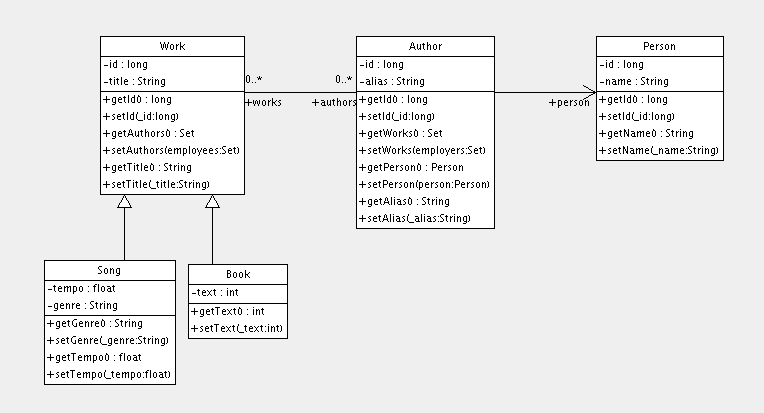
The following mapping document correctly represents these relationships:
<hibernate-mapping>
<class name="Work" table="works" discriminator-value="W">
<id name="id" column="id">
<generator class="native"/>
</id>
<discriminator column="type" type="character"/>
<property name="title"/>
<set name="authors" table="author_work">
<key column name="work_id"/>
<many-to-many class="Author" column name="author_id"/>
</set>
<subclass name="Book" discriminator-value="B">
<property name="text"/>
</subclass>
<subclass name="Song" discriminator-value="S">
<property name="tempo"/>
<property name="genre"/>
</subclass>
</class>
<class name="Author" table="authors">
<id name="id" column="id">
<!-- The Author must have the same identifier as the Person -->
<generator class="assigned"/>
</id>
<property name="alias"/>
<one-to-one name="person" constrained="true"/>
<set name="works" table="author_work" inverse="true">
<key column="author_id"/>
<many-to-many class="Work" column="work_id"/>
</set>
</class>
<class name="Person" table="persons">
<id name="id" column="id">
<generator class="native"/>
</id>
<property name="name"/>
</class>
</hibernate-mapping>
There are four tables in this mapping: works,
authors and persons hold work, author
and person data respectively. author_work is an association
table linking authors to works. Here is the table schema, as generated by
SchemaExport:
create table works (
id BIGINT not null generated by default as identity,
tempo FLOAT,
genre VARCHAR(255),
text INTEGER,
title VARCHAR(255),
type CHAR(1) not null,
primary key (id)
)
create table author_work (
author_id BIGINT not null,
work_id BIGINT not null,
primary key (work_id, author_id)
)
create table authors (
id BIGINT not null generated by default as identity,
alias VARCHAR(255),
primary key (id)
)
create table persons (
id BIGINT not null generated by default as identity,
name VARCHAR(255),
primary key (id)
)
alter table authors
add constraint authorsFK0 foreign key (id) references persons
alter table author_work
add constraint author_workFK0 foreign key (author_id) references authors
alter table author_work
add constraint author_workFK1 foreign key (work_id) references works
In this section we consider a model of the relationships between Customer,
Order, Line Item and Product.
There is a one-to-many association between Customer and
Order, but how can you represent Order /
LineItem / Product? In the example,
LineItem is mapped as an association class representing the many-to-many
association between Order and Product. In
Hibernate this is called a composite element.
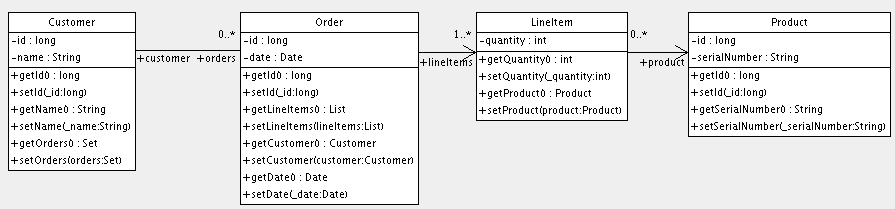
The mapping document will look like this:
<hibernate-mapping>
<class name="Customer" table="customers">
<id name="id">
<generator class="native"/>
</id>
<property name="name"/>
<set name="orders" inverse="true">
<key column="customer_id"/>
<one-to-many class="Order"/>
</set>
</class>
<class name="Order" table="orders">
<id name="id">
<generator class="native"/>
</id>
<property name="date"/>
<many-to-one name="customer" column="customer_id"/>
<list name="lineItems" table="line_items">
<key column="order_id"/>
<list-index column="line_number"/>
<composite-element class="LineItem">
<property name="quantity"/>
<many-to-one name="product" column="product_id"/>
</composite-element>
</list>
</class>
<class name="Product" table="products">
<id name="id">
<generator class="native"/>
</id>
<property name="serialNumber"/>
</class>
</hibernate-mapping>
customers, orders, line_items and
products hold customer, order, order line item and product data
respectively. line_items also acts as an association table linking
orders with products.
create table customers (
id BIGINT not null generated by default as identity,
name VARCHAR(255),
primary key (id)
)
create table orders (
id BIGINT not null generated by default as identity,
customer_id BIGINT,
date TIMESTAMP,
primary key (id)
)
create table line_items (
line_number INTEGER not null,
order_id BIGINT not null,
product_id BIGINT,
quantity INTEGER,
primary key (order_id, line_number)
)
create table products (
id BIGINT not null generated by default as identity,
serialNumber VARCHAR(255),
primary key (id)
)
alter table orders
add constraint ordersFK0 foreign key (customer_id) references customers
alter table line_items
add constraint line_itemsFK0 foreign key (product_id) references products
alter table line_items
add constraint line_itemsFK1 foreign key (order_id) references orders
These examples are available from the Hibernate test suite. You
will find many other useful example mappings there by searching in the
test folder of the Hibernate distribution.
<class name="Person">
<id name="name"/>
<one-to-one name="address"
cascade="all">
<formula>name</formula>
<formula>'HOME'</formula>
</one-to-one>
<one-to-one name="mailingAddress"
cascade="all">
<formula>name</formula>
<formula>'MAILING'</formula>
</one-to-one>
</class>
<class name="Address" batch-size="2"
check="addressType in ('MAILING', 'HOME', 'BUSINESS')">
<composite-id>
<key-many-to-one name="person"
column="personName"/>
<key-property name="type"
column="addressType"/>
</composite-id>
<property name="street" type="text"/>
<property name="state"/>
<property name="zip"/>
</class>
<class name="Customer">
<id name="customerId"
length="10">
<generator class="assigned"/>
</id>
<property name="name" not-null="true" length="100"/>
<property name="address" not-null="true" length="200"/>
<list name="orders"
inverse="true"
cascade="save-update">
<key column="customerId"/>
<index column="orderNumber"/>
<one-to-many class="Order"/>
</list>
</class>
<class name="Order" table="CustomerOrder" lazy="true">
<synchronize table="LineItem"/>
<synchronize table="Product"/>
<composite-id name="id"
class="Order$Id">
<key-property name="customerId" length="10"/>
<key-property name="orderNumber"/>
</composite-id>
<property name="orderDate"
type="calendar_date"
not-null="true"/>
<property name="total">
<formula>
( select sum(li.quantity*p.price)
from LineItem li, Product p
where li.productId = p.productId
and li.customerId = customerId
and li.orderNumber = orderNumber )
</formula>
</property>
<many-to-one name="customer"
column="customerId"
insert="false"
update="false"
not-null="true"/>
<bag name="lineItems"
fetch="join"
inverse="true"
cascade="save-update">
<key>
<column name="customerId"/>
<column name="orderNumber"/>
</key>
<one-to-many class="LineItem"/>
</bag>
</class>
<class name="LineItem">
<composite-id name="id"
class="LineItem$Id">
<key-property name="customerId" length="10"/>
<key-property name="orderNumber"/>
<key-property name="productId" length="10"/>
</composite-id>
<property name="quantity"/>
<many-to-one name="order"
insert="false"
update="false"
not-null="true">
<column name="customerId"/>
<column name="orderNumber"/>
</many-to-one>
<many-to-one name="product"
insert="false"
update="false"
not-null="true"
column="productId"/>
</class>
<class name="Product">
<synchronize table="LineItem"/>
<id name="productId"
length="10">
<generator class="assigned"/>
</id>
<property name="description"
not-null="true"
length="200"/>
<property name="price" length="3"/>
<property name="numberAvailable"/>
<property name="numberOrdered">
<formula>
( select sum(li.quantity)
from LineItem li
where li.productId = productId )
</formula>
</property>
</class>
<class name="User" table="`User`">
<composite-id>
<key-property name="name"/>
<key-property name="org"/>
</composite-id>
<set name="groups" table="UserGroup">
<key>
<column name="userName"/>
<column name="org"/>
</key>
<many-to-many class="Group">
<column name="groupName"/>
<formula>org</formula>
</many-to-many>
</set>
</class>
<class name="Group" table="`Group`">
<composite-id>
<key-property name="name"/>
<key-property name="org"/>
</composite-id>
<property name="description"/>
<set name="users" table="UserGroup" inverse="true">
<key>
<column name="groupName"/>
<column name="org"/>
</key>
<many-to-many class="User">
<column name="userName"/>
<formula>org</formula>
</many-to-many>
</set>
</class>
<class name="Person"
discriminator-value="P">
<id name="id"
column="person_id"
unsaved-value="0">
<generator class="native"/>
</id>
<discriminator
type="character">
<formula>
case
when title is not null then 'E'
when salesperson is not null then 'C'
else 'P'
end
</formula>
</discriminator>
<property name="name"
not-null="true"
length="80"/>
<property name="sex"
not-null="true"
update="false"/>
<component name="address">
<property name="address"/>
<property name="zip"/>
<property name="country"/>
</component>
<subclass name="Employee"
discriminator-value="E">
<property name="title"
length="20"/>
<property name="salary"/>
<many-to-one name="manager"/>
</subclass>
<subclass name="Customer"
discriminator-value="C">
<property name="comments"/>
<many-to-one name="salesperson"/>
</subclass>
</class>
<class name="Person">
<id name="id">
<generator class="hilo"/>
</id>
<property name="name" length="100"/>
<one-to-one name="address"
property-ref="person"
cascade="all"
fetch="join"/>
<set name="accounts"
inverse="true">
<key column="userId"
property-ref="userId"/>
<one-to-many class="Account"/>
</set>
<property name="userId" length="8"/>
</class>
<class name="Address">
<id name="id">
<generator class="hilo"/>
</id>
<property name="address" length="300"/>
<property name="zip" length="5"/>
<property name="country" length="25"/>
<many-to-one name="person" unique="true" not-null="true"/>
</class>
<class name="Account">
<id name="accountId" length="32">
<generator class="uuid"/>
</id>
<many-to-one name="user"
column="userId"
property-ref="userId"/>
<property name="type" not-null="true"/>
</class>
- Write fine-grained classes and map them using
<component>: Use an
Addressclass to encapsulatestreet,suburb,state,postcode. This encourages code reuse and simplifies refactoring.- Declare identifier properties on persistent classes:
Hibernate makes identifier properties optional. There are a range of reasons why you should use them. We recommend that identifiers be 'synthetic', that is, generated with no business meaning.
- Identify natural keys:
Identify natural keys for all entities, and map them using
<natural-id>. Implementequals()andhashCode()to compare the properties that make up the natural key.- Place each class mapping in its own file:
Do not use a single monolithic mapping document. Map
com.eg.Fooin the filecom/eg/Foo.hbm.xml. This makes sense, particularly in a team environment.- Load mappings as resources:
Deploy the mappings along with the classes they map.
- Consider externalizing query strings:
This is recommended if your queries call non-ANSI-standard SQL functions. Externalizing the query strings to mapping files will make the application more portable.
- Use bind variables.
As in JDBC, always replace non-constant values by "?". Do not use string manipulation to bind a non-constant value in a query. You should also consider using named parameters in queries.
- Do not manage your own JDBC connections:
Hibernate allows the application to manage JDBC connections, but his approach should be considered a last-resort. If you cannot use the built-in connection providers, consider providing your own implementation of
org.hibernate.connection.ConnectionProvider.- Consider using a custom type:
Suppose you have a Java type from a library that needs to be persisted but does not provide the accessors needed to map it as a component. You should consider implementing
org.hibernate.UserType. This approach frees the application code from implementing transformations to/from a Hibernate type.- Use hand-coded JDBC in bottlenecks:
In performance-critical areas of the system, some kinds of operations might benefit from direct JDBC. Do not assume, however, that JDBC is necessarily faster. Please wait until you know something is a bottleneck. If you need to use direct JDBC, you can open a Hibernate
Session, wrap your JDBC operation as aorg.hibernate.jdbc.Workobject and using that JDBC connection. This way you can still use the same transaction strategy and underlying connection provider.- Understand
Sessionflushing: Sometimes the Session synchronizes its persistent state with the database. Performance will be affected if this process occurs too often. You can sometimes minimize unnecessary flushing by disabling automatic flushing, or even by changing the order of queries and other operations within a particular transaction.
- In a three tiered architecture, consider using detached objects:
When using a servlet/session bean architecture, you can pass persistent objects loaded in the session bean to and from the servlet/JSP layer. Use a new session to service each request. Use
Session.merge()orSession.saveOrUpdate()to synchronize objects with the database.- In a two tiered architecture, consider using long persistence contexts:
Database Transactions have to be as short as possible for best scalability. However, it is often necessary to implement long running application transactions, a single unit-of-work from the point of view of a user. An application transaction might span several client request/response cycles. It is common to use detached objects to implement application transactions. An appropriate alternative in a two tiered architecture, is to maintain a single open persistence contact session for the whole life cycle of the application transaction. Then simply disconnect from the JDBC connection at the end of each request and reconnect at the beginning of the subsequent request. Never share a single session across more than one application transaction or you will be working with stale data.
- Do not treat exceptions as recoverable:
This is more of a necessary practice than a "best" practice. When an exception occurs, roll back the
Transactionand close theSession. If you do not do this, Hibernate cannot guarantee that in-memory state accurately represents the persistent state. For example, do not useSession.load()to determine if an instance with the given identifier exists on the database; useSession.get()or a query instead.- Prefer lazy fetching for associations:
Use eager fetching sparingly. Use proxies and lazy collections for most associations to classes that are not likely to be completely held in the second-level cache. For associations to cached classes, where there is an a extremely high probability of a cache hit, explicitly disable eager fetching using
lazy="false". When join fetching is appropriate to a particular use case, use a query with aleft join fetch.- Use the open session in view pattern, or a disciplined assembly phase to avoid problems with unfetched data:
Hibernate frees the developer from writing tedious Data Transfer Objects (DTO). In a traditional EJB architecture, DTOs serve dual purposes: first, they work around the problem that entity beans are not serializable; second, they implicitly define an assembly phase where all data to be used by the view is fetched and marshalled into the DTOs before returning control to the presentation tier. Hibernate eliminates the first purpose. Unless you are prepared to hold the persistence context (the session) open across the view rendering process, you will still need an assembly phase. Think of your business methods as having a strict contract with the presentation tier about what data is available in the detached objects. This is not a limitation of Hibernate. It is a fundamental requirement of safe transactional data access.
- Consider abstracting your business logic from Hibernate:
Hide Hibernate data-access code behind an interface. Combine the DAO and Thread Local Session patterns. You can even have some classes persisted by handcoded JDBC associated to Hibernate via a
UserType. This advice is, however, intended for "sufficiently large" applications. It is not appropriate for an application with five tables.- Do not use exotic association mappings:
Practical test cases for real many-to-many associations are rare. Most of the time you need additional information stored in the "link table". In this case, it is much better to use two one-to-many associations to an intermediate link class. In fact, most associations are one-to-many and many-to-one. For this reason, you should proceed cautiously when using any other association style.
- Prefer bidirectional associations:
Unidirectional associations are more difficult to query. In a large application, almost all associations must be navigable in both directions in queries.
One of the selling points of Hibernate (and really Object/Relational Mapping as a whole) is the notion of database portability. This could mean an internal IT user migrating from one database vendor to another, or it could mean a framework or deployable application consuming Hibernate to simultaneously target multiple database products by their users. Regardless of the exact scenario, the basic idea is that you want Hibernate to help you run against any number of databases without changes to your code, and ideally without any changes to the mapping metadata.
The first line of portability for Hibernate is the dialect, which is a specialization of the
org.hibernate.dialect.Dialect contract. A dialect encapsulates all
the differences in how Hibernate must communicate with a particular database to accomplish some
task like getting a sequence value or structuring a SELECT query. Hibernate bundles a wide range
of dialects for many of the most popular databases. If you find that your particular database is
not among them, it is not terribly difficult to write your own.
Originally, Hibernate would always require that users specify which dialect to use. In the case of users looking to simultaneously target multiple databases with their build that was problematic. Generally this required their users to configure the Hibernate dialect or defining their own method of setting that value.
Starting with version 3.2, Hibernate introduced the notion of automatically detecting the dialect
to use based on the java.sql.DatabaseMetaData obtained from a
java.sql.Connection to that database. This was much better, expect
that this resolution was limited to databases Hibernate know about ahead of time and was in no way
configurable or overrideable.
Starting with version 3.3, Hibernate has a fare more powerful way to automatically determine
which dialect to should be used by relying on a series of delegates which implement the
org.hibernate.dialect.resolver.DialectResolver which defines only a
single method:
<!-- <br/> --><span class="java_keyword">public</span><!-- <br/> --><span class="java_plain"> </span><!-- <br/> --><span class="java_type">Dialect</span><!-- <br/> --><span class="java_plain"> resolveDialect</span><!-- <br/> --><span class="java_separator">(</span><!-- <br/> --><span class="java_type">DatabaseMetaData</span><!-- <br/> --><span class="java_plain"> metaData</span><!-- <br/> --><span class="java_separator">)</span><!-- <br/> --><span class="java_plain"> </span><!-- <br/> --><span class="java_keyword">throws</span><!-- <br/> --><span class="java_plain"> </span><!-- <br/> --><span class="java_type">JDBCConnectionException</span>
.
The basic contract here is that if the resolver 'understands' the given database metadata then
it returns the corresponding Dialect; if not it returns null and the process continues to the next
resolver. The signature also identifies org.hibernate.exception.JDBCConnectionException
as possibly being thrown. A JDBCConnectionException here is interpreted to imply a "non transient"
(aka non-recoverable) connection problem and is used to indicate an immediate stop to resolution
attempts. All other exceptions result in a warning and continuing on to the next resolver.
The cool part about these resolvers is that users can also register their own custom resolvers
which will be processed ahead of the built-in Hibernate ones. This might be useful in a number of
different situations: it allows easy integration for auto-detection of dialects beyond those
shipped with HIbernate itself; it allows you to specify to use a custom dialect when a particular
database is recognized; etc. To register one or more resolvers, simply specify them (seperated by
commas, tabs or spaces) using the 'hibernate.dialect_resolvers' configuration setting (see the
DIALECT_RESOLVERS constant on
org.hibernate.cfg.Environment).
When considering portability between databases, another important decision is selecting the identifier generation stratagy you want to use. Originally Hibernate provided the native generator for this purpose, which was intended to select between a sequence, identity, or table strategy depending on the capability of the underlying database. However, an insidious implication of this approach comes about when targtetting some databases which support identity generation and some which do not. identity generation relies on the SQL definition of an IDENTITY (or auto-increment) column to manage the identifier value; it is what is known as a post-insert generation strategy becauase the insert must actually happen before we can know the identifier value. Because Hibernate relies on this identifier value to uniquely reference entities within a persistence context it must then issue the insert immediately when the users requests the entitiy be associated with the session (like via save() e.g.) regardless of current transactional semantics.
Note
Hibernate was changed slightly once the implication of this was better understood so that the insert is delayed in cases where that is feasible.
The underlying issue is that the actual semanctics of the application itself changes in these cases.
Starting with version 3.2.3, Hibernate comes with a set of enhanced identifier generators targetting portability in a much different way.
Note
There are specifically 2 bundled enhancedgenerators:
org.hibernate.id.enhanced.SequenceStyleGeneratororg.hibernate.id.enhanced.TableGenerator
The idea behind these generators is to port the actual semantics of the identifer value
generation to the different databases. For example, the
org.hibernate.id.enhanced.SequenceStyleGenerator mimics the behavior of
a sequence on databases which do not support sequences by using a table.
Warning
This is an area in Hibernate in need of improvement. In terms of portability concerns, this function handling currently works pretty well from HQL; however, it is quite lacking in all other aspects.
SQL functions can be referenced in many ways by users. However, not all databases support the same set of functions. Hibernate, provides a means of mapping a logical function name to a delegate which knows how to render that particular function, perhaps even using a totally different physical function call.
Important
Technically this function registration is handled through the
org.hibernate.dialect.function.SQLFunctionRegistry class
which is intended to allow users to provide custom function definitions without
having to provide a custom dialect. This specific behavior is not fully completed
as of yet.
It is sort of implemented such that users can programatically register functions
with the org.hibernate.cfg.Configuration and those functions
will be recognized for HQL.
[PoEAA] Patterns of Enterprise Application Architecture. 0-321-12742-0. Copyright © 2003 Pearson Education, Inc.. Addison-Wesley Publishing Company.
[JPwH] Java Persistence with Hibernate. Second Edition of Hibernate in Action. 1-932394-88-5. http://www.manning.com/bauer2 . Copyright © 2007 Manning Publications Co.. Manning Publications Co..